Safety Management Landing Page Template | Dashboard Pro
Fleet is a scroll-reveal landing page template built for automotive safety management platforms. It combines a dark cockpit visual identity with a progressive Feature Matrix layout to present fleet inspection tracking, compliance monitoring, and driver behavior data in a way that commands attention and drives click-through conversions from safety managers, risk directors, and operations leaders.
by Rocket studio
Quick summary
Fleet is a single-page, scroll-reveal landing page template designed for automotive safety management platforms. It uses a deep cockpit dark theme with catalytic teal accents to present live-data visuals, compliance metrics, and driver safety features. The layout builds capability proof section by section, guiding fleet safety professionals toward a single, confident click-through action.
Who this template is for
This template is built for safety-focused teams in the commercial fleet and trucking industry. If your platform helps operators stay ahead of audits, violations, and preventable incidents, Fleet speaks directly to your buyers.
- Fleet safety managers who handle Department of Transportation (DOT) audit preparation and vehicle inspection records
- Risk directors at trucking companies who monitor Compliance, Safety, Accountability (CSA) scores and insurance exposure
- Operations vice presidents at last-mile delivery firms managing crash prevention and rising premium costs
What problem this template solves
Fleet safety platforms often struggle to communicate urgency and capability at the same time. A generic template cannot carry the weight of compliance-critical software. This template solves that gap directly.
- Buyers need to feel the consequence of inaction before they engage, and most templates do not create that pressure
- Compliance platforms carry dense feature sets that need a structured reveal, not a wall of text dropped all at once
- Safety managers are analytical and skeptical, so vague marketing language breaks trust before the first scroll
What you get with this template
You get a fully structured, scroll-reveal landing page built around the Fleet brief. Every section has a defined visual role and a clear conversion purpose. The template is ready to adapt to your platform's branding and copy.
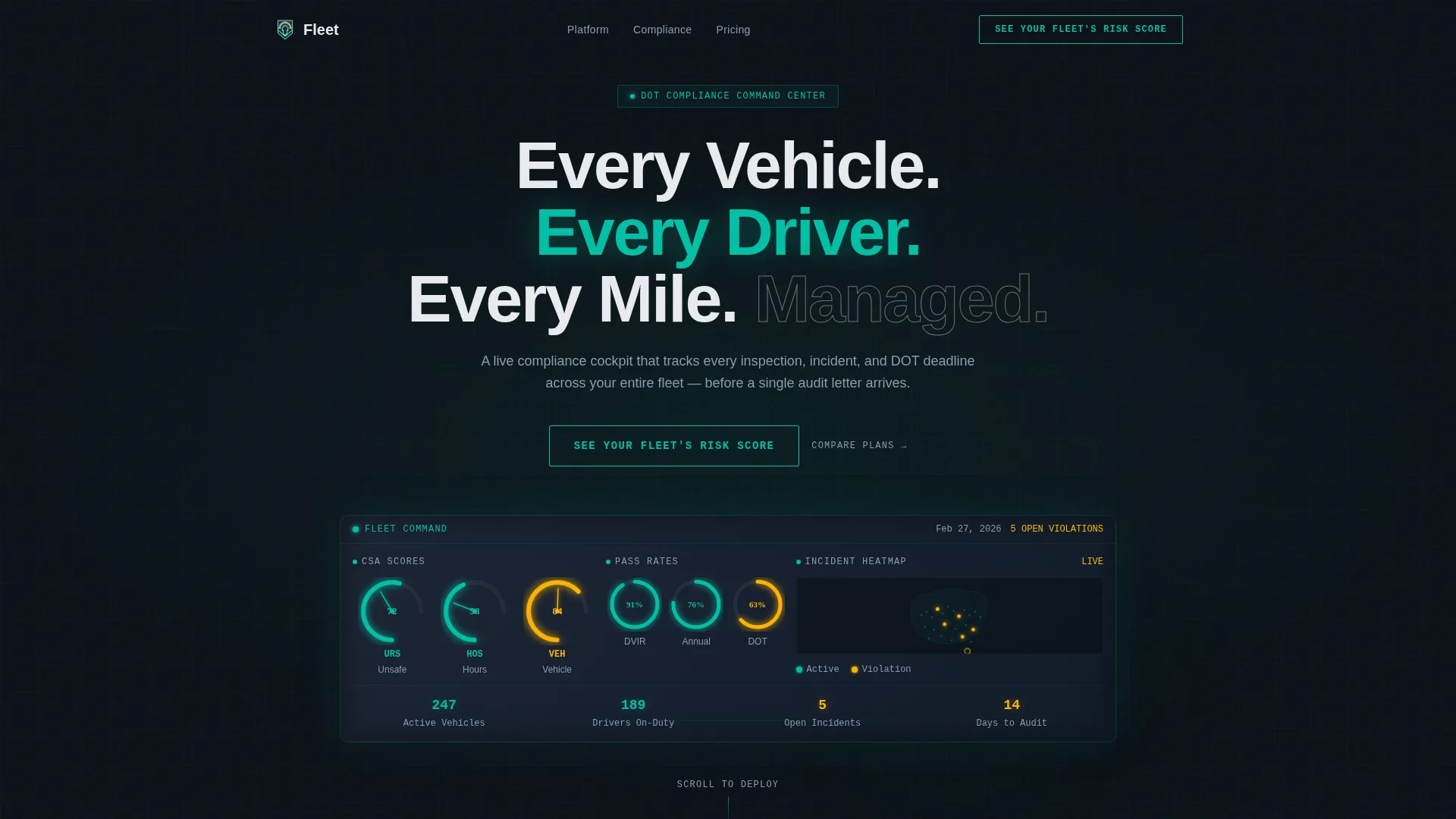
- A dark full-bleed header with a phosphorescent glow animation revealing a live dashboard mockup showing CSA score gauges, inspection pass-rate rings, and a real-time incident heat map
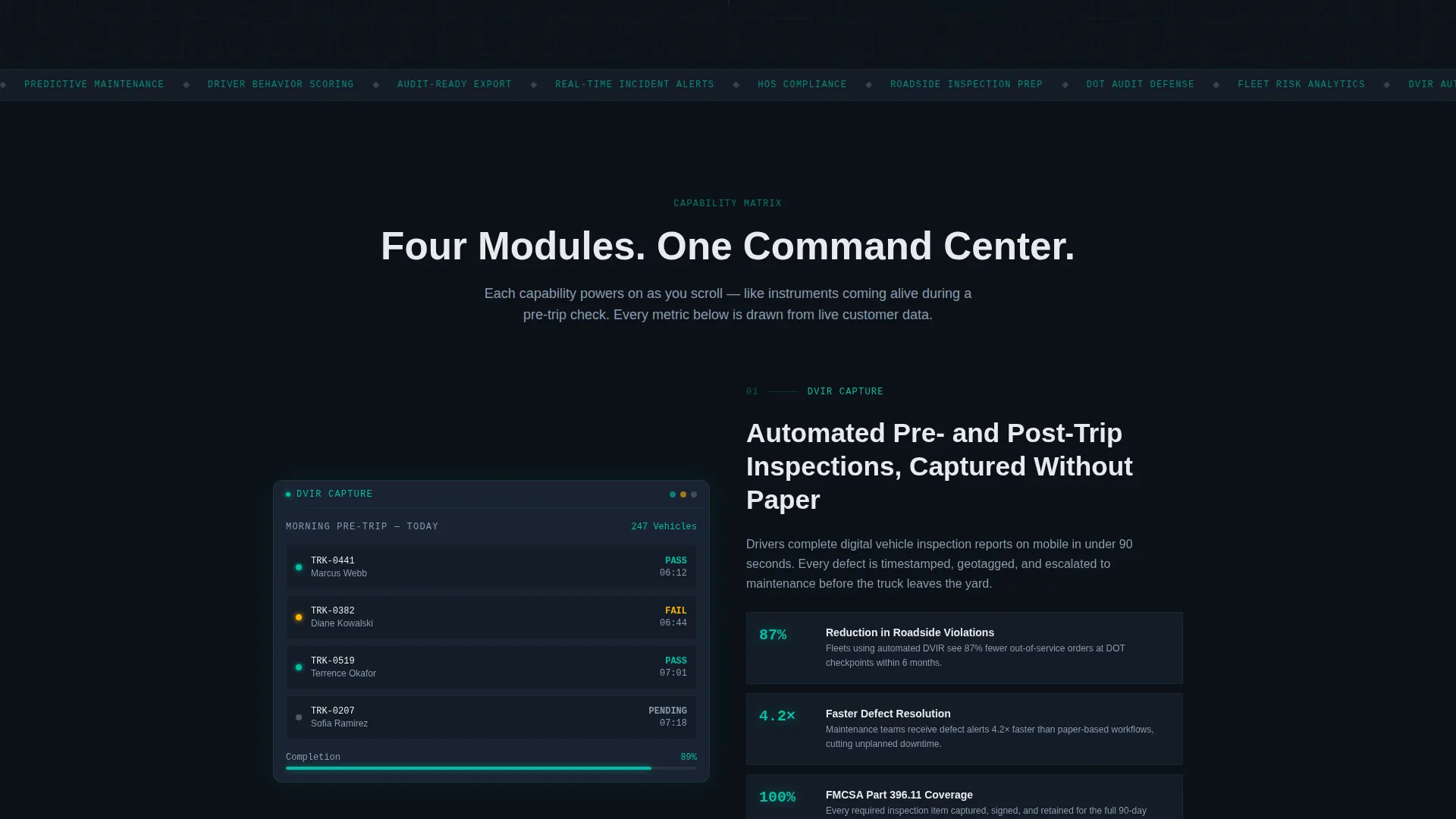
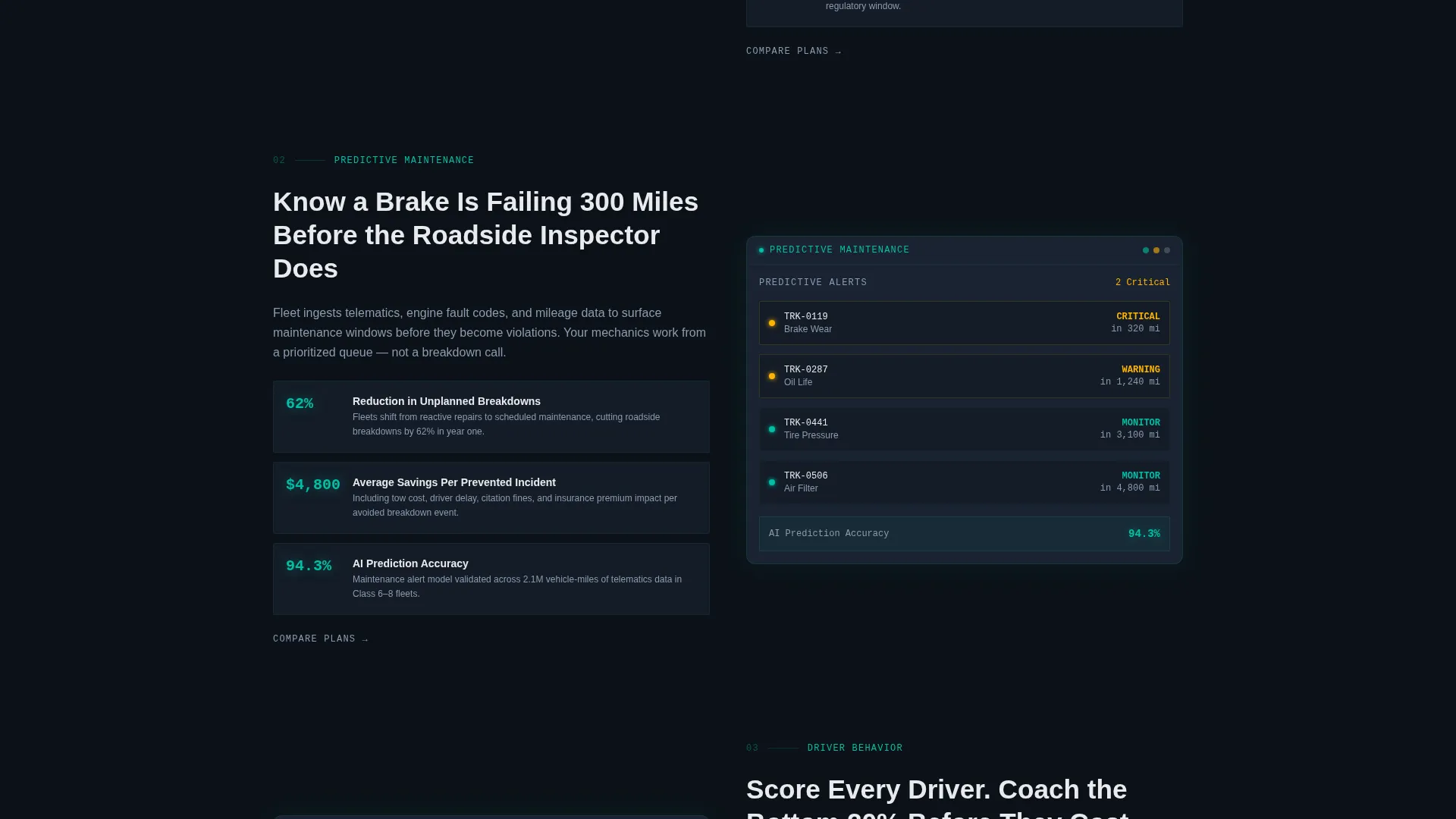
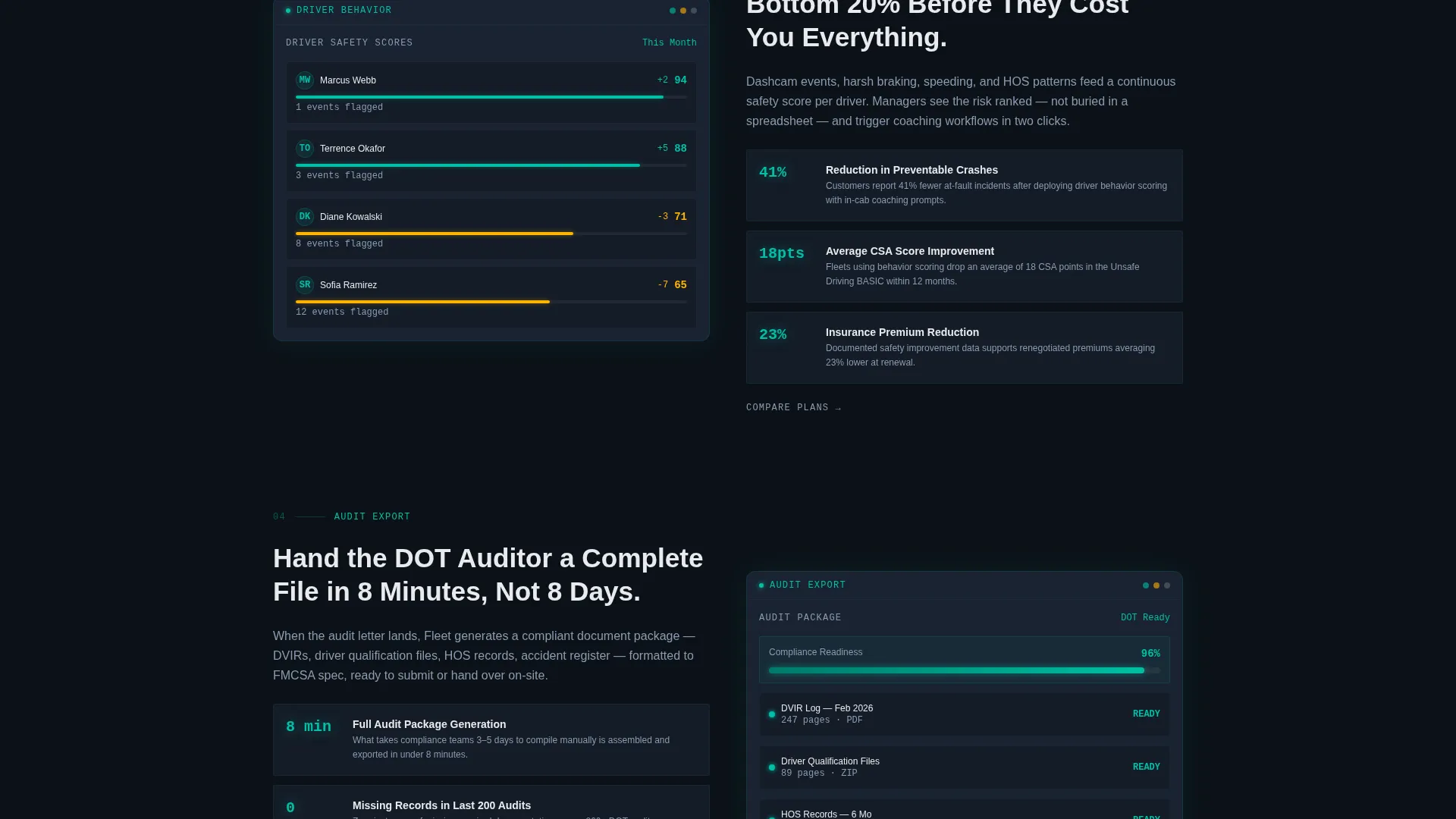
- A progressive Feature Matrix that unlocks capability modules on scroll, each pairing a cropped dashboard screenshot with three concrete metric outcomes
- A persistent floating call-to-action (call to action) bar that appears after the second scroll module, plus a primary call to action in the header and secondary "Compare Plans" text links beneath each module
Feature list
This template covers every major section a fleet safety platform needs to convert informed, high-stakes buyers.
Dark Full-Bleed Header with Glow Reveal
The header fills the entire viewport with deep cockpit black. A slow phosphorescent glow pulses outward from center screen, revealing a live dashboard mockup. CSA score gauges, inspection pass-rate rings, and a real-time incident heat map appear in catalytic teal, with caution amber pings marking open violations. The headline fades in above the dash: "Every Vehicle. Every Driver. Every Mile. Managed."
Progressive Scroll-Reveal Feature Matrix
Each downward scroll unlocks a new capability module. Modules slide and illuminate into place like instruments powering on during a pre-trip check. The sequence moves from daily operations up to enterprise-level compliance, stacking proof as the visitor scrolls.
Capability Modules with Metric Outcomes
Four core modules are structured into the matrix: automated Driver Vehicle Inspection Report (DVIR) capture, predictive maintenance alerts, driver behavior scoring with dashcam integration, and audit-ready documentation export. Each module pairs a cropped dashboard screenshot with three concrete metric outcomes to replace vague promises with specific proof points.
Click-Through Conversion Architecture
The primary call to action, "See Your Fleet's Risk Score," uses a ghost-bordered button in catalytic teal that fills solid on hover. It appears first in the header and repeats as a persistent floating bar after the second scroll module. No form is present on the page; the click routes to a personalized demo environment.
Teal Catalyst Color System and user interface Language
The visual identity uses deep cockpit black, instrument-panel charcoal, catalytic teal for live-data accents, signal white for primary text, and caution amber reserved exclusively for alert states and hover interactions. The palette reads like a next-generation vehicle heads-up display projected onto a dark windshield.
Secondary Funnel Path for Plan Comparison
A "Compare Plans" text link sits beneath each capability module. This gives buyers who are further down the decision funnel a direct path to pricing context without interrupting the primary scroll experience.
Page sections overview
| Section | Purpose |
|---|---|
| Dark Header Viewport | Introduces the platform with a full-bleed glow animation and live dashboard mockup |
| Headline Fade-In | Delivers the core brand statement above the animated dash display |
| DVIR Capture Module | Reveals automated inspection capture as the first scroll-triggered capability |
| Maintenance Alert Module | Presents predictive maintenance alerts as the second capability reveal |
| Driver Behavior Module | Shows driver scoring and dashcam integration as the third capability reveal |
| Audit Export Module | Demonstrates audit-ready documentation export as the fourth capability reveal |
| Persistent Floating call to action | Keeps the primary call to action visible after the second module unlocks |
| Secondary Plan Links | Offers "Compare Plans" access beneath each module for lower-funnel buyers |
Design & branding system
The template uses the Dashboard Pro theme with the Teal Catalyst color system. Every visual decision reinforces the feeling of a high-precision cockpit instrument panel, clinical and electric in equal measure.
- Color palette: deep cockpit black (#0B1117) as the base, instrument-panel charcoal (#1A2332) for panel surfaces, catalytic teal (#00BFA6) for live-data accents and glowing user interface elements, signal white (#E8EAED) for primary text, and caution amber (#FFB300) reserved for alert states and hover interactions only
- Visual style: no stock photography and no lifestyle imagery; all visuals are data-driven dashboard mockups, cropped screenshots, and user interface components that reinforce the platform's analytical authority
Mobile & speed optimization
The scroll-reveal layout is designed to translate the cockpit experience across screen sizes. Progressive disclosure keeps the page focused and the content hierarchy intact on smaller viewports.
- Each capability module is structured to stack cleanly on mobile without losing the screenshot-plus-metrics pairing that drives proof
- The persistent floating call to action bar is positioned to remain visible and accessible during mobile scroll without obstructing content
How this template helps you convert
Fleet is engineered around a single click-through goal. Every design and layout decision works toward that moment when a qualified buyer clicks "See Your Fleet's Risk Score."
- The scroll-reveal structure withholds full capability until the visitor earns each reveal through engagement, building information debt that resolves only with a click
- Concrete metric outcomes shown beside each module replace vague feature claims with specific proof, which accelerates trust for analytical, compliance-minded buyers
- The persistent floating call to action and secondary plan links create two parallel conversion paths, capturing both early-intent clicks and lower-funnel comparison shoppers without a form barrier
Other information about this template
This template is built specifically for the automotive safety management niche within the broader automotive software and technology category. It is a strong fit for any platform operating in commercial fleet compliance, vehicle inspection software, or driver risk management.
- The template style is Scroll Reveal (Progressive), meaning content appears as the visitor scrolls rather than loading all at once
- The header concept is Dark Full-Bleed with Glow, a distinctive visual treatment that sets this template apart from generic software landing pages
- The landing page direction is Click-Through, routing visitors to a personalized demo environment rather than capturing leads with an on-page form
- This template suits platforms that serve the trucking, last-mile delivery, and commercial fleet operations sectors
Theme
Dashboard Pro
Creative direction
Feature Matrix
Color system
Teal Catalyst
Style
Scroll Reveal (Progressive)
Direction
Click-Through
Page Sections
Dark Cockpit Header with Glow Animation
Scroll-triggered Capability Modules
Metric Outcome Proof Points
Click-through Call to Action Architecture
Secondary Plan Comparison Links
Teal Catalyst Visual Identity System
Related questions
Who is this landing page template designed for?
Does this template include an on-page lead capture form?
How many capability modules are included in the Feature Matrix?
Can I adapt the color system and copy to match my platform's branding?
Is there a secondary conversion path for buyers comparing plans?



