Fleet & Transportation Management Privacy Policy Website Template
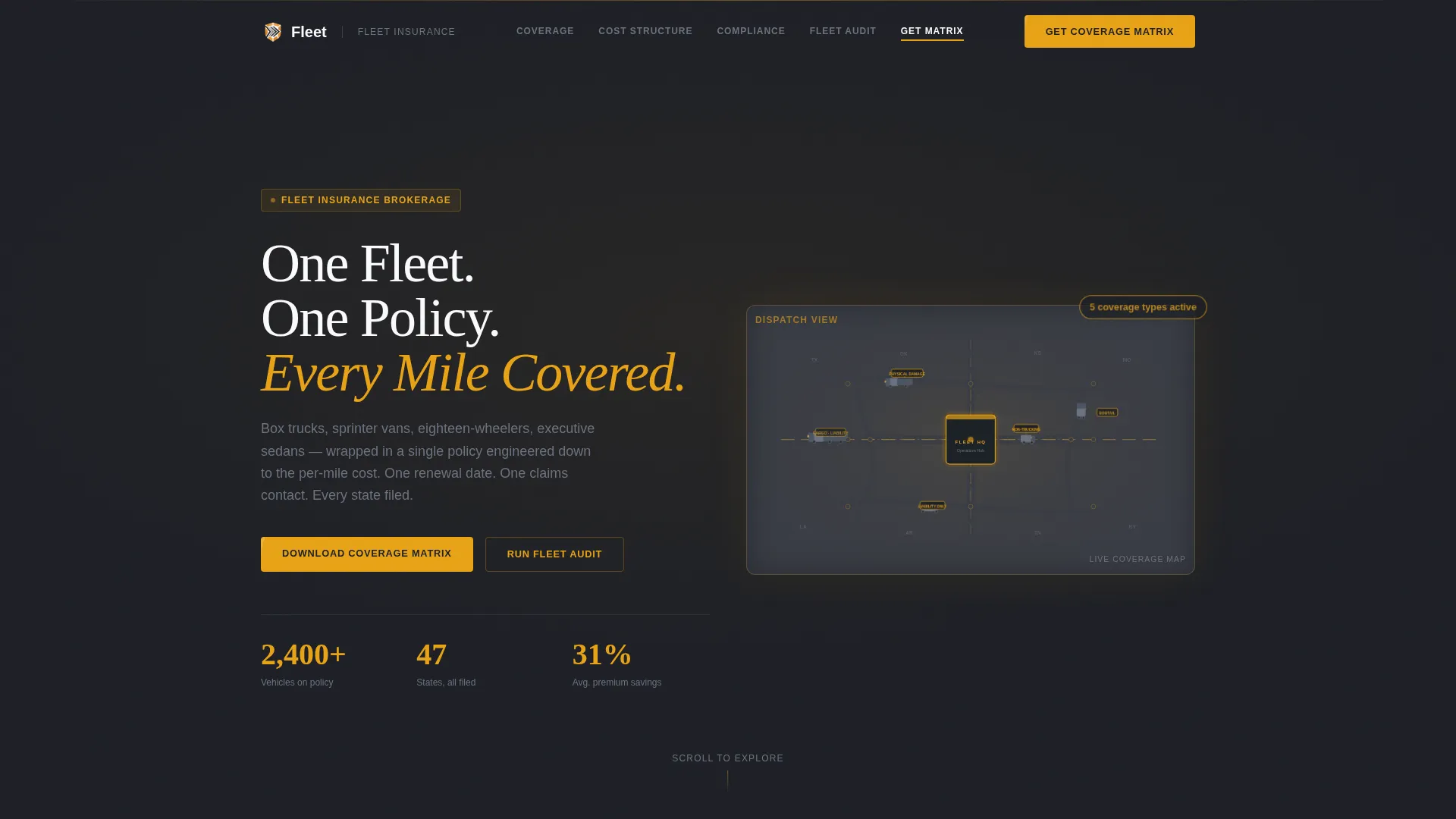
Fleetguard is a hub-and-spoke fleet insurance landing page built for brokerages that cover entire commercial fleets under a single policy. It presents coverage data as technical spec sheets, supports an inline fleet audit tool, and gates a downloadable Fleet Coverage Matrix behind a two-field lead form. The design follows a Service Utility aesthetic in Charcoal and Amber.
by Rocket studio
Quick summary
Fleetguard is a single-page, anchor-nav fleet insurance landing page template built for commercial insurance brokerages. It presents liability limits, cargo valuations, deductible structures, and state-by-state compliance data in tabbed spec-sheet tables. A gated PDF download and an inline fleet audit tool work together to qualify leads before any sales call.
Who this template is for
This template is built for B2B commercial insurance brokerages that manage fleet policies across multiple vehicle classes and state lines. It speaks directly to the buyers who live inside dispatch offices and boardrooms, not general consumers.
- Logistics coordinators managing 40-plus vehicles who need coverage clarity and compliance proof
- Owner-operators scaling from a handful of trucks to a regional fleet, looking for a single-policy solution
- Chief Financial Officers at regional delivery companies facing premium renewal shock and tight quarterly margins
What problem this template solves
Fleet operators routinely juggle separate policies for box trucks, sprinter vans, eighteen-wheelers, and executive sedans. That fragmentation creates compliance gaps, renewal chaos, and cost uncertainty that no spreadsheet fully resolves.
- Multiple carrier relationships produce conflicting renewal dates, inconsistent coverage terms, and hard-to-audit per-mile costs
- State-by-state compliance requirements change frequently, leaving multi-state operators exposed without a central reference
- Buyers arrive at a brokerage website and find marketing copy instead of the specific coverage data they need to make a decision
What you get with this template
You get a fully structured, data-forward landing page that positions the brokerage as an expert resource before a single sales call occurs. Every section is built around real decision-making data, not promotional language.
- An animated isometric hero section with a fleet operations map, floating coverage-type labels, and a sticky anchor navigation bar
- Five spoke sections covering the hero, coverage modules, cost structure, compliance matrix, and the fleet audit tool with gated PDF form
- Tabbed spec-sheet tables, expandable deductible rows, a state-by-state compliance matrix, and an inline diagnostic tool
Feature list
This template ships with a tightly focused set of interactive and visual components, each serving a specific step in the buyer's decision process.
Animated Isometric Fleet Map Hero
The header features an isometric illustration of a fleet operations map. Clean geometric vehicle shapes move along stylized routes, each tagged with a pulsing micro-label showing coverage type such as liability, cargo, physical damage, and bobtail. A central hub building anchors the god-view composition with no stock photography used.
Tabbed Coverage Module Spec Sheets
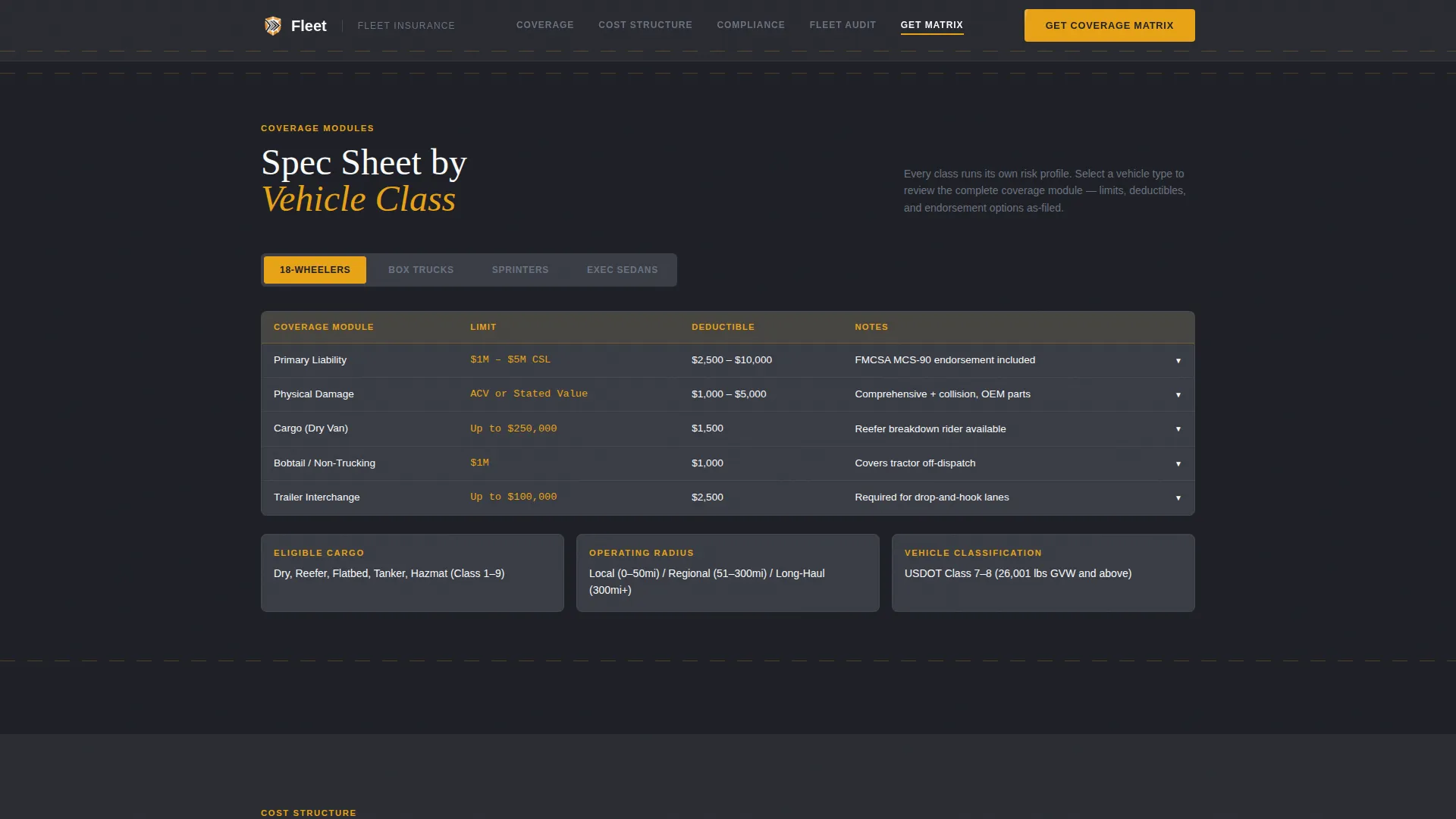
Each coverage module section reads like a technical data sheet. Liability limits, cargo valuations, and deductible structures are organized in tabbed tables by vehicle class. Visitors can flip between box trucks, sprinter vans, eighteen-wheelers, and executive sedans without leaving the section.
Expandable State Compliance Matrix
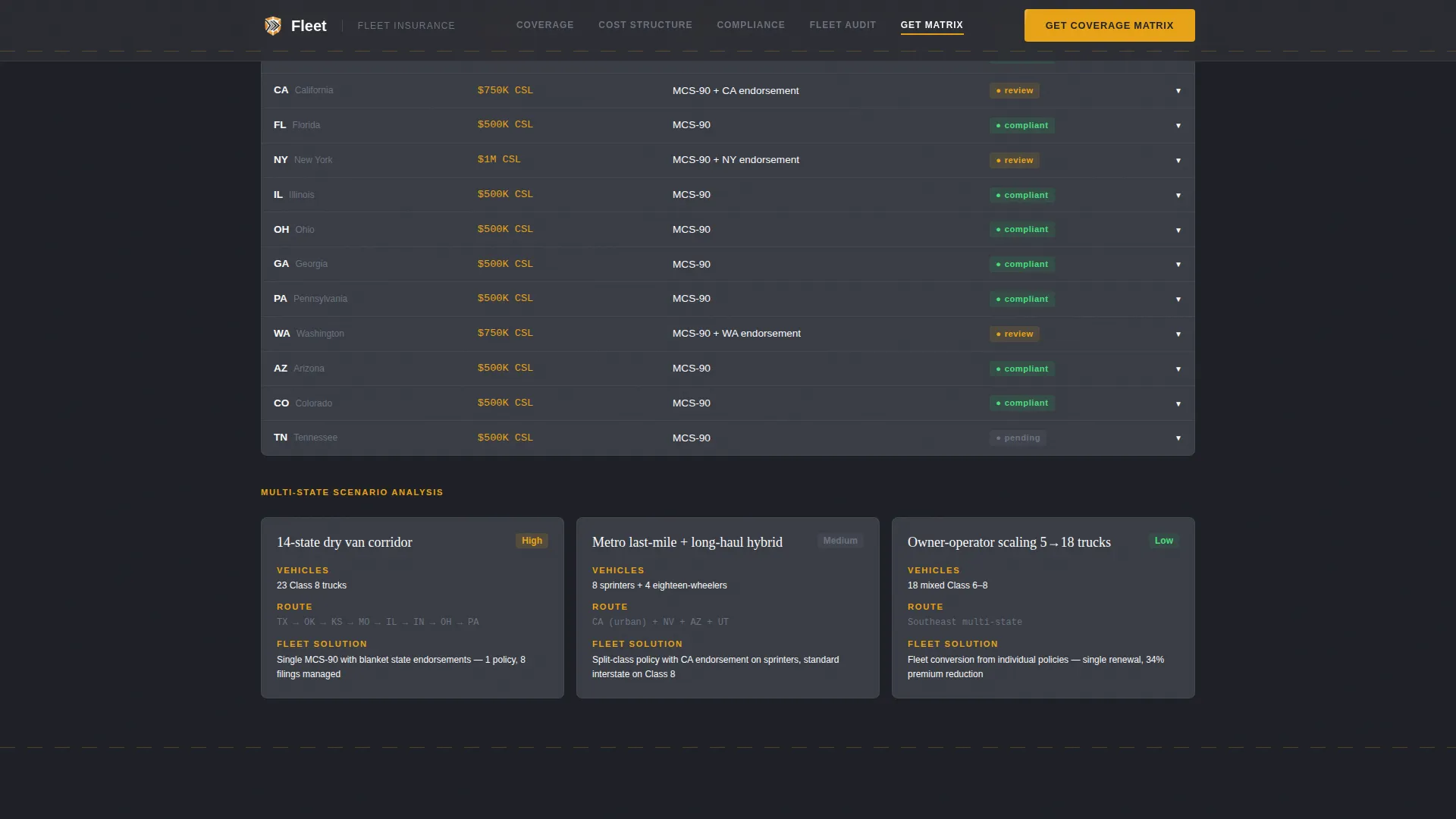
A state-by-state compliance table presents regulatory requirements in expandable rows. Multi-state scenario callouts highlight complex operating situations. This gives logistics coordinators a quick compliance reference they can act on immediately.
Inline Fleet Audit Diagnostic Tool
After the third spoke section, an inline diagnostic tool prompts visitors to enter vehicle types, operating radius, and current annual premium. The tool positions the brokerage as a knowledgeable advisor before any sales conversation begins.
Gated Fleet Coverage Matrix Download
The primary conversion point is a two-field lead form gating a downloadable Fleet Coverage Matrix PDF. Visitors select their fleet size range from a dropdown (5 to 15, 16 to 50, 51 to 150, or 150 and above) and enter a business email. The matrix is a genuine reference document built around per-mile cost data.
Scroll-Triggered Reveal Animations
Section reveals, pulsing data badges, and truck-path animations are driven by scroll-triggered behavior using GSAP ScrollTrigger. Interactive components including tabs, expandable rows, and the audit form are handled as client-side components while static sections use server-side rendering.
Page sections overview
| Section | Purpose |
|---|---|
| Hero & Anchor Nav | Introduces the brokerage, displays the animated fleet map, and anchors sticky section navigation |
| Coverage Module Specs | Presents tabbed spec-sheet tables by vehicle class covering liability, cargo, and physical damage |
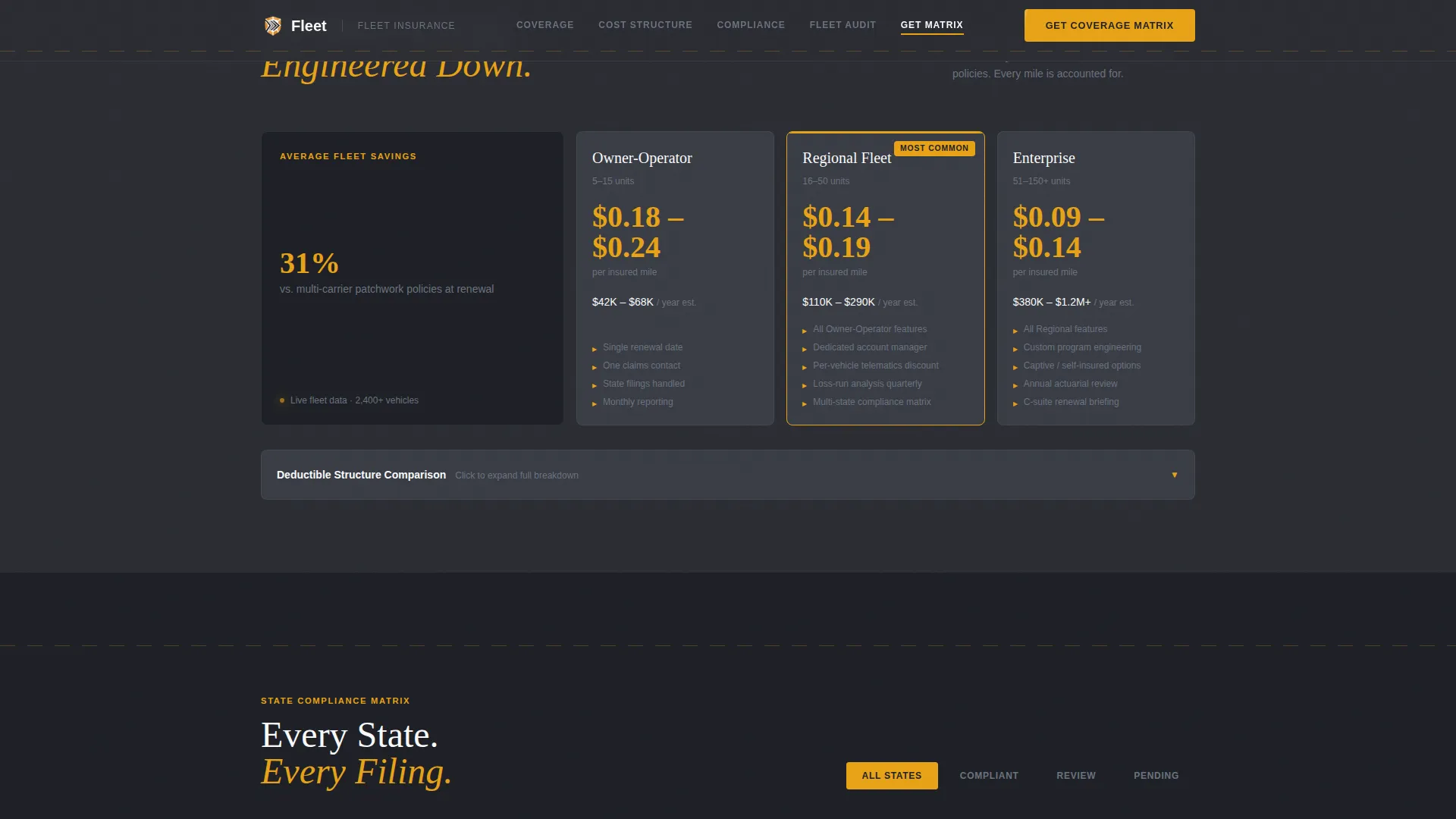
| Cost Structure Cards | Shows per-mile pricing cards with expandable deductible rows in a bento asymmetric layout |
| State Compliance Matrix | Delivers a state-by-state expandable compliance table with multi-state scenario callouts |
| Fleet Audit Tool | Runs an inline diagnostic and hosts the gated Fleet Coverage Matrix PDF download form |
| Footer | Single-row linear footer with brokerage contact and navigation links |
Design & branding system
The visual identity follows a Service Utility theme that feels like a well-lit dispatch office. Every color and type choice serves function over decoration.
- Color system: deep asphalt charcoal (#2B2D33) for primary backgrounds, road-stripe amber (#E8A317) for all interactive elements and data callouts, cool highway gray (#6B7280) for secondary text and dividers, and headlight white (#F9FAFB) for card surfaces and reading areas
- Typography pairing: Fraunces serif for display headlines creates authoritative weight, while DM Sans handles body copy and data tables for clean, high-density readability
- The Spec Sheet creative direction means no decorative imagery; layouts use tabbed tables, expandable rows, and labeled data callouts that reward visitors who read past the headline
Mobile & speed optimization
The template is built desktop-first to match where logistics coordinators and fleet managers actually work, at dispatch desks with wide screens and multiple data views open. Full mobile support is included.
- Static page sections use server-side component rendering to reduce initial load weight, while interactive tools like the audit form and expandable tables load as client components only when needed
- Scroll-triggered animations and animated SVG elements are scoped so they do not block content rendering on smaller viewports
- The sticky anchor navigation adapts for mobile so visitors can jump between coverage modules, the compliance matrix, and the audit tool without scrolling back to the top
How this template helps you convert
The conversion architecture is built around two value exchanges: a reference document worth downloading and a diagnostic tool worth completing. Neither relies on high-pressure copy.
- The gated Fleet Coverage Matrix PDF creates a concrete reason to submit a business email and fleet size range. Visitors who download it leave with a genuine per-mile cost reference, which keeps the brokerage credible and top of mind when renewal season arrives.
- The inline Fleet Audit Tool appears after the third spoke section, once the visitor has already absorbed coverage module data and cost structure details. By that point, entering vehicle types and current annual premium feels like a natural next step, not a sales trap.
Other information about this template
This template is part of a broader logistics and supply chain category covering fleet and transportation management use cases. A few additional details are worth noting before building with it.
- The template is localized for the United States market, using USD pricing, MM/DD/YYYY date formatting, and standard state abbreviations throughout
- Social proof elements are built into the layout structure, including fleet metric callouts for vehicles covered, states served, and claims response time, plus operator quote blocks attributed by company type and fleet size
- The hub-and-spoke anchor navigation pattern means each spoke section functions as a standalone reference module. Visitors can deep-link to the compliance matrix or the cost structure section directly without scrolling through the full page
- Animation intensity is set to high: the hero SVG map, pulsing data badges, and scroll-triggered section reveals all use GSAP ScrollTrigger for coordinated timing
- The footer uses a Pattern 1 linear single-row layout, keeping the bottom of the page clean and functional
Theme
Service Utility
Creative direction
Spec Sheet
Color system
Charcoal & Amber
Style
Hub & Spoke (Anchor Nav)
Direction
Content/Resource
Page Sections
Animated Isometric Fleet Map Hero
Tabbed Coverage Module Spec Sheets
Expandable State Compliance Matrix
Inline Fleet Audit Diagnostic Tool
Gated Fleet Coverage Matrix Download
Scroll-triggered Section Reveals
Related questions
What vehicle classes does the template cover in its spec-sheet sections?
How does the gated PDF download work in this template?
Is this template suitable for a brokerage serving multi-state fleets?
What makes the Fleet Audit Tool different from a standard contact form?
Can smaller owner-operators use this template effectively?