Specialist Dental Digital Presence Appointment Booking Website Template
Floss is a hub-and-spoke dental landing page template built for modern dental practices. It uses a calm midnight blue palette, frosted glass header cards, and a feature matrix layout to guide visitors through five service hubs. A pinned "Book Your Free First Visit" button and a gated fee-guide download work together to convert browsers into booked patients.
by Rocket studio
Quick summary
Floss is a single-page dental landing page template with an anchor navigation system. It covers five service hubs, presents each one as a scannable feature matrix, and funnels visitors toward two conversion paths: a free first visit booking form and a downloadable fee guide. The design feels clinical yet welcoming, with a deep navy and teal color system.
Who this template is for
This template is built for dental practices that want a polished, informative online presence without a complicated multi-page site. It works especially well for practices serving a mixed patient base across life stages.
- General and family dental practices looking to replace a dated or generic website
- Practices offering a broad service menu including preventive, cosmetic, restorative, orthodontic, and emergency care
- Dentists who want to pre-educate patients before the first visit and reduce front-desk phone volume
What problem this template solves
Most dental practice pages either overwhelm visitors with text or undersell their services with vague one-liners. Neither approach helps the hesitant patient make a confident decision.
- Patients comparing sedation options, implant costs, or whitening methods have nowhere to browse clearly
- A busy parent or cost-conscious retiree needs scannable answers, not walls of medical copy
- Practices lose potential bookings because there is no low-friction entry point for visitors who are not yet ready to call
What you get with this template
You get a complete, ready-to-customize dental landing page with a structured layout and two built-in conversion paths. Every visual and content decision supports patient trust and action.
- A sticky anchor navigation bar, five service hub sections, a floating booking button, and a gated fee-guide download form
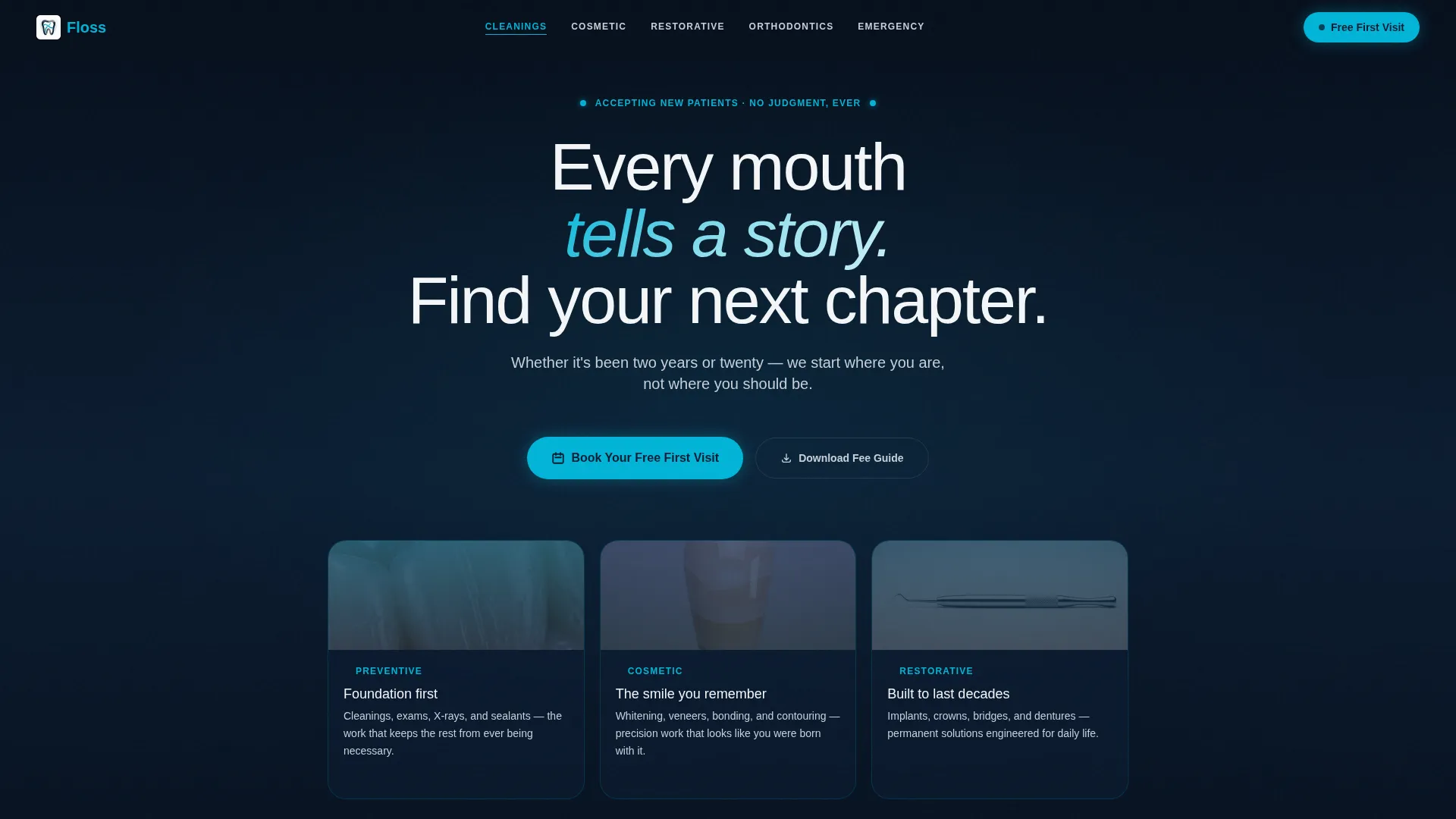
- A frosted dark glass header with three service category cards and slow-drifting enamel macro photography in the background
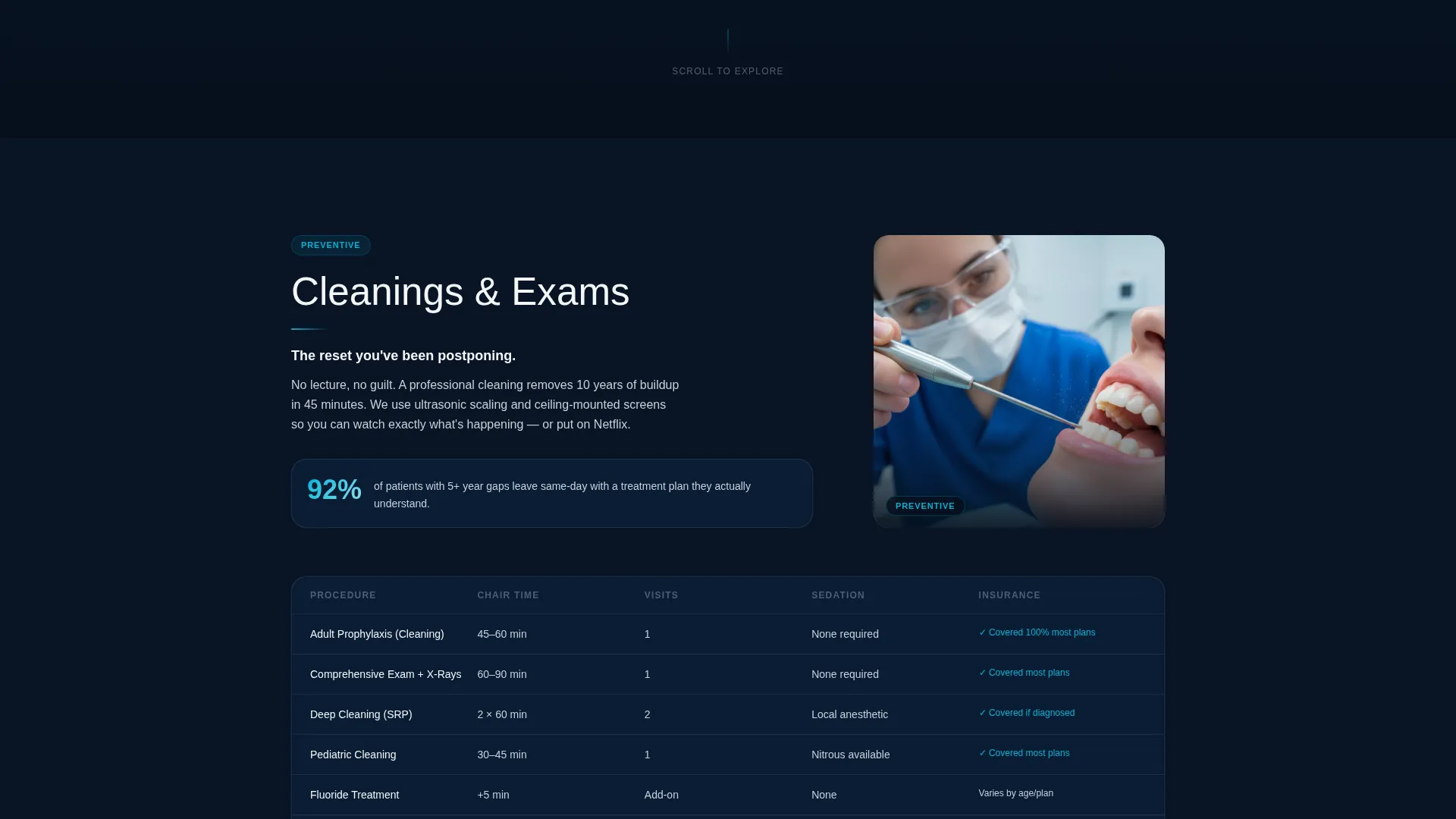
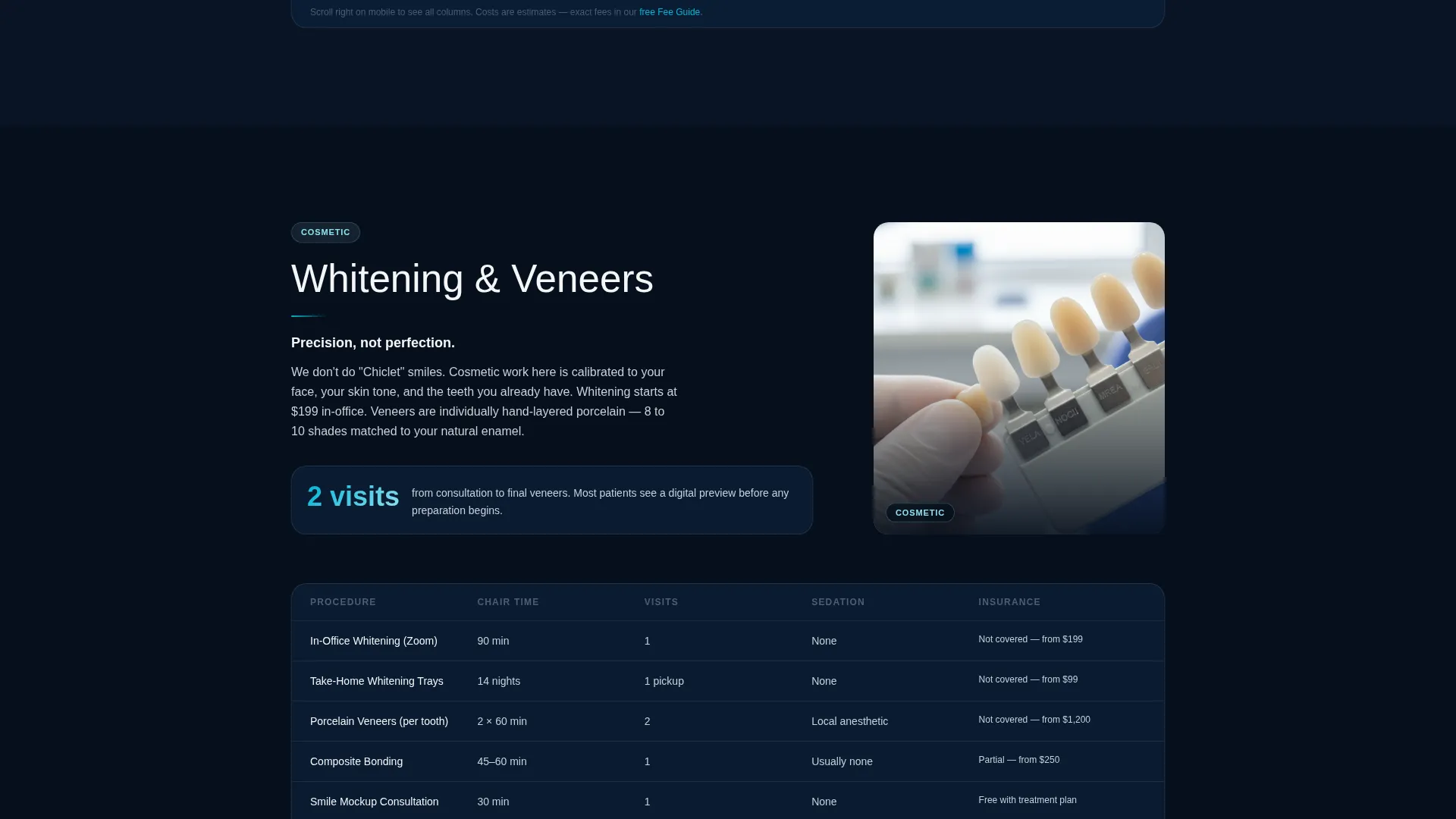
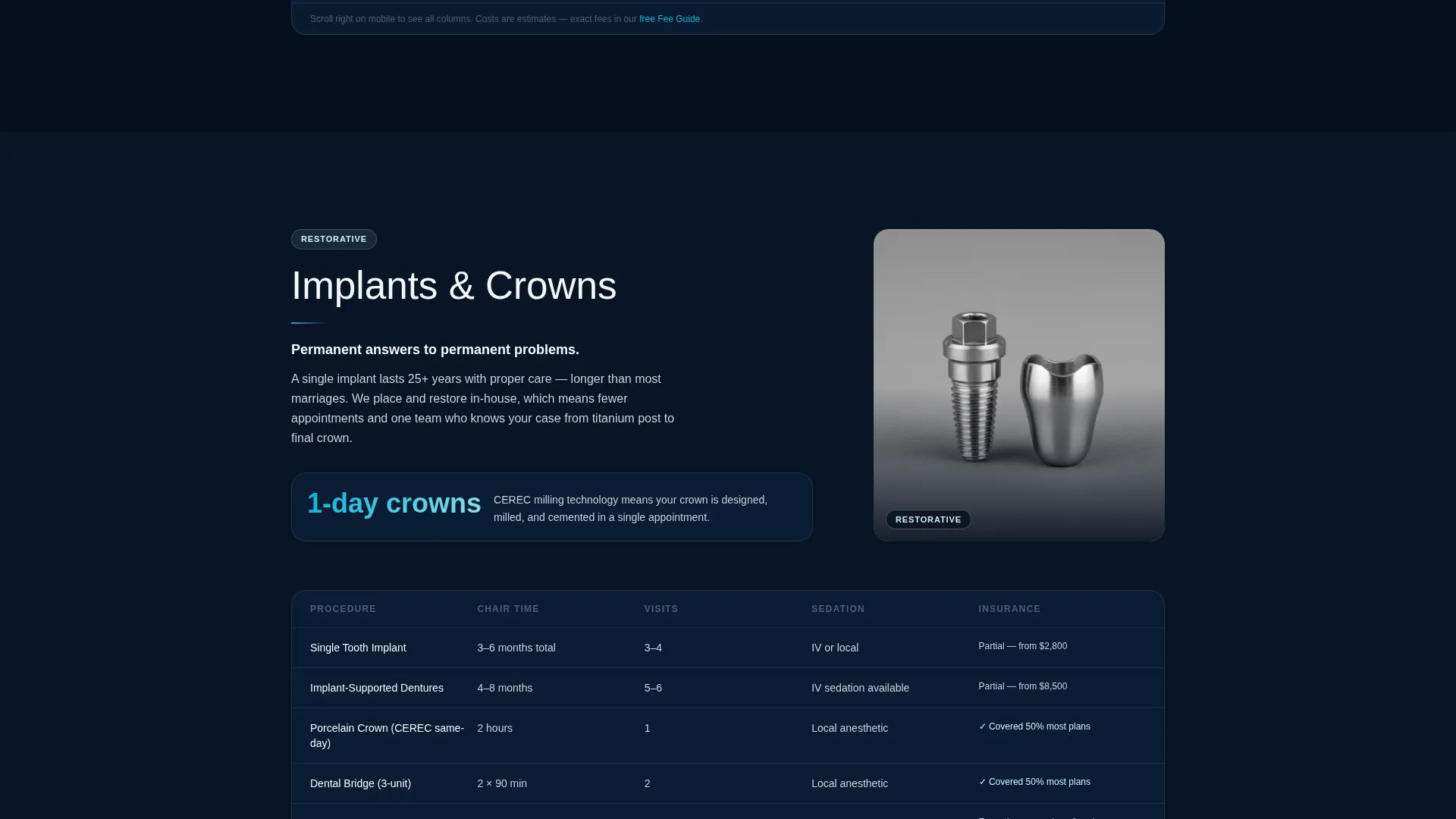
- A feature matrix layout inside each service hub showing procedure time, average visits, sedation options, and insurance-friendliness in scannable rows
Feature list
This template ships with purpose-built components designed for dental patient journeys. Each feature addresses a specific moment in the visitor's decision process.
Dark Glass Panel Header
Three frosted translucent cards float over a deep navy field, each representing a service category: Preventive, Cosmetic, and Restorative. Abstract macro photography of enamel texture and ceramic veneer grain drifts slowly behind the glass. A single headline fades in above the cards on load.
Sticky Anchor Navigation Bar
A slim translucent navigation bar pins to the top of the viewport the moment the visitor begins scrolling. It links directly to each service hub section, letting visitors jump to the information most relevant to them without losing their place.
Service Hub Feature Matrix
Each of the five service sections uses a comparison-rich grid to display procedure time, average number of visits, sedation options, and insurance-friendliness in scannable rows. The layout reads like a curated catalog, not a medical brochure, and deepens specificity as the visitor scrolls.
Floating Booking call to action Button
A teal "Book Your Free First Visit" button is pinned to the bottom-right corner of the page at all times. Clicking it expands a compact three-field form: name, phone number, and a single-select chip row for the visitor's primary concern, with options for Pain, Cosmetic, Checkup, and Not Sure.
Gated Fee Guide Download
A secondary conversion path offers a downloadable fee guide in exchange for a visitor's email address only. This captures the comparison shopper who is researching costs but is not yet ready to book, keeping them in the practice's reach.
Page sections overview
| Section | Purpose |
|---|---|
| Hero Header | Introduce the practice with three frosted service category cards and a fading headline over drifting enamel photography |
| Anchor Nav Bar | Pin navigation to the top on scroll so visitors can jump between service hubs instantly |
| Cleanings & Exams | Present preventive care details in a feature matrix with procedure time, visits, sedation, and insurance rows |
| Whitening & Veneers | Showcase cosmetic options with the same scannable grid format and patient outcome photography |
| Implants & Crowns | Detail restorative procedures with comparison rows and specificity-deepening content flow |
| Orthodontics Hub | Cover orthodontic treatment options in a matrix layout consistent with other service hubs |
| Emergency Care | Surface urgent care information clearly for visitors arriving in pain or distress |
| Fee Guide Download | Offer a gated PDF download requiring only an email to capture cost-conscious researchers |
| Floating Booking Form | Convert ready visitors with a pinned teal button that expands into a quick three-field booking form |
Design & branding system
The visual identity follows a Directory and Discovery theme built on a Midnight Blue color system. Every color choice reinforces a sense of clinical calm and precision without feeling cold or intimidating.
- Core palette: deep clinical navy (#0B1D33) for backgrounds, instrument-steel gray (#3A4A5C) for secondary surfaces, and enamel white (#F4F6F8) for text and card content
- Accent color: fluoride-rinse teal (#00B4D8) reserved for active navigation states, hover glows, and the pulsing primary call-to-action button
- Visual mood: the palette evokes a dental operatory after hours, with monitors glowing softly in a dark room and every surface clean and reflective
Mobile & speed optimization
The template is structured with a mobile-first content hierarchy so visitors on phones can navigate service hubs and reach the booking form without friction.
- The sticky anchor bar and floating booking button remain accessible and clearly visible on small screens
- Feature matrix rows reflow into a stacked card format on narrow viewports, keeping comparison data readable without horizontal scrolling
- Background parallax effects are designed to degrade gracefully on devices where motion may be reduced or unavailable
How this template helps you convert
The template is built around a Freemium and Trial conversion model. Every element is placed to reduce hesitation and move visitors toward one of two actions.
- The floating "Book Your Free First Visit" button is always visible, and the three-field form with concern chips keeps the booking step fast and low-commitment for first-time patients.
- The gated fee guide download captures email addresses from visitors who are still in research mode, giving the practice a second chance to convert them after they leave the page.
Other information about this template
This template suits practices that want to present a broad service menu on a single page without sacrificing depth or clarity. A few additional details worth knowing:
- The hub-and-spoke structure with anchor navigation is well-suited to practices where patients arrive with different priorities, whether that is a routine cleaning, an implant consultation, or an emergency appointment
- The feature matrix creative direction is designed to replace the typical "wall of text" service page with a format that feels closer to a product comparison tool
- Patient outcome photography is referenced in the brief as part of the cosmetic and restorative hub sections, and placeholder image regions are built into those layouts
- The template is built as a standalone landing page, not a multi-page site, so all service information lives in one scrollable, anchor-linked document
- The concern chip row in the booking form (Pain, Cosmetic, Checkup, Not Sure) is designed to reduce form abandonment by making the first interaction feel low-stakes and non-clinical
Theme
Directory & Discovery
Creative direction
Feature Matrix
Color system
Midnight Blue
Style
Hub & Spoke (Anchor Nav)
Direction
Freemium/Trial
Page Sections
Dark Glass Panel Hero Header
Sticky Anchor Navigation
Five-hub Feature Matrix Layout
Floating Booking Call to Action with Concern Chips
Gated Fee Guide Download
Related questions
Can I customize the service hub sections to match my practice's actual offerings?
Does the template support two separate conversion paths at once?
How does the booking form work for new patients?
Is this template suitable for a family or pediatric dental practice?
Can I replace the placeholder photography with my own practice images?



