Intelligent DataOps Landing Page Template
Pipeline is a DataOps landing page template built for platforms that bring order to modern data stacks. It combines an animated live-metrics header, an interactive feature matrix, and a freemium conversion flow into one sharp, terminal-inspired design. Built for data engineers and analytics teams, it communicates reliability before a single word is read.
by Rocket studio
Quick summary
Pipeline is a single-page DataOps landing page template designed to showcase a data orchestration platform. It opens with an animated stats dashboard that signals system health at a glance. A structured feature matrix drives the scroll. Every section earns trust before asking for a signup, making it ideal for freemium and trial-led growth.
Who this template is for
This template speaks directly to technical buyers who evaluate tools the same way they read documentation: fast, skeptical, and detail-first. It is built for teams who run real data infrastructure and need to see proof before they commit.
- Data engineers who manage orchestration pipelines and need a product page that matches how they think
- Analytics leads who must demonstrate data freshness and reliability to non-technical stakeholders
- Platform teams building on top of transformation and warehouse tooling who want a credible, conversion-ready web presence
What problem this template solves
Data infrastructure products are hard to explain to a mixed audience of engineers and business decision-makers. Most landing pages either oversimplify or bury the value in marketing language that technical users immediately distrust. Pipeline solves that gap.
- It replaces vague benefit statements with live-feeling metrics that show system health directly in the header
- It organizes complex feature sets into a scannable grid instead of forcing a linear narrative
- It offers two conversion paths so visitors who are ready to sign up and those who need more context are both served
What you get with this template
You get a fully structured, single-page landing page template with a clear visual hierarchy and purpose-built sections for a DataOps platform audience. Every section is designed to move a technical visitor toward a specific next step.
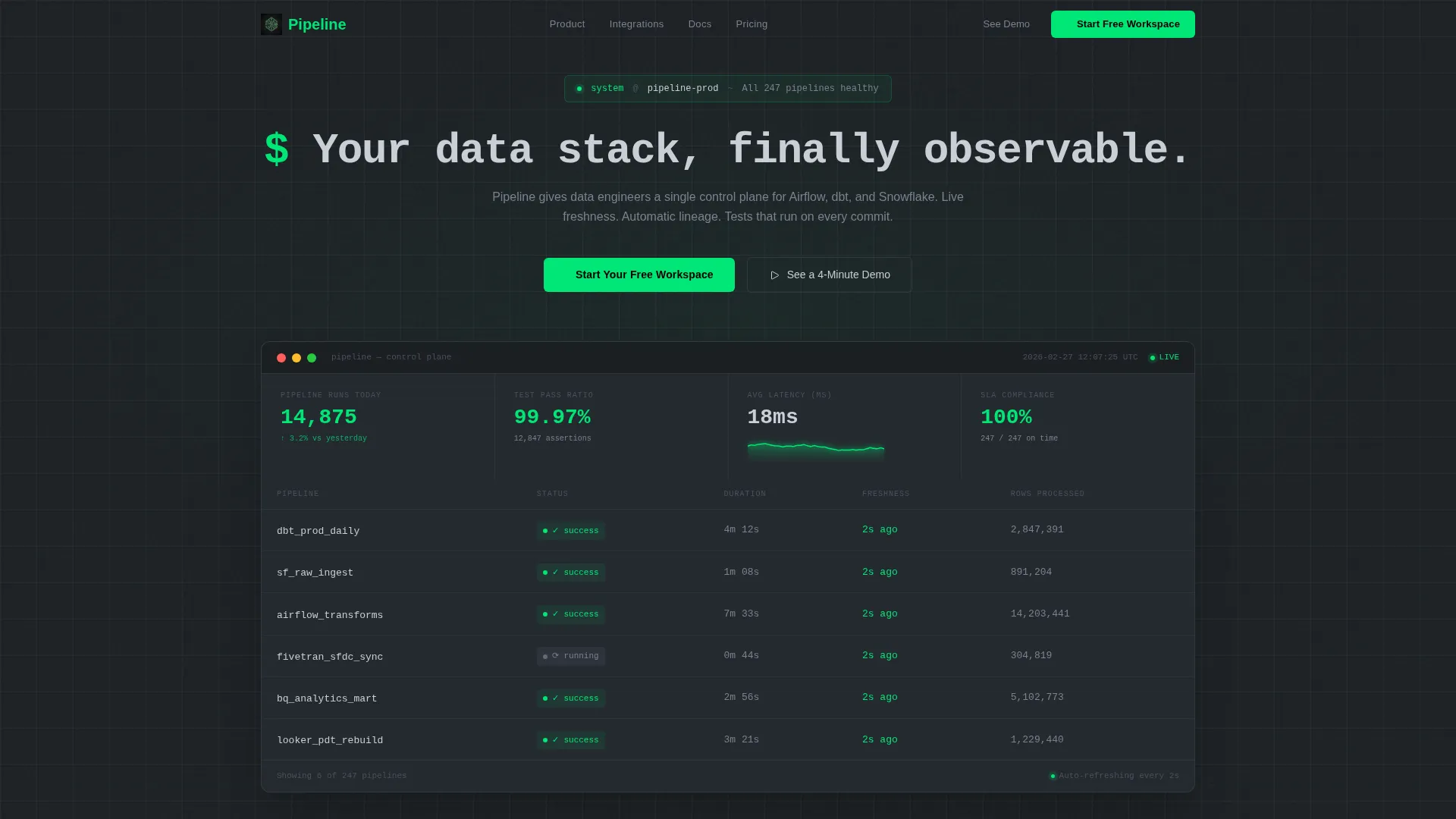
- An animated stats and metrics header with pipeline run counters, freshness timestamps, latency sparklines, and a test-pass ratio display
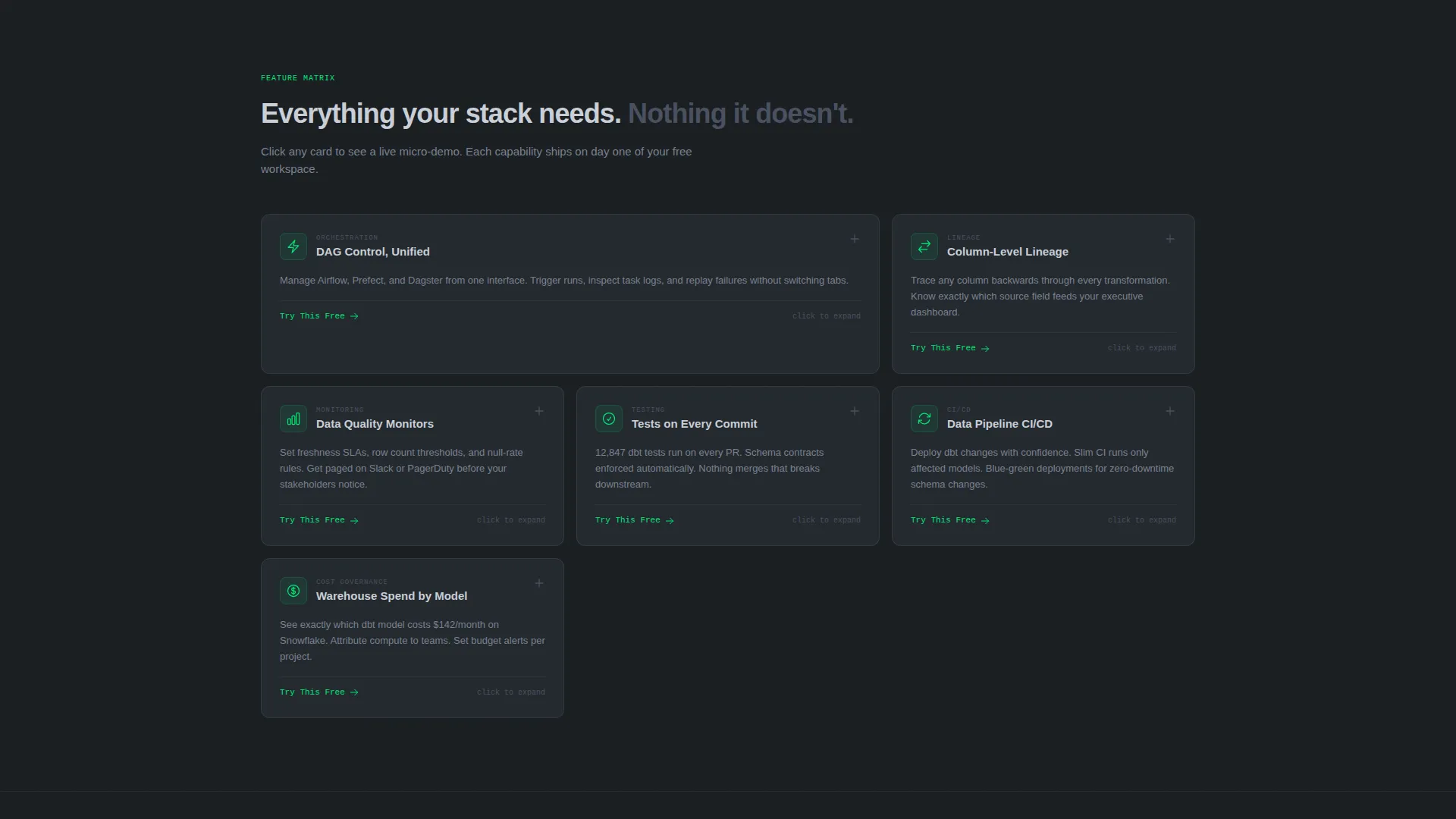
- A six-module feature matrix with expandable capability cards, each containing a micro-demo area and an embedded call-to-action
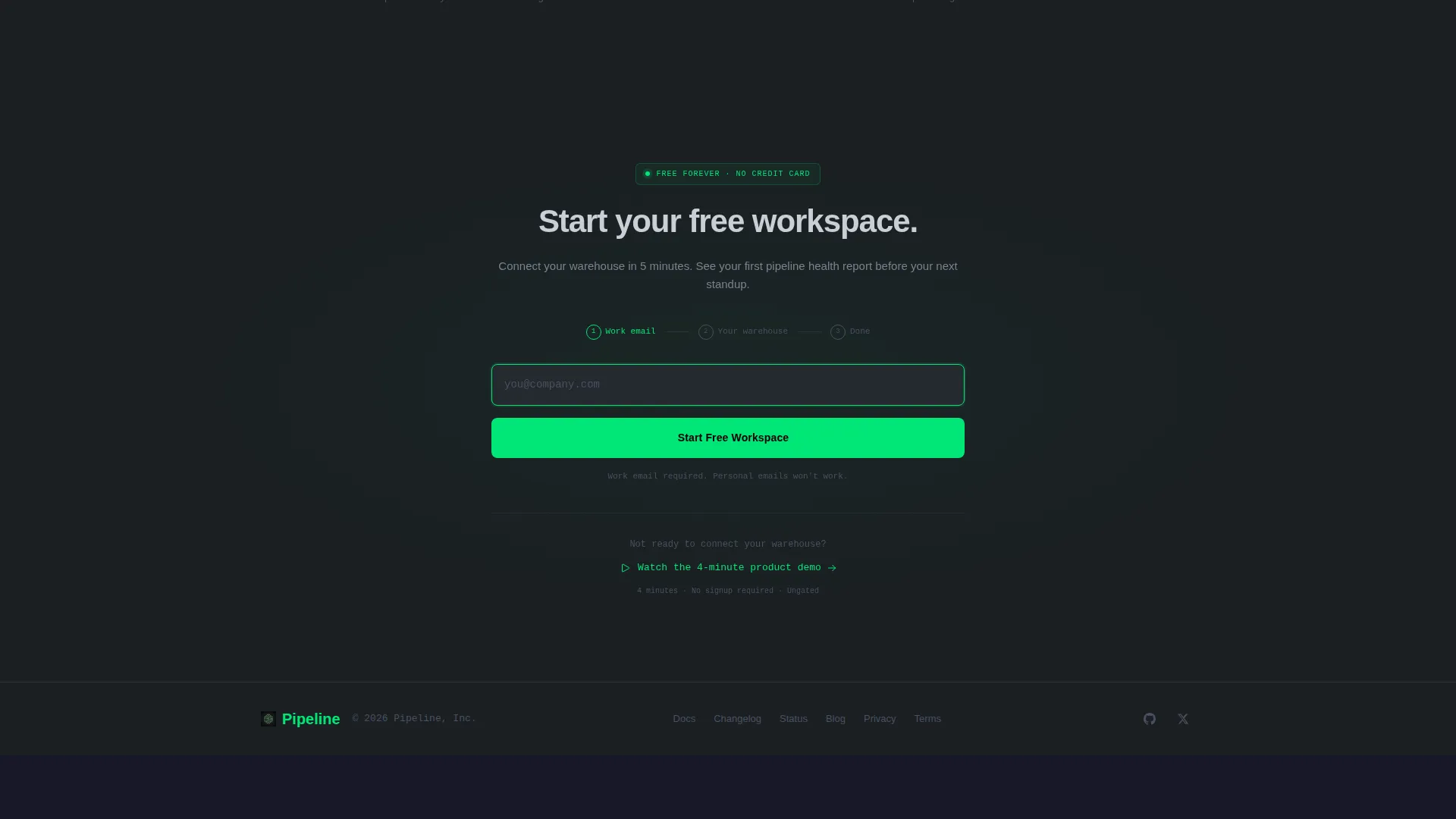
- A progressive signup flow that starts with a work email and collects warehouse type and team size after account creation, plus a secondary demo capture path
Feature list
This template includes purpose-built sections and interactive components that reflect how data platform buyers actually evaluate products.
Animated Live-Metrics Header
The header renders as a live-data dashboard grid. Pipeline run counts tick upward, freshness timestamps read in near-real time, a latency sparkline holds flat, and a test-pass ratio displays at 99.97%. Numbers animate at varied cadences to create the rhythm of a healthy, running system.
Expandable Feature Matrix
Six capability cards cover Orchestration, Lineage, Monitoring, Testing, Continuous Integration and Delivery, and Cost Governance. Each card is a self-contained module. On click, it expands to reveal a micro-demo area, such as a lineage graph or a monitor rule builder, along with a product screenshot and an embedded trial call-to-action.
Terminal-Style Headline Animation
The hero headline types itself into frame like a terminal prompt. This single motion sets the tone for the entire page: precise, technical, and alive. It tells the audience what kind of product this is before any feature copy loads.
Progressive Conversion Signup Flow
The primary call-to-action reads "Start Your Free Workspace" and appears in the pinned navigation and inside each feature card. The first step asks only for a work email. Warehouse type and team size are collected after account creation, reducing initial friction significantly.
Secondary Demo Capture Path
Visitors not ready to enter credentials are offered a "See a 4-Minute Demo" option. This path captures an email address in exchange for access to an ungated walkthrough video, creating a second conversion lane for high-intent but cautious visitors.
Real Interface Screenshots Per Card
Every feature card includes an actual product interface screenshot. This proves the product exists and functions before any commitment is requested, which is a critical trust signal for technical evaluators.
Page sections overview
| Section | Purpose |
|---|---|
| Pinned Navigation Bar | Anchors the primary call-to-action at the top of every scroll position |
| Live Metrics Header | Communicates system health through animated pipeline and freshness data |
| Hero Headline Block | Sets product positioning with a terminal-style animated headline |
| Feature Matrix Grid | Organizes six capability modules into an explorable, expandable card layout |
| Orchestration Card | Details pipeline scheduling and directed acyclic graph management capabilities |
| Lineage Card | Shows column-level data tracing with an interactive lineage graph demo |
| Monitoring Card | Presents rule-based alerting with a drag-and-drop condition builder |
| Testing Card | Covers automated data quality checks and pass-rate reporting |
| CI/CD Card | Explains version-controlled pipeline deployment and change management |
| Cost Governance Card | Addresses warehouse spend visibility and usage tracking |
| Primary Signup Form | Captures work email as the sole first-step field for low-friction signup |
| Demo Capture Path | Offers a four-minute video walkthrough in exchange for an email address |
Design & branding system
The visual identity follows a Data Command theme built on a Monochrome Steel color system. Every color choice has a functional purpose. Green appears only when something is active, passing, or alive, which makes it a genuine signal rather than decoration.
- Background surfaces use deep gunmetal (#1B1F23), card surfaces lift in brushed steel mid-tone (#3D4450), and body text renders in cold silver (#C9CED6) for clear contrast without warmth
- Signal green (#00E676) is reserved exclusively for success states, active call-to-action elements, and live metric indicators
- The overall aesthetic feels like the interior of a server rack at night: no ornament, no gradients, just the structural clarity of a system that is running correctly
Mobile & speed optimization
The template is structured so that its grid-based layout adapts clearly across screen sizes. Dense data grids and expandable cards are designed to remain navigable on smaller viewports without losing their core information hierarchy.
- The feature matrix collapses into a single-column scroll on mobile, preserving card expand and screenshot visibility
- The pinned navigation bar and primary call-to-action remain accessible at all scroll depths on both desktop and mobile views
How this template helps you convert
This template is built around two clear conversion paths and multiple trust signals, so visitors at different levels of readiness both find a clear next step.
- The primary path removes friction at the point of signup by asking only for a work email first, then collecting additional context after the account is created, which reduces drop-off at the most critical step
- The secondary demo path captures interest from visitors who need more context before committing, turning a potential exit into a qualified lead via a short video exchange
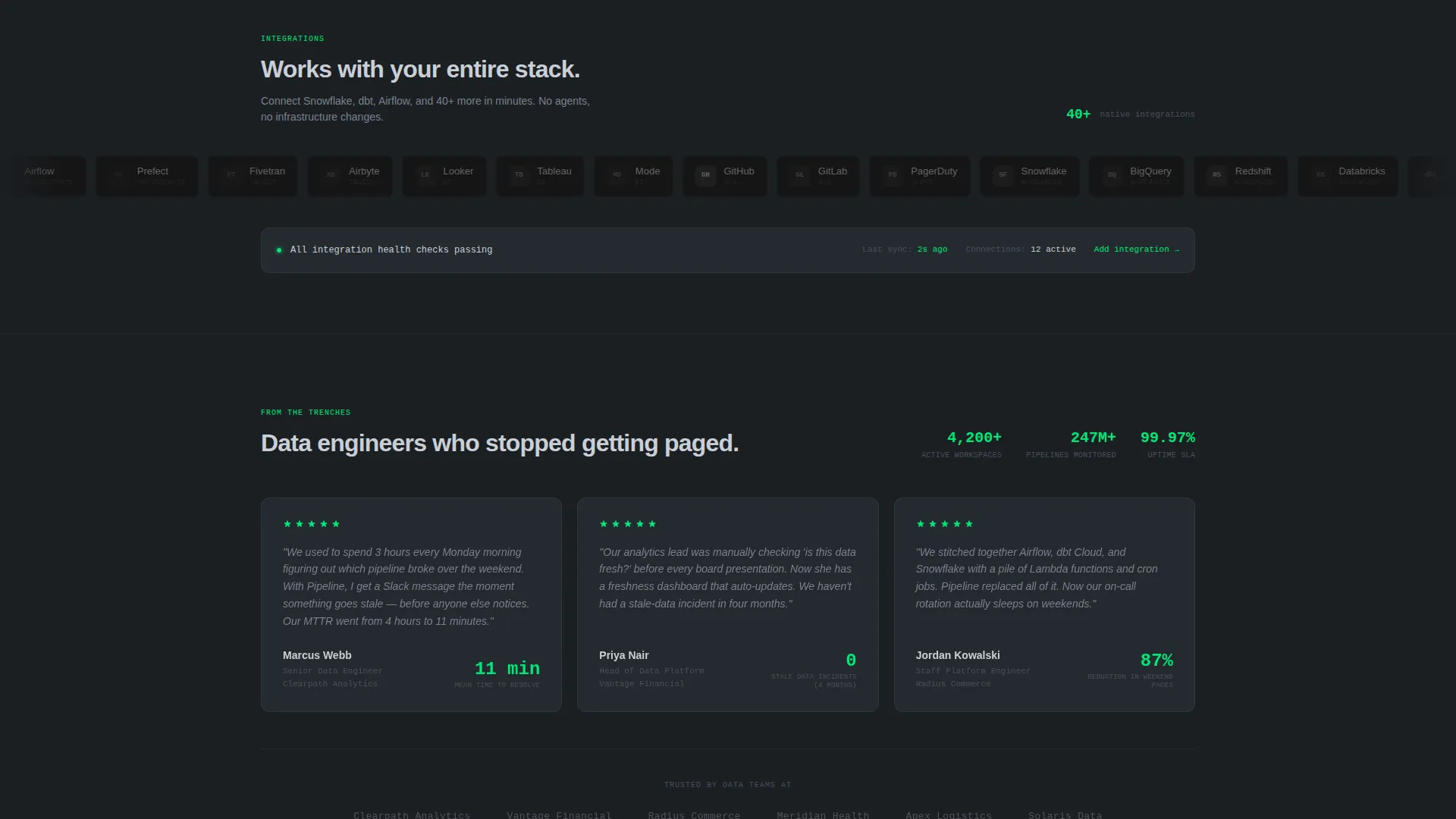
- Real interface screenshots inside every feature card prove the product works before any action is requested, giving technical evaluators the evidence they need to move forward with confidence
Other information about this template
This template is categorized under DataOps Technology and is designed specifically for the DataOps platform niche. It is a strong fit for teams building or marketing products that sit at the intersection of data warehousing, transformation, and business intelligence observability.
- The template style is Dashboard and Data Grid, which aligns with how data engineers and analytics professionals naturally read and process information
- The header concept is Stats and Metrics, making the first impression feel like opening a monitoring console rather than reading a brochure
- The creative direction is Feature Matrix, which mirrors the way technical buyers evaluate software: by scanning capabilities in parallel rather than following a guided story
- The conversion direction is Freemium and Trial, with two capture paths and a progressive onboarding form that reduces signup friction without sacrificing lead quality
- The theme is Data Command and the color system is Monochrome Steel, both of which reinforce the platform's positioning as serious infrastructure software rather than a consumer-facing product
Theme
Data Command
Creative direction
Feature Matrix
Color system
Monochrome Steel
Style
Dashboard/Data Grid
Direction
Freemium/Trial
Page Sections
Animated Live-metrics Header
Expandable Six-module Feature Matrix
Terminal-style Headline Animation
Progressive Low-friction Signup Form
Secondary Demo Video Capture Path
Per-card Interface Screenshots
Related questions
Who is the Pipeline template designed for?
Can I customize the feature cards and metrics shown in the header?
What are the two conversion paths included in this template?
Does the template include the animations described, such as ticking counters and a typing headline?
Is this template suitable for an early-stage or pre-launch DataOps product?



