English Literature Quiz App Landing Page Template
Folio is a sidebar companion landing page template built for English literature practice and quiz apps. It drops visitors straight into a typeset poetry question, builds trust through educator profiles, and guides users toward a ten-question diagnostic assessment. The design channels the quiet authority of a university library, using deep teal, cream, and tutor-red to make every interaction feel studied rather than rushed.
by Rocket studio
Quick summary
Folio is a single-page sidebar companion template for an English literature practice and quiz app. It skips the welcome screen entirely and places visitors inside a live poetry question within two seconds. From there, the page builds credibility through real educator profiles before steering users toward a diagnostic assessment that maps their reading level and recommends modules.
Who this template is for
This template is designed for teams building English literature practice tools that need to convert curious visitors into committed learners. It suits apps targeting students at multiple stages of their literary education.
- A-level students revising poetry and prose the night before an unseen exam
- University undergraduates beginning their first Victorian literature or drama module
- Mature learners returning to formal study who want to rebuild literary analysis confidence
What problem this template solves
Most quiz app landing pages either overwhelm visitors with feature lists or bury the actual product behind a lengthy sign-up flow. Folio cuts straight to the experience, letting the content prove its value before asking for anything in return.
- Visitors leave before engaging because the product value is not immediately felt
- Generic app pages fail to communicate expert authorship behind question banks
- Hesitant users need a low-commitment entry point before they will attempt a diagnostic
What you get with this template
You get a fully structured sidebar companion landing page that combines immediate quiz engagement with trust-building editorial sections. Every layout choice reflects the deliberate pacing of a well-run seminar.
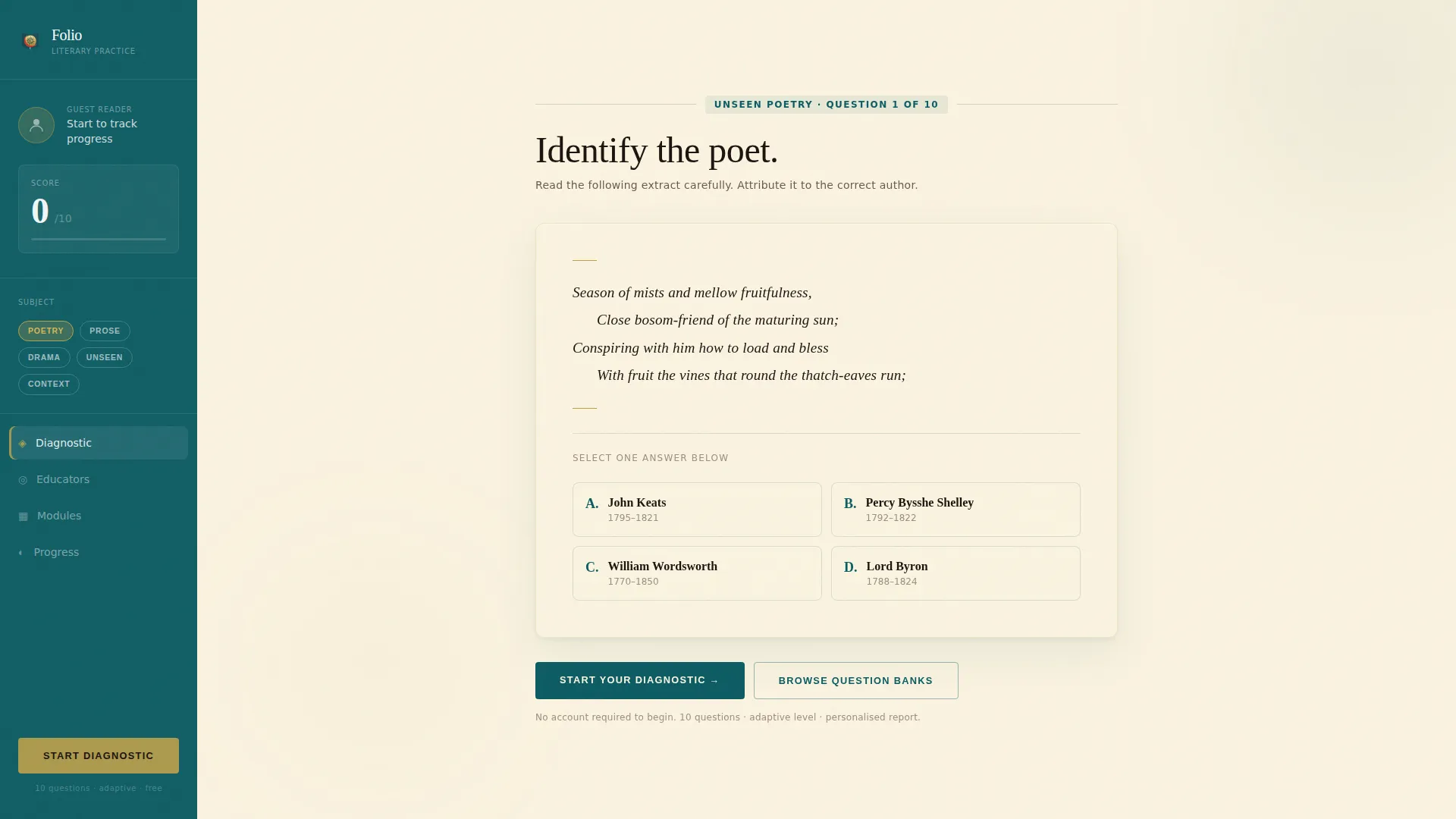
- A fixed sidebar with avatar, live score display, and a subject selector
- A header Quiz Starter section with a typeset four-line stanza and four author-choice options
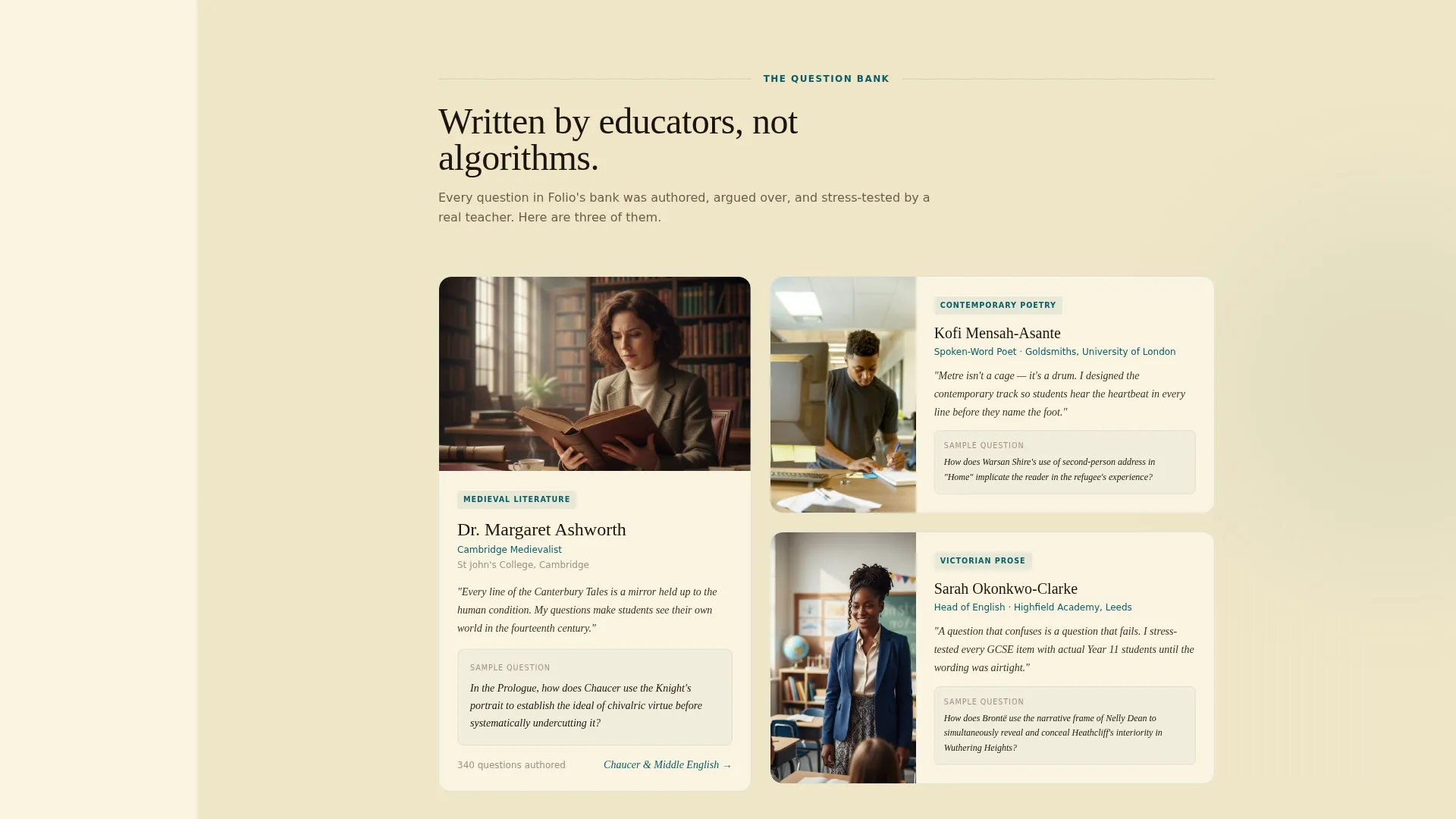
- An educator profiles section with portraits, sample questions, and teaching philosophies
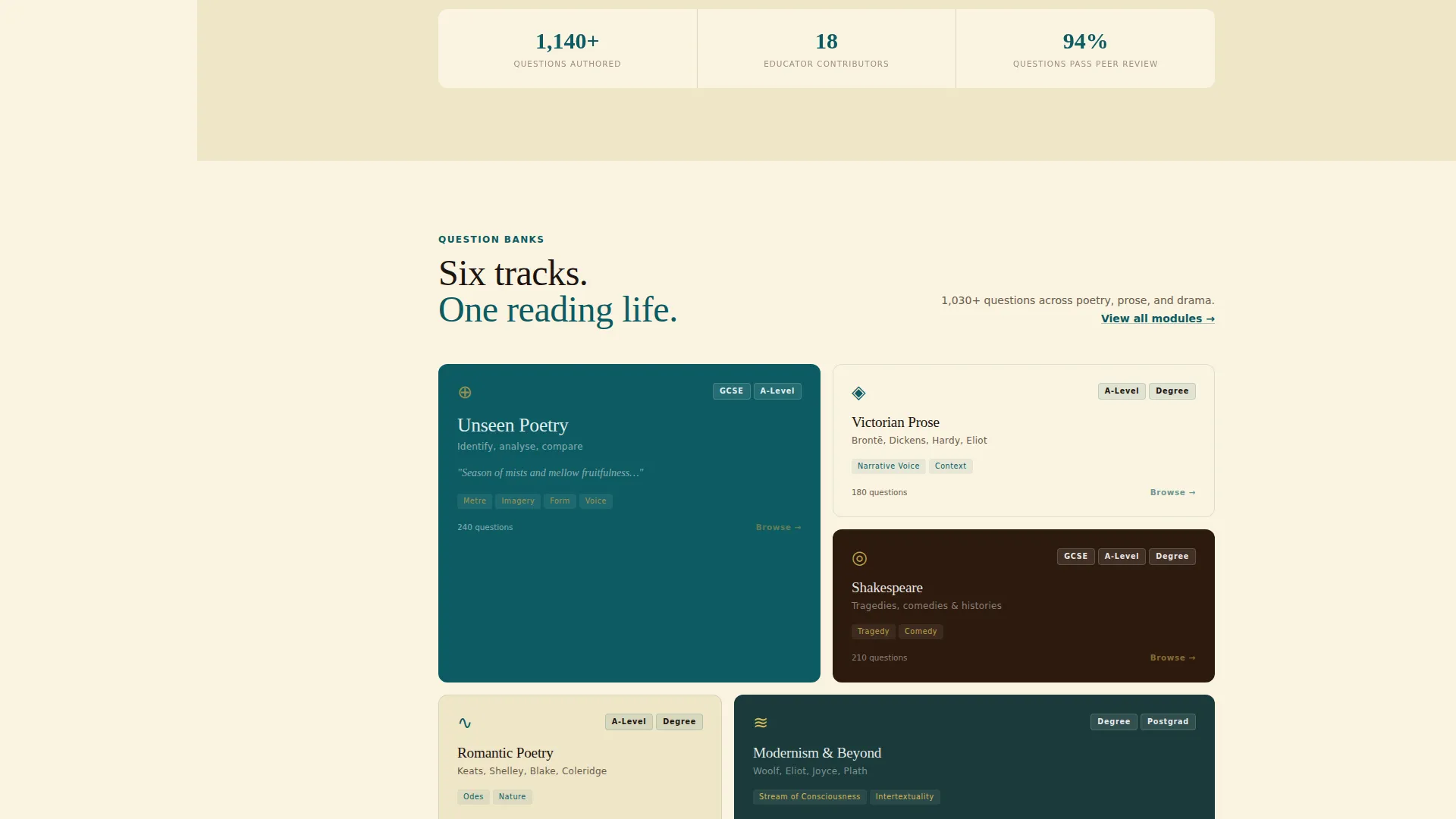
- Dual conversion paths: a primary diagnostic call to action and a secondary question-bank browser
Feature list
A brief overview of what this template delivers across its key functional areas.
Immediate Quiz Starter Header
The header drops visitors into a single beautifully typeset exam-style question from the first moment the page loads. A four-line stanza from an unattributed poem sits above four possible author options, styled with a serif typeface and generous leading. No welcome screen or feature tour interrupts the experience.
Fixed Sidebar Navigation
A persistent left sidebar stays visible throughout the scroll. It displays a silhouette avatar, a running score starting at zero, and a subject selector so visitors can orient themselves without losing their place in the content.
Educator Profile Section
As visitors scroll past the starter question, the page introduces the human experts behind the question bank. Each profile pairs a portrait with a sample question that educator authored and a one-line teaching philosophy, building trust by putting identifiable expertise behind every assessment item.
Dual Conversion Path Design
The primary call to action, "Start Your Diagnostic", appears inside the header question and repeats at the sidebar bottom. A secondary path, "Browse Question Banks", lets hesitant visitors explore topic trees without committing, warming them gradually toward the full diagnostic.
Ten-Question Adaptive Assessment Flow
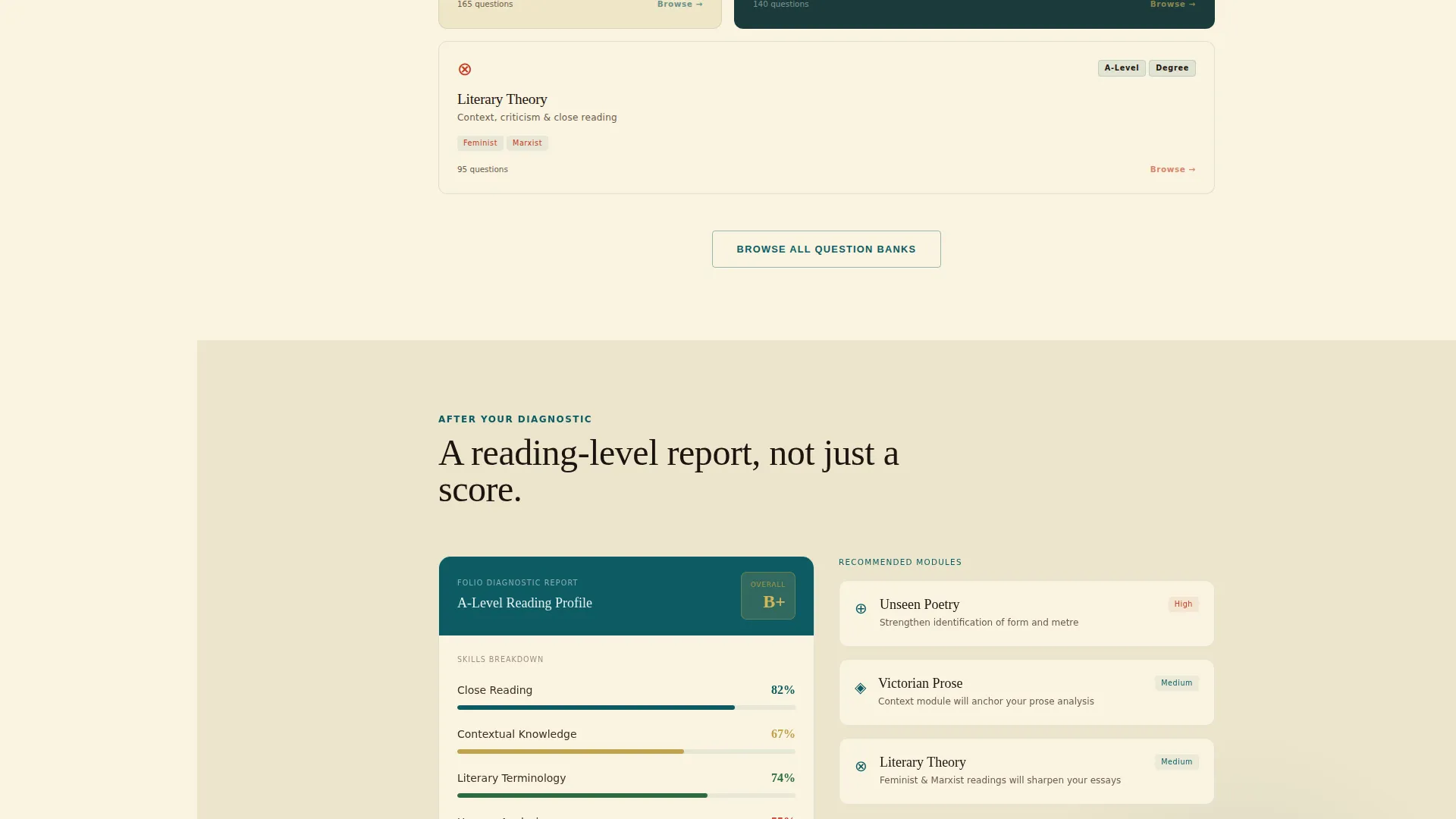
Clicking "Start Your Diagnostic" launches a ten-question assessment spanning poetry, prose, and drama. The assessment gauges the visitor's level before requesting an email, then delivers a personalised reading-level report with tailored module recommendations after submission.
Teal Catalyst Visual System
The template uses a four-colour palette drawn from the Institutional Authority theme. Deep seminar-room teal anchors the sidebar, chalk-dust cream fills the main content field, marginalia red highlights scores and incorrect answers, and aged-page gold activates on hover states and progress indicators.
Page sections overview
| Section | Purpose |
|---|---|
| Quiz Starter Header | Drops visitors into a live poetry question immediately |
| Fixed Left Sidebar | Shows avatar, score, and subject selector throughout scroll |
| Educator Profiles | Introduces expert authors behind each question bank |
| Diagnostic Call to Action | Primary prompt to begin the ten-question assessment |
| Question Bank Browser | Secondary path for exploring topics without committing |
| Results and Recommendations | Delivers personalised reading-level report after submission |
Design & branding system
The visual identity follows an Institutional Authority theme. Every colour and type choice is rooted in the sensory world of a well-used university library, making the interface feel earned rather than designed.
- Deep seminar-room teal (#0D5C63) anchors the persistent sidebar like the cloth binding of a first-edition hardback
- Chalk-dust cream (#FAF3E0) spreads across the main content field, echoing foxed pages and generous white space
- Marginalia red (#C23B22) marks scores, incorrect-answer flags, and tutor-style annotations in the margin
- Aged-page gold (#BFA14A) activates on hover states and progress indicators, referencing gilded page edges
Mobile & speed optimization
The sidebar companion layout is designed to remain functional and readable across screen sizes. The fixed sidebar and typeset question layout adapt to smaller viewports without losing the focused, exam-paper feel.
- The serif typeface and generous leading scale cleanly so poetry stanzas remain legible on mobile screens
- Fixed sidebar behaviour is considered at the layout level to prevent content overlap on narrow displays
- The minimal-distraction structure reduces layout complexity, keeping the page fast to parse visually
How this template helps you convert
The conversion architecture here is built around curiosity and progressive commitment, not pressure. Each design decision is intended to pull the visitor one step deeper into the experience before asking for anything.
- The Quiz Starter header creates immediate engagement by placing the visitor inside an exam scenario within two seconds, making the product value tangible before any sign-up is requested.
- Educator profiles add human credibility to each assessment item, building the trust that hesitant learners need before they will commit to a diagnostic.
- The dual call-to-action structure gives confident visitors a direct path to the diagnostic while offering curious visitors a softer "Browse Question Banks" route that warms them toward conversion without pressure.
Other information about this template
Folio is part of a broader template library designed for education and training products. A few additional points are worth noting for teams evaluating this layout.
- The template style is a sidebar companion, meaning the fixed sidebar is a structural feature of the layout rather than an optional add-on
- The header concept is classified as a Quiz Starter, a specific pattern where the hero section is the product itself rather than a promotional banner
- The creative direction follows a Team and People approach, prioritising human expertise over algorithmic authority as the primary trust signal
- The landing page direction is Quiz and Assessment conversion, making the diagnostic flow the central commercial objective of the page
- The Teal Catalyst colour system is the named palette system used across this template, covering all four core colours described in the design section
- Subject coverage in the question bank spans poetry analysis including metre and form, prose including narrative technique and unreliable narrators, and drama, matching the breadth of the ten-question adaptive assessment
Theme
Institutional Authority
Creative direction
Team & People
Color system
Teal Catalyst
Style
Sidebar Companion
Direction
Quiz/Assessment
Page Sections
Immediate Quiz Starter Header
Fixed Sidebar with Score Display
Educator Profile Trust Section
Dual Conversion Path Architecture
Ten-question Adaptive Assessment
Teal Catalyst Colour System
Related questions
Who is the target audience for this template?
Does the page require visitors to sign up before they engage?
What are the two conversion paths built into this template?
What does the personalised report include after the diagnostic?
Can the educator profile section reflect different subject specialists?



