Forecast - Powerful Whitelabel Landing Page Template
Forecast is a white-label weather platform landing page built for technology companies that need broadcast-grade weather data under their own brand. It combines a radar dashboard, hyperlocal alert feeds, and a seven-day hourly forecast strip into a single API-powered product. The page uses a Problem-to-Solution arc and interactive modules to turn curious visitors into qualified demo requests.
by Rocket studio
Quick summary
Forecast is a white-label weather engine landing page designed for media companies, airlines, logistics operators, and hospitality brands. It delivers radar tiles, hyperlocal alerts, and seven-day hourly strips under a client's own brand identity. The page follows a Problem-to-Solution arc, uses live-feeling interactive modules, and drives leads through a three-step progressive disclosure form.
Who this template is for
This template is built for technology and platform teams who sell or procure embedded weather intelligence. It speaks directly to decision-makers who want a polished, brandable weather product without the cost of building one from scratch.
- Chief Technology Officers at regional broadcast stations who are tired of licensing generic weather widgets
- Product managers at delivery and logistics apps who need minute-level precipitation overlays in their own interface
- Brand directors at resort chains and hospitality groups who want a weather tab that matches their existing design system precisely
What problem this template solves
Launching a branded weather experience from scratch is slow, expensive, and often ends up looking identical to every competitor using the same off-the-shelf widget. This template gives potential clients a concrete, visual argument for why that cycle needs to stop.
- An eight-month average build cycle drains engineering resources before a single user sees a forecast
- Annual licensing costs can reach hundreds of thousands of euros for capabilities that still carry another company's branding
- Generic weather interfaces undermine product differentiation because competitors ship the exact same user experience
What you get with this template
The template delivers a full single-page lead generation flow built around a dashboard and data grid layout. Every section is designed to move a technical or commercial buyer from skepticism to hands-on curiosity before they reach the form.
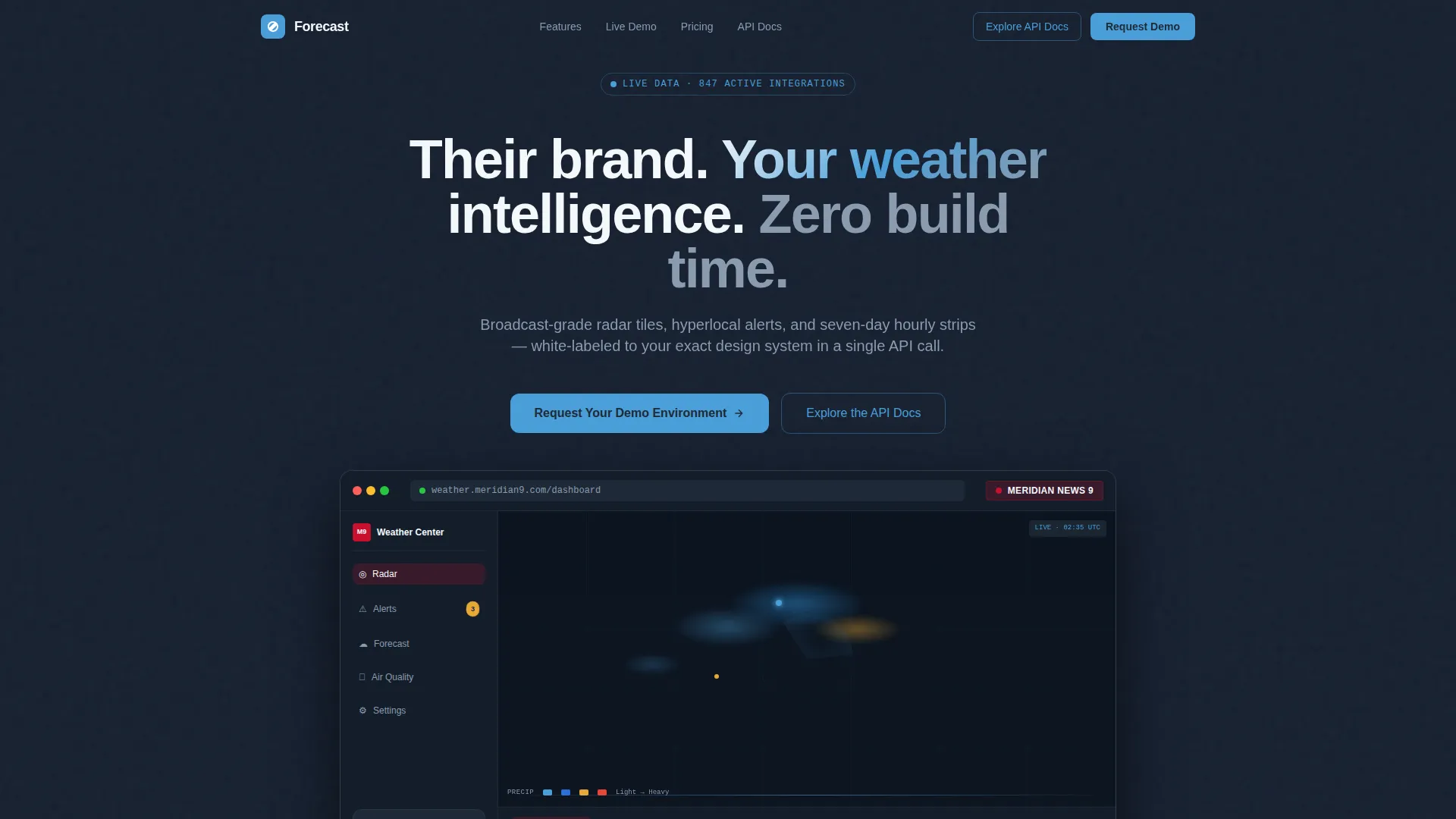
- A full-width product screenshot hero showing the white-label dashboard wearing a fictional brand skin, complete with a live-looking radar map, a five-day forecast strip, and an air-quality ring gauge
- Interactive scroll-stop modules including a pannable radar tile, a severity-filterable alert feed, and a real-time theme editor with a draggable color picker
- A three-step progressive disclosure lead form that qualifies company type, estimated API call volume, data needs, and contact details without overwhelming visitors at first glance
Feature list
The Forecast template is built around a small set of high-impact components. Each one is grounded in the brief and designed to serve a specific conversion or demonstration purpose.
Full-Width Dashboard Hero
The header section renders a pixel-perfect product screenshot on a deep slate canvas. It shows the white-label dashboard wearing a fictional brand skin called "Meridian News 9," complete with precipitation cells in motion, a five-day strip, and an air-quality sidebar gauge. The headline above it reads: "Their brand. Your weather intelligence. Zero build time." The product itself proves the promise before the visitor reads a word.
Problem-to-Solution Card Grid
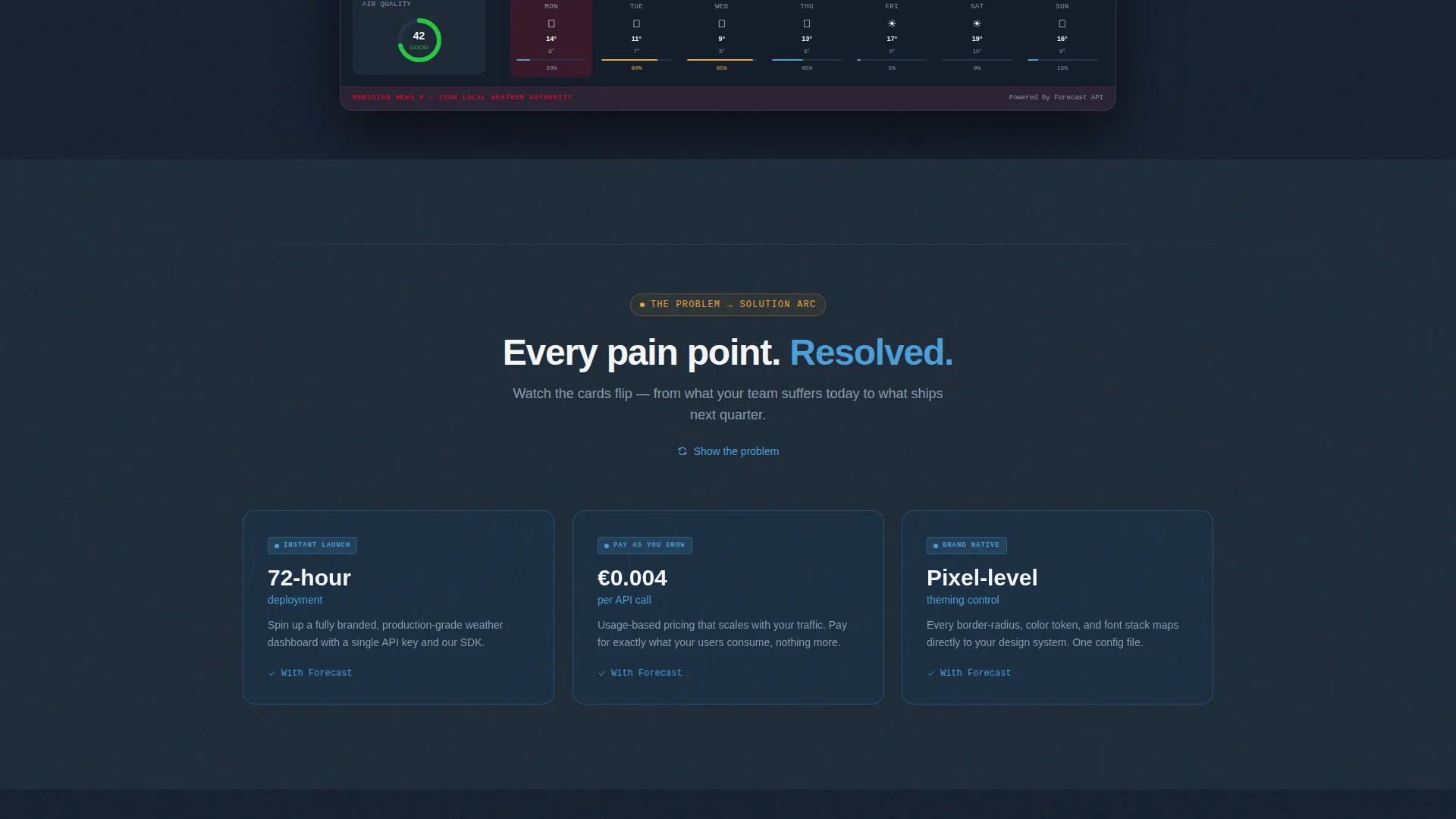
Section one presents three cards, each flagged with a red-highlighted pain metric: an eight-month build cycle, approximately €380K in annual licensing costs, and a generic interface shared with competitors. On scroll, each card flips with an animated transition to reveal its solution: seventy-two-hour deployment, usage-based pricing from €0.004 per API call, and pixel-level theming control. The arc is immediate and hard to dismiss.
Interactive Radar and Alert Modules
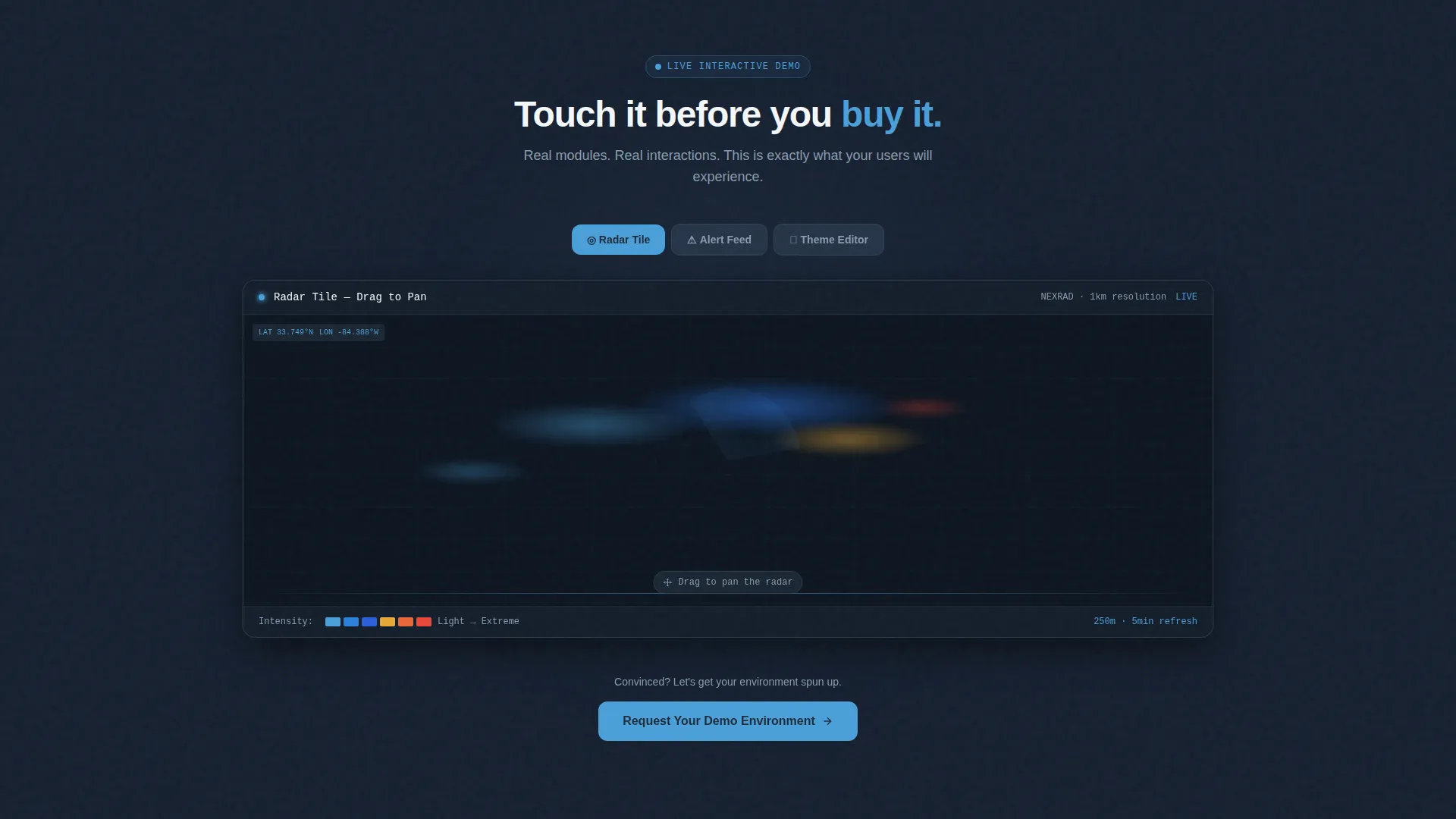
Visitors can pan a live-feeling radar tile, filter an alert feed by severity level, and watch a theme editor re-skin the dashboard in real time by dragging a color picker. These tactile scroll stops let technical evaluators and product managers experience the product before they ever fill in a form field.
Three-Step Progressive Disclosure Form
The lead capture form reveals itself in three stages to reduce friction. Step one collects company name and industry vertical via a dropdown covering broadcast, aviation, logistics, hospitality, and other. Step two uses a slider for estimated monthly API call volume and checkboxes for radar, alerts, or both. Step three captures name, work email, and an optional field for the visitor's biggest pain with their current weather provider.
Persistent Navigation call to action
After the visitor scrolls past the hero, the primary call-to-action button pins itself inside the top navigation bar. A second instance of the same button anchors at the close of the interactive theme editor. A secondary ghost button labeled "Explore the API Docs" sits beside the primary call to action to serve technical evaluators who need endpoint details before booking a meeting.
Slate and Sky Data Grid Layout
The overall layout follows a dashboard and data grid structure. Cards breathe against a deep slate background. Sky blue traces data lines and active toggle states. Warning amber appears sparingly on alert badges and hover states so that every amber element commands immediate visual attention.
Page sections overview
| Section | Purpose |
|---|---|
| Full-Width Hero | Establishes white-label promise with a product screenshot and a single headline |
| Problem Card Grid | Surfaces three quantified pain points to qualify and validate visitor frustration |
| Solution Card Flip | Resolves each pain card with a direct, metric-backed solution on animated scroll |
| Interactive Radar Tile | Lets visitors pan a live-feeling radar map to experience the data layer firsthand |
| Alert Feed Module | Allows severity-level filtering to demonstrate real-time alert customization |
| Theme Editor Module | Drag-and-drop color picker re-skins the dashboard live to prove pixel-level theming |
| Progressive Lead Form | Three-step form qualifies company, data needs, and contact in a low-friction sequence |
| Sticky Navigation call to action | Keeps the primary demo request button visible after the hero leaves the viewport |
Design & branding system
The color system is called Slate and Sky. It draws from the visual language of a professional instrument panel, where every element earns its place and high-signal colors are never wasted on decoration.
- Deep instrument-panel slate (#1E2A38) dominates backgrounds and navigation chrome, giving the page a composed, technical authority
- Altitude blue (#4A9FD9) traces data lines, active toggles, and interactive highlights, while cloud-ceiling gray (#8A9BAE) handles secondary text and structural dividers
- Clear-day white (#F4F7FA) lifts card surfaces so the data grid breathes, and warning amber (#E8A838) appears only on alert badges and hover states so that every amber element commands immediate attention
Mobile & speed optimization
The dashboard and data grid layout is structured so that interactive modules and card grids reflow cleanly across screen sizes. The design prioritizes legibility of data elements at every breakpoint.
- The problem-and-solution card grid collapses into a stacked single-column layout on smaller screens without losing the flip animation context
- The three-step lead form is built for thumb-friendly interaction, with the industry vertical dropdown and API call slider remaining fully usable on touch screens
How this template helps you convert
Every structural decision in this template is oriented around moving a qualified buyer toward a demo request. The page does not ask for commitment before it has earned trust.
- The interactive modules (radar tile, alert feed, and theme editor) let visitors self-qualify by actually using the product before they see a form, which means the people who reach the lead capture step are already bought in
- The three-step progressive disclosure form reduces abandonment by asking only two fields per step, and the optional pain-point field in step three gives the sales team rich context for the follow-up conversation
- The persistent sticky call to action and the secondary ghost button for API documentation create two conversion paths in parallel, so technical evaluators and commercial buyers are both served without either path competing with the other
Other information about this template
This template belongs to the Directory and Discovery theme family and uses the Dashboard and Data Grid template style. It is categorized under Technology, specifically the Consumer App and Platform subcategory, with a niche focus on white-label weather app deployments.
- The creative direction follows a Problem-to-Solution arc, a proven narrative structure for platform and API products targeting technical buyers
- The header concept is a Product Screenshot, which means the visual credibility of the offer is established before the visitor engages with any marketing copy
- The lead generation direction means every layout decision, from the sticky navigation bar to the form step sequence, is optimized around a single primary outcome: booking a demo environment request
Theme
Directory & Discovery
Creative direction
Problem→Solution Arc
Color system
Slate & Sky
Style
Dashboard/Data Grid
Direction
Lead Generation
Page Sections
Dashboard Hero with Product Screenshot
Animated Problem-to-solution Card Grid
Interactive Radar, Alert, and Theme Modules
Three-step Progressive Disclosure Form
Persistent Sticky Call to Action with Dual Conversion Paths
Slate and Sky Data Grid Visual System
Related questions
What industries does this landing page template target?
Can the hero brand skin be swapped out for a different client brand?
What does the three-step lead form collect from visitors?
Who is the secondary 'Explore the API Docs' button designed for?
Is the interactive theme editor included as part of the template?



