Forecast - Precision Weather Landing Page Template
Forecast is a split-screen landing page template built for precision weather applications serving pilots, offshore managers, vineyard operators, and drone coordinators. It leads with a live API code snippet, delivers interactive atmospheric tools before any sales copy appears, and drives lead generation through a progressive reveal that lets the data earn the conversion.
by Rocket studio
Quick summary
Forecast is a specialty weather landing page template designed for hyperlocal atmospheric data products. It opens with a syntax-highlighted API call, then walks visitors through three interactive tools before asking for anything in return. The split-screen layout balances live data on the left with industry-specific context on the right, built for serious operational users.
Who this template is for
This template is built for teams and founders who sell precision weather intelligence to professional operations. Generic weather apps are not the audience here. The template speaks directly to users whose work depends on atmospheric accuracy.
- Commercial drone operators who file flight plans around real-time wind and visibility data
- Vineyard owners, offshore logistics coordinators, and agricultural managers timing critical decisions around weather windows
- Weather technology companies or API providers targeting aviation, maritime, agriculture, and energy verticals
What problem this template solves
Most weather product landing pages rely on stock imagery and vague benefit statements. They fail to demonstrate the depth of data behind the product. Professional buyers in aviation, offshore logistics, and agriculture need to trust the tool before they commit.
- Visitors arrive skeptical and leave without converting because the product never proves itself on the page
- Industry-specific users cannot tell whether the tool handles their exact operational context, such as crosswind components or frost probability timelines
- Generic lead capture forms appear too early, before the visitor has any reason to trust the product
What you get with this template
This template gives you a fully structured, single-page layout purpose-built for a precision weather application. Every section is sequenced to build trust through demonstration before conversion. You get a working design system, interactive tool zones, and two distinct conversion paths.
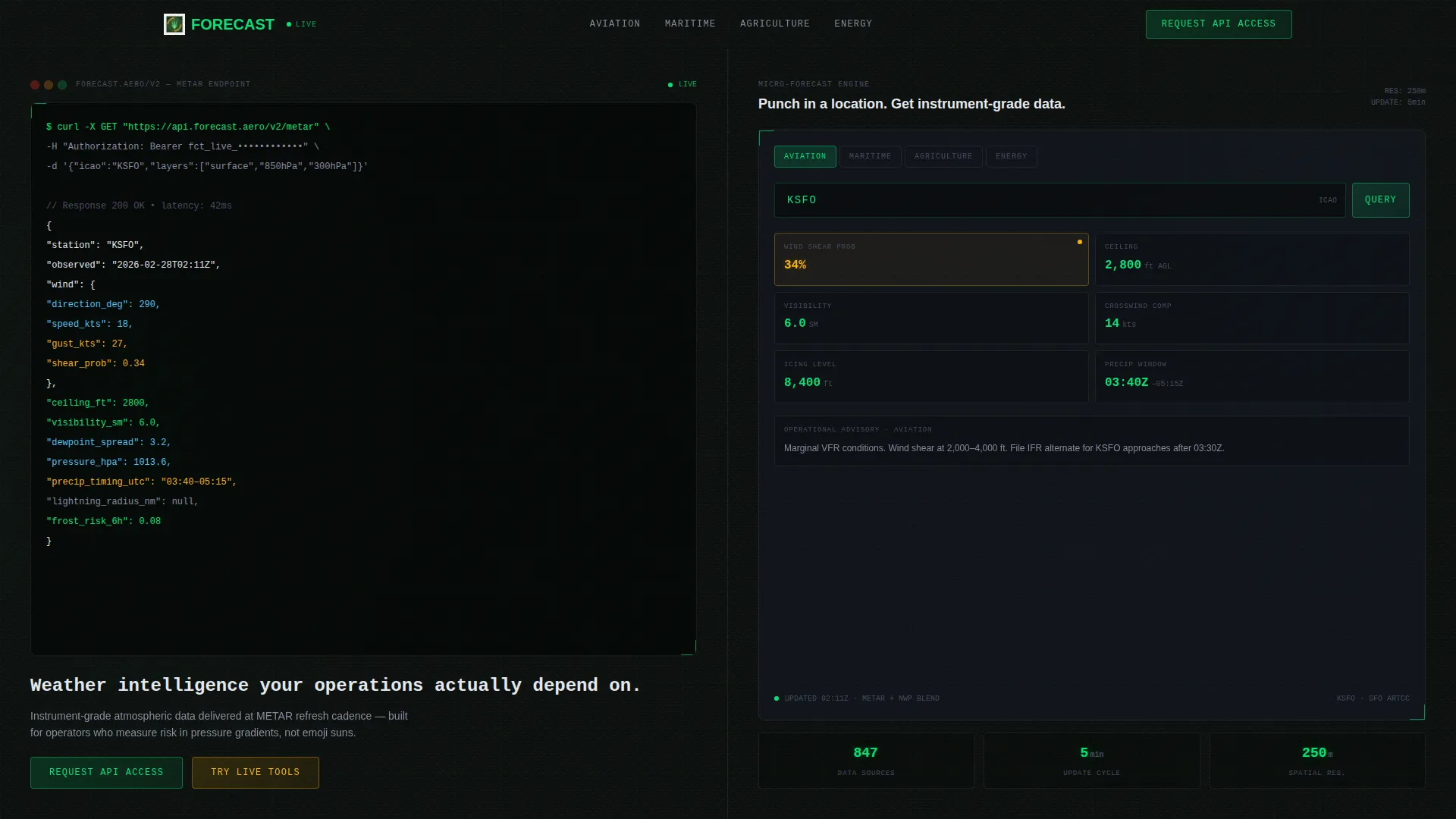
- A split-screen header with a live, animated API code snippet and a typed headline, replacing stock imagery entirely
- Three functional interactive tool sections: a micro-forecast input, a frost-risk timeline, a lightning proximity calculator, and a crosswind component solver
- Two lead generation paths: a primary "Request API Access" form and a secondary "Download Sample Dataset" email capture
Feature list
This template includes purpose-built components that reflect the operational seriousness of its target audience. Each feature below is drawn directly from the template structure and design brief.
Animated API Code Snippet Header
The header renders a live, syntax-highlighted METAR (Meteorological Aerodrome Report) API request in a monospaced typeface against cockpit black. The response object animates line by line, displaying wind vectors, dewpoint spread, ceiling height, and visibility in statute miles. No stock imagery is used anywhere in this section.
Split-Screen Interactive Layout
The left panel presents an interactive location input accepting coordinates, an ICAO (International Civil Aviation Organization) airport code, or a field name. It returns a live micro-forecast including wind shear probability, precipitation timing, and visibility decay curves. The right panel shifts its use-case explainers dynamically based on the selected industry vertical.
Industry Selector with Contextual Panels
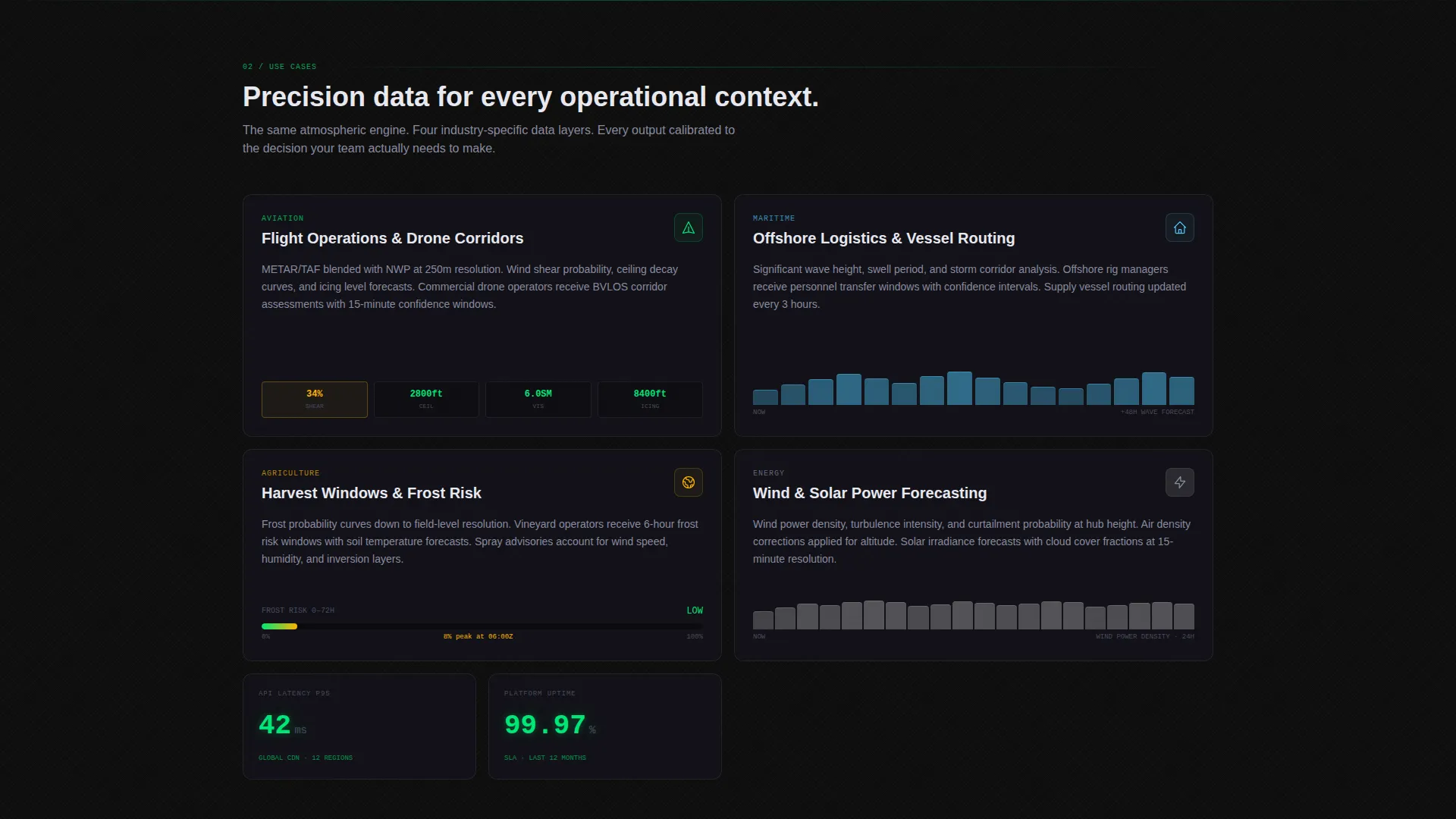
An industry selector above the main tool area lets visitors switch between aviation, maritime, agriculture, and energy contexts. Each selection updates the right-side panel with relevant data interpretations. This keeps the tool meaningful for different professional audiences without requiring separate pages.
Progressive Tool Reveal
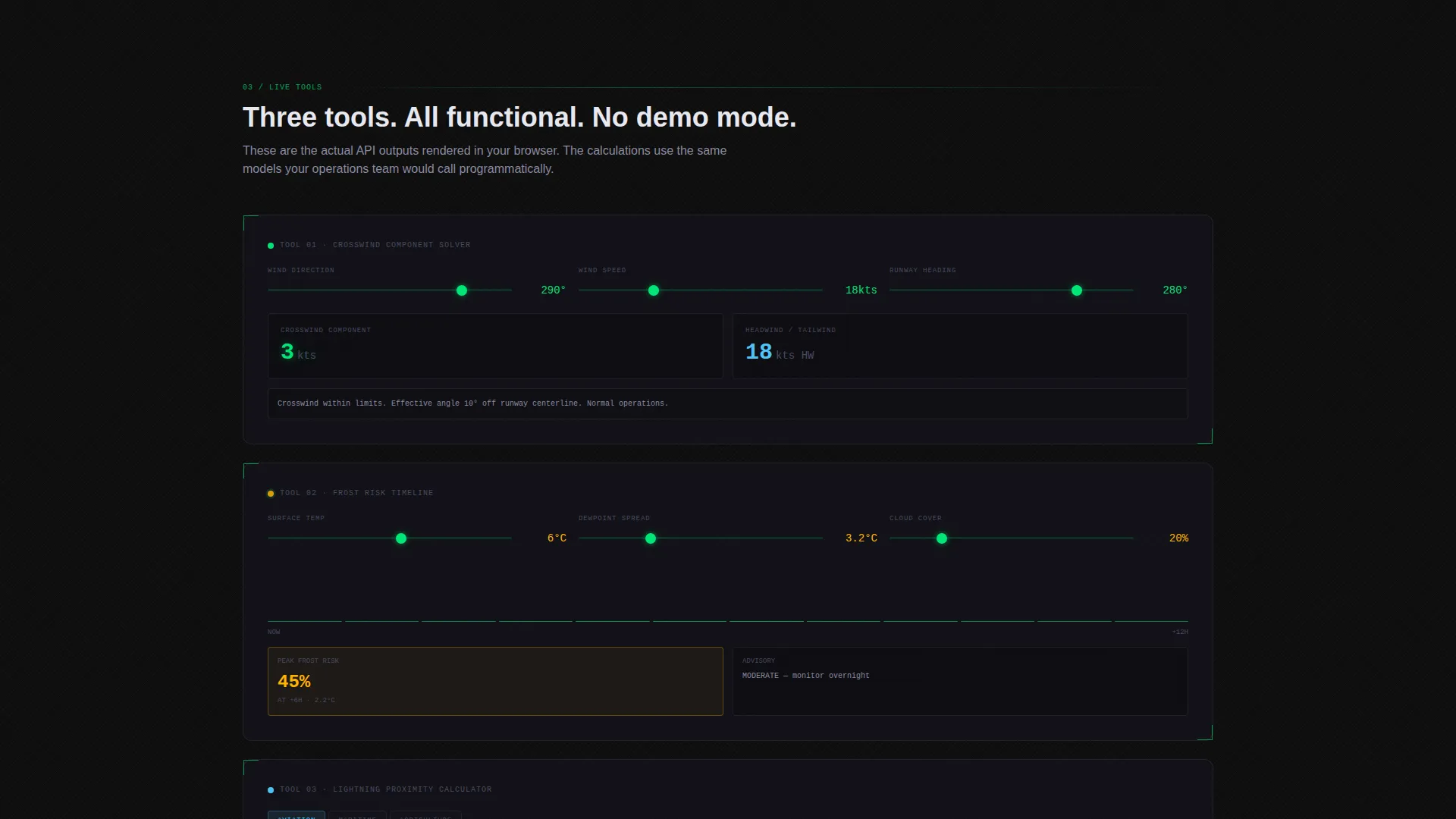
Scrolling deeper reveals three additional functional tools: a frost-risk timeline, a lightning proximity calculator, and a crosswind component solver. Each tool is positioned before any sales copy appears. The sequence is intentional, designed so visitors rely on the product before the conversion ask arrives.
Dual Conversion Path Structure
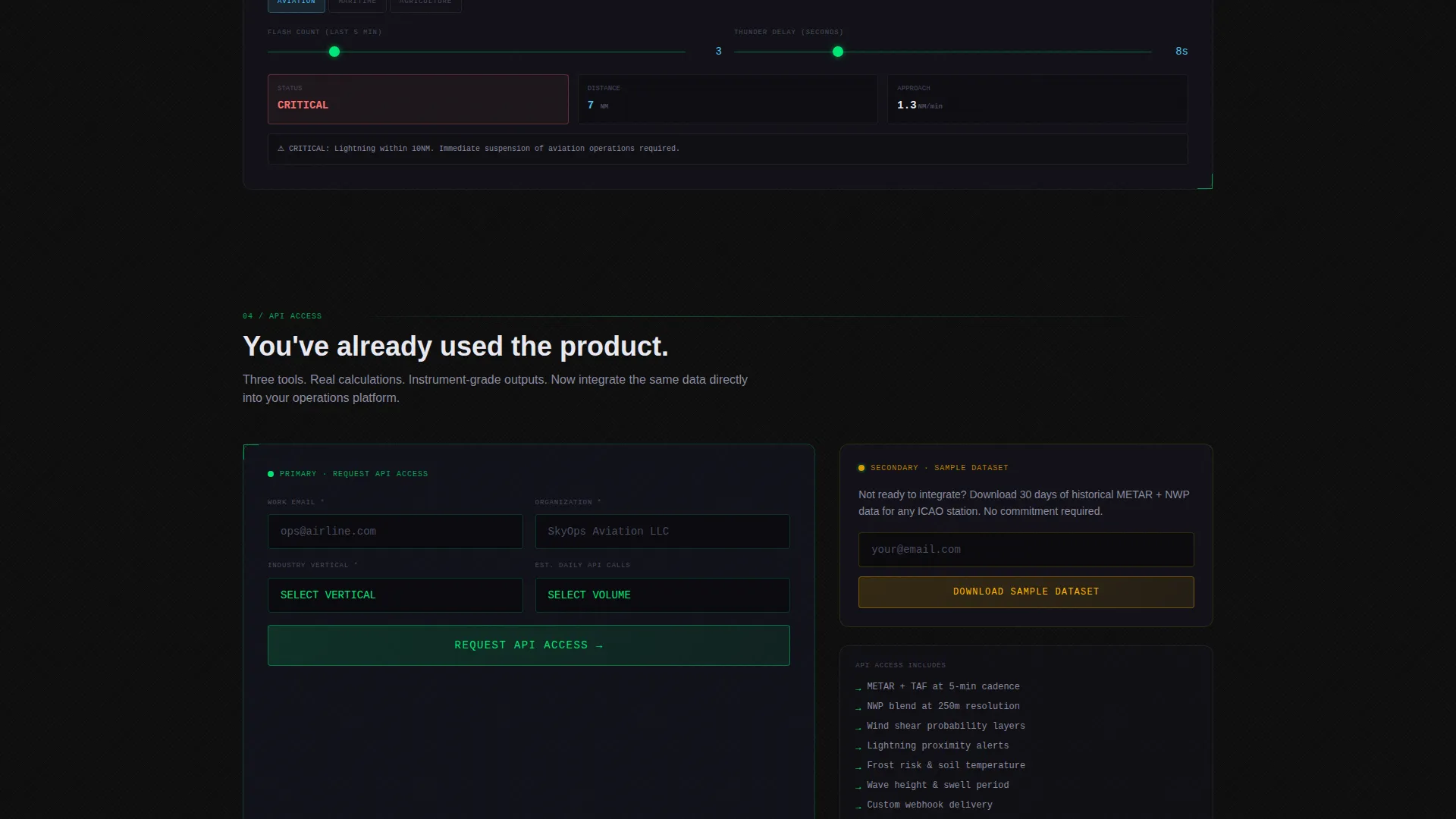
The primary call to action, "Request API Access," is placed after the third interactive tool. The form captures email address, organization name, industry vertical, and estimated daily API call volume. A secondary path offers "Download Sample Dataset" with email-only capture for visitors not yet ready to commit.
Tech Glass Visual Identity
The entire layout uses a Carbon Fiber color system: deep cockpit black, instrument panel charcoal, frosted glass overlays at 19% opacity, and telemetry green for live data accents. Radar amber is reserved for warnings and alert states. Every element is designed to feel backlit and mission-critical, like a heads-up display on a wet runway at night.
Page sections overview
| Section | Purpose |
|---|---|
| Animated API Header | Opens with a live METAR code snippet and typed headline |
| Industry Selector Bar | Lets visitors choose their vertical to personalize tool context |
| Interactive Micro-Forecast Tool | Accepts location input and returns a live atmospheric snapshot |
| Use-Case Context Panel | Shifts explainer content based on the active industry selection |
| Frost Risk Timeline | Shows probability-based frost windows for agricultural planning |
| Lightning Proximity Calculator | Provides real-time strike proximity data for field operations |
| Crosswind Component Solver | Calculates runway crosswind components for aviation use |
| API Access Form | Primary lead capture after the third tool interaction |
| Sample Dataset Download | Secondary email capture for visitors not yet ready to commit |
Design & branding system
The visual identity is built around a Tech Glass aesthetic using a Carbon Fiber color palette. The design feels like a cockpit heads-up display rendered on a dark, wet surface at night. Every color choice serves a functional purpose, not a decorative one.
- Core palette: cockpit black (#0D0D0D), instrument panel charcoal (#1A1A2E), frosted glass overlay (#E0E0E0 at 19% opacity), telemetry green (#00E676) for live data, and radar amber (#FFB300) for warnings
- Typography is monospaced in the header code block and structured for high legibility throughout the data tool sections
- No gradients and no stock photography appear anywhere in the layout; all visual weight comes from data, color, and frosted glass layering
Mobile & speed optimization
The template is structured with a split-screen layout that adapts to smaller viewports without losing the interactive tool functionality. The design prioritizes fast visual comprehension even on mobile displays used in field conditions.
- The 50/50 split collapses into a stacked single-column flow on mobile, keeping tools accessible without horizontal scrolling
- Interactive tool inputs are designed for touch-friendly input, suitable for field operators using tablets or phones on-site
How this template helps you convert
This template earns conversions through demonstration rather than persuasion. The entire page sequence is designed to remove skepticism before the form ever appears.
- Visitors use three functional tools before encountering any lead capture, building genuine reliance on the product and lowering resistance to the primary "Request API Access" ask
- The dual conversion path ensures that visitors who are not ready for API access still enter the funnel through the "Download Sample Dataset" email capture, broadening lead volume without pressuring early-stage prospects
Other information about this template
This template is part of a broader ecosystem of technology-category landing page templates available on the platform. It is best suited for weather intelligence products that already have a functioning API or dataset to deliver on the conversion promises embedded in the page structure.
- The template category is Technology, subcategory Consumer App and Platform, within the Weather App specialty niche
- The creative direction is Calculator and Tool First, meaning the interactive components carry the page's persuasive weight before any copy-driven selling begins
- Template style is Split Screen at a 50/50 ratio, and the header concept is a Code Snippet rendered in a live, animated format
- The lead generation direction means both conversion paths are intentionally sequenced: primary form after the third tool, secondary email capture available throughout
Theme
Tech Glass
Creative direction
Calculator/Tool First
Color system
Carbon Fiber
Style
Split Screen (50/50)
Direction
Lead Generation
Page Sections
Animated API Code Snippet Header
Split-screen Interactive Micro-forecast Tool
Industry Selector with Contextual Panels
Progressive Atmospheric Tool Reveal
Dual Conversion Path Structure
Tech Glass Carbon Fiber Visual System
Related questions
Who is this landing page template designed for?
Do I need a live API to use this template?
Can I customize the industry verticals shown in the selector?
Where does the primary lead capture form appear on the page?
What makes this different from a standard SaaS landing page template?



