Forecast - Predictive Inventory Landing Page Template
Forecast is a bento grid landing page template built for sports AI inventory forecasting platforms. It opens with a live-styled metrics header, escalates through proof points and a case study, and drives leads through a two-step qualification form. The dark Midnight Blue palette and data-forward layout make the product itself the visual centerpiece.
by Rocket studio
Quick summary
Forecast is a single-page bento grid template designed for AI-powered inventory forecasting tools in the sporting goods space. It leads with real-looking dashboard metrics, builds trust through escalating evidence, and captures leads via a two-step form and a secondary email download path. Every section earns the visitor's attention before asking for anything.
Who this template is for
This template is built for teams selling predictive inventory software to the sporting goods retail sector. It speaks directly to buyers who live inside spreadsheets and inventory dashboards every day.
- Inventory planners at regional sporting goods chains who need to justify AI adoption to leadership
- Direct-to-consumer warehouse managers dealing with dead stock after seasonal peaks
- Procurement leads at multi-location retailers who want to move past gut-feel ordering
What problem this template solves
Inventory forecasting platforms often look like every other SaaS landing page. A generic hero image and a bullet list of features do nothing for a buyer who already knows the pain of overstock. This template solves the credibility gap by leading with numbers, not promises.
- Visitors see accuracy scores and overstock-reduction metrics before they read a single feature claim
- Dead stock and seasonal whiplash are named explicitly, so the right buyer recognizes their problem immediately
- The two-step lead form qualifies prospects by store count and pain point, so sales teams get useful context from day one
What you get with this template
You get a fully structured, single-page bento grid layout ready to represent an AI inventory forecasting platform. Every section is purpose-built around the lead generation goal, with no decorative filler.
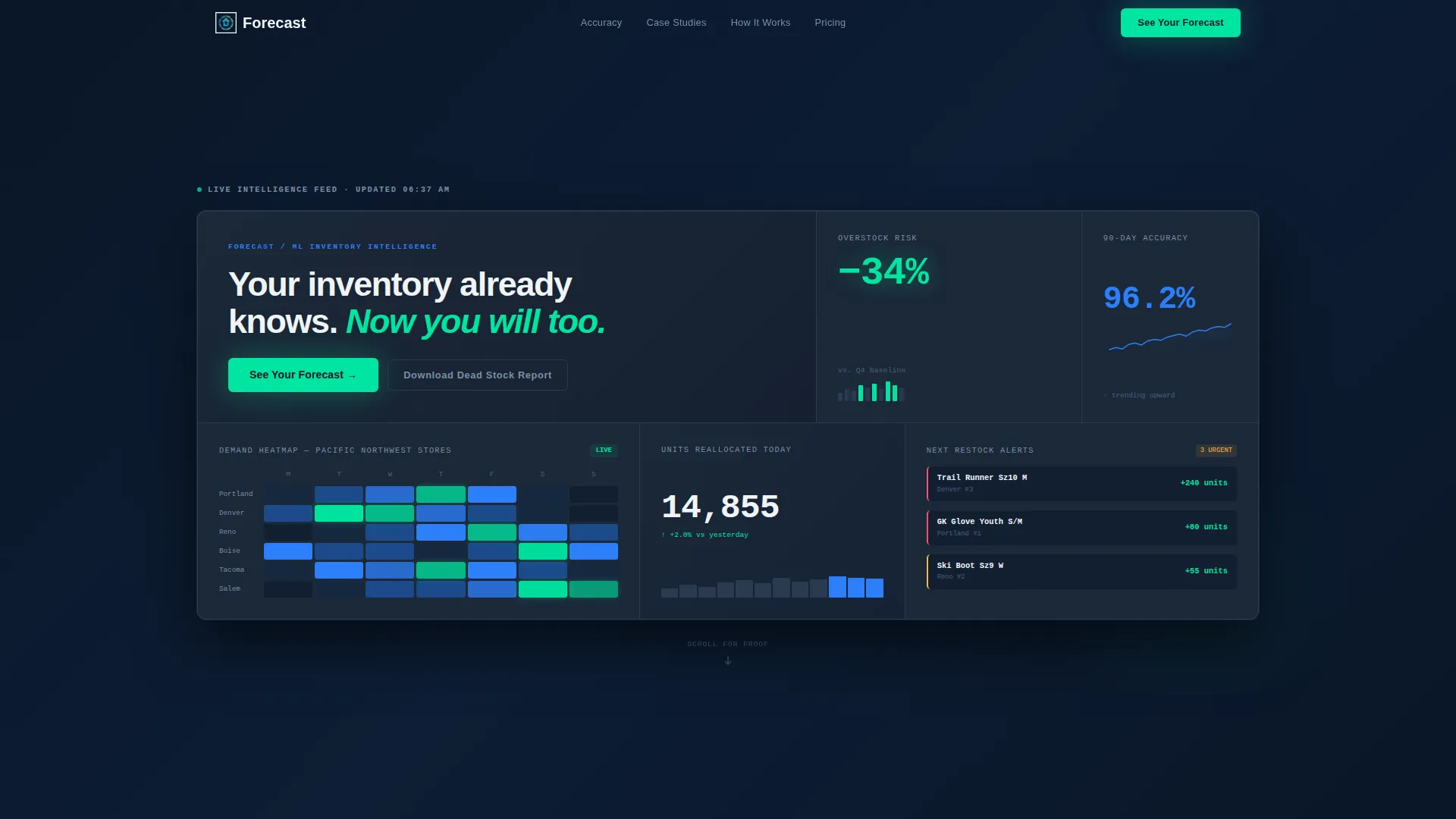
- A live-styled metrics header with four distinct bento cells showing overstock risk, a demand heatmap, real-time unit reallocation, and a 90-day accuracy score with a micro-sparkline
- An interactive simulation widget where visitors enter a stock-keeping unit category and watch a demand curve generate on screen
- A two-step qualification form and a secondary "Download the Dead Stock Report" email capture path
Feature list
This section covers the core functional and structural capabilities built into the Forecast template.
Live-Styled Metrics Header
The header fills the full viewport with a bento grid of real-looking data cells. One cell shows an overstock risk reduction in electric mint, another pulses a demand heatmap across store locations, a third counts units reallocated, and a fourth displays a 90-day forecasting accuracy score with a micro-sparkline trending upward.
Escalating Evidence Layout
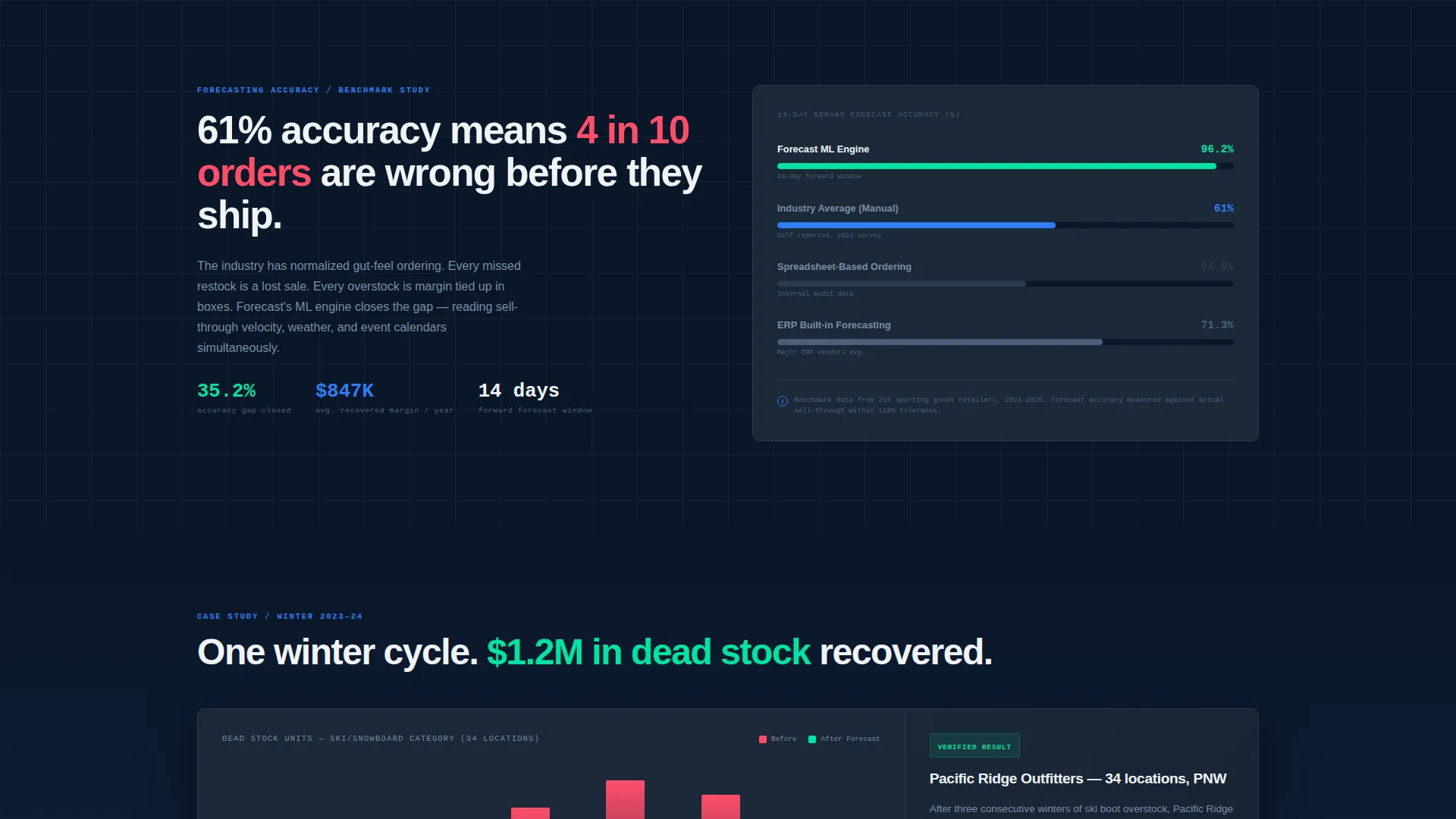
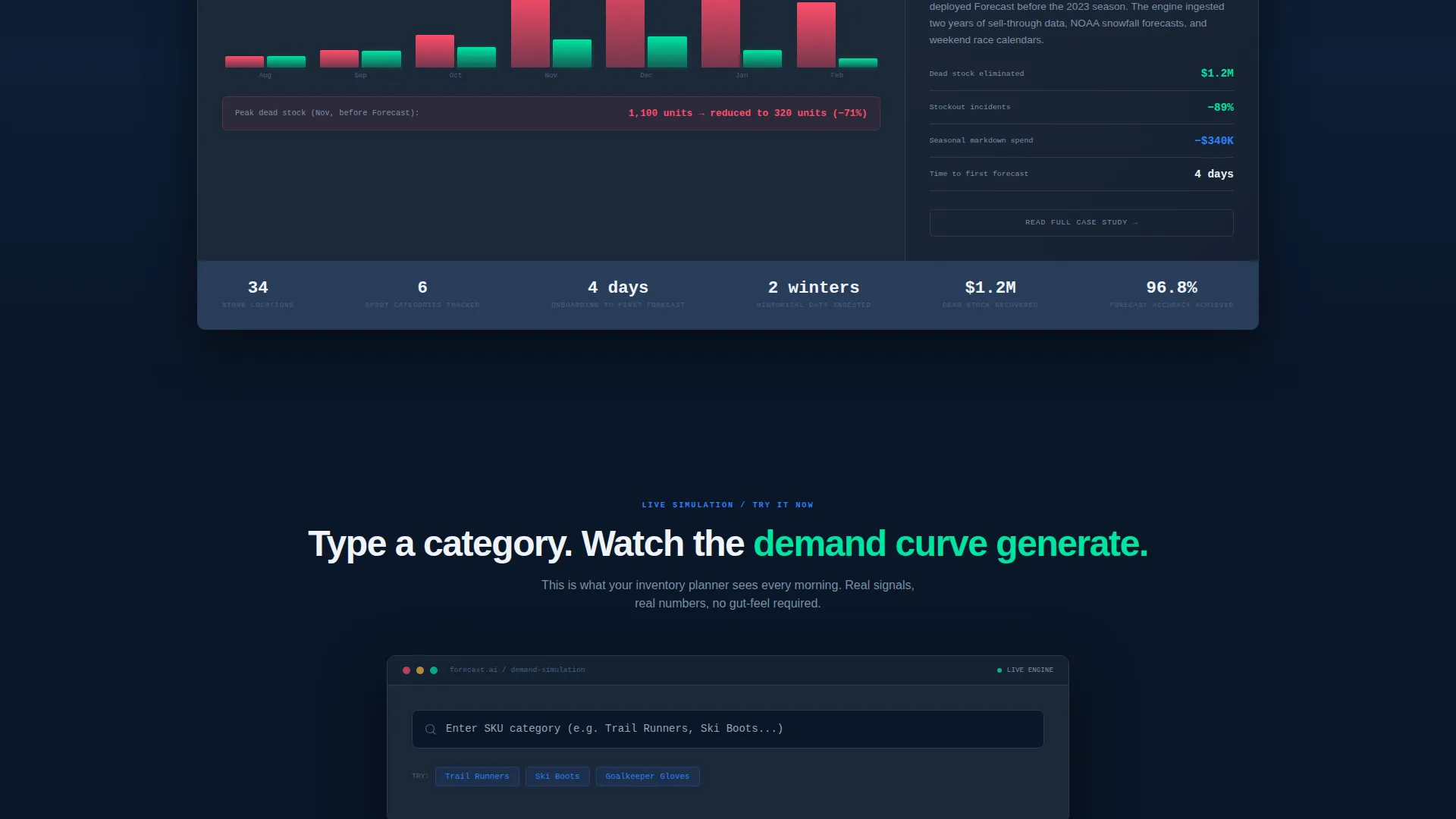
The page is structured so every scroll increment delivers a new proof point. Visitors move from a forecasting accuracy comparison between AI and manual methods, to an expanded case study cell showing a regional chain that cut dead stock by 1.2 million dollars in one winter cycle, before any explanation of how the model works.
Real-Time Simulation Widget
A dedicated bento cell invites visitors to type a stock-keeping unit category and watch a demand curve generate in response. This interactive element lets prospects experience the product logic before they ever speak to a sales rep.
Two-Step Lead Qualification Form
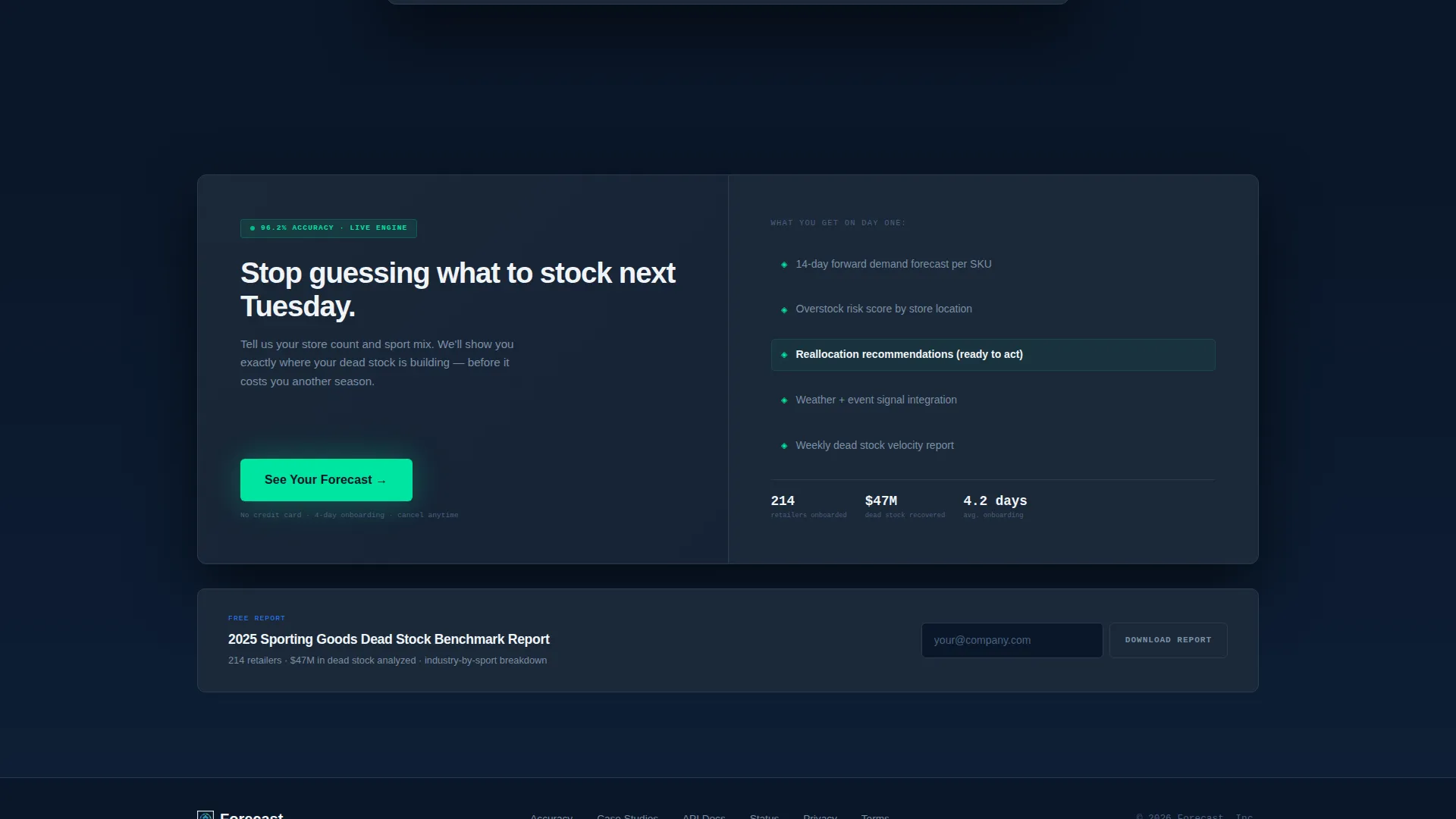
The primary call to action, "See Your Forecast," opens a two-step form. Step one collects company name, number of store locations via a dropdown, and primary sport category mix. Step two asks about the current inventory management tool and biggest pain point from a defined list.
Secondary Email Capture Path
A parallel conversion route, "Download the Dead Stock Report," captures email-only leads who want benchmark data but are not ready to request a demo. This widens the top of the funnel without diluting the primary conversion goal.
Bento Grid Visual System
The entire page is built on a bento grid layout. Individual cells expand to reveal case study details, house interactive widgets, and display metric callouts. The grid makes dense data feel organized and scannable rather than overwhelming.
Page sections overview
| Section | Purpose |
|---|---|
| Header Metrics Grid | Opens viewport with live-styled forecasting stats and primary call to action |
| Accuracy Comparison | Contrasts AI forecasting precision against manual ordering methods |
| Case Study Cell | Expands to show a regional chain cutting dead stock by $1.2M |
| Simulation Widget | Lets visitors generate a demand curve by entering a SKU category |
| Lead Generation Form | Two-step form qualifying prospects by store count and pain point |
| Dead Stock Download | Secondary email capture for benchmark report leads |
Design & branding system
The visual identity follows a Startup Velocity theme built entirely around the Midnight Blue color system. Every color in the palette carries a specific communicative role, so the design functions as much as it decorates.
- Deep terminal navy (#0A1628) as the primary background, cool slate (#1B2838) for card surfaces, and thin 1px muted steel (#2A3A50) borders separating bento cells without visual noise
- Signal blue (#2D7FF9) marks active data points and interactive states; electric mint (#00E5A0) is reserved exclusively for positive-delta indicators and primary call-to-action elements
- Crisp white (#F0F4F8) body text sits against the navy background for high contrast readability across all cells
Mobile & speed optimization
The bento grid layout is designed to reflow naturally at smaller screen sizes, keeping data cells readable without collapsing into a confusing stack. The template prioritizes clarity on compact displays where inventory planners may be checking metrics on the go.
- Individual bento cells are sized to remain scannable on tablet and mobile viewports without losing their metric context
- Interactive elements like the simulation widget and the two-step form are structured to work cleanly within a single-column mobile flow
How this template helps you convert
This template is built around a lead generation goal. Every structural decision moves a skeptical, data-literate buyer closer to a qualified action.
- The header puts accuracy numbers and overstock savings in front of the visitor before any marketing copy appears, establishing credibility in the first seconds of the visit
- The escalating evidence structure raises urgency from "interesting stat" to "this is costing you money" to "here is what recovered margin looks like," so the call to action arrives after trust is already built
- Two conversion paths, a full demo request and a report download, give buyers at different readiness levels a reason to identify themselves, expanding the qualified lead pool without requiring a single extra page
Other information about this template
This template was designed specifically for the sports AI inventory forecasting niche, where buyers are analytically trained and resistant to vague software promises. The layout assumes a visitor who has been burned by manual planning and wants proof before a conversation.
- The template style is bento grid, suited to data-heavy platforms where multiple metrics need to coexist in a single view without visual clutter
- The creative direction is Stats-First Impact, meaning proof points lead every section and explanatory copy follows only after credibility is established
- The header concept is Stats and Metrics, which replaces traditional hero imagery with the platform's own data output as the primary visual
- This template works well for teams launching or repositioning a predictive inventory platform, attending trade events, or running paid campaigns targeting retail operations audiences
Theme
Startup Velocity
Creative direction
Stats-First Impact
Color system
Midnight Blue
Style
Bento Grid
Direction
Lead Generation
Page Sections
Live-styled Metrics Header
Escalating Evidence Page Structure
Real-time Simulation Widget
Two-step Lead Qualification Form
Secondary Email Capture Path
Bento Grid Visual Layout
Related questions
Who is this landing page template built for?
Can I adapt this template for a non-sports inventory platform?
What does the two-step lead form collect?
Is there a secondary lead capture option for visitors not ready to demo?
Why does the template use a bento grid instead of a standard column layout?



