AI Inventory Forecasting Manufacturing Landing Page Template
The Forecast AI inventory forecasting manufacturing landing page template is built for operations directors and procurement leads who need to predict demand before stockouts hit the floor. It uses a bento grid layout, a live-looking dashboard hero, and stats-first bento cells to show visitors exactly what the platform delivers, raw numbers, real context, and a direct path to a sample forecast demo.
by Rocket studio
Quick summary
This is a single-page, bento grid landing page designed for a manufacturing AI inventory forecasting platform. It opens with a full-bleed product dashboard screenshot and moves visitors through oversized impact metrics, a methodology cell, a before-and-after case study, and a direct call to action. Every section is built to turn skeptical engineers and operations directors into demo users.
Who this template is for
This template is built for B2B SaaS teams selling AI inventory and demand forecasting tools to mid-size manufacturers. It speaks directly to buyers who live with production risk every day and need to see proof before they commit.
- Operations directors and plant managers who lose production time to stockouts
- Procurement leads buried in spreadsheets of safety stock levels and manual analysis
- SaaS founders and product marketers launching an ai driven inventory management platform
What problem this template solves
Traditional methods of inventory forecasting are reactive and slow. Procurement teams rely on manual analysis of historical sales data, and by the time a reorder trigger fires, the line is already at risk. This template is designed to communicate how an ai powered forecasting platform changes that pattern entirely.
- Stockouts that halt production lines and destroy on-time delivery rates
- Excess inventory tying up warehouse space and inflating carrying costs
- Operational complexity from tracking raw materials, sales velocity, and supplier lead times across multiple locations
What you get with this template
You get a complete, section-led landing page ready to communicate the operational value of ai forecasting to a technical manufacturing audience. The layout is desktop-first, data-forward, and built to push visitors toward a sandbox demo without a form in the way.
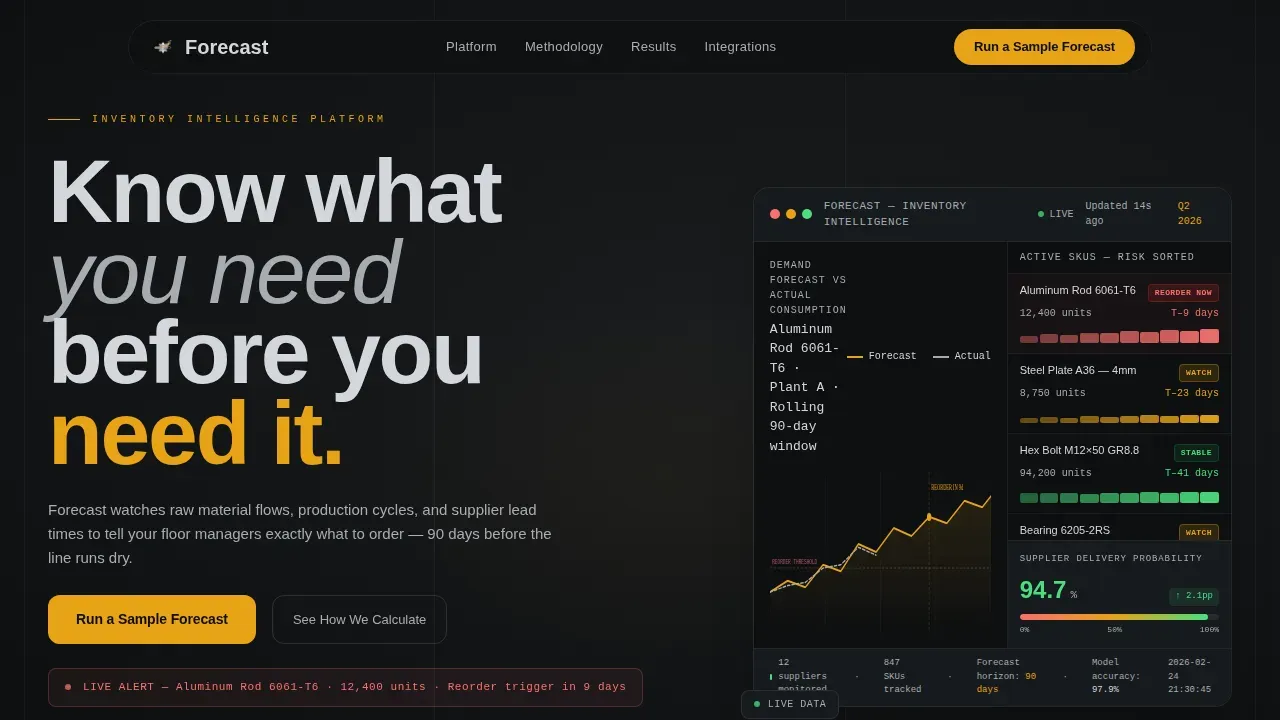
- A full-bleed hero with a live-looking dashboard showing demand forecast curves, SKU risk tiles, and a supplier delivery probability meter
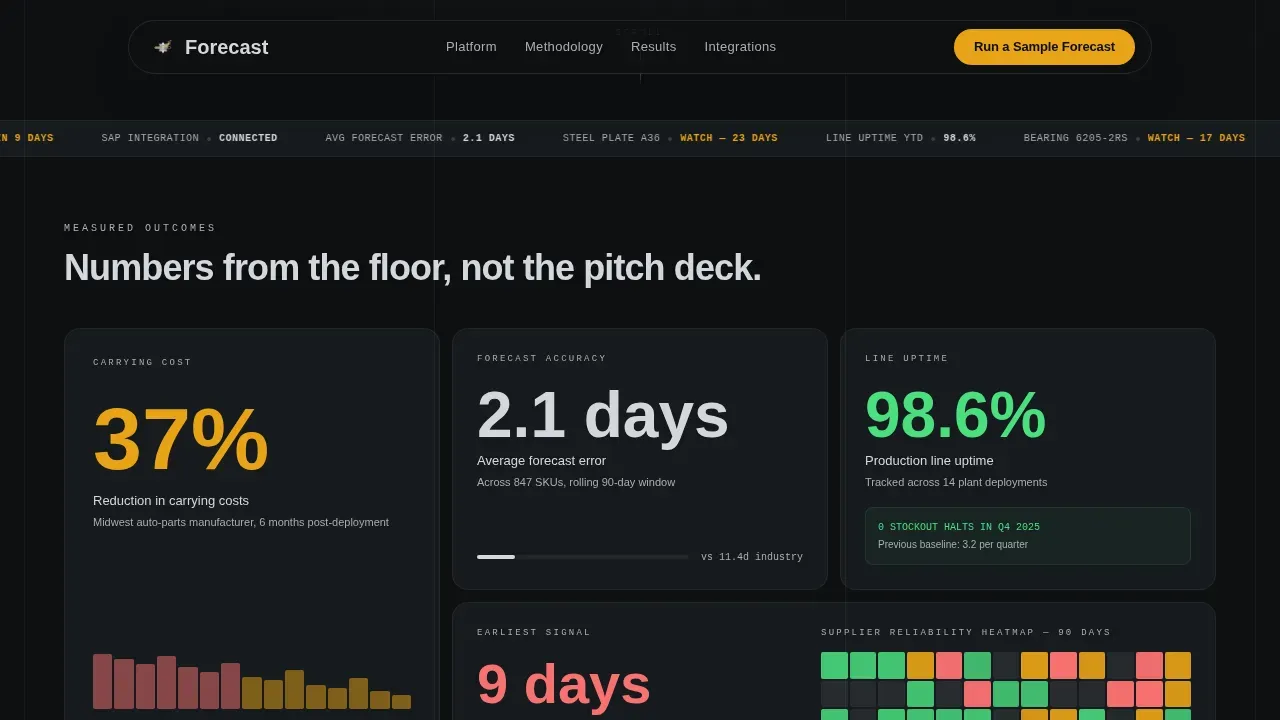
- Four oversized stats bento cells, each opening with a single metric and revealing a mini case study on scroll
- A methodology cell and a before-and-after inventory curve section that catch the skeptical engineer before they leave
Feature list
This template includes the following key features built directly from the source brief.
Stats-First Bento Grid Layout
Each bento cell opens with one oversized metric rendered in machined graphite type on a mill-finish aluminum surface. Metrics like "37% reduction in carrying costs" or "2.1 days average forecast error" are large enough to read from across a room. Scrolling deeper inside each cell reveals supporting context: a mini case study, an inventory curve, or a supplier reliability heatmap.
Live-Looking Dashboard Hero
The header is a full-width product screenshot showing a demand forecast curve overlaid on actual consumption data. SKU tiles are color-coded by risk level. A supplier delivery probability meter sits at 94.7%, and specific SKU data, "Aluminum Rod 6061-T6, 12,400 units, reorder trigger in 9 days", makes the numbers feel real before any body copy appears.
Dual Call-to-Action Structure
The primary call to action, "Run a Sample Forecast," appears in caution amber at the header level and repeats inside the highest-impact bento cells. A secondary text link, "See How We Calculate," anchors to the methodology cell for visitors who need to understand model performance and ai capabilities before they engage.
Methodology and Model Transparency Cell
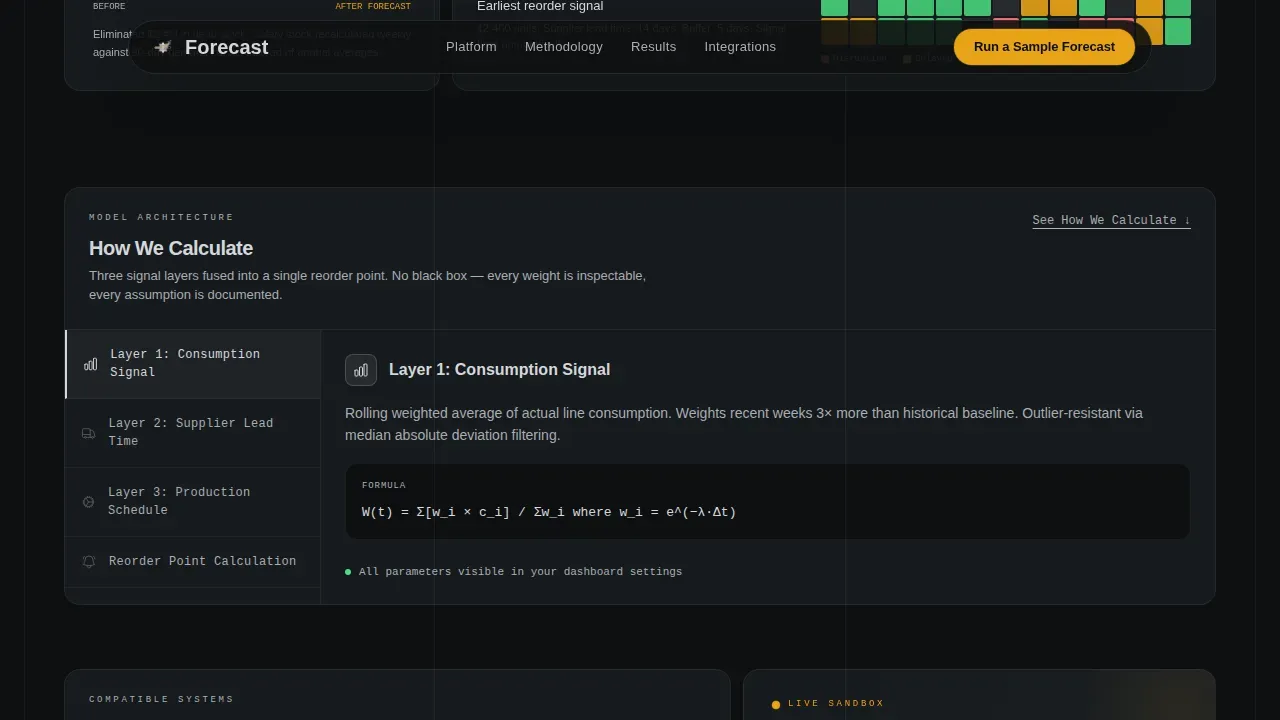
A dedicated bento cell explains how the forecast model works. This section is designed to address data quality concerns, model selection questions, and the logic behind demand prediction. It gives technically minded buyers the forecasting insights they need to trust the platform before clicking the demo.
Before-and-After Case Study Section
A visual case study section shows an inventory curve comparison alongside a supplier reliability heatmap. The before-and-after format makes cost savings and improvements in forecast accuracy concrete and verifiable rather than claimed in abstract terms.
Amber call to action and Live Data Strip
Caution amber (#E8A317) is reserved exclusively for calls to action and live data points. A live-ticker data strip runs across the page, reinforcing the real-time data identity. Hover states on bento cells and amber glow on call to action buttons add interactivity without cluttering the layout.
Page sections overview
| Section | Purpose |
|---|---|
| Hero Dashboard Header | Opens with a full-bleed product screenshot and primary amber call to action |
| Stats Bento Grid | Four oversized metrics with scroll-reveal context and case data |
| Methodology Cell | Explains the forecast model for skeptical technical buyers |
| Before-and-After Case Study | Inventory curve comparison and supplier reliability heatmap |
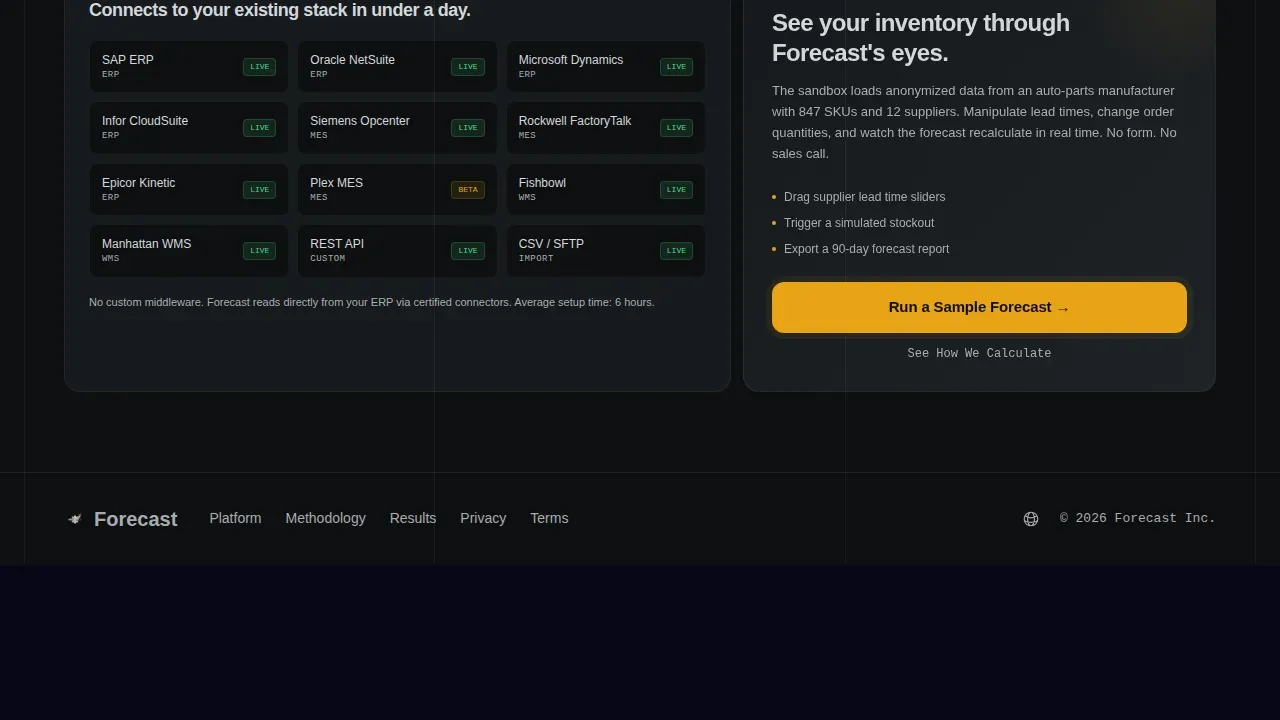
| ERP Integration and call to action | Supported system logos and repeated "Run a Sample Forecast" call to action |
| Footer (Linear Single-Row) | Single-row footer with minimal links and brand mark |
Design & branding system
The visual identity follows a Monochrome Steel system. Every surface exists because it is functional, and zero ornamentation is added. The palette feels like running a hand along a CNC-milled steel block: cool, precise, and flawless.
- Colors: mill-finish aluminum (#D4D7DC) for surfaces, machined graphite (#2C2F33) for type, shop-floor black (#0E1011) for backgrounds, and caution amber (#E8A317) reserved only for live data points and calls to action
- Typography: Manrope for headings, DM Sans for body copy, and JetBrains Mono for all data and numbers to reinforce the control-room industrial feel
Mobile & speed optimization
The template is built desktop-first, reflecting how operations directors and plant managers work: on workstations and laptops on the factory floor or in the operations office. The animation system is calibrated for medium motion without overwhelming the layout.
- Staggered bento reveals and scroll-linked number counters animate content as visitors scroll through the grid
- Shimmer effects on data cells and a live-ticker strip keep the page feeling alive without requiring heavy media files
How this template helps you convert
This template is optimized as a click-through landing page. There is no form to fill out. Every design decision is aimed at moving the visitor into a live sandbox demo loaded with anonymized manufacturing data.
- The amber "Run a Sample Forecast" call to action appears at the hero level and repeats in the highest-impact bento cells, reducing friction and keeping the conversion path short
- The methodology cell and "See How We Calculate" anchor link address technical objections before they become reasons to leave, capturing the skeptical engineer who needs to verify model performance and ai capabilities before committing
Other information about this template
This forecast ai inventory forecasting manufacturing landing page template is built for a specific type of B2B SaaS go-to-market motion. The page is designed around tangible return on investment rather than feature lists, because the target buyer responds to proof, not promises.
- AI inventory forecasting uses machine learning algorithms, including models like Long Short-Term Memory (LSTM) and Gradient Boosting Machines (GBM), to analyze historical data, sales trends, market trends, and external factors to predict future demand
- AI driven demand forecasting can improve forecast accuracy by 20 to 50% over traditional methods when data quality and consistent sales patterns are maintained
- Businesses predict future demand more reliably when ai models process real time data alongside historical sales data, sales velocity, and market conditions
- The platform this template represents is designed to help manufacturers optimize inventory levels, reduce waste, and meet customer demand efficiently across all stocked raw materials
- AI forecasting allows procurement leads to adjust forecasts based on new data, economic indicators, social trends, and seasonal fluctuations without manual analysis
- The template supports erp integration and is designed for use with erp systems and erp platforms, including connections to existing systems that manage production planning and supply chain operations
- AI driven inventory management automates reorder points and generates precise purchasing decisions based on sales velocity, supplier performance, and safety stock levels
- Minimizing stockouts and reducing excess inventory are the core operational goals the platform addresses, with reported cost savings of 20 to 30% in carrying costs for businesses using ai powered demand planning
- The page structure also reflects best practices from the AI Inventory Forecasting Software Business Model Canvas: value propositions link ai capabilities to measurable business improvements, and identifying customer segments ensures the platform addresses real customer problems
- Revenue models for platforms like this can include subscriptions, usage-based pricing, or enterprise licenses, and partnerships with data providers and erp platforms strengthen the overall offering
- E commerce brands and investment firms also use ai forecasting to predict demand fluctuations, gain a competitive edge, and support strategic decision making with actionable insights
- Implementing ai for inventory forecasting requires careful attention to data quality, model selection, feature engineering, and continuous improvement as the model learns from new data
Theme
Directory & Discovery
Creative direction
Stats-First Impact
Color system
Monochrome Steel
Style
Bento Grid
Direction
Click-Through
Page Sections
Stats-first Bento Grid with Scroll Reveal
Full-bleed Dashboard Hero Header
Dual Call to Action Architecture
Methodology and Transparency Cell
Before-and-after Case Study Section
Amber Call to Action and Live Data Strip
Related questions
What sections are included in this landing page template?
Who is this template designed for?
Does this template include a lead capture form?
How does the bento grid structure support demand forecasting communication?
Can this template be adapted for platforms that integrate with ERP systems?



