AI for Construction Advanced Professional Website Template
Foreman is a construction AI voice assistant landing page template built for companies selling jobsite intelligence tools. It pairs a glassmorphic card grid layout with a feature comparison matrix, a product screenshot header, and a focused lead generation form. The template helps visitors instantly understand the tool's value and move toward requesting access.
by Rocket studio
Quick summary
Foreman is a modular card grid landing page designed for a construction AI voice assistant. It opens with a phone screenshot showing a live conversation on real plans, runs visitors through a workflow-by-workflow feature matrix, and closes with a tight three-field lead capture form. The layout is dark, glass-panel-forward, and built to earn trust before asking for a click.
Who this template is for
This template is built for companies and founders launching AI-powered tools into the construction industry. The intended buyer already has a product and needs a landing page that speaks directly to field-level operators.
- General contractors running commercial builds in the $5M to $80M range
- Project engineers managing heavy document control workloads
- Field superintendents who need fast answers from plans without returning to the trailer
What problem this template solves
Construction teams lose hours every week chasing information that already exists somewhere in a document stack. A generic AI landing page cannot credibly address that pain. This template is built around the specific frustration of manual document retrieval, slow RFI cycles, and daily reporting bottlenecks.
- Visitors see their current process mapped directly against the AI solution, card by card
- The feature matrix quantifies time lost per workflow, so the ROI case is built before the form appears
- The demo path lets skeptical buyers hear the tool work before committing any information
What you get with this template
The template delivers a complete, single-page layout with every section pre-structured for a construction AI voice assistant offer. Nothing needs to be invented from scratch.
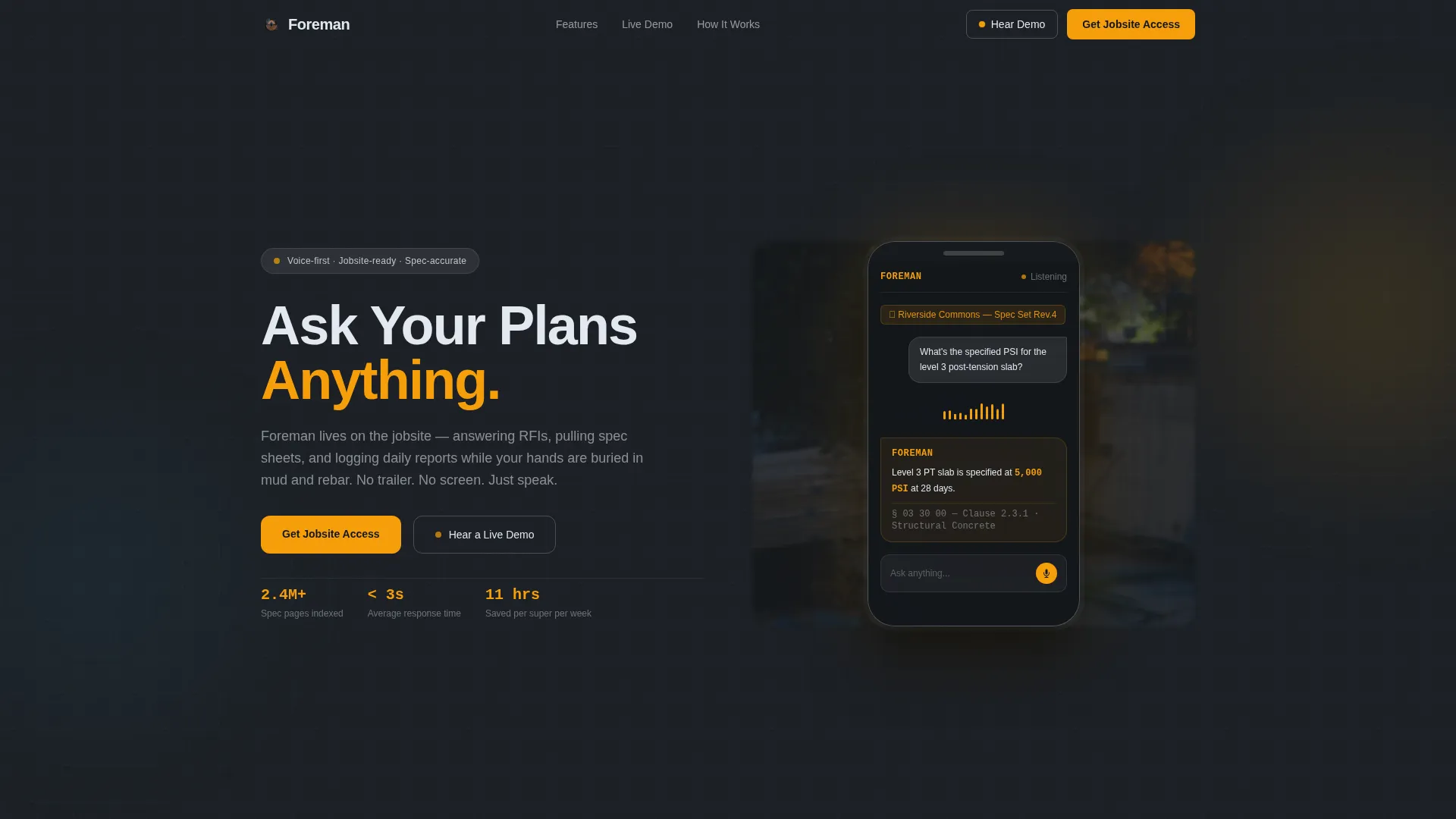
- A header section with a centered product screenshot, animated waveform detail, and flanking headline
- A scrollable feature matrix organized by workflow category with amber checkmark comparisons
- A lead generation form with three fields and a secondary "Hear a Live Demo" audio path
Feature list
This template ships with a focused set of layout and interaction components drawn directly from the brief. Each one serves a specific conversion or credibility function.
Centered Product Screenshot Header
The header places a phone screen mid-conversation at the center of the layout. The query shown reads a real spec question, and the response references an exact clause and value. A blurred construction site at dusk sits behind the phone for depth, and a subtle animated waveform pulses beneath the chat bubble to imply the voice is live.
Workflow-Category Feature Matrix
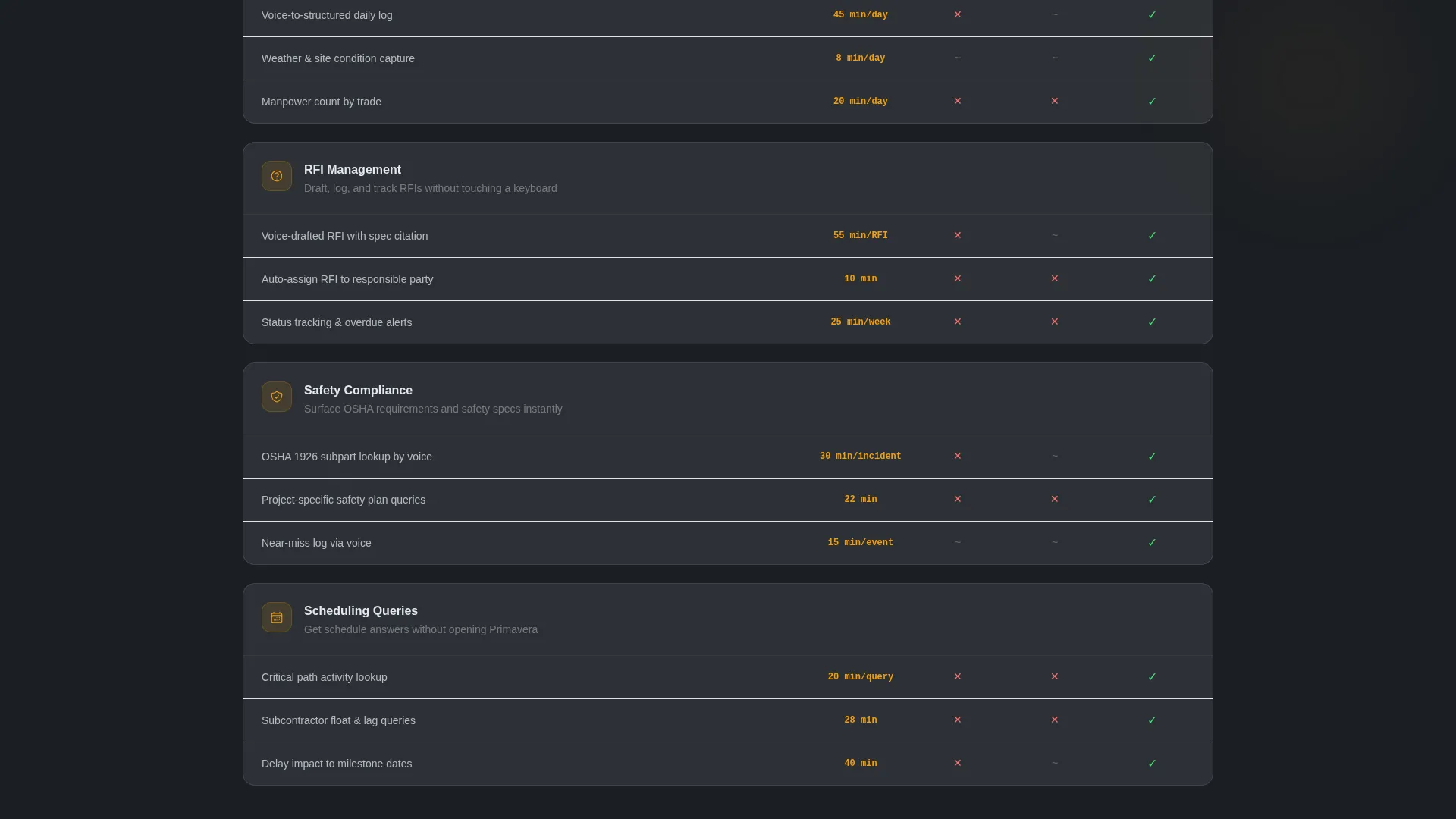
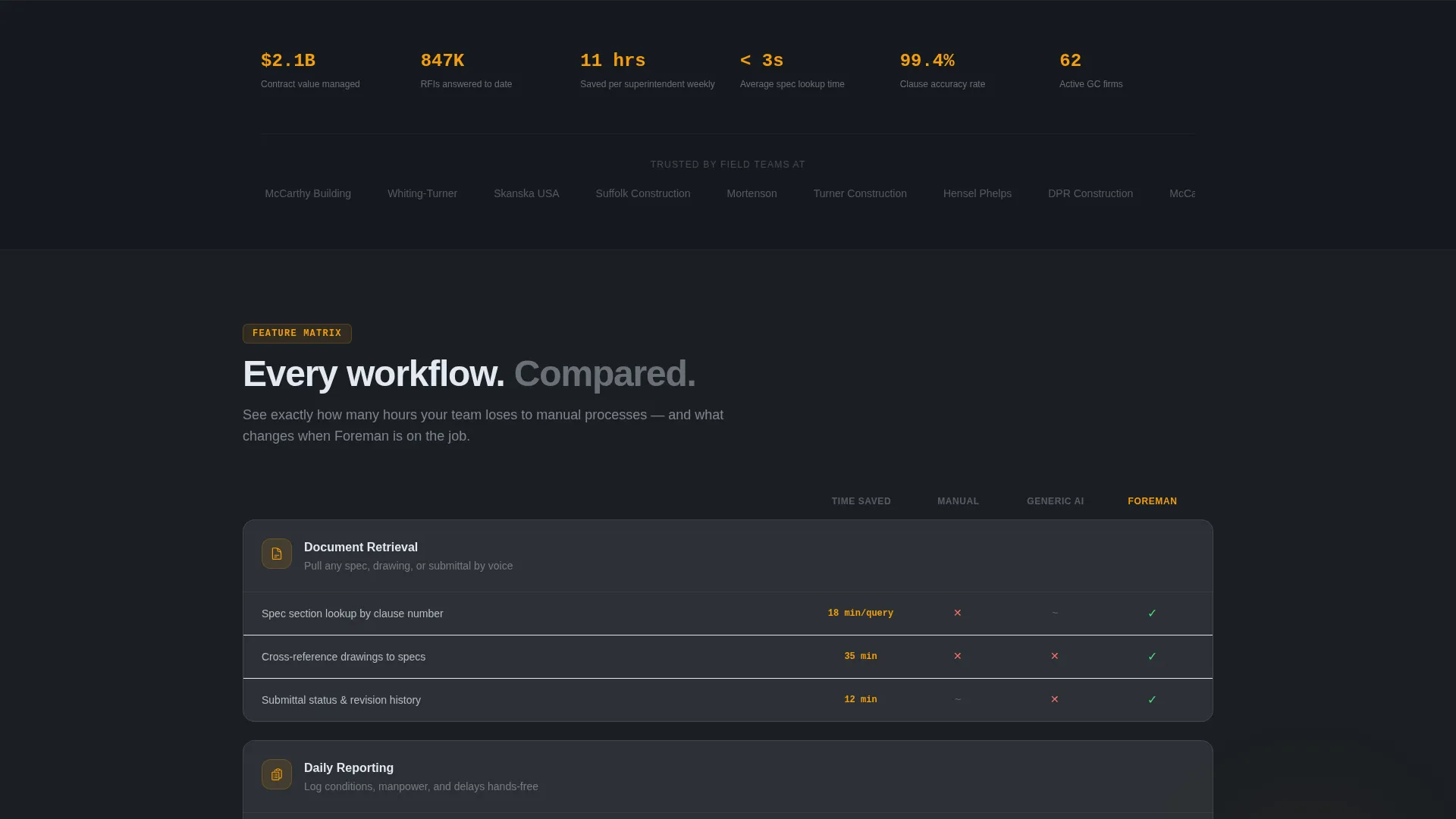
The feature matrix is the primary scroll driver. Frosted glass cards are organized by workflow category: Document Retrieval, Daily Reporting, RFI Management, Safety Compliance, and Scheduling Queries. Each card compares the AI assistant against a manual process and a generic AI column using amber checkmarks, so the visitor sees the gap in concrete terms.
Time-Saved Quantification per Card
Each card row includes a quantified time-saved callout tied to that specific workflow. The visitor does not have to do mental math. By the time they reach the lead form, the cumulative argument for switching is already visible on screen.
Three-Field Lead Capture Form
The primary conversion form collects company name, average project size via a dropdown (under $5M, $5M to $25M, $25M and above), and work email. The form is intentionally short to reduce friction for busy field operators and project managers.
Live Demo Audio Path
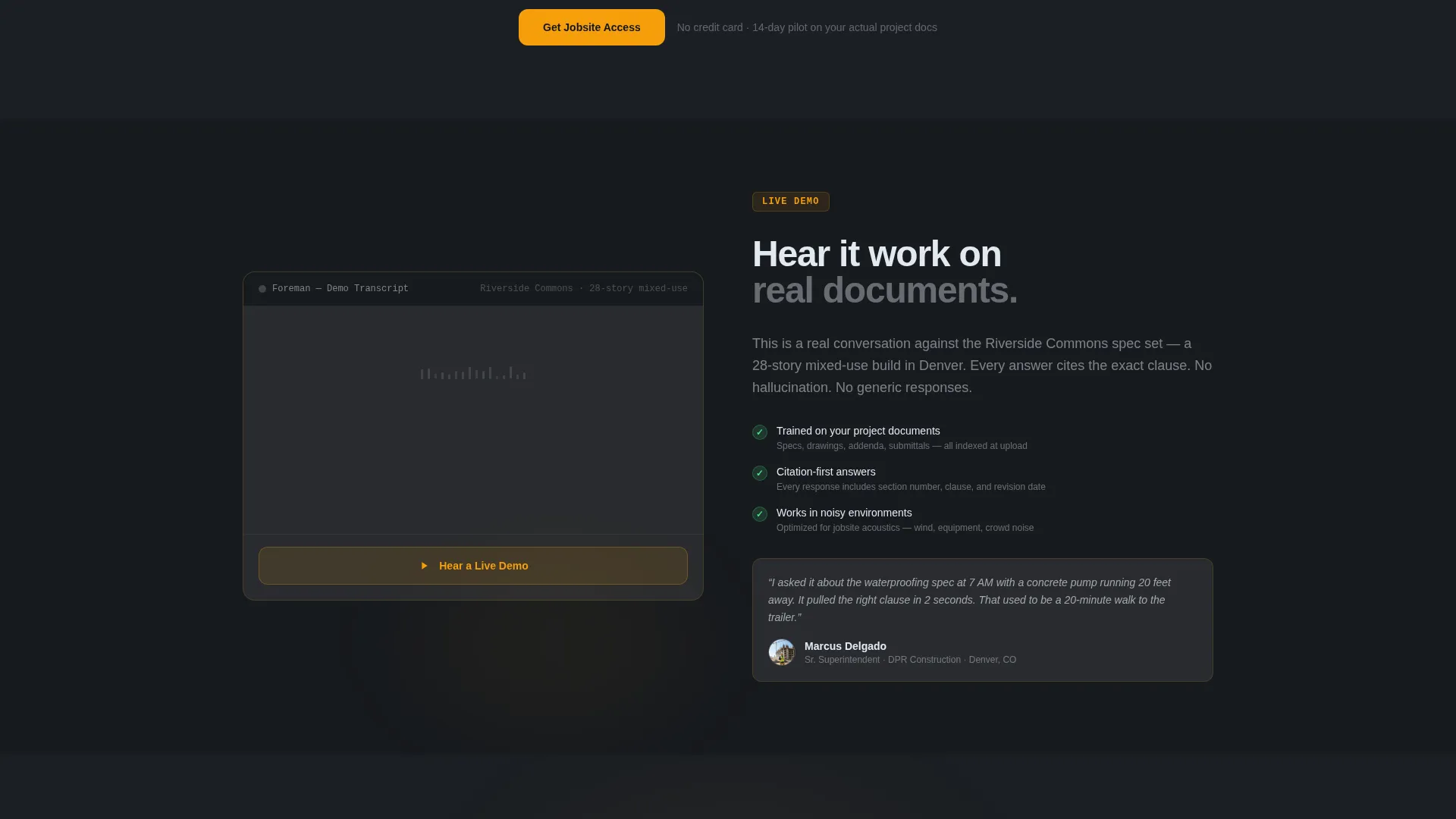
A secondary call to action labeled "Hear a Live Demo" triggers a 90-second recorded voice interaction on an actual set of construction documents. It proves the assistant's fluency with real plan language before asking the visitor to submit any personal information.
Pinned Navigation Call to Action
The primary call to action, "Get Jobsite Access," is pinned in the navigation bar and repeated after the third card row in the matrix. This ensures the conversion path is always visible regardless of scroll depth.
Page sections overview
| Section | Purpose |
|---|---|
| Navigation bar | Pins the primary call to action at all scroll depths |
| Header hero | Anchors product credibility with a live-conversation screenshot |
| Animated waveform | Signals that the voice assistant is active and listening |
| Feature matrix | Maps visitor pain to solution workflow by workflow |
| Document Retrieval cards | Shows spec-sheet and submittal retrieval capability |
| Daily Reporting cards | Demonstrates hands-free report logging in the field |
| RFI Management cards | Illustrates faster RFI answer cycles |
| Safety Compliance cards | Covers compliance document queries by voice |
| Scheduling Queries cards | Handles schedule and timeline questions on site |
| Mid-page call to action | Repeats the lead form after the third matrix row |
| Live Demo block | Delivers a 90-second proof-of-concept audio interaction |
| Lead capture form | Collects company name, project size, and work email |
Design & branding system
The visual identity follows a Directory and Discovery theme expressed through a glassmorphic color system. The palette is designed to feel like looking through a rain-spattered windshield at a lit jobsite trailer: dark surroundings, glowing panels, and amber cutting through.
- Core colors: translucent panel white (rgba 255, 255, 255, 0.12), deep hard-hat charcoal (#1B1F24), safety-signal amber (#F59E0B), and interface frost (#E2E8F0) for text and borders
- Frosted glass cards float over the near-black background, with borders catching light like condensation on a window
- Amber is reserved for interactive states only: button hovers, active voice indicators, and toggle highlights, so the eye always knows where to act
Mobile & speed optimization
The modular card grid layout is structured to restack cleanly on smaller screens. The matrix rows collapse to single-column card stacks without losing the comparison logic.
- The three-field form remains thumb-friendly and fully usable on mobile viewports
- The product screenshot header scales proportionally so the phone screen detail stays legible at smaller sizes
- The pinned navigation call to action remains accessible at all scroll depths on both desktop and mobile
How this template helps you convert
The page is built around a deliberate conversion sequence. Every section earns the next click rather than asking for commitment up front.
- The product screenshot and animated waveform establish immediate product credibility before the visitor reads a single feature claim
- The feature matrix builds a cumulative, quantified ROI argument across five workflow categories, so the visitor arrives at the form already convinced
- The live demo audio path removes the last objection for skeptical buyers by proving fluency on real construction documents before any form is submitted
Other information about this template
This template is designed to support a construction AI voice assistant product positioned against both manual field processes and generic AI tools. It is a single-page, section-led layout with no multi-page navigation required.
- The template style is a Card Grid (modular) layout, suited to products with multiple workflow capabilities that benefit from side-by-side comparison
- The Directory and Discovery theme makes it easy for visitors to scan, find their specific pain point, and self-identify as the right buyer
- The glassmorphic color system and amber accent palette are pre-configured and consistent across all card rows, header elements, and interactive states
- The lead generation direction is reinforced by two call to action placements and the demo audio path, giving the page three distinct moments where a visitor can convert
Theme
Directory & Discovery
Creative direction
Feature Matrix
Color system
Glassmorphic
Style
Card Grid (Modular)
Direction
Lead Generation
Page Sections
Workflow-category Feature Matrix
Product Screenshot Hero Header
Time-saved Quantification Per Feature
Three-field Lead Capture Form
Live Demo Audio Path
Dual-placement Pinned Call to Action
Related questions
What type of product is this template designed for?
How does the feature matrix work in this template?
What does the lead capture form collect?
Can visitors evaluate the product before filling out the form?
Who is the target audience reflected in this template's messaging?



