Fitness & Gym Software Specialist Cost Calculator Website Template
Forge is a dashboard-style landing page template built for fitness and gym learning management platforms. It combines a glassmorphic visual system, an interactive ROI calculator, and data-grid sections to help gym chains, boutique fitness franchises, and personal training academies showcase trainer certification tracking and staff learning tools in one compelling page.
by Rocket studio
Quick summary
Forge is a single-page landing page template purpose-built for fitness learning management platforms. It opens with a product screenshot hero, moves into an interactive ROI calculator, then unfolds modular dashboard card sections. The design uses a deep charcoal and electric green glassmorphic palette to make certification tracking, course progress, and trainer compliance feel urgent and visual.
Who this template is for
This template is designed for teams that manage trainer education and compliance at scale. If you sell or build software for fitness operations, Forge gives your landing page the professional weight to match your platform.
- Multi-location gym chain operators who need to present certification tracking to decision-makers
- Learning and development managers at boutique fitness franchises scaling from a handful of studios to dozens
- Independent personal training academies that want their continuing education platform to look as polished as their programming
What problem this template solves
Managing trainer credentials across multiple locations is messy. Spreadsheets miss expiry dates. Staff miss course deadlines. Gym owners carry real compliance risk when certifications like CPR lapse unnoticed. This template helps you communicate that your platform solves exactly that problem, clearly and instantly.
- Expired or lapsing certifications are hard to surface without a dedicated visual system
- New trainer onboarding through scattered video modules creates gaps in staff knowledge
- Gym operators cannot quickly see who has completed what, or what is overdue
What you get with this template
You get a fully structured, design-ready landing page built around dashboard and data-grid visual patterns. Every section is pre-configured to showcase a fitness learning management system with credibility and clarity.
- A glassmorphic hero with a frosted browser-framed product screenshot showing real certification and course data
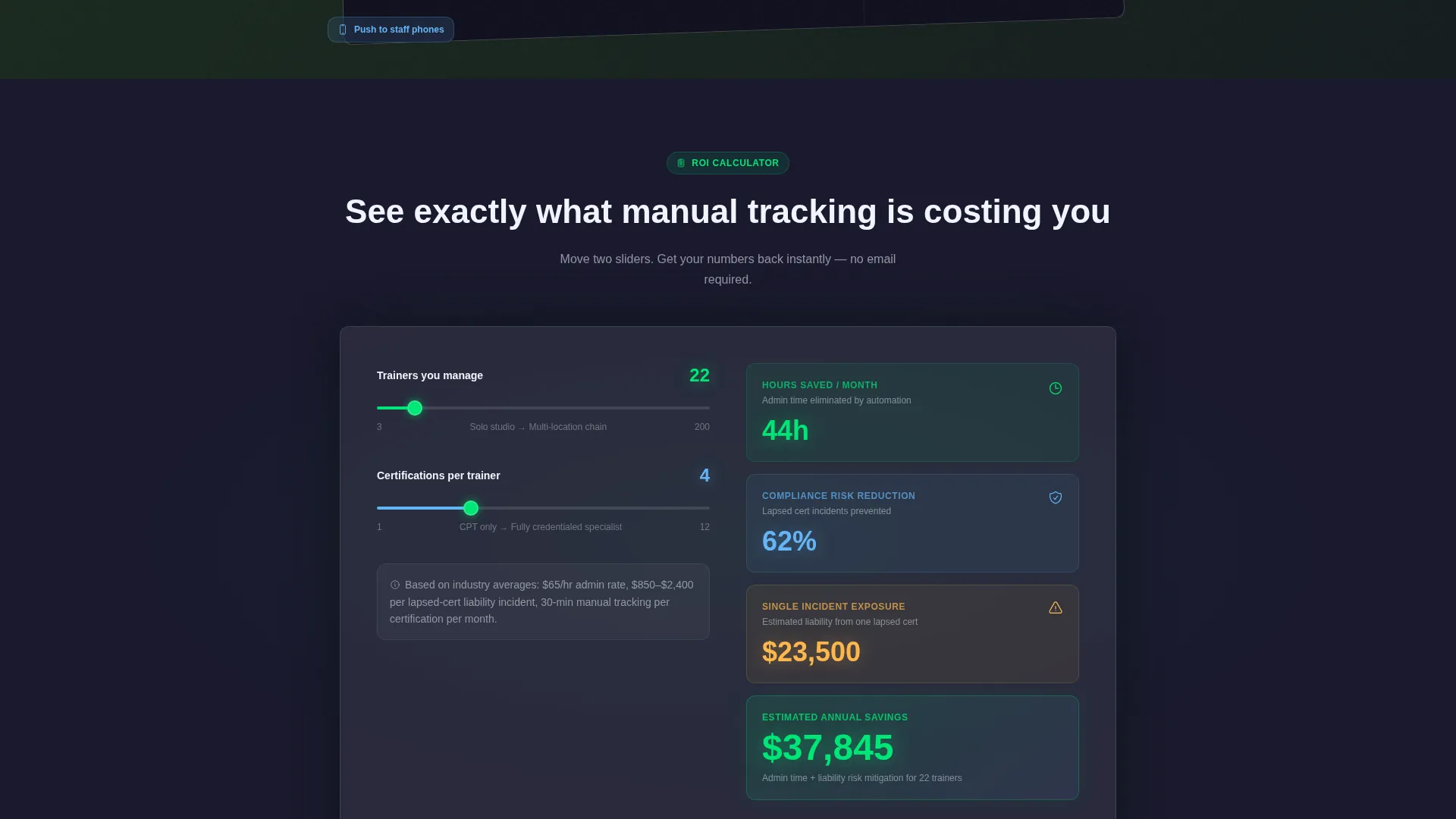
- An interactive ROI calculator widget with two sliders and instant output fields for hours saved and compliance risk
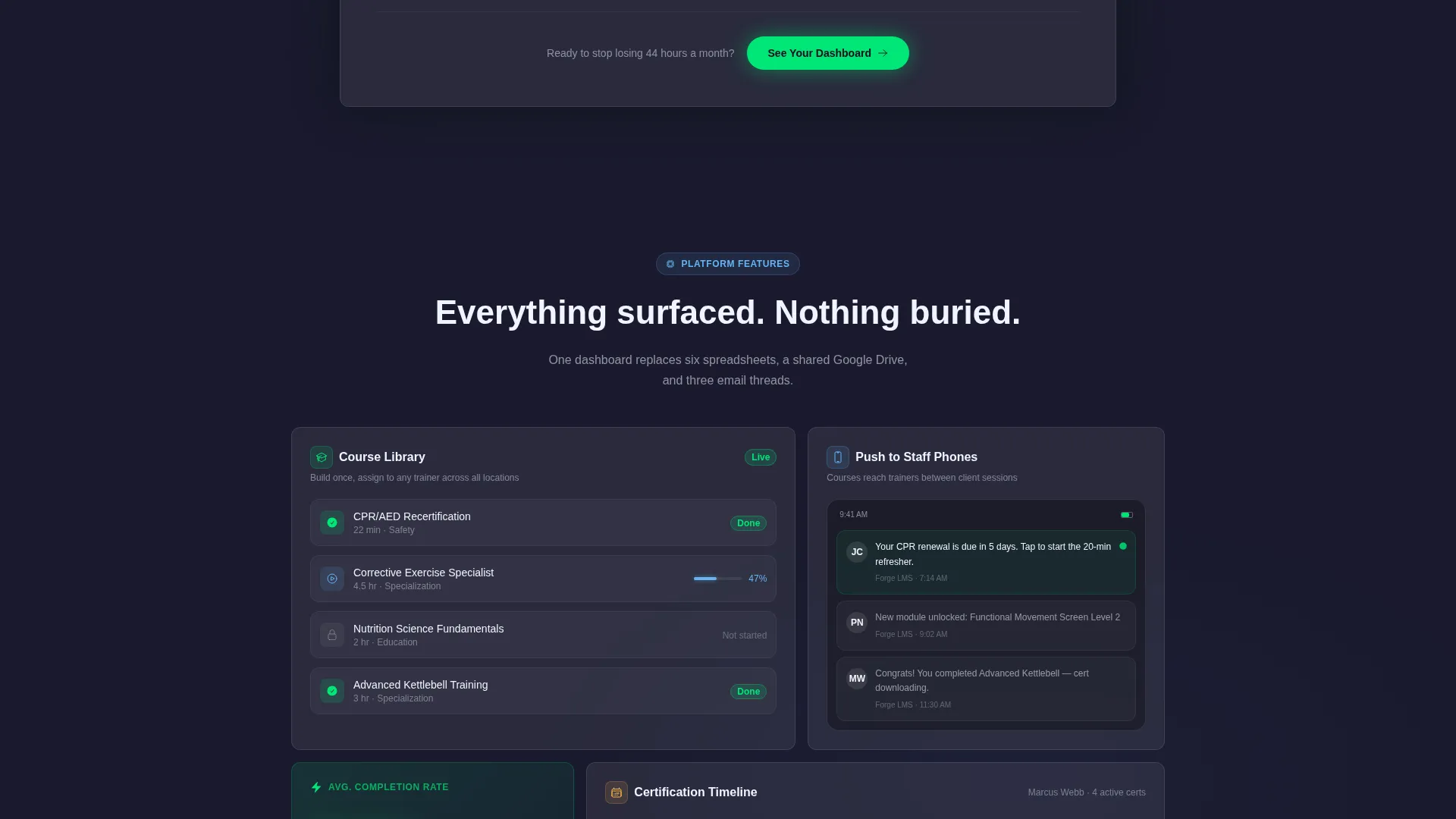
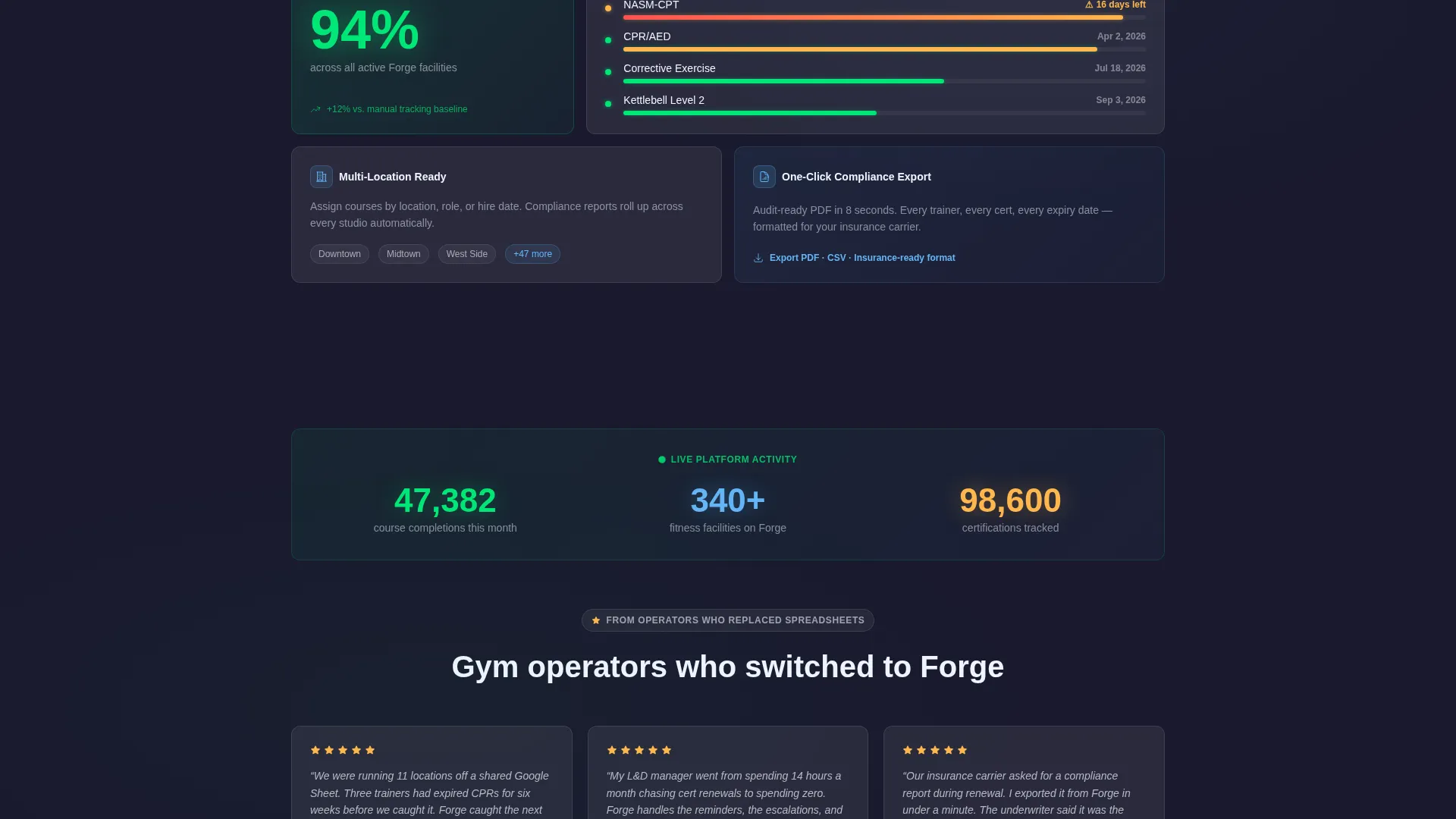
- Modular card sections previewing course builder tools, certification timelines, mobile push notifications, and live completion counters
Feature list
This section covers the key functional and design capabilities built directly into the Forge template.
Interactive ROI Calculator Widget
Two sliders let visitors input their trainer count and certifications per trainer. The widget instantly outputs estimated hours saved per month on manual tracking, a compliance risk reduction percentage, and the estimated cost of a single lapsed-certification incident. No form submission needed before value is delivered.
Glassmorphic Dashboard Card Sections
Modular frosted-glass cards float above the deep charcoal base. Each card uses a luminous 1px border and a soft blur backdrop. Cards display course builder previews, certification tracking timelines, mobile push-notification mockups, and a live-counter animation of platform-wide completions.
Product Screenshot Hero with Browser Frame
The header features a full-width pixel-perfect dashboard screenshot inside a subtle frosted browser frame. The frame is tilted two degrees on the Z-axis to create depth. Green completion indicators and amber expiry flags are visible at a glance, making the platform's core value immediately legible.
Click-Through Primary Call to Action
The primary call to action, "See Your Dashboard," appears immediately after the ROI calculator output. It also persists as a floating button in the lower right corner of the page. No form is required. The click is designed to carry calculator inputs into a personalized demo environment.
Inline Secondary Video Path
A secondary call to action, "Watch a 90-Second Walkthrough," opens an inline video player for visitors who are not ready to click through to the demo. This path keeps undecided visitors on the page and moving forward without pressure.
Certification Status Visual Indicators
Progress rings, amber warning flags, and electric green completion states are built into the dashboard card visuals. The template shows a realistic scenario: 14 of 22 trainers certified, three certifications expiring this week flagged amber, and a video module halfway completed with a trainer avatar and progress ring.
Page sections overview
| Section | Purpose |
|---|---|
| Hero Screenshot | Display the dashboard with real certification and course data inside a frosted browser frame |
| ROI Calculator | Let visitors self-qualify by entering trainer count and certifications to see instant output |
| Primary call to action Block | Drive clicks to a personalized demo immediately after calculator output |
| Course Builder Cards | Showcase video module and course creation capabilities through modular dashboard previews |
| Certification Timeline | Illustrate expiry tracking and compliance visibility across trainer cohorts |
| Mobile Push Mockups | Show staff course delivery via phone notifications between client sessions |
| Live Completion Counter | Animate platform-wide course completions to signal active usage and scale |
| Floating call to action Button | Keep the primary call to action accessible at all scroll depths |
| Inline Video Section | Offer a no-commitment 90-second walkthrough for visitors still evaluating |
Design & branding system
The Forge template uses a Dashboard Pro theme built on a glassmorphic color system. Every design choice reinforces the feeling of a focused, data-rich training environment viewed through a lit, rain-fogged glass wall.
- Base color is deep gym-floor charcoal (#1A1A2E), with frosted translucent card surfaces at approximately #FFFFFF12 with soft blur backdrops
- Electric trainer-green (#00E676) is used for progress bars, completion states, and interactive element pulses; cool steel blue (#64B5F6) handles secondary data points and navigation highlights
- Cards float above the background with luminous 1px borders, and the two-degree Z-axis tilt on the hero frame adds depth without distraction
Mobile & speed optimization
The Forge template is structured so its dashboard card layout translates cleanly to smaller screens. The modular card system stacks gracefully, and interactive elements like the ROI calculator remain usable on touch devices.
- Frosted card components are sized for readable data display on phone and tablet viewports
- The floating call-to-action button stays accessible at the bottom of the screen on mobile, keeping the primary conversion path visible at all scroll depths
- Push-notification mockups in the template are designed to reflect mobile-first staff course delivery, reinforcing the product's real use case for on-the-go training staff
How this template helps you convert
Forge is built around a Calculator-First conversion strategy. The page earns trust before it asks for anything. By the time a visitor sees their own numbers, the next step feels obvious.
- The ROI calculator delivers immediate, personalized value before any click is requested, making the "See Your Dashboard" button feel like a natural continuation rather than a commitment
- The floating call-to-action button and the inline video option give visitors two clearly different forward paths, reducing drop-off for buyers at different stages of the decision process
- The product screenshot hero and live completion counter build credibility through specificity and visible platform activity, so visitors arrive at the call to action already convinced the platform is real and in use
Other information about this template
Forge is a static landing page template and does not include a live backend, real data feeds, or connected software. The dashboard visuals, counters, and calculator outputs are template components designed to represent a fitness learning management system. Buyers building or marketing a gym learning management system platform will adapt the content, numbers, and branding to reflect their own product.
- The template style is Dashboard and Data Grid, suited to software platforms in the fitness and gym software category
- The theme is Dashboard Pro and the color system is glassmorphic, making it suitable for technology products that want a modern, data-forward visual identity
- Page direction is Click-Through, meaning the template is optimized to move visitors toward a demo or personalized environment rather than capturing a form submission on the page itself
- This template works well for fitness technology vendors, gym software founders, and learning management system developers targeting the fitness industry

Theme
Dashboard Pro
Creative direction
Calculator/Tool First
Color system
Glassmorphic
Style
Dashboard/Data Grid
Direction
Click-Through
Page Sections
Interactive ROI Calculator Widget
Glassmorphic Dashboard Card Layout
Product Screenshot Hero with Depth Frame
Persistent Floating Call-to-action Button
Inline Secondary Video Player
Certification Status Visual Indicators
Related questions
Does this template include a working ROI calculator?
Can I use this template if my platform serves a single gym rather than a chain?
Is a form required on this landing page?
How customizable is the dashboard screenshot in the hero section?
What types of fitness businesses is Forge most relevant for?



