Strength & Conditioning Landing Page Template
Forge is a card grid landing page built for strength and conditioning programs. It uses an FAQ-driven layout to dismantle hesitation before asking for commitment. A pinned registration call to action, a trust-mark logo bar, and a bold electric indigo color system make it feel like a real gym community, not a sales page. Built for programs that train firefighters, athletes, and everyday people.
by Rocket studio
Quick summary
Forge is a single-page, card grid landing page template designed for strength and conditioning programs. It leads with community trust marks, then works through every fear a prospective member carries, one flip card at a time. The page earns registration by answering honest questions before it ever asks for a commitment.
Who this template is for
This template suits coaches and gym owners running structured strength and conditioning programs. It works especially well when the audience is mixed and carries real hesitation about walking through the door for the first time.
- Strength coaches and gym owners who train diverse, community-based groups
- Conditioning program operators serving first responders, postpartum athletes, and sport performance clients
- Fitness professionals who want registration over passive interest
What problem this template solves
Most fitness landing pages lead with social proof that feels unrelatable, then ask for a sign-up before earning it. Prospective members arrive with quiet fears. They wonder if they are fit enough to start, if they need equipment, or if they will embarrass themselves. This template flips that order entirely.
- It answers fear-based objections before presenting any call to action
- It builds genuine trust through member-matched FAQ cards instead of generic testimonials
- It converts hesitant browsers into registered first-session attendees
What you get with this template
You get a fully structured, single-page layout with every section pre-built and ready to customize. The design system, copy structure, and interactive card components all come ready to adapt to your program details.
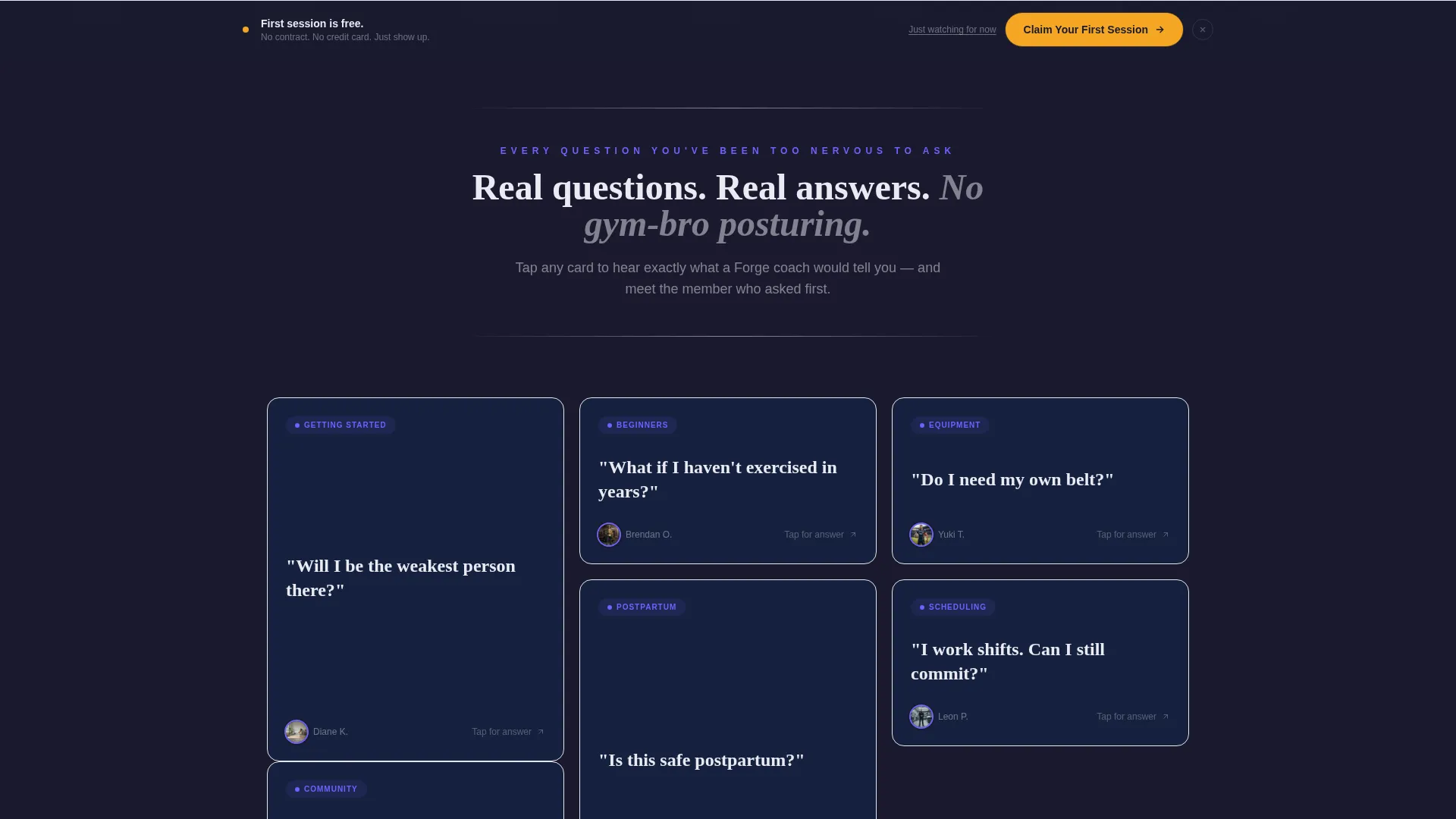
- A modular card grid where each card carries a real prospective member question and a photo-backed honest answer
- A pinned event registration form with a name field, goal dropdown, and time-slot selector
- A secondary email opt-in path for visitors who are not ready to commit immediately
Feature list
A brief overview of the key components built into this template and how each one serves your program.
FAQ-Driven Card Grid
Each card in the grid holds a real question a prospective member has asked. The card flips or expands to reveal an honest answer paired with a photo of a member who once asked that same question. The grid systematically removes every objection before the visitor reaches the registration form.
Pinned Registration call to action
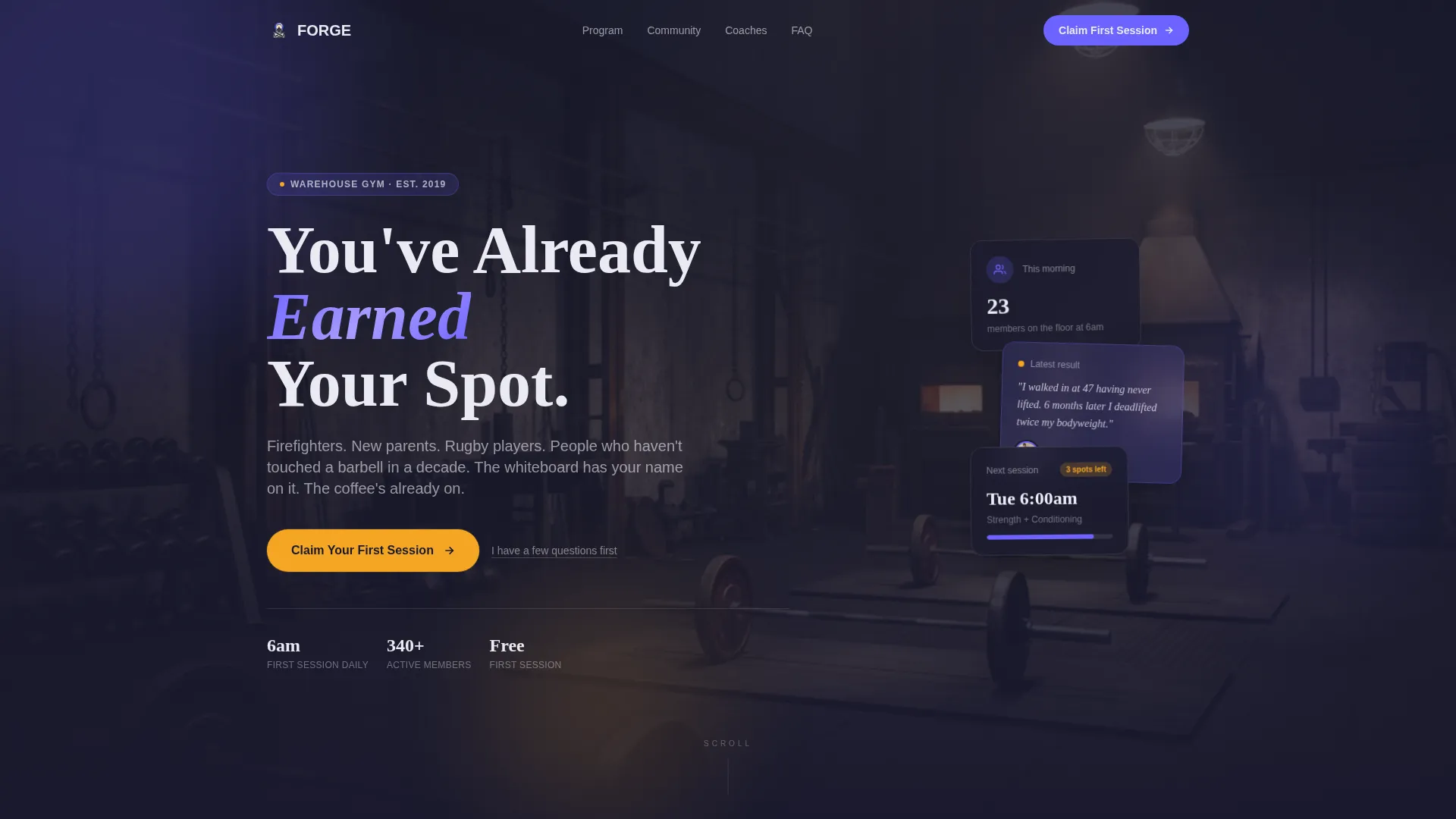
A "Claim Your First Session" button stays fixed to the bottom of the viewport throughout the entire scroll. It links to a short form collecting a first name, a goal selection from a dropdown, and a preferred time slot. The form stays short so friction stays low.
Secondary Email Opt-In Path
Visitors who are not ready to register can tap "Just Watching for Now" to join a weekly email list with programming previews. This secondary path keeps hesitant visitors in the community without pressuring them toward immediate commitment.
Trust-Mark Logo Bar Header
The header is a clean horizontal strip displaying affiliate gym logos, certification badges such as Certified Strength and Conditioning Specialist (CSCS) and USA Weightlifting (USAW), and partner crests from local fire departments and rugby clubs. All marks appear in monochrome chalk white against the deep charcoal background for a credible, professional impression.
Community Hearth Visual System
The template uses a four-color palette built for industrial warmth. Deep gym-floor charcoal grounds the layout. Electric indigo drives headings and interactive states. Warm chalk white handles body text. Molten amber signals urgency and active button states.
Bold Scroll Invitation Headline
A single line of bold indigo type reads "Every Question You've Been Too Nervous to Ask," sitting directly below the logo bar. It frames the entire page as a conversation rather than a pitch and immediately signals that honest answers follow.
Page sections overview
| Section | Purpose |
|---|---|
| Logo Bar Header | Displays trust marks, certifications, and partner crests |
| Scroll Invitation Headline | Sets the FAQ-driven conversation tone |
| FAQ Card Grid | Addresses objections through member-matched question cards |
| Pinned Registration Form | Captures first name, goal, and preferred time slot |
| Secondary Opt-In Path | Retains hesitant visitors via a weekly email list |
Design & branding system
The visual identity follows a Community Hearth theme designed to feel industrial, warm, and alive. The palette references the physical experience of early morning training under fluorescent tubes.
- Deep gym-floor charcoal (#1A1A2E) as the base background, electric indigo (#6C63FF) for headings and key interactive elements, warm chalk white (#EAEAF2) for body text, and molten amber (#F5A623) reserved for active states and urgency cues
- Monochrome chalk white treatment for all logo bar marks keeps trust marks readable without competing with the indigo accent layer
- Bold typographic hierarchy with a single commanding headline line below the logo bar anchors the scroll direction
Mobile & speed optimization
The card grid layout is modular, which means it stacks cleanly on smaller screens without losing the question-and-answer interaction that drives the page. The pinned registration call to action remains accessible at the bottom of the viewport on mobile devices throughout the full scroll.
- Modular card structure adapts naturally to single-column stacking on narrow screens
- Pinned call to action button stays fixed and tappable at the bottom of the viewport on all device sizes
- Short registration form with a dropdown and time-slot selector keeps mobile input fast and low-friction
How this template helps you convert
This template earns conversion by removing fear before presenting a request. The sequence is deliberate and it works in three clear steps.
- The logo bar and certification marks establish immediate credibility, so the visitor trusts the source before reading a single word of body copy
- The FAQ card grid systematically answers every common objection using real member voices and photos, so by the end of the grid the visitor has no remaining excuse not to register
- The pinned call to action and short form are always one tap away, and the secondary opt-in path ensures that even hesitant visitors stay connected to the program
Other information about this template
This template is built specifically for the strength and conditioning niche within sports and fitness training. It sits inside the broader Education and Training category and is designed to support event-based or session-based program enrollment.
- The creative direction is FAQ-driven, meaning the layout prioritizes objection removal over traditional sales copy structure
- The template style is a card grid, which makes it straightforward to add, remove, or reorder question cards as your program evolves
- The event registration flow is optimized for first-session bookings with a goal dropdown covering options such as get stronger, recover from injury, sport performance, and general fitness
Theme
Community Hearth
Creative direction
FAQ-Driven
Color system
Electric Indigo
Style
Card Grid (Modular)
Direction
Event Registration
Page Sections
Faq-driven Flip Card Grid
Pinned Session Registration Call to Action
Secondary Email Opt-in Path
Trust-mark Logo Bar
Community Hearth Color System
Bold Scroll Invitation Headline
Related questions
Can I customize the FAQ cards with my own questions and member photos?
Is this template suitable for a gym with a mixed-ability membership?
How does the secondary opt-in path work?
Can I adjust the registration form fields to match my program?
Does the pinned call to action button work on mobile screens?



