Construction Company Professional Website Template
Forge is a single-page construction company landing page built around verified performance data. It leads with animated stat counters, a side-by-side industry comparison table, and mini project dashboards that walk procurement officers through real bid-to-final-cost evidence. Two conversion paths capture both ready-to-bid developers and early-stage evaluators.
by Rocket studio
Quick summary
Forge is a dark, data-forward construction landing page designed for contractors who win jobs with documented proof, not promises. It opens with a drone-shot header, animates key performance stats on scroll, and centers the page around a six-metric comparison table. Two conversion paths serve different buyer readiness levels without cluttering the layout.
Who this template is for
This template is built for established construction companies that compete on verified performance rather than marketing language. It works best when your audience already has a shortlist and needs a reason to call you first.
- Commercial general contractors responding to developer RFPs (Requests for Proposals)
- Municipal and public-sector contractors evaluated against formal procurement scoring rubrics
- Construction firms targeting facility managers and commercial property developers who prioritize accountability
What problem this template solves
Most contractor websites lead with photography and taglines. Procurement officers and commercial developers need something different. They need numbers, comparisons, and evidence before they pick up the phone.
- Contractors lose bids because their websites feel identical to every competitor on the shortlist
- Evaluation teams waste time gathering prequalification data that a well-structured page could deliver upfront
- Low-commitment visitors leave without a next step because there is no easy entry point below a full bid request
What you get with this template
This template delivers a complete single-page layout structured around progressive due diligence. Each scroll level adds a new layer of proof, moving the visitor from aggregate stats to specific project evidence.
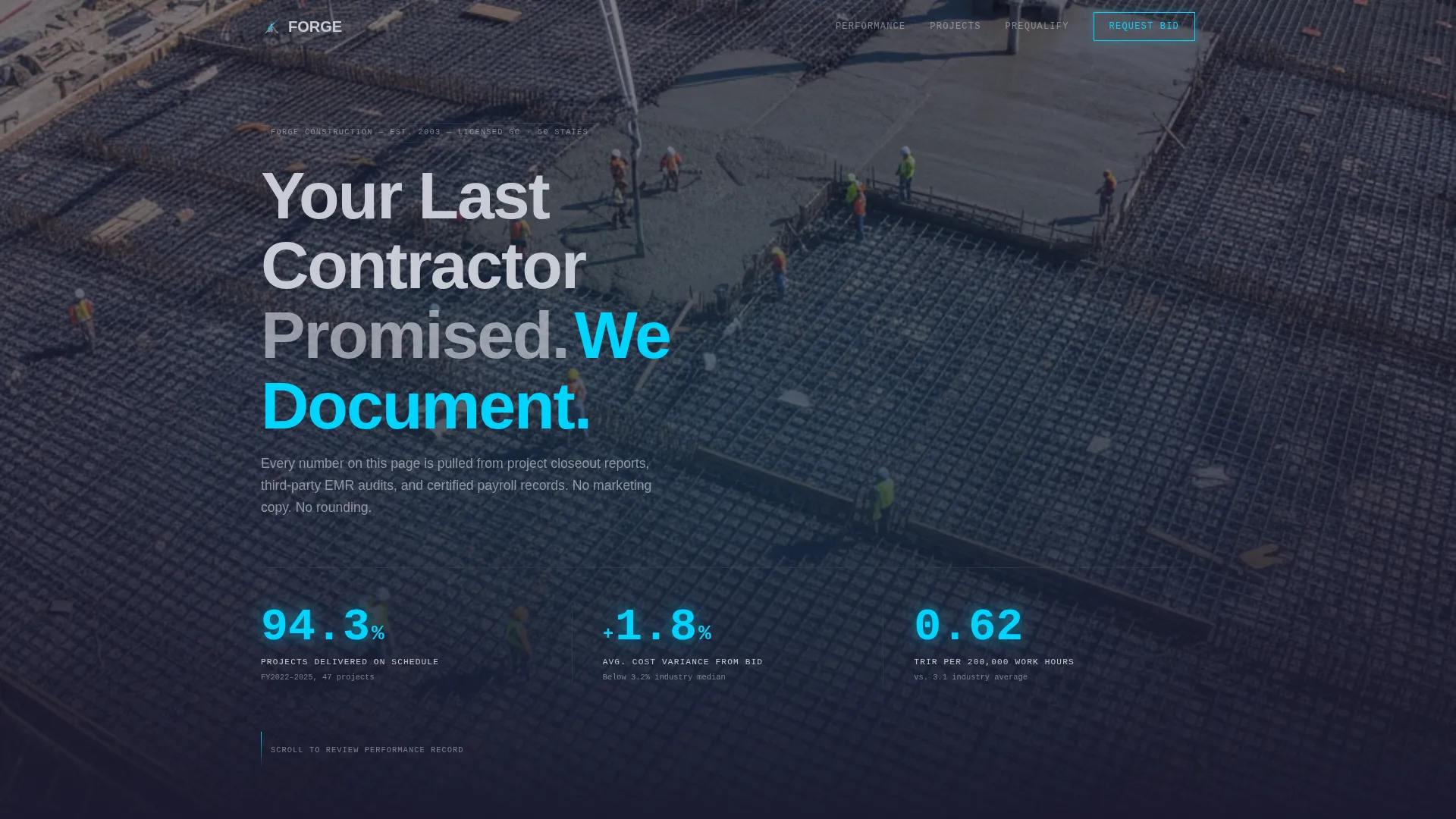
- A full-bleed dark header with animated headline and three scroll-triggered stat counters
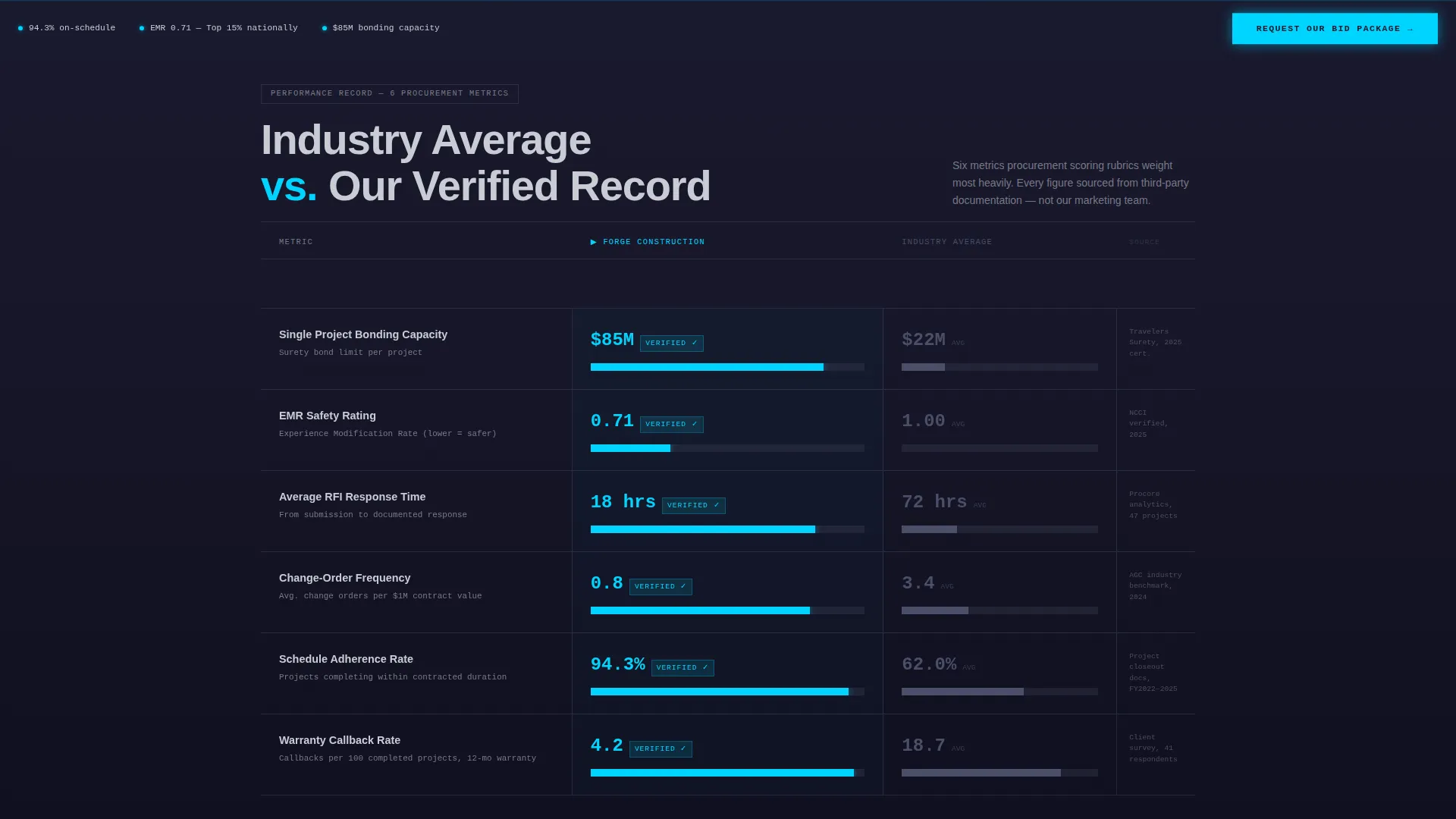
- A side-by-side comparison table covering six procurement-relevant metrics with animated data bars
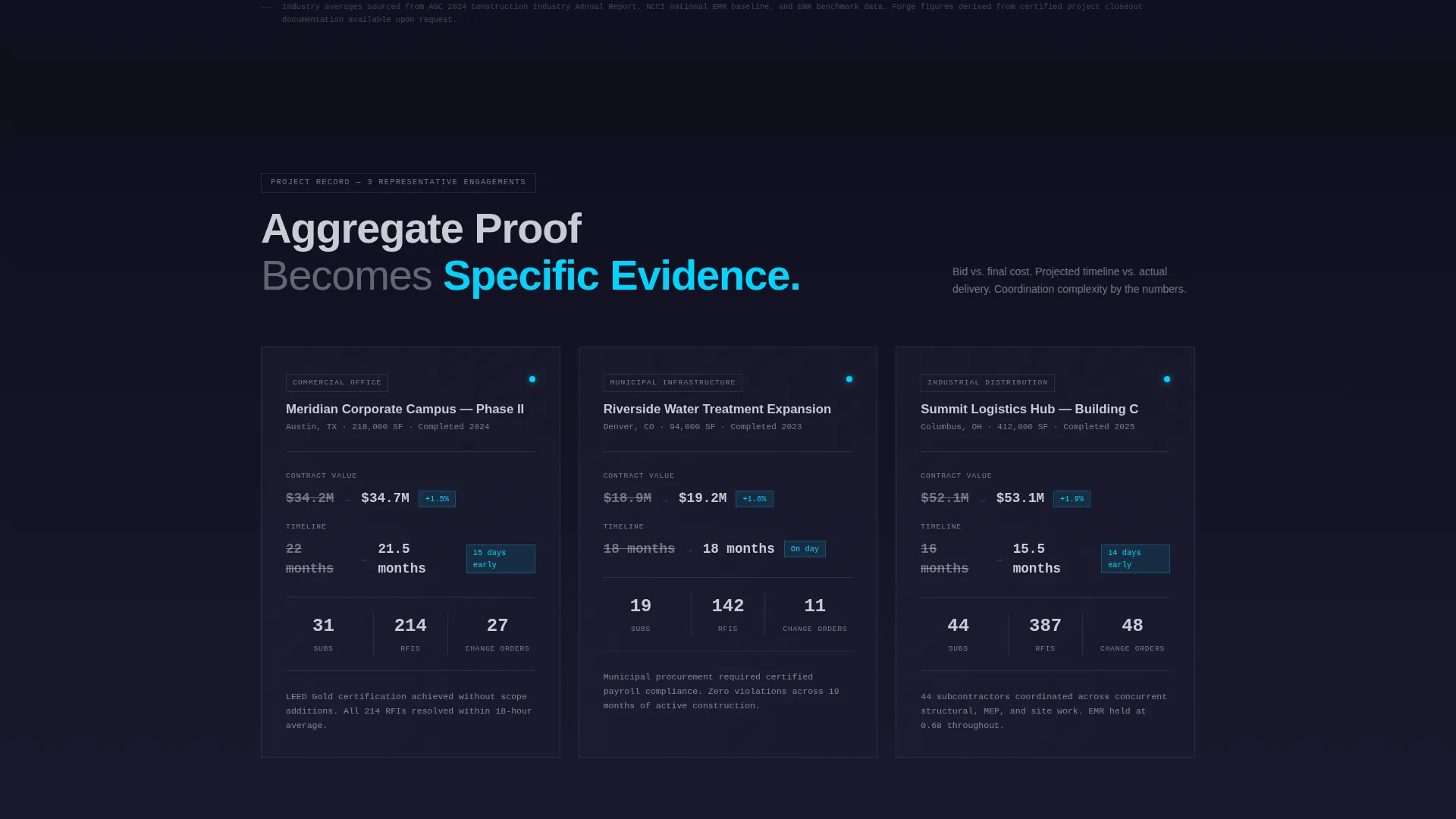
- Three project case study mini dashboards showing bid-versus-actual cost and schedule data
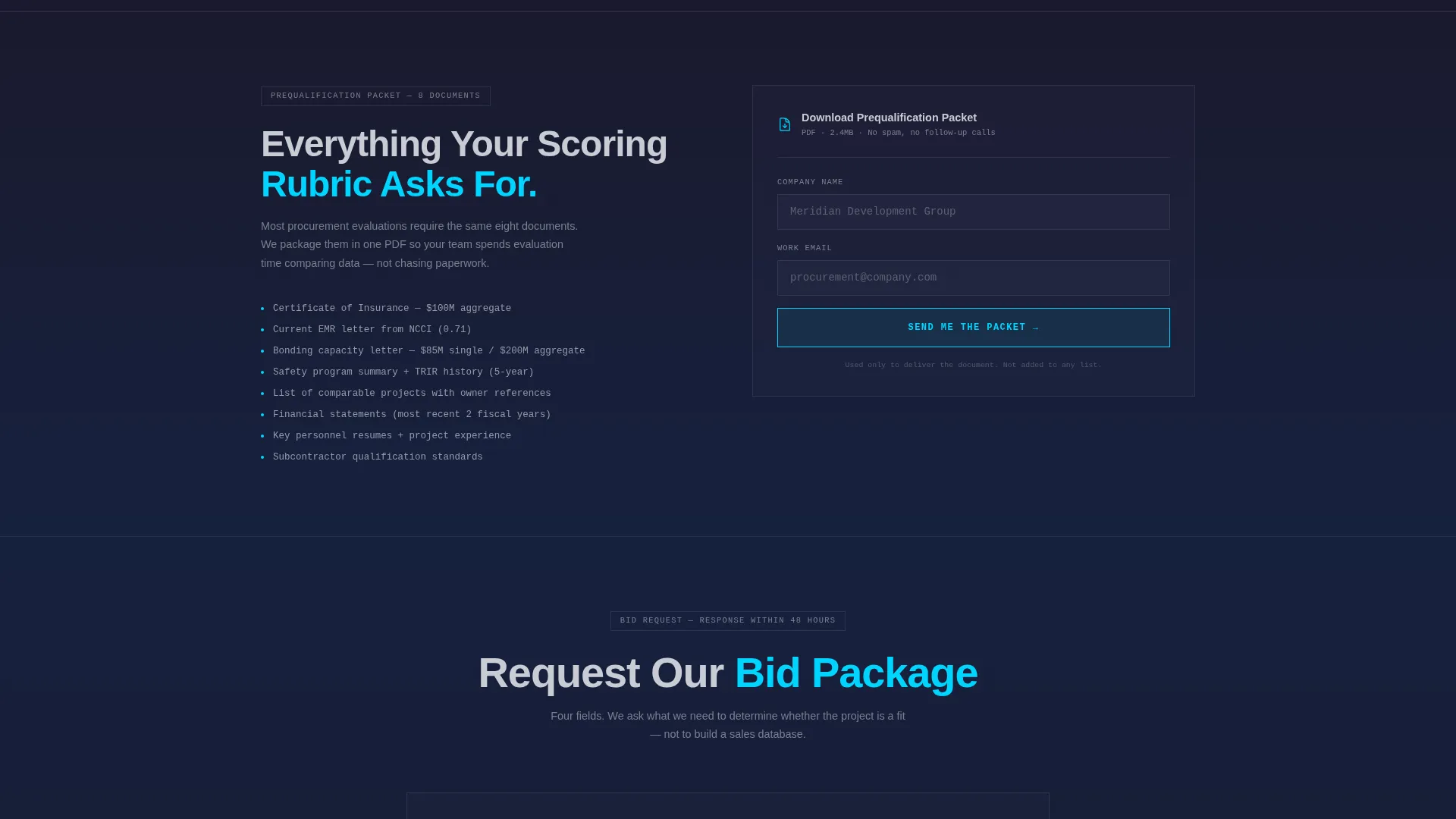
- A pinned bottom-viewport call-to-action form and a secondary gated PDF conversion path
Feature list
A brief on what this template actively does for you, section by section.
Animated Stat Counter Header
Three key performance figures animate upward on page load above a drone-shot aerial photograph of an active foundation pour. The numbers cover schedule delivery rate, cost variance from bid, and safety incident rate. They set the credibility tone before the visitor reads a single sentence.
Side-by-Side Comparison Table
A structured table compares the company's verified record against industry averages across six metrics: bonding capacity, EMR (Experience Modification Rate) safety rating, average RFI (Request for Information) response time, change-order frequency, schedule adherence rate, and warranty callback rate. Each row's data bar animates in arc-weld blue as it enters the viewport.
Project Case Study Dashboards
Three mini data dashboards present individual project records. Each dashboard shows original bid versus final cost, projected timeline versus actual completion, and subcontractor count with coordination complexity. The format mirrors the due diligence format evaluators already use internally.
Pinned Bid Request Form
A sticky call-to-action bar appears after the visitor scrolls past the comparison table. It stays fixed at the bottom of the viewport and collects four practical inputs: project type, estimated square footage range, project zip code, and bid deadline date. The form fields reflect what a contractor needs to assess job fit.
Gated Prequalification PDF Path
A secondary conversion option sits beneath the case studies. Visitors can download a prequalification packet by entering only their company name and email address. This path captures procurement officers still in the early evaluation phase without requiring full bid commitment.
Scroll-Triggered Viewport Animations
Data bars, stat counters, and case study panels all animate as they enter the viewport on scroll. This pacing keeps the page feeling purposeful rather than static, and it allows each proof point to land with deliberate timing.
Page sections overview
| Section | Purpose |
|---|---|
| Full-Bleed Header | Opens with aerial drone photo, animated headline, and three stat counters |
| Comparison Table | Side-by-side six-metric performance table with animated blue data bars |
| Project Case Studies | Three mini dashboards with bid-versus-actual cost and timeline data |
| Pinned Bid Form | Sticky bottom call to action collecting project type, footage, zip, and deadline |
| Prequalification Download | Gated PDF path for early-stage evaluators requiring name and email |
Design & branding system
The visual identity follows a Data Command theme built on a Monochrome Steel color system. The palette references the look of a fabrication shop at night with arc-weld blue as the single active color.
- Core colors: deep mill scale black (#1A1A2E), structural I-beam gray (#4A4E69), cold-rolled silver (#C9CCD5), and electric arc-weld blue (#00D4FF) reserved exclusively for interactive highlights and data emphasis
- Backgrounds run black-to-gunmetal gradients; body text sits in silver; section dividers are thin steel-gray rules
- The header uses a dark full-bleed aerial photograph with a subtle blue glow tracing the rebar grid geometry
Mobile & speed optimization
The layout is built with a single scrolling flow, which keeps the page lean and straightforward to render across devices. Section-by-section reveal animations are tied to viewport entry rather than timers.
- Single-page structure removes the overhead of multi-page navigation and keeps load dependencies minimal
- Scroll-triggered animations activate only when sections enter the viewport, avoiding unnecessary background processing
- The pinned call to action bar and comparison table are designed to remain readable and functional at smaller screen widths
How this template helps you convert
The page is structured around progressive proof, moving the visitor from high-level credibility to specific project evidence before presenting either conversion ask.
- The stat counter header earns initial trust fast, giving procurement officers a data hook before they scroll further into the page.
- The comparison table does the pre-qualification work for the visitor, removing the need to research industry benchmarks separately and reducing the friction between interest and commitment.
- Two distinct conversion paths serve two different buyer stages, capturing both decision-ready developers through the bid request form and evaluation-phase officers through the lower-commitment prequalification PDF download.
Other information about this template
This template is categorized under construction company website templates and is specifically designed as a construction company lead capture landing page. It is a strong fit for teams building or refreshing a contractor web presence on platforms that support custom HTML and CSS layouts.
- The template style is a Comparison Table layout, making it directly relevant to any contractor positioning against a competitive shortlist
- The creative direction follows a Stats-First Impact approach, meaning every section opens with a hard figure before providing supporting context
- The landing page direction is Comparison/Versus, purpose-built for procurement-driven decision environments where side-by-side evaluation is standard practice
Theme
Data Command
Creative direction
Stats-First Impact
Color system
Monochrome Steel
Style
Comparison Table
Direction
Comparison/Versus
Page Sections
Animated Performance Stat Counters
Six-metric Comparison Table
Project Case Study Dashboards
Pinned Bid Request Call to Action Bar
Gated Prequalification PDF Download
Scroll-triggered Section Animations
Related questions
What kind of construction company is this template designed for?
Can I customize the comparison table metrics?
What are the two conversion paths included in this template?
Does this template work if I do not have detailed project records yet?
Is this a single-page layout or a multi-page website?



