Fortress — InfoSec Protection Landing Page Template
Cipher is a Bold Brutalist cybersecurity knowledge base landing page built for security teams who need fast, indexed answers. It combines a Feature Matrix comparison layout, a persistent app download bar, and a terminal-dark Electric Indigo visual system. The result is a single-page experience that earns the install before the visitor ever reaches the bottom.
by Rocket studio
Quick summary
Cipher is a single-page landing page template designed for a cybersecurity knowledge base product. It uses a Bold Brutalist aesthetic, a Feature Matrix creative direction, and an Electric Indigo color system to communicate authority and density. The page guides visitors from a trust-establishing logo bar through capability comparison tables toward a persistent app download call to action.
Who this template is for
This template was built for security-focused teams and product builders who need to present a deep technical knowledge base with clarity and speed. It speaks the language of practitioners, not marketers.
- Security Operations Center (SOC) analysts who need fast, indexed answers during active incidents
- Penetration testers and red team operators scoping engagements and referencing attack techniques
- Chief Information Security Officers (CISOs) and compliance leads building frameworks against published standards
What problem this template solves
Security professionals waste critical time during incidents because knowledge is scattered across PDF whitepapers, gated vendor reports, and browser bookmarks. A landing page that proves density and speed closes that credibility gap instantly.
- Visitors cannot quickly trust a security tool that looks generic or unstructured
- Comparison tables are missing, so potential users cannot see why this product beats static alternatives
- There is no clear, frictionless download path for users across iOS, Android, macOS, and Linux
What you get with this template
The template delivers a complete, single-page layout with every section configured for a cybersecurity knowledge base product launch. Everything from the header bar to the final call-to-action block is included and ready to customize.
- A scrolling compliance logo bar header featuring SOC 2, ISO 27001, NIST, and CISA badges in monochrome white
- Multiple Feature Matrix comparison tables contrasting the product against PDF libraries, generic wikis, and gated vendor reports
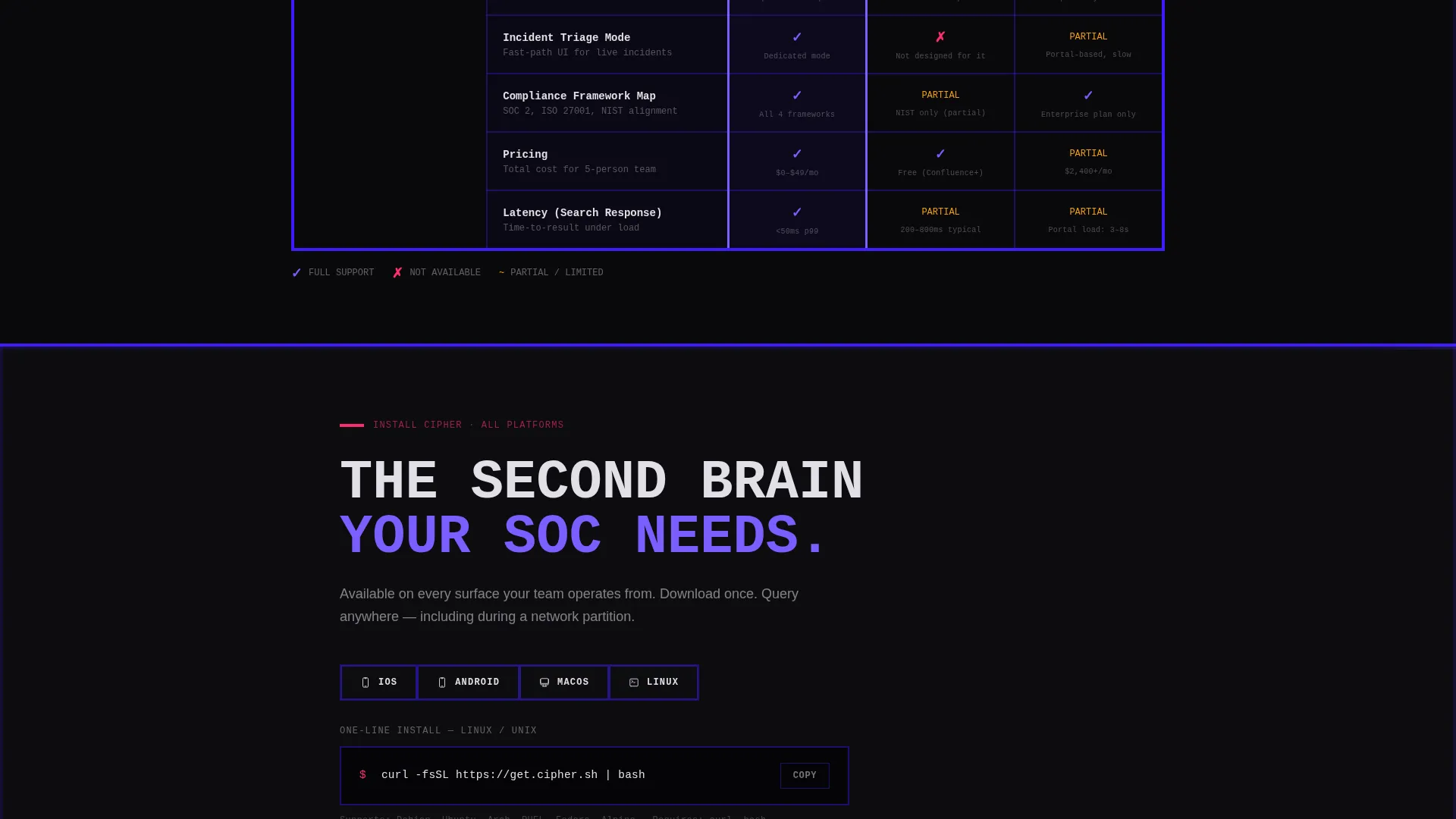
- A persistent viewport-locked app download bar plus a full-width install section with platform-detect buttons and a copyable CLI command block
Feature list
This template includes the following purpose-built sections and components to support a high-conviction knowledge base product launch.
Brutalist Compliance Logo Bar
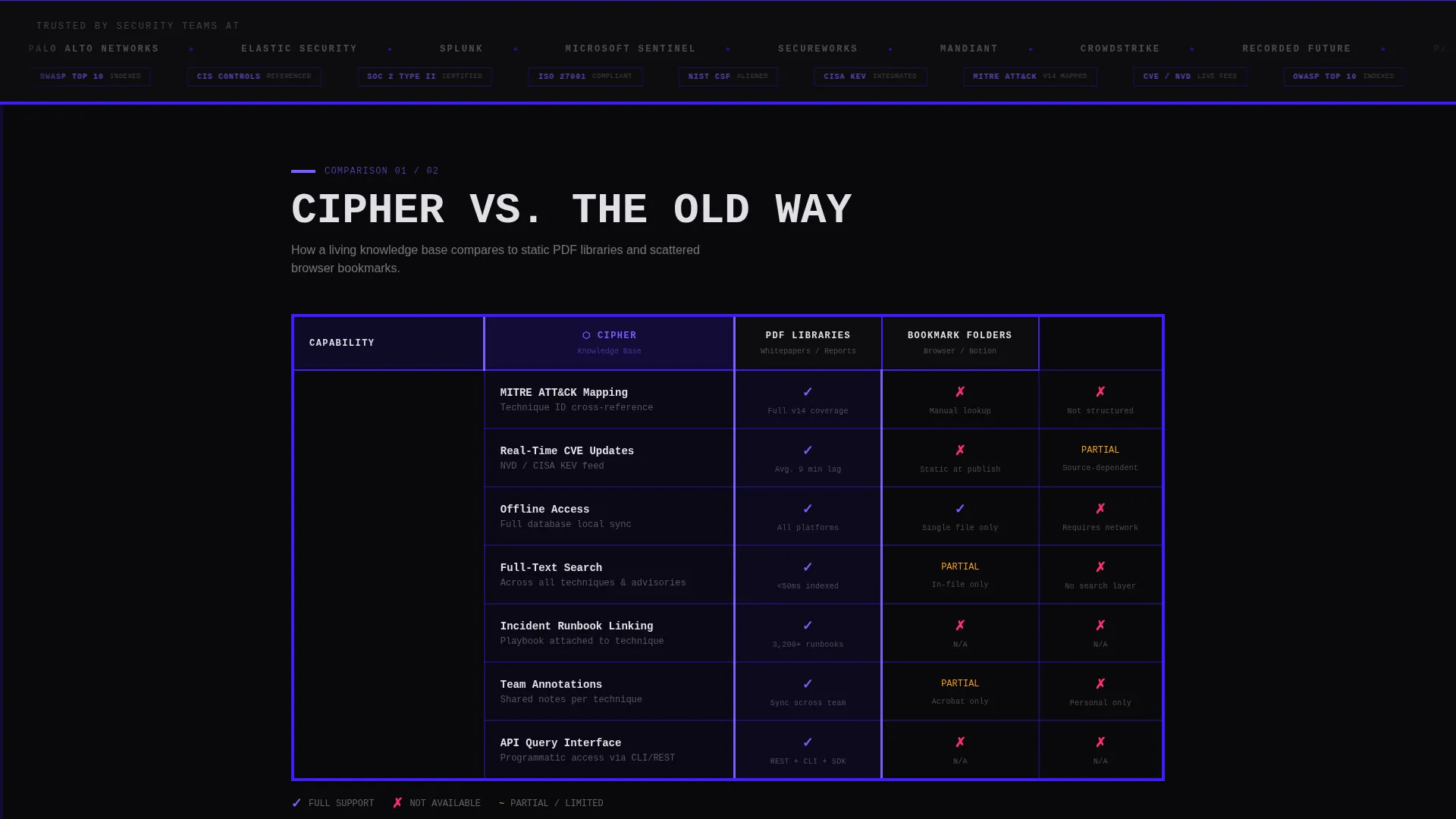
The header is a horizontal scrolling strip of security team logos and compliance badges rendered in monochrome white on a void-black background. It scrolls at a slow, mechanical pace that signals institutional trust without a single word of copy.
Feature Matrix Comparison Tables
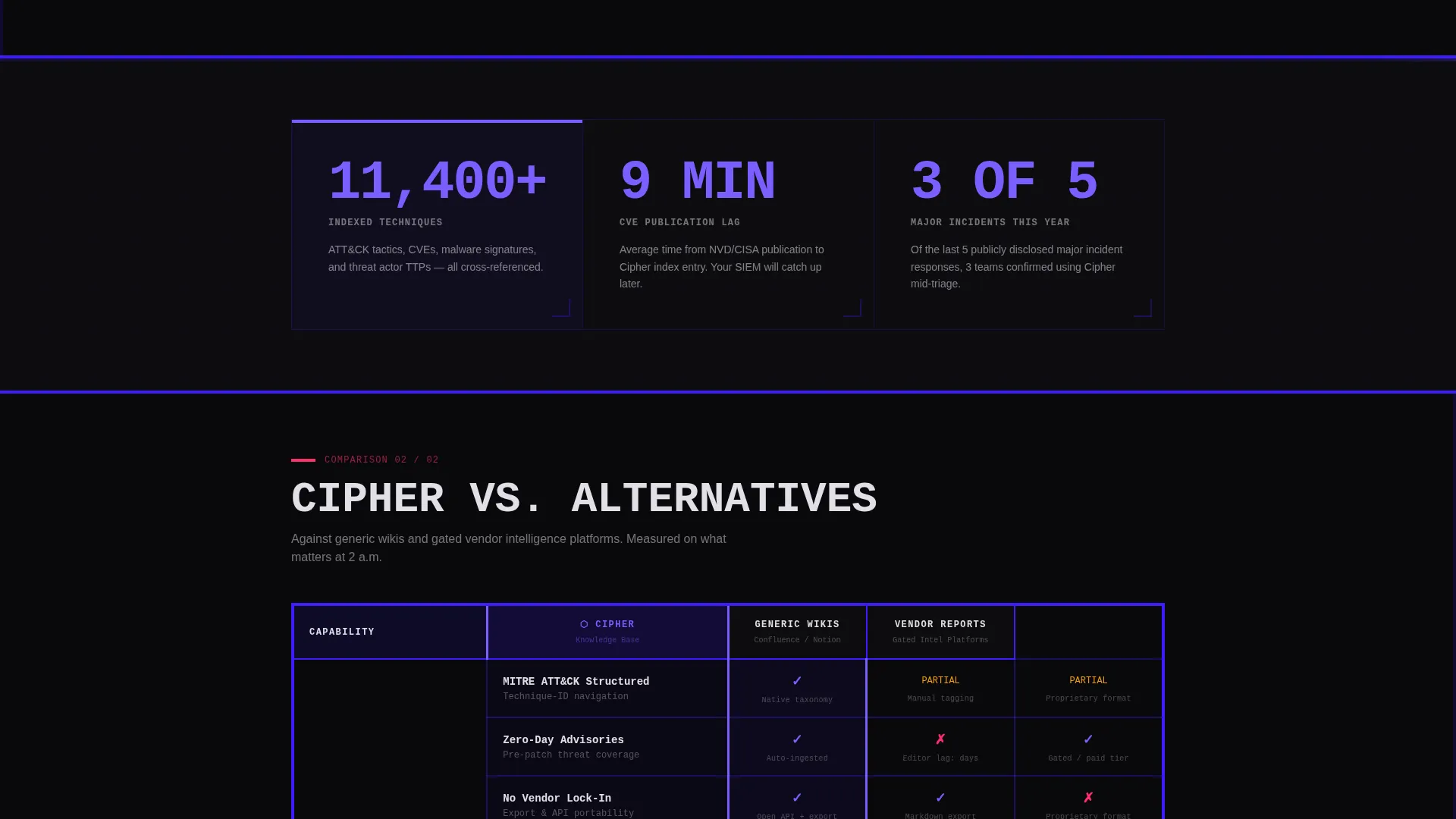
A series of thick-bordered, zero-rounded-corner comparison tables pit the knowledge base against static PDFs, scattered bookmarks, generic wikis, and gated vendor reports. Each row maps a real capability: offline access, MITRE ATT&CK (Adversarial Tactics, Techniques, and Common Knowledge) mapping, real-time CVE (Common Vulnerabilities and Exposures) updates, API query, team annotations, and incident runbook linking.
Single-Stat Callout Blocks
Between comparison tables, hard-hitting single-stat blocks surface proof points pulled from the brief: 11,400 or more indexed techniques, updates within 9 minutes of CVE publication, and usage during 3 of the last 5 major publicly disclosed incident responses. These blocks stop the scroll and deliver conviction.
Persistent App Download Bar
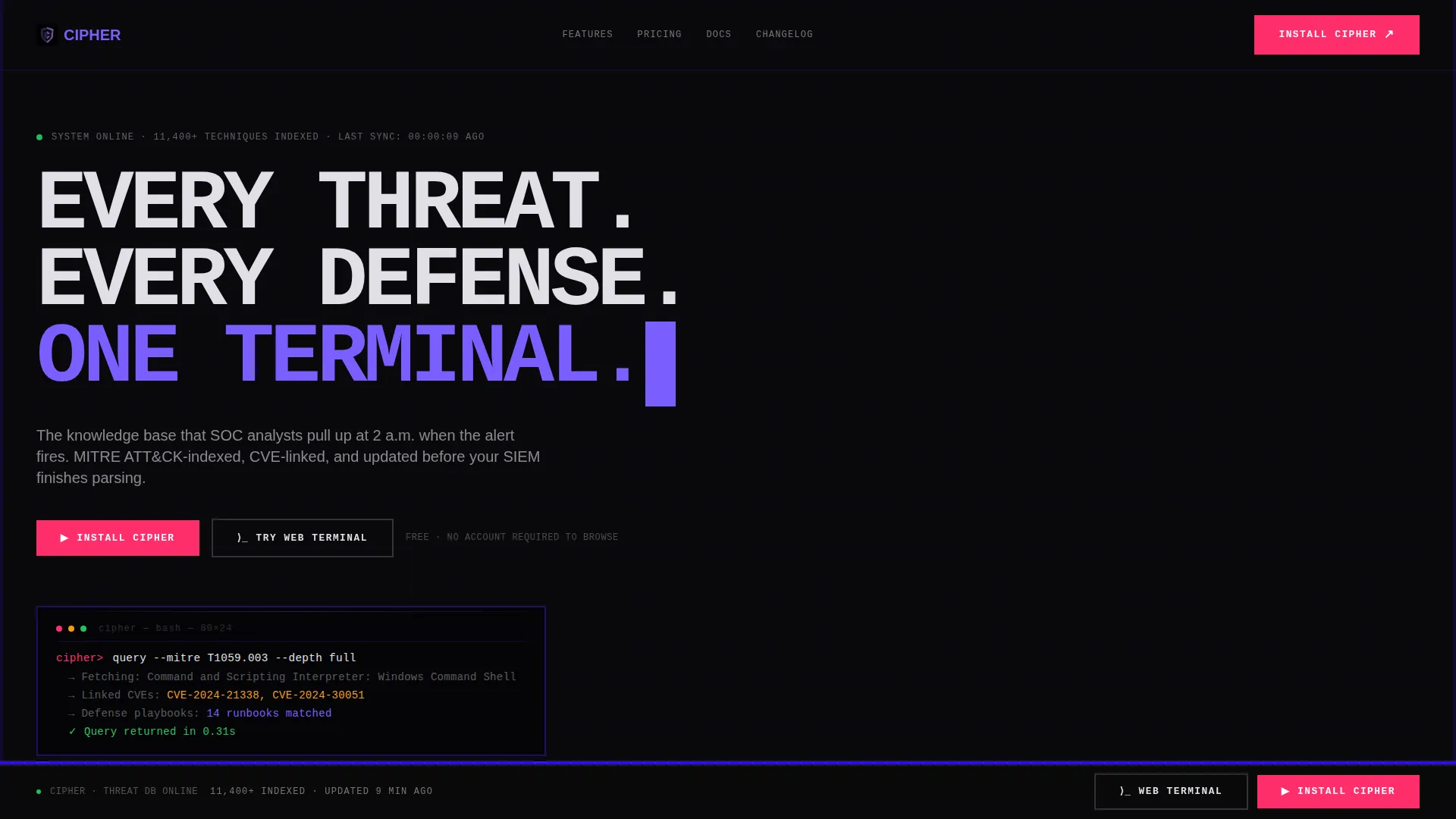
A download bar locks to the bottom of the viewport throughout the scroll. It surfaces platform-detect install buttons for iOS, Android, and macOS alongside a copyable CLI install command for Linux users, ensuring the conversion path is always visible.
Full-Width Terminal call to action Section
After the final comparison table, a full-width call-to-action section repeats the install options with the primary "Install Cipher" action and a secondary "Try the Web Terminal" link for browser-based demo access.
Uppercase Monospace Hero Headline
The hero area carries a single brutalist headline set in uppercase monospace type: "EVERY THREAT. EVERY DEFENSE. ONE TERMINAL." No imagery, no gradients. The restraint communicates authority through deliberate minimalism.
Page sections overview
| Section | Purpose |
|---|---|
| Compliance Logo Bar | Establish trust via scrolling security badges |
| Brutalist Hero Headline | State product intent with monospace authority |
| Comparison Table One | Contrast capabilities versus. static PDF libraries |
| Comparison Table Two | Contrast capabilities versus. generic wikis |
| Stat Callout Blocks | Deliver hard proof points between table groups |
| Comparison Table Three | Contrast capabilities versus. gated vendor reports |
| Persistent Download Bar | Keep install call to action locked to viewport bottom |
| Full-Width call to action Section | Close the page with install and web demo options |
Design & branding system
The visual identity is grounded in a terminal aesthetic. Every design decision reinforces the feeling of a monitor glowing in a dark Network Operations Center (NOC) room, where only critical data catches the eye.
- Color palette: void black (#09090B) for backgrounds, deep indigo (#3D1DFF) and phosphor violet (#7B5EFF) for structure and interactive elements, terminal white (#E0E0E6) for body text, and threat-alert magenta (#FF2E6C) reserved exclusively for calls to action and critical-state indicators
- Typography: monospaced fonts for all headers to reinforce the terminal aesthetic, paired with high-contrast sans-serif for body copy to maintain readability at speed
- Structural details: 4px solid indigo section dividers, no rounded corners on table elements, phosphor violet checkmarks and threat-alert magenta crosses inside comparison table cells, and thick borders throughout
Mobile & speed optimization
The template is structured to remain functional and readable on smaller screens, ensuring the comparison tables and persistent download bar translate cleanly across device sizes.
- Comparison tables are laid out to support horizontal scrolling on mobile without hiding critical data
- The persistent download bar is designed to remain accessible at the bottom of the viewport on touch devices
- Typography scales maintain monospaced header legibility and body readability across screen widths
How this template helps you convert
This template earns the download by making visitors use the page as a reference tool before they ever reach the install button. By the time they arrive at the call to action, trust is already built.
- The scrolling compliance logo bar immediately signals institutional credibility, reducing skepticism before the visitor reads a single feature claim
- The Feature Matrix comparison tables let visitors self-qualify by scanning rows of real capabilities, so the decision feels informed rather than pressured
- The persistent download bar and copyable CLI command block remove every point of friction at the moment of conversion, covering all major platforms in one place
Other information about this template
This template is built specifically for the cybersecurity knowledge base niche, where the audience values precision, density, and speed over decorative design. A few additional details are worth noting for teams evaluating this template.
- The MITRE ATT&CK framework indexing reference in the comparison tables is a structural content decision, meaning the table rows are pre-labeled and ready for your data
- The copyable CLI install command block is a pre-styled code component, ready to receive your actual install string
- The "Try the Web Terminal" secondary call to action is a linked button component, designed to point to a browser-based demo environment of your choice
- This template fits naturally into a product launch workflow where the knowledge base is delivered as a native app with a web fallback
Theme
Bold Brutalist
Creative direction
Feature Matrix
Color system
Electric Indigo
Style
Comparison Table
Direction
App Download
Page Sections
Brutalist Compliance Logo Bar
Feature Matrix Comparison Tables
Single-stat Callout Blocks
Persistent Viewport-locked Download Bar
Uppercase Monospace Hero Headline
Full-width Terminal Call to Action Section
Related questions
What type of product is this template designed for?
Can I customize the comparison table rows and content?
What does the persistent download bar include?
Is the compliance logo bar editable?
Does this template include a path for visitors who are not ready to install?



