Forum - Dynamic Community Landing Page Template
The Forum Dynamic Community Landing Page template is a hub-and-spoke single-page layout built for SaaS B2B teams launching branded community forums. It leads with an animated metrics header, walks visitors through five feature spokes, and drives sign-ups through a persistent floating call-to-action and a two-step lead capture modal. The result is a high-conviction, data-forward landing page that converts.
by Rocket studio
Quick summary
This template gives SaaS teams a ready-to-launch landing page for a B2B community forum platform. The design follows a Dynamic Motion theme with an Acid Digital color system. A stats-heavy header opens the page, five anchor-linked spokes unpack every feature, and a persistent "Launch Your Community" call-to-action drives qualified leads from the first scroll.
Who this template is for
This template is built for teams at mid-stage SaaS companies that need to replace scattered support channels with a searchable, branded community. It suits professionals who already know the problem and need a compelling page that converts informed buyers.
- Developer relations leads who want a dedicated space for technical community engagement
- Head-of-community hires building their first structured engagement stack
- VP Support leaders looking to reduce ticket volume through self-serve resolution
What problem this template solves
Support tickets pile up, Slack channels fragment knowledge, and documentation goes stale. Buyers in this market need a landing page that communicates depth and credibility fast. This template solves the presentation problem by making platform capability immediately visible and persuasive.
- Community forum platforms lose deals because their landing pages bury the proof
- Decision-makers need comparison context before they will book a demo
- Lead forms placed too early, before trust is established, kill conversion rates
What you get with this template
You get a fully structured, single-page layout that front-loads social proof, walks visitors through platform features in logical order, and closes with two conversion paths suited to different buyer readiness levels.
- A full-viewport animated metrics header with four live-scale numbers and a scrolling thread-activity background
- Five anchor-nav spokes covering Threads and Taxonomy, Reputation Engine, Moderation AI, Analytics Suite, and SSO and API access
- A persistent floating call-to-action and a two-step lead capture modal with segmentation fields
Feature list
This template is engineered around one principle: earn the click before asking for it. Every section is sequenced to build conviction, and every interactive element has a clear job to do.
Kinetic Metrics Header
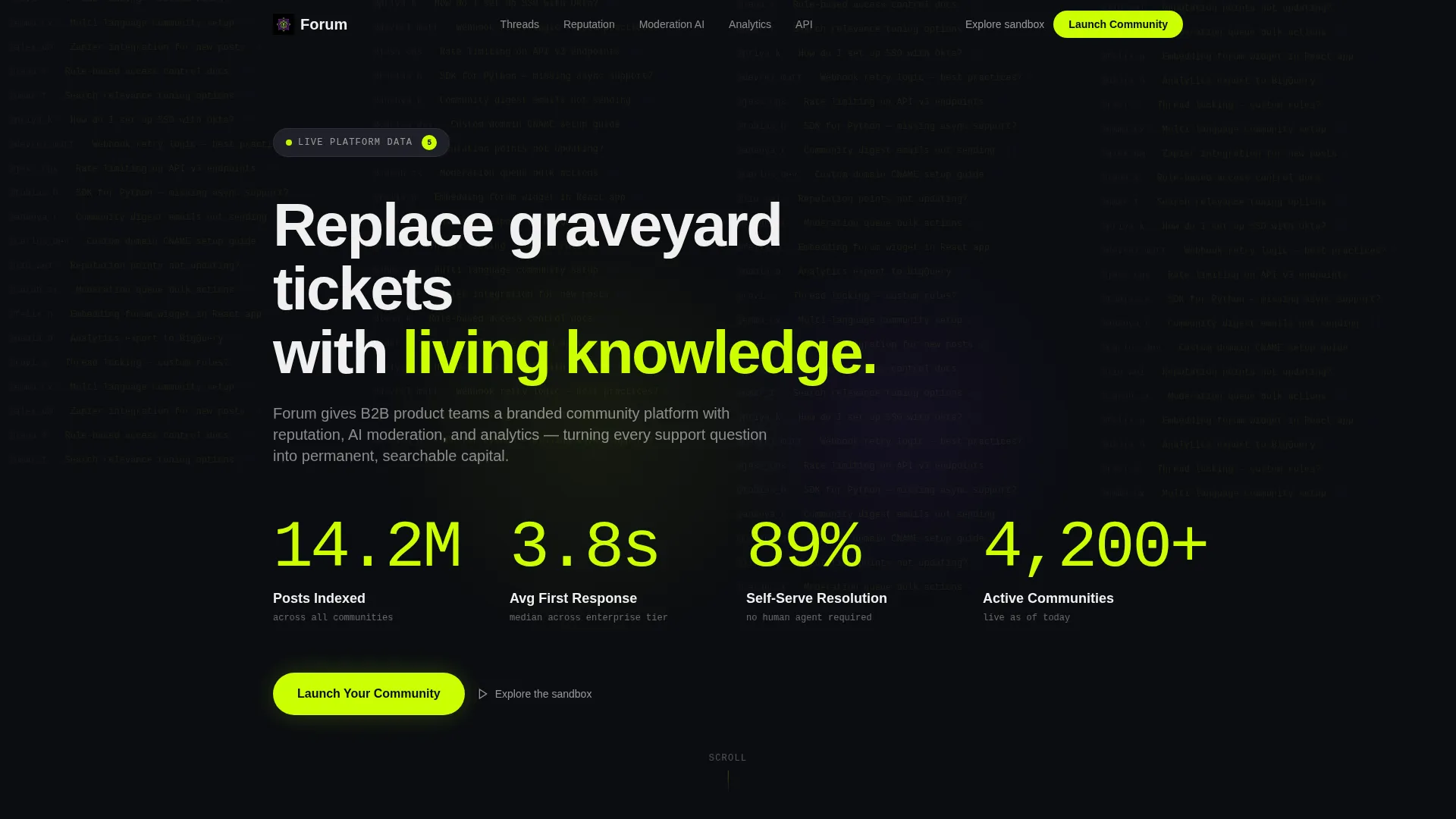
The header fills the full viewport with four composite performance numbers: 14.2 million posts indexed, 3.8-second average first-response time, 89 percent self-serve resolution rate, and 4,200-plus active communities. Each counter animates in sequentially using a kinetic roll effect, with chartreuse digits on void black and faint scrolling thread activity in the background.
Hub and Spoke Anchor Navigation
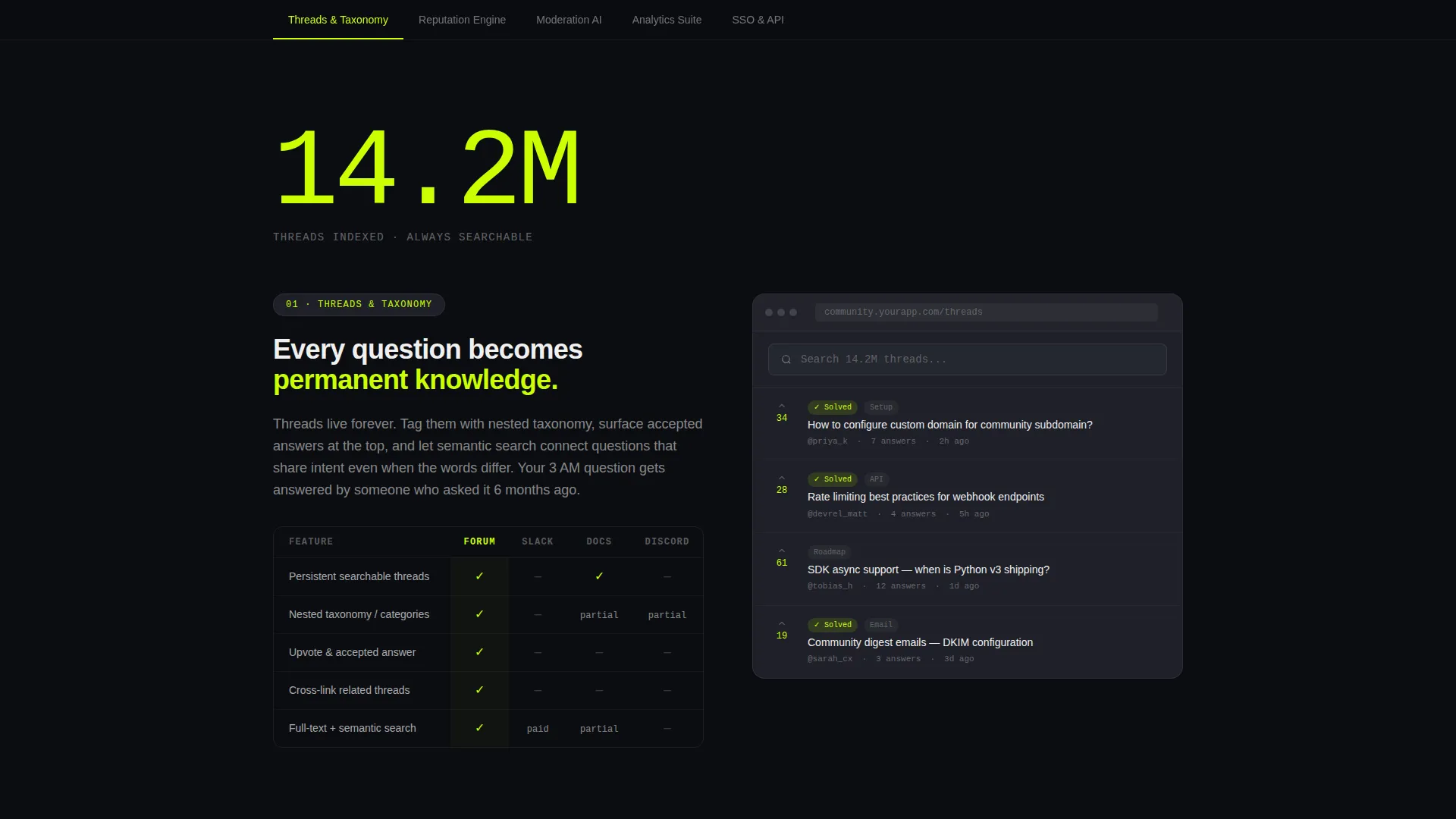
A sticky anchor navigation bar links to five distinct feature spokes. As the visitor scrolls, the active spoke label receives a chartreuse underline that slides like a cursor between items. This gives buyers direct access to the sections most relevant to their role without losing page context.
Spec Sheet Feature Spokes
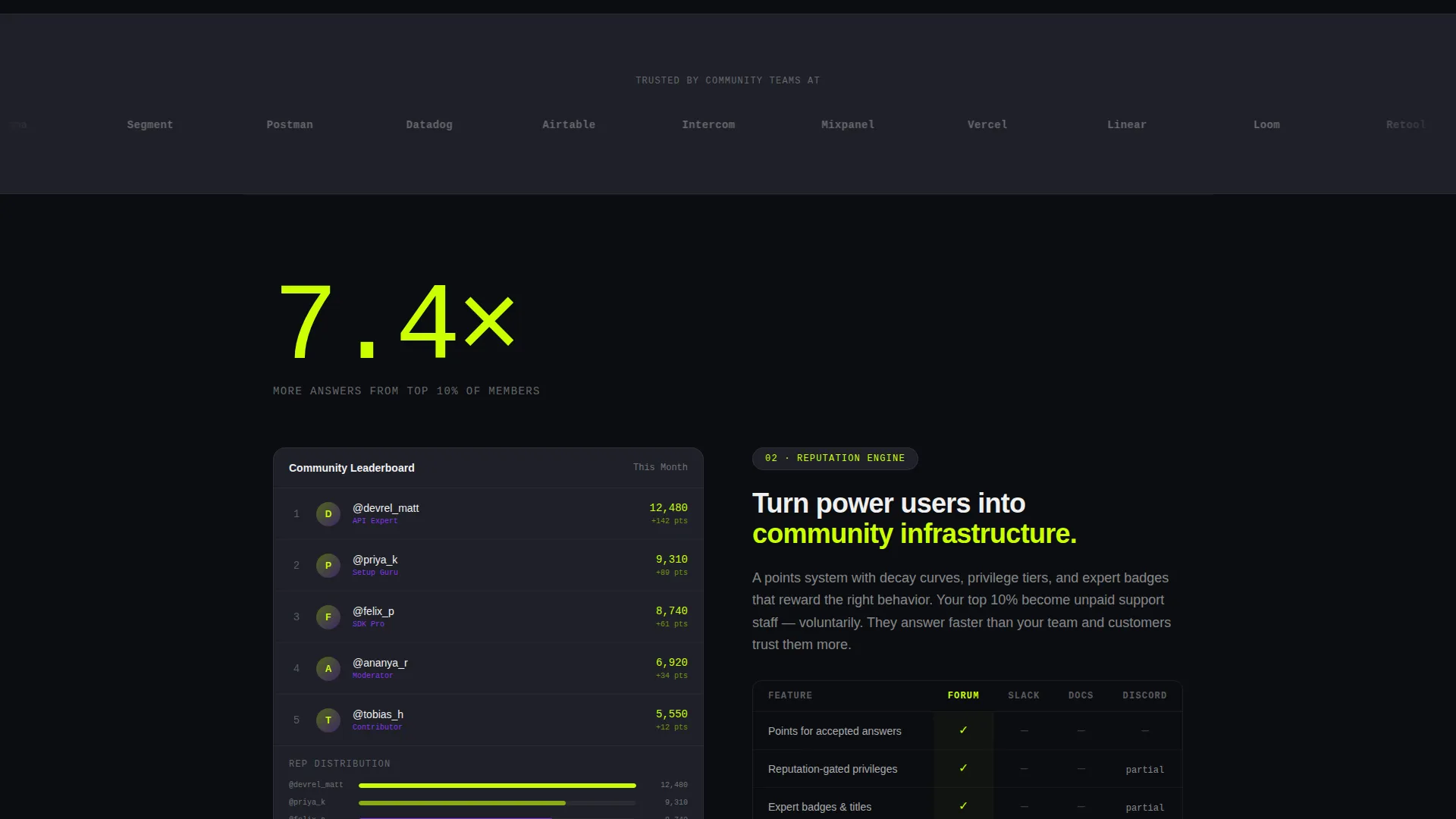
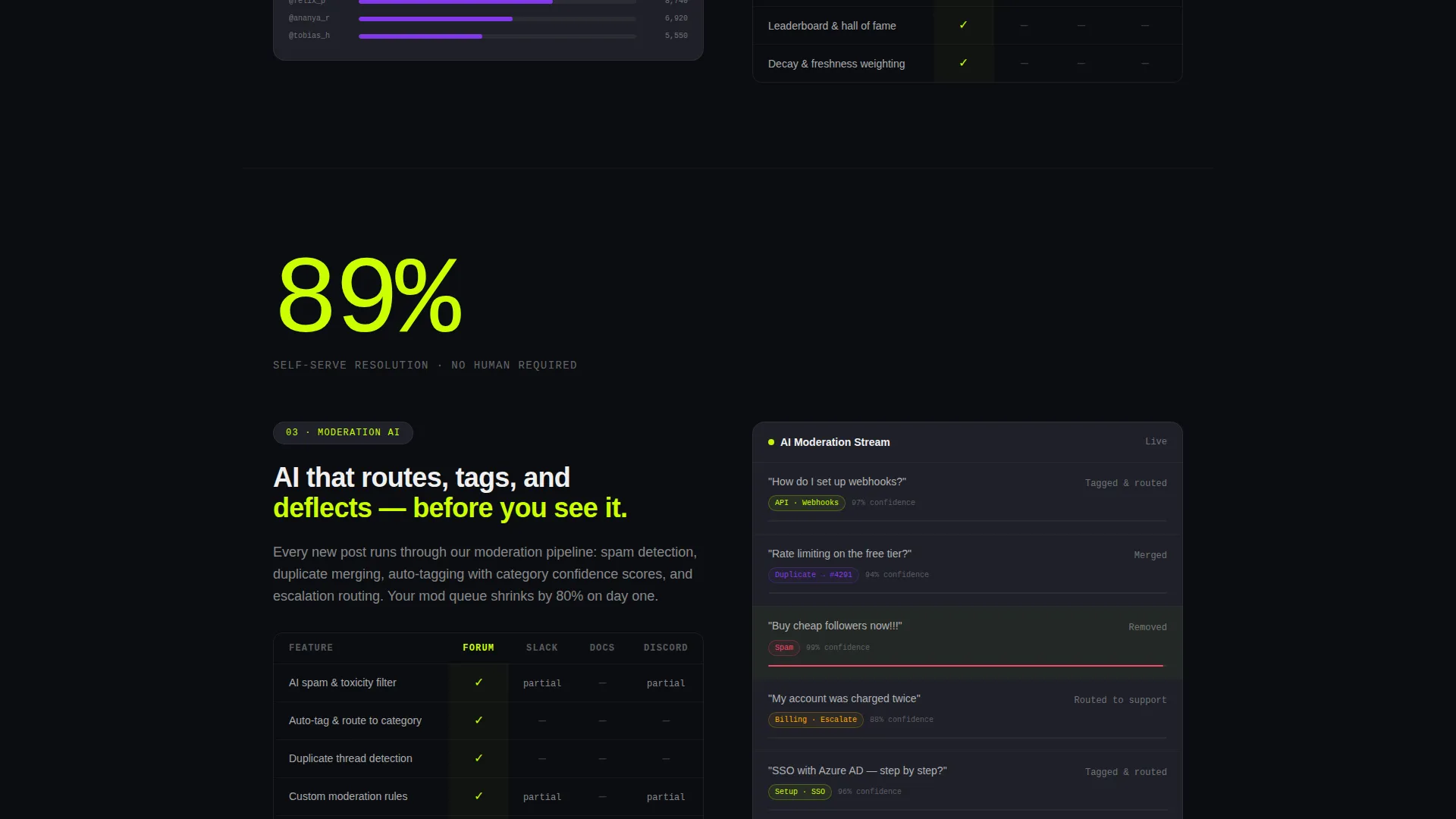
Each spoke section opens with a single oversized performance metric, then unpacks the feature through annotated interface screenshots, integration logos, and short comparison tables. The tables place the platform alongside Slack, Docs, and Discord so visitors can benchmark value at a glance.
Persistent Floating Call-to-Action
A "Launch Your Community" button floats with the visitor after the second spoke. It stays visible without obstructing content. The design uses the chartreuse-on-black treatment to keep it prominent and consistent with the visual system.
Two-Step Lead Capture Modal
Clicking the primary call-to-action opens a two-step modal. Step one collects work email and company name. Step two asks for community size range and primary use case, giving the sales team qualified context before the first conversation.
Trust Logo Bar and Secondary Conversion Path
A logo bar of recognizable SaaS brands appears at the page midpoint, establishing social proof before the lead form. Below the primary call-to-action, a secondary link reading "Explore the sandbox" gives self-directed buyers access to an interactive demo without requiring a sales conversation.
Page sections overview
| Section | Purpose |
|---|---|
| Metrics header wall | Establishes platform scale with four animated performance numbers |
| Sticky anchor nav | Lets visitors jump to any feature spoke from anywhere on the page |
| Threads and Taxonomy spoke | Shows how content is structured and made searchable |
| Reputation Engine spoke | Explains the scoring system that drives community participation |
| Moderation AI spoke | Details automated moderation capability and workflow |
| Analytics Suite spoke | Presents community health data and reporting features |
| SSO and API spoke | Covers identity integration and developer access options |
| SaaS logo trust bar | Builds credibility with recognizable brand logos mid-page |
| Lead capture modal | Collects segmented lead data through a two-step form flow |
| Sandbox demo link | Offers a self-serve path for buyers not ready to contact sales |
Design & branding system
The visual identity follows an Acid Digital color system built around four core values. The palette is high contrast by design, using terminal-inspired tones that make every data point feel like a live signal.
- Void black (#0B0D11) for section backgrounds, electric chartreuse (#CAFF04) for calls-to-action and live-data highlights, synthetic violet (#8338EC) for secondary actions and graph lines, and interface gray (#1E2028) for content cards
- White text (#F0F0F0) keeps body copy readable across all dark backgrounds
- Motion carries throughout: sections slide in with parallax offsets, charts draw themselves on scroll, and the anchor nav underline animates between active states
Mobile & speed optimization
The template is structured for a fast, readable experience across screen sizes. The Dynamic Motion theme applies performance-conscious animation patterns so visual effects do not degrade the core experience on smaller devices.
- The anchor navigation collapses cleanly for touch-based navigation on mobile viewports
- Scroll-triggered animations are scoped to section entry so they do not block content rendering
- Content cards built on the interface gray tile system reflow naturally across breakpoints
How this template helps you convert
Every layout decision serves a single outcome: turning an informed SaaS buyer into a qualified lead. The page earns trust before it asks for anything.
- The metrics header establishes platform scale in the first three seconds, reducing bounce from skeptical visitors who need proof before reading further.
- The spec sheet spokes with comparison tables handle common objections inline, so visitors arrive at the call-to-action already convinced rather than uncertain.
- The two-path conversion system captures both sales-ready leads through the modal and self-directed buyers through the sandbox demo link, maximizing the total addressable audience on a single page.
Other information about this template
This template is part of a SaaS B2B Digital Presence category within the Technology vertical. It is designed to serve the community forum niche specifically, where platform differentiation is hard to communicate through generic marketing pages.
- The hub-and-spoke layout style with anchor navigation is well suited to platforms with multiple distinct feature sets that serve different buyer personas simultaneously
- The Spec Sheet creative direction pairs naturally with technical buyers such as developer relations leads and engineering-adjacent community managers who want detail before they commit
- The Lead Generation page direction is reflected in every structural choice, from the sequenced trust-building flow to the segmentation fields inside the modal
Theme
Dynamic Motion
Creative direction
Spec Sheet
Color system
Acid Digital
Style
Hub & Spoke (Anchor Nav)
Direction
Lead Generation
Page Sections
Kinetic Stats Header with Counter Animation
Hub and Spoke Anchor Navigation
Comparison Tables Inside Feature Spokes
Persistent Floating Call-to-action
Two-step Segmented Lead Modal
Trust Logo Bar and Sandbox Demo Path
Related questions
Can I customize the metrics shown in the animated header?
How does the two-step lead capture modal work?
What is the 'Explore the sandbox' link for?
Can I adjust the number of anchor nav spokes?
Who is this landing page template designed for?



