Community & Forum Professional Website Template
Forum is a comparison table landing page template built for product community platforms. It opens with a live terminal-style API snippet, stacks evidence through two structured comparison tables, and drives visitors toward a click-through registration flow. The design uses a Slate and Sky color system with monospace typography, giving data a sharp, credible presence from the first scroll.
by Rocket studio
Quick summary
Forum is a single-page landing page template designed for professional product communities. It leads with a live-data code snippet in the header, builds trust through two dense comparison tables, and ends with a focused click-through to thread browsing. The layout is terminal-functional, data-forward, and built for product people who want proof before sign-up.
Who this template is for
This template is built for founders, product managers, and community builders who want to launch a credible product community platform. It suits teams that have real engagement data and want to let that data do the selling.
- Solo founders and senior product managers who need a high-trust entry point for their community
- Design leads and engineers building or relaunching a product-focused forum
- Community operators who want to convert skeptical visitors using evidence, not marketing copy
What problem this template solves
Most community landing pages lead with promises. Visitors arrive, read a tagline, and leave unconvinced because there is nothing concrete to hold onto. This template flips that pattern by putting live data and structured comparisons front and center.
- No hero image means no vague aspirational framing; the API snippet replaces it with real numbers
- Visitors often struggle to understand why one community is better than a Slack group or Reddit thread; the platform comparison table answers that directly
- Free versus Pro decisions stall when feature differences are unclear; the membership table removes that friction
What you get with this template
This template gives you a complete, structured landing page ready to adapt for your product community. Every section is purpose-built to move a reader from skeptical visitor to registered member.
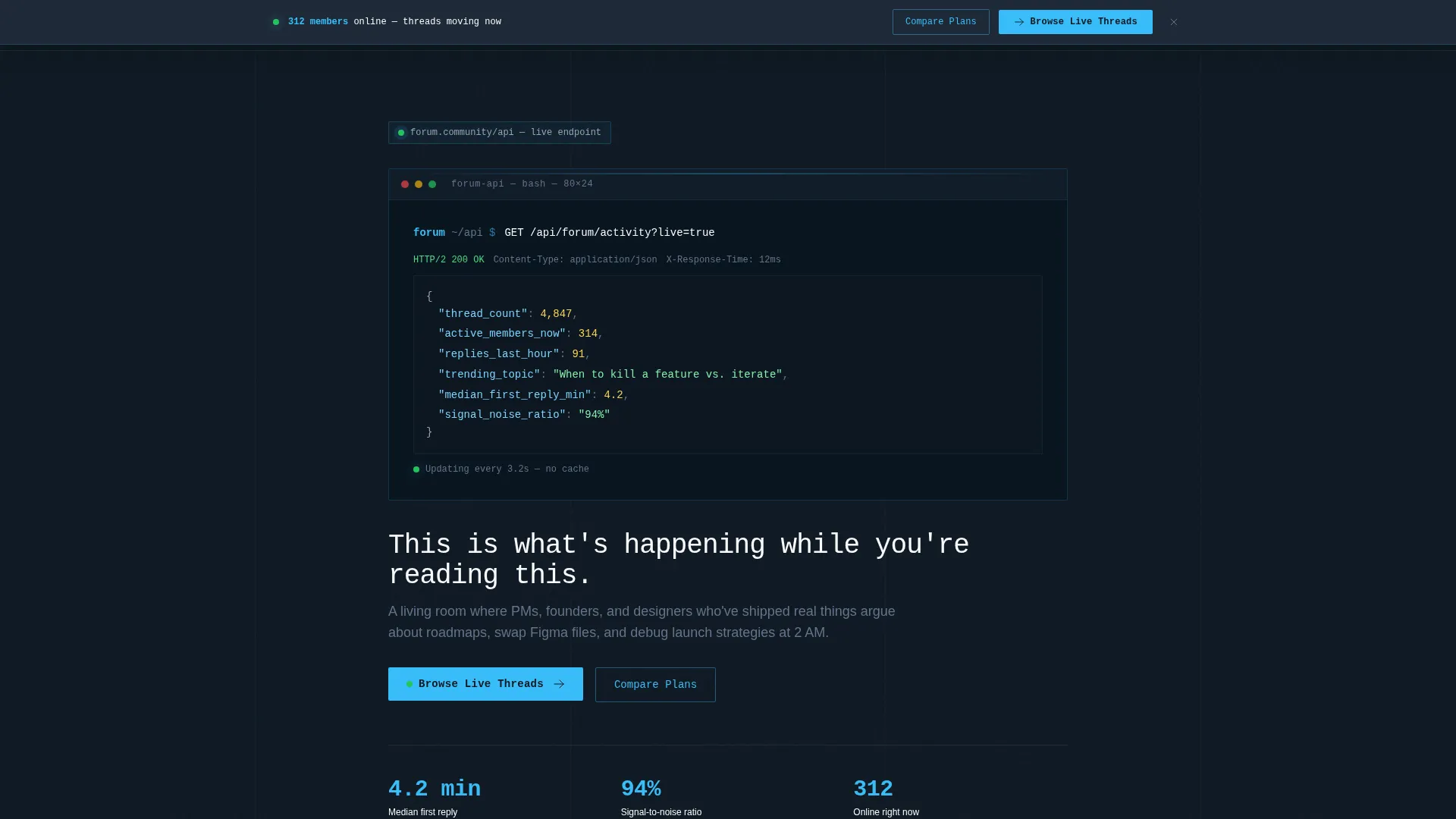
- A terminal-style header block with a live-updating JSON snippet showing thread count, active members, replies per hour, and trending topic
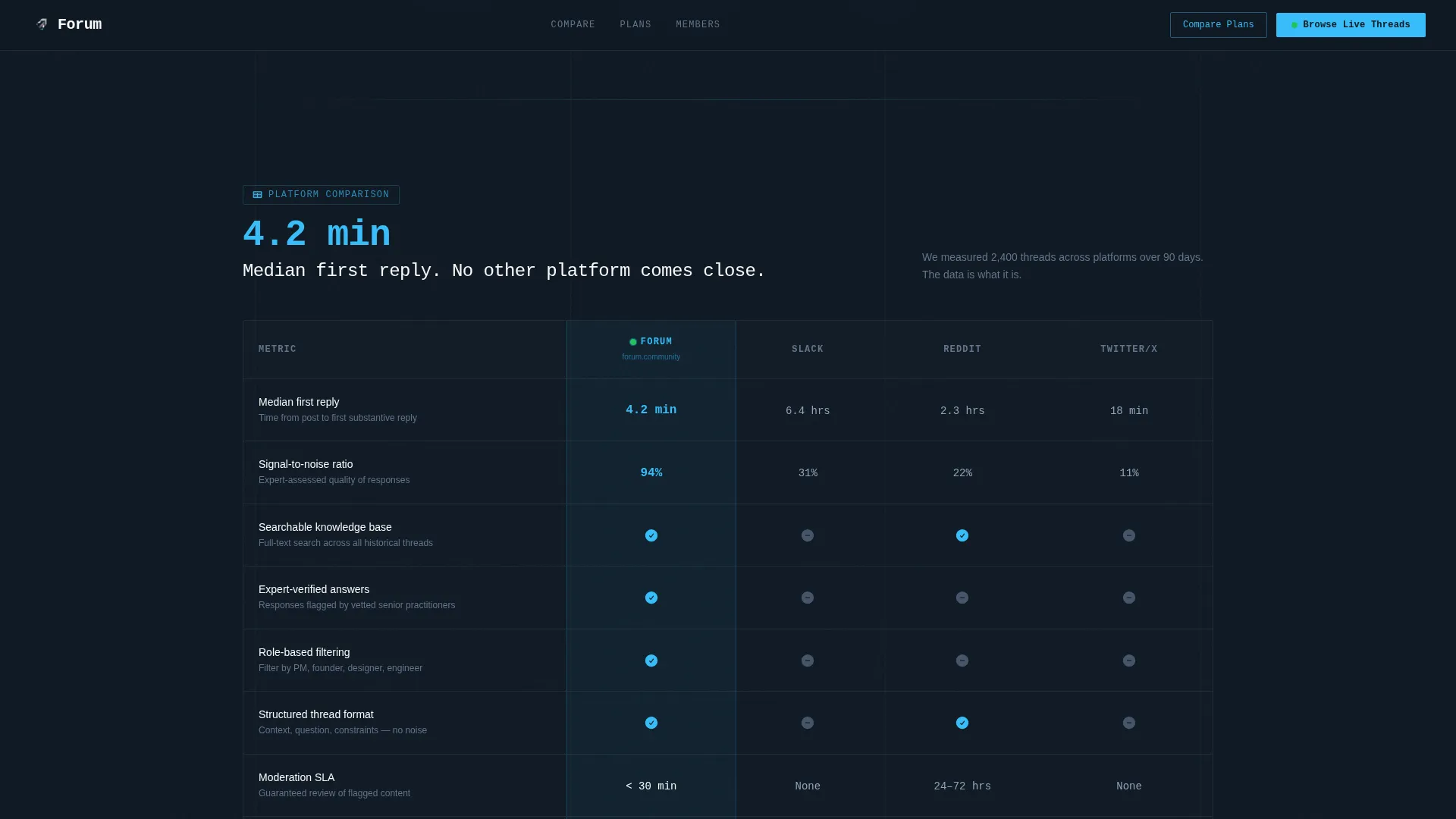
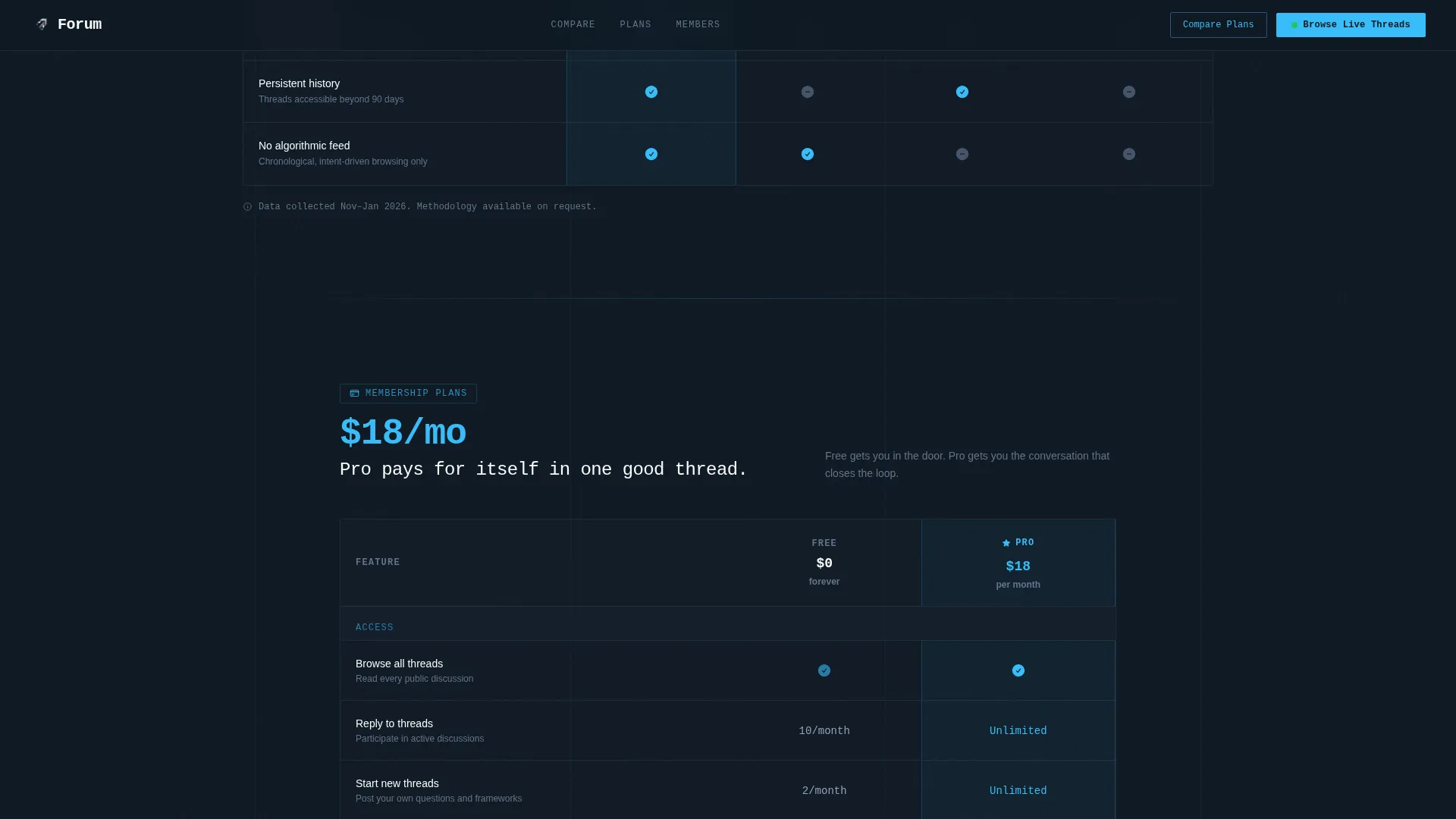
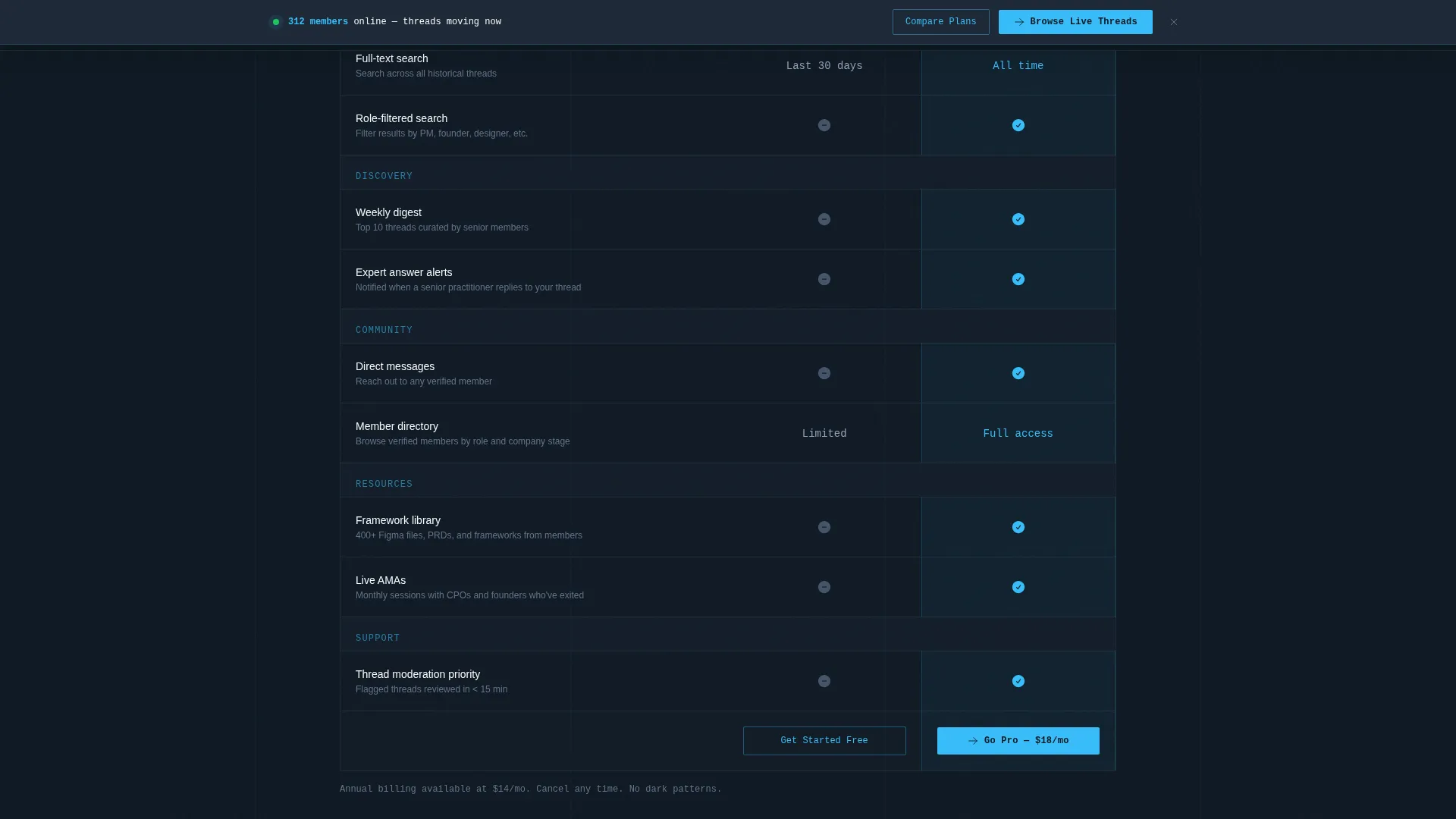
- Two full comparison tables: one benchmarking your forum against other platforms, one breaking down Free versus Pro membership tiers
- A sticky call-to-action bar, two primary call-to-action placements, social proof cards, and a final dark-slate conversion section
Feature list
This template is built around a clear set of functional components. Each one is grounded in the project brief and designed to support a data-led, click-through conversion flow.
Live Terminal Header Snippet
The header opens with a styled code block showing a real API call to the forum's activity endpoint. It returns live JSON data including thread count, active members online, replies in the last hour, and the top trending topic. Numbers update in real time using client-side counter animations.
Platform Comparison Table
The first comparison table benchmarks the forum against Slack communities, Reddit, and Twitter/X. Columns cover average reply time, signal-to-noise ratio, searchable knowledge base availability, and expert-verified answers. Numbers are displayed in 32-pixel sky blue to pull the eye immediately.
Free versus. Pro Membership Table
The second table lays out every feature difference between the free tier and Pro membership. Each section opens with a single foregrounded stat before the table adds full context. This format makes upgrade decisions feel logical rather than pressured.
Sticky Call-to-Action Bar
After the second comparison table, a sticky bar appears at the bottom of the viewport. It carries the primary call-to-action and stays visible as the visitor continues scrolling. This keeps the conversion path accessible without interrupting reading flow.
Social Proof Cards
Three asymmetric testimonial cards display specific outcomes from real member roles including founders, senior product managers, and design leads. Each card names a role and company stage so readers can find their own reflection in the social proof.
Scroll-Triggered Reveal Animations
Sections animate into view as the visitor scrolls deeper. Counter animations bring stat numbers to life on entry. These medium-intensity interactions give the page energy without distracting from the data it is presenting.
Page sections overview
| Section | Purpose |
|---|---|
| Terminal API Header | Opens with live JSON data to establish credibility immediately |
| Platform Comparison Table | Shows how the forum outperforms Slack, Reddit, and Twitter/X |
| Membership Tier Table | Clarifies Free versus Pro feature differences side by side |
| Social Proof Cards | Three role-specific testimonials grounding claims in real outcomes |
| Final Call-to-Action | Dark slate section driving the primary registration click-through |
| Footer | Single-row linear footer with essential navigation links |
Design & branding system
The template uses a Slate and Sky color system built around four values. Deep charcoal slate (#1E2A38) dominates backgrounds and primary text. Cool mid-gray (#64748B) handles labels and secondary copy. Open sky blue (#38BDF8) marks every clickable surface and live-data accent. Cloud white (#F8FAFC) fills card interiors and comparison table cells so information feels sorted, not stacked.
- Typography pairs JetBrains Mono for all code blocks, numbers, and data labels with DM Sans for body copy and section headings
- The visual theme follows a Directory and Discovery direction: functional, calm, and data-forward with no decorative illustration or hero imagery
- Sky blue at 32-pixel scale foregrounds key numbers in both comparison tables, creating a consistent visual hierarchy that guides the eye through dense data
Mobile & speed optimization
The template is designed desktop-first to match the primary audience of product people working at computers. Mobile layout is fully supported with solid responsive behavior across breakpoints.
- Static content is handled via server components; live counter updates are isolated to client components to keep initial load lean
- Table layouts reflow cleanly on smaller screens so comparison data stays readable without horizontal scrolling
- Scroll-triggered animations are scoped to medium intensity, keeping interaction smooth without adding unnecessary rendering weight
How this template helps you convert
This template earns the conversion before it asks for one. Every scroll reveals another layer of evidence, and the click-through flow is designed to show the product running live before requesting any information.
- The live API snippet in the header establishes immediate credibility by showing real activity data, so the visitor's first impression is proof, not pitch
- Two stacked comparison tables answer the most common objections before a visitor can voice them, making the decision to click through feel like a logical conclusion rather than a leap of faith
- The primary call-to-action lands visitors in a read-only thread feed before any gate appears, letting the community speak for itself and using a soft email-plus-role prompt only when the visitor is already engaged
Other information about this template
This template is categorized under Documentation and Support, specifically the Community and Forum subcategory, targeting the product community forum niche. It suits B2B community platforms, product management tools, and SaaS products that serve cross-functional product teams.
- The template style is Comparison Table, making it a strong fit for any community or platform that wants to differentiate itself from alternatives in a direct, structured format
- The landing page direction is Click-Through, meaning no form lives on the page itself; the conversion happens inside the product after the initial click
- The header concept is a Code Snippet, a deliberate design choice that signals technical credibility and attracts an audience comfortable with data and developer-adjacent tools
- The intersection match covers Documentation and Support at the category level, Community and Forum at the subcategory level, and Product Community Forum at the niche level
Theme
Directory & Discovery
Creative direction
Stats-First Impact
Color system
Slate & Sky
Style
Comparison Table
Direction
Click-Through
Page Sections
Live Terminal Header Snippet
Platform Comparison Table
Free Versus. Pro Membership Table
Sticky Call-to-action Bar
Social Proof Testimonial Cards
Scroll-triggered Section Reveals
Related questions
Can I customize the comparison table data for my own community?
Does the live JSON ticker require a real API connection?
Is this template suitable for a community that is still in early access?
What happens after a visitor clicks the primary call-to-action?
Can I change the typography or color system?



