Precision Construction Landing Page Template
Scaffold is a dashboard-style construction thank-you landing page built for commercial builders. It transforms a post-submission confirmation into an interactive capability showcase. Visitors explore live-style project data, equipment inventories, safety stats, and a before-and-after portfolio gallery. The iridescent dark-panel design signals serious operational depth from the first second.
by Rocket studio
Quick summary
Scaffold is a single-page, post-submission confirmation template built for commercial construction companies. It replaces a static thank-you screen with an immersive dashboard experience. Visitors explore project timelines, crew stats, equipment modules, and completed builds. The design feels like a next-generation project management terminal, keeping new leads engaged and confident they chose the right builder.
Who this template is for
This template is built for construction companies that handle large-scale commercial projects. It suits teams where the estimator is always in the field and the superintendent's calendar never empties. If your clients are developers, municipal managers, or general contractors, this page speaks their language.
- Commercial construction firms building strip malls, schools, or warehouses from ground up
- Construction sales teams who need a thank-you page that builds client confidence immediately after a quote request
- Project-focused builders who want to show operational depth rather than deliver a generic confirmation screen
What problem this template solves
After a client submits a quote request or books a consultation, they often land on a blank thank-you screen. That silence creates doubt. They wonder if they chose the right contractor, and that doubt can lead them straight to a competitor's website.
- Eliminates post-submission drop-off by replacing a dead-end confirmation with an interactive proof of capability
- Removes the need to manually send follow-up materials, since the capabilities deck download is available with a single click and no extra form fields
- Bridges the gap between lead capture and client conviction by making the visitor feel already onboarded
What you get with this template
You get a fully structured, single-page dashboard landing page designed to work immediately after form submission. Every section is built to hold a visitor's attention and reinforce their decision. The layout is dense with purposeful data visuals, not decorative filler.
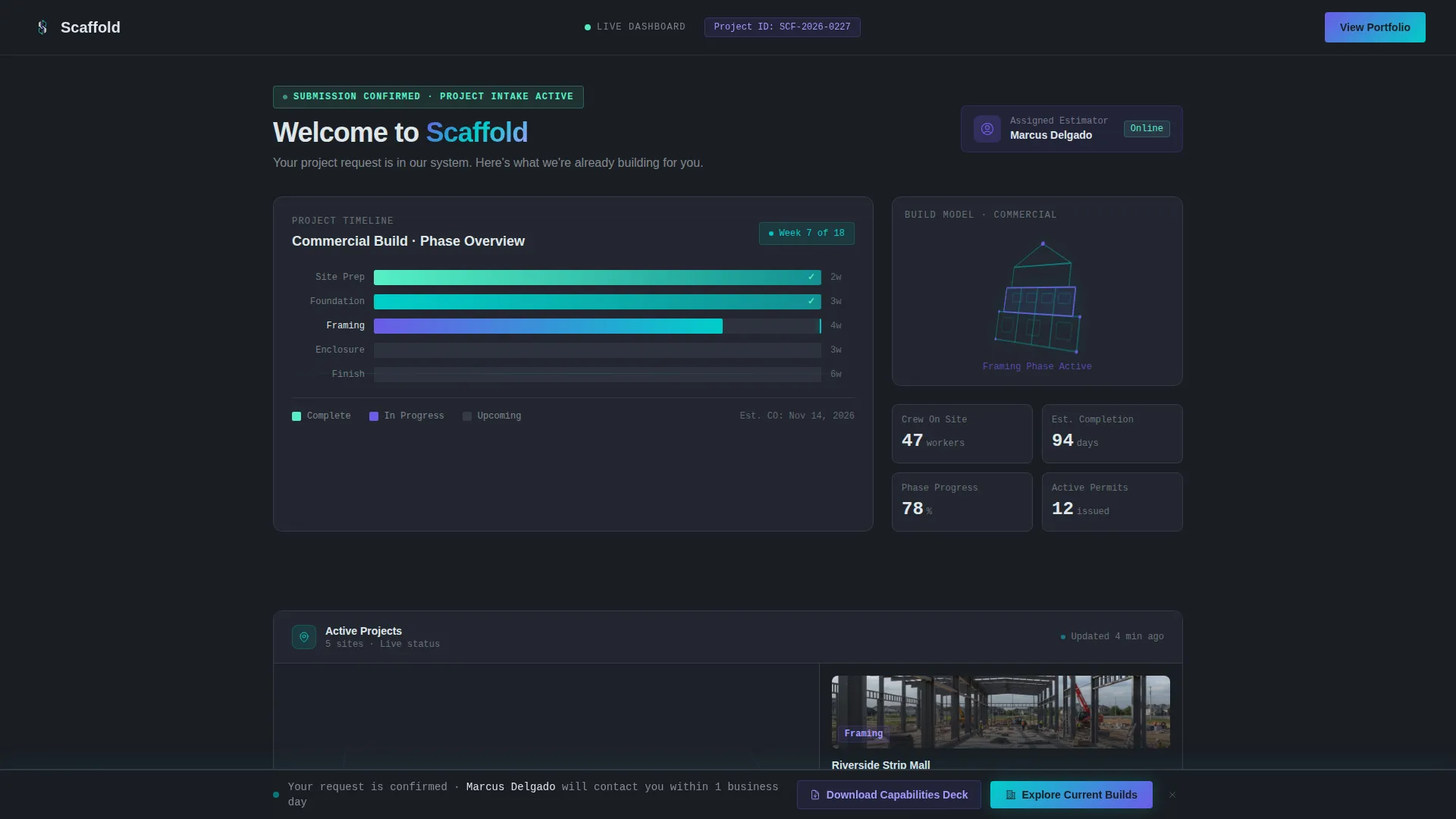
- An interactive header dashboard with a Gantt chart, crew numbers, estimated timeline, and a rotating 3D commercial building wireframe
- Four clickable grid modules covering active projects, fleet and equipment, safety record, and a before-and-after portfolio gallery
- A persistent bottom bar call-to-action with iridescent teal glow and a single-click capabilities deck download button
Feature list
This section highlights the core functional components built into the Scaffold template.
Interactive Header Dashboard
The header opens as a live-style project dashboard, not a static hero image. A Gantt chart displays five labeled phases: Site Prep, Foundation, Framing, Enclosure, and Finish. Each phase bar fills with iridescent progress color. Crew allocation numbers and an estimated project timeline occupy adjacent grid cells, giving the visitor an immediate sense of operational control.
Personalized Project Portal Feel
The top-left of the header displays the visitor's name or project type pulled from their previous form submission. This detail makes the confirmation screen feel like a logged-in client portal rather than a generic landing page. It signals that the company is already treating their project as active.
Rotating 3D Building Wireframe
A rotating three-dimensional wireframe of a commercial building skeleton sits inside the header grid. It reinforces the construction context visually without relying on static photography. The animation adds motion and depth that distinguishes this template from standard thank-you pages.
Clickable Capability Modules
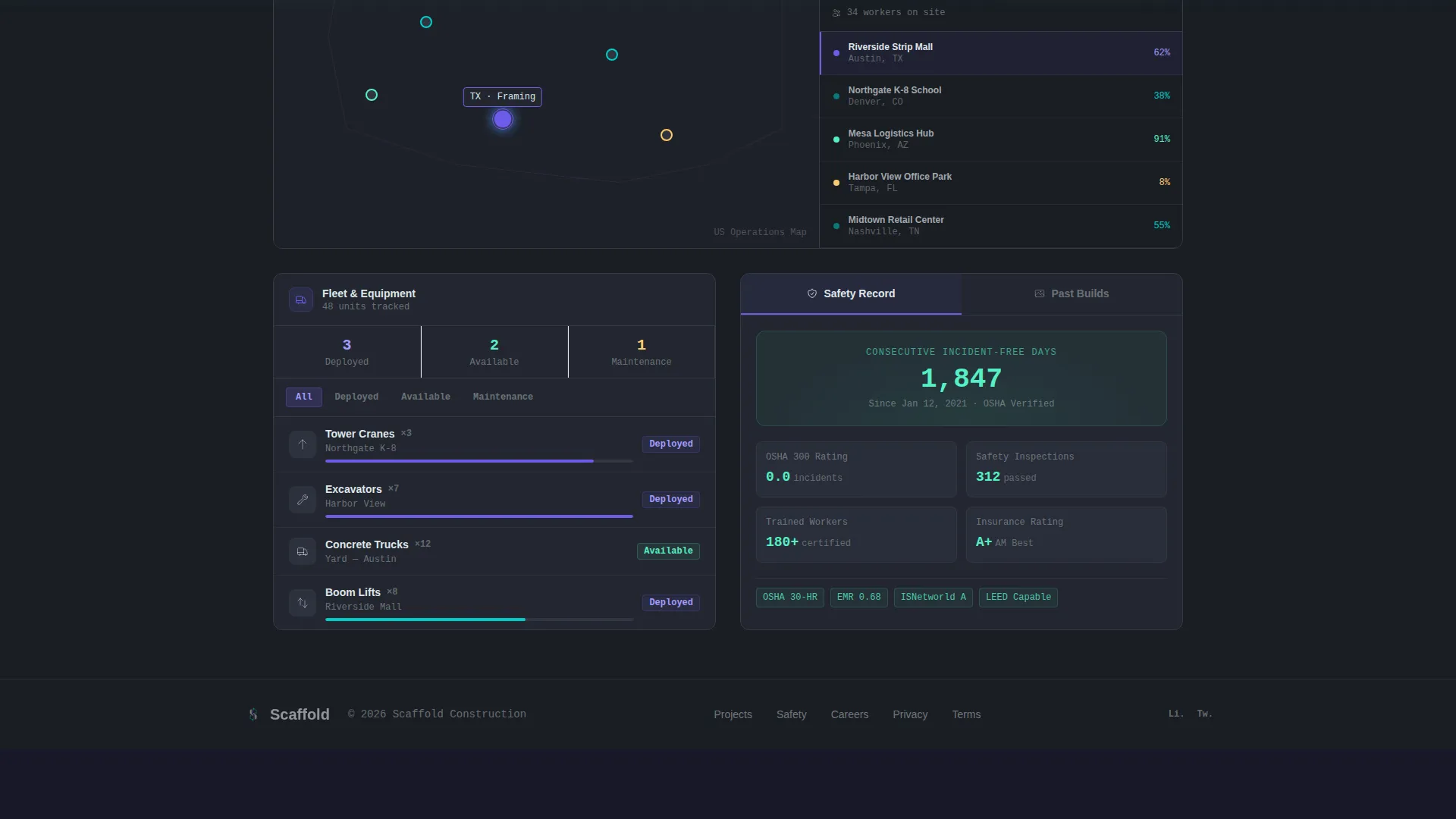
Below the header, four grid tiles function as self-guided exploration modules. The Active Projects tile reveals a map with pinned job sites and live status badges. The Fleet and Equipment tile opens a visual inventory of cranes, excavators, and concrete trucks with availability indicators. The Safety Record tile shows an animated counter of consecutive incident-free days. The Past Builds tile launches a before-and-after slider gallery of completed commercial projects.
Persistent Click-Through Bottom Bar
A bottom bar follows the visitor through every module. It glows with iridescent teal and holds the primary call-to-action: "Explore Our Current Builds," linking to the full project portfolio. This ensures the conversion path is never more than a glance away, no matter how deep the visitor explores.
Single-Click Capabilities Deck Download
A secondary conversion option sits alongside the primary call-to-action. Visitors can download the company's capabilities deck with one click and no additional form fields. Because the lead is already captured from the previous submission, this removes all friction from the next step in the sales process.
Page sections overview
| Section | Purpose |
|---|---|
| Header Dashboard | Displays a Gantt chart, crew stats, project timeline, and rotating building wireframe to simulate an active project portal |
| Active Projects Module | Shows a map of pinned job sites with live status badges so visitors see real operational scale |
| Fleet and Equipment Module | Opens a visual inventory of construction equipment with availability indicators to demonstrate resource depth |
| Safety Record Module | Animates a counter of consecutive incident-free days to build trust around operational standards |
| Past Builds Gallery | Launches a before-and-after slider of completed commercial projects to provide tangible proof of delivery |
| Persistent Bottom Bar | Keeps the primary call-to-action and capabilities deck download visible throughout the entire page experience |
Design & branding system
The visual identity follows a Dashboard Pro theme built on an AI Iridescent color system. The palette feels like a construction management platform designed decades ahead of its time, where every data point glows with purpose.
- Deep graphite (#1A1D23) serves as the primary background, creating a project management terminal feel at dusk
- Shifting violet-blue (#6C5CE7) activates on data modules to signal interactive and clickable states
- Iridescent teal (#00CEC9) pulses across progress bars, status indicators, and the persistent bottom bar call-to-action
- Scaffold white (#DFE6E9) handles all typography and card surfaces, keeping data readable against the dark base
Mobile & speed optimization
The dashboard grid layout is structured to adapt across screen sizes. The module-based design means each tile reflows cleanly on smaller viewports without losing the layered data feel.
- Grid tiles resize and restack on mobile so the interactive modules remain tappable and legible
- The persistent bottom bar stays anchored on mobile viewports, keeping the call-to-action accessible at every scroll depth
- Lightweight data-visual components keep the page feeling fast without requiring heavy external dependencies
How this template helps you convert
This template is engineered to move a visitor from confirmation to conviction. Every design decision reduces doubt and encourages the next action.
- The personalized header dashboard makes the visitor feel their project is already active, which creates an immediate sense of momentum and reduces the urge to compare competitors.
- The four interactive modules reward exploration with deeper proof of capability, so by the time a visitor has clicked through three tiles they feel certain about the builder they chose.
- The persistent bottom bar and single-click capabilities deck download eliminate friction from both conversion paths, making it easy to take the next step without interrupting the exploration experience.
Other information about this template
The Scaffold template is categorized under construction company website templates and is specifically designed for the construction company thank-you page niche. It sits within the broader Technology category on the template marketplace. The template style is Dashboard and Data Grid, and the theme is Dashboard Pro. The creative direction follows an Interactive Explorer approach, meaning visitor curiosity drives the experience rather than a linear scroll. The header concept is Interactive Preview, simulating an already-in-motion project dashboard from the first moment. The landing-page direction is Click-Through, keeping conversion paths persistent and low-friction throughout.
- Designed as a single landing page, not a multi-page website build
- The color system is AI Iridescent, combining deep graphite, violet-blue, iridescent teal, and scaffold white
- The template is suited for construction companies winning commercial contracts with developers, municipal project managers, and general contractors
- No additional form fields are required to access the capabilities deck download since the lead is already captured at submission


Theme
Dashboard Pro
Creative direction
Interactive Explorer
Color system
AI Iridescent
Style
Dashboard/Data Grid
Direction
Click-Through
Page Sections
Interactive Header Dashboard
Personalized Project Portal Display
Rotating 3D Building Wireframe
Four Clickable Capability Modules
Persistent Teal Bottom Bar Call to Action
Single-click Capabilities Deck Download
Related questions
Can I update the Gantt chart phases to match my actual project workflow?
Does the visitor's name in the header require a form integration to work?
Can the capabilities deck download link to any file format?
Is this template suitable for a construction company that builds multiple project types?
Can I change the primary call-to-action destination in the bottom bar?



