Cross-Platform Landing Page Template
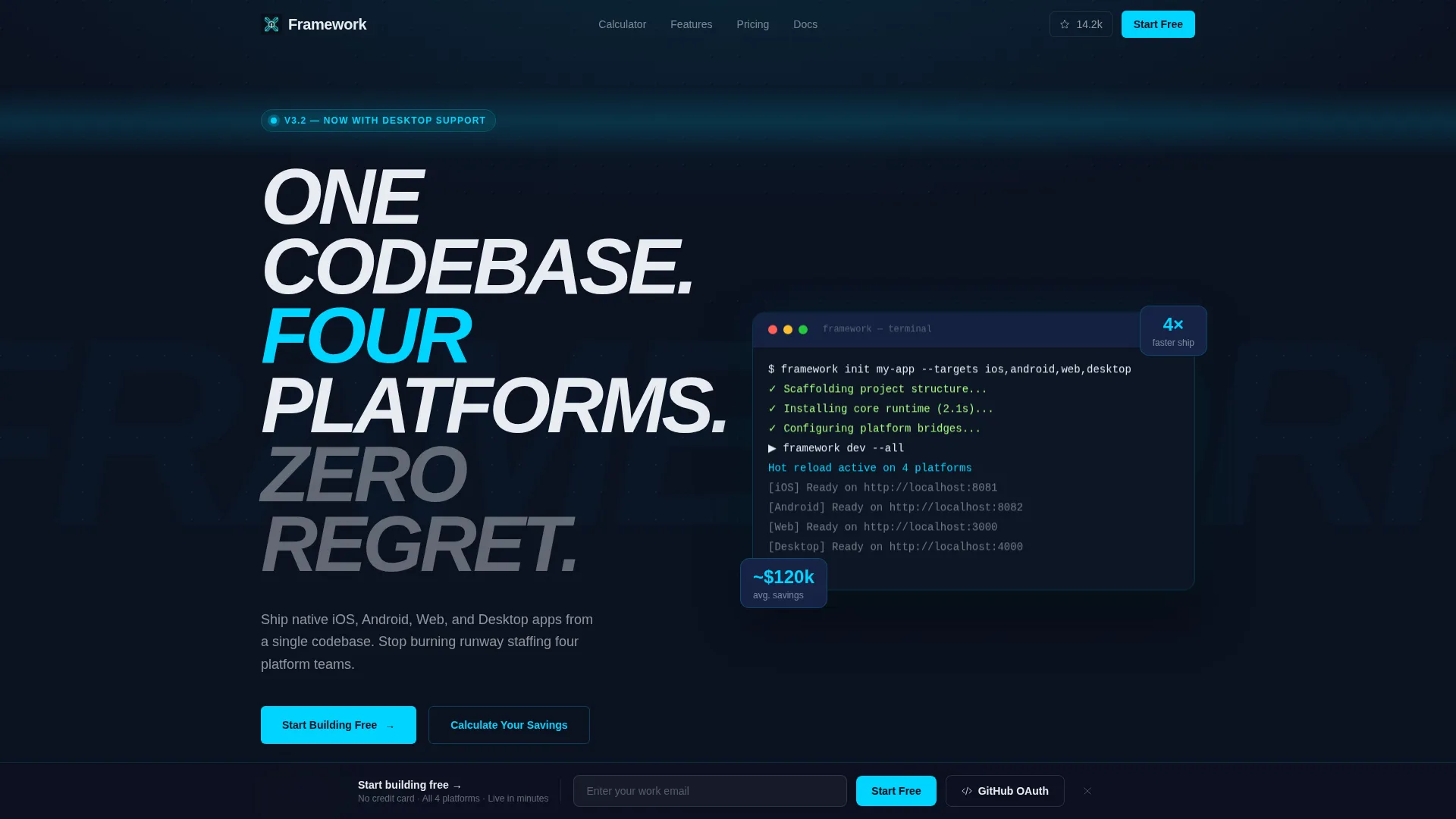
Framework is a scroll-reveal landing page template built for cross-platform development toolkits. It opens with an interactive Ship Time Calculator, unfolds a progressive feature matrix with live code snippets, and closes with a freemium conversion bar. The midnight-blue visual system makes it feel like a code editor at peak focus, built for startup CTOs, solo developers, and agency leads.
by Rocket studio
Quick summary
Framework is a single-page template designed for cross-platform development products. It opens with an interactive cost estimator, reveals capabilities one scroll at a time, and drives sign-ups through a sticky freemium conversion bar. The dark Midnight Blue palette and electric cyan accents give it the focused energy of a terminal window running its first clean build.
Who this template is for
This template is built for teams and individuals who ship software across multiple platforms and need to justify or promote a unified development toolkit.
- Startup CTOs who are spending budget on parallel native codebases and need to show stakeholders the cost of that approach
- Solo developers and side-project builders who want a polished landing page that communicates technical depth quickly
- Agency leads quoting clients on tight timelines who need to present a cross-platform solution with credibility
What problem this template solves
Managing four separate platform teams is expensive and slow. This template gives cross-platform framework products a landing page that makes that cost impossible to ignore.
- Visitors arrive without understanding the true development overhead of building separately for iOS, Android, web, and desktop
- Most framework landing pages list features without converting objections into arithmetic the visitor has already run
- Generic templates lack the dark, high-contrast visual identity that developer audiences expect and respond to
What you get with this template
You get a fully structured scroll-reveal landing page that leads with a persuasive interactive calculator and builds momentum through a progressive feature matrix.
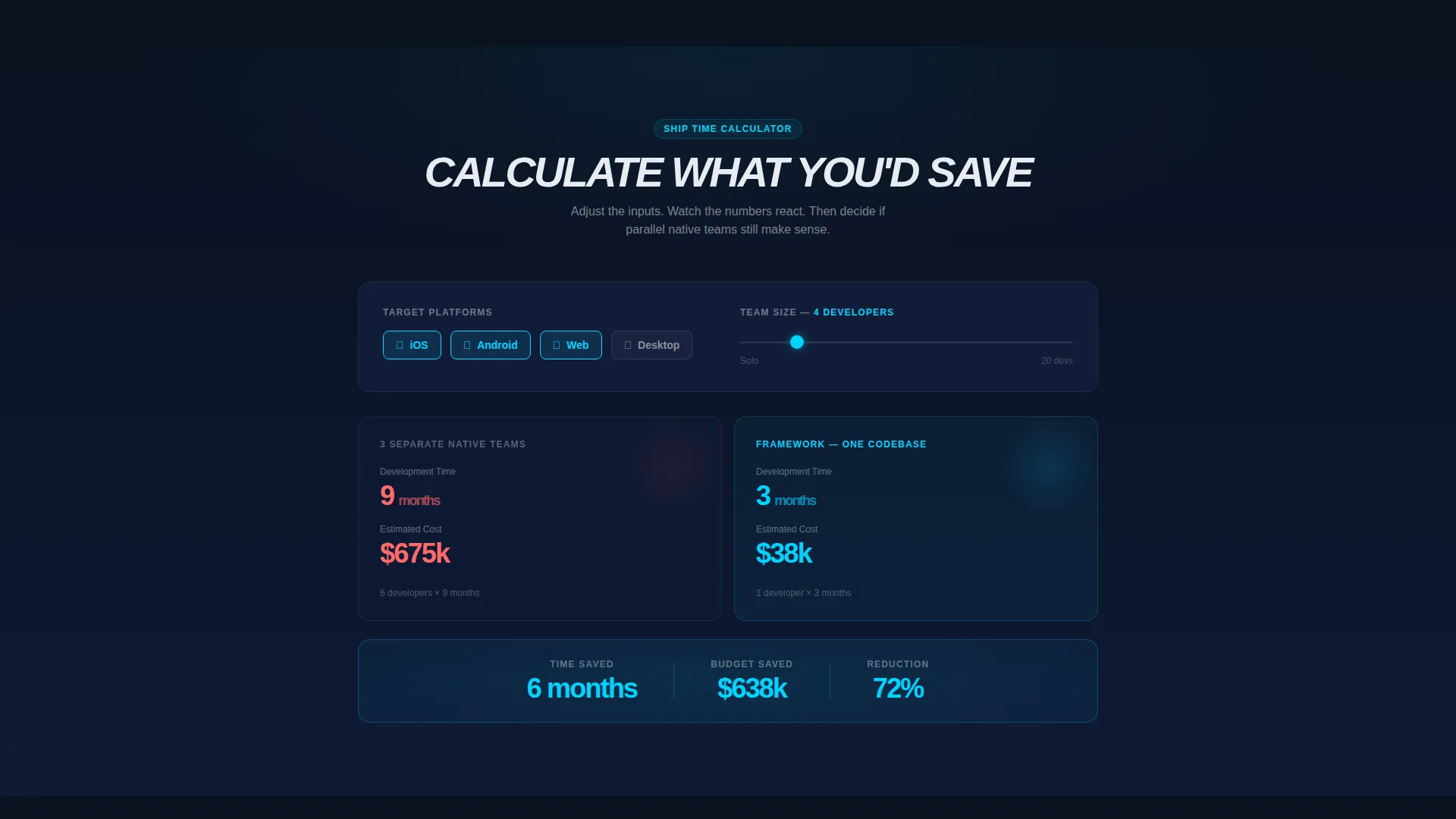
- An interactive Ship Time Calculator with platform toggles, a team-size slider, and a real-time split comparison showing development months and cost
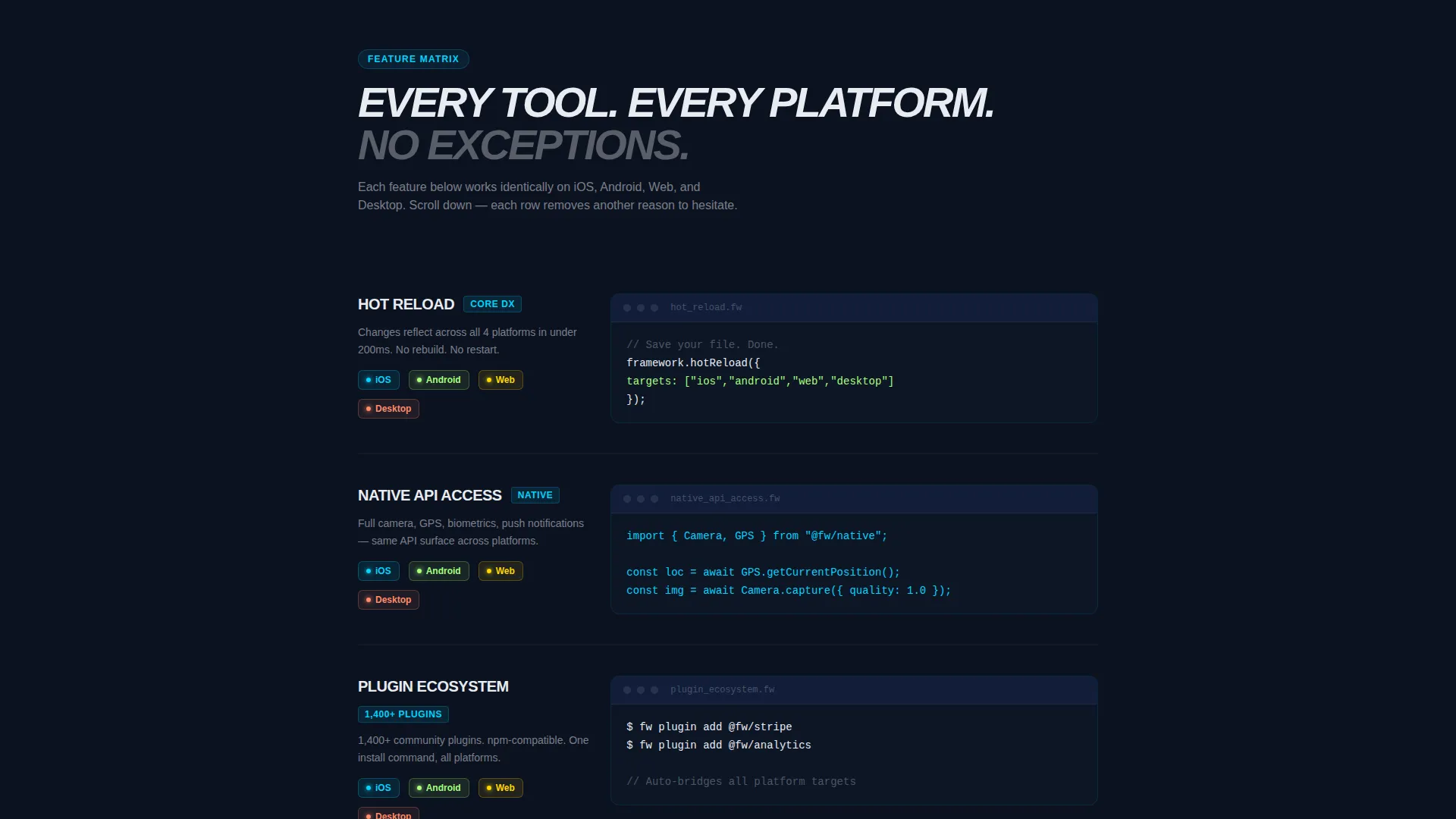
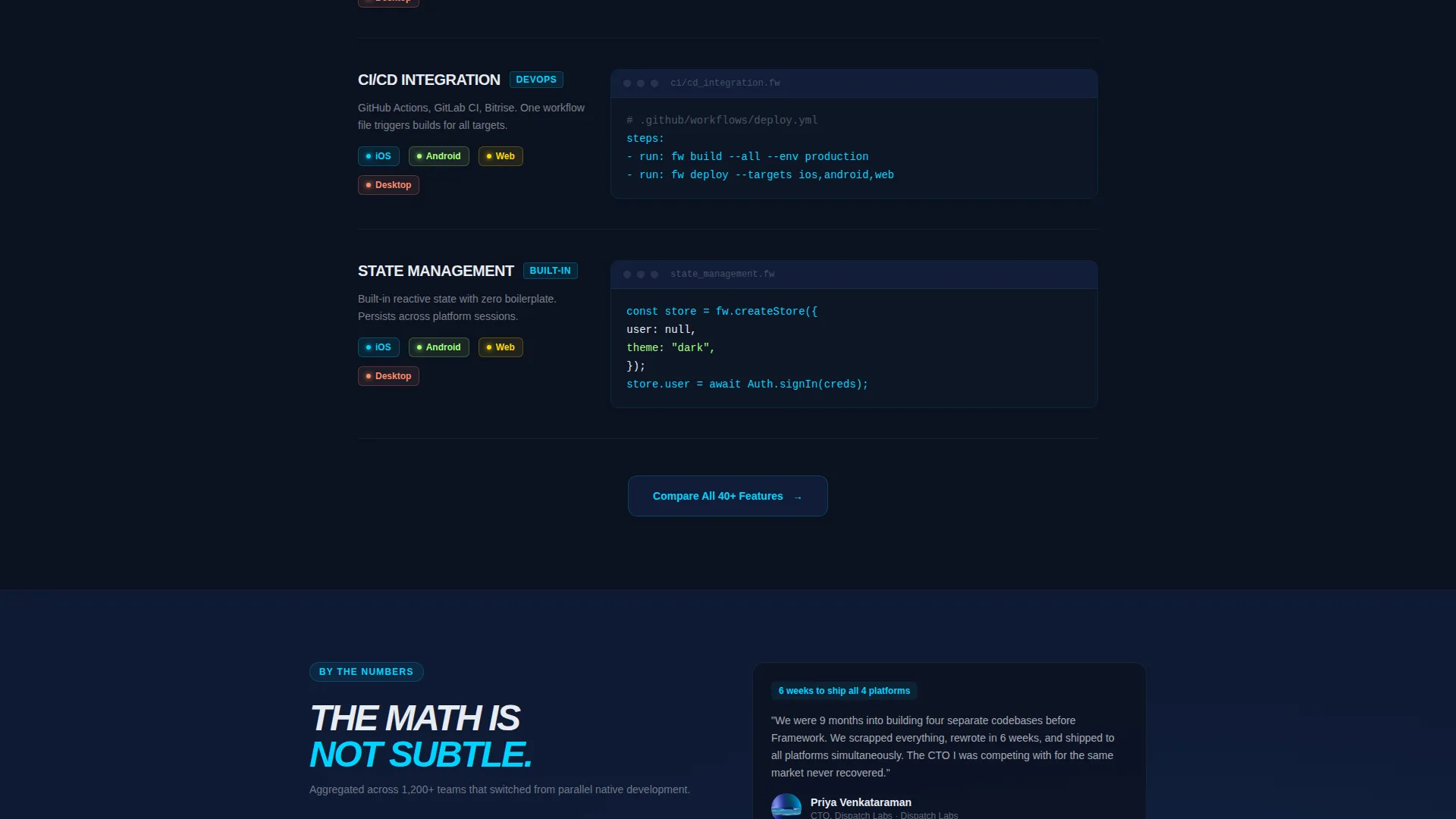
- A scroll-driven feature matrix with hot reload, native API access, plugin ecosystem, CI/CD integration, and state management rows, each entering with a left-to-right wipe animation and inline code snippets
- A sticky freemium conversion bar with an email field and a GitHub OAuth button, plus a secondary call-to-action linking to full documentation
Feature list
This template ships with purposeful components that map directly to the needs of a developer-focused product launch.
Interactive Ship Time Calculator
Visitors select target platforms using toggle chips for iOS, Android, Web, and Desktop, set a team size using a one-to-twenty slider, and choose their current framework. The estimator renders a live split comparison: native-team cost and timeline on the left, single-codebase savings on the right, with numbers that tick down like a countdown clock.
Progressive Scroll-Reveal Feature Matrix
Each capability row enters the viewport with a subtle left-to-right wipe as the visitor scrolls. Every row shows the feature name, a three-line code snippet, and a grid of platform icons that light up to confirm compatibility. The matrix covers hot reload, native API access, plugin ecosystem, CI/CD integration, and state management.
Sticky Freemium Conversion Bar
After the first scroll, a slim bar pins to the bottom of the screen. It holds a single email input field and a GitHub OAuth button, keeping the sign-up path fast and friction-free throughout the rest of the page.
Secondary Feature Documentation call to action
After the feature matrix completes, a secondary call-to-action button reads "Compare All 40+ Features" and links to full documentation. It serves visitors who need deeper proof before committing to a free account.
Scroll-Driven Section Sequencing
Each section is timed to appear as the visitor scrolls, building evidence progressively. The design intent is that by the time the visitor reaches the conversion bar, the feature matrix has already answered every major objection.
Page sections overview
| Section | Purpose |
|---|---|
| Ship Time Calculator | Opens the page with an interactive cost and timeline estimator |
| Calculator Headline | Anchors the estimator with "Calculate what you'd save" messaging |
| Feature Matrix Rows | Reveals cross-platform capabilities one scroll step at a time |
| Code Snippet Display | Shows three-line syntax examples inline with each feature row |
| Platform Icon Grid | Lights up per-platform compatibility for each feature |
| Sticky Conversion Bar | Pins email and GitHub OAuth sign-up after first scroll |
| Secondary call to action Block | Directs high-intent visitors to full documentation comparison |
Design & branding system
The visual identity follows a Startup Velocity theme built on a Midnight Blue color system. Every color decision reinforces the feeling of a focused terminal session.
- Void-dark navy (#0B1120) as the primary background, deep ocean (#162447) for card surfaces and section breaks, electric cyan (#00D4FF) for interactive highlights, code syntax accents, and the pulsing delta savings figure, and chalk white (#E8ECF1) for body text
- The overall aesthetic reads like a code editor open in a dark room: high-contrast, minimal distraction, and visually energized by the cyan accent layer
- Scroll-reveal animations use subtle left-to-right wipes that feel native to the developer experience without adding visual noise
Mobile & speed optimization
The template is structured for a clean experience across device sizes, with layout decisions that support both desktop-first developer workflows and mobile review sessions.
- The calculator toggles, slider, and split comparison are built into a layout that adapts across screen widths without losing the side-by-side comparison logic
- The sticky conversion bar is designed to remain readable and tappable at mobile viewport sizes, keeping the freemium path accessible at every scroll depth
How this template helps you convert
Every structural decision in this template is aimed at reducing the time between a visitor arriving and a visitor clicking "Start Building Free."
- The Ship Time Calculator leads with personalized, numeric proof of value before asking for anything. Visitors see their own cost delta in electric cyan before they encounter a single sign-up field.
- The progressive feature matrix builds cumulative trust. Each scroll step adds one more confirmed capability, making the total evidence feel earned rather than dumped on the visitor at once.
- The sticky freemium bar and GitHub OAuth button keep the conversion action visible and low-friction throughout the entire page, removing the need to scroll back up to act.
Other information about this template
This template was designed for the cross-platform mobile app development niche, where developer audiences are skeptical of marketing and respond to specificity, technical demonstration, and honest cost framing.
- The template style is Scroll Reveal (Progressive), meaning content enters the viewport in deliberate sequence rather than loading all at once
- The header concept is a Calculator/Estimator, which is a high-engagement interactive component that earns visitor attention by delivering personalized value before requesting a conversion
- The landing page direction is Freemium/Trial, structured to remove signup friction with both email and OAuth entry points
- The theme is Startup Velocity, a design language suited to early-stage developer tools that need to signal momentum and technical credibility simultaneously
Theme
Startup Velocity
Creative direction
Feature Matrix
Color system
Midnight Blue
Style
Scroll Reveal (Progressive)
Direction
Freemium/Trial
Page Sections
Ship Time Calculator with Live Comparison
Scroll-reveal Feature Matrix
Sticky Freemium Conversion Bar
Secondary Documentation Call to Action
Midnight Blue Dark Visual System
Related questions
Can I customize the platform toggles in the Ship Time Calculator?
Do I need coding experience to edit this template?
How does the sticky conversion bar work?
Is this template suitable for a product that supports fewer than four platforms?
What does the secondary call to action link to?



