Franchise - Powerful Contract Landing Page Template
The Franchise Contract Management landing page template gives franchise development directors and multi-brand operators a Data Command-themed comparison layout. It opens with a live interactive portfolio preview, drives scroll with three specialized feature matrix tables, and closes every visit with a persistent app download bar. The result is a focused, conversion-ready single-page experience built for franchise contract complexity.
by Rocket studio
Quick summary
This landing page template is built for franchise contract management platforms. It combines an interactive portfolio preview header, three progressively detailed feature matrix tables, and a persistent download call-to-action bar. The Data Command theme and Teal Catalyst color system keep dense comparison content readable and visually sharp throughout.
Who this template is for
This template fits operators and builders who manage franchise agreements at real scale. It is designed specifically for people whose current tools are failing under the weight of multi-unit complexity.
- Franchise development directors managing 200 or more unit agreements across multiple states
- Multi-brand operators whose legal teams spend hours every week buried in amendment trackers
- Emerging franchisors who have crossed the 50-unit threshold and outgrown spreadsheet-based tracking
What problem this template solves
Franchise contract portfolios grow faster than the systems built to manage them. Renewal dates slip, royalty clauses live in different folders, and territory restrictions get missed entirely when the only tool is a shared spreadsheet.
- No single place to view clause status, renewal timelines, and territory data across all units
- Generic contract tools miss franchise-specific needs like FDD cross-referencing and Item 19 tracking
- Operators struggle to communicate the value of dedicated software versus cheaper, familiar alternatives
What you get with this template
You get a fully structured, single-page comparison layout that does the selling through evidence rather than assertions. Every section is designed to build trust as the visitor scrolls deeper.
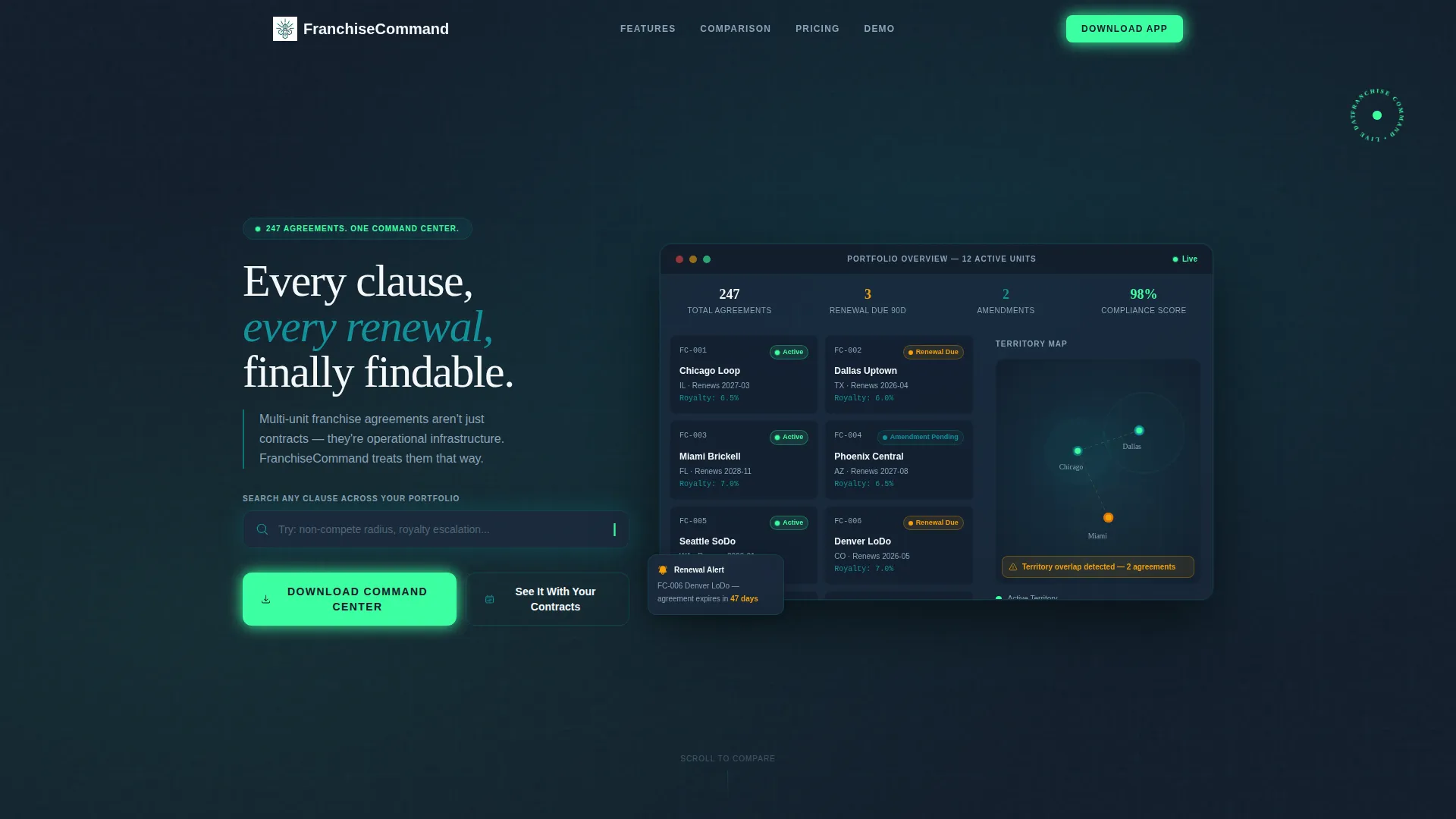
- An interactive header preview showing a simulated franchise portfolio with live status indicators and a working clause search bar
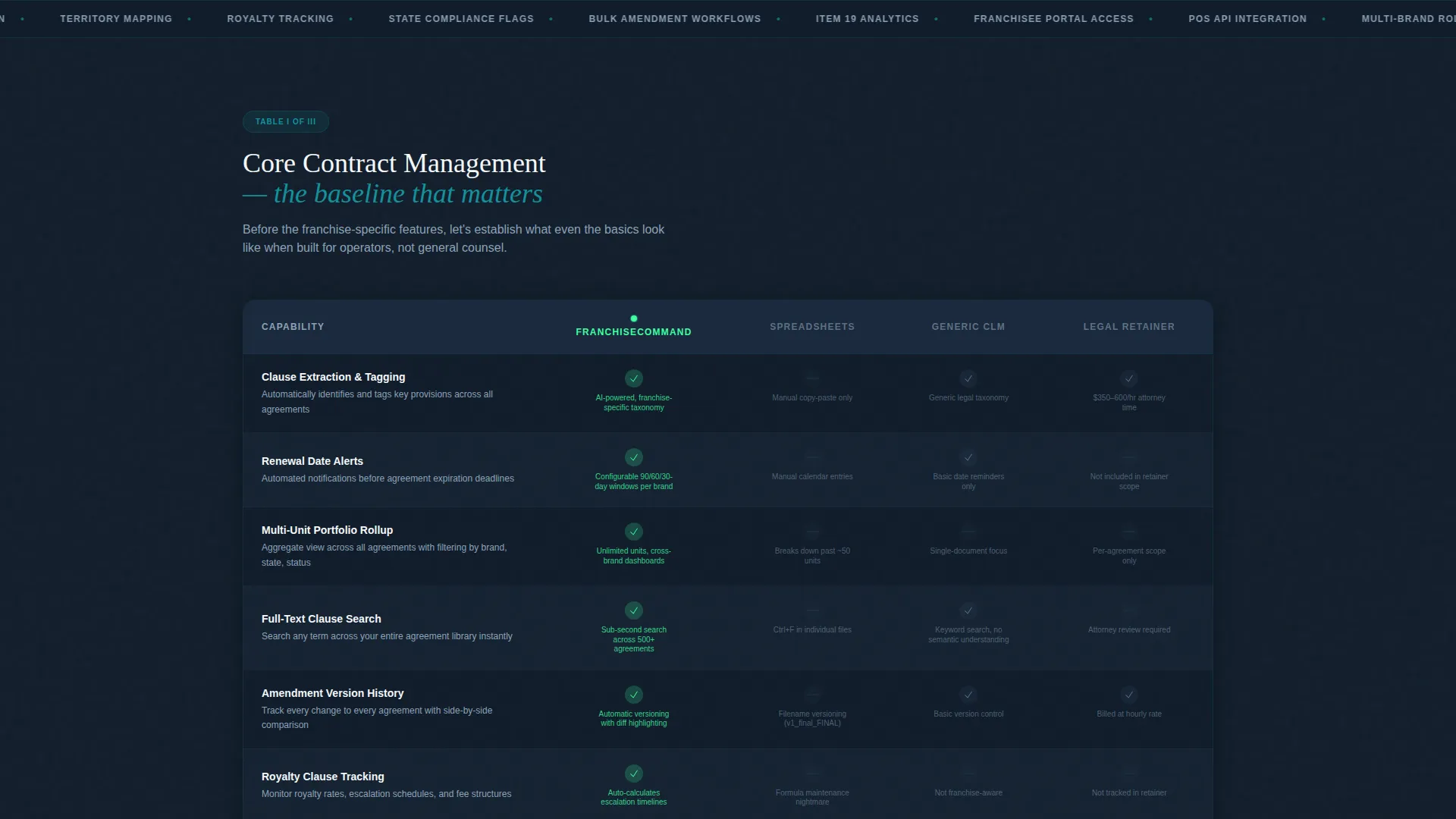
- Three horizontal feature matrix tables comparing the platform against spreadsheets, generic CLM tools, and legal firm retainers
- A persistent bottom-bar call-to-action with a platform selector, email capture field, and franchise unit count dropdown
Feature list
This template delivers a tightly connected set of interactive and visual components, each serving a specific role in the conversion flow.
Interactive Portfolio Header
The header embeds a functioning mini-dashboard directly in the viewport. Visitors see twelve unit cards with status pills labeled Active, Renewal Due, and Amendment Pending. A territory map shows overlapping radius circles. A clause search bar accepts real keystrokes and auto-completes with franchise-specific terms like "non-compete radius" and "royalty escalation," surfacing mock contract snippets instantly.
Three-Stage Feature Matrix
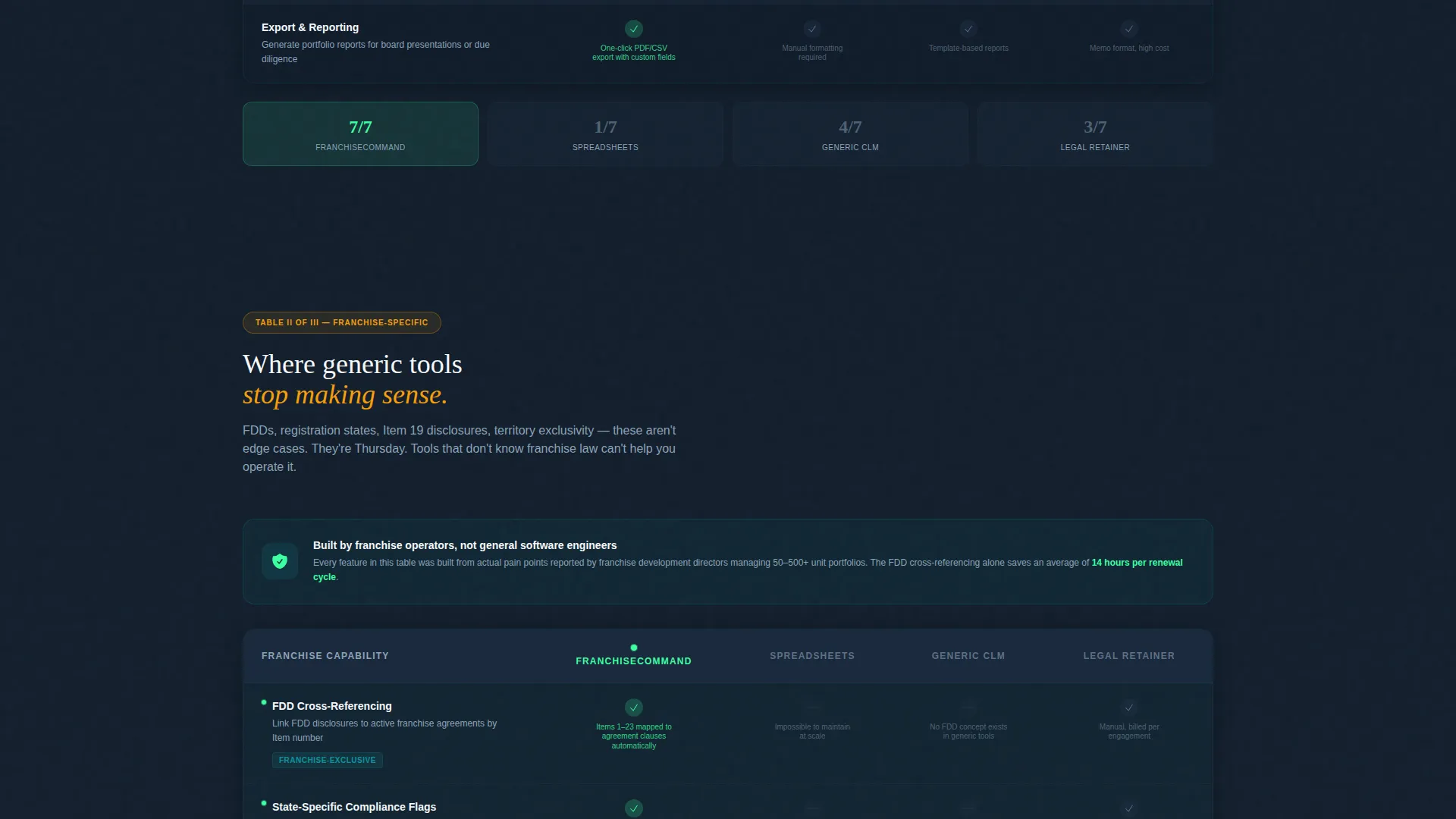
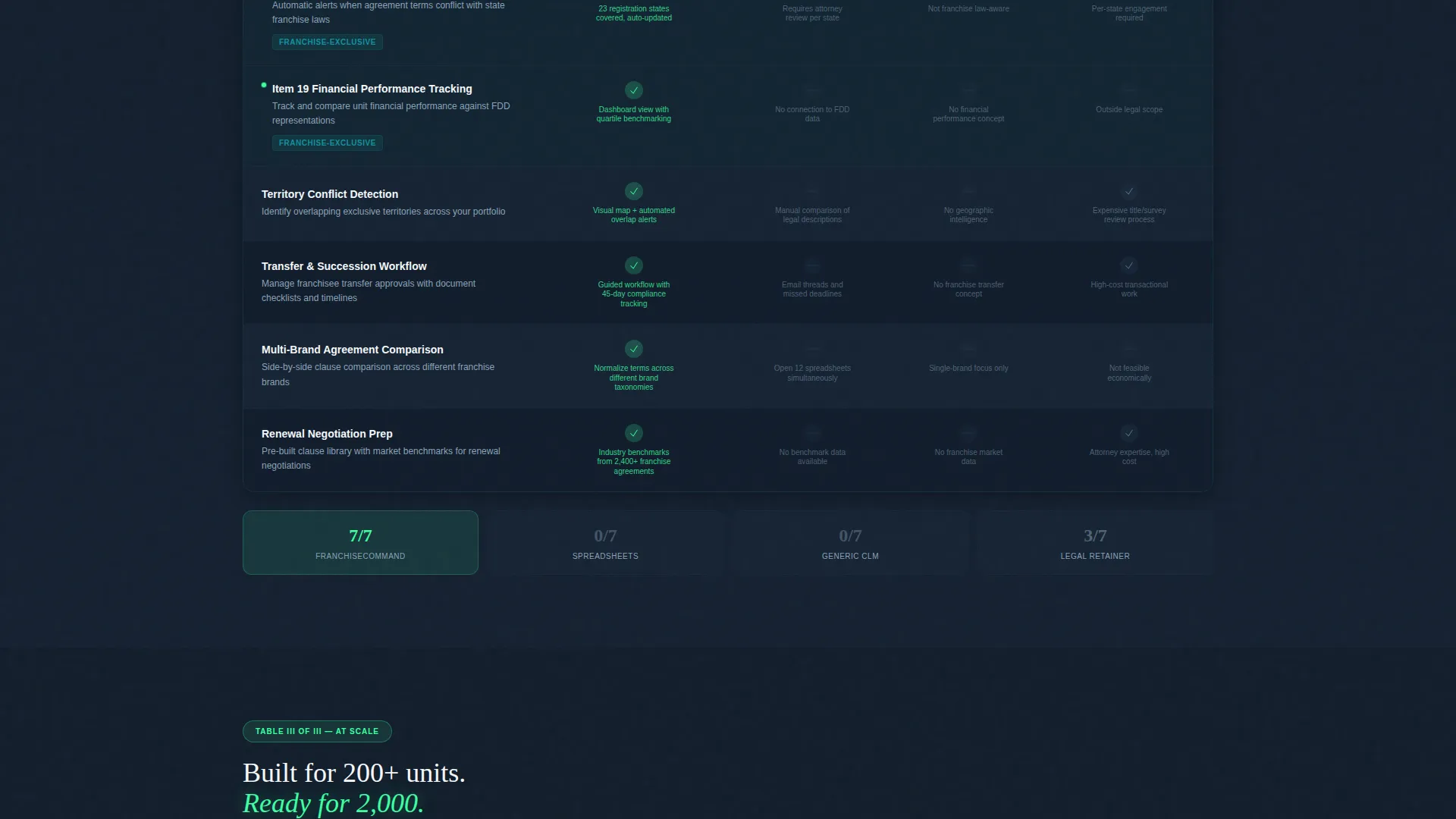
Three horizontal comparison tables advance in specificity as the visitor scrolls. The first covers clause extraction, renewal alerts, and multi-unit rollups. The second addresses FDD cross-referencing, state-specific compliance flagging, and Item 19 financial performance tracking. The third covers API integration with franchise point-of-sale systems, bulk amendment workflows, and franchisee portal access.
Catalyst Green and Charcoal Visual Indicators
Each table row uses catalyst green checkmarks for supported features and charcoal dashes for gaps. This binary system makes the competitive advantage immediately scannable without requiring the visitor to read every cell in detail.
Persistent App Download Bar
A slim charcoal bar stays locked to the bottom of the viewport through every comparison table. It holds a catalyst green download button that remains visible at all times. Tapping opens a platform selector for iOS, Android, or Desktop, followed by a single email field and a unit count dropdown.
Segmented Onboarding Flow
The download trigger collects a franchise unit count selection from four ranges: 1 to 50, 51 to 200, 201 to 500, and 500 or more. This dropdown personalizes the onboarding path based on operational scale, so each user enters the product at the right starting point.
White-Glove Demo Booking Path
A secondary call-to-action labeled "See It With Your Contracts" offers guided demo booking. It is positioned for operators managing 200 or more units who need assisted migration rather than a self-serve download.
Page sections overview
| Section | Purpose |
|---|---|
| Interactive Portfolio Header | Opens the page with a live simulated franchise dashboard the visitor can interact with immediately |
| Clause Search Bar | Lets visitors type franchise-specific terms and see mock contract snippets auto-populate in real time |
| Territory Map Display | Shows overlapping radius circles across a simulated unit portfolio to illustrate territorial data management |
| Basic Feature Matrix | Compares clause extraction, renewal alerts, and multi-unit rollups against three alternatives |
| Advanced Compliance Matrix | Covers FDD cross-referencing, state compliance flagging, and Item 19 tracking in a dedicated table |
| Scale and Integration Matrix | Addresses API integration, bulk amendment workflows, and franchisee portal access at the third table level |
| Persistent Download Bar | Keeps the primary call-to-action visible throughout the entire scroll journey |
| Platform Selector Modal | Guides the visitor to choose iOS, Android, or Desktop after tapping the download button |
| Onboarding Dropdown | Captures unit count range to route each user into a personalized onboarding flow |
| Demo Booking Path | Offers a white-glove migration option for large multi-unit operators |
Design & branding system
The Teal Catalyst color system gives this template the visual language of an operations command center. Every color choice serves a function, not just an aesthetic.
- Deep operational teal (#0D7377) anchors navigation and section dividers; command-dark charcoal (#1B2A3D) grounds backgrounds and table headers; catalyst green (#3DFFA2) fires only on status indicators, checkmarks, and the primary download button; clean contract white (#F4F7F9) keeps comparison rows from collapsing into visual noise
- The Data Command theme treats the page like the bridge of a well-run ship at night: dark surfaces, glowing indicators, and every color carrying a specific meaning
Mobile & speed optimization
The persistent bottom bar and comparison tables are structured to work across device sizes. The layout prioritizes function at every viewport width.
- The locked download bar remains accessible on mobile screens without obscuring table content, keeping the primary action reachable throughout the scroll
- Table rows and status pill components are designed to stay legible and scannable on smaller screens, preserving the competitive comparison experience on touch devices
How this template helps you convert
This template converts by doing the persuasion work before the visitor ever reaches the call-to-action button. The page is engineered around progressive trust, not a single pitch moment.
- The interactive header puts the visitor's hands on the product within five seconds of landing, creating immediate engagement before any feature claim is made
- The three-stage matrix structure rewards continued scrolling with increasingly specific franchise proof points, so operators who stay longer arrive at the download button already convinced
- The segmented unit count dropdown makes the onboarding feel personal, reducing the friction that comes from landing in a generic product flow
Other information about this template
This template is part of the Technology category under the Franchise Software subcategory, built specifically for the Franchise Contract Management niche. It suits platforms that serve the full range of franchise operators, from emerging franchisors just past the 50-unit mark to large multi-brand networks with legal teams managing hundreds of active agreements.
- The Comparison Table template style makes it well suited to competitive positioning contexts where buyers are evaluating multiple solutions before committing
- The Feature Matrix creative direction and App Download landing-page direction work together to keep the page focused on one action: getting the platform downloaded or demoed
- The Interactive Preview header concept sets this template apart from static screenshot-led pages, making it immediately useful to technical and non-technical buyers alike
Theme
Data Command
Creative direction
Feature Matrix
Color system
Teal Catalyst
Style
Comparison Table
Direction
App Download
Page Sections
Interactive Franchise Portfolio Header
Three-stage Feature Matrix Tables
Catalyst Green Competitive Indicators
Persistent Bottom-bar Download Call to Action
Segmented Unit Count Onboarding
White-glove Demo Booking Path
Related questions
Who is this landing page template designed for?
What makes the header different from a standard product screenshot?
How does the three-table comparison structure work?
Can the template support both self-serve and high-touch conversion paths?
Is this template suitable for platforms serving smaller franchise networks?



