Specialist Consulting Digital Presence Professional Website Template
Portal is a bento grid client portal landing page template built for consulting firms that need a single, professional workspace for every active engagement. It replaces scattered emails, shared drives, and endless follow ups with one clean client portal. The design runs on a dark, electric Acid Digital palette and is optimized for lead generation from the first scroll.
by Rocket studio
Quick summary
Portal is a dark, high-energy bento grid landing page template for consulting firms building their own client portal. It is designed to convert prospects through a progressive lead form, showcase core client portal features through animated tiles, and signal trust through security and social proof. Everything a managing partner needs to see is surfaced immediately on the home page.
Who this template is for
This client portal template was designed for professional services teams that manage high-stakes, ongoing client relationships. It fits anyone who needs a custom client portal that looks and performs like enterprise software without the enterprise build time.
- Managing partners at mid-tier strategy firms juggling ten or more active client projects simultaneously
- Solo fractional chief operating officers who need a full back-office presence for new clients without a full team behind them
- Boutique advisory teams and social media managers who are tired of fielding the same "where is my deliverable?" questions every week
What problem this template solves
Consulting teams lose real hours every week to scattered emails, duplicate file versions, and manual follow ups. The client experience suffers when project details live in five different places and logged in users still cannot find what they need. This client portal template gives you a single platform to fix that.
- Messy email threads and back and forth emails replace structured client communication, eroding the professional experience your firm should be delivering
- Clients cannot self service their own project progress, forcing your team to answer repetitive status questions instead of doing billable work
- Managing projects across multiple clients with no centralized hub means duplicating work and risking version confusion on sensitive data
What you get with this template
Portal delivers a fully structured bento grid landing page that acts as the front door to your custom client portal. The template provides everything needed to present your portal's value, capture leads, and guide visitors toward signing up, in just a few clicks from a clean starting point.
- A hero section with a floating dashboard mockup, sticky call-to-action bar, and progressive lead form collecting work email first, then expanding to firm details
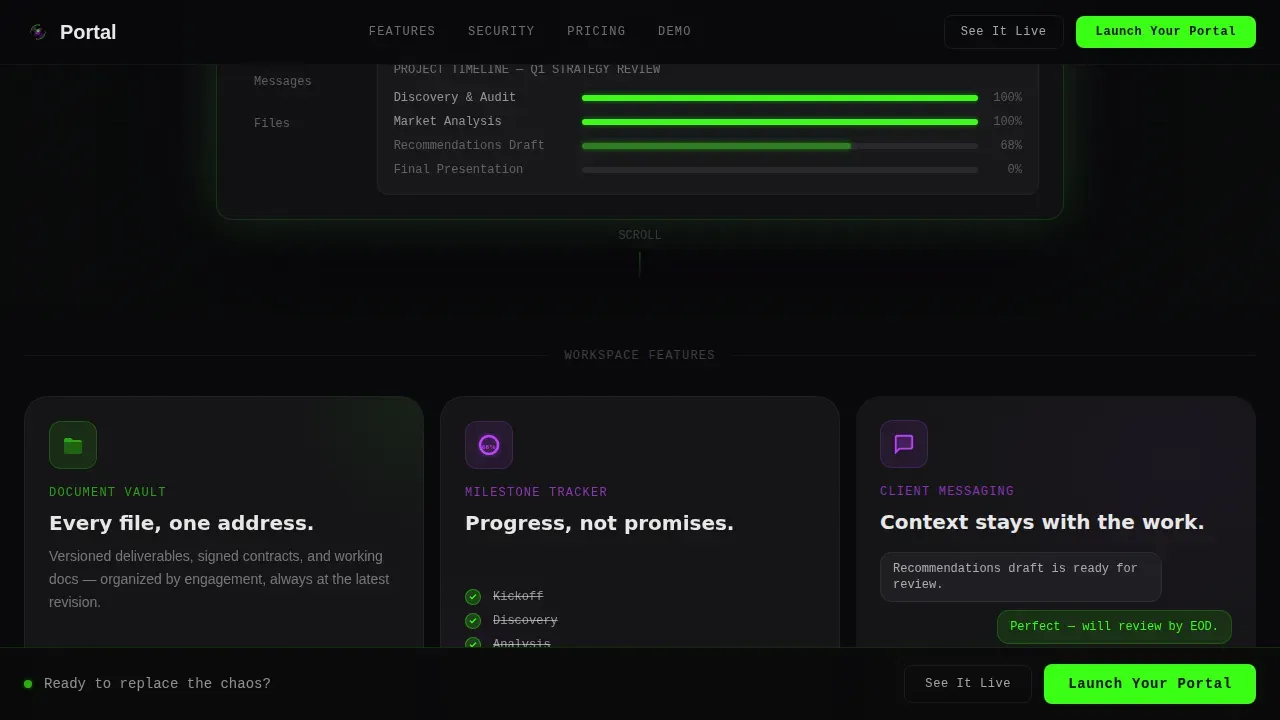
- Three bento feature tiles covering the document vault, milestone tracker, and client messaging, each with micro-animations that bring the portal to life on scroll
- Integration, testimonial, security, pricing comparison, and live demo tiles that build trust in sequence before asking for commitment
Feature list
The following built-in sections and design components are included in this client portal template.
Animated Bento Grid Layout
The page assembles tile by tile as the visitor scrolls, with each card snapping into position using Intersection Observer animations. This scroll-driven reveal creates a launch energy feel and keeps client management storytelling progressive and engaging across the full page.
Floating Dashboard Mockup Hero
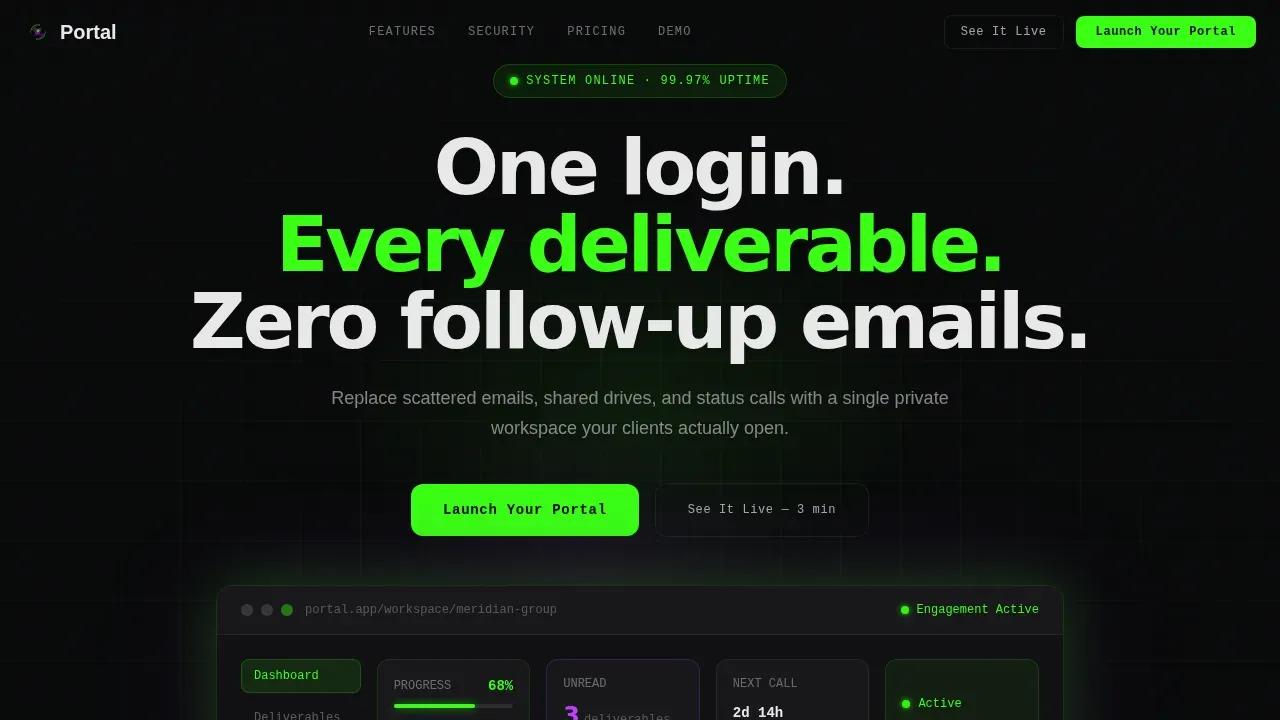
The hero section contains a live-looking bento dashboard mockup showing a project timeline at 68 percent complete, three unread deliverables, a next-meeting countdown, and a pulsing green status dot beside "Engagement Active." Visitors see what the client portal actually looks like before they ever reach the form.
Progressive Lead Capture Form
The sticky bottom bar appears after the first scroll. The form opens with a single work email field, then expands to collect firm name, number of active clients, and current tool stack via multi-select chips. This approach reduces friction for new clients while gathering richer data sources for follow ups.
Integration Showcase Tile
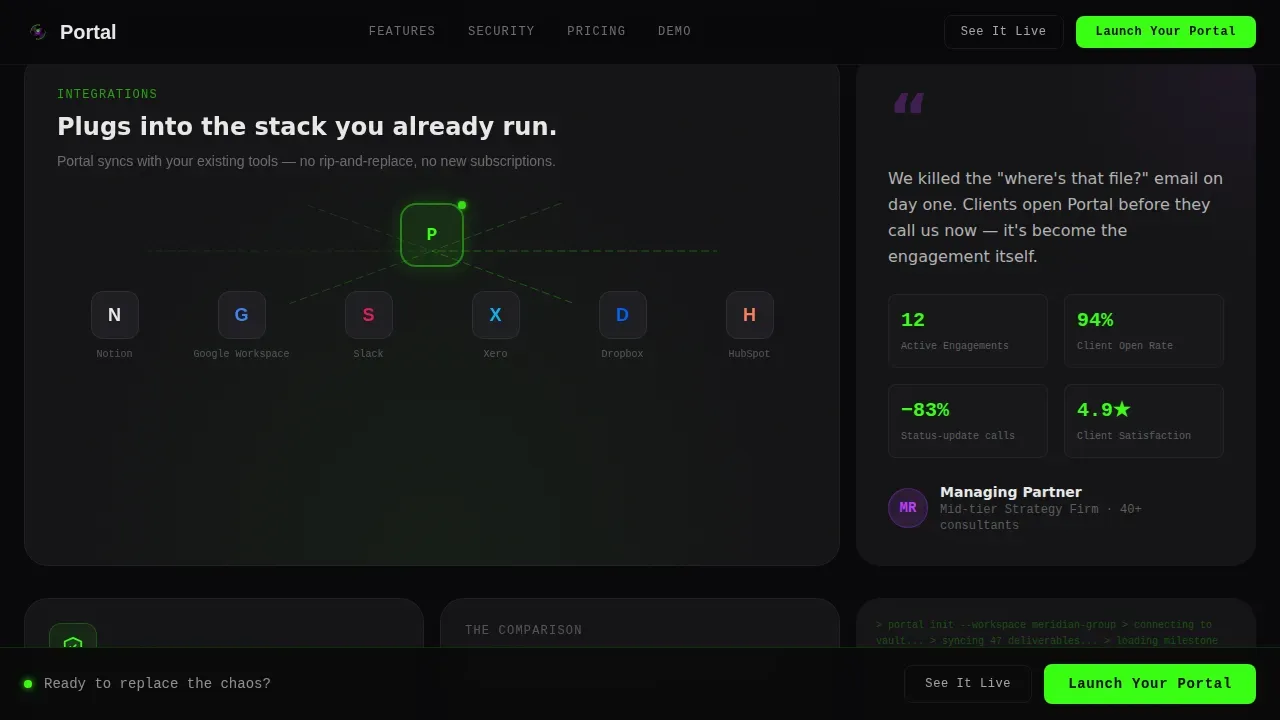
A wide bento tile displays logos of tools consultants already use, connected by glowing animated lines. This demonstrates how the portal slots into an existing tech stack without forcing teams to abandon their current automated workflows or data sources.
Security and Trust Tile
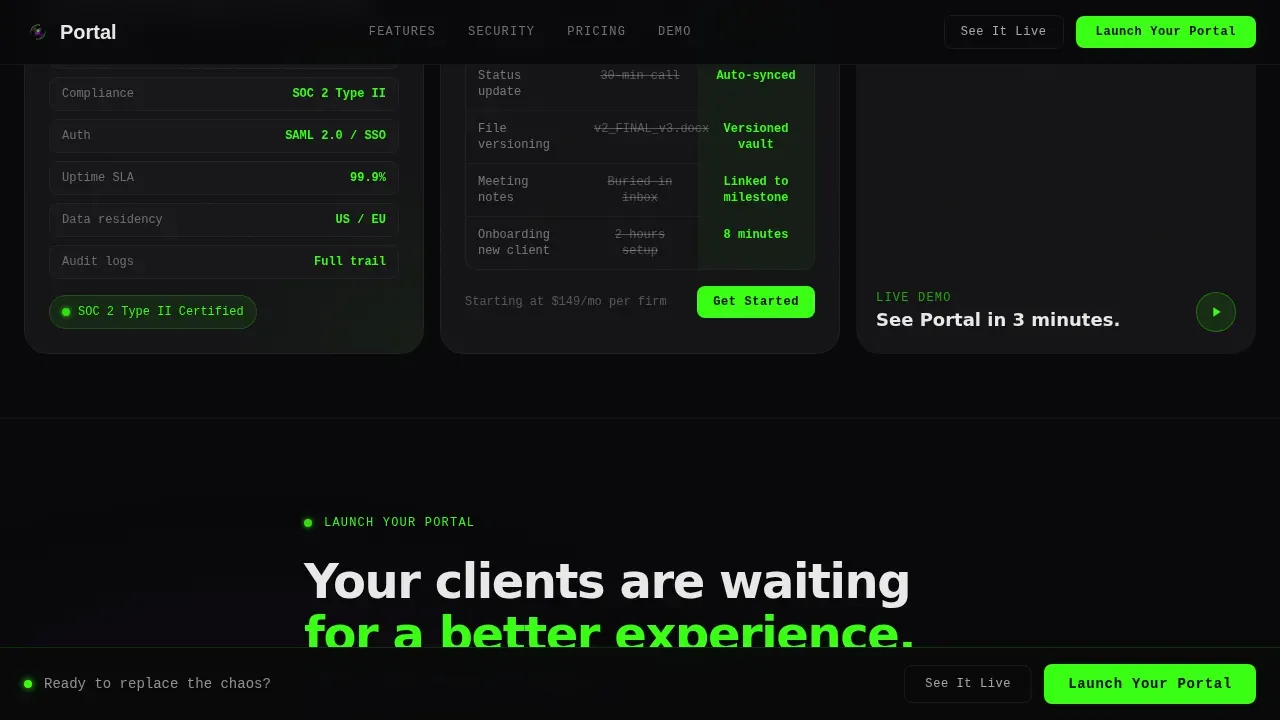
A dedicated security tile presents encryption specs and compliance language prominently. Security features such as granular permissions and bank-level encryption address the concerns that managing partners have about storing sensitive data in a shared portal environment.
Live Demo Hover Tile
A demo tile plays a 15-second screen recording on hover, giving visitors a self service preview of the client portal experience without requiring signup. This lowers commitment anxiety and moves prospects toward the primary call to action with real evidence.
Page sections overview
| Section | Purpose |
|---|---|
| Hero with Mockup | Shows real portal dashboard and delivers headline before any form |
| Sticky call to action Bar | Keeps the primary action visible after the first scroll |
| Document Vault Tile | Demonstrates secure file sharing and document management capability |
| Milestone Tracker Tile | Visualizes project timelines and progress tracking in the portal |
| Client Messaging Tile | Shows centralized client communication and task tracking flow |
| Integration Showcase Tile | Displays existing tools compatibility with glowing connection lines |
| Testimonial Tile | Provides anonymized managing partner quote with engagement stats |
| Security Trust Tile | Presents granular permissions and compliance trust signals |
| Pricing Comparison Tile | Contrasts spreadsheet chaos with structured client portal access |
| Live Demo Tile | Plays hover-activated screen recording for self service preview |
| Progressive Lead Form | Expands from email to full firm profile in one smooth sequence |
| Footer | Minimal developer-style footer with links and legal |
Design & branding system
The visual identity follows a Directory and Discovery theme using the Acid Digital color system. The result feels like a circuit board lit by blacklight: synthetic, electric, and completely deliberate. Custom branding is built into every layer of the template.
- Void black (#09090B) floods every background tile; phosphor green (#39FF14) is used for live-status indicators, progress bars, and primary buttons; ultraviolet purple (#BF40FF) marks hover states, active navigation, and section dividers; terminal white (#E8E8E8) handles body text
- Typography uses JetBrains Mono for labels and status readouts, DM Sans for body copy, and large tight-tracked headlines that command attention without decoration
- Professional branding is applied through custom dashboards, white-labeled tile layouts, and a home page aesthetic that signals operational precision to any client who lands on it
Mobile & speed optimization
The template is desktop-first by design, as managing partners and fractional operators typically review client portal services and project details from a workstation. However, the layout is built to remain fully responsive so that logged in users can access information from any device.
- Responsive tile structure ensures the bento grid reflows cleanly across screen sizes, protecting the client experience on tablets and smartphones
- Server Components handle static portal sections for fast initial load, while Client Components power animations, the progressive form, and the demo tile hover interaction
- The sticky call-to-action bar and progressive form are optimized for touch interaction, ensuring the lead capture flow works for new clients arriving on mobile
How this template helps you convert
This client portal template is built around a specific lead generation sequence. It earns trust before it asks for anything, then makes the ask feel obvious.
- Visitors see the dashboard mockup on the hero home page first, understanding the full client portal experience before the form appears, which removes the "what am I signing up for?" objection entirely
- The sticky call-to-action bar and progressive form work together to lower barrier to entry, collecting just a work email first, then expanding to gather richer context about client projects and the current tech stack
- The "See It Live" secondary path offers a 3-minute interactive demo requiring no signup, giving hesitant visitors a self service route that still moves them toward conversion without pressure
Other information about this template
Portal is a pre-built template designed to be adapted with no-code tools, which means you can build your own client portal and launch it without extensive coding skills. It is compatible with portal providers and no-code platforms that support drag-and-drop customization, allowing teams to connect their existing data sources and automate workflows quickly.
- The template supports custom branding including your logo, brand colors, and a custom domain, so every client sees a professional, white-labeled experience from the first login
- Domain-based redirection for Single Sign-On (SSO) can be configured so that logged in users are routed to their specific SSO provider based on email domain, streamlining client onboarding at scale
- User groups and granular permissions let you control exactly which client profiles can access which project details, protecting sensitive data across all active engagements
- Knowledge base sections and training materials can be added within the portal structure, giving clients a self service resource they can reference between meetings
- The template's integration tile is styled to showcase connections to tools like Google Drive, and data pulled from sources such as Google Sheets can surface inside custom dashboards for a seamless experience
- Automations connect your existing workflow tools to the portal so that project updates, task management alerts, and document sharing notifications flow without manual intervention
- This template covers free and paid options for portal deployment, with pricing comparison content built into the bento layout to help prospects understand the value against their current setup
- For teams running marketing campaigns alongside their consulting services, the portal's lead form collects the context needed to segment and follow up intelligently
- The knowledge base tile and internal collaboration sections provide a comprehensive guide to what clients can expect inside the portal, reducing onboarding questions and support overhead
- SQL databases and structured data sources can be connected to the portal backend for teams that need richer client management reporting beyond what standard tools offer
- An all in one system approach is what this template sells: one login, one home page, every deliverable, and zero scattered emails after go-live
- This is the portal one login consulting client portal landing page template built specifically for professional services firms that want to deliver a good client portal experience at the first impression
Theme
Directory & Discovery
Creative direction
Launch Energy
Color system
Acid Digital
Style
Bento Grid
Direction
Lead Generation
Page Sections
Animated Bento Grid with Scroll Reveal
Floating Dashboard Hero Mockup
Progressive Lead Capture Form
Integration Showcase Tile
Security and Compliance Trust Tile
Hover-activated Live Demo Tile
Related questions
Can I customize this template to match my firm's branding?
Does the template support integration with tools my team already uses?
How does the progressive lead form work?
Is this template suitable for solo consultants or small advisory teams?
What security signals does the template include?



