UPSC IAS Coaching Center Landing Page Template
Gazette is a single-page landing page template built for UPSC and IAS coaching centers. It opens with an animated counter dashboard that leads with verified results, then walks visitors through real candidate case studies in a zigzag layout. The page drives event registrations for a free strategy session while a secondary lead path offers a downloadable topper study plan PDF.
by Rocket studio
Quick summary
Gazette is a purpose-built landing page template for UPSC and IAS coaching centers. It pairs an authority-first visual identity with a case study narrative layout. Animated result counters open the page, alternating story-and-result sections build trust, and a focused registration form converts visitors into confirmed session attendees.
Who this template is for
This template suits coaching centers and educators who prepare candidates for competitive civil services examinations. It works especially well for institutes with documented results, real candidate stories, and an upcoming session or seminar to promote.
- UPSC and IAS coaching institutes looking to register attendees for a free strategy session or orientation seminar
- Educators who want to present verified selection data and real candidate journeys instead of generic marketing claims
- Coaching brands targeting aspirants at different stages: first-time candidates, working professionals, and repeat attempt students
What problem this template solves
Many coaching center pages open with classroom photos, long course descriptions, and testimonials that feel anonymous. UPSC aspirants are skeptical readers. They have spent years studying critical analysis and they apply the same standard to everything they read. Generic claims do not convert them.
- Credibility gap: visitors arrive uncertain whether a center has real results, and the template addresses this immediately with a live counter dashboard showing verified selection numbers
- Friction in registration: the sign-up form asks only for name, phone number, attempt status, and preferred medium so time-pressed aspirants do not abandon it midway
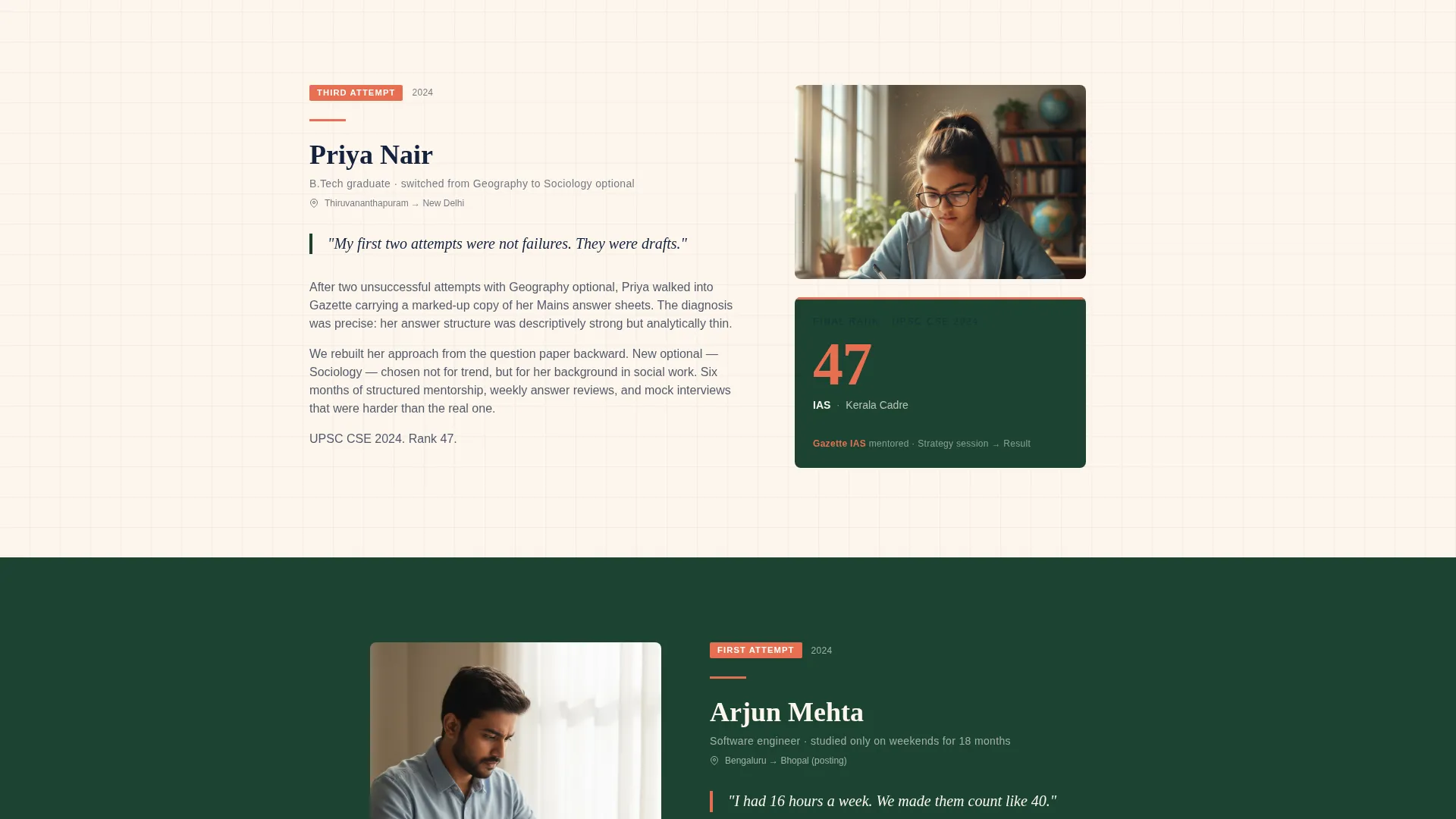
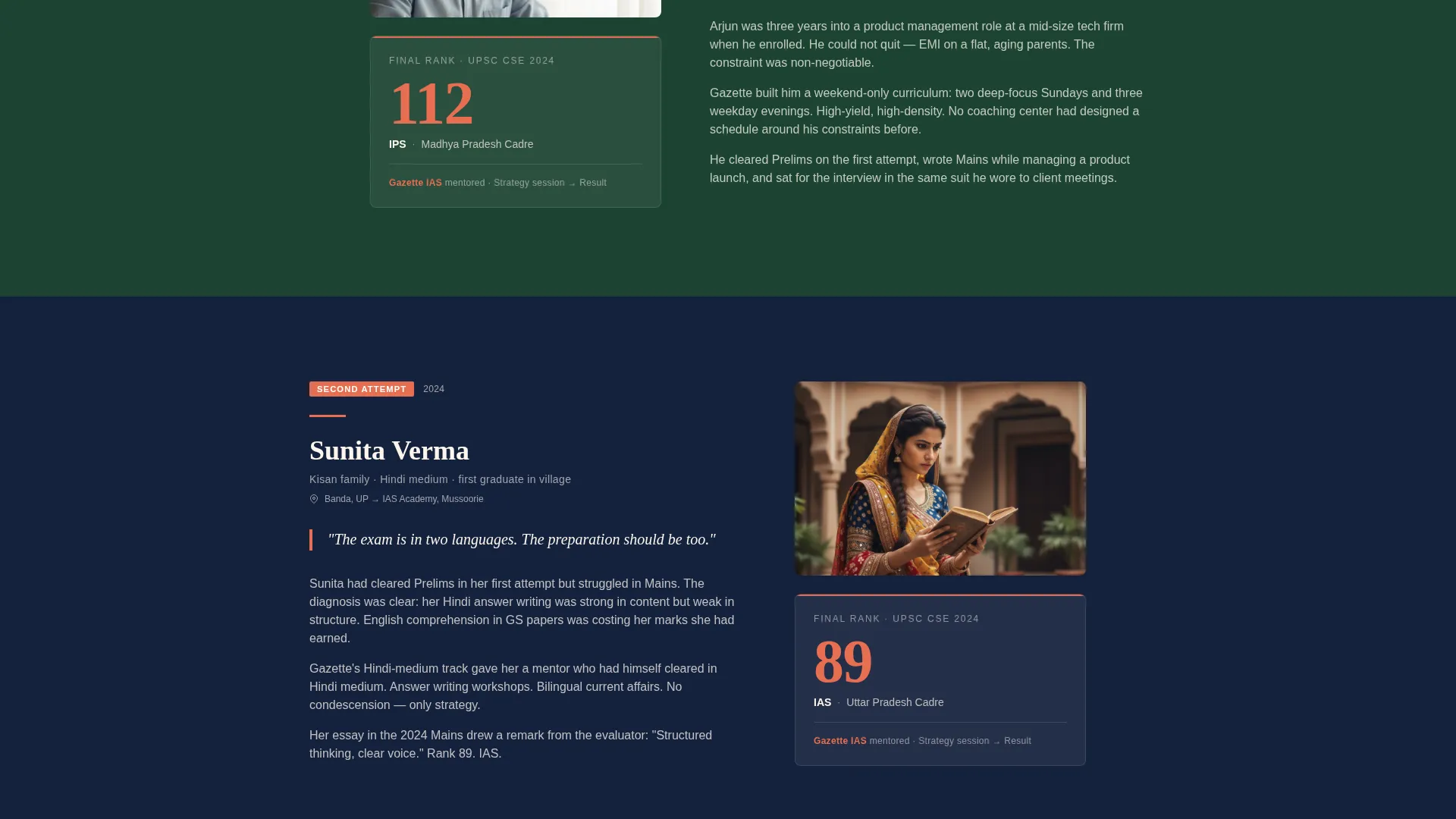
- Weak audience connection: the zigzag case study sections each profile a different candidate archetype, so a rural student, a working professional, and a repeat attempt candidate each see their own story reflected on the page
What you get with this template
You get a fully structured single-page layout ready to represent your coaching center with the authority it has earned. The design system, content zones, and conversion elements are all defined and consistent from the first scroll to the last.
- An animated counter header section, a multi-block zigzag case study layout, a primary event registration form, a secondary PDF lead capture, and a sticky mobile call-to-action bar
- A Forest Trust color palette using deep administrative green, gazette-paper cream, civil service navy, and result-highlight saffron applied consistently across every section
- A clear content hierarchy that leads with data, builds trust through narrative, and closes with a low-barrier registration ask
Feature list
This section describes each functional and visual component built into the template.
Animated Results Counter Header
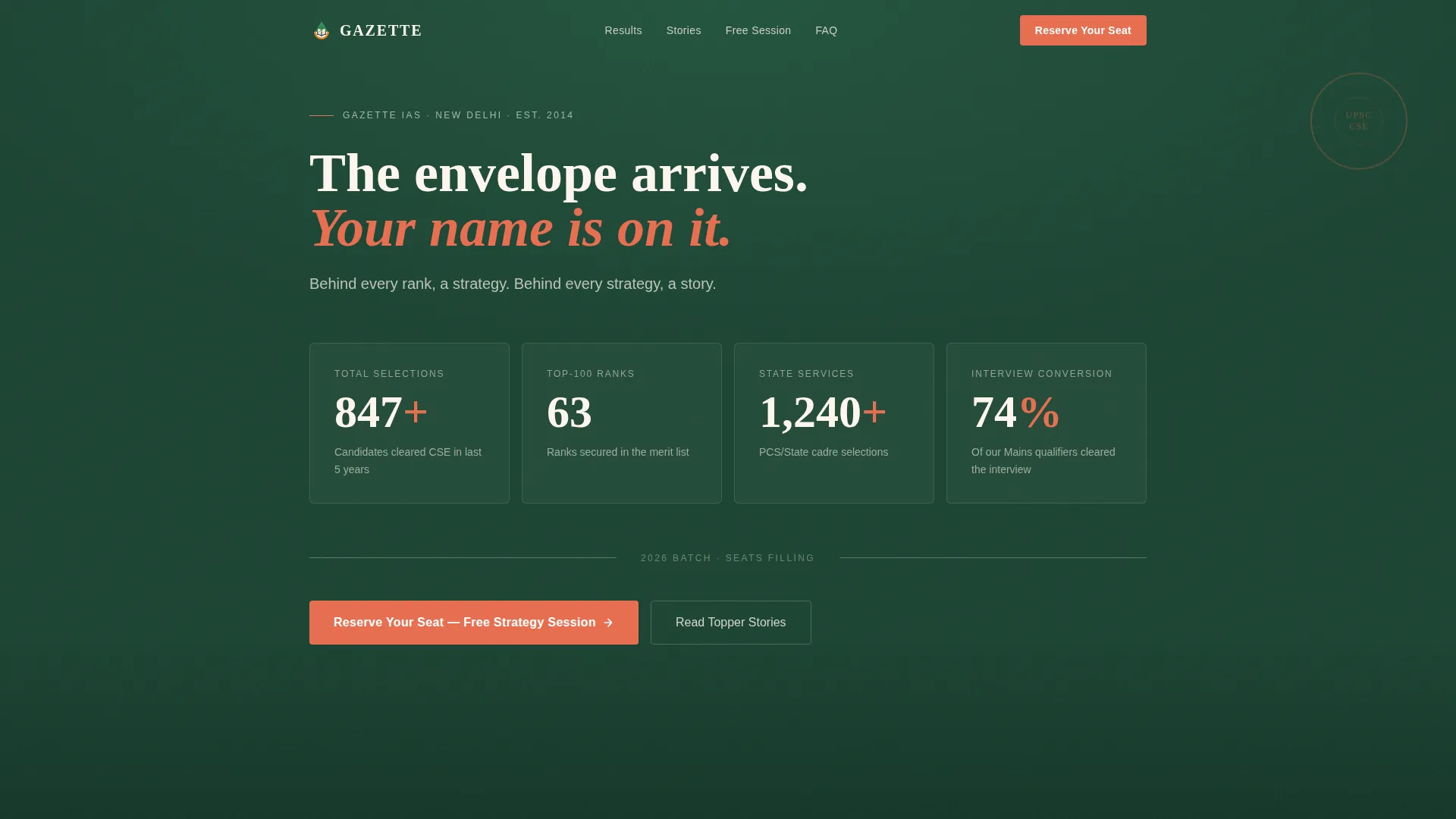
The header opens with a data dashboard instead of a classroom photograph. Four counters tick upward on page load: total candidates cleared, top-100 ranks secured, state service selections, and interview conversion rate. All counters sit against a deep administrative green background. A single cream tagline sits below: "Behind every rank, a strategy. Behind every strategy, a story."
Zigzag Case Study Sections
Each alternating section pairs a left-aligned story block with a right-aligned result card, then reverses for the next candidate. Three candidate profiles are included: a third-attempt candidate who switched optional subjects, a working professional who studied only on weekends, and a rural candidate with no English-medium schooling background. The alternating layout creates visual rhythm and prevents the page from reading as a flat list of claims.
Event Registration Form
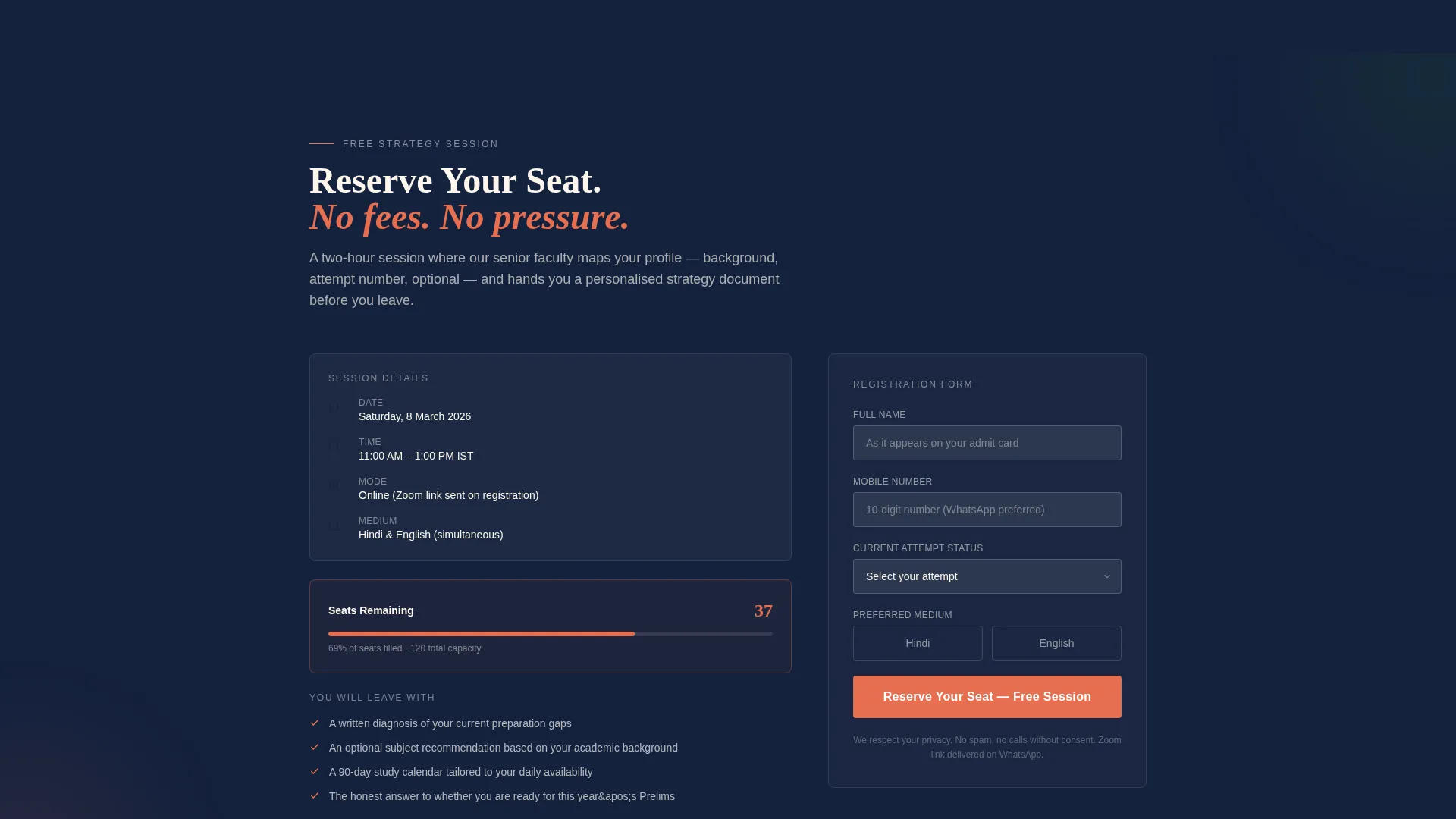
The primary conversion element is a focused form that collects name, phone number, current attempt status (first, second, or third-plus), and preferred medium (Hindi or English). It appears after the second case study, once credibility is established. The session date, time, and a live remaining seat count display beside the form to communicate genuine availability.
Sticky Mobile Call-to-Action Bar
A persistent bar at the bottom of the screen on mobile devices repeats a condensed call-to-action: "Join Free Session, Limited Seats." It stays visible throughout the scroll so the registration path is never lost, even on smaller screens.
Secondary PDF Lead Capture
Visitors who are not ready to commit to a session can instead download a previous-year topper's study plan in exchange for their email address. This secondary path captures warm leads at an earlier stage of the decision journey without disrupting the main conversion flow.
Scarcity Indicators
Real session scarcity is communicated through the live seat count displayed next to the form. The date and time of the session also appear in the same zone. These elements are factual rather than fabricated, which matches the expectations of an audience trained to verify every claim.
Page sections overview
| Section | Purpose |
|---|---|
| Animated Counter Header | Opens with live selection data to establish authority before any claim |
| Tagline Block | Anchors the data with a single human line that invites the scroll |
| Case Study One | Profiles the third-attempt candidate who changed optional subjects |
| Registration Form Block | Captures event sign-ups after credibility has been earned through two stories |
| Case Study Two | Profiles the working professional who studied only on weekends |
| Case Study Three | Profiles the rural candidate with no English-medium schooling background |
| PDF Lead Capture | Offers a topper study plan download for visitors not yet ready to register |
| Sticky Mobile Bar | Keeps the registration call to action accessible throughout the scroll |
Design & branding system
The visual identity follows an Institutional Authority theme. Every color, spacing, and typographic choice is meant to evoke the weight and formality of a civil services result notification rather than a typical online course advertisement.
- Forest Trust color system: deep administrative green (#1B4332) and civil service navy (#14213D) alternate as section backgrounds, gazette-paper cream (#FDF6EC) carries all body text, and result-highlight saffron (#E76F51) is reserved strictly for ranks, call-to-action buttons, and success markers
- The palette references the wood-paneled lobby of a district collector's office: teak furniture, brass nameplates, and formal government aesthetics translated into a digital layout
- Saffron appears sparingly so it retains visual impact every time it signals an achievement or prompts an action
Mobile & speed optimization
The template is structured so every conversion element remains accessible on a mobile screen without requiring a user to scroll back to the top. The sticky bar handles this for the primary action.
- The sticky bottom bar on mobile keeps the session registration call to action visible at all times during the scroll
- The registration form is intentionally minimal, with only four fields, reducing input burden for visitors on smaller screens and slower connections
- Section layouts alternate cleanly between green and navy backgrounds, keeping visual separation clear even on compact displays
How this template helps you convert
The page is built around a deliberate trust sequence. Visitors move from data, to story, to registration in an order that earns the conversion rather than demanding it.
- The counter header front-loads verified selection numbers so authority is established within the first viewport, before a single written claim asks for the visitor's belief
- The alternating case study sections each profile a different aspirant archetype, progressively building the visitor's sense that the center understands their specific situation, which reduces hesitation before the form appears
- The live seat count and session details displayed next to the form create a factual urgency that matches the mindset of an aspirant who has already learned to verify everything they read
Other information about this template
This template is designed specifically for the UPSC and IAS coaching market in India. Several elements reflect the cultural and psychological profile of civil services aspirants, which is distinct from general online course buyers.
- The form medium field (Hindi or English) signals that the center serves aspirants from all linguistic backgrounds, not only English-medium students
- The three candidate archetypes were chosen to reflect the actual diversity of the UPSC aspirant pool: urban repeat-attempt candidates, employed professionals, and students from non-English-medium backgrounds
- The page direction is event registration, making it most effective when deployed ahead of an upcoming free strategy session or orientation seminar with a defined date and seat limit
- The secondary PDF download path functions as a softer entry point, suitable for visitors still in the research phase of their coaching decision
Theme
Institutional Authority
Creative direction
Case Study Narrative
Color system
Forest Trust
Style
Zigzag/Alternating
Direction
Event Registration
Page Sections
Animated Results Counter Header
Zigzag Case Study Layout
Focused Event Registration Form
Sticky Mobile Call-to-action Bar
Secondary PDF Lead Capture
Scarcity and Session Details Display
Related questions
What type of coaching center is this template designed for?
Can I use this template if my center teaches in Hindi rather than English?
What information does the registration form collect?
What is the secondary PDF lead capture section for?
How does the live seat count beside the form work?



