Specialist Government Digital Presence Careers & Recruitment Website Template
Gazette is a hub-and-spoke government job board landing page built on a Dynamic Motion theme with a Slate and Sky color system. It streams federal, state, and municipal job listings in a live dashboard preview, guides visitors through five feature spokes, and converts through a freemium model with a clear free-to-Pro upgrade path.
by Rocket studio
Quick summary
Gazette is a single-page government job board template with a live-data dashboard header, sticky anchor navigation, and a five-spoke feature matrix. It targets civil service job seekers and converts them through a freemium signup flow. The design uses deep slate, sky blue, and clearance-granted green to feel polished, trustworthy, and alive.
Who this template is for
This template is built for teams launching or redesigning a government job board. It works best when the audience expects real-time listing data and a structured, trust-forward experience.
- Civil service aspirants who need verified federal, state, and municipal listings in one place
- Career-transitioning veterans scanning General Schedule pay scales and agency-specific roles
- Mid-career professionals seeking stability, pensions, and long-term public sector opportunities
What problem this template solves
Government job seekers face fragmented search experiences. Listings are scattered across agency websites, deadlines slip by unnoticed, and there is no single view of salary, eligibility, and exam requirements together.
- No centralized hub tracking federal, state, and municipal vacancies with live deadline countdowns
- No clear upgrade path that shows free users exactly what Pro access unlocks
- No structured visual hierarchy that makes a complex, data-rich board feel calm and navigable
What you get with this template
You get a fully structured, single-page layout with a live-dashboard header, a sticky anchor navigation bar, and five content spokes that each unfold into a feature comparison matrix. Every visual and interaction detail is defined in the brief.
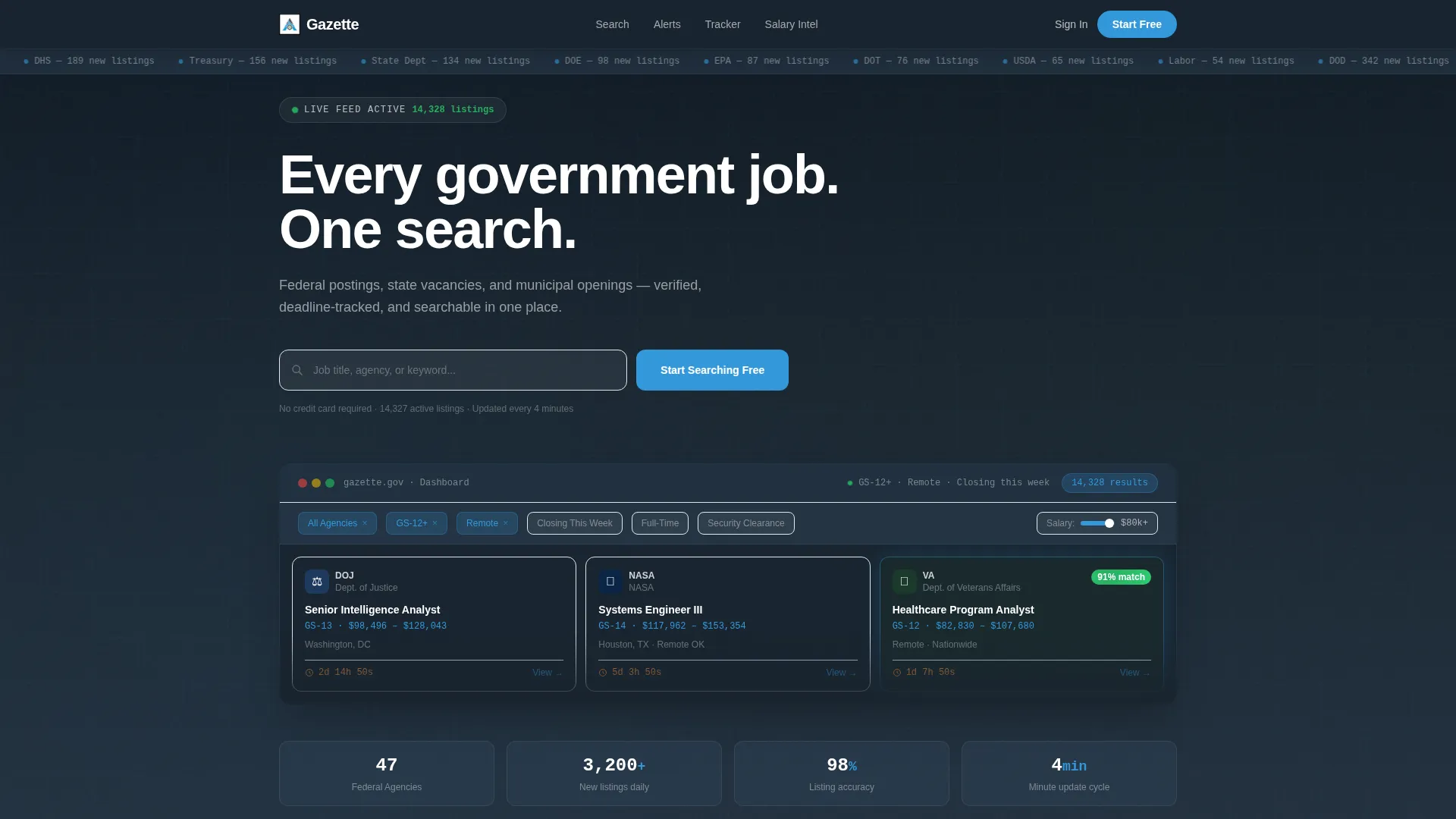
- A full-width dashboard preview header with animated job cards, agency seals, and a salary range slider
- Five anchor nav spokes: Search Power, Alerts, Application Tracker, Salary Intel, and Exam Prep
- A freemium conversion flow with a two-step signup and a timed Pro trial trigger on scroll
Feature list
This template packs every element a government job board needs to feel credible, functional, and conversion-ready. Each feature is grounded directly in the design brief.
Live Dashboard Header
The header displays a full-width, angled screenshot of the live job board interface. It shows 14,327 active federal listings, visible agency seals for departments like DOJ, NASA, and VA, and a salary range slider mid-drag. Micro-animations pulse through the preview: a new listing slides in from the right, a countdown timer ticks on a closing date, and a match badge shimmers.
Typing Headline Animation
The headline types itself letter by letter above the dashboard preview. The copy reads "Every government job. One search." This motion effect sets an immediate tone of precision and live data without feeling gimmicky.
Sticky Hub-and-Spoke Navigation
A sticky anchor nav keeps five spokes always accessible: Search Power, Alerts, Application Tracker, Salary Intel, and Exam Prep. Visitors can jump to any spoke without losing context. Each spoke section opens with a bold stat before unfolding into its feature grid.
Three-Tier Feature Matrix
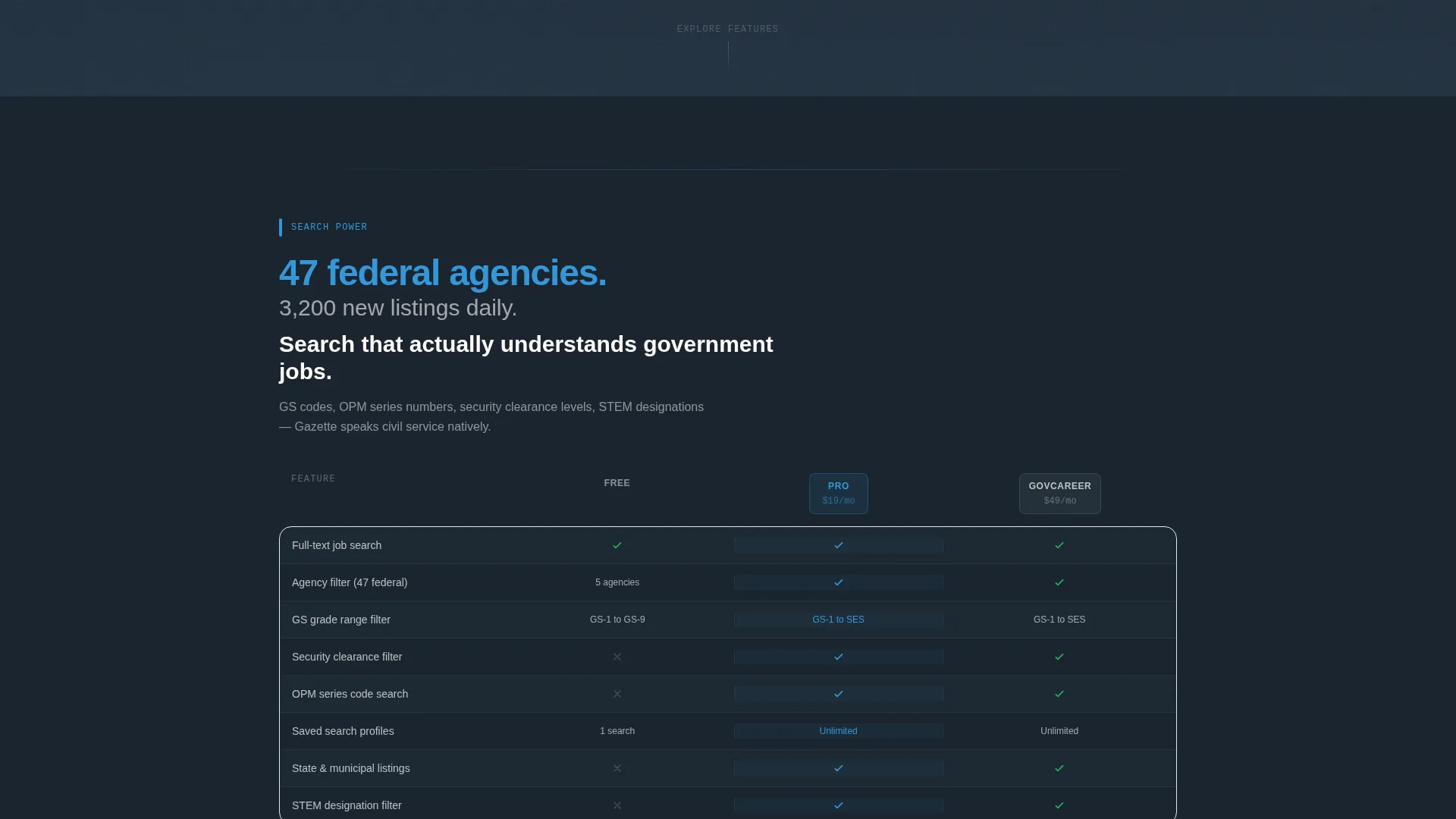
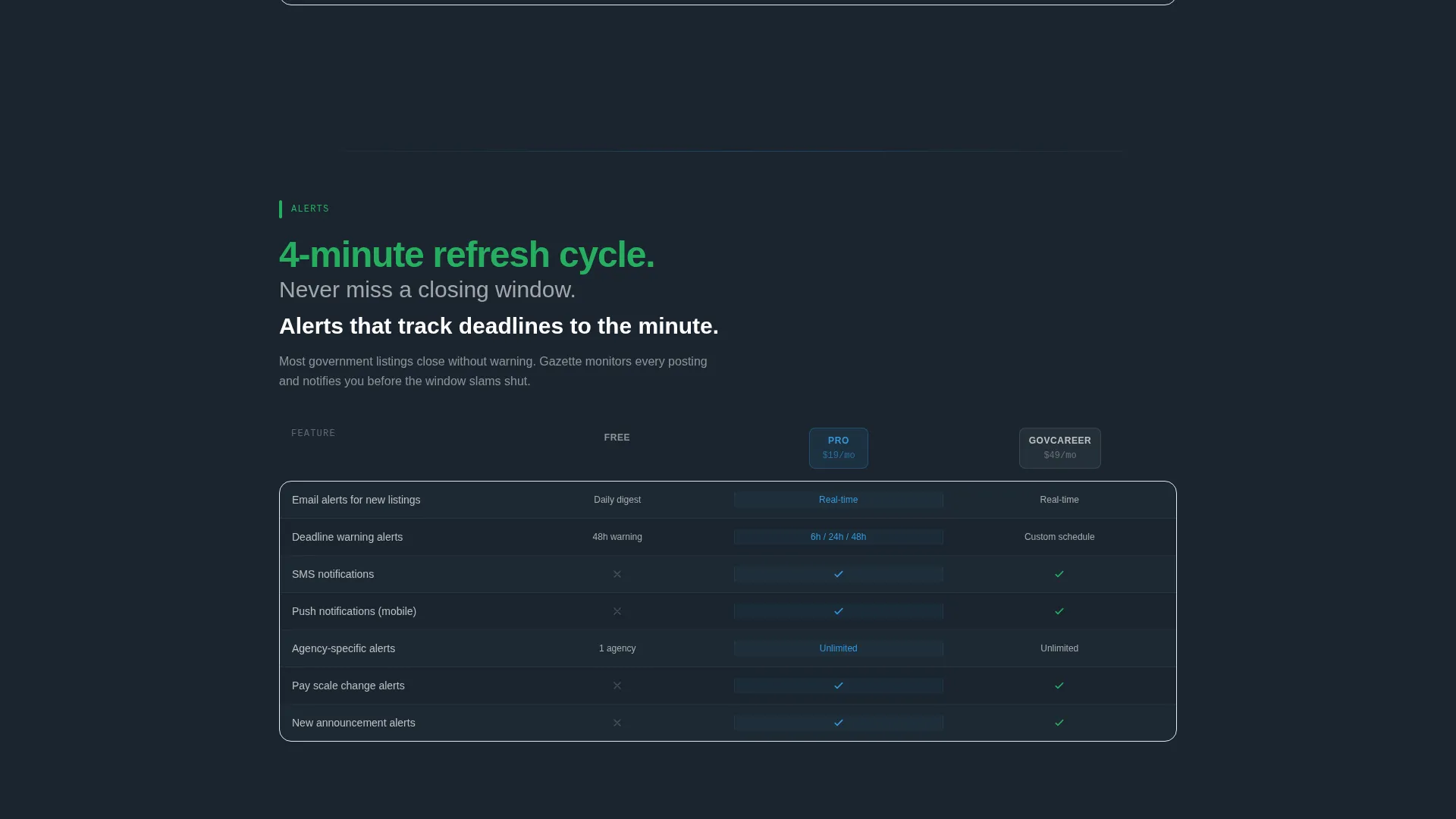
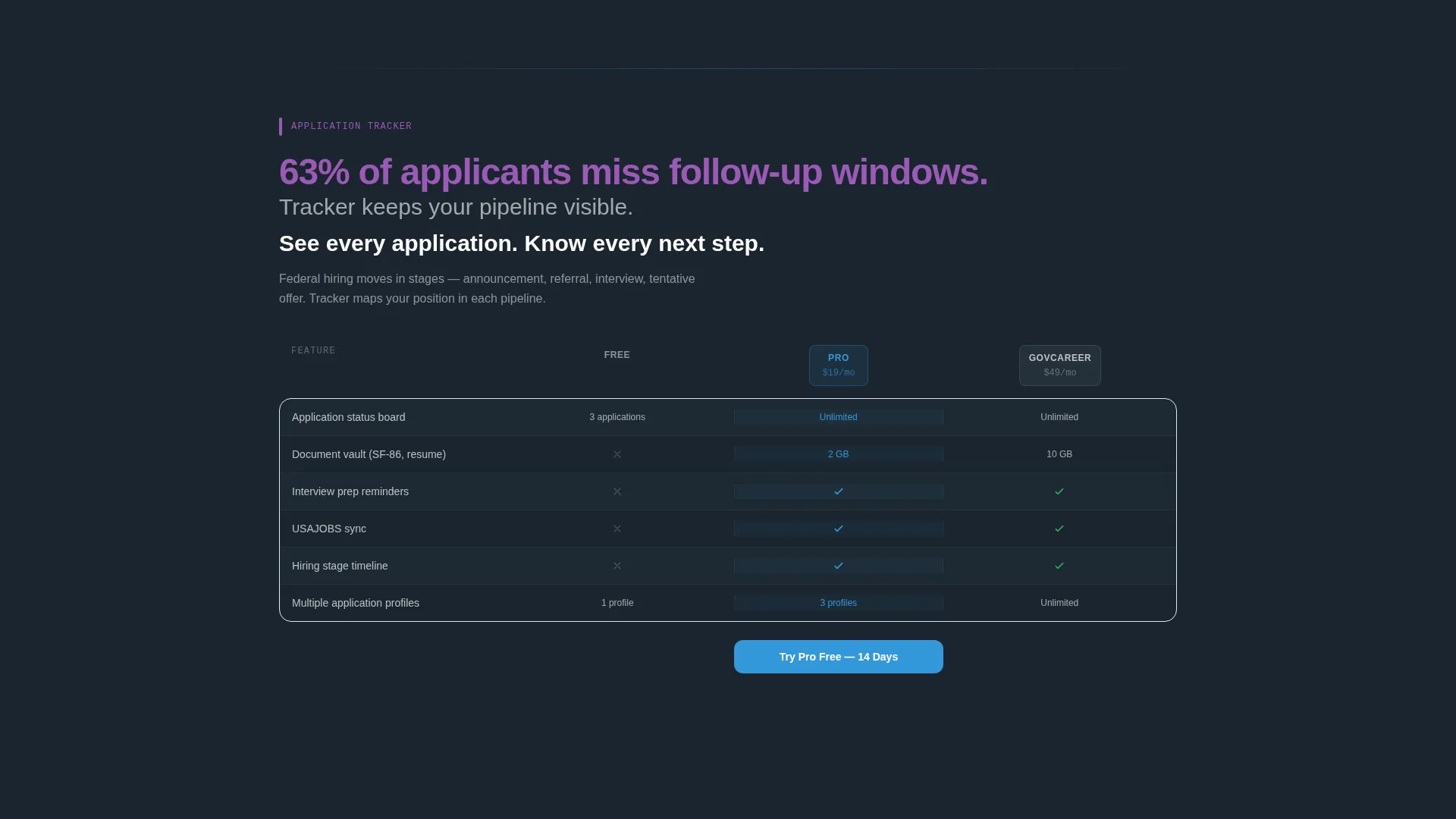
Each spoke section contains a three-column comparison grid for Free, Pro, and GovCareer tiers. The Pro column carries a sky-blue glow to make the upgrade feel natural. Lateral sliding animations move between spokes, keeping the page feeling active and data-driven.
Freemium Conversion Flow
The primary call to action, "Start Searching Free," appears inside the dashboard header as a functional search bar and again as a floating scroll button. Clicking triggers a two-step signup: email and preferred job category first, then optional fields for General Schedule level, location radius, and agency preference.
Scroll-Triggered Pro Trial Prompt
After a visitor scrolls past the third spoke, a secondary call to action, "Try Pro Free for 14 Days," becomes available. This earned reveal lets the accumulated feature evidence do the persuasion work before the upgrade ask appears.
Page sections overview
| Section | Purpose |
|---|---|
| Dashboard Header | Displays live job board preview with animated listings and primary call to action |
| Typing Headline | Introduces core value proposition with letter-by-letter animation |
| Sticky Anchor Nav | Gives instant access to all five feature spokes on scroll |
| Search Power Spoke | Highlights search depth with agency count and daily listing volume stat |
| Alerts Spoke | Covers deadline tracking, saved searches, and notification features |
| Application Tracker Spoke | Shows how users manage and monitor active applications |
| Salary Intel Spoke | Presents General Schedule pay scale data and salary range tools |
| Exam Prep Spoke | Outlines civil service exam resources and eligibility guidance |
| Feature Comparison Matrix | Compares Free, Pro, and GovCareer tiers side by side per spoke |
| Floating call to action Button | Persists on scroll to keep the free signup always reachable |
| Pro Trial Trigger | Reveals the 14-day Pro trial call to action after the third spoke section |
| Two-Step Signup Flow | Captures email and job category, then optional profile fields |
Design & branding system
The Slate and Sky color system is the visual backbone of Gazette. Every color carries a clear functional role, so the interface feels like a coherent system rather than a styled page.
- Deep bureaucratic slate (#2C3E50) dominates backgrounds and navigation rails, grounding the layout in institutional weight
- Open-sky blue (#3498DB) marks every interactive element, live data pulse, and the Pro column glow across all matrix rows
- Clearance-granted green (#27AE60) confirms user actions such as applied, saved, and matched states, and activates on success and filter confirmations
Mobile & speed optimization
The Dynamic Motion theme is designed to feel responsive and live without sacrificing clarity on smaller screens. Animations are purposeful rather than decorative.
- Lateral sliding transitions between spokes keep orientation clear on both desktop and mobile viewports
- The floating call to action button and sticky anchor nav are built to remain accessible as users scroll through long feature sections
- Micro-animations, including the countdown timer, listing slide-in, and match badge shimmer, are scoped to specific components so the overall layout stays clean
How this template helps you convert
Gazette is structured so that trust builds progressively before any upgrade ask appears. The conversion architecture is deliberate and layered.
- The functional search bar inside the header dashboard lets visitors take immediate action before they have committed to anything, lowering the barrier to a first interaction.
- The three-tier feature matrix places the Pro column in sky-blue glow on every spoke, so the value gap between Free and Pro becomes visible naturally through reading rather than through sales copy.
- The scroll-triggered Pro trial call to action appears only after the visitor has moved through three spokes, meaning the ask is earned by accumulated evidence rather than pushed upfront.
Other information about this template
Gazette is built for the government digital presence space, sitting at the intersection of civic technology and public sector career services. A few additional details are worth noting for teams evaluating this template.
- The template style is Hub and Spoke with anchor navigation, a structure that works well for feature-dense single-page layouts where users need to jump between topic areas
- The freemium and trial conversion model is baked into the layout logic, not added as an afterthought
- The template sits in the Technology category under the Government Digital Presence subcategory, making it relevant for civic tech teams, government HR portals, and public sector career platforms
- Color tokens are named by function, making it straightforward for a designer to swap palette values while preserving the visual hierarchy
Theme
Dynamic Motion
Creative direction
Feature Matrix
Color system
Slate & Sky
Style
Hub & Spoke (Anchor Nav)
Direction
Freemium/Trial
Page Sections
Live Dashboard Header with Micro-animations
Letter-by-letter Typing Headline
Sticky Five-spoke Anchor Navigation
Three-tier Feature Comparison Matrix
Two-step Freemium Signup Flow
Scroll-triggered Pro Trial Reveal
Related questions
What type of page is Gazette?
Who is this template designed for?
Can I customize the tier labels and feature rows in the matrix?
How does the freemium conversion flow work in this template?
What do the micro-animations in the header actually do?



