Data-Driven Commercial Cleaning Landing Page Template
Gleam is a split-screen commercial cleaning landing page template built around a Data Command theme. It pairs an interactive operations dashboard header with an industry-report scroll flow, turning facility hygiene into measurable outcomes. Designed for cleaning service providers targeting facility managers and property teams, it drives action through data-led storytelling and a persistent clean-score assessment call to action.
by Rocket studio
Quick summary
Gleam is a single-page commercial cleaning landing page template with a 50/50 split-screen layout. It combines an interactive floor-plan dashboard header, an industry-report scroll narrative, and two conversion paths into one high-impact page. The visual identity uses a Data Command theme with an AI Iridescent color palette that makes cleanliness feel like a computable, verified outcome.
Who this template is for
This template is built for commercial cleaning businesses that serve large facilities and want to position their service as a precision operation rather than a commodity. It works best when the audience is data-aware and expects proof, not promises.
- Facility managers overseeing large commercial portfolios who need vendors they can verify
- Property management companies responding to tenant complaints about air quality and hygiene
- Office administrators tasked with sourcing a new cleaning provider after a previous vendor failed to perform
What problem this template solves
Most cleaning service landing pages look identical. Generic stock photos, a short list of services, and a contact form do little to earn trust from a facility manager managing 200,000 square feet of occupied space. Gleam reframes the entire conversation.
- It positions cleaning as a measurable operational outcome backed by data, not a subjective impression
- It addresses the credibility gap left by unreliable vendors through photo-verified proof and real-time status displays
- It gives hesitant buyers a low-friction secondary path so they engage before they are ready to commit
What you get with this template
You get a fully designed, single-page layout that guides facility decision-makers from awareness to action. Every section is structured to surface a data-driven finding that makes inaction feel costly.
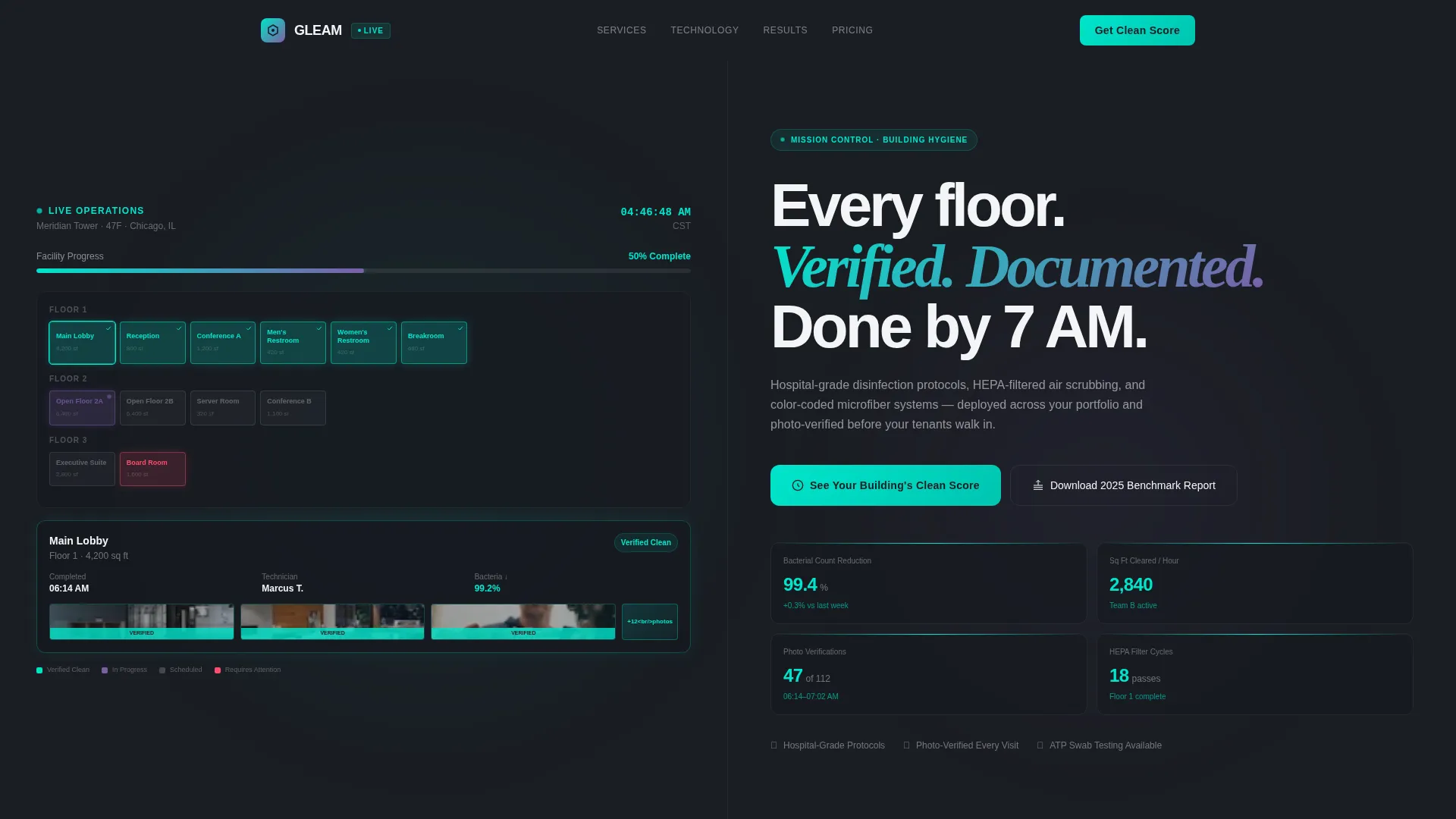
- An interactive dashboard header with a 3D floor plan, color-coded room status, and real-time streaming metrics
- An industry-report scroll flow with three data-focused split sections covering tenant costs, air quality benchmarks, and pathogen heatmaps
- Two conversion paths: a primary "See Your Building's Clean Score" assessment call to action and a secondary email-gated benchmark report download
Feature list
This template ships with purpose-built components designed for one specific goal: converting skeptical facility buyers into engaged leads.
Interactive Dashboard Header
The header splits into two live-style panels. The left panel displays a 3D floor plan with rooms color-coded by cleaning status: completed, in-progress, or scheduled. The right panel streams metrics including bacterial count reduction percentages, square footage cleared per hour, and photo verification timestamps. Visitors can click individual rooms to view before-and-after inspection photos.
Industry Report Scroll Sections
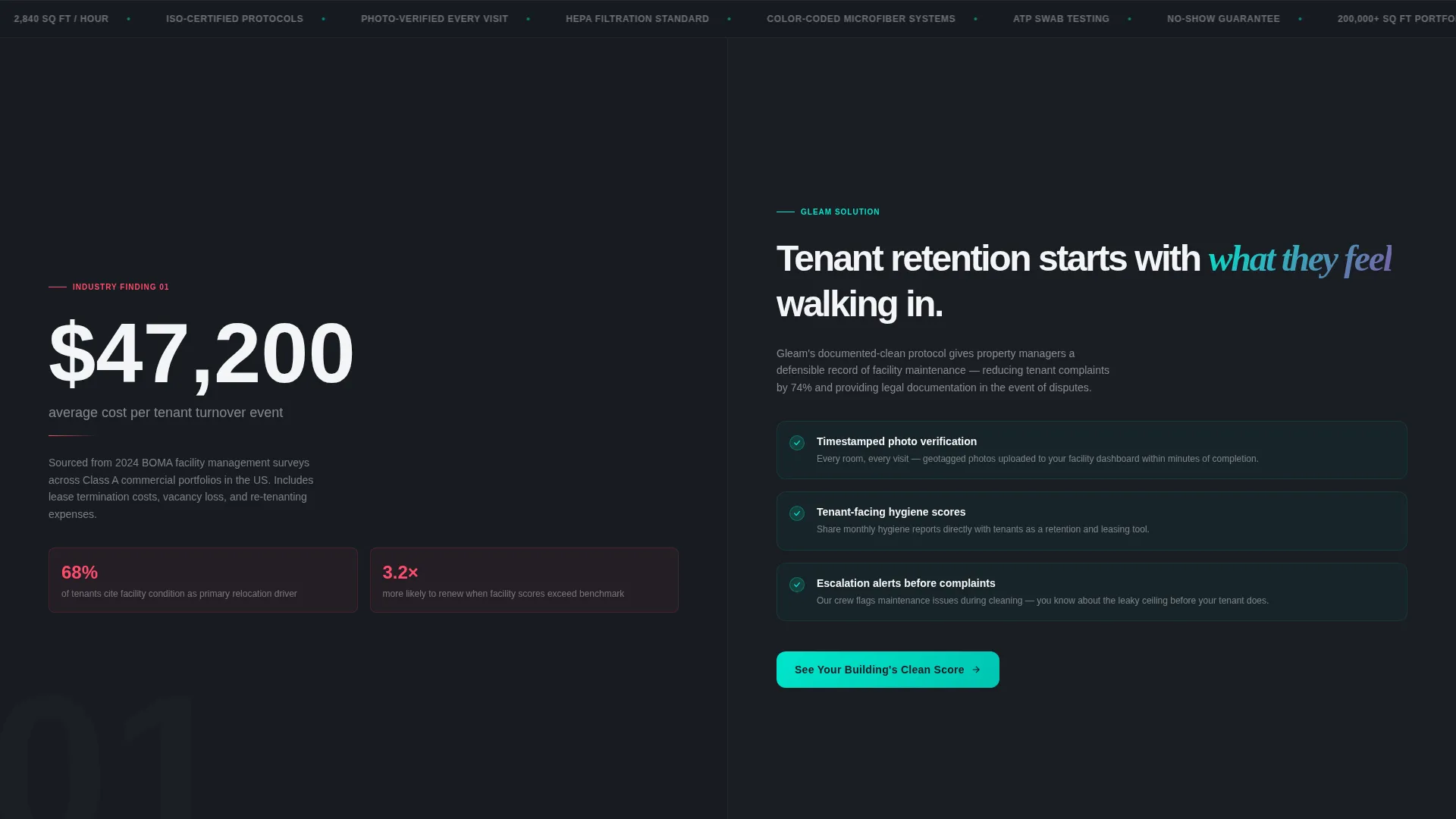
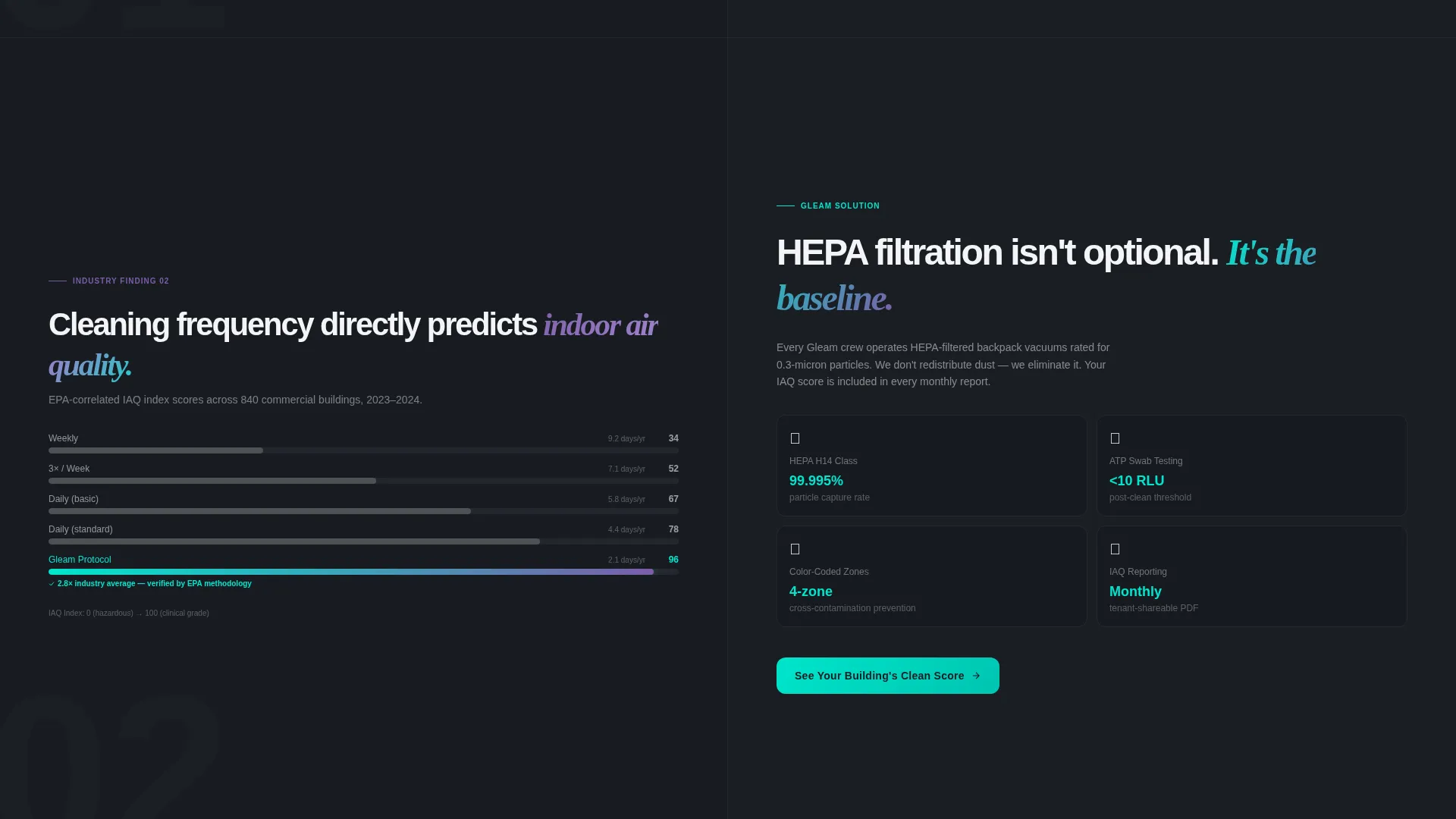
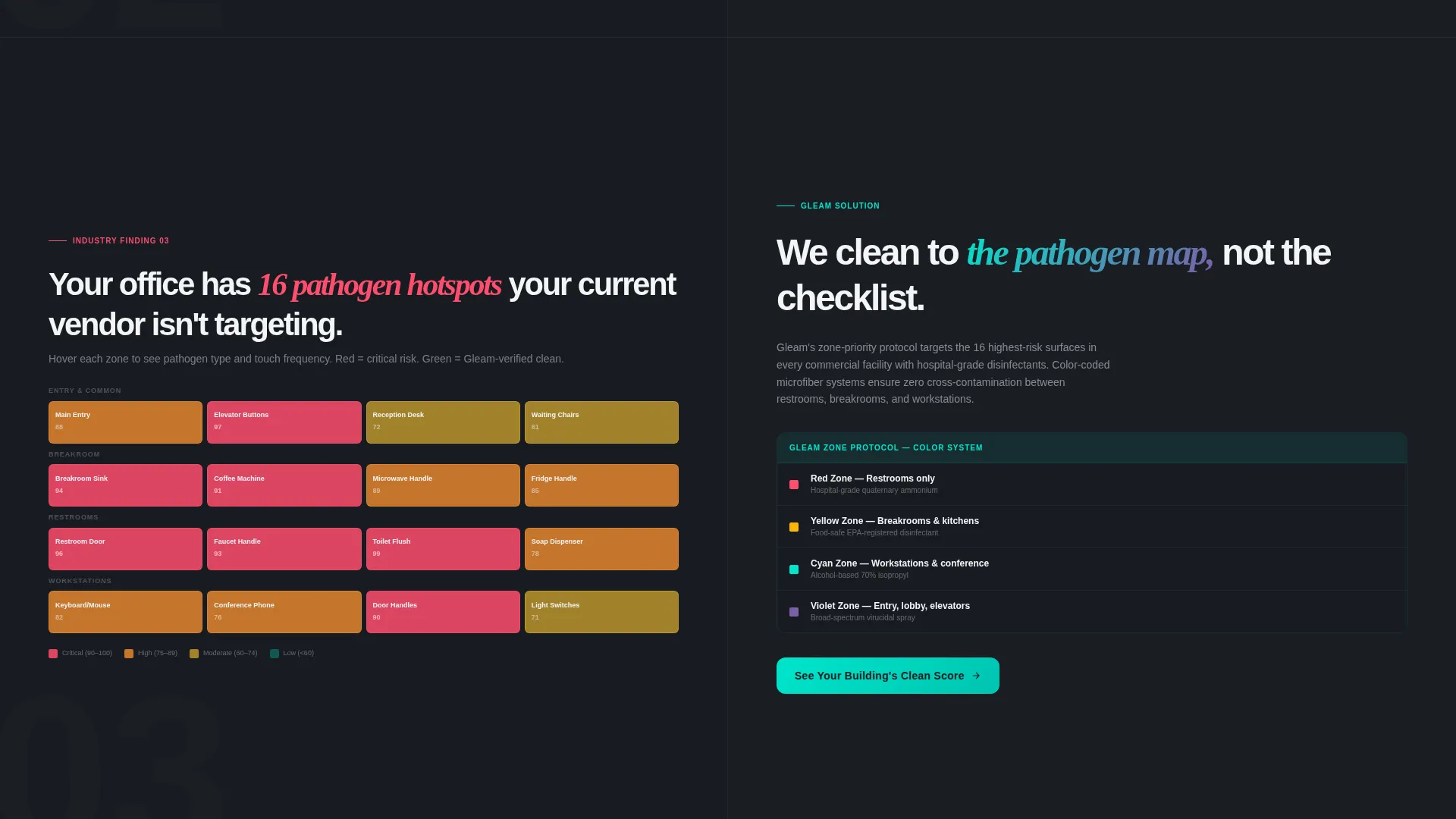
Each scroll section pairs a stark statistic on the left panel with an operational solution on the right. Section one surfaces the average cost of tenant turnover tied to poor facility maintenance. Section two benchmarks cleaning frequency against indoor air quality scores. Section three maps pathogen hotspots using heatmap overlays on a typical office layout.
Persistent Assessment call to action
The primary call to action, "See Your Building's Clean Score," launches as a floating button after the header interaction and reappears at every section break. It routes visitors to a dedicated assessment page where they input building size, current cleaning frequency, and facility type.
Email-Gated Benchmark Report
A secondary conversion path offers visitors the "2025 Facility Hygiene Benchmark Report" behind an email gate. This captures buyers who are researching but not yet ready to speak with a sales team, keeping them in the funnel without pressure.
AI Iridescent Color System
The palette is built around four purposeful values: deep graphite for backgrounds, holographic violet for hover states and data highlights, clinical cyan for progress bars and verification badges, and sterile white for typography and card surfaces. Every color choice reinforces the Data Command theme.
Page sections overview
| Section | Purpose |
|---|---|
| Dashboard Header | Showcases live floor-plan status and real-time cleaning metrics |
| Tenant Cost Findings | Reveals the financial impact of poor facility maintenance |
| Air Quality Benchmarks | Compares cleaning frequency against indoor air quality scores |
| Pathogen Heatmap Section | Maps contamination hotspots across a typical office layout |
| Floating Assessment call to action | Drives visitors toward the building clean-score tool |
| Benchmark Report Gate | Captures email leads through a downloadable hygiene report |
Design & branding system
The visual system is built around the Data Command theme, which treats cleanliness as a computable, measurable state rather than an aesthetic. The AI Iridescent palette creates a dark-mode control panel feel where light refracts off polished surfaces and every metric feels tracked.
- Deep graphite (#1A1D23) anchors backgrounds like a spacecraft operations console
- Holographic violet (#7B5EA7) activates on hover states and data highlights, while clinical cyan (#00E5CC) pulses through progress bars and verification badges
- Sterile white (#F4F5F7) is reserved for typography and card surfaces to keep readability sharp against dark backgrounds
Mobile & speed optimization
The 50/50 split-screen layout is designed to reflow cleanly at smaller breakpoints so the dashboard header and scroll sections remain legible on any screen size. The data-display components are built to feel responsive without sacrificing the precision aesthetic.
- Split panels stack vertically on mobile, preserving the left-data, right-solution narrative in a linear scroll
- Interactive room-click behavior on the floor plan adapts to tap gestures on touch screens
- Floating call to action button maintains visibility across all viewport sizes so the primary conversion path is never buried
How this template helps you convert
Gleam is engineered around a specific psychological mechanism: making the visitor feel like they are already behind on data their competitors have. Every section is designed to move a cautious facility buyer closer to action.
- The interactive dashboard header creates immediate engagement by letting visitors explore room-level cleaning status and real-time metrics, building credibility before a single word of copy is read.
- The industry-report scroll flow surfaces costs, benchmarks, and risk data that reframe the buying decision as an operational necessity rather than a discretionary expense, making each call to action feel like the logical next step.
Other information about this template
Gleam is a strong fit for commercial cleaning businesses that want to stand out in a crowded market by presenting their operation as a data-verified, technology-forward service. The template is built specifically for the cleaning service landing page niche within the commercial and facility management sector.
- The template style is Split Screen (50/50), which naturally supports side-by-side data and solution storytelling at every scroll depth
- The creative direction follows an Industry Report format, meaning each section reads like a proprietary whitepaper finding rather than a standard service pitch
- The header concept is an Interactive Preview, giving visitors a hands-on experience with the dashboard before they reach any explicit sales copy
- The landing page direction is Click-Through, with every design decision aimed at earning the call to action tap rather than closing a sale on the page
Theme
Data Command
Creative direction
Industry Report
Color system
AI Iridescent
Style
Split Screen (50/50)
Direction
Click-Through
Page Sections
Interactive Dashboard Header Panel
Industry Report Scroll Flow
Persistent Clean Score Call to Action
Email-gated Report Download
AI Iridescent Color System
Related questions
Who is the Gleam template best suited for?
What are the two conversion paths included in this template?
Does the template include real live data or is it a designed visual?
Can I update the colors and branding to match my business?
Is this template only practical for large commercial cleaning companies?



