Beauty & Salon Software & SaaS Booking Website Template
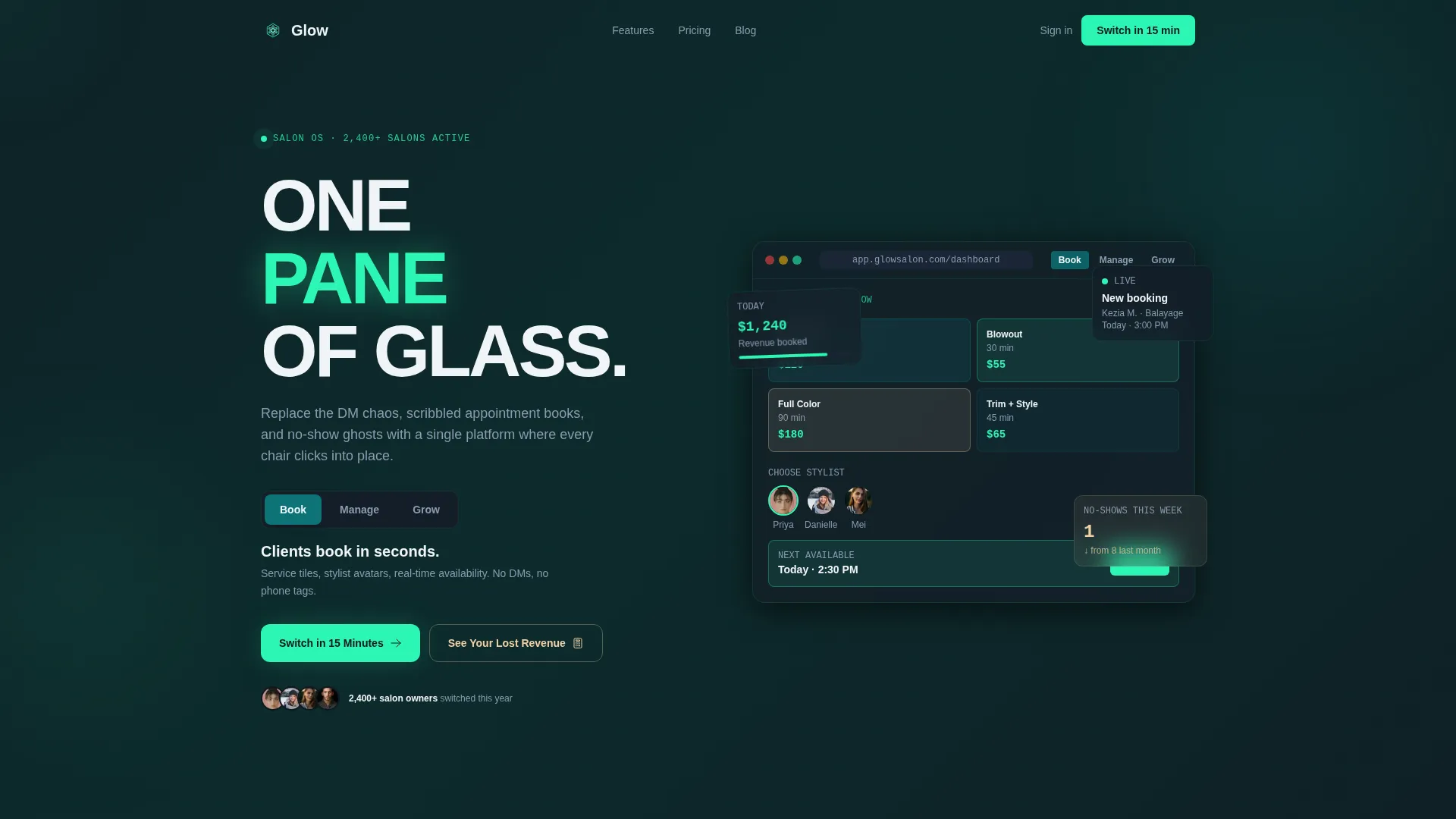
Glow is a modular, card grid landing page template built for beauty and salon booking software. It features a Feature Tab Switcher header, interactive flip cards, a sticky comparison panel, and a lost-revenue calculator. The Dynamic Motion theme and Teal Catalyst color system give it a polished, electric look that builds trust and drives sign-ups.
by Rocket studio
Quick summary
Glow is a single-page, card grid landing page template designed for beauty and salon booking software. It combines a Feature Tab Switcher header, staggered modular feature cards, a sticky side-by-side comparison module, and a two-field revenue calculator into one cohesive, scroll-driven experience that turns curious visitors into confident sign-ups.
Who this template is for
This template is built for founders and product teams launching or growing a salon booking software platform. It speaks directly to the pain points of the people their software serves, making the value proposition feel personal and immediate.
- Independent salon owners managing walk-ins, color treatments, and chair schedules simultaneously
- Multi-location spa managers who need real-time visibility across several sites
- Freelance beauty professionals such as braiders and lash techs who run their business from a phone
What problem this template solves
Most salon software landing pages rely on static screenshots and feature lists that fail to show the product in action. Visitors leave without understanding what changes the moment they sign up. Glow solves this by making the page itself feel like a live product demo.
- Eliminates the credibility gap between "we have a booking tool" and "watch it work right now"
- Replaces passive reading with interactive exploration, so visitors self-qualify before ever filling in a form
- Reduces form friction to a near-zero level with a minimal three-field sign-up and an instant revenue calculator
What you get with this template
You get a fully structured, single-page layout built around modular cards, animated transitions, and a persuasion architecture that escalates from immediate needs to hidden revenue losses. Every section is designed to do a specific job in the buyer journey.
- A Feature Tab Switcher header with three tabs: Book, Manage, and Grow, each revealing a different live dashboard mockup
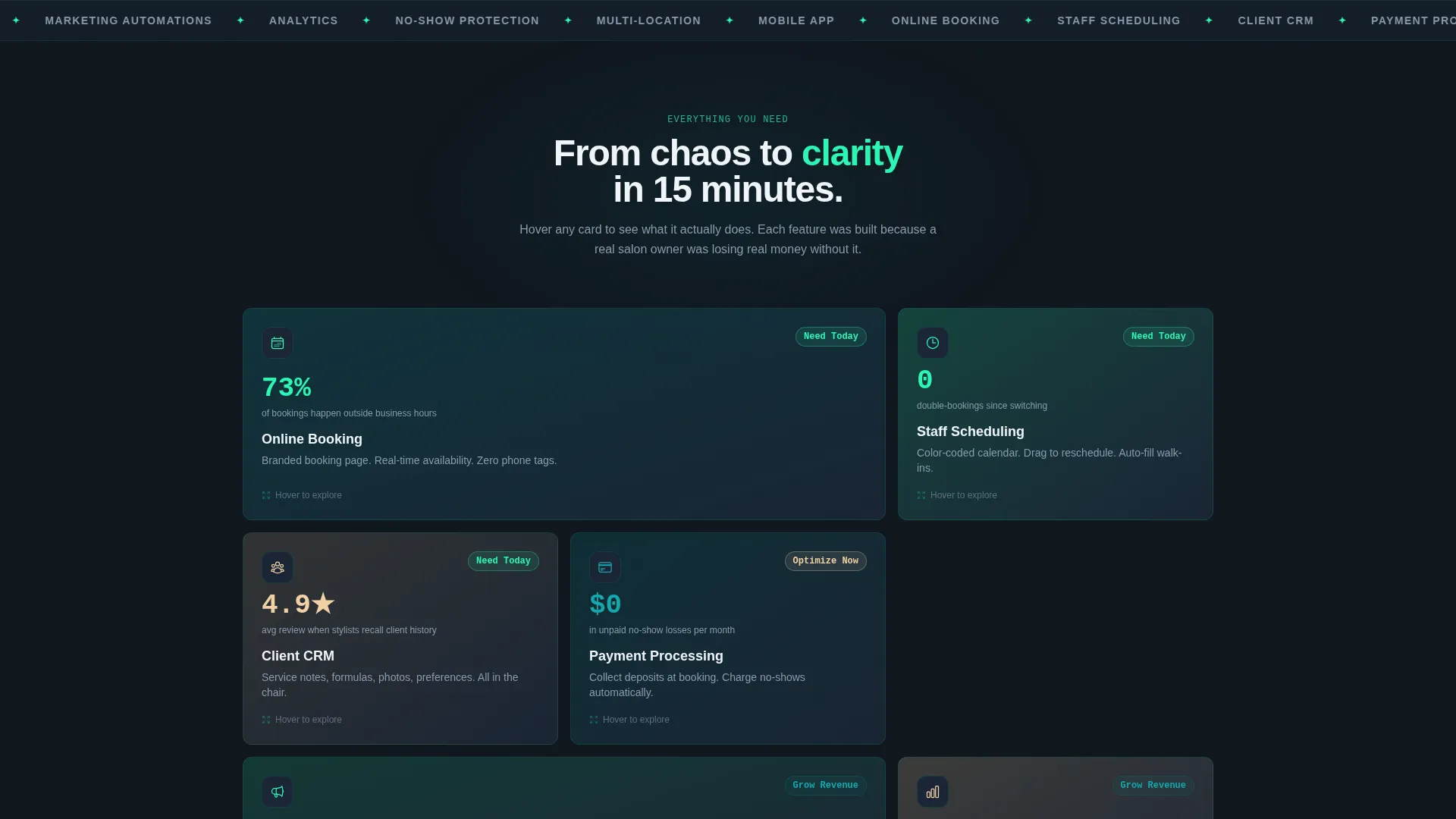
- Six interactive feature cards covering Online Booking, Staff Scheduling, Client CRM, Payment Processing, Marketing Automations, and Analytics
- A sticky comparison panel, a floating call-to-action button, and a two-field lost-revenue calculator
Feature list
This template includes purpose-built interactive components drawn directly from the source brief. Each one is designed to reduce hesitation and accelerate the decision to switch.
Feature Tab Switcher Header
Three clickable tabs labeled Book, Manage, and Grow sit above a live product mockup. Each tab swap triggers a fluid card-shuffle animation where elements slide, stack, and settle rather than simply appearing or fading.
Modular Flip Card Grid
Six feature category cards bloom into the viewport in staggered motion as the visitor scrolls. Hovering any card flips it to reveal a micro-demo or animated stat. Clicking expands the card into a full comparison panel for deeper exploration.
Sticky Comparison Module
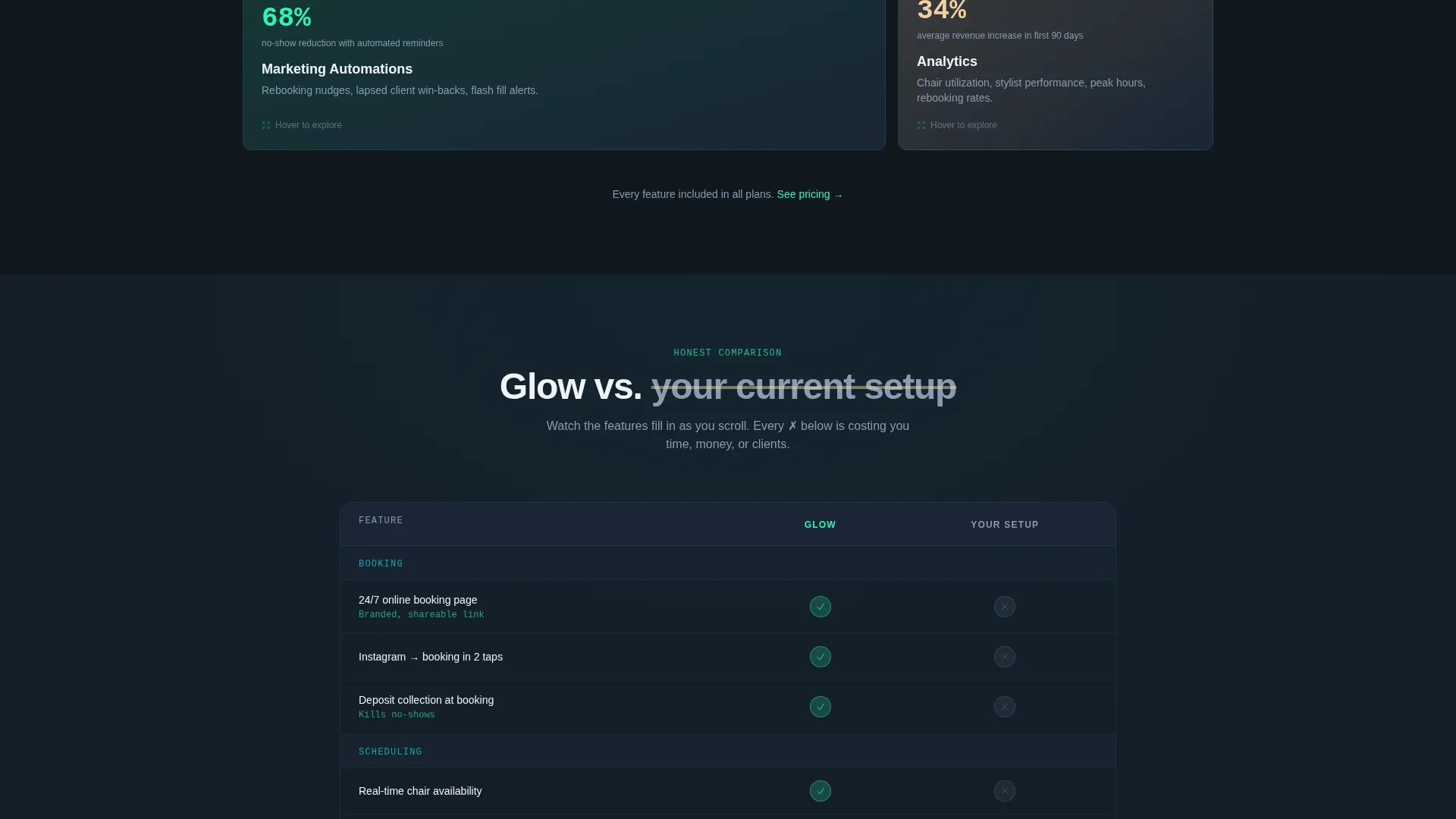
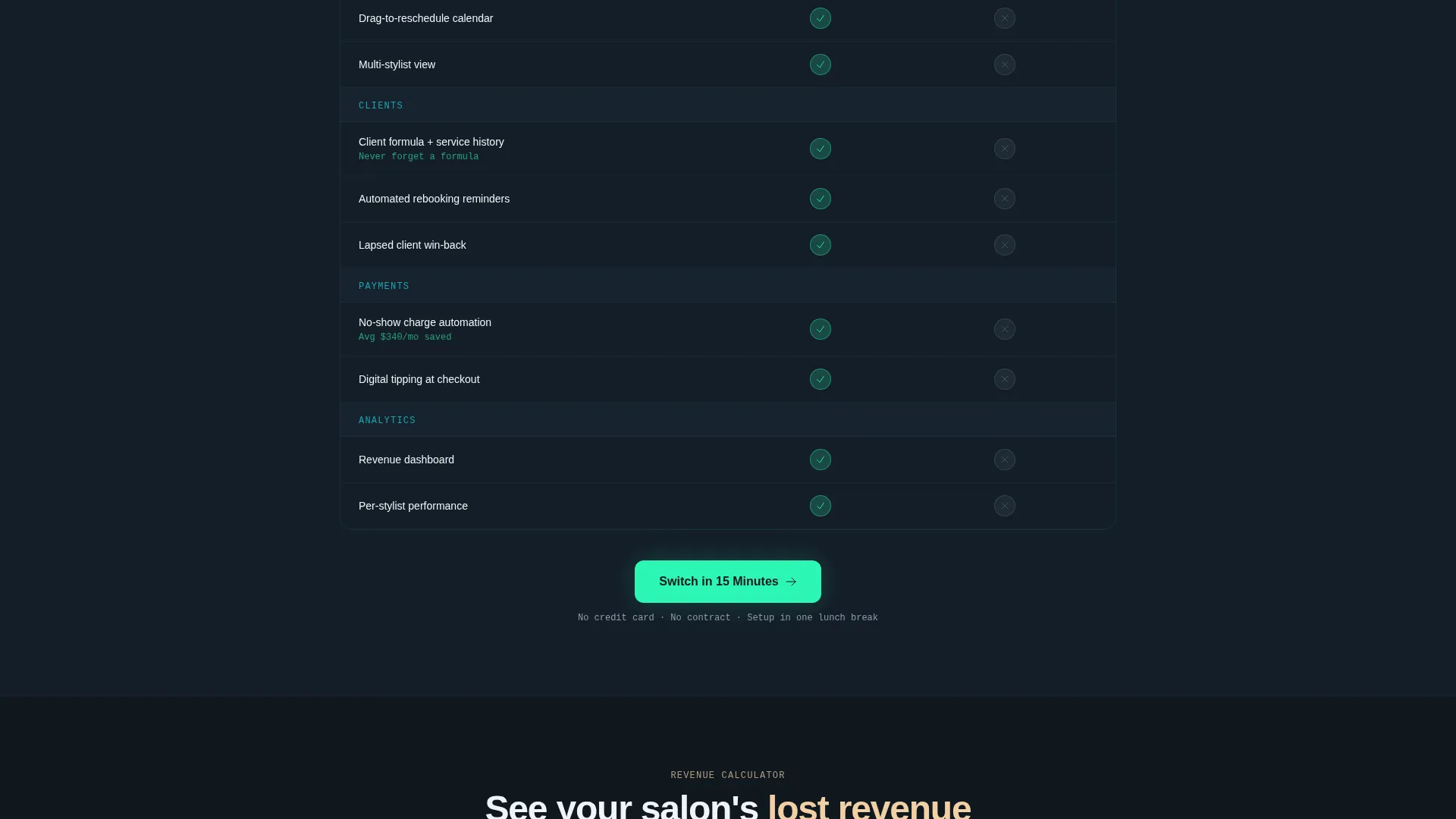
A side-by-side panel pins Glow's feature set against a visitor's current setup mid-scroll. Animated checkmarks fill in and X-marks gray out in real time as the visitor scrolls through each feature category.
Lost Revenue Calculator
Two input fields, average appointments per week and no-show percentage, instantly render a dollar figure showing how much revenue the visitor's current system is costing them. It reframes the cost of inaction without a single sales line.
Low-Friction Sign-Up Form
The sign-up form asks only for salon name, current booking method via a dropdown, and email address. The dropdown options cover pen and paper, Instagram direct messages, another platform, and nothing, matching the exact language of the target audience.
Floating Call-to-Action Button
A persistent "Switch in 15 Minutes" button anchors to the viewport after the comparison table appears. It stays visible throughout the lower half of the page so the primary conversion path is never more than one click away.
Page sections overview
| Section | Purpose |
|---|---|
| Tab Switcher Header | Introduce the product through three interactive dashboard states |
| Feature Card Grid | Let visitors explore six feature categories through flip and expand interactions |
| Sticky Comparison Panel | Show Glow's advantages against a visitor's current booking setup |
| Revenue Calculator | Quantify the cost of inaction using the visitor's own numbers |
| Sign-Up Form | Capture leads with minimal friction using only three fields |
| Floating call to action Button | Keep the primary conversion action visible throughout the scroll |
Design & branding system
The visual identity follows a Dynamic Motion theme built on the Teal Catalyst color system. The palette is deliberately bold but grounded, designed to feel modern and trustworthy at the same time.
- Deep salon teal (#0D7377) anchors the primary brand presence across buttons, active states, and key user interface elements
- Midnight scheduling black (#101820) sets the background tone and carries typographic weight throughout the layout
- Warm highlight champagne (#F2D0A4) activates on hover states and selected cards, adding warmth to an otherwise cool palette
- Bright catalyst cyan (#2CF6B3) drives calls-to-action and animated accents, giving interactive moments a sharp, electric contrast
Mobile & speed optimization
The card grid layout and staggered motion animations are structured to adapt across screen sizes without breaking the interactive experience. The template is designed with mobile-first beauty professionals in mind, particularly freelance technicians who manage their entire business from a phone.
- Modular card layout reflows naturally across small screens without losing the flip and expand interaction model
- Floating call-to-action button and sticky comparison panel remain accessible and usable on touch devices
How this template helps you convert
Glow is built as a persuasion sequence, not a brochure. Every section moves the visitor one step closer to understanding why their current setup is costing them time and money.
- The Feature Tab Switcher opens with product proof, showing the booking flow, calendar management, and revenue growth before the visitor reads a single marketing claim.
- The card escalation structure moves from features visitors need today to costs they did not know they were incurring, building a quiet case that their current tool is a liability.
- The lost-revenue calculator and low-friction form close the loop by making the switch feel both financially obvious and logistically easy.
Other information about this template
This template is categorized under Technology, specifically within the Beauty and Salon Software and Software-as-a-Service subcategory. It is designed for the beauty and salon booking software niche and scores a strong intersection match between its creative direction, visual theme, and target use case.
- Template style: Card Grid (Modular), suited to software products with multiple feature categories to communicate
- Creative direction: Interactive Explorer, meaning the scroll experience itself is the demo
- Landing page direction: Comparison/Versus engine, positioning the platform against a visitor's current booking method
- Header concept: Feature Tab Switcher, delivering three product states in one above-the-fold component
- Theme: Dynamic Motion, with staggered card entry, fluid tab transitions, and animated comparison states
Theme
Dynamic Motion
Creative direction
Interactive Explorer
Color system
Teal Catalyst
Style
Card Grid (Modular)
Direction
Comparison/Versus
Page Sections
Feature Tab Switcher Header
Interactive Modular Card Grid
Sticky Comparison Panel
Lost Revenue Calculator
Low-friction Sign-up Form
Floating Call-to-action Button
Related questions
Who is this landing page template made for?
Can I edit the feature cards and tab content to match my product?
What does the lost-revenue calculator do?
What color palette does this template use?
Is this template a single page or a multi-page website?



