Premium Data & Analytics Professional Website Template
Govern is a data governance landing page template built for enterprise data teams. It features an animated lineage graph hero, interactive scroll-driven sections, glassmorphic card layouts, and a mint-green download call to action. The design puts your product front and center, letting visitors explore a sample dataset before committing to a download or sign-up.
by Rocket studio
Quick summary
Govern is a single-page template designed for data governance platforms. It opens with a live-style animated dashboard hero, walks visitors through interactive feature sections, and closes with a clear app download call to action. The glassmorphic visual system and dynamic motion theme make a complex product feel immediately approachable and trustworthy.
Who this template is for
This template is built for teams that need to communicate the depth and clarity of a data governance platform to a technically sophisticated audience. It speaks directly to buyers who understand what a compliance audit or a data lineage map actually means.
- Chief data officers and data governance leads evaluating new platform tooling
- Data stewards and privacy engineers who need to demo platform value quickly
- Product marketers and founders launching a data intelligence or policy automation product
What problem this template solves
Enterprise data platforms often struggle to explain complex capabilities through static marketing pages. Visitors leave before they understand what the product actually does. This template solves that by letting the product speak for itself through interaction.
- Compliance-focused buyers need to see the tool working, not just read about it
- Static hero images fail to communicate real-time data mapping capabilities
- Generic landing pages do not build enough trust to earn a desktop app download
What you get with this template
You get a fully structured, single-page template that mirrors the feel and function of the platform it promotes. Every section is designed to escalate visitor understanding while keeping the interaction effortless.
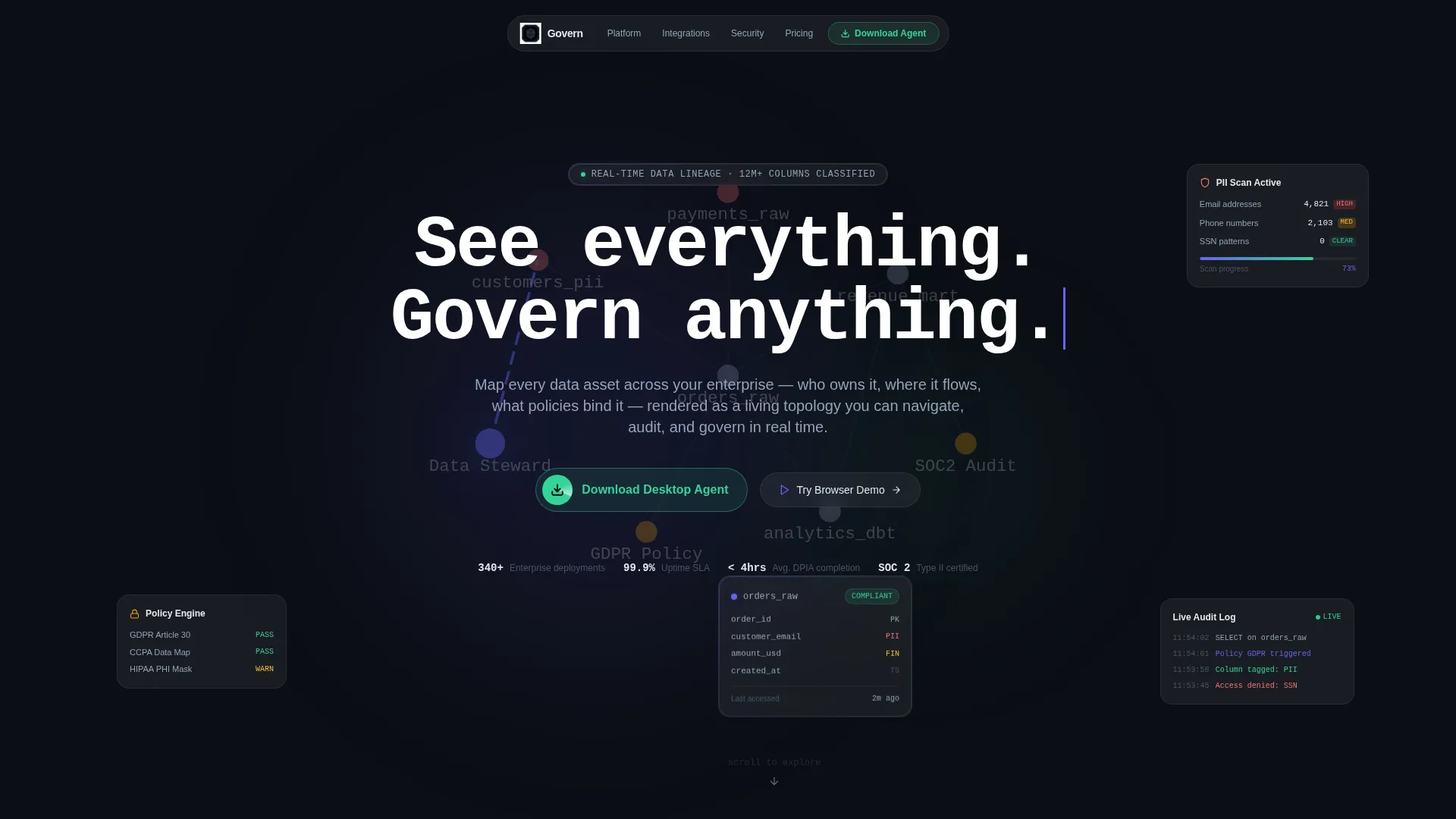
- An animated dashboard hero with a force-directed lineage graph and live-style node metadata cards
- Scroll-triggered interactive sections including a miniature lineage explorer and glassmorphic tilt-on-hover feature cards
- A sticky download call to action bar with OS detection, a secondary browser demo path, and a mobile email capture field
Feature list
This template includes purpose-built components that reflect the complexity of enterprise data governance without overwhelming the visitor.
Animated Lineage Graph Hero
The header features a live-style data lineage graph in motion. Nodes representing tables, policies, and data owners drift in a force-directed layout. One node pulses in electric indigo while its metadata card slides open in frosted glass, showing column names, sensitivity tags, last-accessed timestamps, and a green compliance badge. The headline types itself in monospace as the camera slowly zooms in.
Interactive Scroll-Driven Explorer
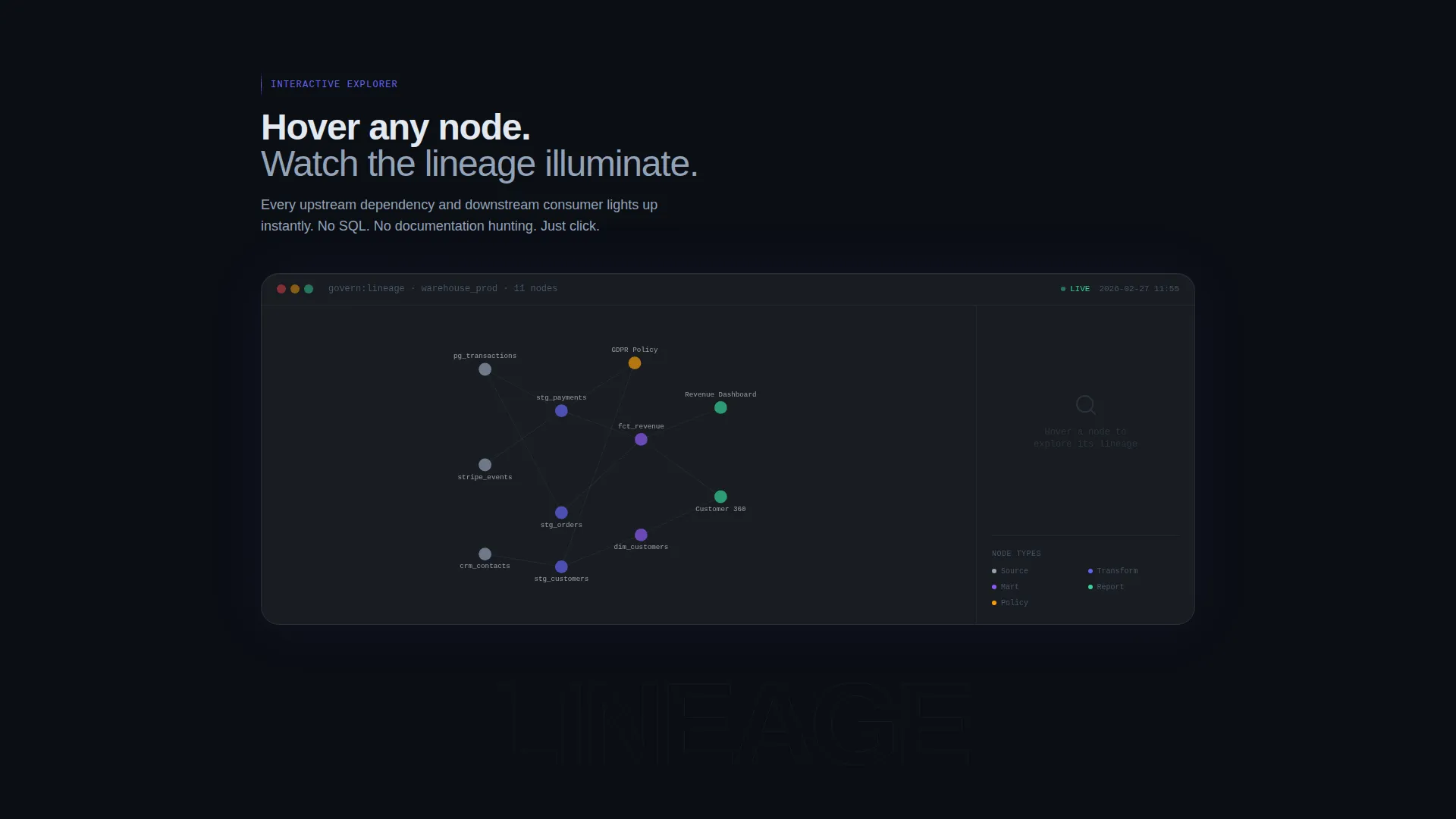
Below the hero, a miniature embedded lineage map responds to cursor movement. Hovering a node illuminates upstream dependencies in indigo trails. This interaction lets visitors experience the platform's core capability before reading a single feature description.
Glassmorphic Tilt Card Grid
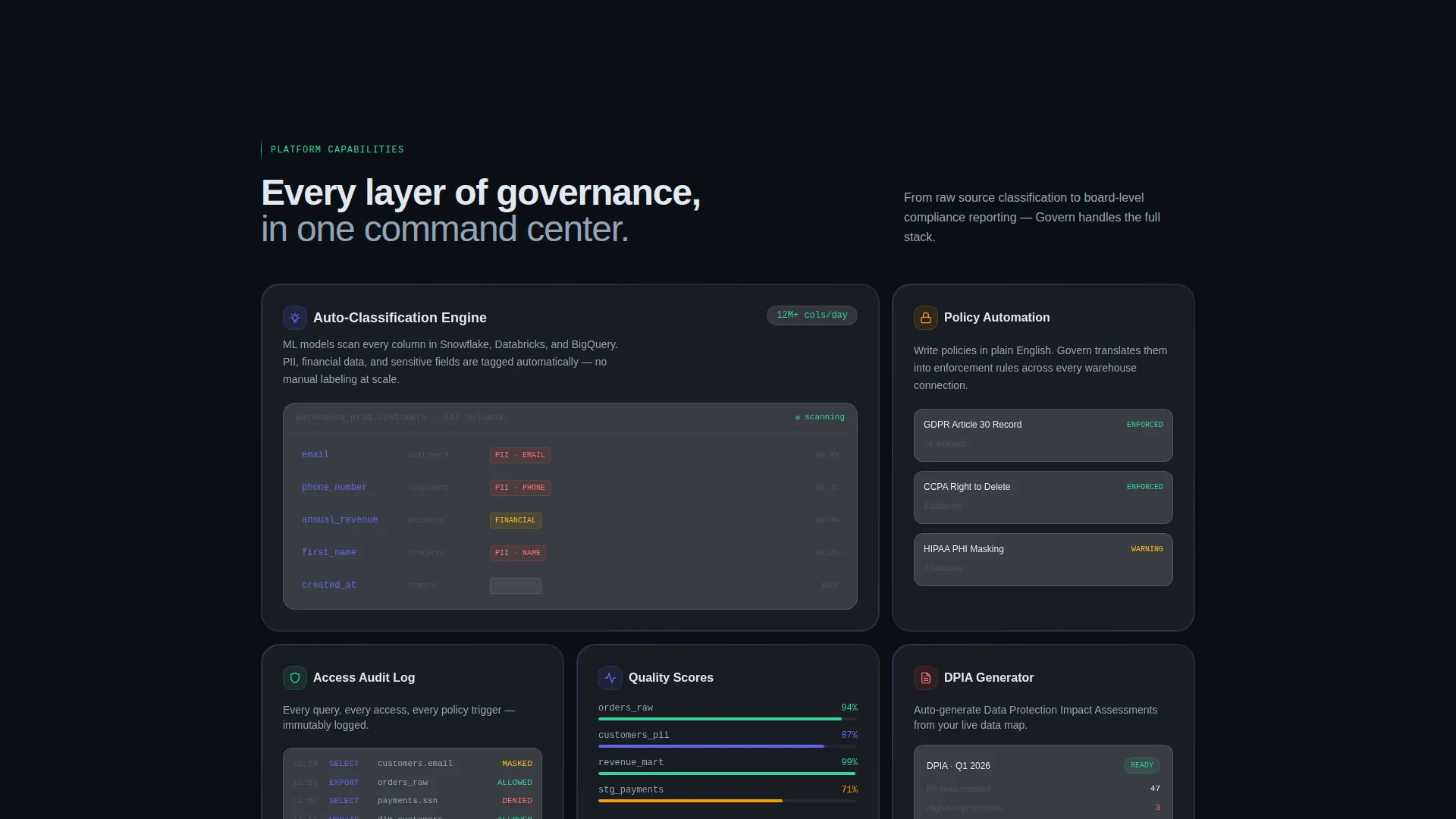
A scroll-triggered card grid animates into view and responds to mouse movement with a tilt effect. Each card surfaces a distinct governance capability: policy automation rules, classification engines, and access audit logs. Cards slide and layer like stacked frosted glass panels.
Sticky App Download call to action Bar
A persistent bottom bar keeps the primary call to action visible throughout the scroll journey. The download button auto-detects the visitor's operating system and displays the matching icon. A secondary option invites visitors to try a browser demo instead.
Mobile Email Capture Field
A single-line email field labeled "Send me the link instead" sits below the primary download button. It captures mobile visitors who are not ready to download directly, keeping them in the conversion funnel without friction.
Dynamic Motion Design System
Long easing curves, overlapping transitions, and layered panel slides create a sense of depth and control. Motion is continuous but never distracting. Every animation reinforces the platform's promise of clarity over complexity.
Page sections overview
| Section | Purpose |
|---|---|
| Animated Hero Header | Introduce the product through a live-style lineage graph with typed headline |
| Interactive Lineage Explorer | Let visitors hover nodes and trace upstream data dependencies |
| Glassmorphic Feature Cards | Showcase policy automation, classification, and audit log capabilities |
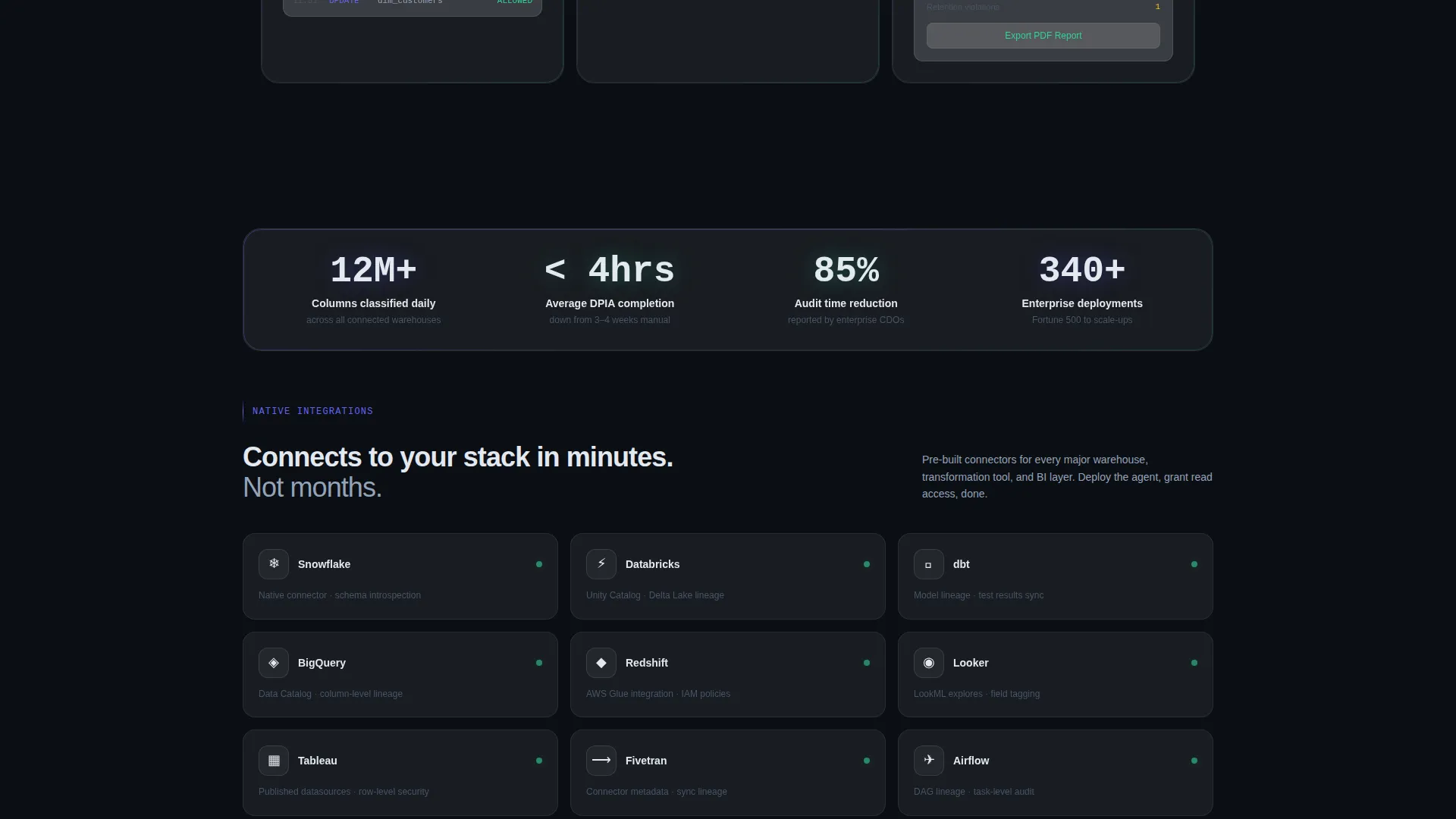
| App Download call to action | Drive installs with OS-detected download button and browser demo fallback |
| Email Capture Row | Capture mobile visitors with a lightweight "send me the link" field |
Design & branding system
The visual identity uses a glassmorphic color system layered over a dynamic motion framework. The result feels like looking through a rain-streaked cockpit window at a structured city of data below: dark, luminous, and precise.
- Base layer in deep void black (#0B0E14), frosted panels at 8% white opacity with 12-pixel blur, electric indigo (#6366F1) for active nodes and connection lines, and sharp mint (#34D399) reserved for compliance indicators and call to action surfaces
- Monospace typography reinforces a technical, command-line aesthetic that resonates with data engineering audiences
- All color choices carry functional meaning: indigo signals activity, mint signals success and action, and frosted glass signals layered context
Mobile & speed optimization
The template is structured to remain functional and visually coherent on smaller screens. Interactive elements degrade gracefully so mobile visitors still receive a clear, usable experience.
- The sticky call to action bar and email capture field are optimized for thumb-reach placement on mobile viewports
- Motion and transition complexity is designed to scale without breaking the page's core conversion flow on constrained devices
How this template helps you convert
This template earns the click rather than demanding it. By the time a visitor reaches the download button, they have already interacted with the product.
- The animated hero establishes immediate credibility by showing the platform working, not just describing it
- The interactive lineage explorer and tilt card grid let visitors build hands-on familiarity before any commitment is required
- The layered call to action system, sticky bar, browser demo option, and email capture field, ensures every visitor type has a clear and low-friction next step
Other information about this template
This template is categorized under Technology, specifically within the Data and Analytics subcategory, targeting the data governance platform niche. It is well-suited for teams building products that compete in the enterprise data intelligence space.
- The template style follows a Dashboard and Data Grid layout, making it a strong fit for showcasing data lineage, metadata management, or policy compliance tooling
- The Interactive Explorer creative direction and Product Screenshot header concept are both built into the template structure, requiring no additional configuration to activate
- The Dynamic Motion theme and Glassmorphic color system work together as a cohesive design language, not as separate add-ons
Theme
Dynamic Motion
Creative direction
Interactive Explorer
Color system
Glassmorphic
Style
Dashboard/Data Grid
Direction
App Download
Page Sections
Animated Data Lineage Graph Hero
Cursor-responsive Lineage Explorer
Glassmorphic Tilt Feature Cards
Os-detecting Download Button
Sticky Bottom Call to Action Bar
Mobile Email Capture Field
Related questions
Can I replace the sample dataset in the interactive lineage explorer?
Does the download button really detect the visitor's operating system?
Is this template suitable for a browser-only SaaS product?
How difficult is it to customize the glassmorphic color system?
Who is this template designed for?



