Nonprofit Thank You Landing Page Template
Gratitude is a nonprofit thank-you landing page built around an interactive impact calculator. It greets donors by name with a dark, glow-lit header, then immediately translates their gift into real outcomes using a three-column comparison table. The design follows a Tech Glass aesthetic with Monochrome Steel tones and a luminous teal accent, guiding donors toward a monthly sustainer upgrade without ever feeling pushy.
by Rocket studio
Quick summary
Gratitude is a single-page nonprofit thank-you experience that turns a donation receipt into a vivid proof of impact. It opens with a personalized glow header, then leads donors through an interactive calculator and animated comparison table. The layout escalates from personal confirmation to community scale, closing with a clear path to monthly giving.
Who this template is for
This template is built for nonprofit organizations that want their post-donation page to do more than say thanks. It suits teams handling a range of donor types in one unified experience.
- First-time donors arriving from social media campaigns who need instant reassurance their gift landed
- Recurring monthly sustainers who want to review their cumulative contribution in plain terms
- Corporate match coordinators who need a shareable, data-populated impact card for internal reporting
What problem this template solves
Most thank-you pages stop at confirmation. They show a transaction number and a generic message, then leave donors wondering whether their gift actually mattered. This template closes that gap.
- Donors leave without seeing where their money went, reducing the chance they give again
- Organizations miss the natural upgrade moment right after a gift clears, when donor motivation is at its highest
- Proof-of-impact is scattered across reports instead of delivered as one shareable card at the right time
What you get with this template
You get a fully structured landing page designed specifically for the nonprofit post-donation moment. Every section is purposeful and tied to a clear conversion or retention goal.
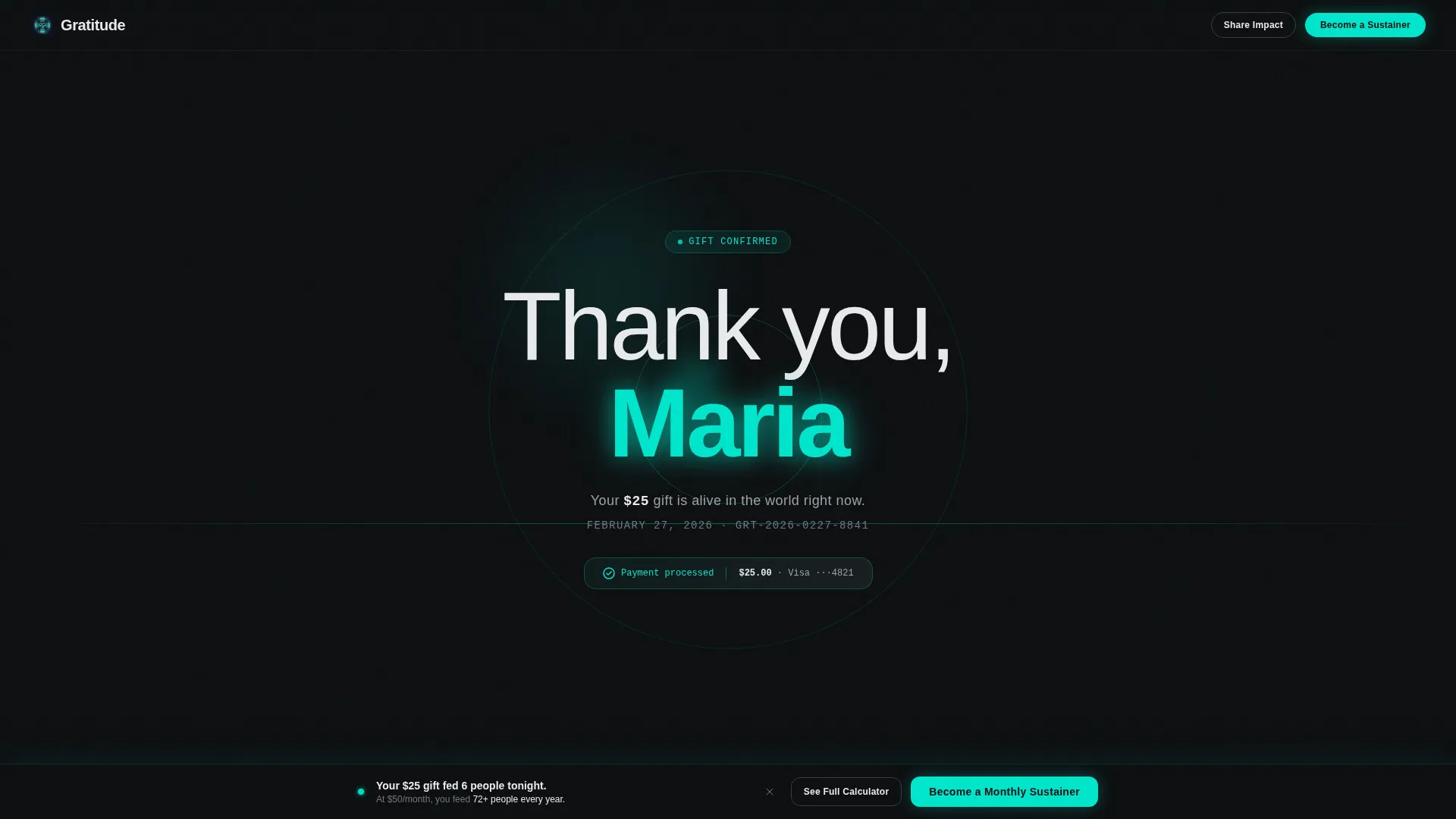
- A personalized dark header with a soft teal glow that renders the donor's first name in oversized type
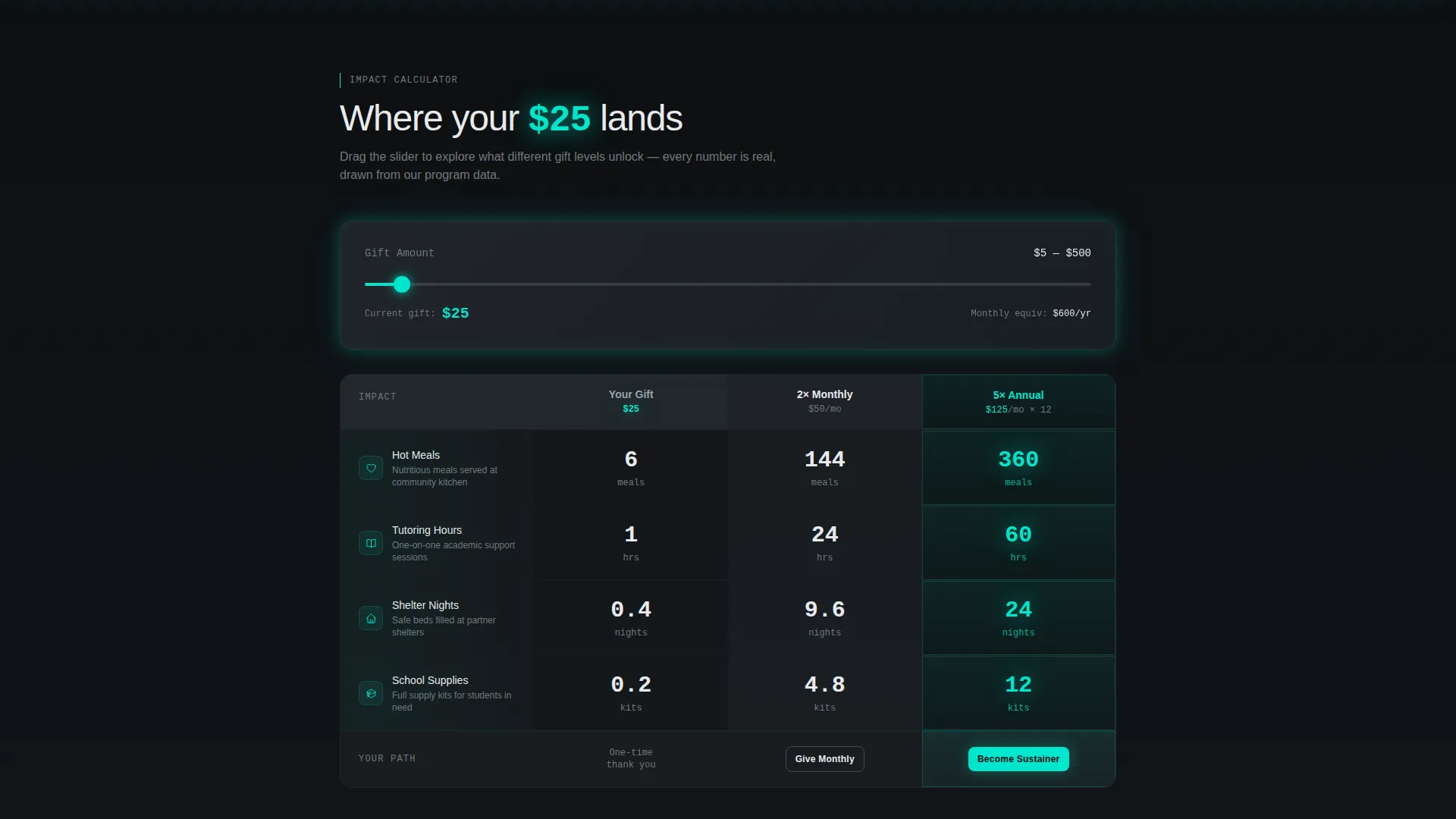
- An interactive impact calculator pre-loaded with the donor's gift amount and a three-column comparison table
- A persistent bottom-bar call to action and a secondary share path that generates a branded impact card
Feature list
This template packages several distinct functional and visual components into one cohesive post-donation experience.
Personalized Glow Header
The header fills the full viewport in near-black (#0D0F11). A soft teal light blooms from center screen, and the donor's first name renders in large, lightweight type. The glow radiates from behind the letters for a quiet, confident welcome before any scroll prompt appears.
Interactive Impact Calculator
Positioned immediately below the header, the calculator arrives pre-loaded with the donor's actual gift amount. A draggable slider lets the donor explore what a larger or recurring gift would unlock, making the upgrade feel self-directed rather than pressured.
Three-Column Comparison Table
The comparison table shows three tiers side by side: the donor's current gift, a two-times monthly equivalent, and a five-times annual sustainer level. Each row maps dollars to tangible outcomes, such as meals served, tutoring semesters, or scholarship funding, so the numbers stay human and concrete.
Sequential Row Animation
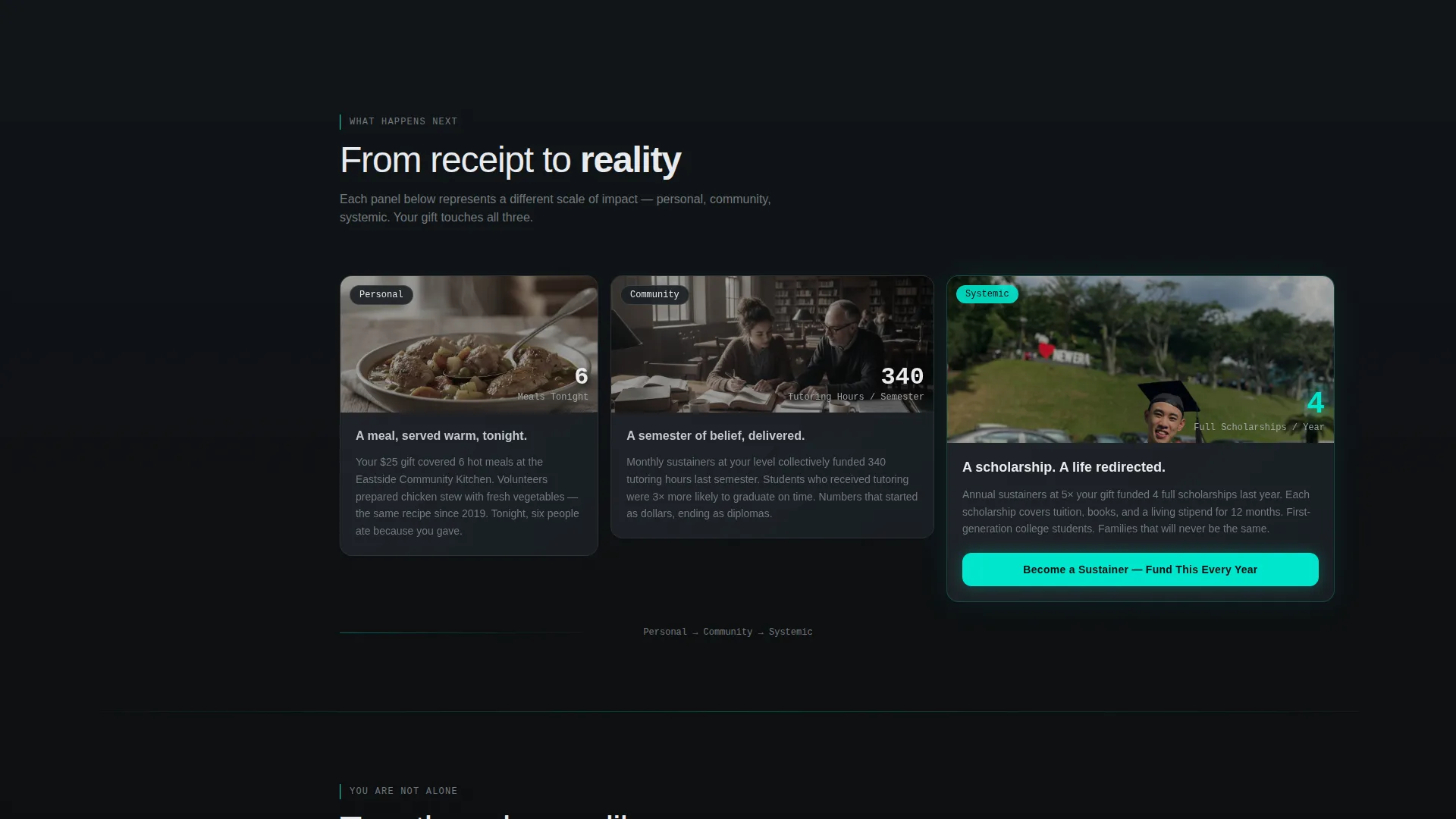
Table rows animate one by one as the visitor scrolls. Each steel panel slides apart like a glass card to reveal the outcome beneath. The scroll journey escalates from personal receipt to community scale to systemic change, with frosted-glass panels growing wider as the impact numbers grow.
Contextual and Persistent calls to action
The primary call to action, "Become a Monthly Sustainer," appears in teal on gunmetal inside the calculator when the slider moves past the monthly column. It also locks into a persistent bottom bar after the first scroll, keeping the upgrade path visible without interrupting the reading flow.
Shareable Impact Card
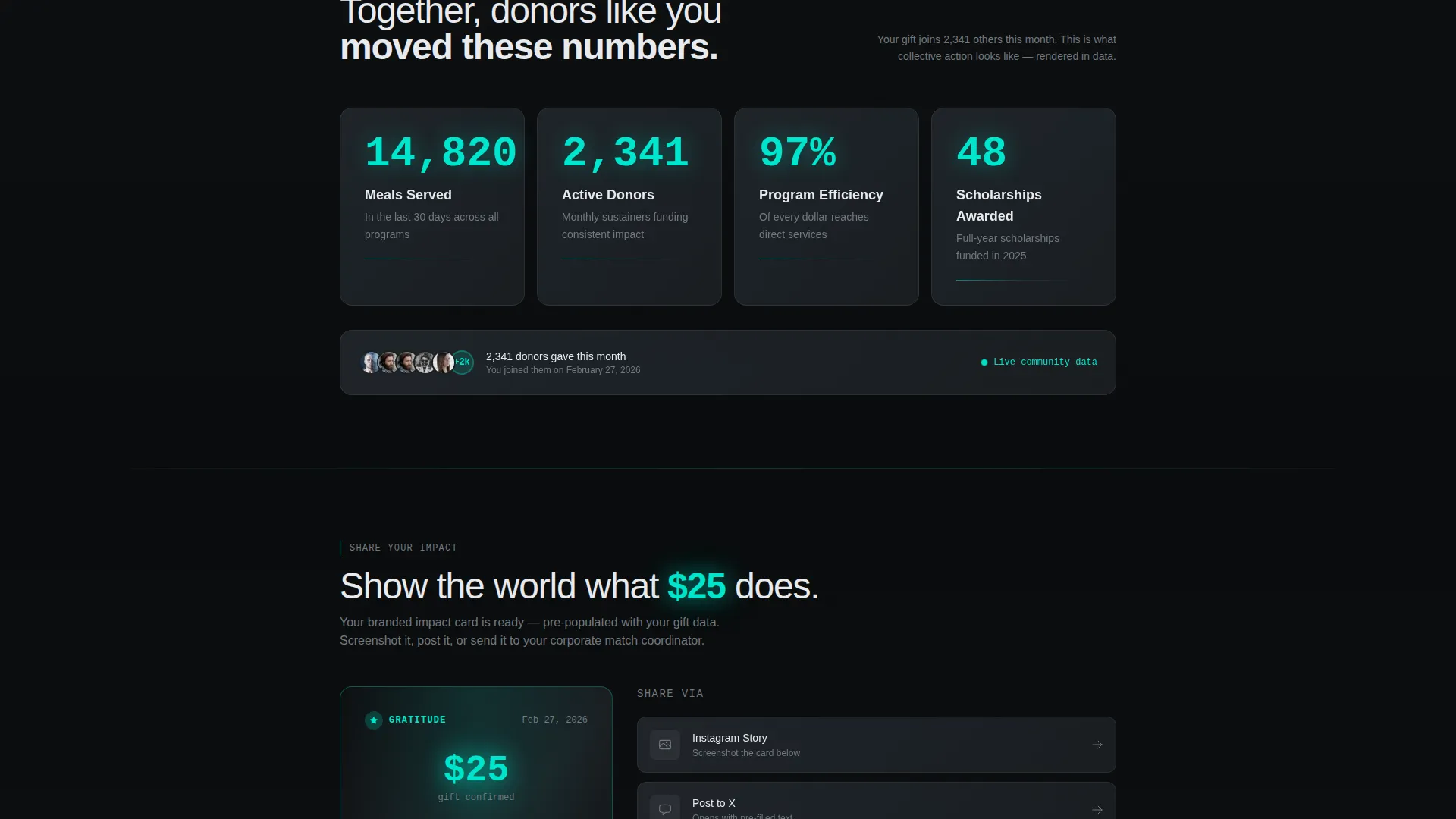
A secondary action, "Share Your Impact," generates a branded card populated with the donor's actual data. The donor can screenshot or post the card directly, turning a private thank-you moment into organic social proof for the organization.
Page sections overview
| Section | Purpose |
|---|---|
| Personalized Glow Header | Greet donor by name with a centered teal bloom on a near-black background |
| Impact Calculator | Show pre-loaded gift amount and let donor drag slider to explore upgrade tiers |
| Comparison Table | Map three giving tiers to specific real-world outcomes row by row |
| Animated Outcome Rows | Reveal impact data sequentially as donor scrolls through the page |
| Community Scale Section | Escalate narrative from individual gift to broader community-level change |
| Systemic Change Section | Show how sustained giving connects to long-term, structural outcomes |
| Persistent Bottom Bar | Keep "Become a Monthly Sustainer" call to action visible after the first scroll |
| Shareable Impact Card | Generate a branded, data-filled card the donor can post or screenshot |
Design & branding system
The visual identity follows a Tech Glass theme built on a Monochrome Steel palette. Every surface is reflective and intentional, with warmth arriving only through a single luminous teal accent.
- Core palette: deep gunmetal (#1B1F23), brushed chromium (#71797E), frosted panel white (#E8EAED), and luminous accent teal (#00E5CC) reserved for interactive glows and confirmation states
- Typography uses oversized, lightweight letterforms in the header and clean readable type in the calculator and table sections
- Frosted-glass panel styling defines the card components, with panels growing visually wider as the scroll journey progresses toward larger impact tiers
Mobile & speed optimization
The layout is designed to work cleanly on smaller screens where most social-media-referred donors will land. Touch interactions replace drag gestures where appropriate.
- The slider in the impact calculator is touch-friendly, allowing mobile donors to explore giving tiers without friction
- Frosted-glass card panels stack vertically on narrow viewports so the comparison table remains readable on a phone screen
- The persistent bottom-bar call to action is sized for thumb-tap interaction and stays visible throughout the mobile scroll
How this template helps you convert
The template is built around a Calculator/Tool First creative direction, which means conversion is earned through demonstrated value before any ask is made.
- The impact calculator shows the donor exactly what their current gift achieved, then lets them visualize a larger contribution through the slider, so the upgrade request feels like a natural next step rather than a new demand.
- The contextual call to action inside the calculator appears only when the donor has already moved the slider past the monthly giving column, timing the ask to the moment of highest intent.
- The shareable impact card creates a secondary conversion path where the donor becomes an advocate, extending the organization's reach without any additional spend.
Other information about this template
This template sits within the nonprofit organization website templates category and is specifically scoped to the nonprofit organization thank-you page use case. A few additional details worth noting:
- The template style is a Comparison Table layout, meaning the three-column structure is the structural core of the page, not a supplementary element
- The header concept is Dark Full-Bleed with Glow, a deliberate contrast to the bright confetti-style pages common in nonprofit giving flows
- The Tech Glass theme and Monochrome Steel color system give the page a tone more commonly seen in technology products, which can help organizations signal transparency and precision to corporate donors
- The intersection match score for this template across category, subcategory, and niche alignment is 13, indicating a high degree of specificity to the nonprofit thank-you page context
- This template is listed under the Technology category, reflecting the visual and interactive design language rather than the organization type it serves
Theme
Tech Glass
Creative direction
Calculator/Tool First
Color system
Monochrome Steel
Style
Comparison Table
Direction
Click-Through
Page Sections
Personalized Glow Header
Interactive Impact Calculator
Three-column Comparison Table
Sequential Scroll Animation
Dual-path Call to Action
Branded Shareable Impact Card
Related questions
Can I personalize the header with each donor's name?
Does the calculator work with any gift amount, or only fixed tiers?
Who is the Share Your Impact feature designed for?
Is this a single page or a multi-page template?
Can the comparison table rows be edited to match our organization's real outcomes?



