Enterprise Security Intelligence Landing Page Template
Sentinel is a dashboard-style landing page template built for an open-source Security Information and Event Management (SIEM) platform. It features an animated dashboard hero, live-style stats, a glass-panel design system in void black and iridescent violet, and a frictionless three-path download flow. It speaks directly to SOC analysts, DevSecOps engineers, and security-focused founders.
by Rocket studio
Quick summary
Sentinel is a single-page template designed to launch an open-source SIEM platform with force and clarity. The layout opens on a fully rendered dashboard preview, escalates through capability and community proof, and closes on a zero-friction app download flow. Every section is built around the kinetic tension of a live security product.
Who this template is for
This template is purpose-built for security software teams who need to present a complex, data-heavy product without losing visitors in the first ten seconds. It speaks the language of the people who will actually deploy it.
- SOC analysts and security operations teams who evaluate tools by seeing them work, not by reading bullet points
- DevSecOps engineers who want detection-as-code workflows and need a page that reflects that technical depth
- Startup CISOs and open-source maintainers who need to demonstrate enterprise-grade visibility on a lean budget
What problem this template solves
Most software landing pages describe features. Security practitioners ignore those pages. They want to see throughput numbers, real correlation logic, and proof that the community is active. This template is built around that reality.
- Commercial SIEM pricing pages repel the open-source audience before a single word is read
- Generic SaaS templates cannot carry the visual weight of a live threat dashboard or animated log ingestion counter
- Pages without instant proof lose technically skeptical visitors within seconds of landing
What you get with this template
You get a complete, single-page layout that moves visitors from first impression to active download with no form gates and no dead sections. Every component is designed to communicate capability before asking for a commitment.
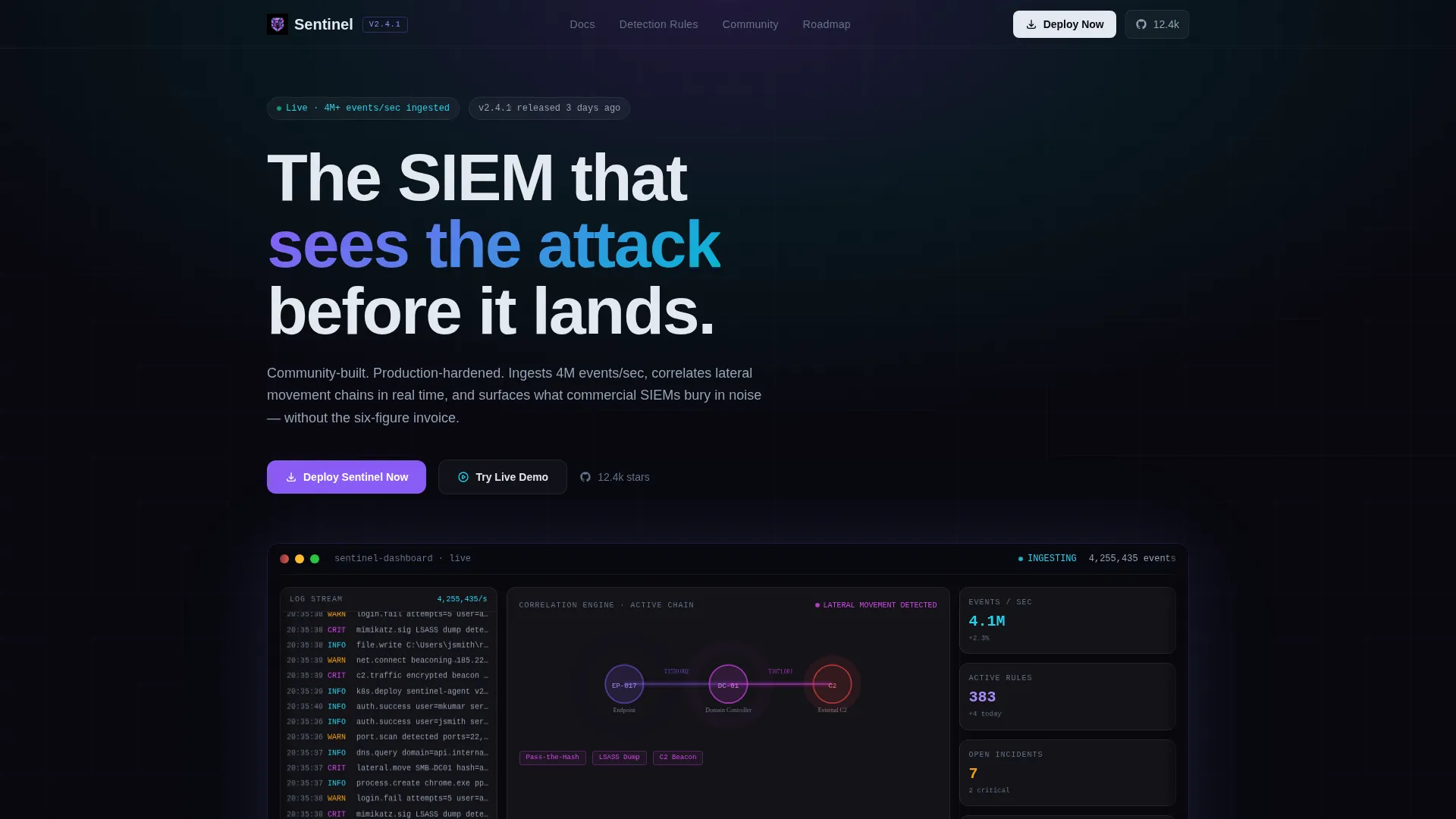
- An animated dashboard hero showing a live-style threat map, log ingestion counters, a lateral-movement correlation graph, and a severity heatmap
- Velocity stats section with scroll-triggered number animations, inline capability sections, a GitHub stars counter, contributor wall, and deployment testimonials
- A three-card download flow presenting Docker, Helm chart, and cloud-hosted options, each with a copy-to-clipboard command and estimated deploy time
Feature list
This template ships with purpose-built components that reflect how a serious open-source SIEM platform actually earns trust. Each section does a specific job.
Animated Dashboard Hero Panel
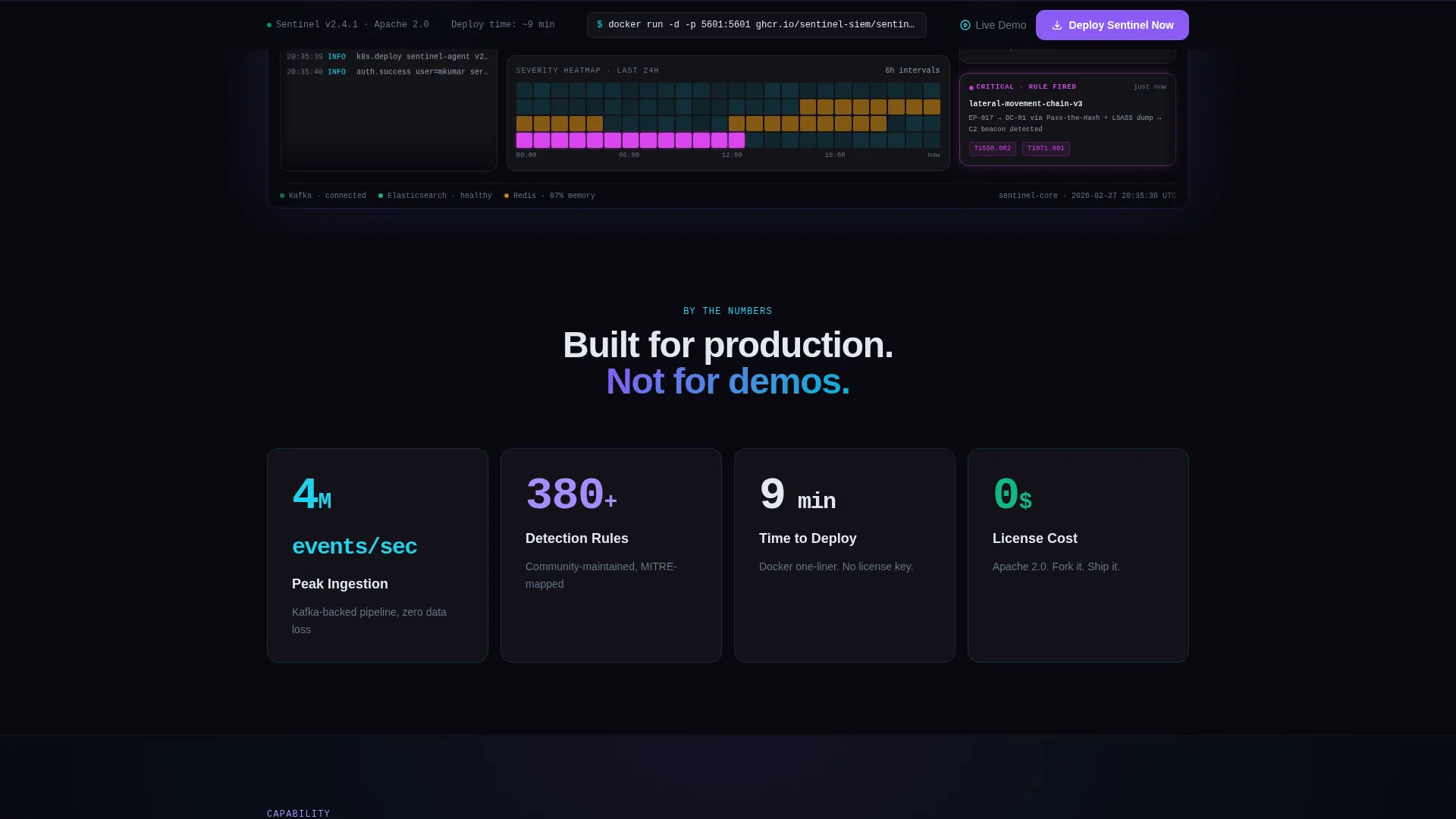
The header drops visitors into a fully rendered SIEM interface. It shows an animated threat map, log ingestion counters ticking upward on scroll, a correlation graph connecting nodes of a lateral-movement chain, and a severity heatmap glowing in threat-critical magenta. A detection rule fires mid-view, pushing a critical alert card into frame with a micro-animation.
Scroll-Triggered Velocity Stats
Three headline numbers animate from zero on scroll entry: 4 million events per second ingested, 380-plus community detection rules, and a deploy time of under nine minutes. Each stat is designed to land with physical impact and reinforce platform credibility before a visitor reads a single paragraph.
Capability and Proof Escalation Flow
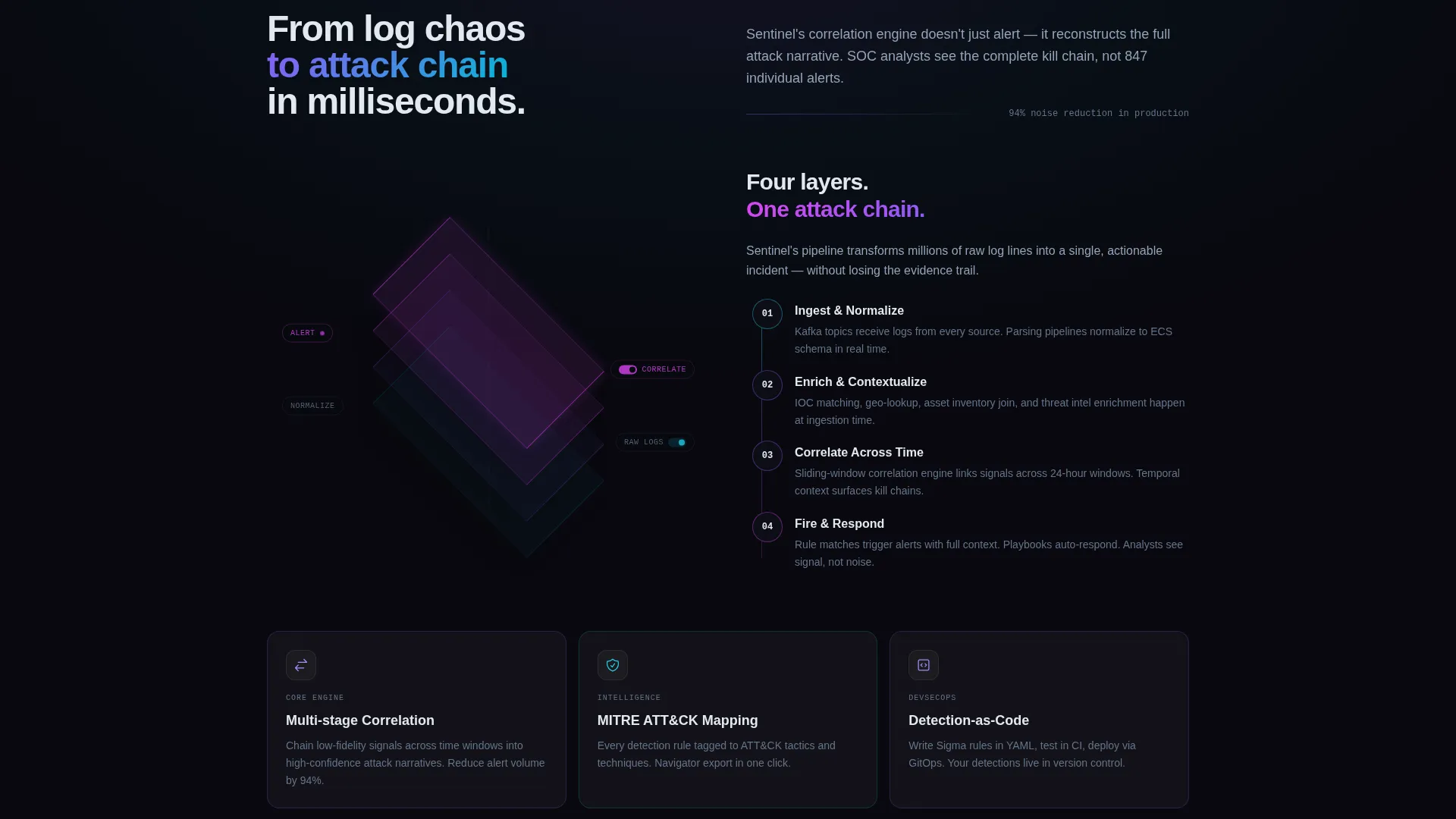
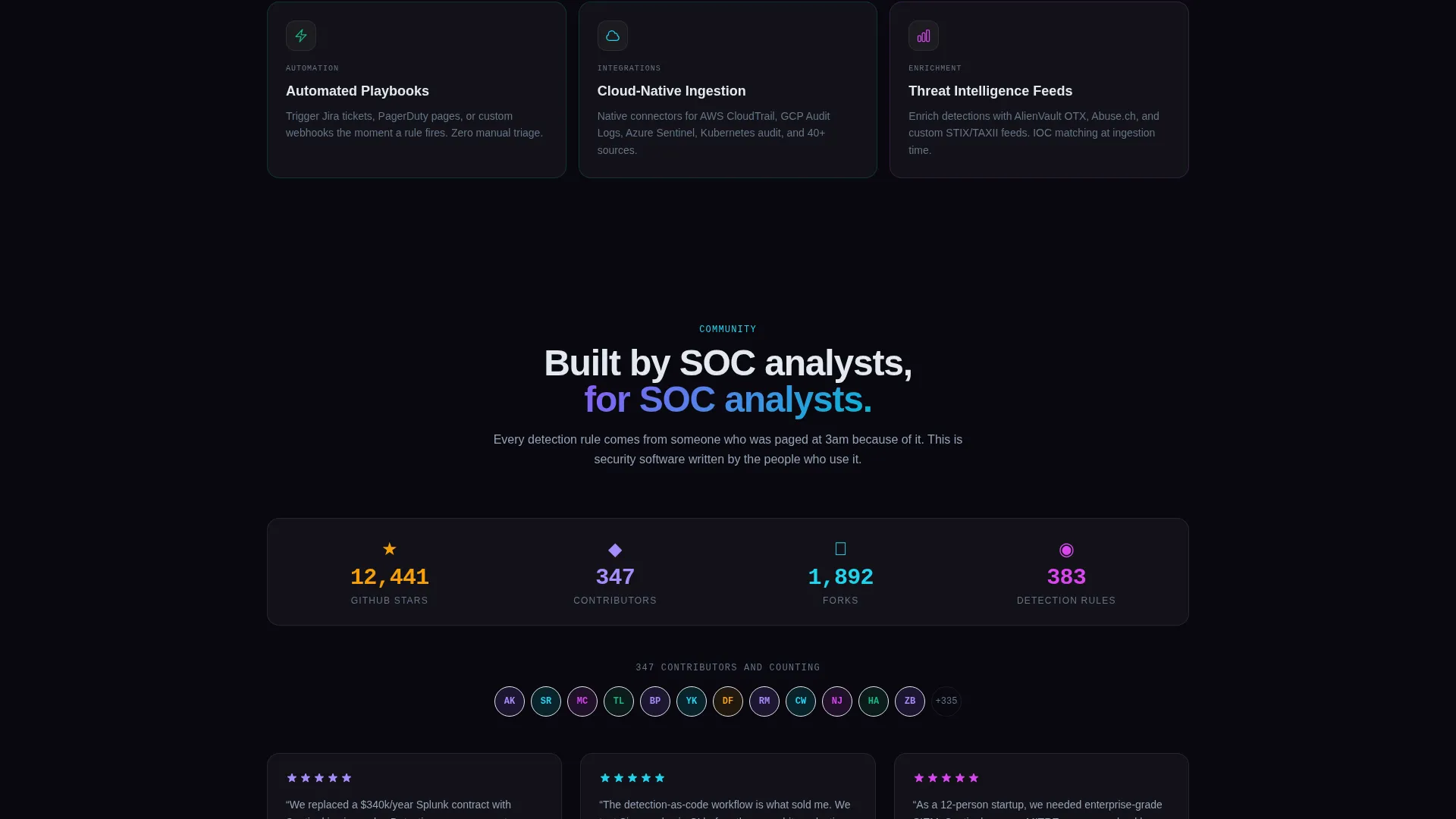
Sections build in a deliberate sequence. Capability sections cover the correlation engine, MITRE ATT&CK (Adversarial Tactics, Techniques, and Common Knowledge) framework mapping, and automated playbooks. Proof sections follow with a live GitHub stars counter, a contributor wall, and named deployment testimonials from SOC leads.
Frictionless Three-Path Download Flow
The download section presents three deployment cards side by side: Docker one-liner, Helm chart, and cloud-hosted. Each card shows a copy-to-clipboard command and an estimated deploy time. No form gates the download. The page earns the install by proving capability first.
Sticky Primary Call-to-Action Bar
A sticky bottom bar reading "Deploy Sentinel Now" appears after the dashboard preview scrolls out of view. It stays visible throughout the rest of the page. A secondary inline call-to-action, "Try the Live Demo," opens a sandboxed in-browser instance for zero-commitment exploration.
Release Cadence and Roadmap Sections
A release timeline displays build momentum visually. A roadmap vote board lets community members see what is coming next. Both sections use progress bars and terminal-style self-typing text to reinforce the sense of a product that is actively shipping.
Page sections overview
| Section | Purpose |
|---|---|
| Dashboard Hero Panel | Render a live SIEM interface with animated threat map, log counters, correlation graph, and alert card |
| Velocity Stats Bar | Animate three platform numbers on scroll entry to establish throughput and rule coverage at a glance |
| Correlation Engine Block | Explain the core signal-correlation capability with MITRE ATT&CK mapping and automated playbook context |
| Community Proof Rail | Display GitHub stars, contributor wall, and named SOC-lead testimonials to build deployment confidence |
| Release Timeline | Show the project cadence visually with progress bars and terminal-style animated build text |
| Roadmap Vote Board | Let visitors see upcoming features and reinforce that the community actively shapes the product |
| Download Flow Cards | Present Docker, Helm, and cloud-hosted paths with copy-to-clipboard commands and deploy-time estimates |
| Sticky call to action Bar | Keep "Deploy Sentinel Now" visible after the hero and surface the live demo option inline |
Design & branding system
The visual identity follows a Tech Glass theme built on an AI Iridescent color system. The palette is designed to feel like a holographic prism floating in deep space, where surfaces shift between violet and cyan depending on context and every interactive element carries a faint prismatic shimmer.
- Core palette: void black (#09090F) as the base, iridescent violet (#8B5CF6) and shifting cyan (#06B6D4) for primary surface shifts, hot-state magenta (#D946EF) reserved exclusively for threat-critical accents, and translucent glass panels at (#FFFFFF0A) layered with frosted blur
- Glass panel depth: panels use subtle depth-of-field blur at their edges, creating a layered hover effect over absolute darkness that makes data feel three-dimensional
- Typography and motion: terminal-style text that types itself, progress bars, and micro-animations on alert cards reinforce the sense of a living, watching system
Mobile & speed optimization
The grid layout is built to rearrange responsively. Each glass card reflows as a standalone data panel at smaller viewport sizes, preserving the dashboard aesthetic without sacrificing readability on mobile screens.
- Data panels rearrange from multi-column grid to single-column stack on smaller screens, keeping every stat and card accessible without horizontal scrolling
- Animated counters and scroll-triggered elements are tied to viewport entry, so they fire correctly whether a visitor is on desktop or a mobile browser
How this template helps you convert
The page is structured to remove every friction point between a visitor's first impression and a running instance. Trust is built before any action is requested.
- The dashboard hero front-loads proof of capability so technically skeptical visitors see the product working before they read a single marketing claim, reducing drop-off at the most critical moment
- The three-card download flow with copy-to-clipboard commands and no form gate means a motivated visitor can go from landing on the page to a running deployment with the fewest possible steps
Other information about this template
This template is categorized under Technology and specifically targets the open-source enterprise software space. It is a strong fit for teams positioning a community-built SIEM against commercial alternatives that carry high licensing costs.
- Template style: Dashboard and Data Grid single-page layout
- Creative direction: Launch Energy, built to carry the kinetic tension of a product about to ship
- Header concept: Dashboard Preview, rendering the actual product interface rather than illustration or stock photography
- Primary call-to-action direction: App Download, structured as a frictionless three-path deployment flow
- The no-form-gate philosophy is central to the page strategy: the template earns the install through proof before asking for any user action
Theme
Tech Glass
Creative direction
Launch Energy
Color system
AI Iridescent
Style
Dashboard/Data Grid
Direction
App Download
Page Sections
Animated Dashboard Hero Panel
Scroll-triggered Velocity Stats
Capability and Proof Escalation Flow
Frictionless Three-path Download Flow
Sticky Primary Call-to-action Bar
Release Timeline and Roadmap Board
Related questions
Can I edit the animated stats and dashboard numbers?
Does the dashboard preview require a live data connection?
How does the 'Try the Live Demo' call-to-action work?
Can I customize the three download cards for my own deployment methods?
Is this template suitable for a commercial SIEM product, or only open-source?



