Instant Parent FAQ Resource Landing Page Template
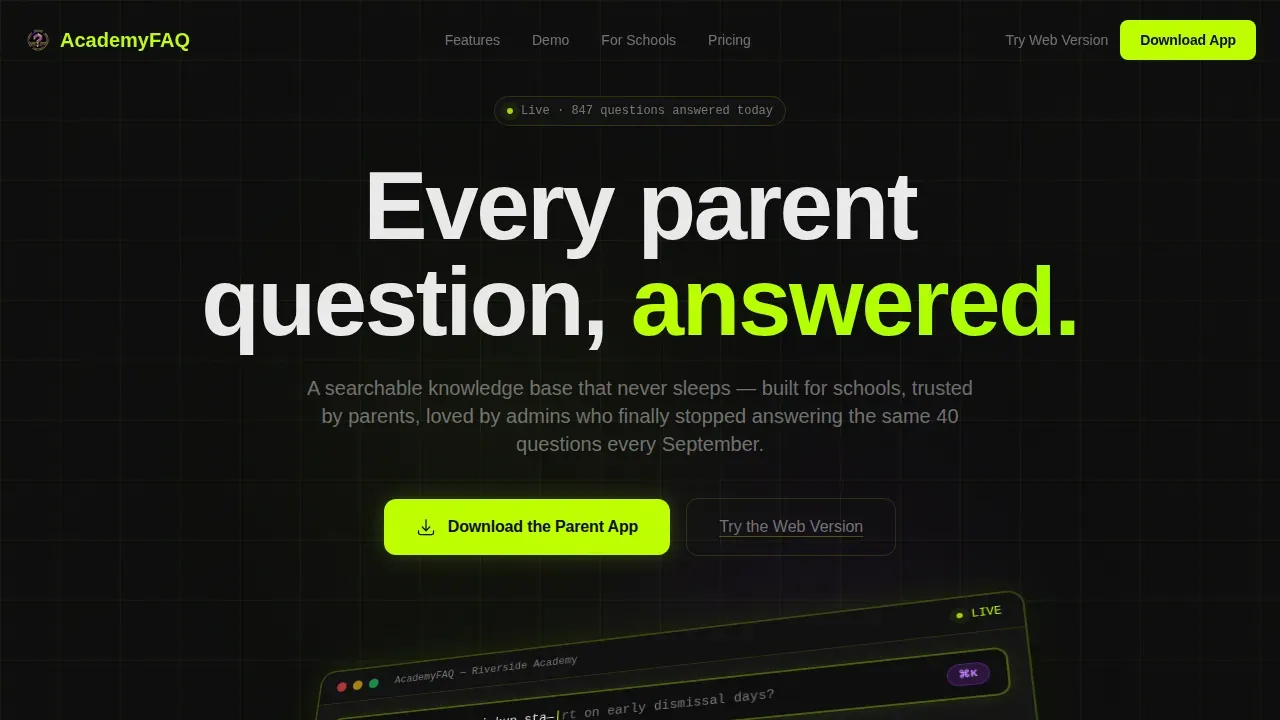
The Academy Instant Answer Parent frequently asked question Landing Page Template is a bento grid landing page built for schools and academies that need a 24/7 knowledge base. It gives anxious parents instant answers, helps new families compare programs, and frees your office staff from repeating the same questions every September. The design runs on a bold Acid Digital color system with a live dashboard preview hero.
by Rocket studio
Quick summary
This template delivers a single-page, bento grid frequently asked question experience purpose-built for schools. It combines a live dashboard preview hero, a six-tile feature matrix, interactive frequently asked question demo tiles, social proof, and a mobile-pinned app download call to action. The design uses void black, electric chartreuse, and UV purple to create a terminal-screen aesthetic that feels both urgent and organized.
Who this template is for
This template is built for anyone running or marketing a school communication platform where parents, administrators, and new families all need fast, reliable answers. It works equally well as a product landing page promoting an EdTech app or as a school's own frequently asked question page rolled out to its community.
- Anxious parents who search for school policies late at night on a mobile device
- School office administrators who want to stop answering the same common questions every September
- New families comparing academies during admissions season who need to find answers quickly and confidently
What problem this template solves
Every school office faces the same pressure: a flood of repetitive support questions that arrive faster than any support team can respond. Parents send emails at 11pm wondering about snow day protocols. Enrollment season multiplies customer questions about tuition, uniforms, and daily schedules. Without a structured frequently asked question page, the inbox becomes the knowledge base, and that does not scale.
- Parents cannot find answers fast enough, creating anxiety and repeat support tickets for administrators
- New families comparing schools have no single, organized place to find answers, which risks losing potential customers during admissions
- Administrators spend hours each week on support questions that a good frequently asked question page could deflect automatically
What you get with this template
You get a fully designed, single page bento grid layout that is ready to customize. Every section is intentional, from the isometric dashboard hero to the interactive frequently asked question demo tiles that let visitors search, tap, and read real answers before they download the app. The template is structured so that your support team, your parents, and your prospective families all get what they need from one page.
- A six-tile feature matrix bento grid with micro-animations triggered on viewport entry
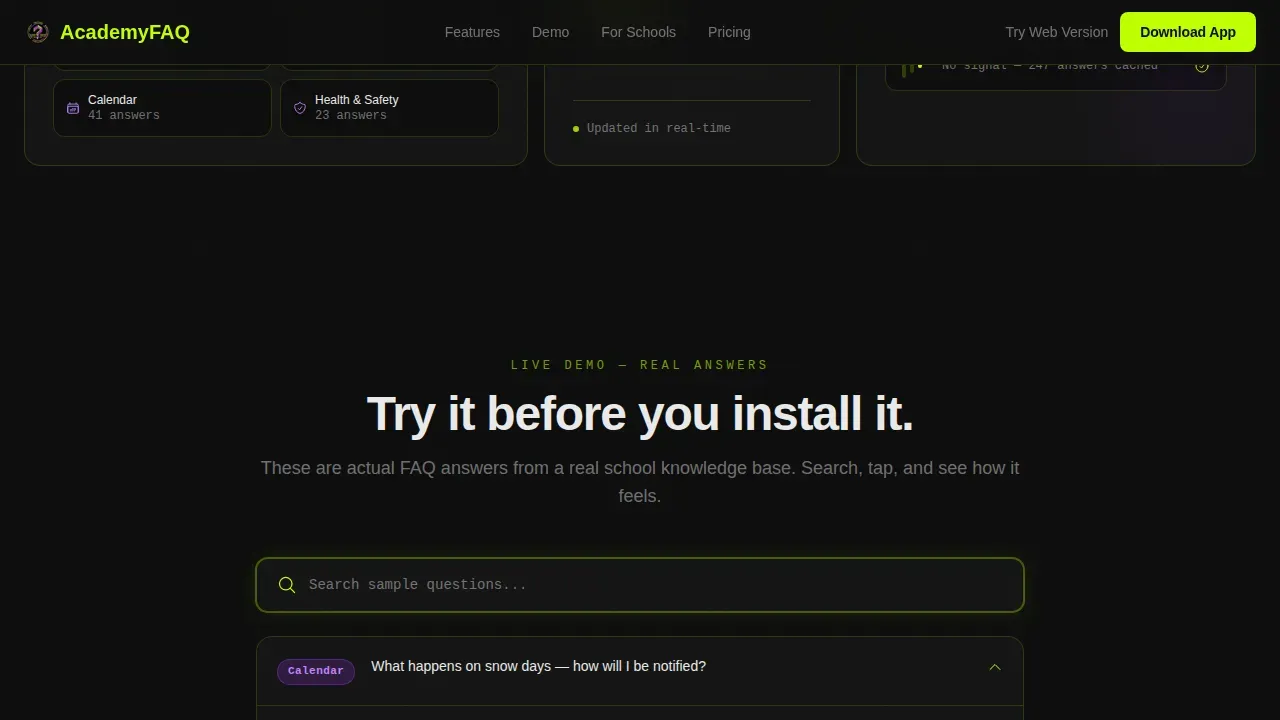
- Three functional, interactive frequently asked question demo tiles embedded directly in the page so visitors experience the product before committing
- A mobile-pinned "Download the Parent App" call to action bar plus a secondary "Try the Web Version" text link for desktop users
Feature list
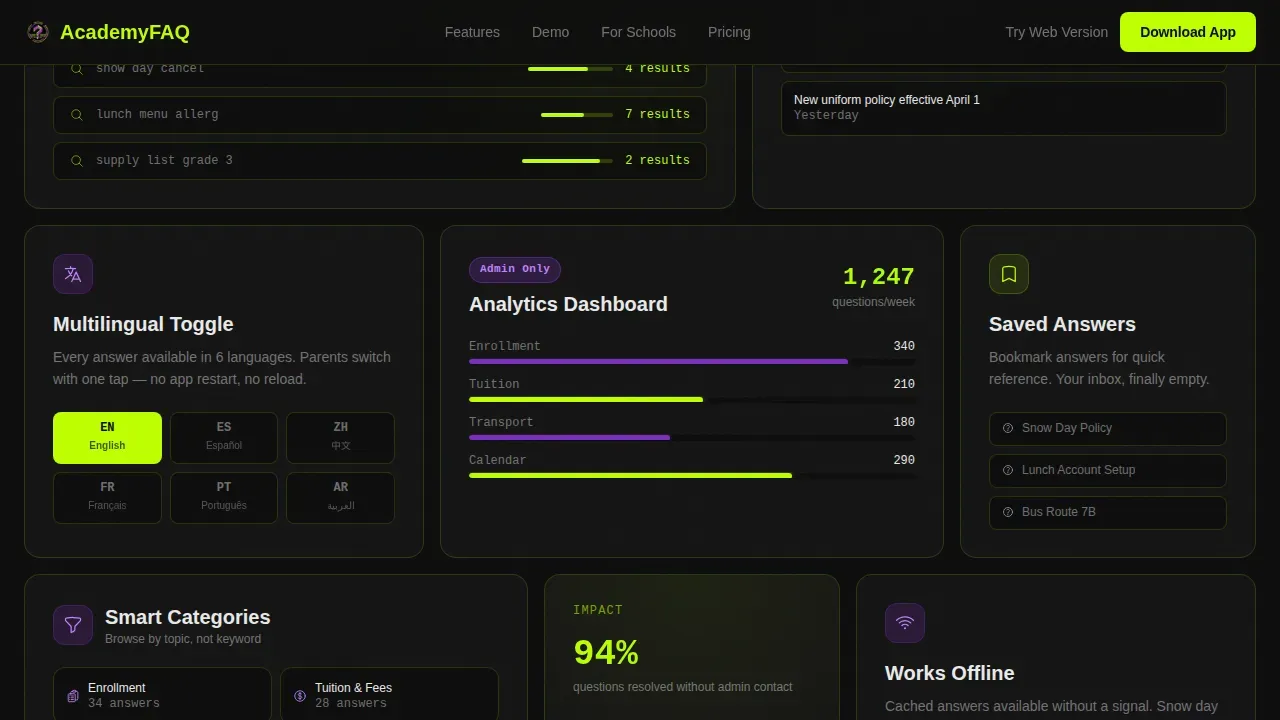
This template is built around six core capability tiles. Each one is a self-contained proof point in the bento grid layout.
Instant Search with Live Autocomplete
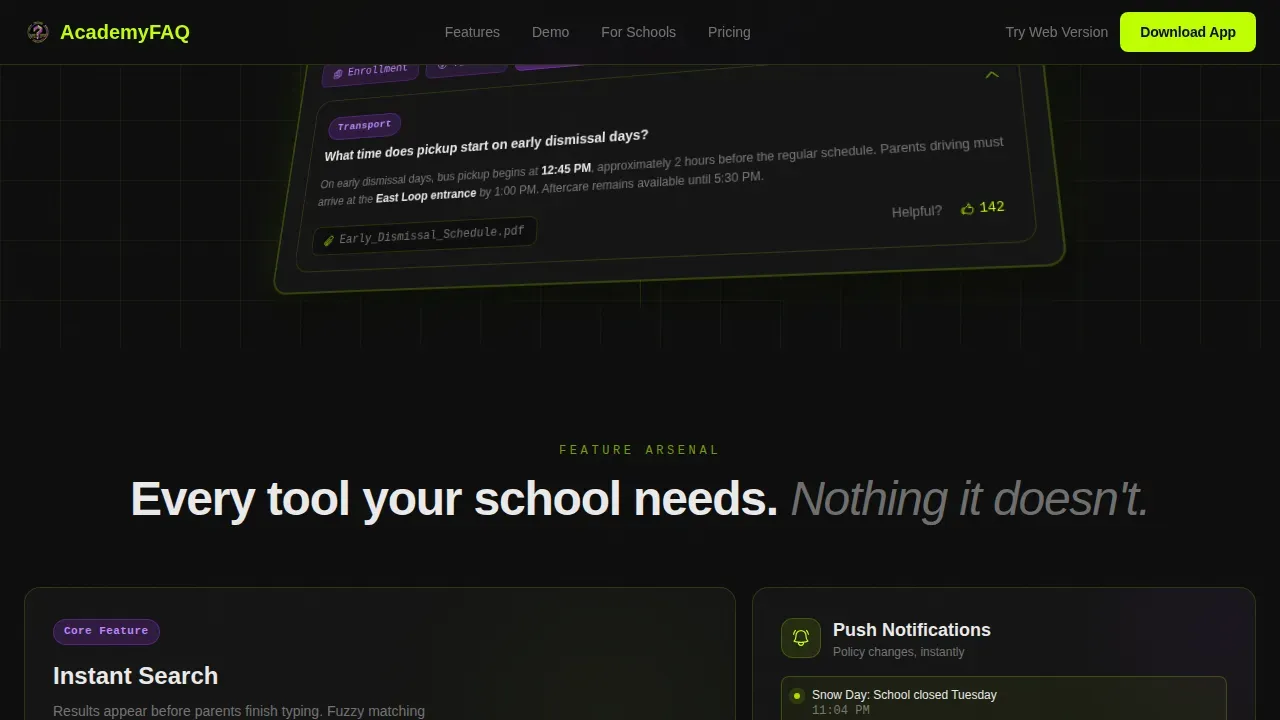
The hero section renders a pixel-perfect isometric mockup of the frequently asked question interface, showing a search bar mid-query with live autocomplete suggestions. Visitors see exactly how fast the search function returns relevant answers, building confidence before they ever install the app. A prominent search bar at the top of the experience sets the expectation that finding answers here takes seconds, not minutes.
UV Purple Category Filtering
Five category tiles glow in UV purple inside the dashboard mockup: Enrollment, Tuition, Transport, Uniforms, and Calendar. These logical categories let users navigate directly to the frequently asked question section they need rather than scrolling through a long list. Organizing questions into clear groups is a proven way to help users find answers in as few as three clicks.
Push Notification Tile for Policy Updates
One dedicated bento tile showcases push notifications that alert parents whenever a policy changes. This keeps the knowledge base current and ensures information remains accurate without requiring parents to check the page manually. Regularly updating the frequently asked question page is essential, and this feature automates that communication loop.
Multilingual Toggle
A standalone feature tile highlights the multilingual toggle capability, letting schools serve families in their preferred language. This directly broadens the audience reach of the frequently asked question page and reduces the volume of support questions from non-English-speaking families. It is a practical feature that makes the help center more inclusive without adding workload to the support team.
Admin Analytics Dashboard Tile
One bento tile surfaces an admin analytics dashboard view, giving administrators visibility into which questions get searched most often. This data mirrors the best practice of using customer support data and user feedback to identify the most common questions and keep frequently asked question content relevant. Administrators can use these search results to update the knowledge base and close gaps proactively.
Bookmarked Answers
Parents can bookmark specific answers inside the app for quick return access. This feature reduces repeat support questions from existing customers who need to revisit a policy during the school year. It also improves the overall customer experience by making the help center feel personal rather than generic.
Page sections overview
| Section | Purpose |
|---|---|
| Hero Dashboard Preview | Showcases the isometric frequently asked question interface mockup with live autocomplete animation and category tiles |
| Feature Bento Grid | Six-tile arsenal isolating one platform capability per card with scroll-triggered micro-animations |
| Live frequently asked question Demo | Three interactive, functional frequently asked question tiles where visitors search, tap, and read real answers |
| Social Proof | Usage metrics, admin testimonial quote, and school logo wall to build credibility |
| Download Call to Action | App download primary call to action plus a secondary web version text link |
| Footer | Linear single-row footer with essential links |
Design & branding system
The visual identity is built on the Acid Digital color system, which creates a terminal-screen sci-fi school office aesthetic. Every color in the palette has a specific job, and the combination reinforces the brand identity of a platform that is fast, precise, and always on.
- Void black (#0D0D0D) forms the infinite-depth background behind each bento tile; electric chartreuse (#BFFF00) marks interactive elements, hover states, and the grid dividers that glow faintly between tiles; UV purple (#7B2FBE) colors active category badges and selected states throughout the dashboard mockup
- Typography uses DM Sans for all user interface text, keeping body copy clean and readable, and JetBrains Mono for search bar and code-style elements, reinforcing the terminal aesthetic
- The chartreuse drop-shadow under the hero mockup makes the interface feel like a living product rather than a static screenshot, and every tap target throbs with electric green on hover
Mobile & speed optimization
The template is designed mobile-first, which matches the primary user: a parent on their phone late at night. Most parents access school information via mobile devices, so the frequently asked question page must be fully responsive and load fast enough to serve someone in a moment of real urgency.
- The "Download the Parent App" call to action is pinned as a floating bottom bar on mobile, keeping the conversion path visible at all times without interrupting the browsing experience
- GSAP ScrollTrigger powers staggered bento tile reveals and the autocomplete typing animation, using GPU-accelerated transforms to keep motion smooth without heavy page weight
- Images are lazy-loaded, and the bento grid rearranges in density as the user scrolls, compressing from sparse and confident at the top into a tighter matrix at the bottom
How this template helps you convert
The page is structured to earn the app download before asking for it. Visitors do not encounter a download prompt until they have already experienced the product through the interactive demo tiles embedded in the page.
- The interactive frequently asked question demo tiles let visitors search a real question, tap a category, and read a formatted answer complete with a PDF attachment badge and a "Was this helpful?" prompt. By the time they reach the download call to action, the install feels like upgrading something they already trust.
- The social proof section anchors trust with usage statistics, an admin testimonial, and a school logo wall. These signals answer the unspoken question every potential customer has: "Do real schools actually use this?"
- The secondary "Try the Web Version" text link removes the friction for desktop users and skeptics who are not ready to install. It opens a lower-commitment path to conversion while keeping the primary call to action clear and dominant.
Other information about this template
This template sits at the intersection of EdTech product marketing and school communication, which means it carries specific design and content conventions that differ from standard frequently asked question templates or general landing pages. The notes below cover additional context that buyers and administrators often ask about.
- The template is designed as a single page bento grid layout. It is not a multi-page website. Buyers who need separate product pages or a contact page alongside the frequently asked question should plan to extend the template with additional pages.
- The frequently asked question page design follows best practices seen across many strong faq page examples: a prominent search bar, logical categories, accordion-style answer cards, and a "Still have questions?" section directing users to live support. These are the same structural choices that make good faq page examples like IKEA, Dropbox, and WhatsApp easy to navigate.
- Effective faq page design also benefits from faq schema markup. Adding faq schema to the page can improve how search engines display your answers in search results, which supports search engine optimization goals and brings more potential customers to your help center organically.
- Looking at best faq page examples across industries, patterns emerge: Zappos uses large logical categories, Canva relies on a strong search function, and Adobe Creative Cloud separates product-specific faqs by plan. Each of these page examples reinforces the same principle: organize questions into logical categories so customers search for what they need and find relevant answers immediately.
- Additional faq page examples worth studying include Yam's filter system for navigating sections, Clean Break Divorce's clean accordion design, and UrgiDoctor's tab system for separating different audiences. These faq examples show that a good faq page can serve multiple user types from a single page without confusing customers.
- The template supports multilingual toggle, which echoes approaches like Bianca Chaves' bilingual frequently asked question page offering content in both English and French. This is especially useful for schools serving diverse communities where a general faq in English alone would leave families underserved.
- When building your own faq page with this template, practical tips include writing faq answers that start with "Yes" or "No" for direct questions, using internal linking to direct users to related knowledge base articles, and keeping faq content jargon-free so answers questions clearly for every reading level.
- The admin analytics tile surfaces customer data about the most-searched topics, enabling the support team to identify gaps and update the knowledge base before customer concerns become support tickets. Using customer feedback and user feedback loops this way is one of the most effective ways to keep a help center accurate over time.
- This template is categorized under School and Academy Website Templates in the Technology category, making it easy to find for buyers searching for an academy instant answer parent faq landing page template or a school-focused help center solution.
- Account management features visible in the admin analytics bento tile complement the parent-facing frequently asked question experience, giving administrators a full picture of service usage and common concerns across the school community.
Theme
Dashboard Pro
Creative direction
Feature Matrix
Color system
Acid Digital
Style
Bento Grid
Direction
App Download
Page Sections
Live Autocomplete Search Bar
Six-tile Feature Bento Grid
Interactive Frequently Asked Question Demo Tiles
Mobile-pinned App Download Call to Action
Push Notifications for Policy Updates
Admin Analytics Dashboard Tile
Related questions
Can I customize the frequently asked question categories shown in the template?
Does the template work well on mobile devices?
Does the template include the interactive frequently asked question demo tiles?
How does this template help reduce support tickets for school administrators?
Is the smart app download link included in the template?



