Specialist AI for Construction Comparison Website Template
Hardhat is a construction AI image generator landing page template built around a Feature Matrix comparison table. It targets general contractors, estimators, and marketing directors who need photorealistic construction renders fast. The Dynamic Motion design uses a Slate and Sky color system to create a high-energy, jobsite-inspired experience that moves visitors straight toward a free generation trial.
by Rocket studio
Quick summary
Hardhat is a single-page, comparison-table landing page template for a construction AI image generator. It converts rough site photos into photorealistic renders in under ninety seconds. The template is built for click-through conversion, guiding every visitor toward one clear action: generating their first render for free, with no account required.
Who this template is for
This template is built for construction professionals and marketing teams who need high-quality visual output without the wait time of a traditional rendering studio. If your pitch deck, bid package, or campaign depends on credible visuals, this template speaks your language directly.
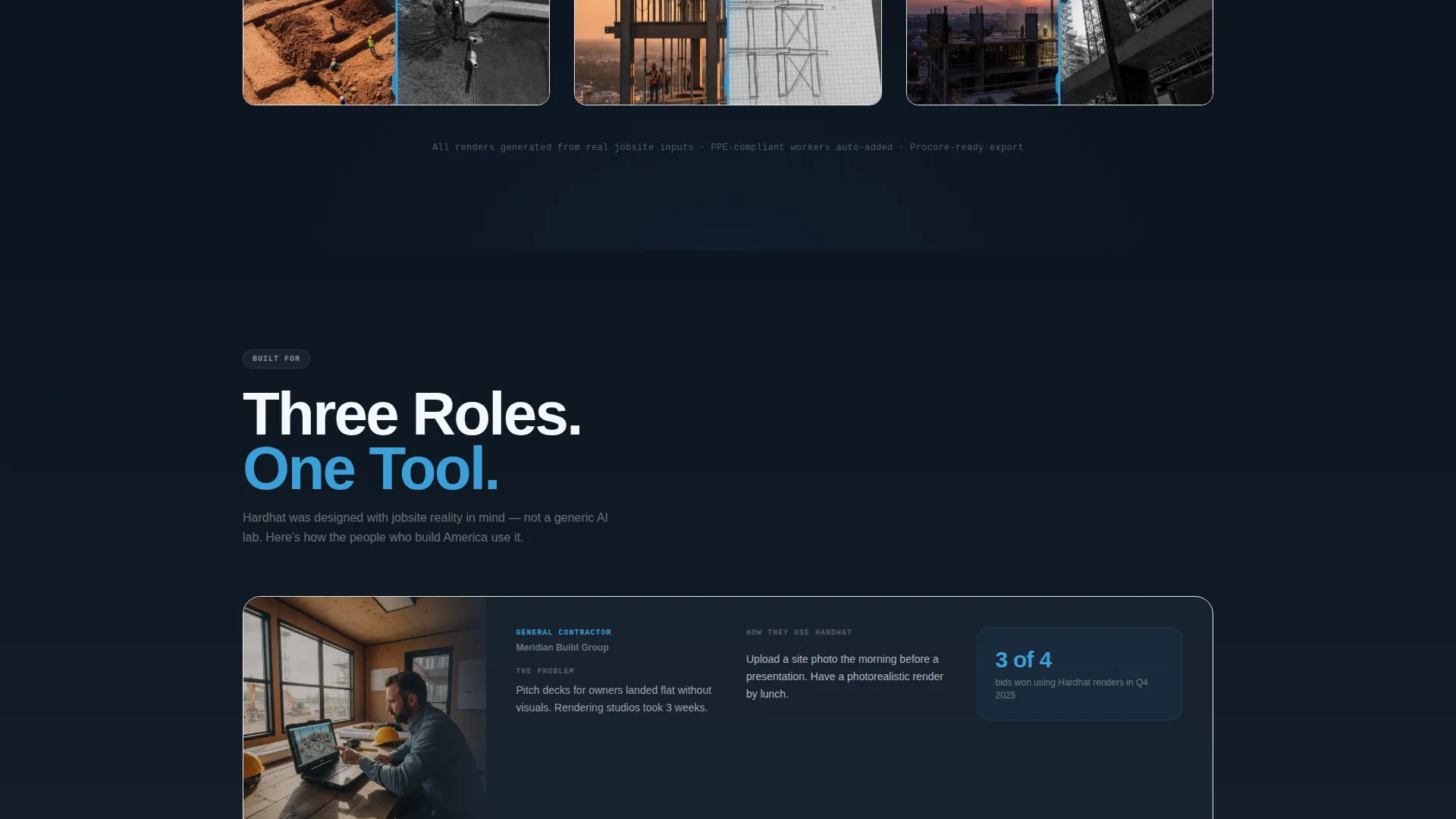
- General contractors who need presentation-ready renders for owner pitch decks
- Estimators preparing visual scope breakdowns for subcontractor bids
- Marketing directors at large construction firms who cannot wait weeks for a rendering studio
What problem this template solves
Sourcing photorealistic construction visuals is slow, expensive, and often out of sync with project timelines. A rendering studio can take three weeks to return a single image. Stock photo libraries rarely show the right equipment, site conditions, or safety details. This template frames those pain points clearly and positions the AI generator as the faster, more accurate alternative.
- Slow turnaround from traditional rendering studios delays pitch and bid timelines
- Generic stock images lack construction accuracy, correct equipment models, and proper safety gear on workers
- General-purpose AI tools do not understand construction-specific details like rebar grids, formwork, or crane positions
What you get with this template
You get a fully structured, single-page layout that moves visitors from awareness to action without detours. Every design decision reinforces the core value: fast, accurate, construction-specific AI renders. The page is ready to be customized and launched as a focused click-through destination.
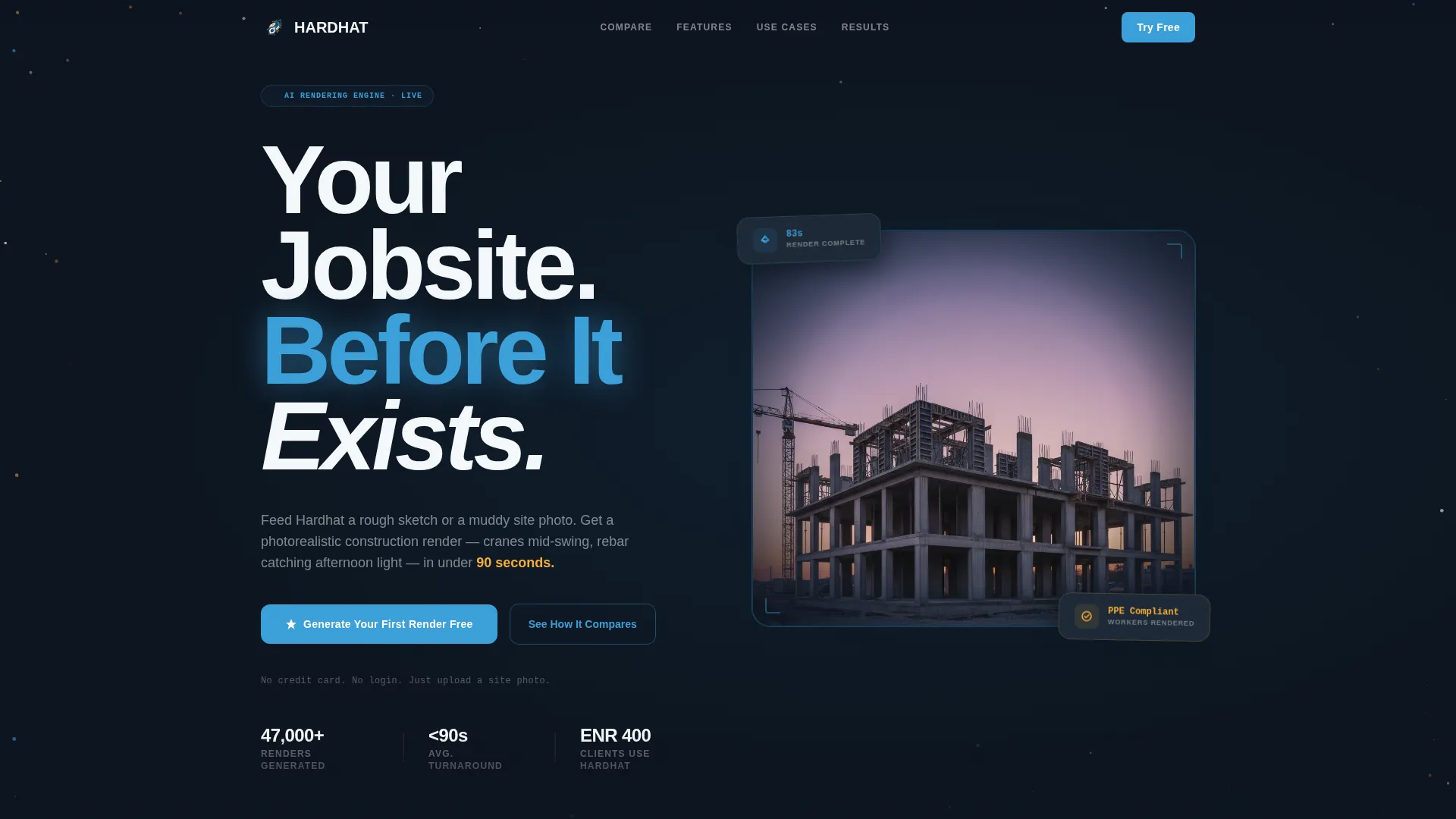
- A dark full-bleed animated header with a glowing AI-generated construction render and a tight headline
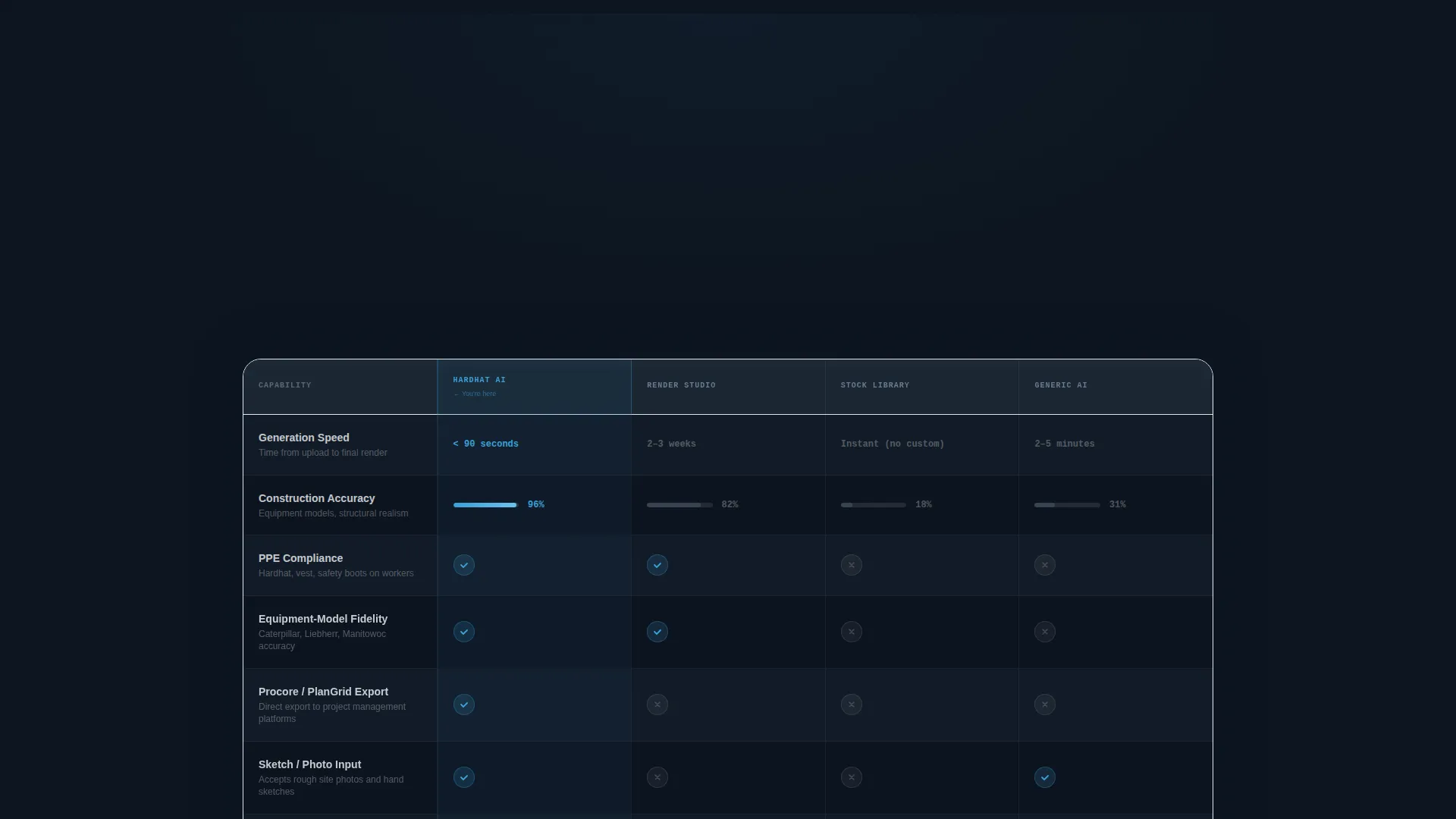
- A living Feature Matrix comparison table with animated rows, competitor columns, and highlighted product results
- Repeating call-to-action placements including a sticky bar, post-header block, and a full-width footer call to action
Feature list
This section describes the core template capabilities drawn directly from the brief.
Animated Feature Matrix Table
The comparison table measures the AI generator against traditional rendering studios, stock photo libraries, and generic AI tools. Rows cover generation speed, construction accuracy, worker PPE compliance in generated images, equipment-model fidelity, and export formats. Competitor columns are muted in concrete gray while the product column uses sky-blue highlights, filling progress bars, and snapping checkmarks to draw the eye.
Dark Full-Bleed Header with Glow Effect
The header opens with a pitch-black background. A single AI-generated construction render emerges from darkness, its edges dissolving into particles of light. A faint blue glow pulses once behind the image. The headline fades in over the scene in white, heavy-weight type, kerned tight: "Your Jobsite. Before It Exists."
Before-and-After Feature Deep-Dives
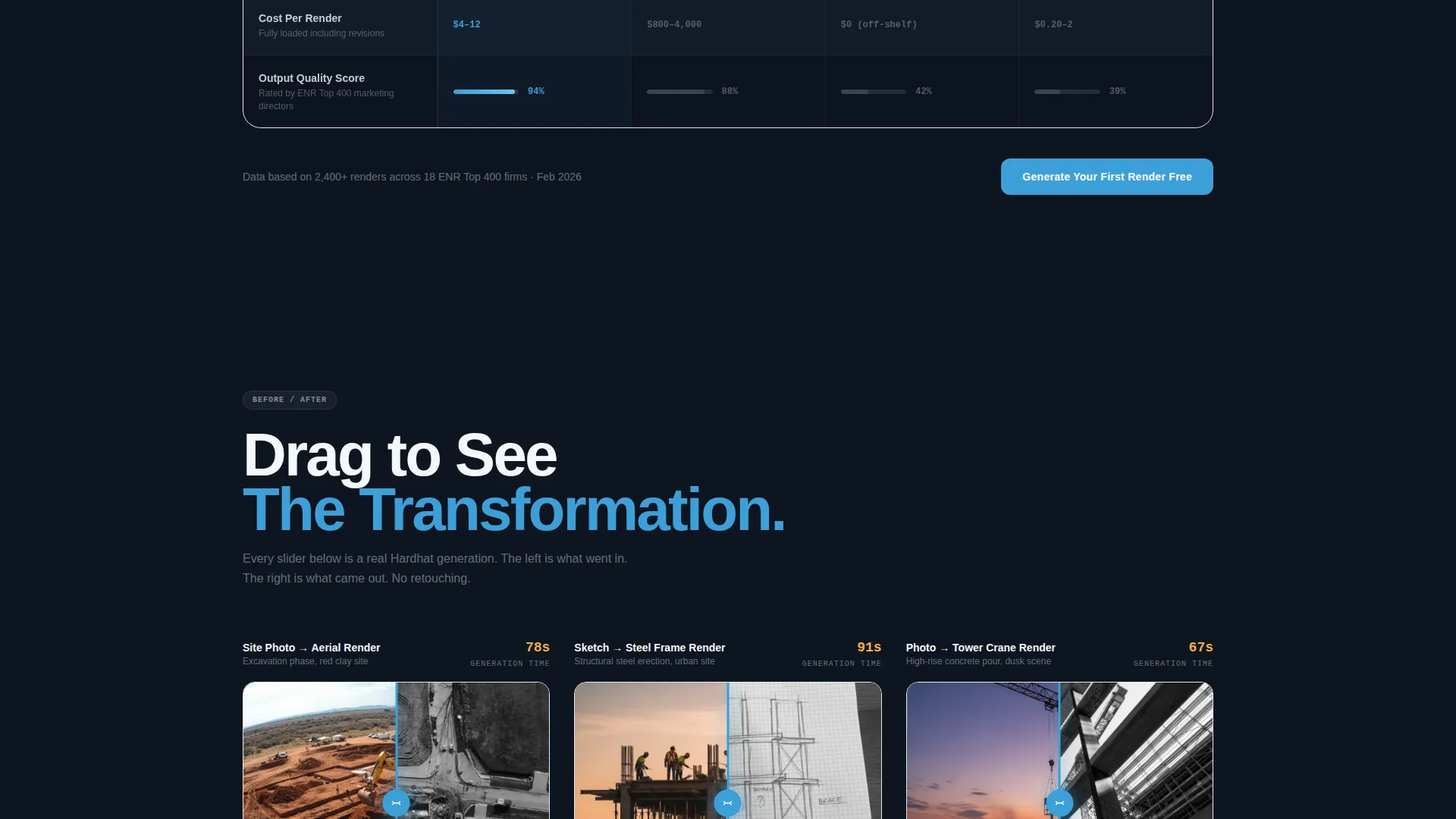
Below the comparison table, each feature gets its own mini section. A blurry phone photo of a muddy site sits on the left. The output, a presentation-ready aerial render, slides in from the right. The kinetic entry animation matches the Dynamic Motion theme and makes the product's value immediately visible.
Sticky Call-to-Action Bar
During the comparison table scroll, a slim sticky bar stays pinned at the top of the viewport. It carries the primary call to action at all times so the click opportunity is never out of reach. The bar is unobtrusive but persistent, reinforcing the conversion path without interrupting the reading experience.
Zero-Friction call to action System
The primary call to action, "Generate Your First Render Free," appears after the header, inside the sticky bar, and in a full-width anchor block at the bottom of the page. The bottom block adds a secondary line: "No credit card. No login. Just upload a site photo." Every placement reduces objections and shortens the path to the generation tool.
Page sections overview
| Section | Purpose |
|---|---|
| Dark Header Hero | Introduce the product with a cinematic AI render and the headline |
| Feature Matrix Table | Compare the AI generator against competitors across key criteria |
| Feature Deep-Dives | Show before-and-after transformations for each core capability |
| Sticky call to action Bar | Keep the primary conversion action visible during table scroll |
| Footer call to action Block | Close the page with a full-width, zero-friction offer to generate free |
Design & branding system
The template uses a Dynamic Motion theme built on the Slate and Sky color system. The palette is industrial and directional, built to feel like a pre-dawn jobsite lit by electric floodlights. Every color has a structural role, and motion is used purposefully to show progress rather than decoration.
- Deep structural slate (#1E2A38) as the primary page background, reinforced concrete gray (#4A5568) for card and competitor-column surfaces
- Open-sky blue (#3B9FD8) as the primary accent on buttons, glow effects, progress bars, and animated checkmarks
- Safety-vest amber (#F6AD37) reserved for hover states and urgent callouts to direct attention without overuse
Mobile & speed optimization
The template is designed to stay legible and functional across screen sizes. The comparison table and before-and-after sections are the most complex visual components, so the layout accounts for smaller viewports without losing the core message or the conversion path.
- The Feature Matrix table adapts to narrower screens so key comparison rows remain readable on mobile devices
- Call-to-action elements, including the sticky bar and footer block, remain accessible and tappable at all viewport sizes
- Animations are structured to enhance the experience without requiring the page to load heavy assets before showing content
How this template helps you convert
Every structural decision in this template serves the click-through goal. The page does not ask visitors to explore. It asks them to act.
- The sticky call-to-action bar ensures the primary offer stays visible throughout the longest section of the page, the comparison table, so visitors never have to scroll back up to find the button.
- The before-and-after feature sections deliver proof at the point of consideration, showing the actual transformation from a rough site photo to a finished render before any account is required.
- The zero-friction footer block removes the final objections with plain, direct language confirming no credit card, no login, and immediate access to the generation tool.
Other information about this template
This template is categorized under Technology, specifically within the AI for Construction subcategory. It is designed for the construction AI image generator niche, where buyers are evaluating speed, accuracy, and workflow fit before committing. The comparison-table format is well suited to this decision context because it makes the product case visually without requiring long paragraphs of copy.
- The template is built as a single landing page with a defined section order and no multi-page navigation
- The Dynamic Motion theme uses particle-dissolve effects and pulsing glow treatments that are described as visual design direction for the developer or designer implementing the template
- The color system and motion behavior are defined at the component level, making it straightforward to adapt brand colors or swap the headline copy during customization
Theme
Dynamic Motion
Creative direction
Feature Matrix
Color system
Slate & Sky
Style
Comparison Table
Direction
Click-Through
Page Sections
Animated Feature Matrix Comparison Table
Dark Full-bleed Header with Pulse Glow
Before-and-after Feature Deep-dives
Persistent Sticky Call-to-action Bar
Zero-friction Footer Call to Action Block
Related questions
Who is this landing page template designed for?
What makes the comparison table different from a standard feature list?
Can I customize the headline, colors, and call-to-action text?
Does the template require visitors to sign up before trying the product?
How many times does the call to action appear on this landing page?



