Authoritative Sustainable Agriculture Landing Page Template
Tillage is a hub-and-spoke landing page template built for an AI-powered agriculture scheduling assistant. It combines an interactive seven-day schedule grid, animated weather integration, and a side-by-side AI versus manual comparison module to show row-crop operators, vineyard managers, and ag consultants exactly what precision scheduling can do for their fields.
by Rocket studio
Quick summary
Tillage is a single-page AgTech template designed for an AI field scheduling assistant. It opens with a draggable weather grid, flows through five anchor-linked spokes, and closes with a "Run Your First Schedule" conversion form. The dark command-center aesthetic and live micro-interactions put visitors in control before they ever read a headline.
Who this template is for
This template is built for AgTech SaaS products serving professionals who manage large-scale field operations. If your product synthesizes weather, soil, or commodity data into precise scheduling windows, this template speaks your audience's language.
- Row-crop operators managing 1,000 to 5,000 acres of corn and soy who need spray, plant, and harvest timing down to the half-hour
- Ag consultants juggling 20 or more client farms across multiple time zones who need a clear multi-farm management view
- Vineyard managers running frost-protection decisions at 3 a.m. who cannot afford a missed critical window
What problem this template solves
Manual farm scheduling leaves gaps. Weather changes overnight, soil conditions shift, and commodity futures move before a plan can be updated. Operators lose windows they cannot recover. This template gives your product a page that demonstrates the cost of guesswork and the value of AI-driven precision without asking visitors to take anything on faith.
- Missed spray and harvest windows that cost real money per acre go unaddressed by static scheduling tools
- Managing multiple farm operations simultaneously creates coordination overhead that paper plans and spreadsheets cannot absorb
- Visitors need to feel the intelligence before they commit to a sign-up, and static screenshots do not build that confidence
What you get with this template
You get a fully structured, single-page landing page with five scroll-linked spoke sections, each built around a distinct interactive moment. The page is designed desktop-first to match how row-crop operators actually view data, with a solid mobile fallback for field use.
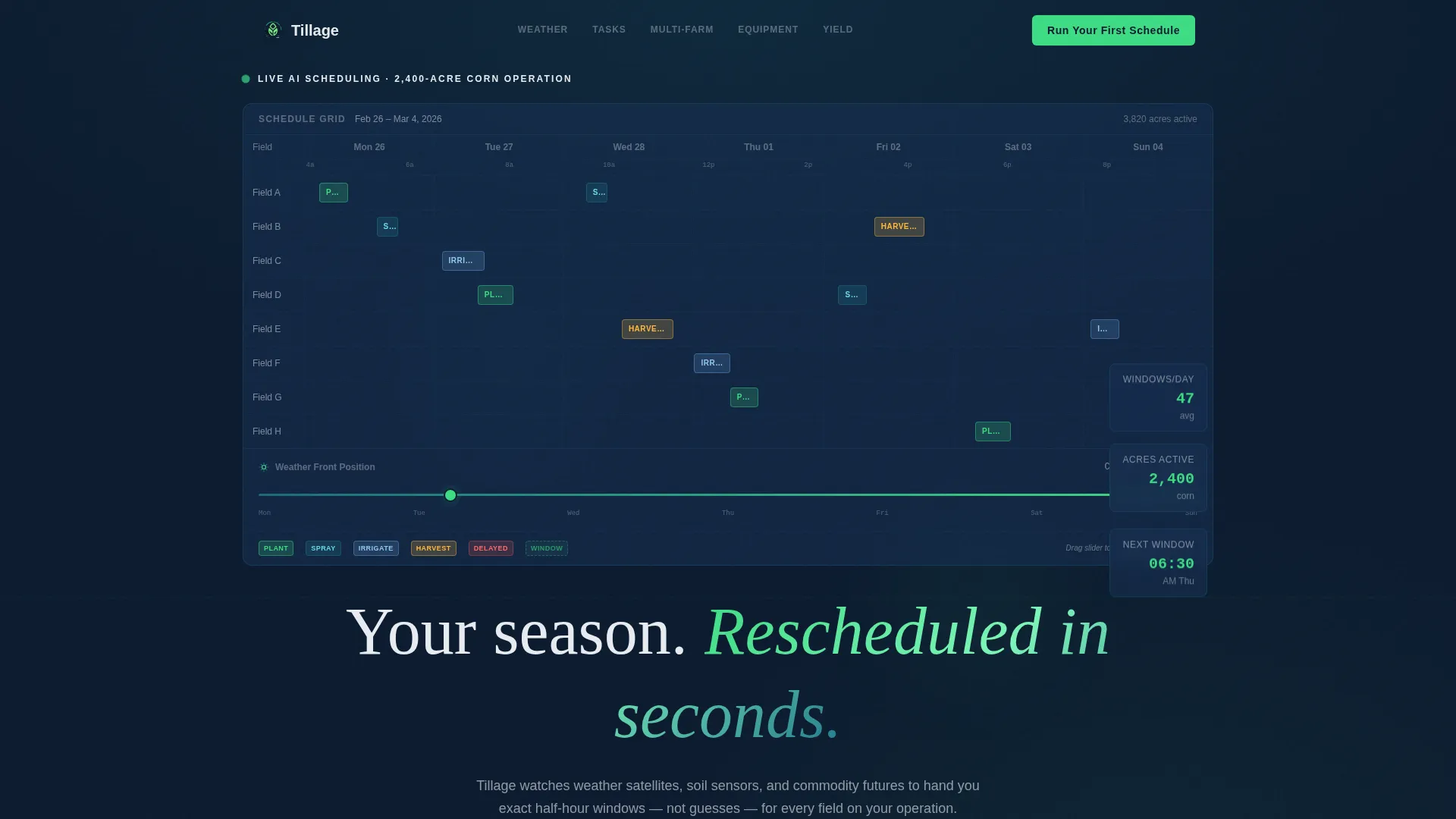
- An interactive hero section with a seven-day schedule grid and a draggable weather slider that reschedules a fictional 2,400-acre corn operation in real time
- Five anchor-linked spokes covering Weather Integration, Task Optimization, Multi-Farm Management, Equipment Coordination, and Yield Impact, each with its own micro-interaction
- A persistent split comparison module that pins AI scheduling against manual planning and shows hours saved, recovered windows, and per-acre cost difference
Feature list
This section describes the core built-in capabilities delivered in the Tillage template.
Interactive Seven-Day Schedule Grid
The hero section renders a functioning schedule grid for a fictional 2,400-acre corn operation. Colored task blocks shift in real time as a simulated weather front moves through, rescheduling spray windows, pushing irrigation forward, and flagging harvest delays. Visitors drag a weather slider themselves to watch the AI reschedule tasks live.
Hub-and-Spoke Anchor Navigation
A persistent top navigation bar links to five spoke sections: Weather Integration, Task Optimization, Multi-Farm Management, Equipment Coordination, and Yield Impact. The active anchor highlights as the visitor scrolls, keeping orientation clear across a long single page.
Per-Spoke Micro-Interactions
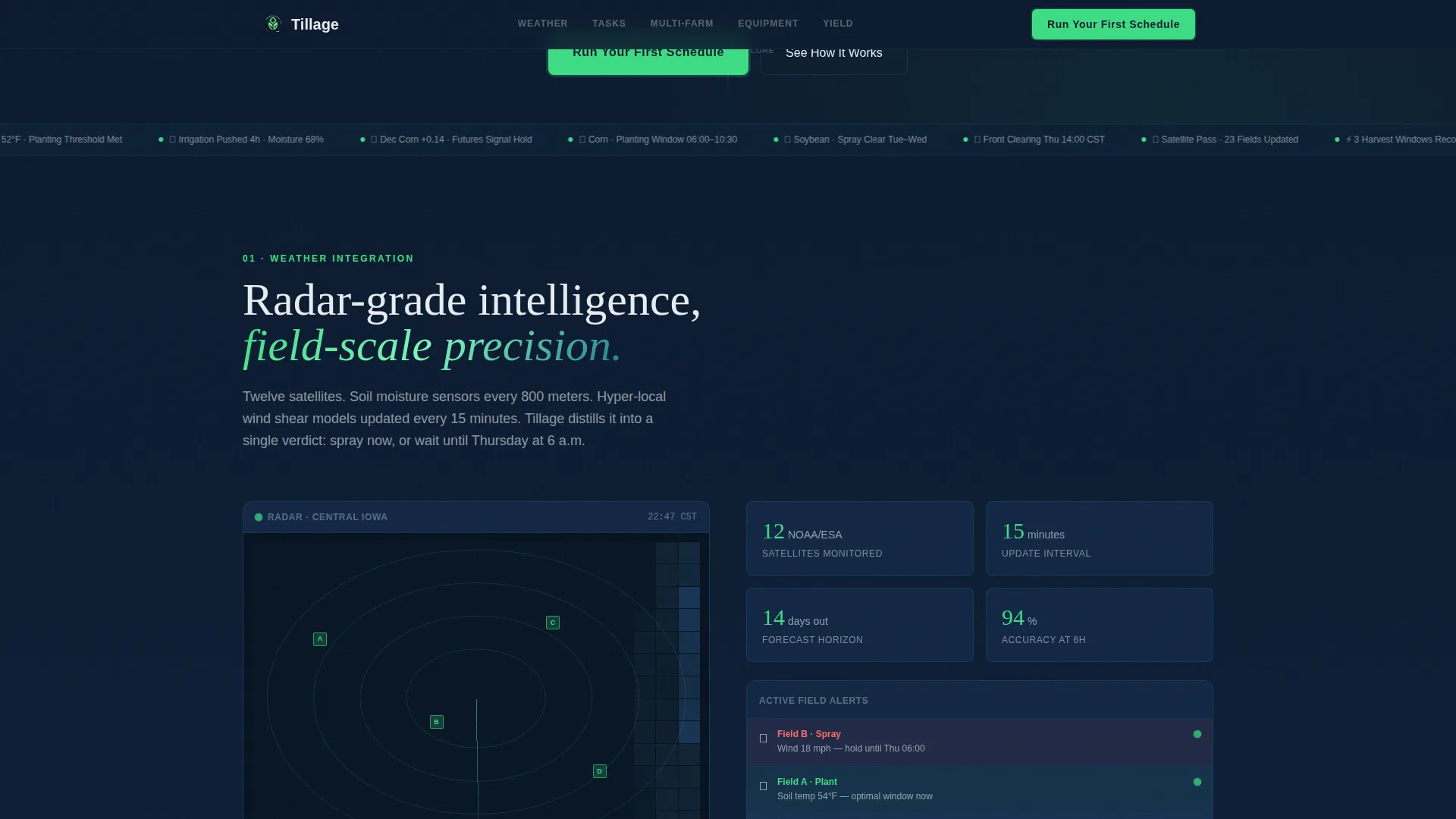
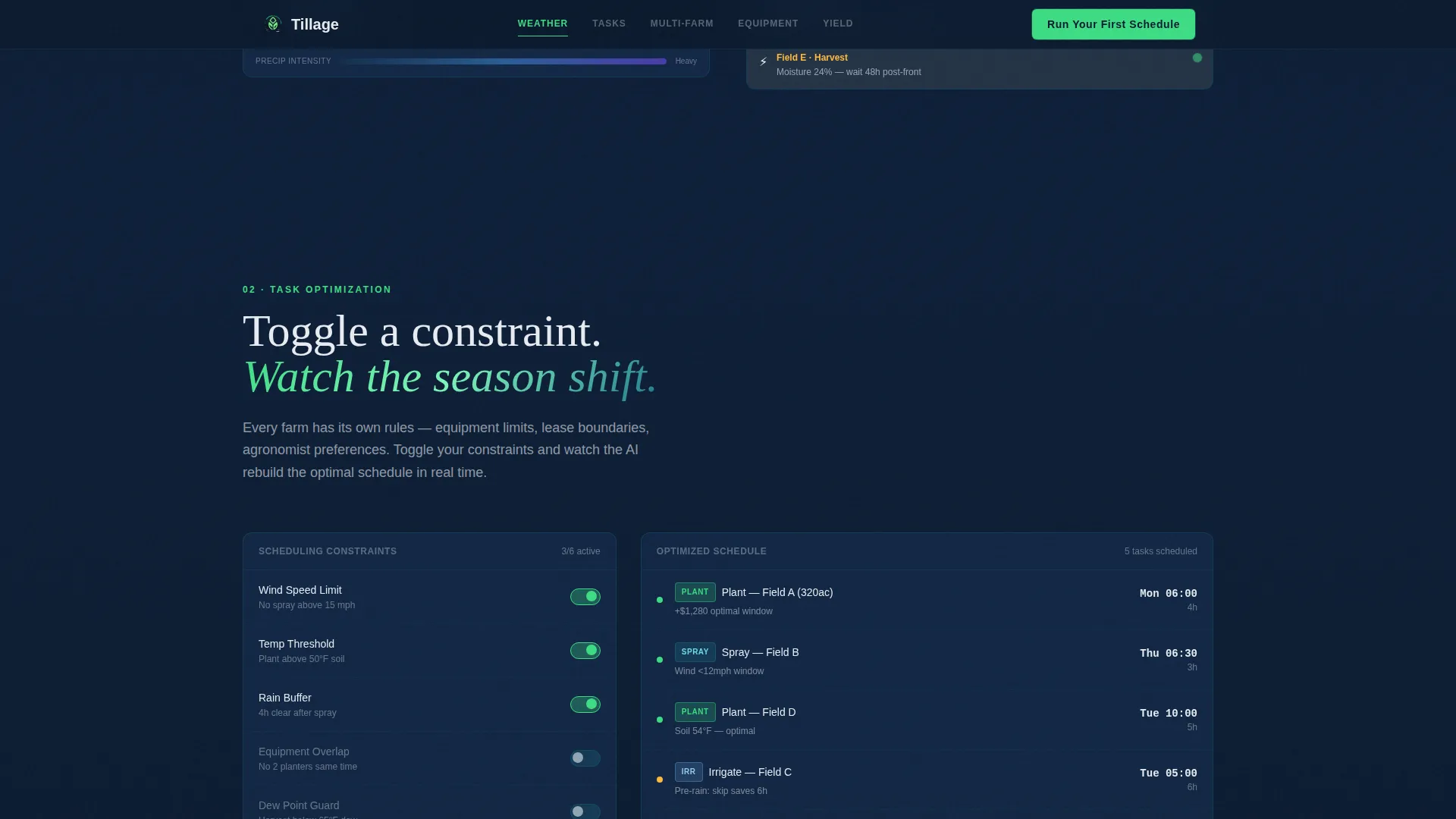
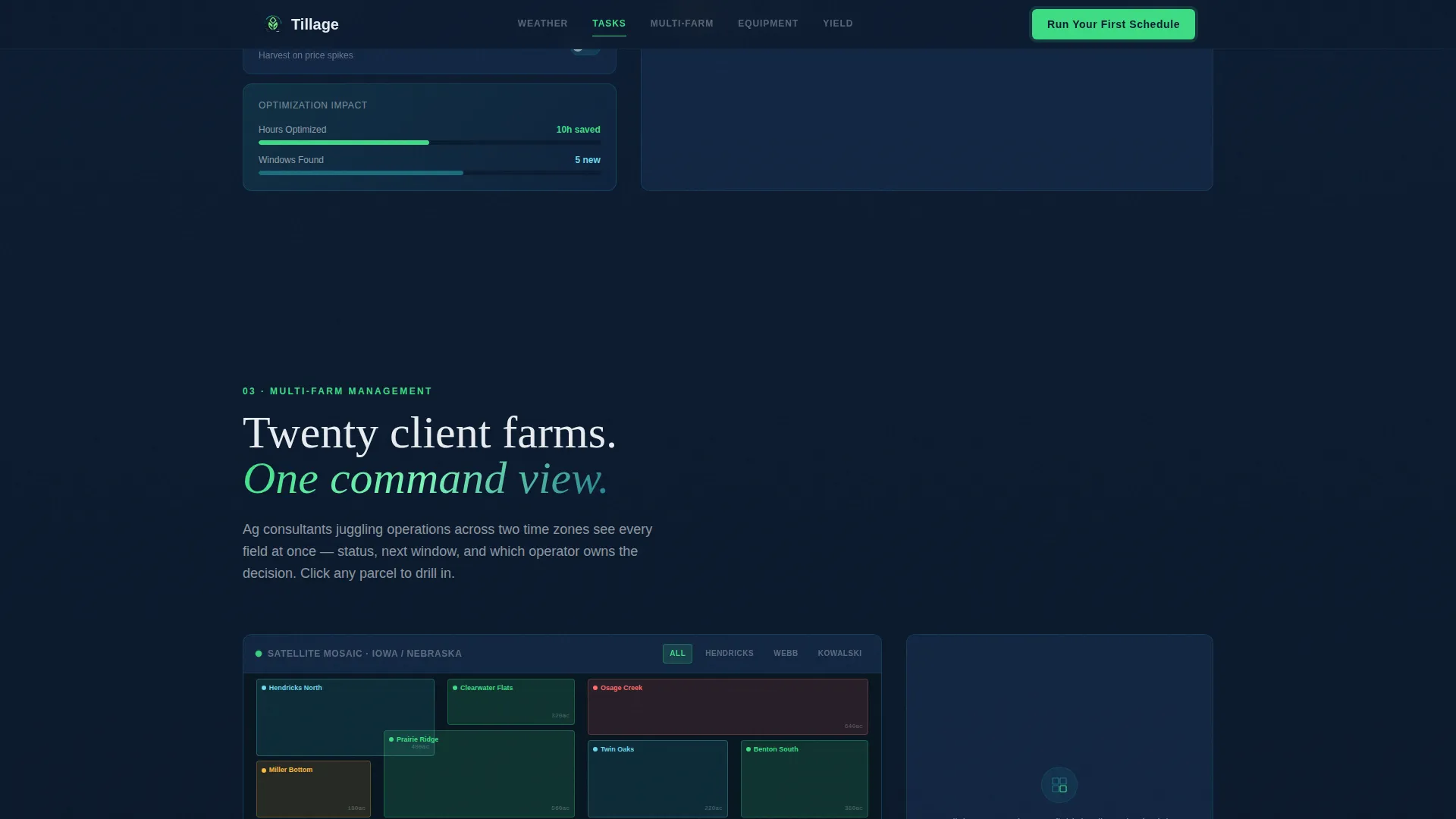
Each spoke section opens with its own interactive moment. The Weather Integration spoke shows animated radar fronts crossing a field map with live data pulses. Task Optimization lets visitors toggle constraints and watch the calendar reorganize. Multi-Farm Management renders a satellite mosaic that zooms into individual parcels.
AI Versus Manual Comparison Module
A persistent split module in the Multi-Farm spoke pins the AI schedule directly against a manual plan. It surfaces hours saved, missed windows recovered, and per-acre cost difference across real crop scenarios. This comparison earns the conversion click before the sign-up form appears.
"Run Your First Schedule" Conversion Form
The primary call to action uses a minimal three-field form: total acreage, a crop-type dropdown, and a zip code for instant weather pairing. A secondary path labeled "See It Beat Your Current Plan" links to a live benchmark tool, giving hesitant visitors a lower-commitment entry point.
Dynamic Motion Visual System
The template is built around GSAP ScrollTrigger animations, Intersection Observer reveals, CSS keyframes, and interactive JavaScript sliders. Motion serves the data narrative throughout, with sensor-green pulses marking live data points and section transitions driven by teal overlays on a deep navy base.
Page sections overview
| Section | Purpose |
|---|---|
| Hero Schedule Grid | Drag weather slider, watch AI reschedule a 2,400-acre corn operation live |
| Weather Integration Spoke | Animated radar fronts and live field-map data pulses |
| Task Optimization Spoke | Toggle constraints and watch the calendar reorganize in real time |
| Multi-Farm Comparison | Satellite mosaic zoom plus AI versus manual split module |
| Yield Impact Spoke | Per-acre numbers, recovered windows, and cost delta metrics |
| Run Your First Schedule | Three-field conversion form with secondary benchmark path |
| Linear Footer | Single-row footer with navigation and supporting links |
Design & branding system
The Tillage template uses a Midnight Blue color system that evokes a weather radar screen at midnight: dark and luminous, with green pulses that signal something is happening right now. Typography pairs DM Sans for body readability with Fraunces display serif for headlines, creating a command-center feel that still reads as professional.
- Color palette: deep field-dark navy (#0B1A2E) as the primary background, satellite-image teal (#1B6B7D) for section transitions, sensor-green (#3DDC84) pulsing on live data points and calls to action, and pale dawn gray (#E8ECF1) for body text and cards
- Typography: DM Sans handles all body copy and user interface labels for clean legibility at small sizes; Fraunces display serif carries hero and section headlines for visual authority
- Motion identity: high-animation Dynamic Motion theme using GSAP ScrollTrigger, Intersection Observer, and CSS keyframes throughout, with interactive JavaScript sliders tied to the schedule grid and constraint toggles
Mobile & speed optimization
The template is designed desktop-first to serve the combine-cab screen context where row-crop operators typically view field data. A solid mobile fallback ensures the page remains functional and readable on smaller devices used in the field.
- Server Components handle all static content sections for fast initial load, while Client Components are scoped to the interactive schedule grid and micro-interaction zones
- Interactive elements such as the weather slider, constraint toggles, and satellite mosaic are built as isolated client modules so they do not block the rendering of surrounding static sections
- The mobile fallback preserves the core conversion flow, including the anchor navigation, comparison module, and "Run Your First Schedule" form, so no primary user path is lost on smaller screens
How this template helps you convert
The page is structured as a Comparison/Versus engine. Every section builds evidence before asking for a commitment. Visitors interact with the product's intelligence before they ever see the form.
- The interactive hero grid lets visitors drag a weather slider and watch tasks reschedule live, creating a hands-on demonstration of value before any persuasive copy appears
- The AI versus manual comparison module in the Multi-Farm spoke surfaces concrete numbers, hours saved, recovered windows, and per-acre cost delta, so the form feels like a logical next step rather than a leap of faith
- The dual call-to-action structure offers both "Run Your First Schedule" for ready visitors and "See It Beat Your Current Plan" for those who need one more proof point, reducing drop-off at the bottom of the page
Other information about this template
The Tillage template is built specifically for AgTech SaaS products operating in the precision agriculture scheduling space. It is localized for US Midwest geography, using Imperial units (acres and degrees Fahrenheit) and USD pricing references throughout.
- Template style: Hub and Spoke with Anchor Navigation, using a five-spoke structure linked from a persistent top nav
- Creative direction: Interactive Explorer, where the scroll experience demonstrates intelligence through play rather than through persuasion text
- Header concept: Interactive Preview, placing the product's core capability directly in the hero before any explanation
- Localization defaults: English language, USD, Imperial measurements, US Midwest crop scenarios including corn and soy
- The fictional farm scenario used in the interactive grid represents a 2,400-acre corn operation across a seven-day scheduling window, giving visitors a realistic and specific reference point
Theme
Dynamic Motion
Creative direction
Interactive Explorer
Color system
Midnight Blue
Style
Hub & Spoke (Anchor Nav)
Direction
Comparison/Versus
Page Sections
Interactive Weather-driven Schedule Grid
Five-spoke Anchor Navigation
Per-spoke Micro-interactions
AI Versus Manual Comparison Module
Dual Call-to-action Conversion Flow
Dynamic Motion Design System
Related questions
Who is the Tillage template designed for?
What makes the hero section different from a standard product screenshot?
How does the AI versus manual comparison module work?
Can the template support crop types beyond corn and soy?
Is this template suitable for both desktop and mobile users?



