Harvest - Dynamic Agriculture Landing Page Template
Harvest is a dynamic agriculture order management landing page template built around a live dashboard grid. It shows regional ag distributors, co-op procurement managers, and farm CFOs exactly how seed orders, fertilizer shipments, and equipment invoices move from placement to payment, all in one real-time view. The design uses a deep teal and catalyst green palette to signal precision and momentum.
by Rocket studio
Quick summary
Harvest is a single-page template for an agriculture order management platform. It combines a live-terminal code snippet header, an industry-data narrative, and an animated comparison grid to show buyers the full gap between manual processes and real-time order tracking. Every section builds urgency before asking for a single click.
Who this template is for
This template is built for technology products serving the agricultural supply chain. It speaks directly to the people carrying the weight of spring rush and bulk procurement season.
- Regional ag distributors managing hundreds of active grower accounts during peak order windows
- Co-op procurement managers reconciling bulk chemical and fertilizer orders against warehouse inventory
- Farm CFOs tracking receivables across disconnected spreadsheets and informal systems
What problem this template solves
Agricultural operations lose time and money when purchase orders, delivery windows, and payment statuses live in separate tools. The template frames this problem visually and quantitatively before presenting a solution.
- Manual order tracking across email threads, CSV exports, and phone confirmations creates costly errors
- Disconnected systems make it hard to match invoices to deliveries or flag shipment delays in real time
- Procurement teams lack a single view that shows order status from placement through payment
What you get with this template
The template delivers a structured, section-led landing page flow that guides each visitor from recognizing a problem to requesting access. Every component described below is defined in the source brief.
- An animated code snippet header that simulates a live API call posting a real purchase order object
- A scrolling industry-report narrative with animated counters, a comparative bar chart, and a live-simulated order flow dashboard
- A persistent split-view comparison grid contrasting legacy manual workflows against the platform's automated features
- Two distinct calls to action: a primary button anchored below the comparison grid and a secondary sticky bar form
Feature list
This template is built around interactive, data-forward components that reflect the operational reality of agriculture procurement.
Animated Terminal Header
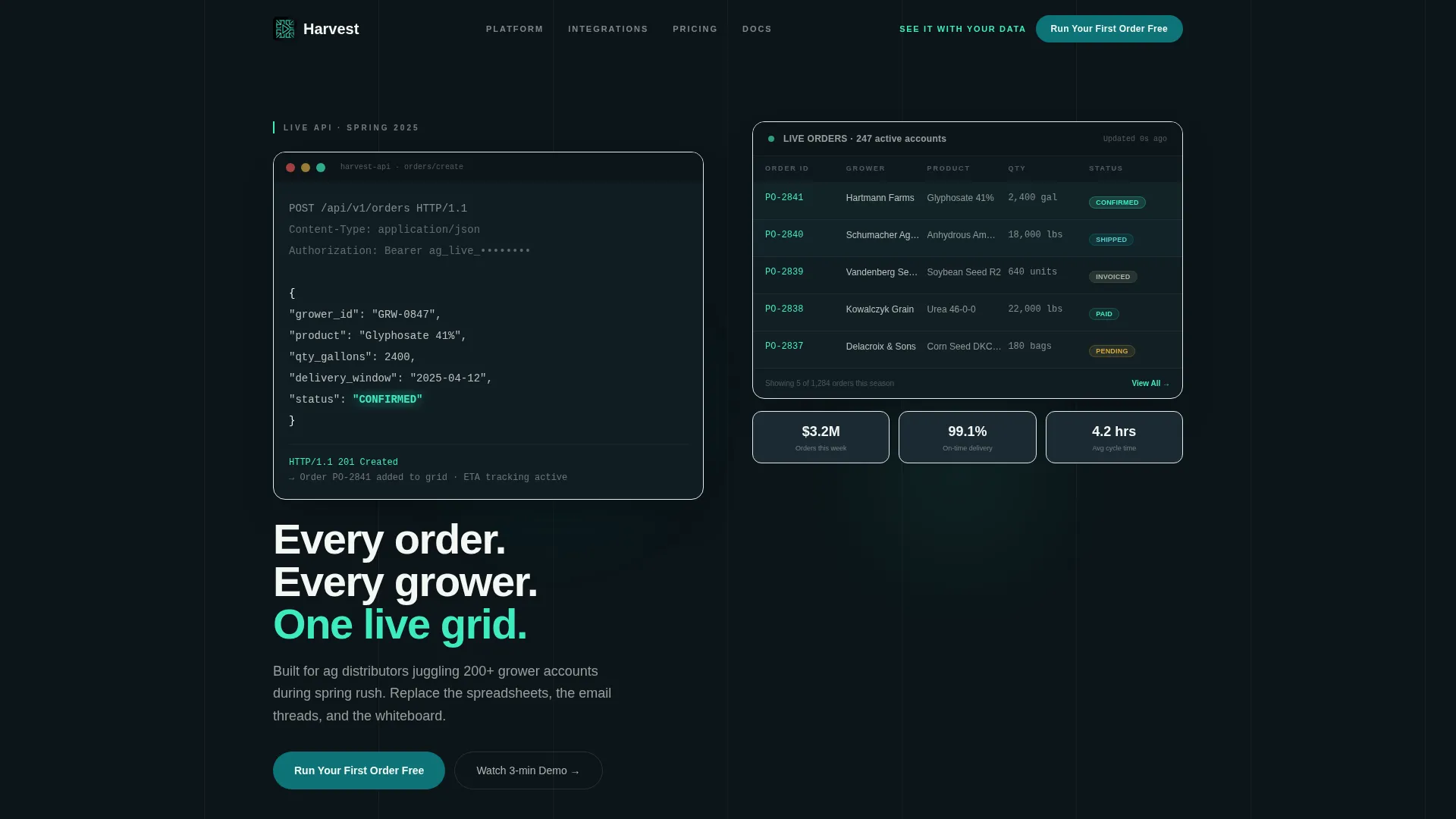
The header opens with a styled code snippet simulating a live API call. The POST request body displays a real order object line by line, including product name, quantity, delivery date, and a glowing confirmed status indicator. The animation creates immediate credibility before any headline appears.
Scrolling Industry Data Narrative
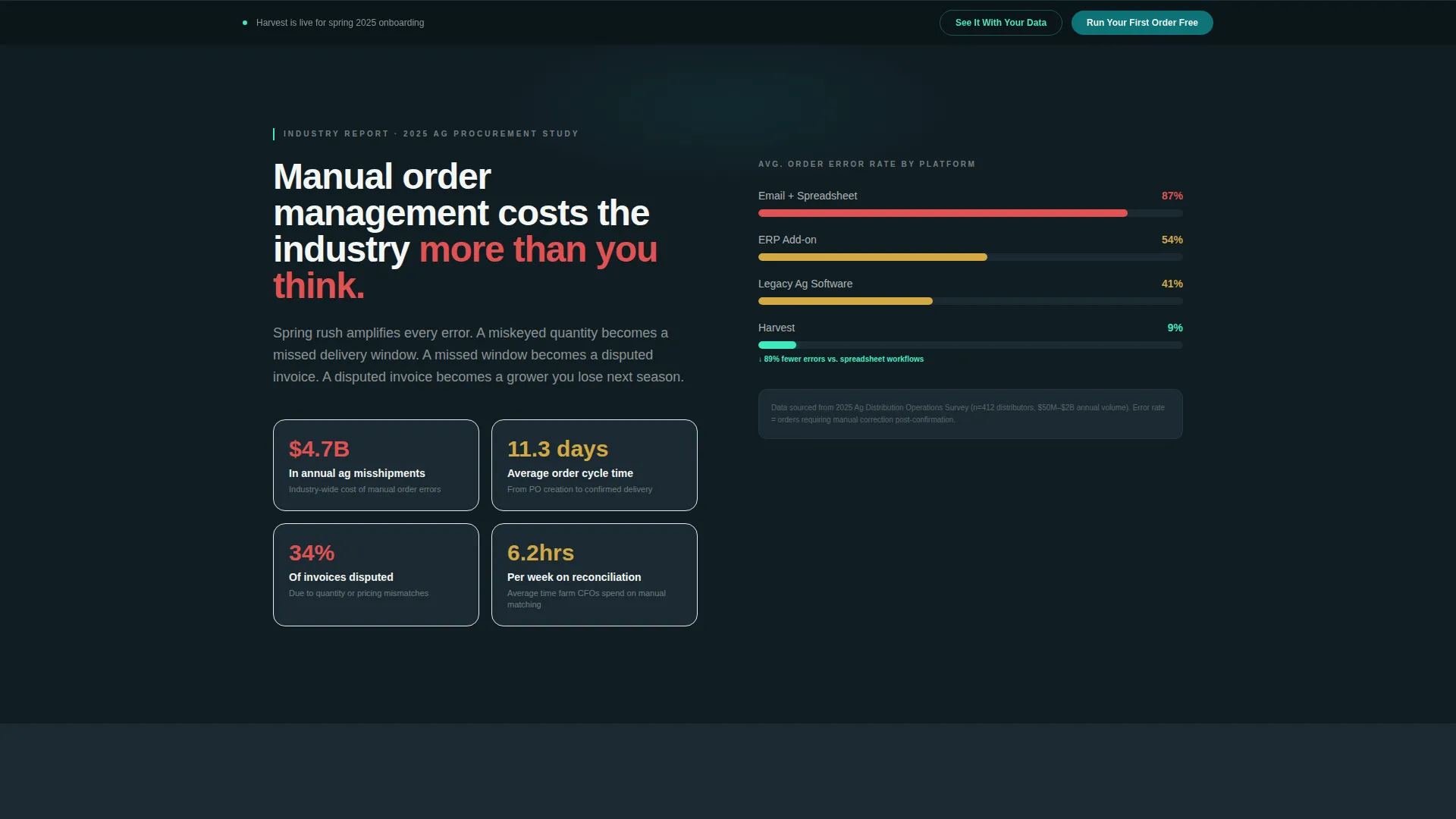
Three sequential data sections build a cost-of-inaction story as the visitor scrolls. An animated counter displays industry-wide misshipment figures, a comparative bar chart illustrates order cycle times, and a live-simulated dashboard shows orders moving through each stage from placement to payment.
Live Order Flow Simulation
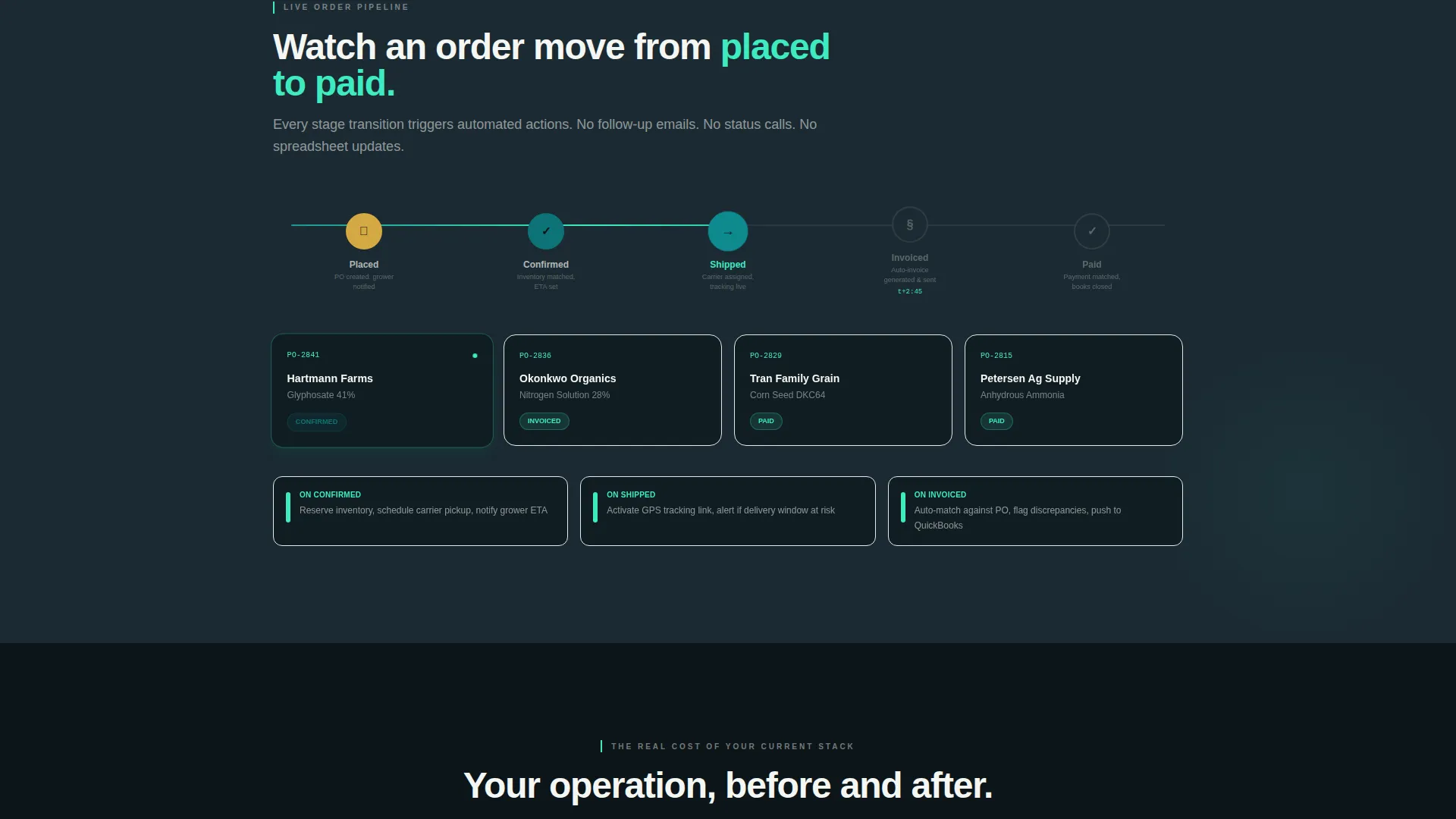
A simulated dashboard shows sample orders transitioning through five stages: placed, confirmed, shipped, invoiced, and paid. Each stage transition animates with teal pulse effects. This lets visitors experience the platform's logic before signing up.
Split-View Comparison Grid
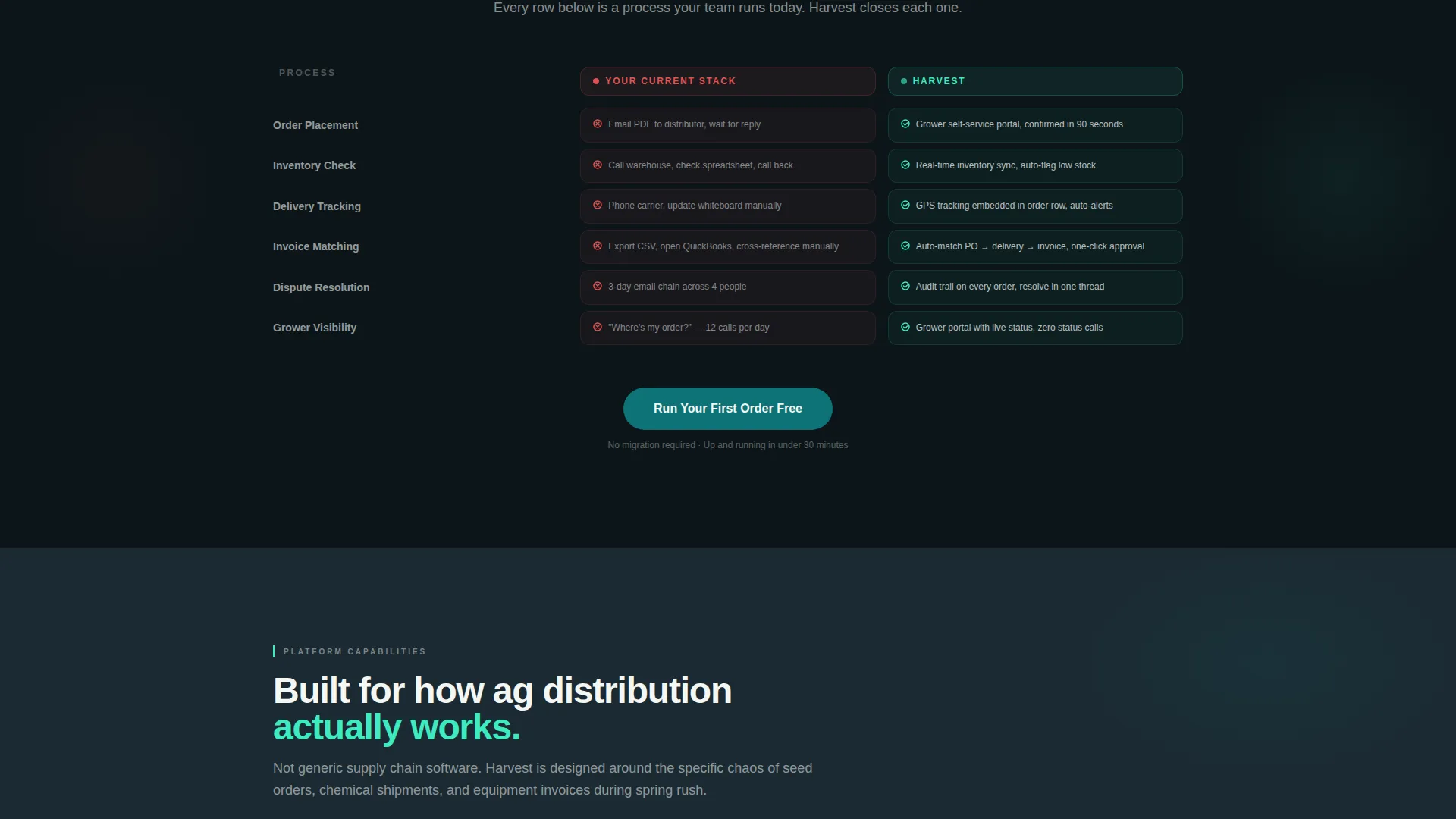
A persistent side-by-side panel contrasts the visitor's current manual stack against the platform's automated workflow. Each row animates from a red-flagged problem state on the left to a catalyst-green resolved state on the right. The layout makes switching costs feel immediately visible.
Dual Call-to-Action System
The primary call to action, labeled "Run Your First Order Free," anchors below the comparison grid. A secondary sticky bar labeled "See It With Your Data" opens a lightweight intake form. The form captures company name, active grower account count, and primary order type to personalize follow-up.
Teal Catalyst Color System
The visual identity uses deep field teal as the primary action color, rain-soaked soil tones for dashboard backgrounds, and bright catalyst green reserved for live-status indicators. The palette is purpose-built to feel operational and data-driven rather than decorative.
Page sections overview
| Section | Purpose |
|---|---|
| Terminal Code Header | Opens with a live API order animation to establish platform credibility instantly |
| Industry Cost Section | Animated counter showing the financial scale of manual order errors |
| Cycle Time Chart | Scrolling bar chart comparing order processing speeds |
| Live Dashboard Preview | Simulated order flow from placement through payment with animated stage transitions |
| Comparison Grid | Split-view panel contrasting manual workflows against platform capabilities row by row |
| Primary call to action Block | "Run Your First Order Free" button anchored at the base of the comparison section |
| Sticky Bar call to action | Persistent "See It With Your Data" bar with a lightweight intake form |
Design & branding system
The template uses the Teal Catalyst color system with a Dynamic Motion visual theme. Every color choice reinforces the feeling of a live operational dashboard rather than a marketing brochure.
- Deep field teal (#0D7377) drives primary buttons, links, and active user interface elements
- Rain-soaked soil (#1B2A32) fills dashboard backgrounds; freshly-tilled loam (#3E4A40) tones secondary panels; bright catalyst green (#3EEBC1) pulses on live-status indicators; clean grain-bin white (#F4F6F3) surfaces card text and data rows
Mobile & speed optimization
The template is structured to maintain visual clarity across screen sizes. Animated and data-dense sections are designed to read cleanly on smaller viewports without losing the operational feel.
- The comparison grid and dashboard simulation scale responsively so both columns remain legible on tablet and mobile screens
- Sticky bar and primary call to action placements are sized for easy tap interaction on touch devices
How this template helps you convert
Every design decision in this template is oriented toward earning trust and reducing hesitation before asking for a commitment.
- The animated terminal header communicates technical depth immediately, so procurement professionals recognize the platform as a serious operational tool before reading a single line of marketing copy.
- The industry data narrative makes the visitor's current pain quantifiable with specific numbers and visual comparisons, building urgency through context rather than pressure.
- The dual call-to-action system offers two entry points at different commitment levels, so visitors who are not ready to start an order can still share their data and stay in the funnel.
Other information about this template
This template is categorized under Technology and Agriculture Software, specifically targeting the agriculture order management niche. It is designed as a single-page, section-led landing page rather than a multi-page site.
- The template style is Dashboard and Data Grid, making it well-suited for platforms where real-time data visibility is the core product value
- The header concept is a Code Snippet, which positions the platform as developer-friendly and operations-ready from the first scroll
- The creative direction follows an Industry Report format, using data storytelling to build credibility across each section
- The landing-page direction is Comparison and Versus, a layout pattern proven to work well for platforms competing against legacy manual workflows
- The Dynamic Motion theme ties all animated elements together into a cohesive visual language that reinforces the idea of live, moving data
Theme
Dynamic Motion
Creative direction
Industry Report
Color system
Teal Catalyst
Style
Dashboard/Data Grid
Direction
Comparison/Versus
Page Sections
Animated Terminal Code Header
Scrolling Industry Data Narrative
Live Order Flow Simulation
Split-view Comparison Grid
Dual Call-to-action System
Teal Catalyst Visual Identity
Related questions
Who is the Harvest template designed for?
What makes the header section different from a standard hero?
Can I customize the color palette and sample data in the template?
What calls to action are included in this template?
Is this template suitable for a platform still in early access or beta?



