In-Person Tutoring Center Landing Page Template
Hearth is a warm, modular landing page template built for in-person tutoring centers. It opens with a parent-facing quiz, flows through FAQ-driven card sections that answer real concerns, and drives leads with a focused "Book a Free Assessment" form. The Electric Indigo and amber color system makes every section feel trustworthy, approachable, and action-ready.
by Rocket studio
Quick summary
Hearth is a single-page, card-grid landing page template designed for neighborhood tutoring centers. It opens with a quiz that speaks directly to parents, then answers their real questions through scrollable FAQ-style card clusters. Two clear conversion paths, a free assessment booking form and a downloadable parent guide, give every visitor somewhere useful to go.
Who this template is for
This template is built for small and mid-sized in-person tutoring centers that want a warm, credible online presence. It works especially well for operators who rely on parent trust rather than flashy branding to fill their roster.
- Tutoring center owners launching or refreshing their first landing page
- Independent tutors expanding into a small center serving local families
- Education program directors who need a lead-capture page before the school year begins
What problem this template solves
Most tutoring center pages lead with a stock photo of a smiling family and a generic tagline. Parents who are genuinely worried about their child skip past that without connecting. Hearth addresses the real emotional moment: a parent scrolling late at night, wondering what is actually going wrong with their kid's grades.
- Parents arrive stressed and skeptical; the quiz immediately validates the exact worry they came with
- Generic hero layouts lose credibility fast; the FAQ-driven structure answers objections before they form
- Most forms feel like sales funnels; leading with the child's name reframes the process as child-centered help
What you get with this template
You get a fully structured, modular card-grid landing page ready to represent your tutoring center. Every section is purpose-built for parent conversion, from the opening quiz to the sticky booking bar.
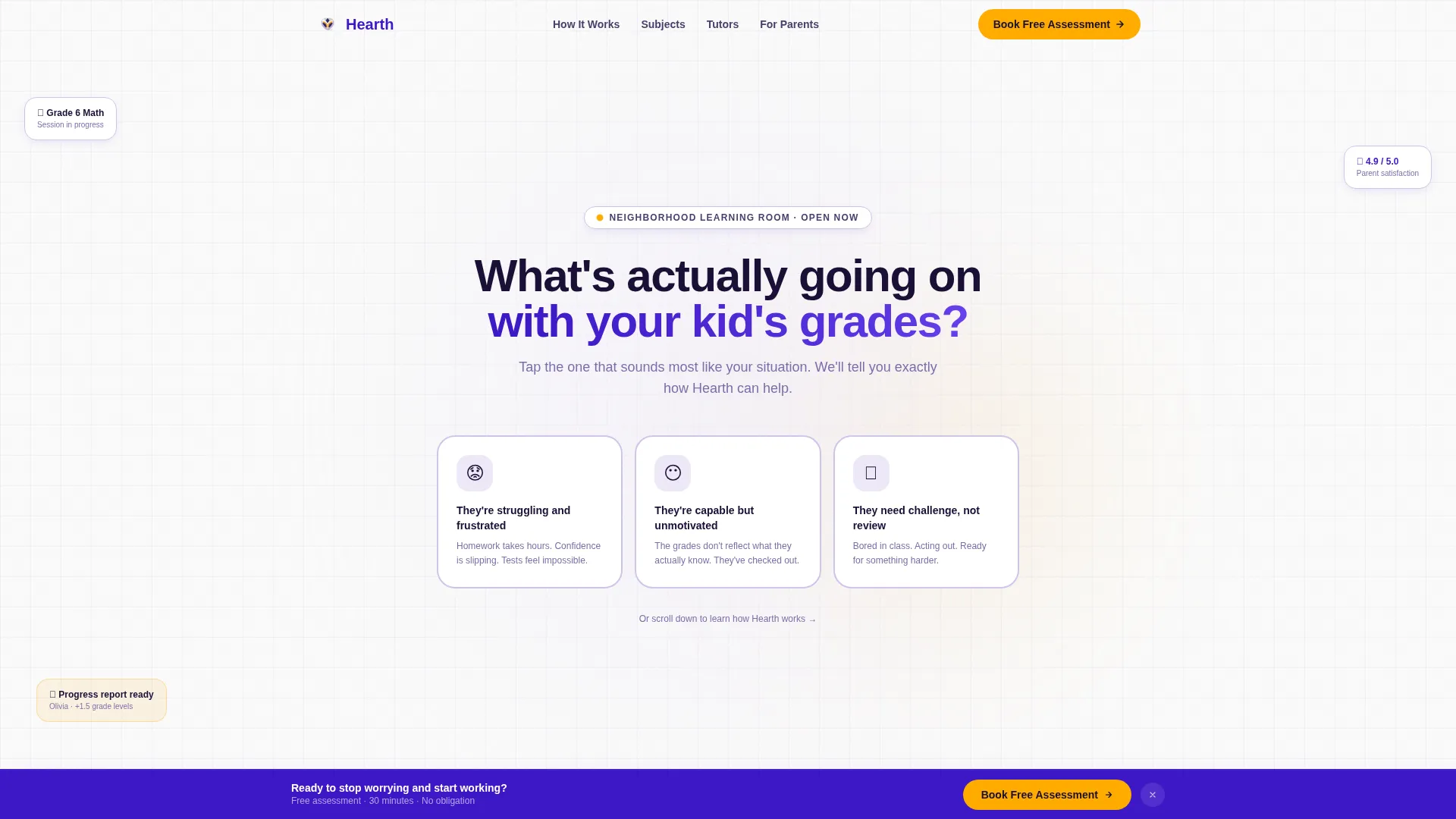
- A quiz-led header with three illustrated answer cards tailored to the most common parent concerns
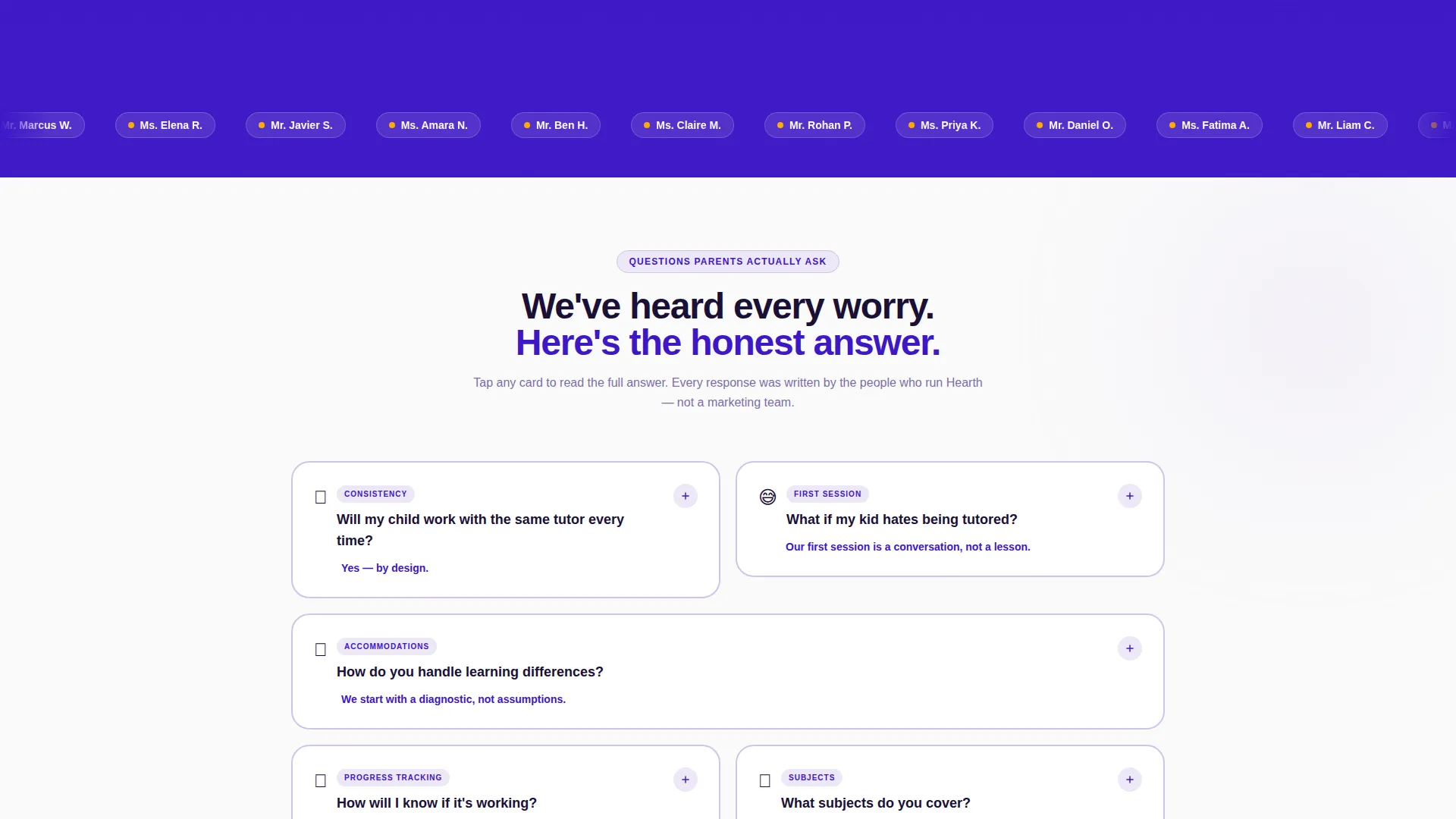
- A scrollable FAQ card grid covering tutor matching, first-session experience, and learning differences
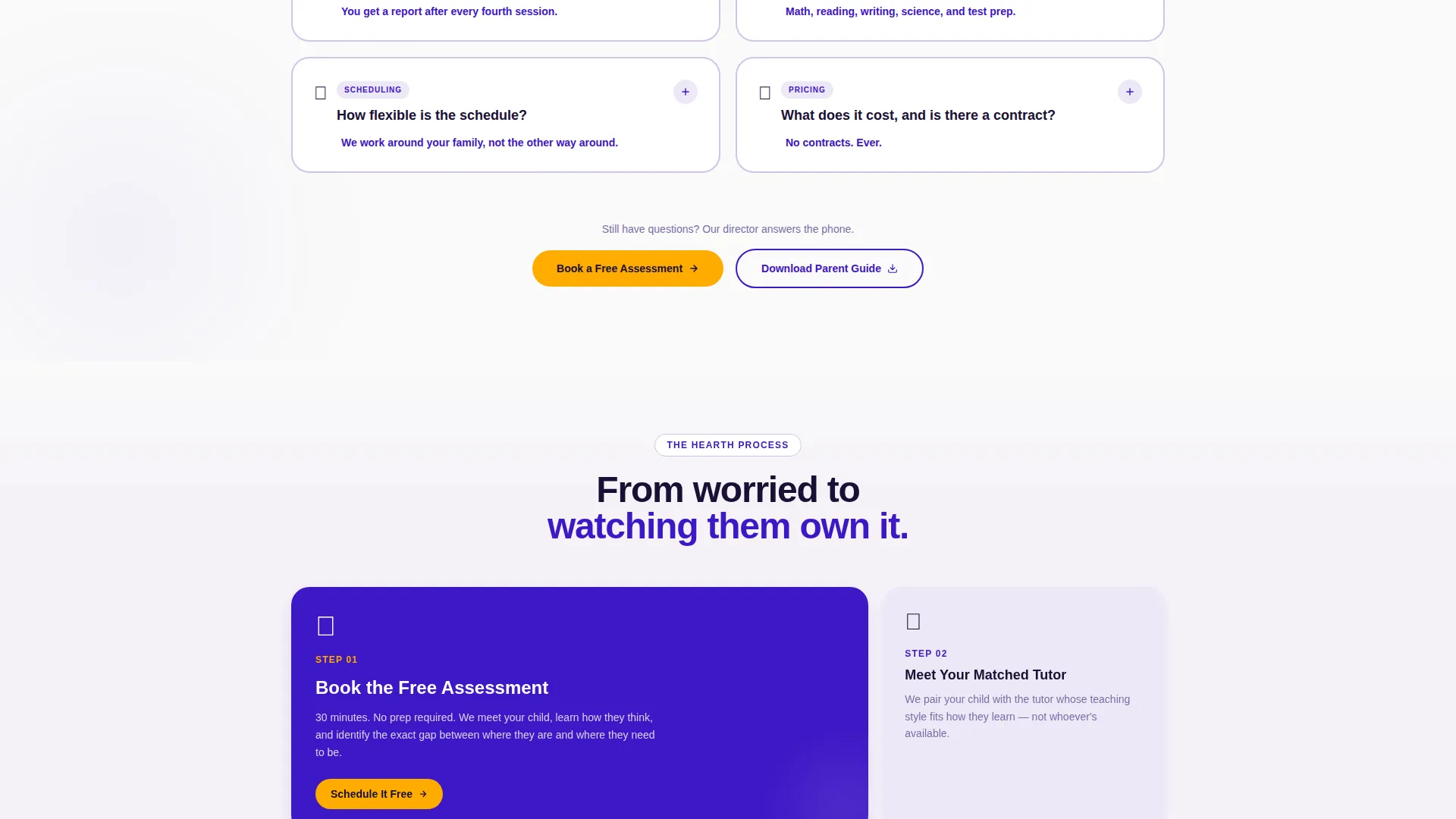
- Two conversion paths: a "Book a Free Assessment" form and a "Download Our Parent Guide" gated PDF offer
Feature list
This template is built around six core components that work together to move a worried parent from arrival to booked assessment.
Interactive Quiz Header
The page opens with a single bold question centered in large indigo type: "What's actually going on with your kid's grades?" Parents tap one of three illustrated answer cards. Each selection delivers a personalized result card that connects their concern to the center's specific approach.
FAQ-Driven Card Grid
Every scroll section is a card or cluster of cards answering one real parent question. Cards cover tutor matching, first-session protocol, and how the center handles learning differences. The modular grid lets cards rearrange by subject, grade band, or concern type.
Dual Conversion Paths
The primary call to action is "Book a Free Assessment," styled in amber and appearing first after the quiz result and again in a sticky bottom bar. A secondary path offers a gated "Download Our Parent Guide" PDF for parents who need more time before calling.
Child-First Lead Form
The assessment booking form asks for the child's first name, grade level, primary subject of concern via dropdown, and the parent's phone number in that exact order. Leading with the child reframes the form as an act of care rather than a sales step.
Sticky Bottom Conversion Bar
After the parent scrolls past the third FAQ cluster, a persistent bottom bar appears with the "Book a Free Assessment" call to action in amber. It stays visible without interrupting the reading experience, providing a low-friction return path to the form.
Modular Section Architecture
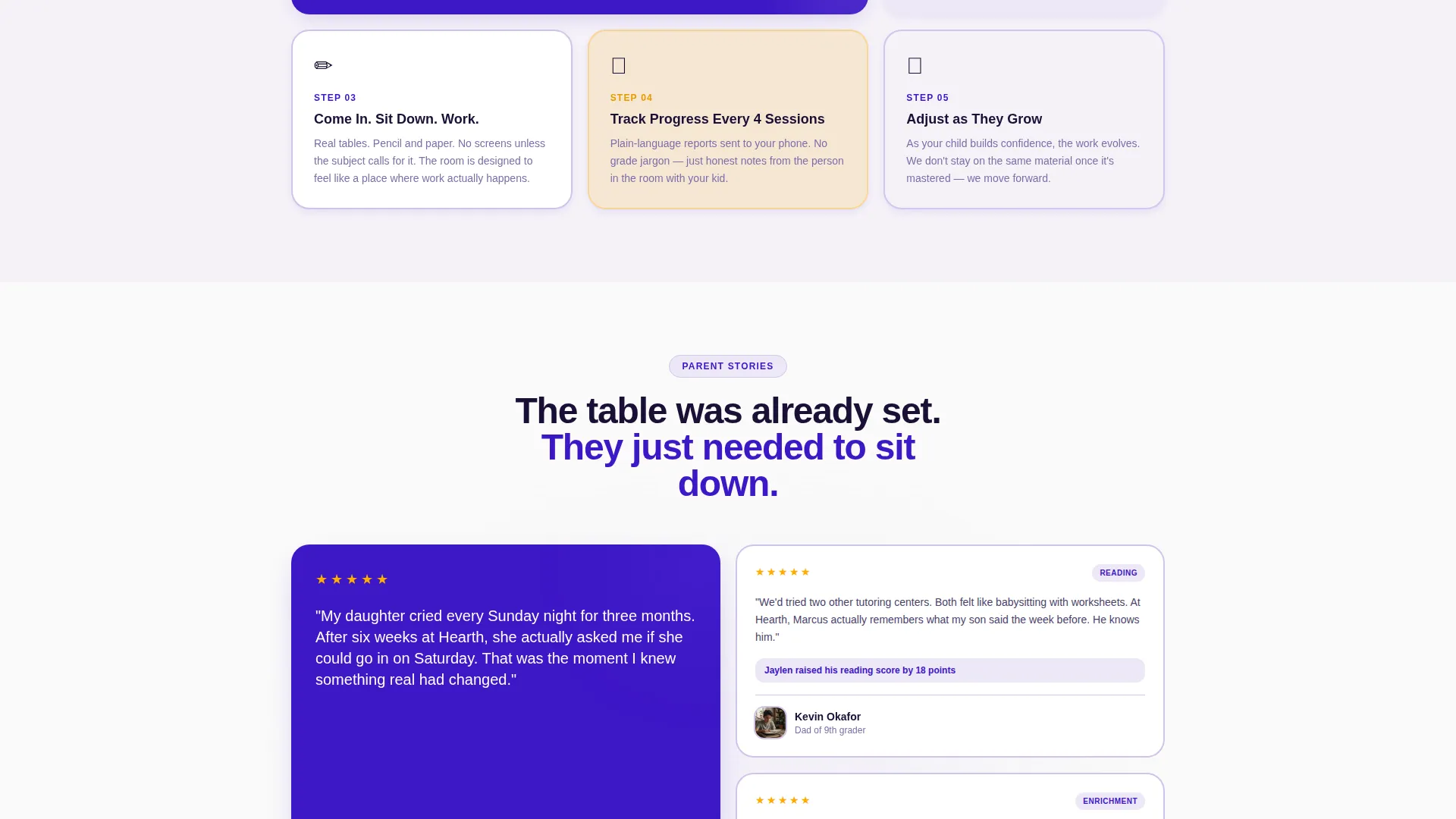
The card-grid layout is built for flexibility. Sections can be reordered, swapped, or expanded to reflect different grade bands, subject areas, or seasonal concerns without breaking the visual system.
Page sections overview
| Section | Purpose |
|---|---|
| Quiz Starter Header | Opens with parent question and three illustrated answer cards |
| Personalized Result Card | Delivers a tailored response after quiz selection |
| Tutor Matching Card | Answers "Will my child work with the same tutor every time?" |
| First Session Card | Addresses "What if my kid hates being tutored?" |
| Learning Differences Card | Explains diagnostic and accommodation approach |
| Assessment Booking Form | Captures child name, grade, subject, and parent phone |
| Parent Guide Download | Gated PDF offer for parents in the research phase |
| Sticky Booking Bar | Persistent call to action after third FAQ cluster |
Design & branding system
The Electric Indigo color system gives Hearth the feel of a schoolroom at golden hour: modern and energetic, but domestic and reassuring at the same time. Every color decision is intentional and communicates something specific to the parent audience.
- Deep indigo (#3D17C6) anchors headings and key text, carrying authority without feeling cold or corporate
- Soft lavender mist (#EDE7F6) fills card backgrounds and section areas, keeping the page airy and easy to read
- Warm chalk white (#FAFAFA) serves as the main page canvas, maintaining a clean and uncluttered feel
- Bright amber (#FFAB00) powers all buttons, progress indicators, and interactive highlights, acting as the warm lamp that draws the eye forward
Mobile & speed optimization
The modular card-grid layout is structured to reflow cleanly on smaller screens. Parents reaching this page from a phone at night will find the quiz, the cards, and the booking form all easy to tap and read.
- Cards stack vertically on mobile so each FAQ answer remains readable without horizontal scrolling
- The sticky bottom bar stays accessible on small screens, keeping the booking call to action within thumb reach
- Illustrated card options in the quiz header are sized for touch interaction, not just mouse clicks
How this template helps you convert
Hearth is designed around the specific emotional and practical barriers that prevent a parent from booking a tutoring assessment. Every structural decision targets one of those barriers.
- The quiz header removes the first wall by naming the parent's exact worry out loud, creating an immediate sense that this center already understands their situation before any pitch is made.
- The FAQ card grid handles objections in the natural order a parent thinks through them, so by the time they reach the booking form they have already resolved their main hesitations.
- The child-first form structure and dual conversion paths reduce commitment anxiety by offering both a direct booking option and a softer research path through the parent guide download.
Other information about this template
Hearth fits within the Community Hearth theme, which uses familiar domestic warmth as a design signal for safety and reliability. The template is built on a Card Grid (Modular) structure, meaning sections are independent units that can be updated or reordered as the center's offerings change across school terms. The FAQ-Driven creative direction and Quiz Starter header concept were selected specifically for the tutoring niche because parent decision-making is research-heavy and emotionally driven. The Lead Generation landing-page direction shapes every structural choice, from quiz placement to form field order.
- Template theme: Community Hearth
- Template style: Card Grid (Modular)
- Creative direction: FAQ-Driven
- Header concept: Quiz Starter
- Landing-page direction: Lead Generation
- Color system: Electric Indigo
Theme
Community Hearth
Creative direction
FAQ-Driven
Color system
Electric Indigo
Style
Card Grid (Modular)
Direction
Lead Generation
Page Sections
Interactive Quiz Header
Faq-driven Card Grid
Dual Conversion Paths
Child-first Lead Form
Sticky Bottom Conversion Bar
Modular Section Architecture
Related questions
Can I change the quiz questions to match my center's specialties?
Does the template include both the booking form and the parent guide download?
Can I reorder the FAQ card sections to match what my parents ask most?
Is the sticky booking bar visible on mobile devices?
Is this template designed only for in-person tutoring centers?



