Helix - Precision Diagnostics Landing Page Template
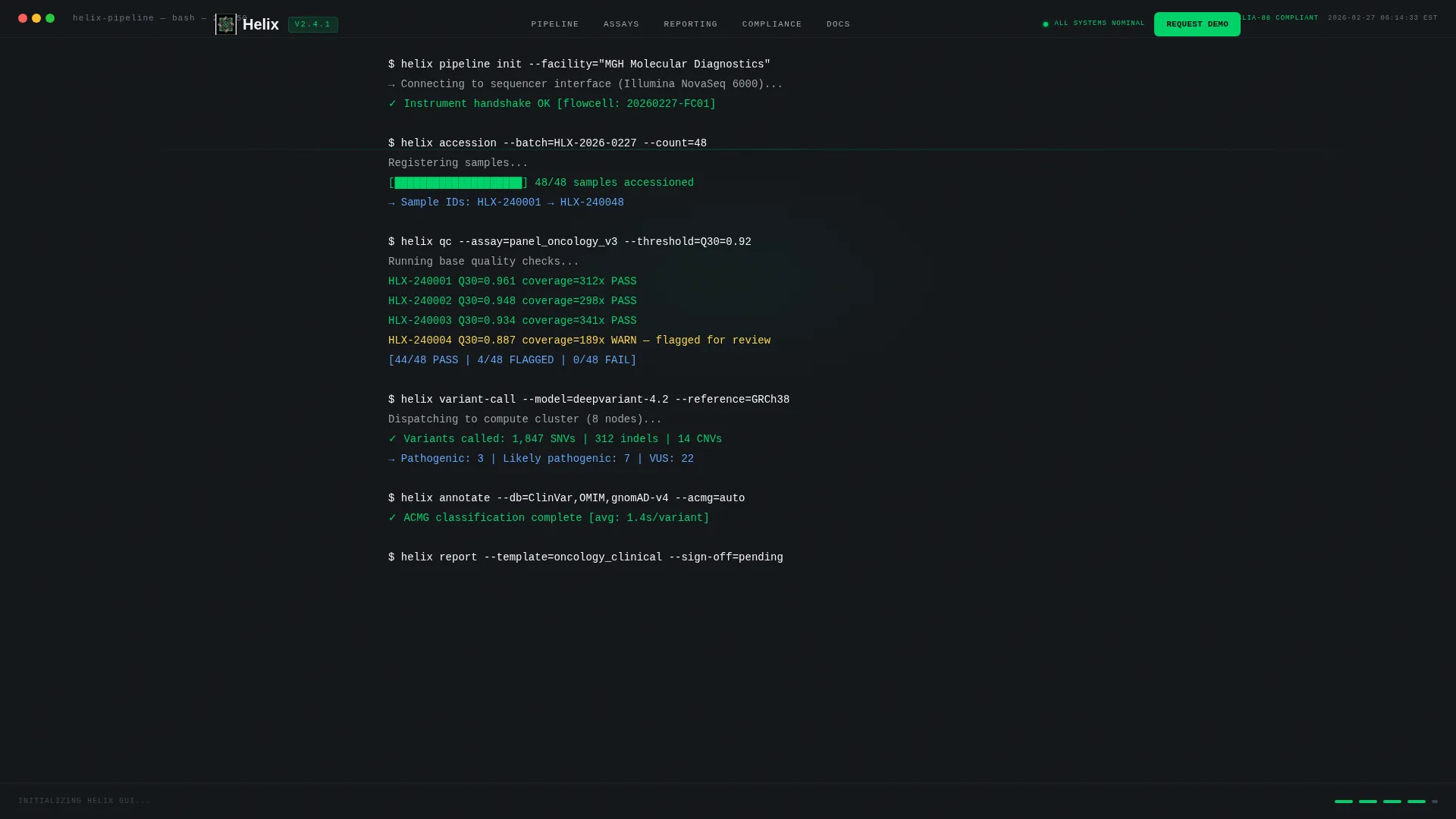
Helix is a bento grid landing page template built for genetic testing management software. It features a live terminal header, interactive module tiles, and a persistent lead-capture bar. The Monochrome Steel palette and Data Command theme give it the precise, clinical feel that lab directors, bioinformatics leads, and genetic counselors expect from enterprise-grade pipeline software.
by Rocket studio
Quick summary
Helix is a single-page bento grid template designed for genetic testing vertical SaaS platforms. It opens with an animated terminal sequence that dissolves into a product dashboard. Interactive tiles let visitors explore pipeline modules hands-on. Every design decision serves one goal: earning the demo request before a single sales word is spoken.
Who this template is for
This template is built for teams selling complex, workflow-heavy software to scientific and clinical buyers. It communicates depth and precision at a glance, which is exactly what technical evaluators need to see.
- Lab directors managing Clinical Laboratory Improvement Amendments (CLIA)-certified molecular diagnostics facilities
- Bioinformatics leads who evaluate architecture before looping in leadership
- Genetic counselors who need clean, clinician-ready reports delivered on schedule
What problem this template solves
Generic SaaS landing pages fail in highly specialized verticals. A lab director evaluating pipeline software does not respond to stock imagery and bullet-point feature lists. They need to feel the system working before they commit to a demo call.
- Buyers cannot assess workflow fit without touching the product interface
- Technical leads distrust vague marketing claims and need architecture-level evidence
- Sales teams lose qualified leads who never reach a conversion point that matches their intent
What you get with this template
You get a fully structured, interaction-driven landing page with a clear conversion architecture. Every section earns its place by reflecting a real moment in the genetic testing workflow.
- A full-viewport animated terminal header that transitions into a live product dashboard view
- A bento grid of interactive tiles covering sample tracking, variant annotation, and turnaround-time analytics
- A persistent bottom bar with a lead-capture form and a secondary gated PDF download path
Feature list
This template is built around five tightly scoped, purpose-driven components. Each one reflects a specific behavior described in the product brief.
Animated Terminal Header
The header fills the full viewport with a dark terminal canvas. Monospaced pipeline commands stream in sequence: sample IDs arriving, quality control thresholds passing, variant calls resolving line by line. A blinking cursor marks each completed step. The sequence then dissolves into the product dashboard, giving visitors a cinematic first impression grounded in real lab language.
Interactive Bento Grid Tiles
Each tile in the grid is a clickable, hoverable module. One tile shows a miniature sample tracker with draggable status columns. Another renders a variant annotation card with expandable fields. A third displays turnaround-time analytics with a live-updating sparkline. Visitors can interrogate each module individually, building confidence in the platform before any sales conversation begins.
Engagement-Triggered Demo Bar
The primary call to action is "Request Pipeline Demo," anchored in a persistent bottom bar. The bar activates only after the visitor has interacted with any two bento tiles. This earned-engagement model means the ask arrives at the moment of highest intent, not on page load.
Dual Conversion Path Design
A secondary conversion path, "Download Integration Specs," gates a technical PDF behind a single email field. This catches bioinformatics leads who want architecture details before involving their director. Two paths, two audiences, zero friction at each entry point.
Scoped Lead Capture Form
The demo request form collects four specific fields: lab name, monthly test volume via dropdown (under 500, 500 to 5,000, 5,000 to 50,000, or 50,000 and above), primary assay type (panels, exomes, or whole genome), and current Laboratory Information System or Laboratory Information Management System (LIS/LIMS) platform. The form qualifies leads at the point of capture without adding unnecessary friction.
Page sections overview
| Section | Purpose |
|---|---|
| Terminal Header Canvas | Opens with animated pipeline commands dissolving into the product dashboard |
| Interactive Bento Grid | Lets visitors explore sample tracking, variant annotation, and analytics tiles |
| Engagement Demo Bar | Persistent call to action bar that activates after two tile interactions |
| Secondary Download Path | Gates technical integration PDF behind a single email field |
| Lead Capture Form | Collects lab name, test volume, assay type, and current LIS/LIMS platform |
Design & branding system
The visual identity follows a Data Command theme built on a Monochrome Steel color system. Every color choice has a functional reason. The palette feels like the anodized housing of a next-generation sequencer: cold, machined, and completely free of decoration.
- Core palette: deep gunmetal (#1B1F23), brushed steel mid-tone (#3E4451), light alloy (#A0A4AB), and clinical white (#F4F5F7)
- Signal-green accent (#00D26A) is used exclusively for active states, success indicators, and primary call-to-action elements
- Typography throughout uses monospaced type on dark backgrounds, reinforcing the terminal and pipeline aesthetic at every section
Mobile & speed optimization
The bento grid layout is structured to translate cleanly across screen sizes. Interactive tile behavior is designed to remain functional on smaller viewports so mobile visitors can still engage with the product modules.
- Tile grid reflows into a single-column stack on mobile without losing the interactive module behavior
- The persistent demo bar remains anchored to the bottom of the viewport on all screen sizes
- The terminal animation is scoped to the header section, keeping the rest of the page lightweight and content-focused
How this template helps you convert
The conversion architecture in this template is built around earned engagement rather than interruption. Every element is sequenced to move a skeptical technical buyer toward action at their own pace.
- The terminal header immediately speaks the visitor's language, establishing credibility before a single marketing claim appears
- Interactive bento tiles let visitors self-qualify by exploring the modules most relevant to their workflow, raising intent before the demo bar appears
- The dual conversion path captures both decision-makers and technical evaluators in the same page flow, without forcing either audience into a path that does not fit them
Other information about this template
This template is categorized under Technology, specifically the Genetic Testing Vertical SaaS subcategory, and is optimized for the genetic testing management software niche. It is built on a Bento Grid template style with an Interactive Explorer creative direction.
- The Intersection Match Score for this template context is 13, indicating a tight alignment between the design system, creative direction, and niche audience
- The header concept is classified as Code Snippet, referencing the terminal-style animated opening sequence
- The landing page direction is Lead Generation, with both a primary demo request path and a secondary gated asset path working in parallel
- This template supports use cases where the buyer evaluates software independently before involving their organization, a common pattern in clinical and bioinformatics procurement



Theme
Data Command
Creative direction
Interactive Explorer
Color system
Monochrome Steel
Style
Bento Grid
Direction
Lead Generation
Page Sections
Animated Terminal Header Sequence
Interactive Bento Grid Modules
Engagement-triggered Demo Bar
Dual Conversion Path Architecture
Scoped Qualifying Lead Form
Related questions
Who is this template designed for?
What makes the bento grid interactive?
How does the lead capture form work?
Can technical buyers access details without requesting a demo?
What does the terminal header actually display?



