Aviation & Maritime School Careers Website Template
Helm is a sidebar companion landing page template built for marine engineering schools. It uses a guided quiz flow to help merchant navy cadets, working mariners, and career-changers find their ideal certification path. A fixed sidebar tracks progress with a brass-gold gauge, surfaces industry facts after each answer, and leads visitors toward a personalized results page with a single name-and-email step.
by Rocket studio
Quick summary
Helm is a quiz-driven landing page template designed for marine engineering schools. It guides visitors through seven adaptive questions about their qualifications, sea time, and study availability. The sidebar stays fixed throughout, tracking progress and delivering industry facts. After the final question, visitors unlock a personalized certification roadmap by entering only a first name and email.
Who this template is for
This template is built for marine engineering schools and training programs that serve maritime professionals at different career stages. It works especially well when the school offers multiple certification paths and needs to match each visitor to the right one quickly.
- Merchant navy cadets choosing their first certification
- Working mariners upgrading from oiler or wiper to third engineer
- Career-changers from automotive or industrial trades exploring a path to sea
What problem this template solves
Most school landing pages ask visitors to browse a course catalogue and figure out where they fit. That approach loses people who are new to the profession or unsure which qualification applies to them. This template replaces passive browsing with an active, personalized conversation.
- Visitors don't know which certification level to pursue
- Generic programme pages fail to reflect a visitor's existing sea time or trade background
- Schools lose enrollment interest before the visitor ever reaches a contact form
What you get with this template
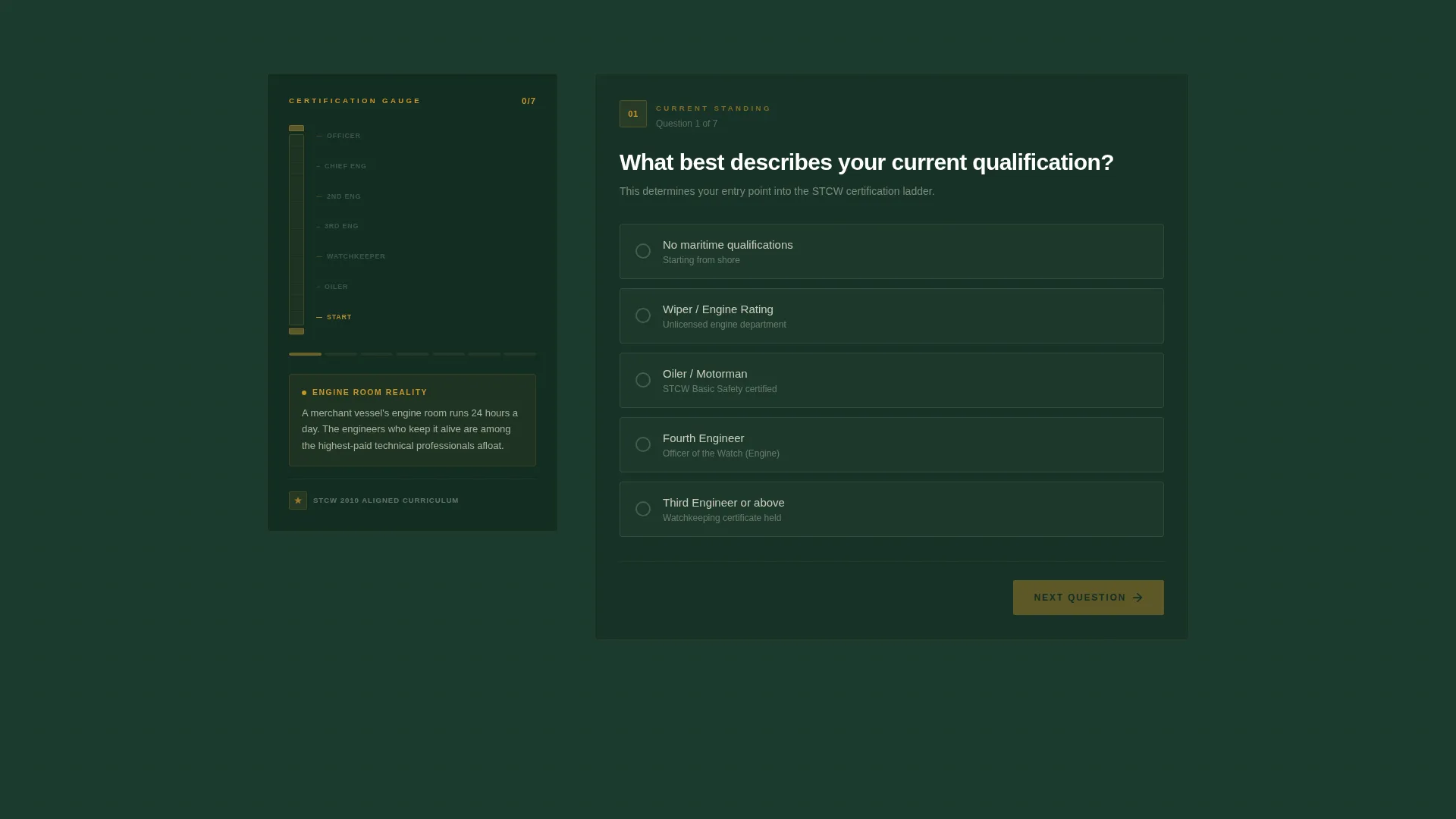
You get a fully structured single-page layout that puts a guided quiz at the center of the enrollment experience. The page is organized into a two-column view: a fixed left sidebar and a right-side quiz panel that advances through seven adaptive questions.
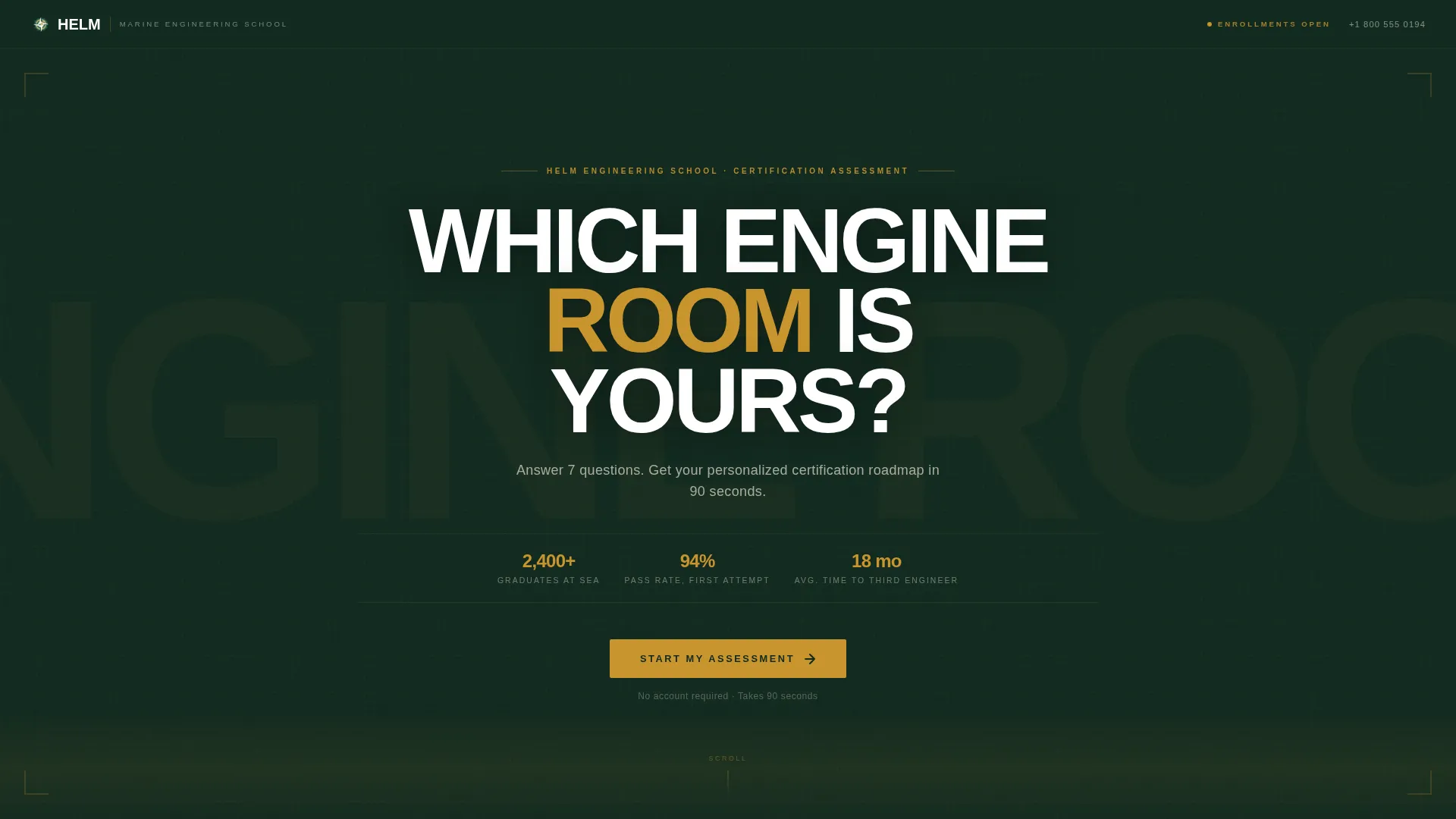
- A giant headline section with centered white type on deep watch-green
- A fixed sidebar with a vertical brass-gold progress gauge and live industry fact cards
- A post-quiz results reveal gated by first name and email only
- A secondary call-to-action linking to a calendar booking widget for admissions conversations
Feature list
This section describes the core functional and visual components included in the Helm template.
Adaptive Seven-Question Quiz
The quiz opens by asking about current qualifications and adapts each follow-up based on the previous answer. Questions cover sea time logged, preferred vessel type, mechanical background, and study availability. The flow feels like a conversation, not a form.
Fixed Sidebar Progress Tracker
The left sidebar stays in place as the quiz advances on the right. A vertical brass-gold gauge fills like a sight glass with each completed answer, giving the visitor a clear visual sense of how far along they are.
Live Industry Fact Cards
After each answer, the sidebar surfaces a relevant fact tied to that response. Facts include average salary at the relevant certification level, fleet demand statistics, or a one-sentence graduate testimonial. This keeps the visitor informed and engaged between questions.
Personalized Certification Roadmap Reveal
After the final question, the visitor enters a first name and email to unlock their results. The results page shows recommended courses, an estimated completion timeline, and eligible financial aid options. The ask feels earned because the quiz has already delivered real diagnostic value.
Secondary Admissions Booking Path
Below the results, a secondary call-to-action invites the visitor to book a conversation with an admissions advisor. A calendar booking widget supports this path. Visitors who want a human conversation can find it without leaving the page.
Educational Guide Visual Theme
The page uses a deep watch-green and chart cream background system with bulkhead gray body text. Brass instrument gold appears only on interactive elements, progress indicators, and call-to-action buttons. The palette evokes a well-used technical manual, keeping the design authoritative and on-brand for maritime education.
Page sections overview
| Section | Purpose |
|---|---|
| Giant Headline Header | Presents the central question and quiz promise above the fold |
| Quiz Opening Question | Captures current qualification level to begin the adaptive path |
| Adaptive Follow-Up Questions | Gathers sea time, vessel preference, background, and availability |
| Fixed Sidebar Tracker | Shows progress gauge and surfaces live industry facts per answer |
| Results Reveal Gate | Collects first name and email before showing the personalized roadmap |
| Personalized Results Page | Displays recommended courses, timeline, and financial aid options |
| Admissions Booking Widget | Offers a secondary path to speak with an admissions advisor |
Design & branding system
The visual identity follows an Educational Guide theme rooted in a Forest Trust color system. Every color choice connects to a familiar object from the maritime profession, making the palette feel purposeful rather than decorative.
- Deep watch-green (#1B3A2D) and chart cream (#F5F0E1) alternate as section backgrounds, keeping the page readable and anchored
- Bulkhead gray (#4A5568) carries all body text, providing strong contrast against both background tones
- Brass instrument gold (#C9952D) is reserved strictly for interactive highlights, progress fills, and call-to-action buttons, so it always signals action
Mobile & speed optimization
The sidebar companion layout adapts cleanly for smaller screens. On mobile, the fixed sidebar collapses into an inline progress bar above the quiz panel so the experience remains clear without sacrificing the progress tracking logic.
- The quiz panel stacks vertically on narrow viewports, keeping each question fully readable without horizontal scrolling
- The brass-gold progress indicator shifts to a horizontal fill bar on mobile, preserving the sight-glass metaphor in a compact form
- Call-to-action buttons and the booking widget remain accessible and prominently placed at each key decision point on all screen sizes
How this template helps you convert
The quiz earns the conversion before it asks for anything. Each question adds value to the visitor's experience, so by the time the results gate appears, entering a name and email feels like a natural next step rather than a barrier.
- The adaptive question sequence builds trust by proving the school understands the visitor's exact position in the profession, making the results feel genuinely personalized rather than generic.
- The sidebar fact cards maintain engagement between questions by delivering salary data, fleet demand figures, and testimonials that reinforce the value of the certification the visitor is working toward.
- The two-step post-quiz path (results page first, admissions booking second) respects visitor readiness by offering immediate value before introducing a human conversation.
Other information about this template
Helm is part of a broader template library covering Education and Training use cases across specialised schools and professional certification programs. It is particularly well suited to niche training providers where the course catalogue is meaningful only once the visitor understands which track applies to them.
- The template style is classified as Sidebar Companion, making it a strong fit for any diagnostic or assessment-led enrollment flow
- The quiz-and-personalize creative direction works across maritime, aviation, trades, and other technical training schools that serve learners at multiple experience levels
- The landing page direction is Quiz and Assessment, designed to qualify visitors and deliver personalized output before any hard enrollment ask
- The header concept is Giant Headline Centered, a high-contrast format that communicates a single decisive question with no competing visual noise

Theme
Educational Guide
Creative direction
Quiz & Personalize
Color system
Forest Trust
Style
Sidebar Companion
Direction
Quiz/Assessment
Page Sections
Adaptive Seven-question Quiz Flow
Fixed Sidebar Progress Gauge
Live Industry Fact Cards
Personalized Certification Roadmap
Admissions Calendar Booking Widget
Forest Trust Visual Identity System
Related questions
Can this template support different certification levels without redesigning the quiz?
How many questions does the quiz include?
What information does a visitor need to provide to see their results?
Is the sidebar visible throughout the entire quiz?
Can I add a booking widget for admissions conversations?



