School (K-12) Specialist Professional Website Template
Homeroom is a playful geometric landing page template built for public school open house events. It opens with a personalized quiz that routes families to the right session, then walks them through the night step by step. A comparison table, sticky registration bar, and dual call-to-action paths make it easy for every visitor to sign up or request information.
by Rocket studio
Quick summary
Homeroom is a single-page event registration template designed for neighborhood public schools. It greets families with a quick quiz, personalizes the open house experience by visitor type, and guides them through the evening in clear steps. A side-by-side comparison table and two registration paths ensure no family leaves without the information they need.
Who this template is for
This template is built for elementary and middle school staff who need a warm, organized landing page for open house nights. It works equally well for PTA organizers and school communications leads who want a welcoming first impression online.
- Public school administrators planning kindergarten orientation or back-to-school nights
- Teachers and office staff who need a self-service page for families to register and get details
- Parent-teacher association leaders coordinating multi-session open house events
What problem this template solves
Families often arrive at school events confused about which session applies to them, where to park, or what the evening schedule looks like. A single plain-text email or flyer cannot answer everyone's question at once.
- Incoming families, current parents, and community neighbors all need different information from the same event
- Schools lose registrations when the sign-up process is buried or hard to find on a busy night
- Families who cannot attend still want materials, and there is rarely a clear path to request them
What you get with this template
This template gives you a complete, ready-to-customize open house landing page. Every section is purposefully ordered so that a first-time visitor understands the event, finds their session, and registers in one smooth scroll.
- A quiz-driven header that personalizes the page instantly for three visitor types
- A step-by-step section guiding families through check-in, classroom maps, teacher meetings, and the book fair
- A side-by-side comparison table contrasting all three open house sessions and a dual registration path for attendees and remote families
Feature list
This template bundles several purpose-built components that work together as one cohesive open house registration flow.
Personalized Quiz Header
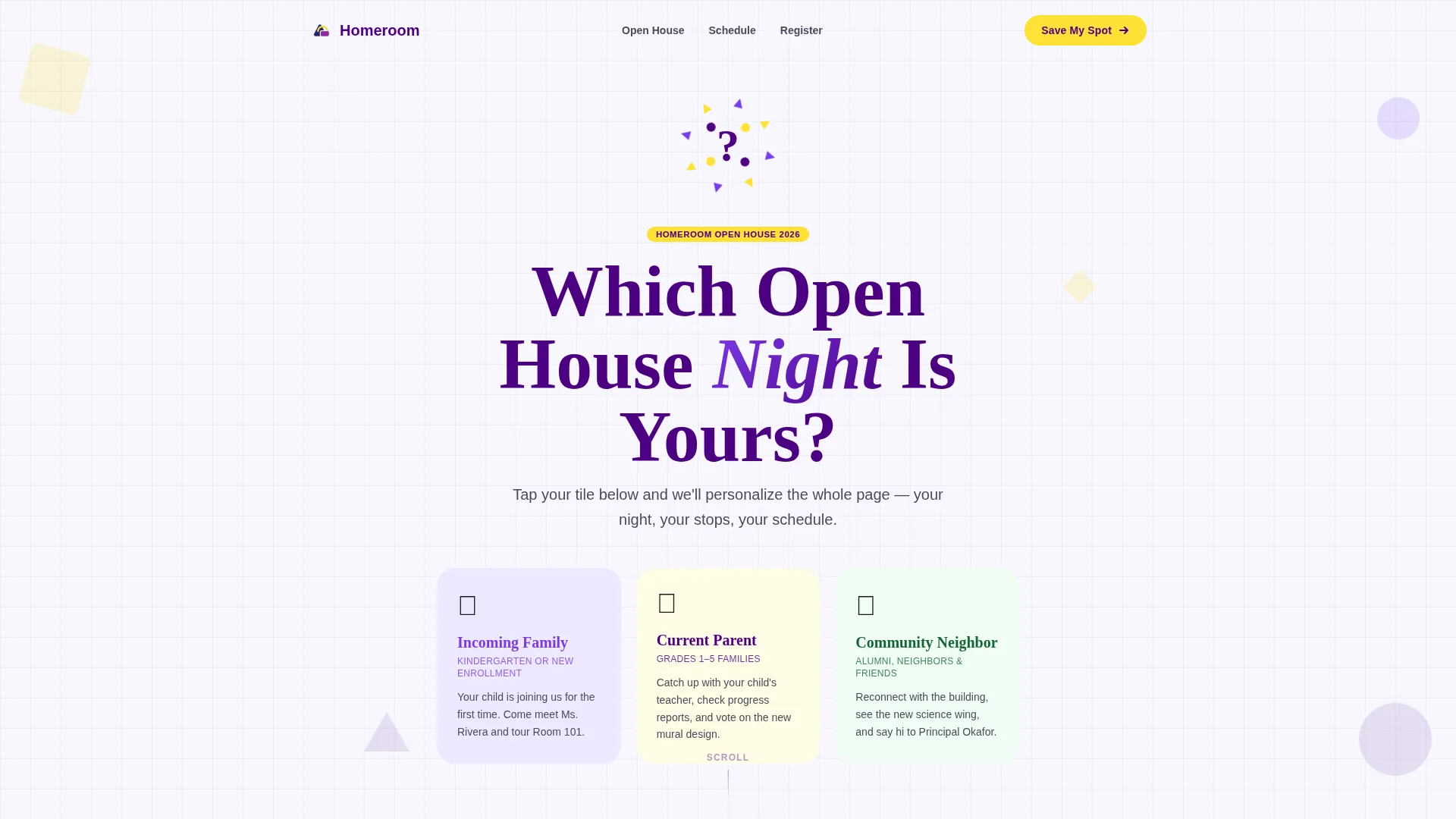
The header opens with a bold geometric question mark and three illustrated tiles: "Incoming Family," "Current Parent," and "Community Neighbor." Visitors tap their tile and the page instantly surfaces the session date, agenda, and classroom stops most relevant to them. Each tile bounces with a subtle rubber animation on hover, making the interaction feel approachable and fun.
Step-by-Step Event Guide
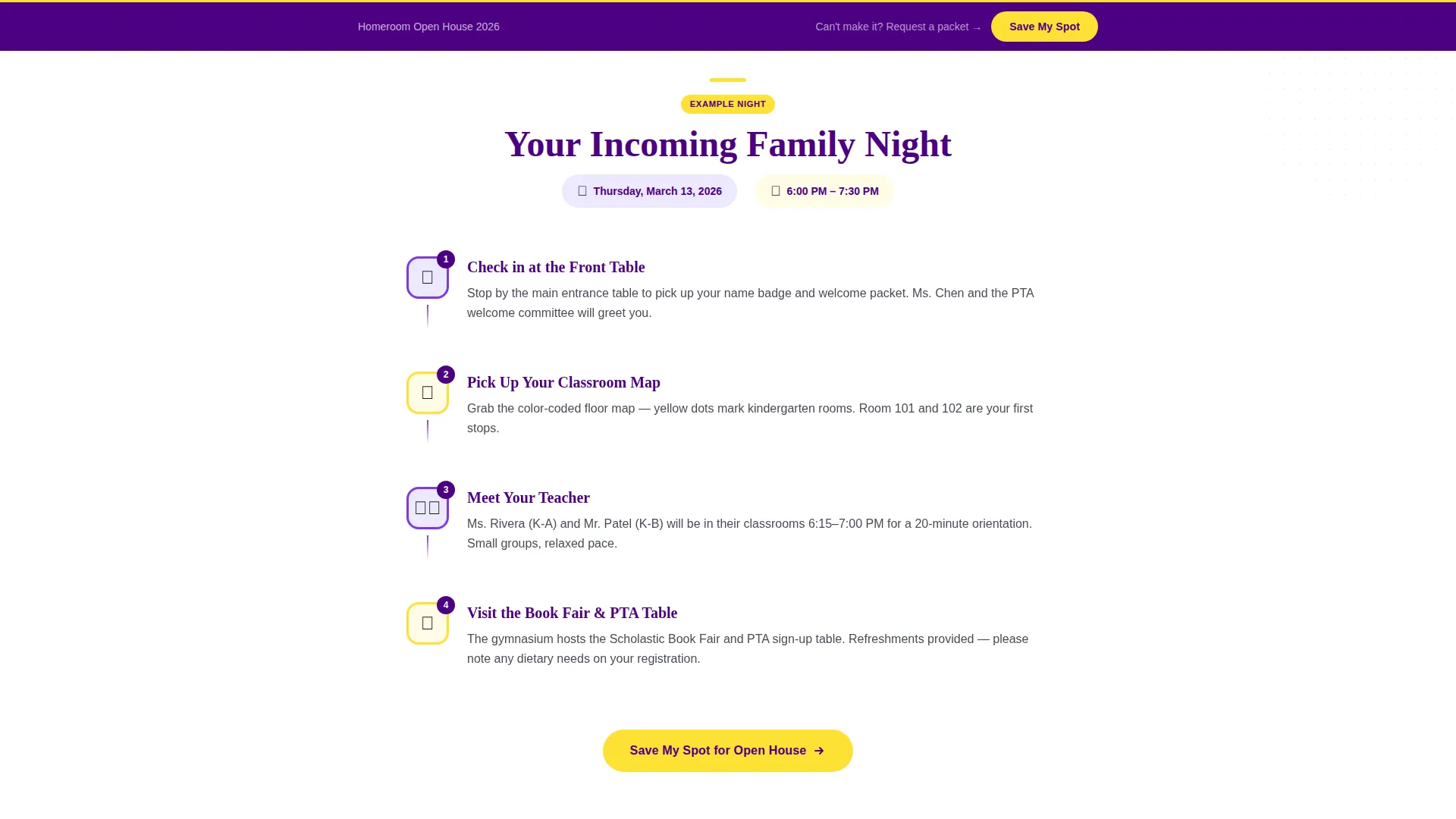
After the quiz sorts visitors, the page walks them through exactly what their open house night looks like. Four illustrated steps cover check-in, collecting a classroom map, meeting the teacher, and visiting the book fair and PTA table. Each step pairs a geometric illustration with a short paragraph so the flow is easy to follow even on a first visit.
Session Comparison Table
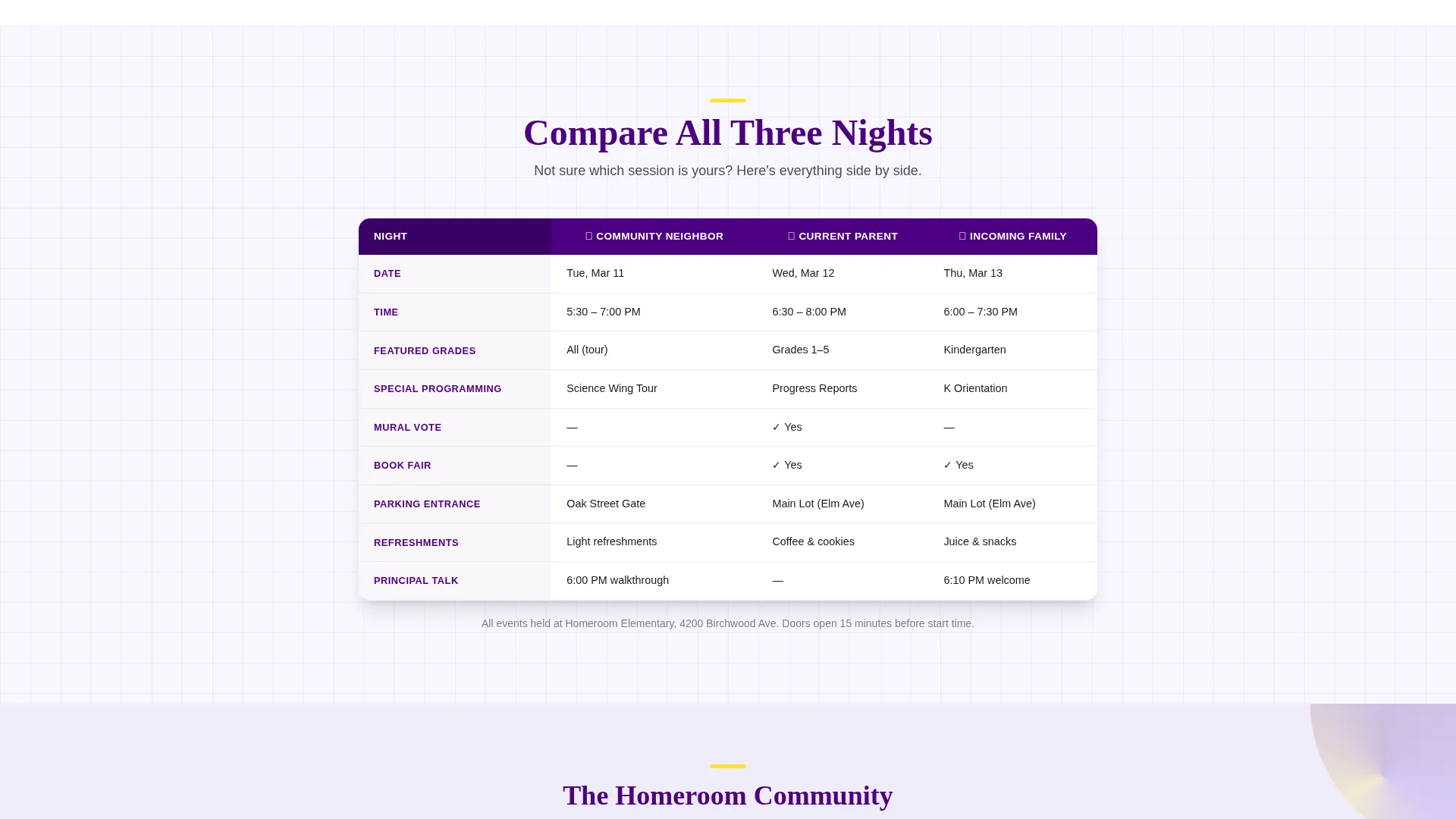
A mid-page comparison table displays all three open house nights side by side. It covers event date, featured grade levels, special programming, and parking entrance so families who are unsure which session fits can decide at a glance. Highlighter yellow accents make the key differences easy to spot.
Sticky Registration Bar
A "Save My Spot" call-to-action appears first right after the quiz result and again as a sticky bar that follows the visitor on scroll. This keeps the primary registration action visible throughout the entire page without interrupting the reading experience.
Dual Registration Paths
The primary registration form collects parent or guardian name, child's grade level via a dropdown, preferred session pre-filled from the quiz result, and an optional dietary-needs field for the refreshment table. A secondary path labeled "Can't Make It? Request a Packet" captures emails from families who want information mailed home, so every visitor has a clear next step.
Playful Geometric Visual System
The layout uses bold geometric shapes, rotating triangles, circles, and structured grid sections throughout. This visual language reinforces the school setting while keeping the page energetic and easy to navigate for a wide range of family visitors.
Page sections overview
| Section | Purpose |
|---|---|
| Quiz Header | Personalize visitor experience by type |
| Quiz Result Display | Surface relevant session details instantly |
| Step 1: Check-In | Guide families to the front table |
| Step 2: Classroom Map | Explain how to collect wayfinding materials |
| Step 3: Meet Teacher | Introduce classroom stop expectations |
| Step 4: Book Fair | Highlight PTA table and book fair visit |
| Session Comparison Table | Contrast three open house nights side by side |
| Primary Registration Form | Capture attendee sign-ups with grade dropdown |
| Packet Request Path | Collect emails from families who cannot attend |
| Sticky Registration Bar | Keep "Save My Spot" visible on scroll |
Design & branding system
The visual identity follows a Playful Geometric theme built on an Electric Indigo color system. The palette is saturated and optimistic, designed to feel like a brand-new box of markers uncapped on the first day of school.
- Deep indigo (#4B0082) anchors headers and navigation; vivid violet (#7C3AED) activates hover states and active tabs; chalk-white (#F8F7FF) covers backgrounds like a freshly cleaned whiteboard
- Highlighter yellow (#FFE135) punches through on buttons, badges, and comparison table accents to draw the eye to the most important actions
- Geometric shapes including rotating triangles and circles build every illustration and decorative element, keeping the school theme consistent and playful throughout
Mobile & speed optimization
The template layout is structured for clean rendering across screen sizes. Geometric sections and illustrated steps are organized in a linear scroll that works naturally on a phone held in one hand.
- The sticky registration bar is designed to remain visible on mobile scroll without covering important content
- The quiz tiles and step illustrations are sized and spaced for comfortable tap targets on smaller screens
- The comparison table is formatted to stay readable on narrow viewports so families can scan session differences on any device
How this template helps you convert
Every design and layout decision in this template points toward one outcome: getting families registered before the night of the event.
- The quiz personalizes the experience immediately, so each visitor sees only the session details relevant to them, which reduces confusion and drop-off before they reach the registration form.
- The sticky "Save My Spot" bar keeps the primary call-to-action visible throughout the entire scroll, meaning visitors never have to hunt for the sign-up button no matter how deep they read.
- The secondary "Can't Make It? Request a Packet" path catches families who would otherwise leave without engaging, turning a potential lost visitor into a confirmed email contact for follow-up.
Other information about this template
This template is part of a category of education event pages designed for the specific rhythms of a public school calendar. It is well-suited for annual back-to-school events and seasonal orientation nights.
- The template style is a Comparison Table layout, making it useful beyond open house nights for any school event that involves multiple sessions or tracks
- The header concept is a Quiz Starter, a format that works particularly well when a school serves multiple family types or grade bands in a single event
- The creative direction follows a Step-by-Step Guide structure, which is effective for events where families need to understand a physical sequence of activities before they arrive
Theme
Playful Geometric
Creative direction
Step-by-Step Guide
Color system
Electric Indigo
Style
Comparison Table
Direction
Event Registration
Page Sections
Personalized Quiz Header
Step-by-step Event Walkthrough
Session Comparison Table
Sticky Registration Call-to-action
Dual Registration Paths
Related questions
Can I use this template for events other than open house night?
How does the quiz personalization work in this template?
What information does the registration form collect?
What happens if a family cannot attend the open house?



