AutoML Landing Page Template for Research Labs
Hyperparameter is a hub-and-spoke landing page template built for AutoML research labs. It opens with a live experiment-savings estimator, then scrolls into an evidence-driven benchmark paper structure. Anchor navigation, a competitor comparison table, and a gated report download work together to convert ML engineers, researchers, and decision-makers who need proof before they act.
by Rocket studio
Quick summary
Hyperparameter is a single-page template designed for automated machine learning research labs. It leads with a functional savings estimator, then guides visitors through benchmark findings, competitive comparisons, and architecture search results. Every section builds proof rather than hype. The result is a landing page that earns trust before it asks for anything.
Who this template is for
This template is built for technical teams and organizations that need to communicate the value of automated machine learning pipelines to a skeptical, expert audience.
- Machine learning engineering leads who manage large experiment backlogs and need to justify an AutoML investment to leadership
- VP-level decision-makers evaluating whether to build an in-house model optimization stack or adopt an external solution
- PhD researchers and applied scientists who have spent months hand-tuning neural network architectures and want evidence that automated search outperforms manual effort
What problem this template solves
ML teams often struggle to communicate the concrete value of AutoML to both technical peers and business stakeholders. A generic product page fails that audience. They want numbers, methodology, and comparisons, not promises.
- Visitors arrive skeptical and need proof before they will engage with a call to action
- Experiment costs and timelines are hard to visualize without a hands-on tool that reflects a visitor's own context
- Competitive positioning is unclear without a structured side-by-side comparison that covers latency, accuracy, compute cost, and setup time
What you get with this template
You get a full hub-and-spoke landing page structured like a published benchmark paper. The layout is built around accumulated evidence and interactive proof points, not marketing copy.
- A functional header estimator where visitors input their own training parameters and receive projected savings before scrolling a single section
- An anchor navigation rail with five labeled spoke sections that let visitors jump directly to the evidence most relevant to their role
- A gated benchmark report download with a role-selector field, giving you a secondary conversion path alongside the primary call to action
Feature list
This template includes six core functional and design features grounded in the source brief.
Live Savings Estimator Header
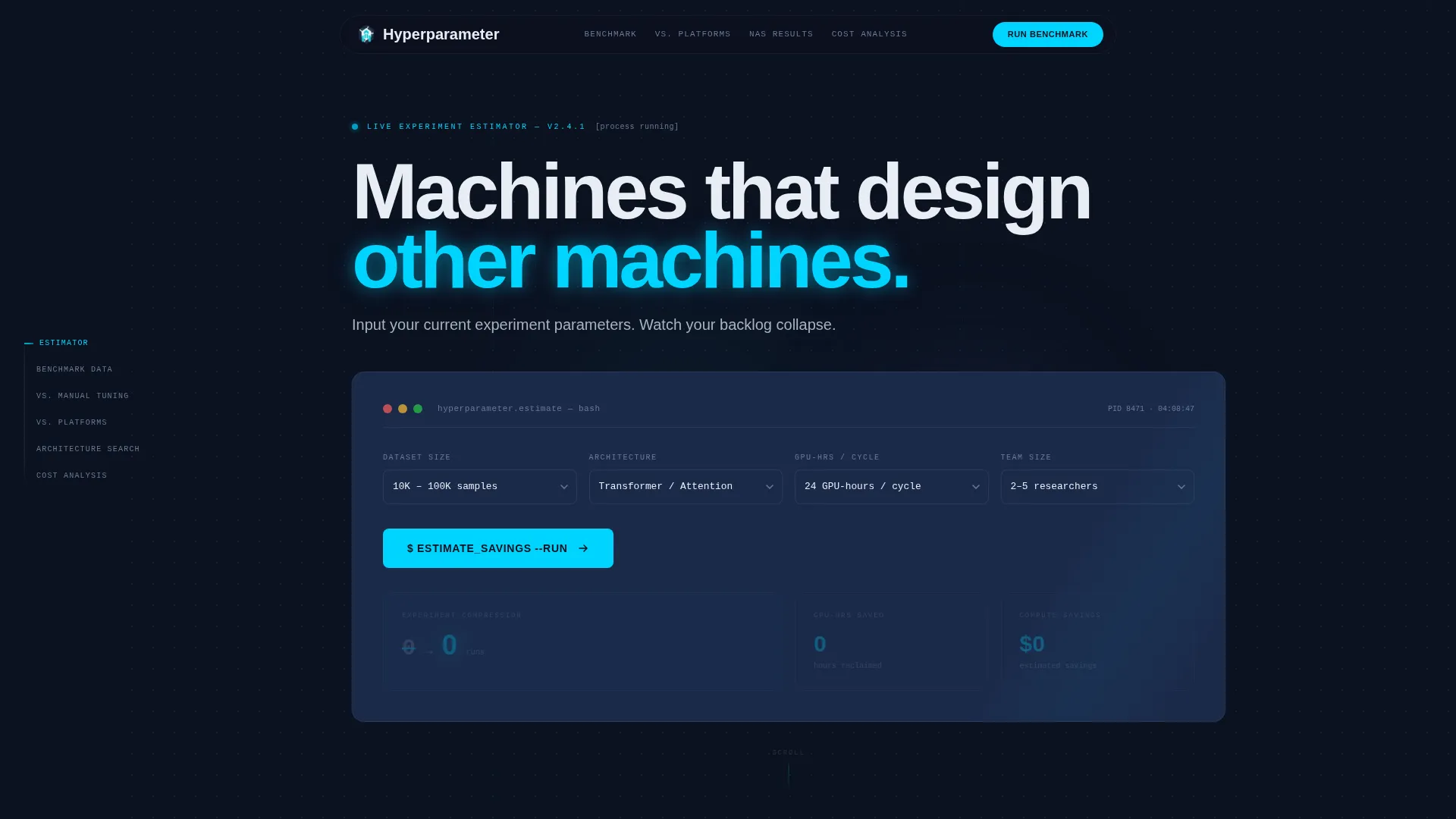
The header fills the full viewport with a functional calculator. Visitors select dataset size, architecture family, GPU hours per experiment cycle, and team size. They click "Estimate Savings" and the tool animates projected experiment reduction, time-to-best-model compression, and estimated compute cost savings. Numbers render in electric cyan against void navy, ticking upward like a countdown running in reverse. No imagery, no illustration. The tool is the hero.
Anchor Navigation Rail
A persistent left-rail anchor navigation pins to the page as visitors scroll. Spoke labels include Benchmark Data, versus. Manual Tuning, versus. Competing Platforms, Architecture Search Results, and Cost Analysis. Active sections highlight in electric cyan, giving visitors a clear sense of progress through the evidence cascade without losing orientation.
Benchmark Evidence Cascade
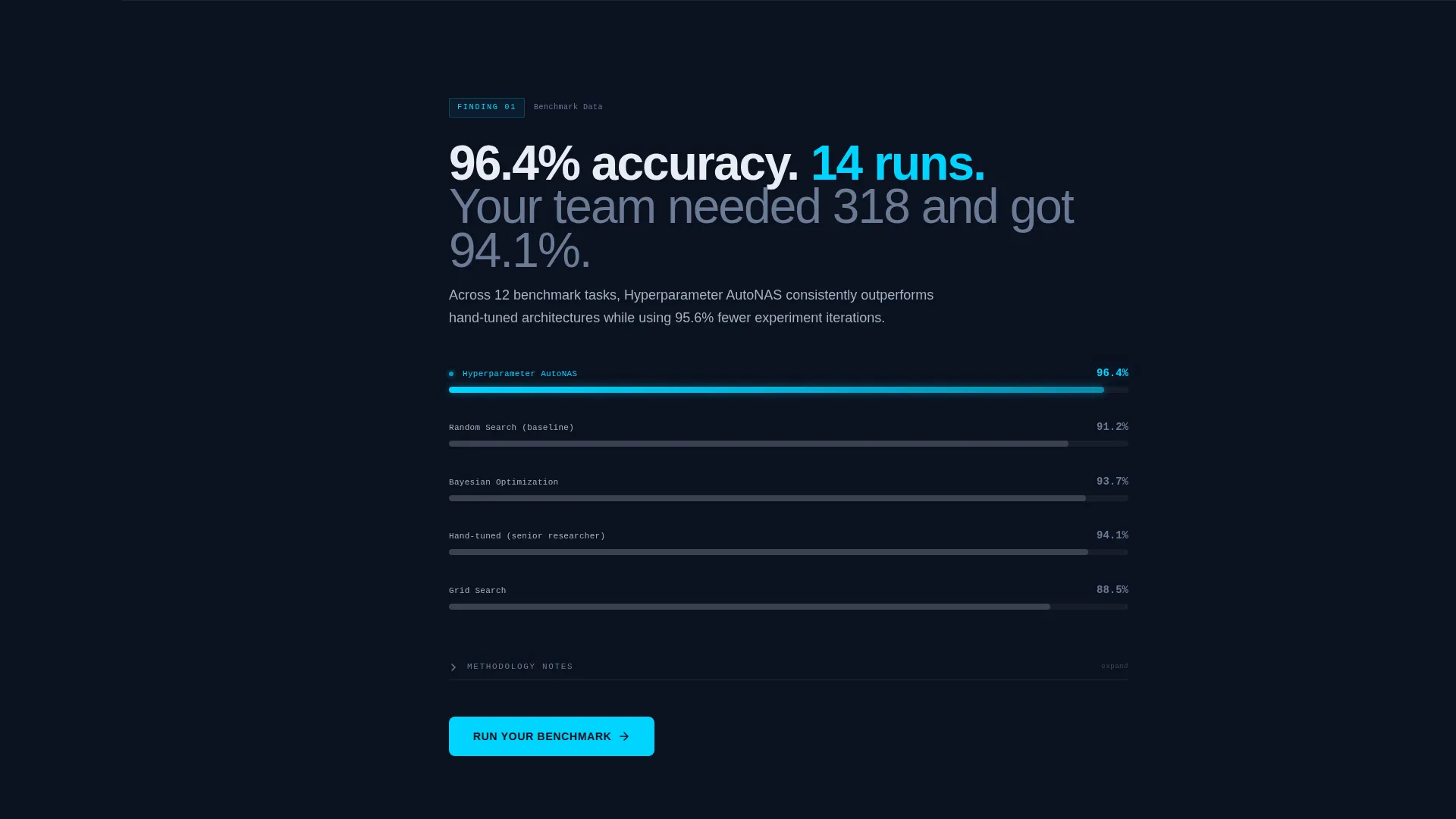
Each spoke section opens with a single bold finding pulled from experimental runs. It then unfolds into interactive charts and expandable methodology notes. The scroll feels like reading a research paper where every figure responds to the reader. Proof accumulates section by section, making each claim harder to dismiss.
Competitor Comparison Table
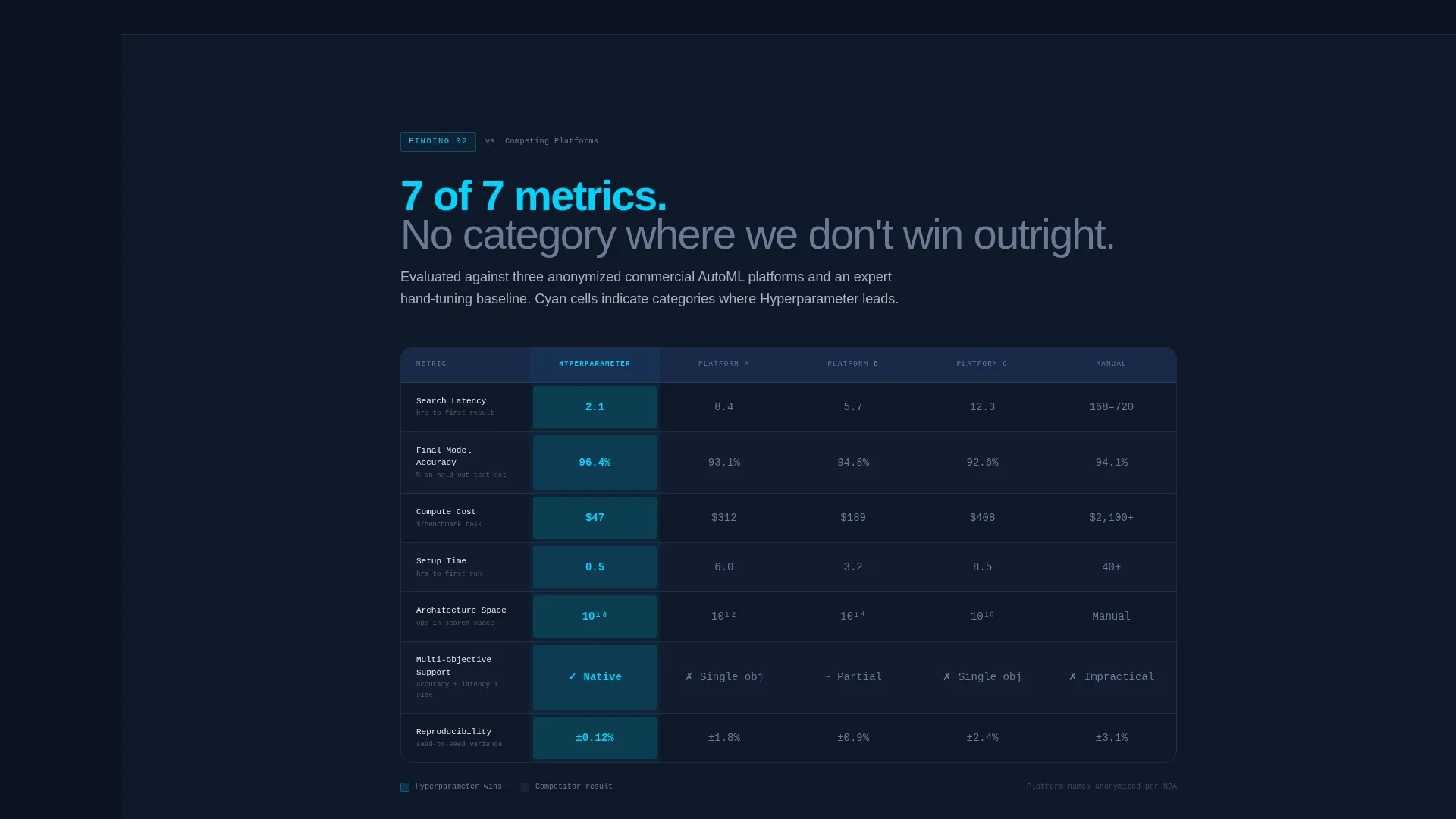
A persistent comparison table inside the "versus. Competing Platforms" section lays out the lab's AutoML pipeline against three anonymized competitors and manual tuning. Columns cover latency, final model accuracy, compute cost, and setup time. Cells where the lab wins are highlighted in electric cyan, making the advantage visible at a glance.
Gated Benchmark Report Download
A secondary conversion path offers a downloadable PDF benchmark report. Access requires a work email address and a role selector with four options: Researcher, ML Engineer, Engineering Manager, and Executive. The gate is placed after the estimator and comparison table have already delivered value, so the ask feels earned rather than premature.
Recurring Primary Call to Action
The "Run Your Benchmark" call to action appears first beneath the estimator results and recurs at the conclusion of each spoke section. Repetition is intentional. By the time visitors reach the final section, they have already seen their own numbers reflected back at them and are primed to act.
Page sections overview
| Section | Purpose |
|---|---|
| Estimator Header | Visitor inputs parameters; animated savings results render in real time |
| Anchor Nav Rail | Persistent left-rail navigation linking all five spoke sections |
| Benchmark Data | Opens with a bold finding; unfolds into interactive charts and methodology notes |
| versus. Manual Tuning | Compares automated pipeline results against hand-tuned architectures |
| versus. Competing Platforms | Side-by-side comparison table against three anonymized competitors |
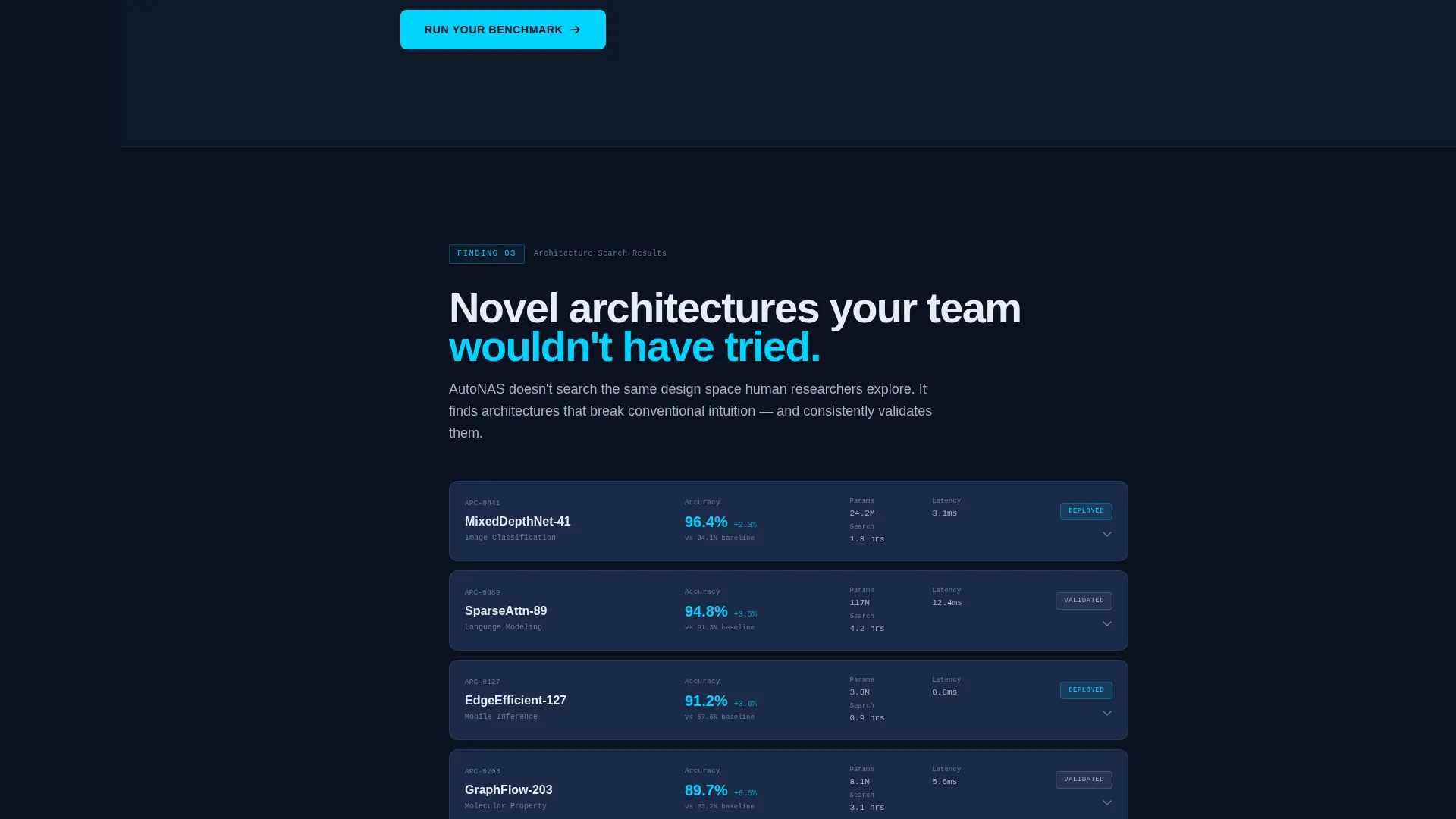
| Architecture Search Results | Showcases neural architecture search outcomes from real experimental runs |
| Cost Analysis | Breaks down compute cost savings with downloadable PDF section |
| Report Download Gate | Secondary call to action gated behind work email and role selector |
Design & branding system
The visual identity follows a Startup Velocity theme built on a Midnight Blue color system. The palette is precise and focused, designed to evoke the atmosphere of a live machine learning environment running after hours.
- Void-dark navy (#0B1120) serves as the primary background, reading like an active integrated development environment in a dark room; deep steel blue (#1B2A4A) is used for card surfaces and section dividers
- Cool silver (#A8B2C1) handles all body text, giving copy the feel of terminal output without sacrificing readability
- Electric cyan (#00D4FF) is reserved exclusively for interactive elements, anchor navigation highlights, estimator result numbers, and comparison table win-state cells
Mobile & speed optimization
The template is structured for fast, focused delivery across devices. The evidence-cascade layout keeps content modular, which supports clean rendering at any viewport width.
- The anchor navigation rail adapts to smaller screens so visitors can still jump between spoke sections without losing their place in the scroll
- Estimator inputs and animated result panels are designed to remain functional and readable on mobile viewports, keeping the tool accessible to visitors who arrive on a phone or tablet
How this template helps you convert
Every design and content decision in this template is built to reduce friction and build confidence before asking for a commitment.
- The estimator delivers personal, context-specific value in under ten seconds, giving visitors a reason to keep scrolling before they have read a single marketing claim
- The benchmark paper structure and comparison table give decision-makers the objective evidence they need to build an internal case, turning the page into a resource rather than a pitch
- The recurring "Run Your Benchmark" call to action and the gated report download create two conversion paths suited to different buyer stages, so visitors who are not ready to act immediately still have a low-friction next step
Other information about this template
This template is designed for the AutoML technology category and sits at the intersection of research-lab credibility and direct-response conversion. It is well suited to teams that need to speak to both technical and executive audiences on the same page.
- The hub-and-spoke structure with anchor navigation is particularly effective for long-form technical landing pages where different visitor roles care about different sections
- The Industry Report creative direction means every section is framed as evidence first, which aligns naturally with how ML engineers and researchers evaluate tools
- The Comparison/Versus landing-page direction is built into the core layout, making this template a strong fit for any automated machine learning product that competes on measurable performance metrics
- Downloadable PDF sections inside each spoke allow the page to double as a lead-generation asset without interrupting the reading experience
Theme
Startup Velocity
Creative direction
Industry Report
Color system
Midnight Blue
Style
Hub & Spoke (Anchor Nav)
Direction
Comparison/Versus
Page Sections
Live Savings Estimator Header
Anchor Navigation Rail
Benchmark Evidence Cascade
Competitor Comparison Table
Gated Benchmark Report Download
Recurring Primary Call to Action
Related questions
Can I customize the estimator inputs for my own training parameters?
Does the comparison table support more or fewer than three competitors?
Is this template suitable if I do not yet have benchmark data?
Who is the gated report download designed for?
Can the anchor navigation labels be renamed to match my research areas?



