Advanced AI Personalization Landing Page Template
The Catalyst real time ai personalization engine landing page template is built for mid-market direct-to-consumer brands that have outgrown generic product recommendations. It presents a split-screen, dark-dashboard design where animated metrics, a live product grid, and an interactive revenue calculator work together to turn every visitor into a qualified lead.
by Rocket studio
Quick summary
Catalyst is a single-page, split-screen landing page template designed for an AI-powered e-commerce personalization engine. It targets e-commerce directors who need to replace static product grids with real-time, visitor-specific recommendations. The template uses animated counters, a scrolling problem-to-solution arc, and an interactive revenue calculator to engage visitors and capture leads.
Who this template is for
This template is built for growth-focused professionals at direct-to-consumer brands generating between five million and eighty million dollars in annual revenue. These are the people who define commercial strategy and feel the daily cost of irrelevant product recommendations.
- E-commerce Directors and Heads of Digital Commerce who need to justify AI investment with hard revenue data
- VP of Growth professionals and marketing teams running paid campaigns and watching revenue-per-session closely
- Marketing organizations evaluating AI powered solutions to replace native platform recommendation tools
What problem this template solves
Generic storefronts show the same twelve products to every visitor, regardless of their browsing history, purchase patterns, or traffic source. That mismatch bleeds conversion rates and inflates customer acquisition costs. This template frames that problem visually and then walks the visitor through the solution, one scroll at a time.
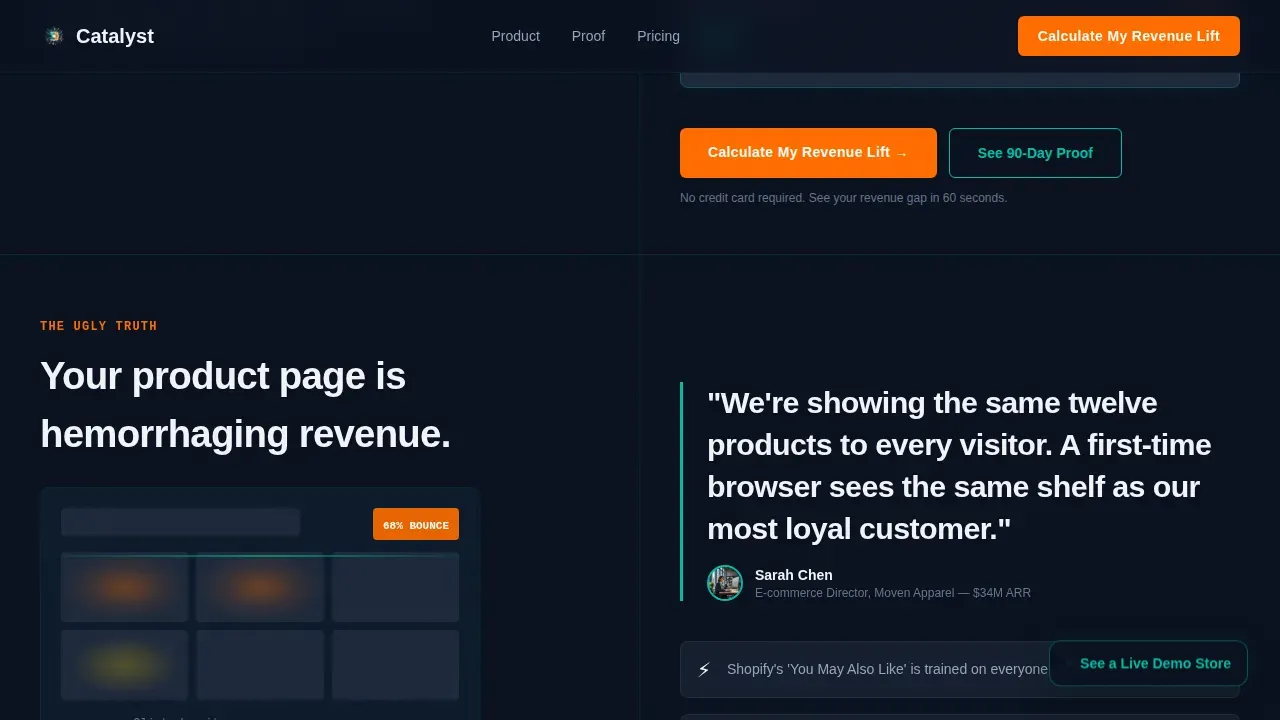
- Sixty-eight percent of visitors bounce from pages that ignore individual preferences, and the template opens with that statistic front and center
- E-commerce teams struggle to demonstrate the revenue value of AI powered personalization to executives; this page builds that case for them
- Static landing pages cannot reflect different content variations for different visitor segments, leaving personalized offers and contextual personalization untapped
What you get with this template
You get a fully structured, single-page landing page built around a dark mission-control aesthetic and a deliberate problem-to-solution arc. Every section is designed to deliver value before asking for anything in return.
- A five-section page flow: animated hero, problem arc, engine intelligence diagram, proof and integration section, and a revenue calculator lead-gen form
- Scroll-triggered animations, persona cycling labels, animated metric counters, and a product grid rearrangement loop built into the hero
- A compact lead-gen form asking only for monthly traffic range, current conversion rate, and e-commerce platform, reducing friction for users at the final call to action
Feature list
This section article explores the key components built into the template and explains what each one does for the visitor experience.
Animated Split-Screen Hero
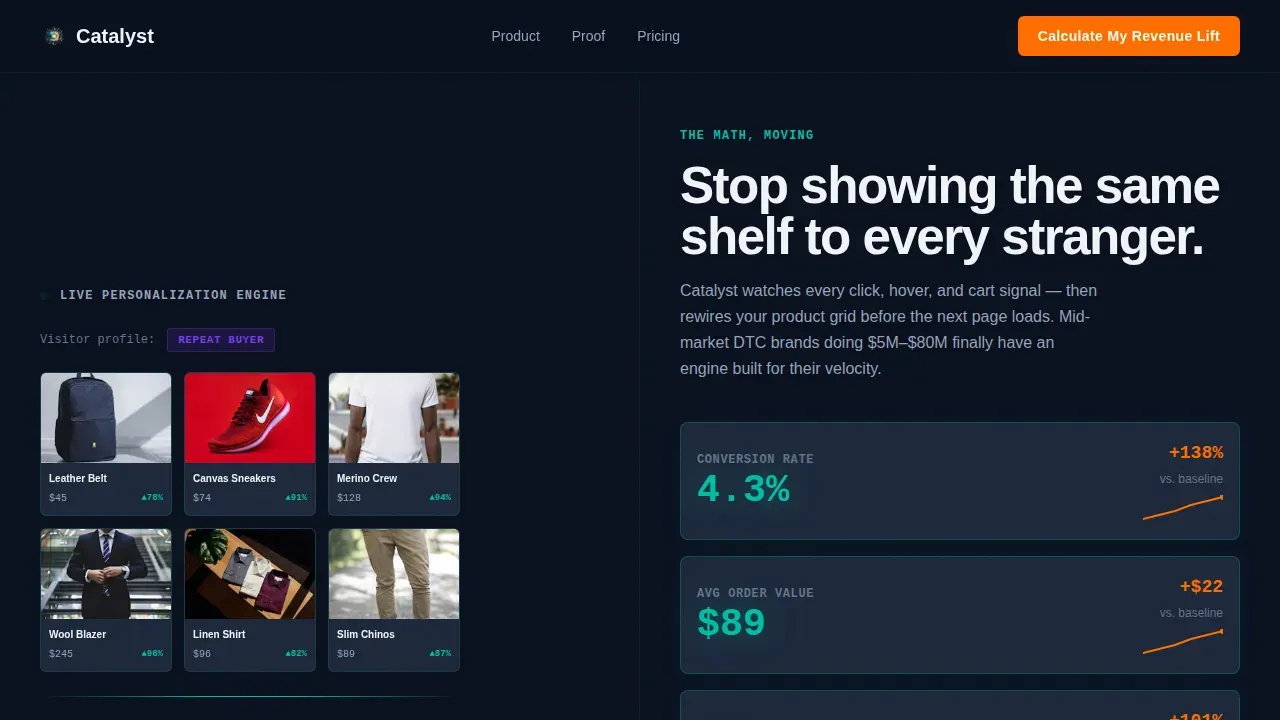
The hero section divides the viewport into two equal panels. The left panel displays a simulated storefront grid where product tiles rearrange in a smooth loop as visitor persona tags cycle above it. The right panel shows three animated metric counters climbing in real time, each value rendered in oversized teal with the delta highlighted in orange. This section conveys who the engine is for, its purpose, and its value in seconds.
Problem-to-Solution Arc Sections
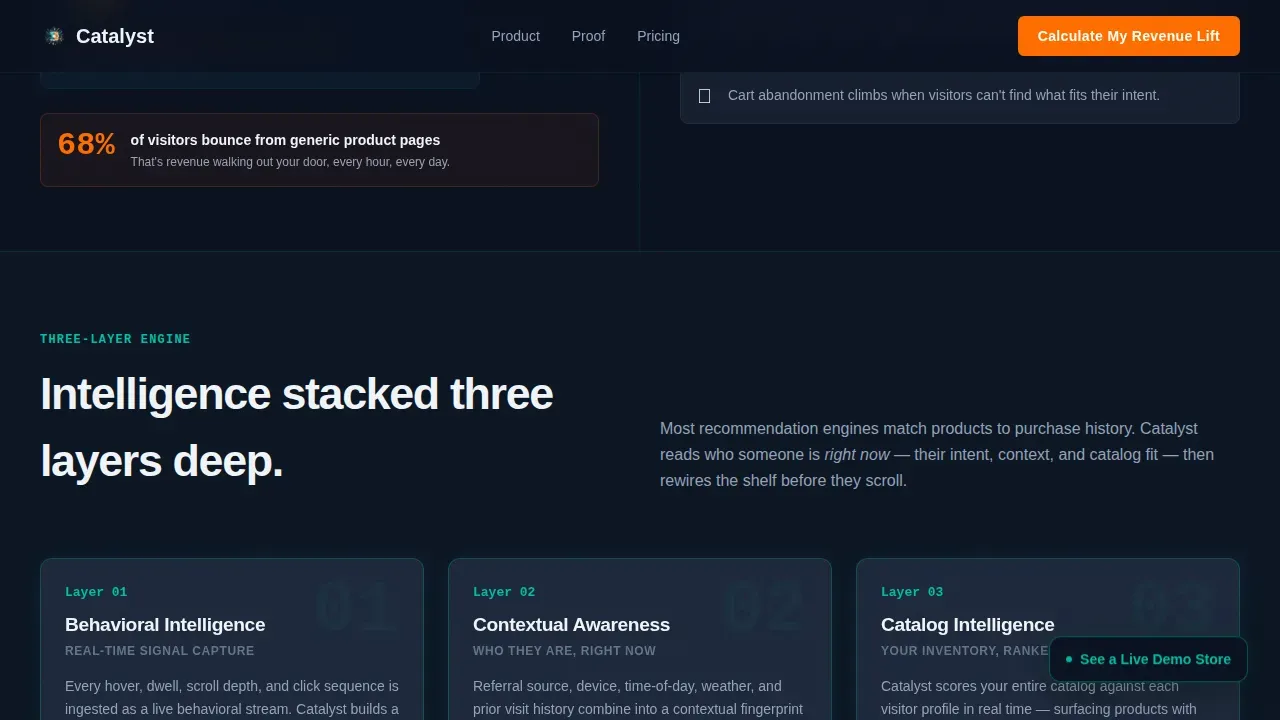
Two consecutive split-screen sections build narrative tension before releasing it. Section one pairs a heatmap bounce visualization on the left with a raw pain-point pull-quote on the right. Section two introduces a three-layer intelligence diagram, with each layer animating onto the screen as the visitor scrolls. This structure is how the template turns passive readers into engaged prospects.
Scroll-Triggered Intelligence Diagram
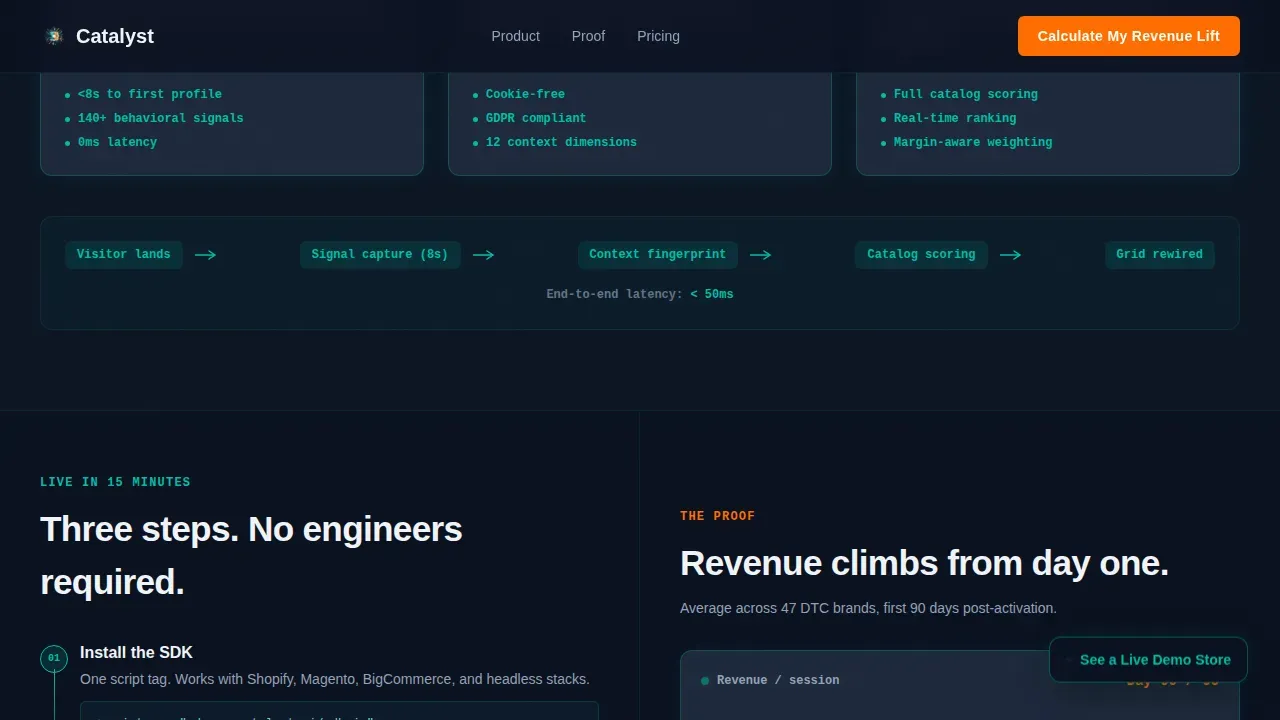
The engine intelligence section animates three distinct layers onto a diagram as the user scrolls: behavioral signals, contextual personalization cues, and catalog-aware matching. Each layer appears independently on scroll entry, making the technology feel alive rather than static. This approach helps marketers communicate complex AI logic without requiring a live demo.
Interactive Revenue Calculator
The revenue calculator is the primary lead-generation engine on the page. A visitor inputs their monthly site traffic range, their current conversion rate, and their e-commerce platform. The calculator previews a dollar-figure revenue gap before gating the full report behind a name and work email. Using only two to three fields keeps friction low and completion rates high.
Proof and Integration Section
A 90-day revenue graph rises on the right panel while the left panel walks through three integration steps: SDK snippet, dashboard screenshot, and first recommendations going live. This section removes doubt by showing both the outcome and the path to get there. The data quality of the visualization communicates credibility without requiring external testimonials.
Floating Secondary Call to Action
A floating button anchored in the bottom-right corner invites the visitor to explore a live demo store in a sandbox environment. It stays visible as the user scrolls, maintaining a persistent low-friction conversion path throughout the page.
Page sections overview
| Section | Purpose |
|---|---|
| Animated Hero Split | Establish AI value with live metrics and persona-cycling product grid |
| Problem Heatmap Panel | Visualize bounce cost and surface the core visitor pain point |
| Engine Intelligence Diagram | Animate three-layer AI logic on scroll to explain the solution |
| Proof and Integration | Show 90-day revenue growth alongside simple integration steps |
| Revenue Calculator Form | Capture leads by previewing a personalized revenue gap estimate |
| Footer Row | Deliver a clean single-row close with brand and legal context |
Design & branding system
The visual identity channels a trading-floor dashboard aesthetic, dark and focused, lit only by the data that matters. Every color decision is intentional and serves a specific communication role on the page.
- Deep black (#0B1120) as the base, primary teal (#00BFA6) for section dividers, graph lines, and hover states, cool slate (#1E293B) for card surfaces, and conversion orange (#FF6D00) used exclusively on calls to action and upward-trending metric lines
- Manrope handles all headings to maintain brand voice with a modern geometric feel, while JetBrains Mono renders all metric and number values for a precise, data-terminal look
- Body text runs in crisp white (#F0F4F8) against the dark slate, keeping readability high across long scroll sessions on desktop
Mobile & speed optimization
The template is designed desktop-first, reflecting how e-commerce directors work: at a dashboard, on a wide screen, with multiple data panels visible at once. That said, the layout and animation system are structured to remain functional across device sizes.
- Client-side components handle the high-animation sections (counter loops, grid rearrangement, scroll-triggered diagram layers) while static shells are server-rendered, keeping the page load lean for the interactive elements
- The compact form structure with dropdown ranges and a single optional text input is inherently thumb-friendly and fast to complete on any device
- Sub-100ms response for static content keeps the page sharp enough that real-time AI driven dynamic content changes remain perceptible and impactful to the visitor
How this template helps you convert
This template is built around a single focused goal: generating qualified leads by making the visitor's revenue problem feel real and solvable. Every design and copy decision supports that goal.
- The hero shows the math moving before the visitor reads a single word of body copy, creating immediate emotional engagement and establishing the AI system's credibility through live data rather than marketing language.
- The revenue calculator previews a personalized dollar figure before asking for contact details, following the principle that personalized calls to action convert significantly better than generic buttons by showing the visitor their own potential upside first.
- The floating secondary call to action and the zero-navigation page structure keep every user focused on one of two conversion paths: submit the calculator form or visit the demo store, removing distracting links and menus that dilute intent.
Other information about this template
This template sits at a meaningful intersection of technology and commercial storytelling. It is designed for businesses that need to articulate the value of artificial intelligence to a skeptical but data-literate audience. Several additional context points are worth noting for teams evaluating this template.
- Personalized landing pages can improve conversion rates by 25 to 40 percent compared to generic static pages, and this template is structured to demonstrate that gap to the visitor before they convert
- Personalization can reduce customer acquisition costs by up to 50 percent; the revenue calculator section is where that claim becomes tangible for the visitor
- The business impact of AI powered personalization includes boosting revenue by 5 to 15 percent and increasing marketing return on investment by 10 to 30 percent, figures the template surfaces through its animated metric counters
- Personalized calls to action convert 202 percent better than generic buttons, which is why the primary call to action reads "Calculate My Revenue Lift" rather than a generic "Get Started"
- In e-commerce, personalized recommendation systems analyze browsing history, past purchases, and time spent on products to suggest items the user is most likely to buy; the template communicates this logic through its three-layer intelligence diagram
- AI systems identify patterns and connections that manual analysis would miss, enabling continuous improvement of recommendations over time; the 90-day revenue graph section makes this visible
- The future of AI personalization includes machine learning models that anticipate user needs before they are articulated, a concept the template supports through its predictive framing in the engine intelligence section
- Marketing teams and marketing organizations evaluating this template should note that dynamic content rules can change page sections based on traffic source, geolocation, or referral context, making the underlying product concept directly applicable to their campaigns
- The template supports GDPR and CCPA compliance messaging placement if the implementing team needs to display data handling notices for visitor tracking
- Platforms referenced in the lead-gen form dropdown include Shopify, Magento, BigCommerce, and Custom, covering the primary e-commerce platforms in the mid-market segment
- The template can support logo showcase rows and trust badge placements near the call to action to deliver immediate social proof for companies that have brand recognition to leverage
- AI enables businesses to craft highly tailored, engaging, and conversion-optimized landing pages; this template is a practical example of that principle applied to a real B2B sales context
Theme
Startup Velocity
Creative direction
Problem→Solution Arc
Color system
Teal Catalyst
Style
Split Screen (50/50)
Direction
Lead Generation
Page Sections
Animated Split-screen Hero with Live Metrics
Scroll-triggered Three-layer Intelligence Diagram
Interactive Revenue Calculator with Lead Gate
Problem-to-solution Arc with Heatmap Visualization
Day Revenue Proof with Integration Steps
Floating Secondary Call to Action
Related questions
Who is this landing page template designed for?
What sections are included in the template?
Can the revenue calculator be customized for different traffic volumes and platforms?
How does this template support the lead-generation goal?
Is this template suitable for desktop-focused audiences?



