Auto Repair Shop Blog Website Template
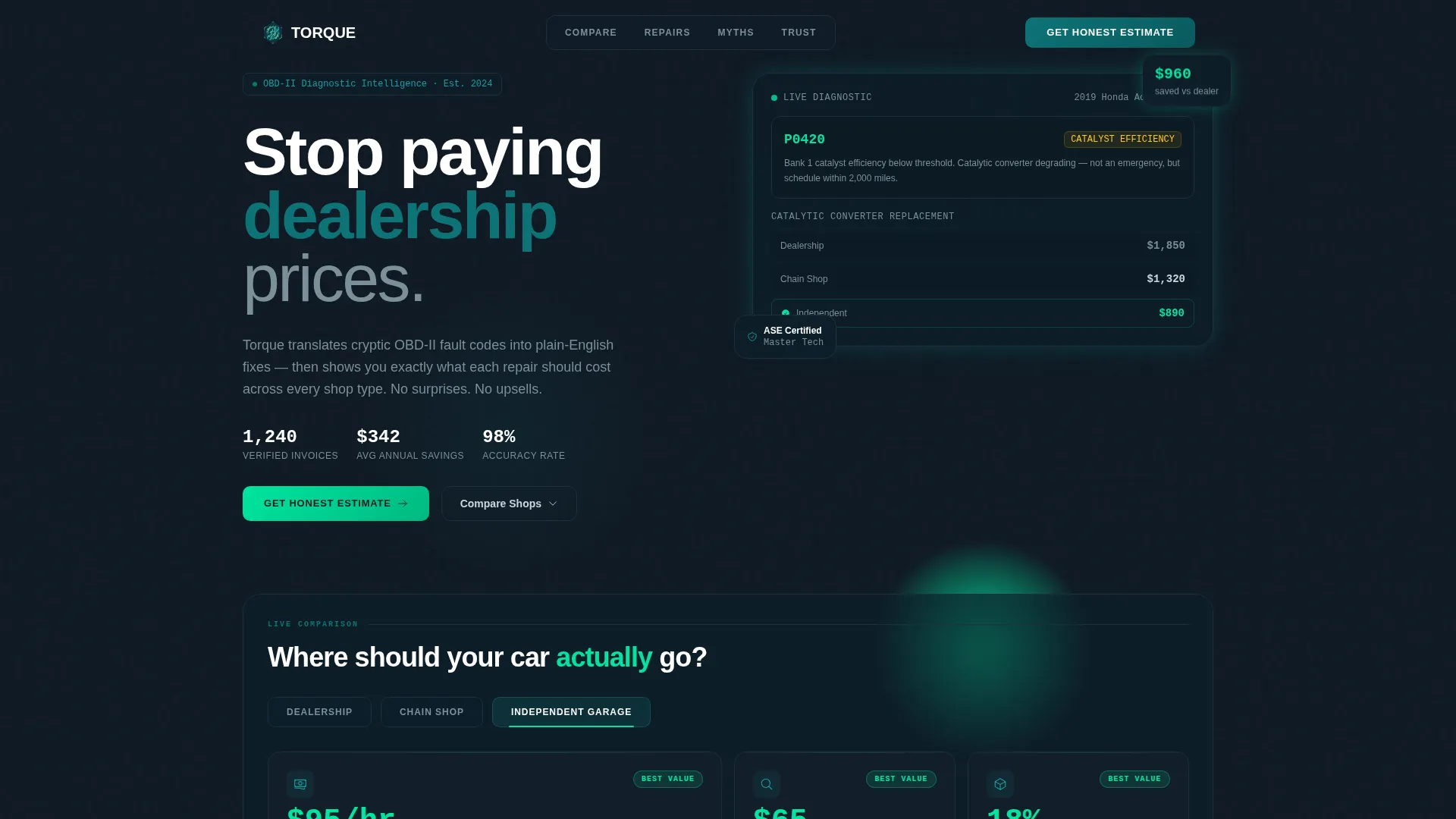
Torque is a bento grid landing page template for auto repair shop blogs. Built on a Tech Glass visual theme, it presents cost comparisons, diagnostic data, and repair scenarios through an interactive tab switcher and animated data tiles. It is designed to turn curious car owners into engaged, trust-ready leads.
by Rocket studio
Quick summary
Torque is a single-page bento grid template for auto repair shop blogs. It uses a Feature Tab Switcher, layered data grids, and a sticky estimate form to guide visitors from curiosity to conversion. The Tech Glass design and Teal Catalyst color system make dense repair data feel organized, clear, and trustworthy.
Who this template is for
This template is built for auto repair shop blogs that want to publish transparent, data-led content. It speaks directly to readers who research before they book a service appointment.
- DIY weekend wrenchers comparing repair options and part choices before a job
- Fleet managers weighing dealership service against independent garage pricing
- First-time car owners trying to understand diagnostic codes and repair costs
What problem this template solves
Most auto repair content either buries the data or oversimplifies it. Readers leave before they trust the source enough to act. This template solves that by making the comparison data the centerpiece.
- Visitors struggle to compare dealership, chain shop, and independent garage pricing in one place
- Blog pages often fail to convert readers into leads because the call to action arrives before trust is earned
- Diagnostic information typically reads as technical jargon rather than plain, decision-ready language
What you get with this template
You get a fully structured bento grid landing page with layered, scroll-driven content sections. Every section is designed to answer the question the previous one raised.
- A Feature Tab Switcher header with three interactive tabs and animated stat tiles
- Four layered bento grid sections covering cost breakdowns, repair scenarios, myth-busting cards, and trust signals
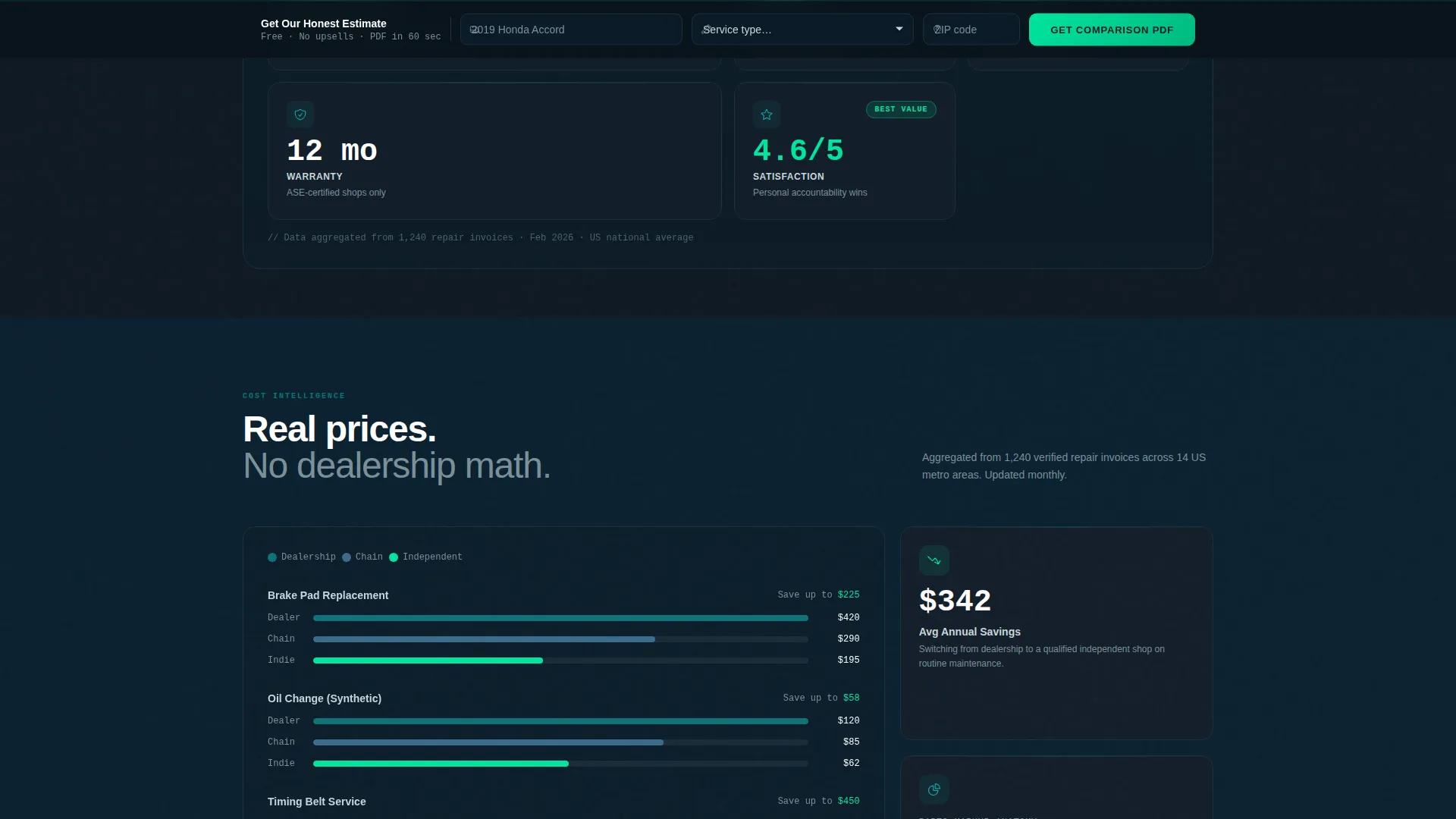
- A sticky bottom bar with a three-field estimate form that appears after the second scroll section
Feature list
This template includes a set of purpose-built components that work together to deliver a data-rich, high-trust reading experience.
Feature Tab Switcher Header
Three glass-morphic tabs labeled "Dealership," "Chain Shop," and "Independent Garage" sit above a dark viewport. Clicking any tab reshuffles the bento grid below to show labor rates, diagnostic fees, parts markup, warranty length, and satisfaction scores. Numbers count up like a live dashboard, and the active tab glows reactor green along its bottom edge.
Animated Cost Comparison Grid
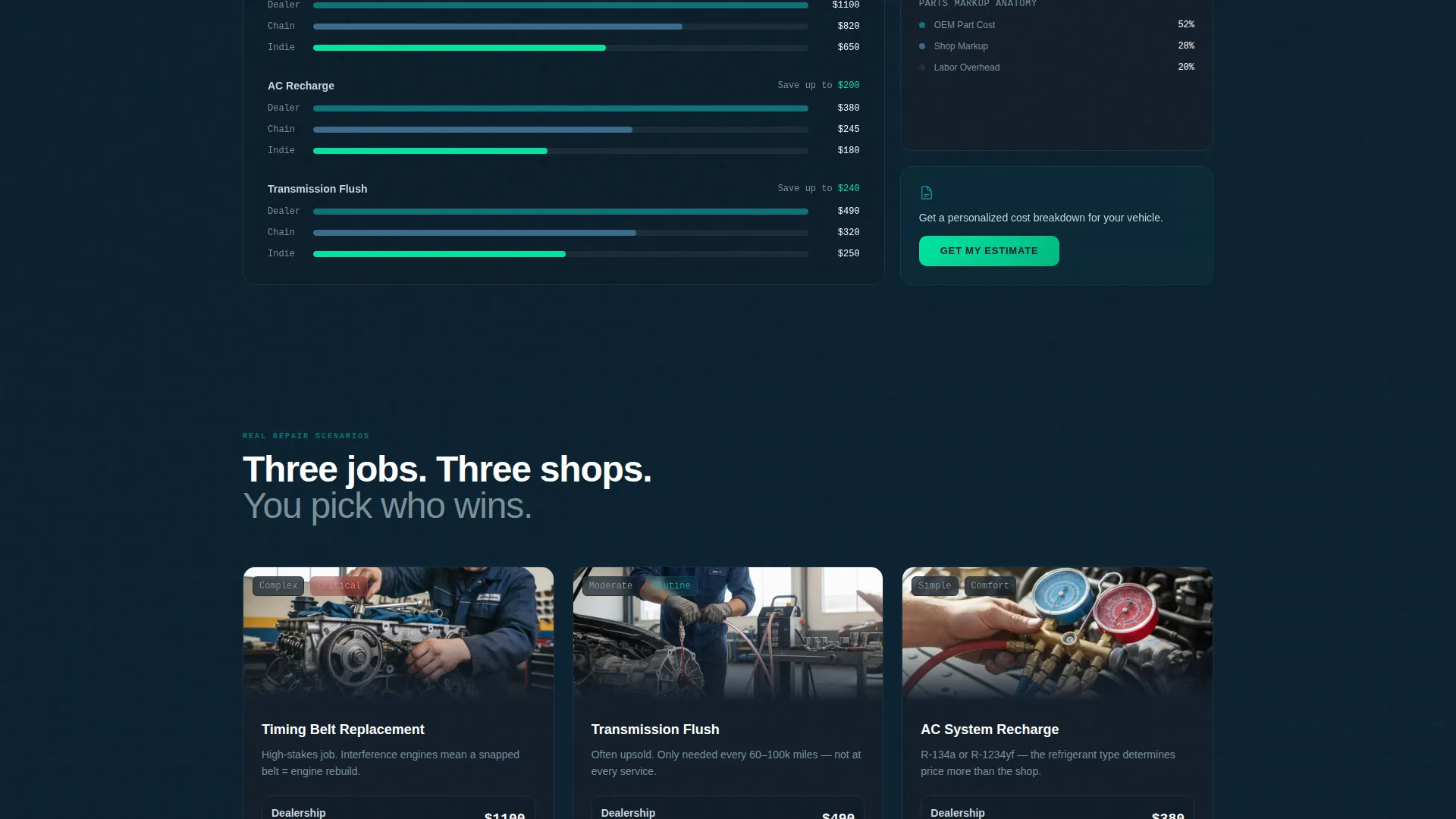
The first bento section presents cost breakdowns with animated bar comparisons across all three shop types. The visual format makes pricing differences immediately readable without requiring the visitor to do mental math.
Real Repair Scenario Grid
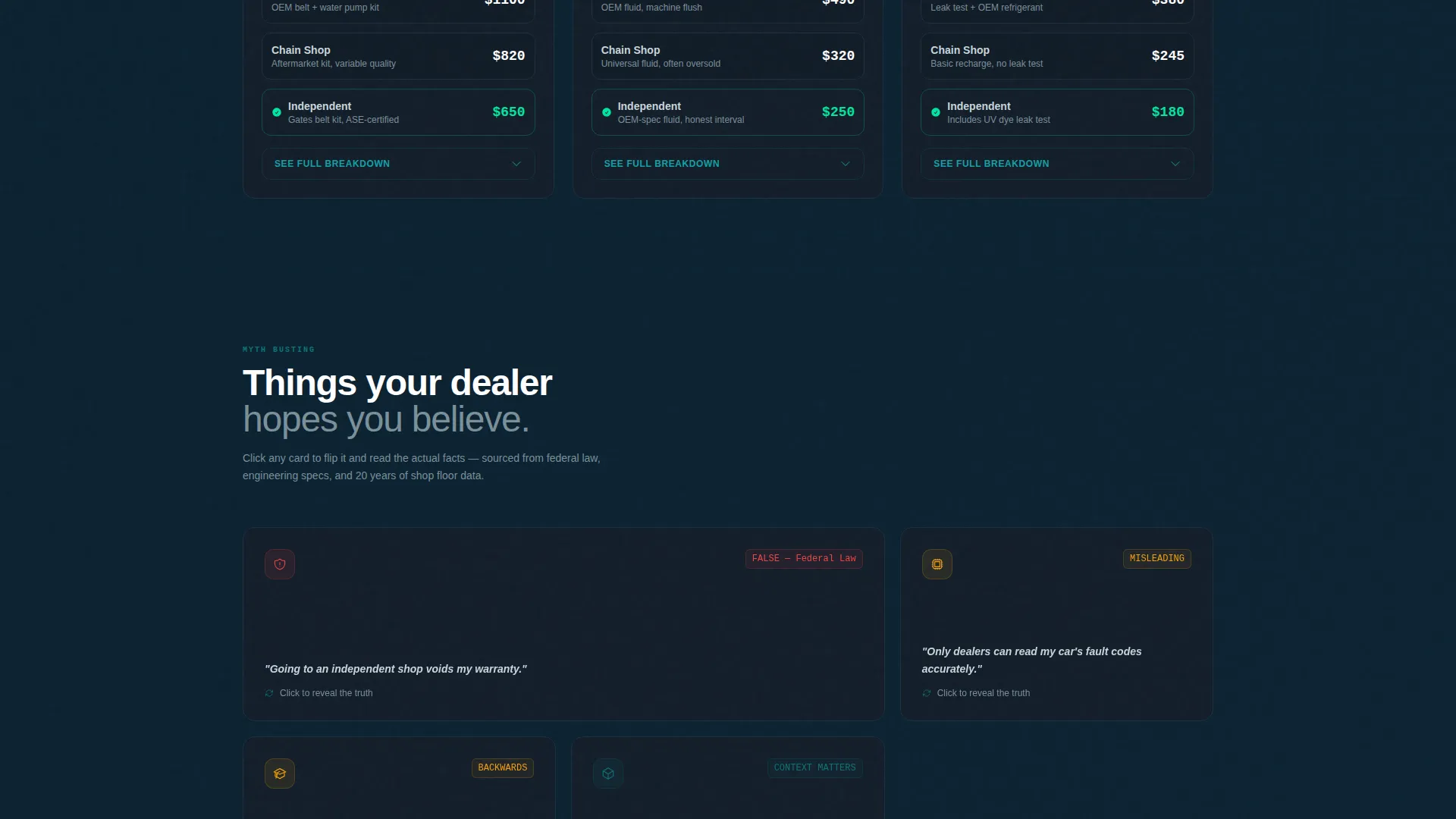
The second bento section shows actual repair cases, including timing belt replacement, transmission flush, and air conditioning recharge, priced across all three shop types. Thumbnail process photos accompany each scenario to add visual context.
Myth-Busting Flip Cards
The third bento section features cards that flip on click to reveal plain-language explanations of common repair myths. For example, the claim that dealerships void warranties if you go independent flips to reveal a clear summary of consumer warranty protections under relevant legislation.
Trust Signal Cluster
The fourth bento section groups credibility markers into one visual block. This includes certification badge displays, reader-submitted repair receipt samples, and a live review score pulled from the shop's review source via an available API connection.
Sticky Estimate Form Bar
A sticky bottom bar appears after the visitor passes the second scroll section. It holds a three-field form: a vehicle year, make, and model auto-complete field, a service type dropdown, and a zip code field. Submission triggers a personalized cost comparison document sent to the visitor's inbox.
Page sections overview
| Section | Purpose |
|---|---|
| Tab Switcher Header | Introduces shop type comparison with interactive stat tiles |
| Cost Breakdown Grid | Visualizes pricing differences using animated bar comparisons |
| Repair Scenario Grid | Shows real service prices across all three shop types |
| Myth-Busting Cards | Flips common repair misconceptions into plain-language facts |
| Trust Signal Cluster | Groups certifications, receipts, and live review scores |
| Sticky Estimate Bar | Captures leads with a three-field personalized estimate form |
Design & branding system
The template uses a Tech Glass theme built on the Teal Catalyst color system. The palette is designed to feel like a heads-up display on a rain-slicked windshield at night: cool, luminous, and information-dense without feeling cluttered.
- Deep diagnostic teal (#0D7377) anchors primary elements; midnight chassis (#0F1923) fills card backgrounds and negative space
- Catalytic silver (#C8D6DB) runs across body text and divider lines for clean contrast at every scroll depth
- Reactor green (#00E5A0) activates on hover states, active tabs, and comparison winner highlights to guide the eye
Mobile & speed optimization
The bento grid layout is built to restack cleanly on smaller screens. Each tile is self-contained, so the reading experience stays organized regardless of viewport size.
- Bento grid columns collapse into readable single-column stacks on mobile devices
- Sticky bottom bar and tab switcher remain functional and accessible on touch screens
- Animated elements are scoped to individual tiles, keeping interactions contained and manageable
How this template helps you convert
This template earns the conversion by showing its data before asking for anything in return. Transparency is the conversion strategy built into the layout itself.
- The tab switcher and animated stat tiles create immediate engagement, keeping visitors on the page long enough to build context and interest.
- The sticky estimate form appears only after two scroll sections, meaning visitors have already seen comparison data before the ask arrives.
Other information about this template
This template is part of a broader set of auto repair shop website templates designed for content-led lead generation. It is particularly well suited to blog pages that publish ongoing repair guides, diagnostic explainers, and service comparison content.
- The template style is Bento Grid, making it straightforward to add or reorder content tiles as your blog content grows
- The Tech Glass theme and dark viewport design make it visually distinct from standard automotive blog layouts
- The OBD-II diagnostic framing in the header section supports content targeting readers who search for fault code explanations and check engine light guidance
- This template can support ongoing seasonal content updates, since each bento section is structured as a modular block
Theme
Tech Glass
Creative direction
Industry Report
Color system
Teal Catalyst
Style
Bento Grid
Direction
Comparison/Versus
Page Sections
Feature Tab Switcher with Live Stat Tiles
Layered Bento Grid Data Sections
Myth-busting Flip Card Component
Trust Signal Cluster Block
Sticky Estimate Form with Auto-complete
In-page Detail Panel Expansion
Related questions
Can I customize the tab labels and stat data in the header switcher?
Does the sticky estimate form connect to a real email delivery system?
Is this template suitable for a shop that only offers one service type?
Can I replace the myth-busting cards with different content?
What type of blog content works best with this template?



