Ignition - Precision Automotive Landing Page Template
Ignition is a comparison table landing page built for automotive AI voice assistant products. It speaks directly to OEM procurement teams, fleet managers, and Tier 1 suppliers through hard performance data, spec-sheet-style sections, and a lead generation flow that earns trust before asking for contact details. The design channels an instrument cluster aesthetic with void black, phosphor green, and HUD cyan.
by Rocket studio
Quick summary
Ignition is a single-page, data-forward landing page template for an automotive AI voice assistant. It uses a comparison table structure to present latency benchmarks, language support grids, and wake-word accuracy figures. The design feels like a live instrument cluster. Every section builds an evidence wall aimed at engineering procurement audiences.
Who this template is for
This template is built for B2B technology sellers in the automotive space. If your product needs to convince technical buyers with data rather than marketing language, this page is designed for that conversation.
- Automotive OEMs evaluating embedded infotainment partners for next-generation vehicles
- Fleet managers and operations leads looking to reduce driver distraction incidents
- Tier 1 suppliers assessing voice stack solutions to bundle into new head units
What problem this template solves
Technical buyers in automotive procurement rarely trust a demo alone. They want numbers, and they want them fast. This template solves the challenge of presenting complex voice AI capability data in a format that engineers and product managers can read, compare, and act on.
- No clear structure to present latency, accuracy, and integration data side by side
- Landing pages that lead with marketing copy before earning credibility with a technical audience
- Weak lead capture flows that ask for contact details before proving product value
What you get with this template
You get a fully structured, single-page layout built around comparison tables and performance data sections. Each scroll section is purpose-built to present one capability at a time, building confidence as the buyer moves down the page.
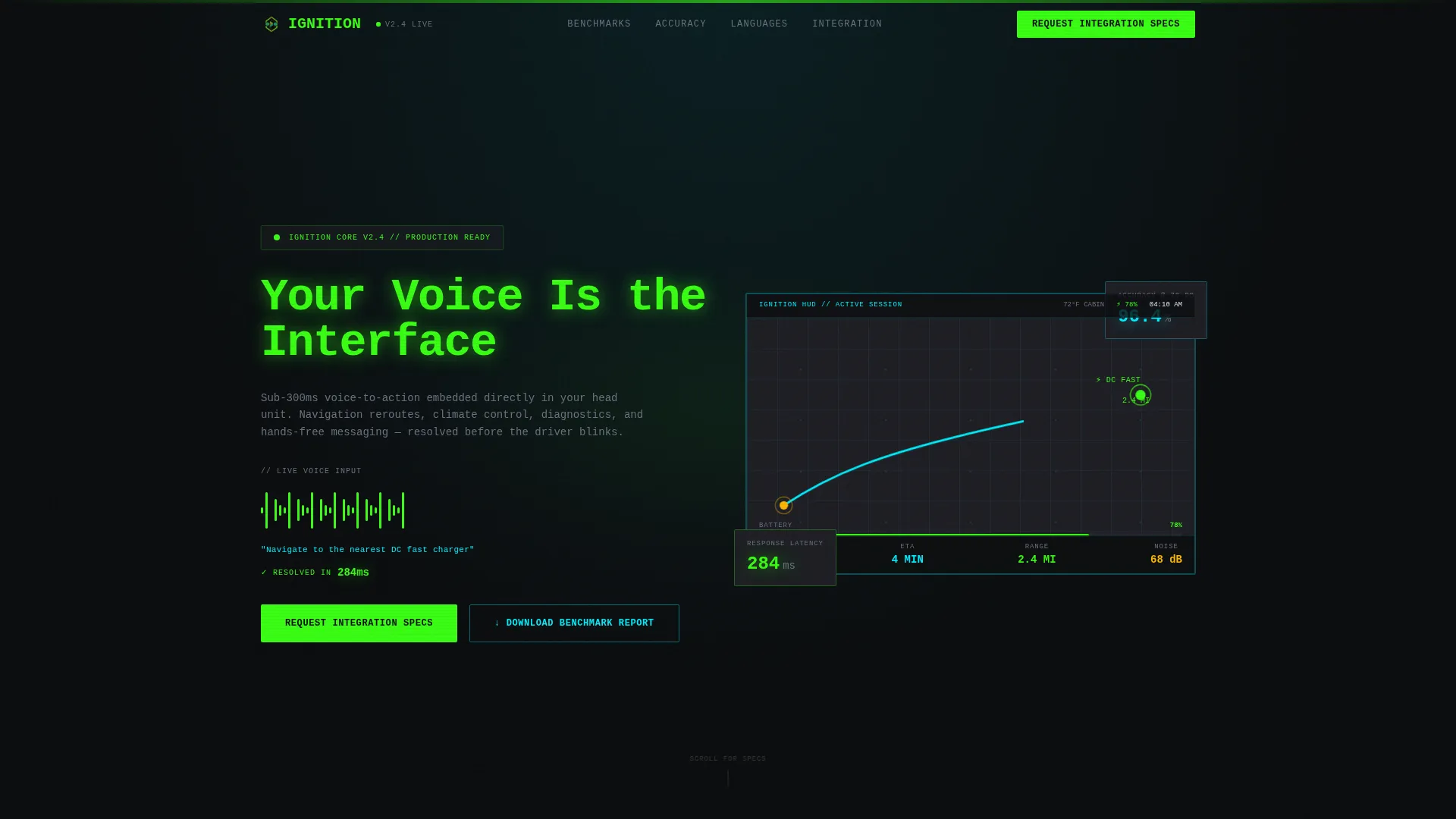
- A dashboard preview header with a rendered automotive HUD, live voice waveform, and real-time route recalculation visual
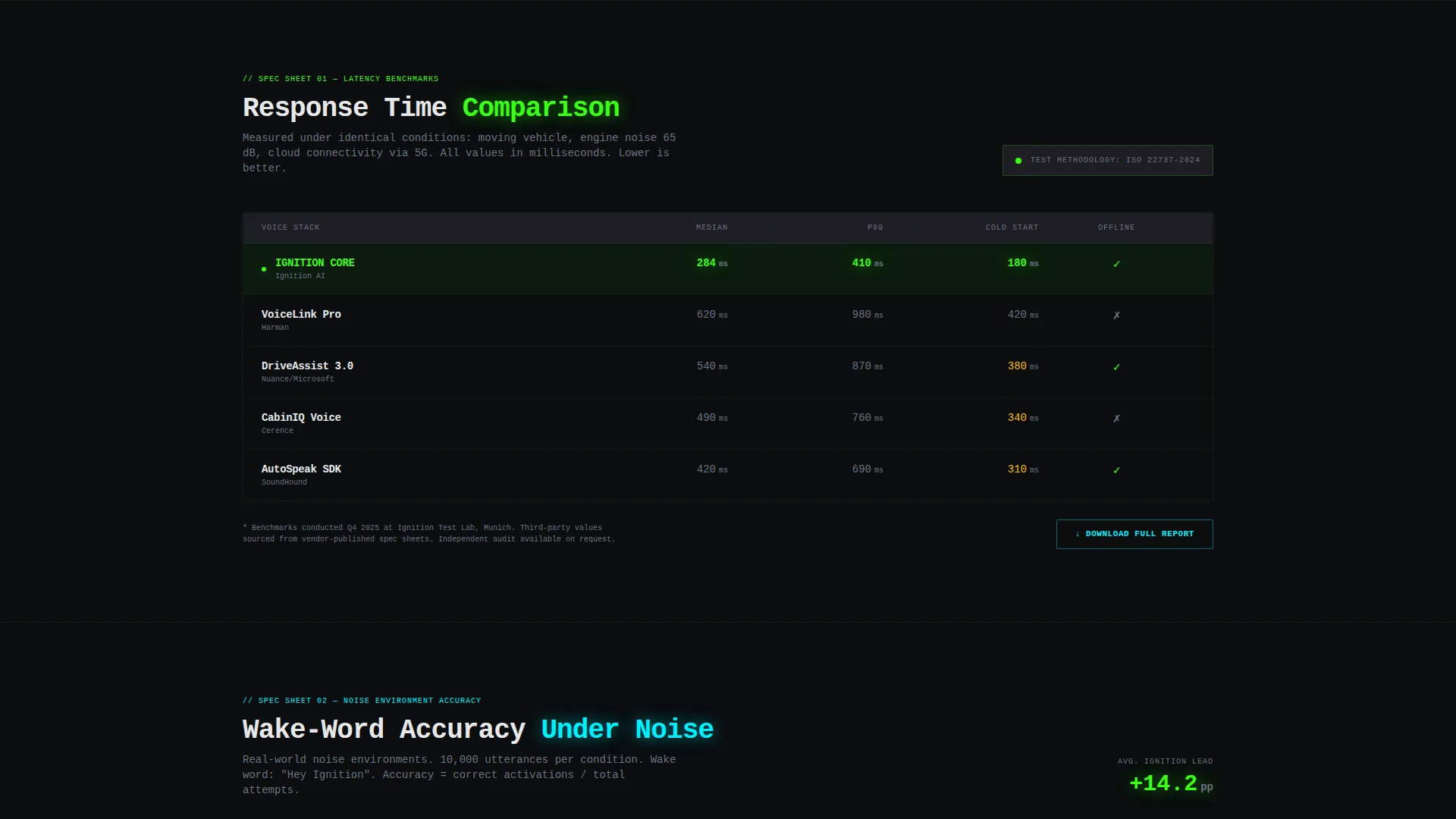
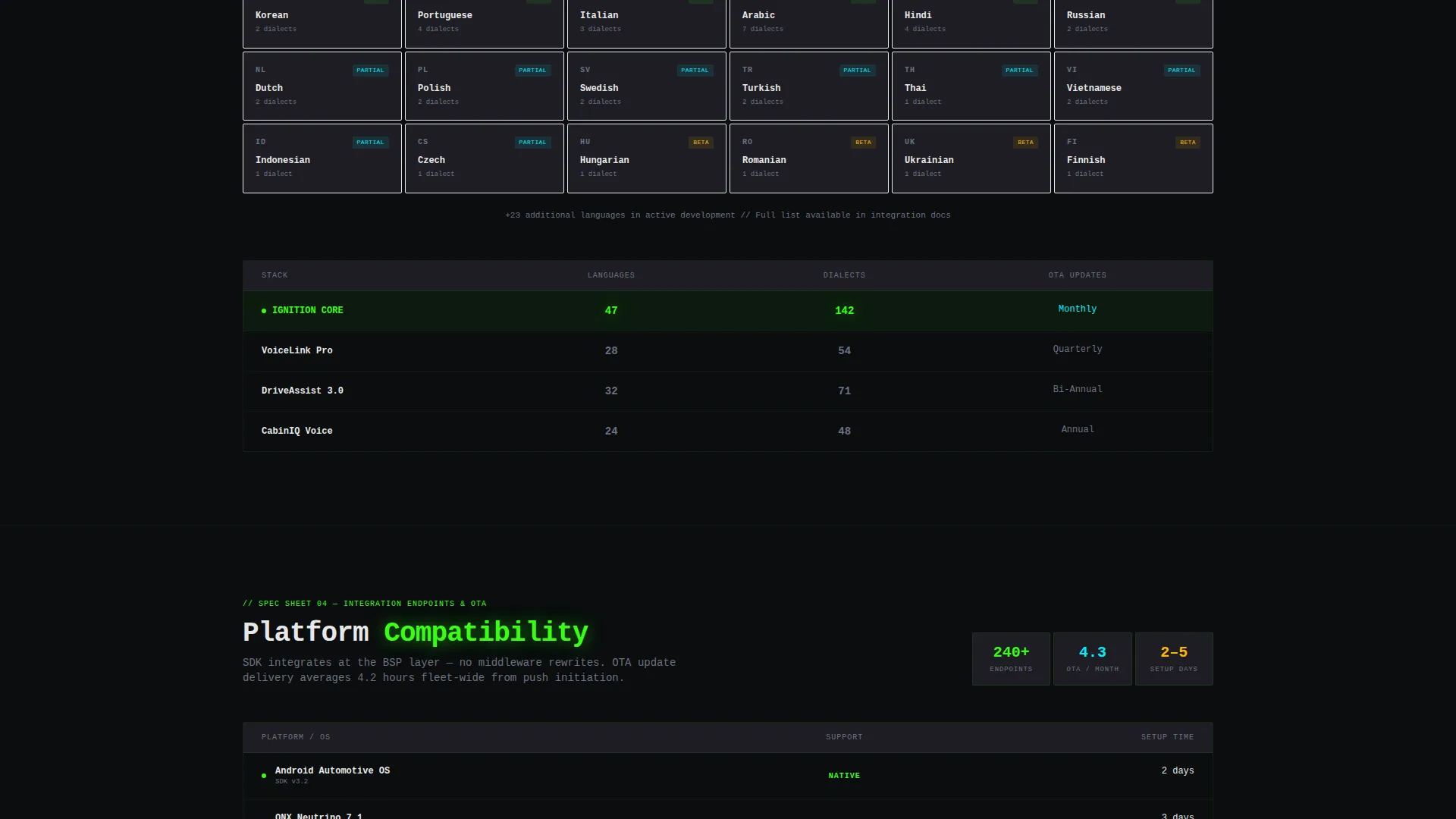
- Multiple spec-sheet comparison table sections covering latency, language support, wake-word accuracy, and integration endpoints
- A dual-path lead generation section with a primary "Request Integration Specs" form and a secondary "Download Benchmark Report" email gate
Feature list
This template includes purpose-built components that serve a technical, procurement-oriented audience. Each section does a specific job.
Dashboard Preview Header
The header fills the viewport with a rendered automotive HUD visual. A voice waveform ripples across the center console as a spoken command resolves in real time. Route recalculation, charge status, and ambient lighting state changes are all shown inline. The headline types itself character by character with a blinking cursor.
Comparison Table Sections
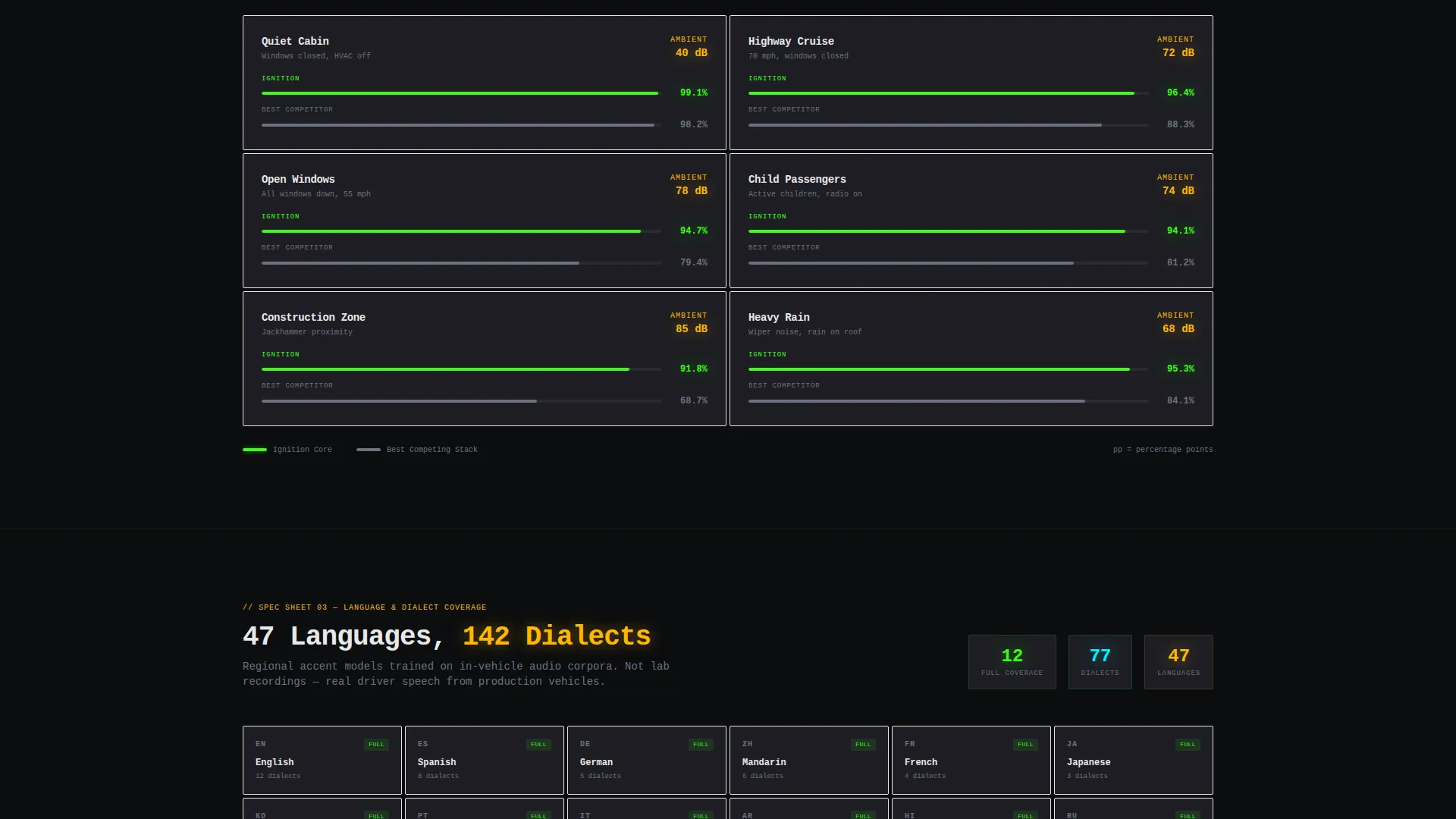
Each scroll section presents a single capability as a structured comparison table. Latency benchmarks, supported languages and dialects, wake-word accuracy across noise environments, and integration endpoint counts are all laid out in scannable rows. Numbers escalate section by section to build an evidence wall.
Sticky Lead Generation Navigation
The primary call to action, "Request Integration Specs," is anchored in a sticky navigation bar. It stays visible throughout the scroll so buyers can act the moment they feel ready, without hunting for a contact link.
Dual-Path Conversion Flow
The page offers two commitment levels. The primary form captures company name, role, current infotainment platform, and projected annual unit volume. The secondary path gates a benchmark report behind email only, offering a lower-friction entry point for early-stage buyers.
Monospaced Data Typography
The type system uses a tight monospaced font stack that reinforces the instrument cluster aesthetic. Headlines, table headers, and data values all read like a live readout, keeping the visual language consistent with the automotive HUD theme.
Ambient Color Signal System
Signal states are built into the color system. The palette uses void black, terminal phosphor green, HUD cyan, and brushed graphite for surfaces. Signal amber accents pulse to indicate warnings or state changes, mirroring how real vehicle dashboards communicate priority.
Page sections overview
| Section | Purpose |
|---|---|
| HUD Header | Renders the automotive dashboard preview and types the hero headline |
| Voice Command Demo | Shows a live spoken command resolving with route and charge visuals |
| Latency Benchmark Table | Compares response time against competing voice stacks |
| Language Support Grid | Lists supported languages and dialects in a scannable comparison layout |
| Wake-Word Accuracy Table | Shows accuracy percentages across highway wind, child passengers, and open windows |
| Integration Endpoints Table | Details supported integration connections and OTA update frequency |
| Lead Capture Form | Collects company name, role, platform, and unit volume for the primary call to action |
| Benchmark Report Gate | Offers a lighter email-only download path for early-stage prospects |
Design & branding system
The visual identity follows a Data Command theme built on the Acid Digital color system. Every color choice is functional, not decorative. The palette reads like an instrument cluster at night.
- Core colors: void black (#0B0D0F) for backgrounds, terminal phosphor green (#39FF14) for active data, HUD cyan (#00F0FF) for overlay elements, and brushed graphite (#1E1E24) for card surfaces and table rows
- Signal amber (#FFB800) pulses on accent warnings and state-change indicators, while the monospaced typography keeps all text tight, data-dense, and consistent with a live HUD readout
Mobile & speed optimization
The layout is built to load fast and read cleanly on smaller screens. Comparison tables are structured to remain scannable when viewed on a phone or tablet.
- Table sections are designed to scroll horizontally on narrow viewports, keeping data rows intact without breaking the comparison structure
- The sticky navigation bar and call-to-action button remain accessible at all screen sizes, so lead capture is never buried below the fold on mobile
How this template helps you convert
The page earns the lead before it asks for one. Hard performance data appears first, and the contact form comes last. That sequence matches how technical buyers actually make decisions.
- Front-loading benchmark data and accuracy tables builds credibility with procurement teams before any contact request appears, reducing friction at the form stage.
- The dual-path conversion design lets early-stage visitors download a benchmark report with just an email, while sales-ready buyers complete the full integration specs request form, capturing leads at both commitment levels.
Other information about this template
This template is built for the automotive AI voice assistant category within the broader technology and AI for automotive space. It is well suited for product teams preparing for trade show launches, procurement pitches, or partner evaluations.
- The template style is a comparison table layout, purpose-matched to spec-driven B2B sales cycles in the automotive technology sector
- The creative direction follows a Spec Sheet approach, where each section presents one technical dimension of the product with supporting data
- The header concept is a Dashboard Preview, designed to immediately signal product category and capability to a technically literate visitor
- The lead generation direction prioritizes data-first trust-building, with the form appearing only after the evidence wall is established
Theme
Data Command
Creative direction
Spec Sheet
Color system
Acid Digital
Style
Comparison Table
Direction
Lead Generation
Page Sections
Dashboard Preview Header with HUD Visual
Spec-sheet Comparison Tables
Sticky Request Integration Specs Call to Action
Dual-path Lead Capture Flow
Ambient Color Signal System
Monospaced Data-dense Typography
Related questions
Who is this landing page template designed for?
Can I replace the comparison table data with my own benchmarks?
What does the dual-path lead capture section include?
Is the voice waveform in the header an animated element?
Is this template suitable for a product launch or trade show pitch?



