Micro-SaaS & Developer Tools Professional Website Template
Intercept is a browser extension landing page template built for developer tools. It uses a hub and spoke layout with anchor navigation, three interactive tab demos, and live sandbox sections that let visitors explore network interception, DOM inspection, and header injection before downloading. The Void and Violet color system gives it a sharp, terminal-native look.
by Rocket studio
Quick summary
Intercept is a single-page landing page template for a browser extension aimed at developers, quality assurance engineers, and security researchers. It uses a hub and spoke anchor navigation structure, a Feature Tab Switcher header, and interactive sandbox sections to demonstrate real capabilities before asking for the download.
Who this template is for
This template is built for technical builders who need to present a powerful developer tool without dumbing it down. It speaks directly to people who spend long nights reading raw network traffic and want a page that earns trust through demonstration, not marketing copy.
- Frontend developers who debug production issues and need to show a tool that matches their workflow
- Quality assurance engineers tracing flaky network requests across staging environments
- Security researchers and indie developers shipping browser extensions to a technical audience
What problem this template solves
Most extension landing pages rely on static screenshots and feature bullet points. That approach fails with developer tools, where the audience needs to see the tool behave before they will trust it. This template replaces passive description with active proof.
- Visitors lose interest when they cannot interact with a tool before installing it
- Generic landing page layouts signal low effort to a technical audience that values precision
- Static demos fail to convey real-time behavior like waterfall views, DOM trees, or WebSocket frames
What you get with this template
You get a fully structured hub and spoke landing page with five anchor-navigated capability zones, a three-tab animated header mockup, and interactive sandbox sections. Every section is designed to simulate the extension experience inside the browser.
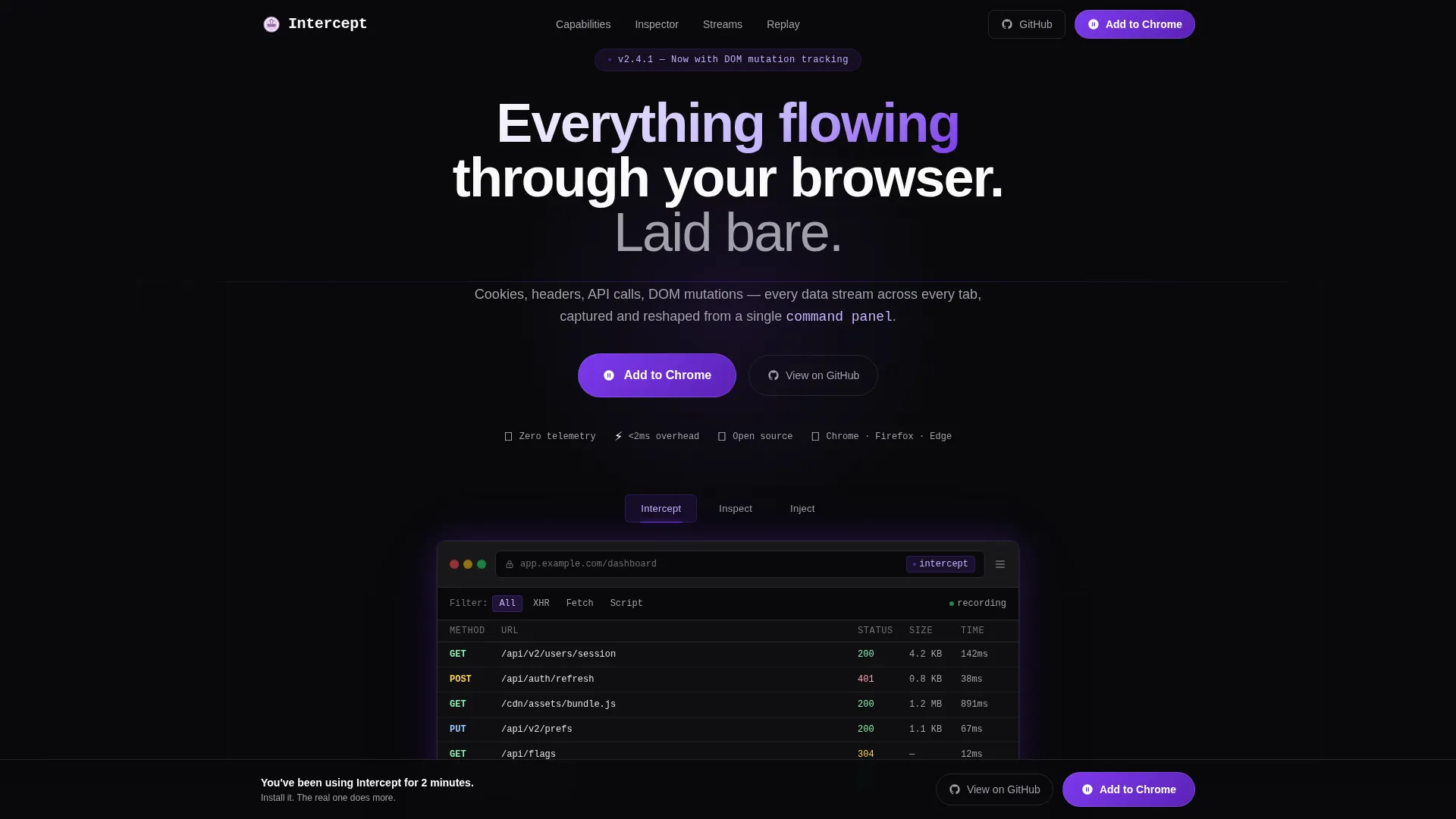
- A Feature Tab Switcher header with three tabs: Intercept, Inspect, and Inject, each triggering an animated browser mockup transition
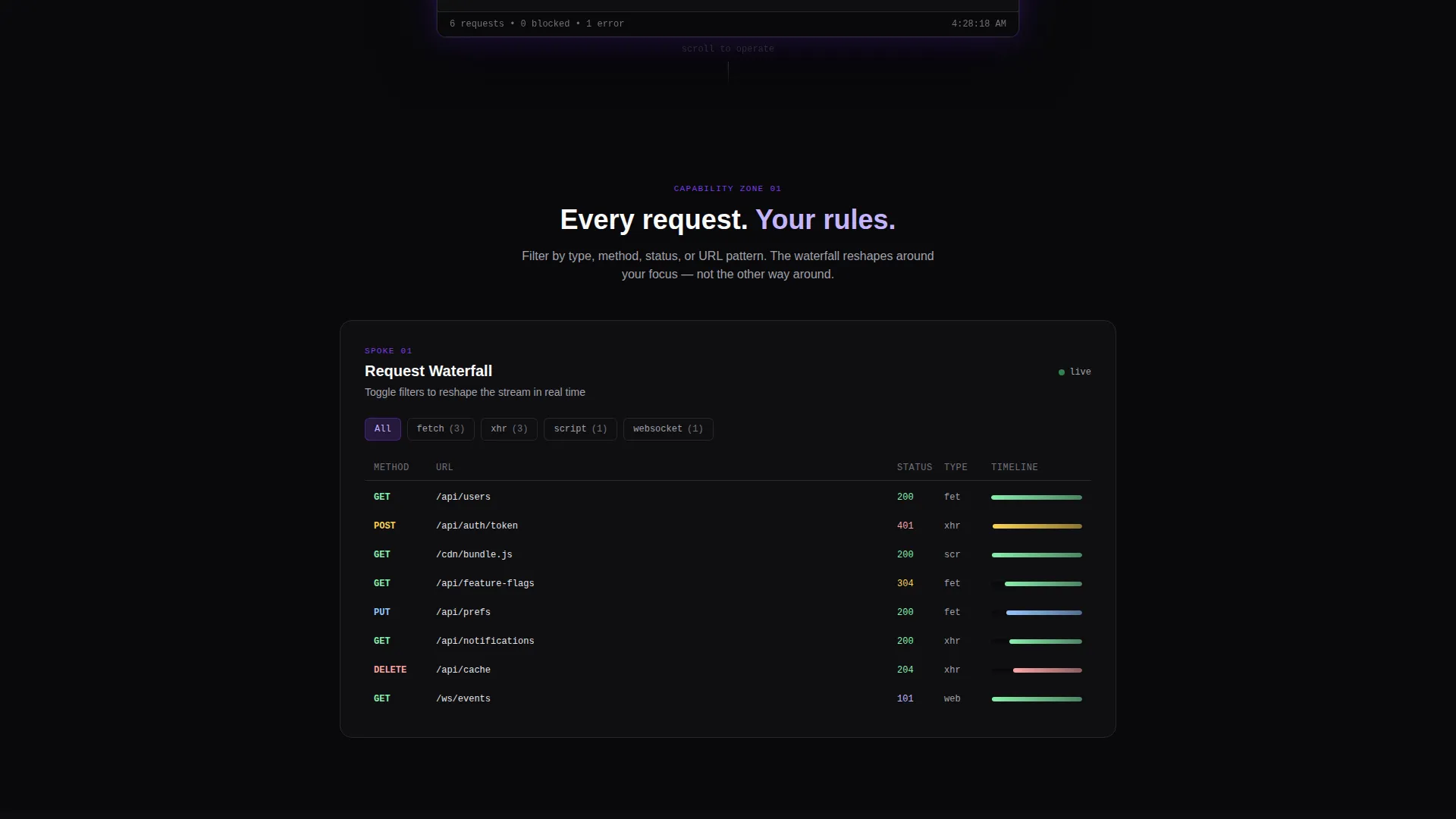
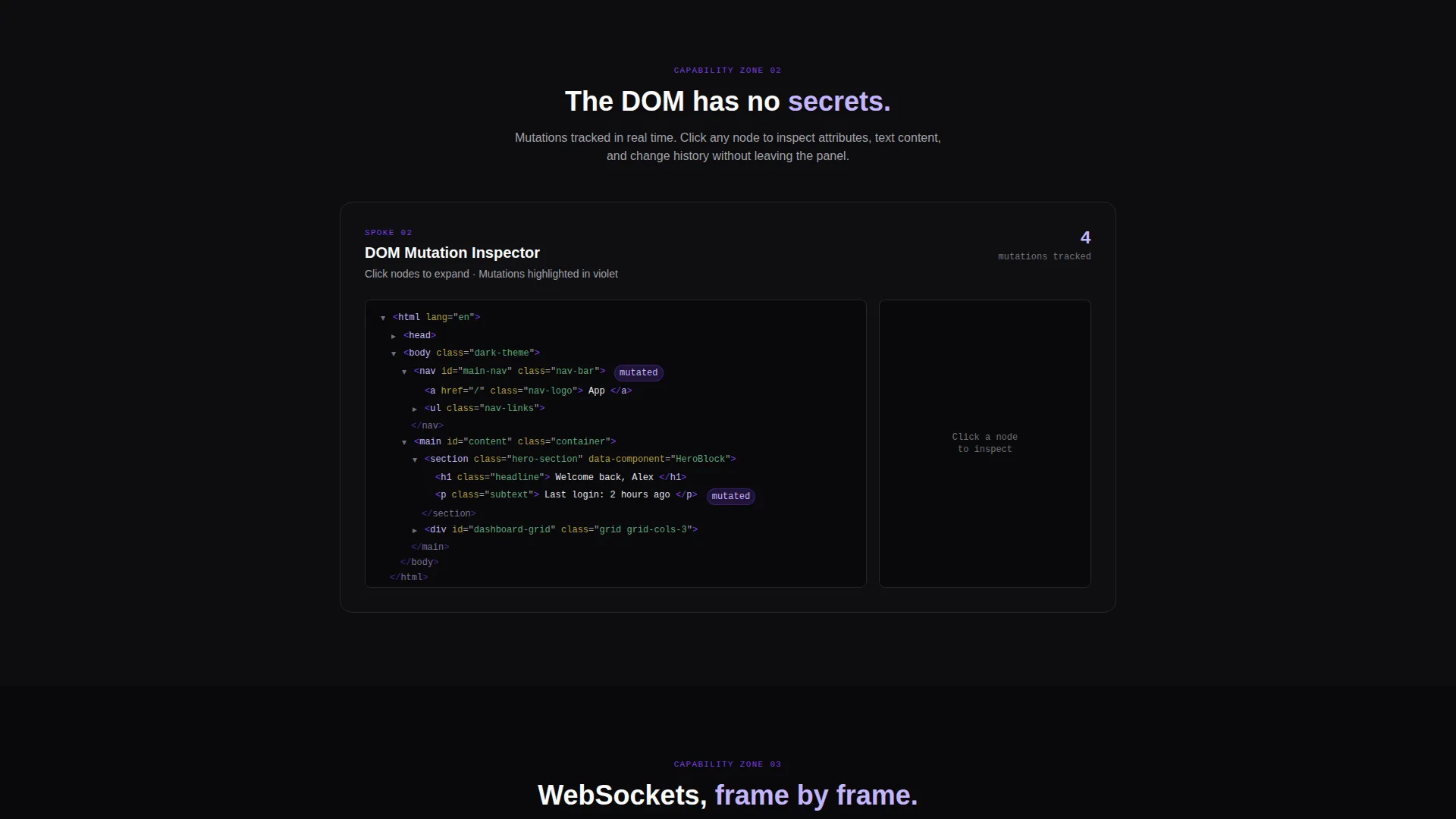
- Five interactive spoke sections including a request filter toggle, a collapsible DOM tree, and a WebSocket frame visualizer
- A sticky download bar with a browser-detecting call-to-action button and a ghost-outlined secondary button linking to GitHub
Feature list
This template comes with distinct, purposeful components. Each one is described below.
Animated Feature Tab Switcher Header
Three tabs labeled Intercept, Inspect, and Inject sit centered above a live-rendered browser mockup. Each tab swap triggers an animated transition: a frozen waterfall view, an expanding JSON tree with highlighted key paths, and a code editor injecting a modified response header. The mockup glows faintly violet at the edges to reinforce the extension metaphor.
Hub and Spoke Anchor Navigation
A fixed left-side anchor navigation tracks the visitor's scroll position through five capability zones using glowing dot indicators. Each dot marks the active section and lets visitors jump between zones without losing context. This structure works equally well for skimmers and deep readers.
Interactive Capability Sandboxes
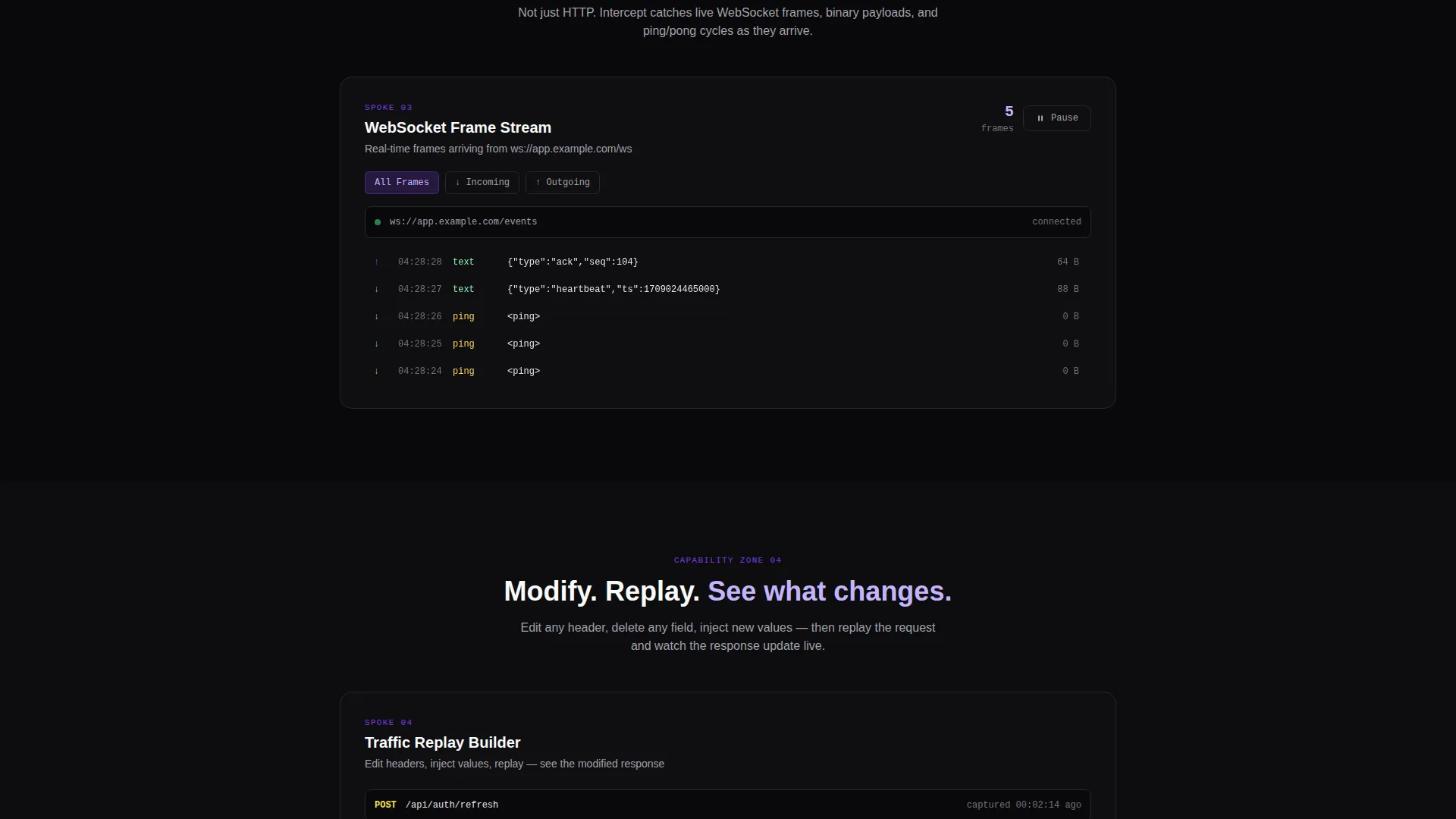
Each spoke section is its own interactive demo rather than a static description. Visitors can toggle request filters and watch a simulated waterfall rearrange, click through a collapsible DOM tree, and observe WebSocket frames arriving in real time. The complexity of each sandbox escalates deliberately to build confidence.
Browser-Detecting Download call to action
The primary call-to-action button is a violet pill labeled "Add to Your Browser." It detects the visitor's browser and appends the correct browser icon, whether Chrome, Firefox, or Edge. This removes friction at the most critical conversion point.
Sticky Conversion Bottom Bar
After the visitor passes the second spoke section, a sticky bottom bar appears with both the primary download button and the secondary GitHub link. The bar surfaces at exactly the moment the visitor has engaged with enough sandboxes to feel confident about the tool.
Void and Violet Visual System
The color palette uses absolute void black for all background surfaces, deep ultraviolet for interactive anchors and active states, phosphor lilac for code snippets and hover states, and terminal gray for body copy. The result is a visual environment that feels native to developer tooling.
Page sections overview
| Section | Purpose |
|---|---|
| Tab Switcher Header | Introduces core capabilities through three animated browser mockup demos |
| Anchor Nav Rail | Keeps visitor orientation fixed across all five spoke sections |
| Request Filter Spoke | Lets visitors toggle filters and watch a live waterfall simulation respond |
| DOM Tree Spoke | Presents a collapsible, clickable DOM tree visitors can explore directly |
| WebSocket Frame Spoke | Visualizes real-time WebSocket frames arriving in sequence |
| Traffic Replay Spoke | Demonstrates full traffic replay as the most advanced capability zone |
| Sticky Download Bar | Resurfaces the primary and secondary calls to action after the second spoke |
Design & branding system
The template uses a Data Command theme grounded in the Void and Violet color system. Every design decision reinforces the feeling of a live terminal environment built for people who are comfortable with raw data.
- Void black (#09090B) covers every background surface; ultraviolet (#7C3AED) marks interactive anchors, active nav dots, and button fills
- Phosphor lilac (#C4B5FD) highlights code snippets, data values, and hover states; terminal gray (#A1A1AA) handles body copy and muted labels
- The browser mockup in the header glows violet at its edges, and each interactive sandbox uses the same violet pulse to signal interactivity
Mobile & speed optimization
The layout is structured to remain usable across screen sizes while preserving the immersive terminal aesthetic. The fixed anchor navigation and interactive sandboxes are designed with responsive behavior in mind.
- The fixed left-side anchor navigation adapts to smaller viewports so the hub and spoke structure stays navigable on mobile
- Animated mockup transitions and interactive sandbox elements are scoped to avoid layout shifts during scroll
- The sticky bottom bar is built to remain visible and tappable across device sizes without obscuring content
How this template helps you convert
This template converts by letting visitors experience the extension before downloading it. Every interactive element doubles as a trust signal.
- The animated header tabs give a credible first impression in under ten seconds, showing real behaviors rather than marketing illustrations
- Each spoke sandbox acts as a micro-trial, so by the time the sticky download bar appears the visitor has already operated the tool in spirit
- The browser-detecting call to action button removes the final click-hesitation by confirming compatibility before the visitor has to think about it
Other information about this template
This template is categorized under Technology, specifically within the Micro-SaaS and Developer Tools subcategory, with a niche focus on browser extensions. It is well-suited for developers shipping tools that require demonstration rather than description to earn downloads.
- The template style is Hub and Spoke with anchor navigation, optimized for the App Download landing page direction
- The header concept is a Feature Tab Switcher, a pattern that works particularly well for multi-mode developer tools
- The Interactive Explorer creative direction ensures that scroll behavior drives feature discovery rather than passive reading
- A ghost-outlined secondary button linking to GitHub is included for audiences who review source code before installing any extension
Theme
Data Command
Creative direction
Interactive Explorer
Color system
Void & Violet
Style
Hub & Spoke (Anchor Nav)
Direction
App Download
Page Sections
Animated Feature Tab Switcher
Hub and Spoke Anchor Navigation
Interactive Capability Sandboxes
Browser-detecting Download Button
Sticky Conversion Bottom Bar
Void and Violet Design System
Related questions
Who is this landing page template designed for?
Can I adapt the three header tabs to match my own extension features?
Does the template include the interactive sandbox behavior out of the box?
What makes the sticky bottom bar appear?
Is the GitHub secondary button included in the template?



