Micro-SaaS & Developer Tools Professional Website Template
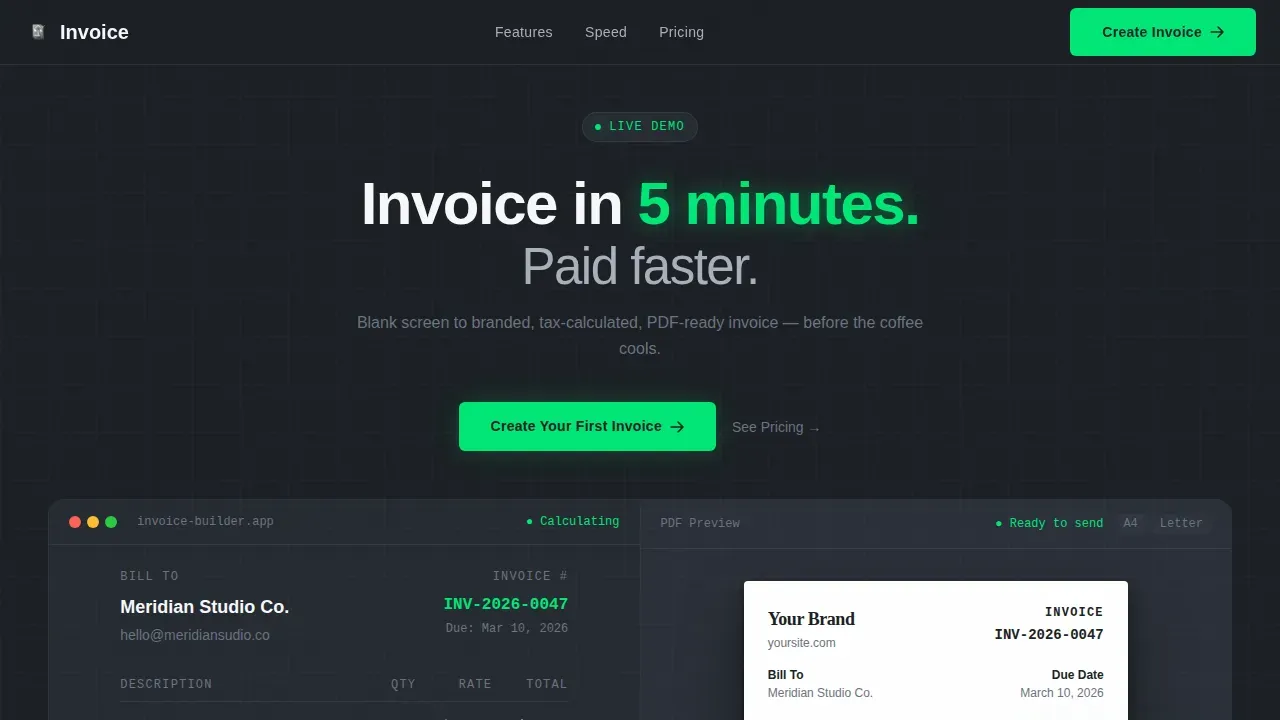
This invoice instant brand stamped pdf generator landing page template is built for freelancers, solo developers, and small agencies who need to bill clients fast without friction. The split-screen layout demonstrates the invoice generator live, showing fields auto-populate, tax calculations run, and a finished PDF appear in real time. Clean, dark, and surgical in design, it routes visitors directly to the invoice editor with one click.
by Rocket studio
Quick summary
This is a single-page, split-screen landing page template built for a free invoice generator product. It follows a Startup Velocity theme with a Monochrome Steel color system. The left half of every section shows the invoice template in action. The right half shows the hard specs. The result is a page that proves speed and builds trust before the visitor touches a thing.
Who this template is for
This template is designed for founders and developers who are launching a free invoice maker or invoicing software product and need a landing page that converts visitors on first contact. It is equally well suited for freelance designers and small business owners who want to promote a tool that lets users create professional invoices without an account, a learning curve, or a long billing process.
- Solo developers shipping their first billing product for freelancers and small businesses
- Freelance designers and two-person agencies who need to invoice directly and get paid faster
- Micro-SaaS founders building an online invoice generator for small business owners
What problem this template solves
Creating professional invoices from scratch is slow, error-prone, and stressful when a client is waiting. Many freelancers still rely on paper invoices, Excel files, or generic free templates that lack branding, skip tax calculations, and omit essential elements like a proper invoice number, invoice date, payment terms, and billing address. This template exists to show visitors that a better path is available, completely free and ready in seconds.
- Eliminates the blank-screen problem by demonstrating the invoice template working live before the visitor signs up
- Removes friction from the billing process by routing the primary call-to-action directly to the invoice editor, no form required
- Replaces cluttered, outdated paper invoices with a clean, brand-stamped pdf invoice that is ready to send after service completion
What you get with this template
You get a fully structured, single-page landing page built around a live, animated product demonstration. Every section is purposeful. Every scroll reinforces that creating an invoice takes seconds, not sessions. The template includes all the layout, animation hooks, and conversion logic described in the brief, ready to customize and deploy.
- A split-screen hero with an auto-animating invoice template on the left and a live PDF preview on the right
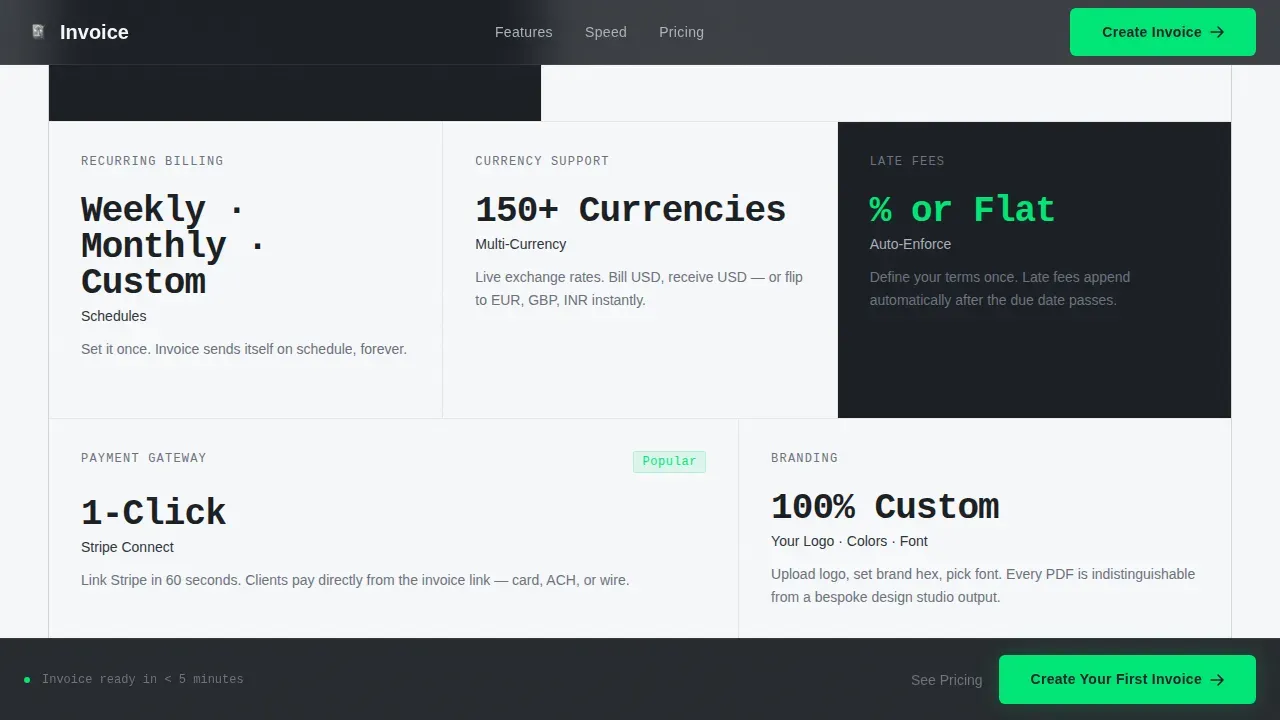
- A spec-sheet scroll layout that pairs feature capabilities with hard numbers, covering recurring invoices, multi-currency support, tax rate automation, and payment methods
- A sticky call-to-action bar, freelancer testimonials, a final conversion section, and a linear single-row footer
Feature list
This section details the core built-in capabilities of the template as described in the source brief.
Live Interactive Invoice Preview Hero
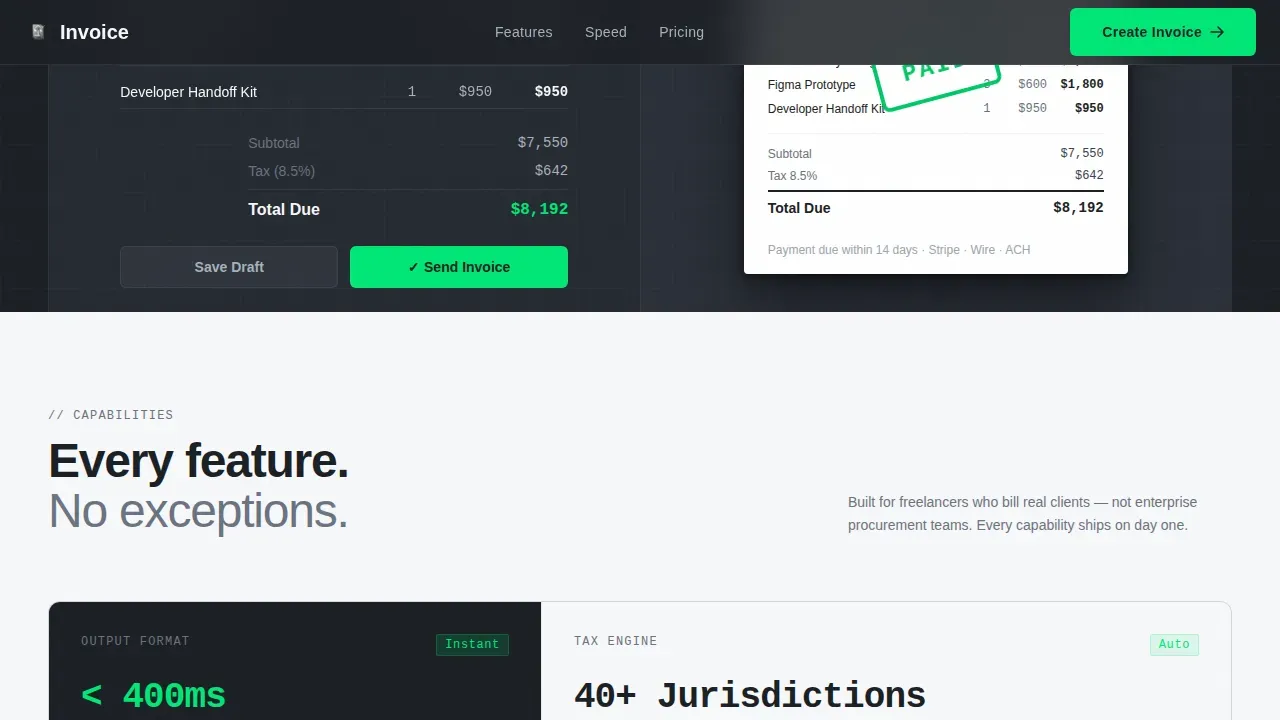
The header splits 50/50. The left panel shows a free invoice being assembled in real time: a client name types itself out, line items cascade in, the tax rate calculates automatically, and a total snaps into place. The right panel renders the finished PDF output simultaneously, pixel-perfect with brand colors, the company logo placed correctly, and a digital "PAID" stamp that animates on completion. No stock photography is used. The product is the hero.
Spec Sheet Scroll Sections
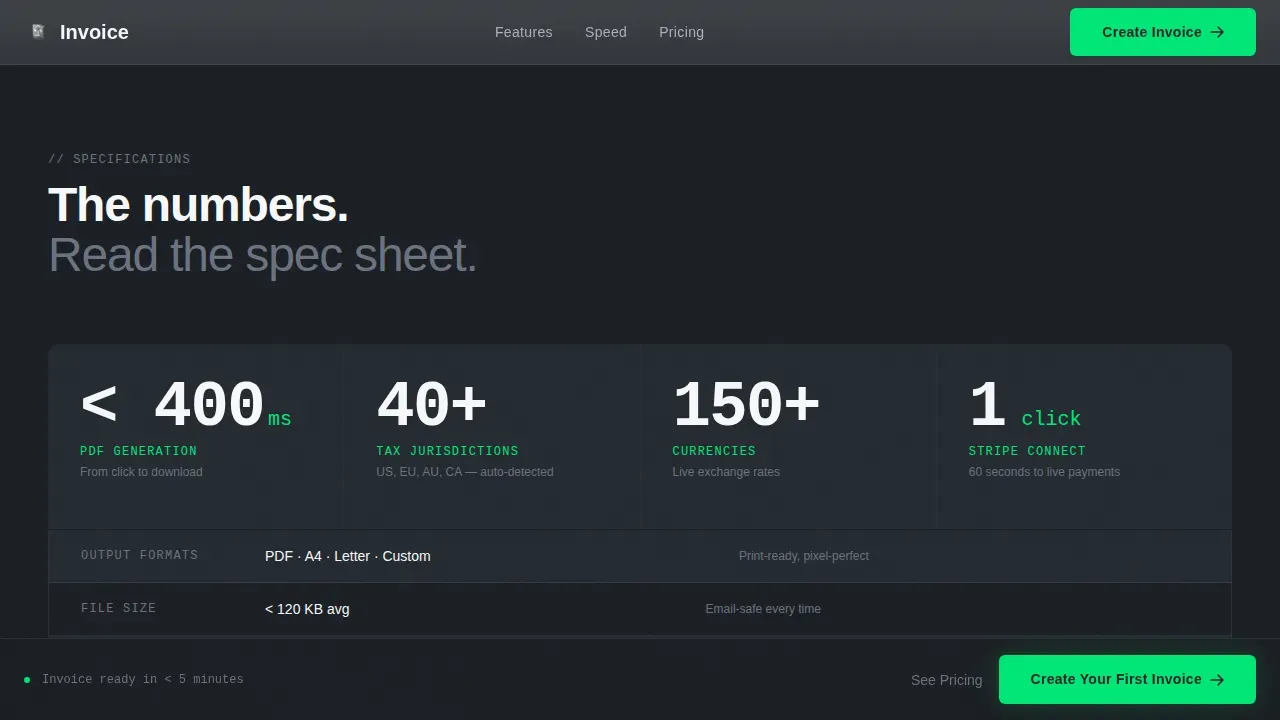
Each scroll section is a single capability shown bare on a split screen. The left side shows the feature in action, such as recurring invoices scheduling themselves, a multi-currency toggle switching between rates, late payment fees applying automatically, or a one-click payment connection activating. The right side shows the hard spec: formats supported, tax jurisdictions covered, payment methods accepted, and invoice generation speed in milliseconds. Numbers are oversized in chrome gray. Labels are small-caps in gunmetal.
Sticky Call-to-Action Bar
The primary call-to-action button, labeled "Create Your First Invoice," appears first in the header beside the live preview. It reappears as a sticky bottom bar after the second scroll section. A secondary text link, "See Pricing," sits beneath it for comparison shoppers. No form appears anywhere on this page. The click routes directly to the app's invoice editor, pre-loaded with a blank invoice template so the visitor experiences the product immediately.
Freelancer Testimonial Section
Three concrete freelancer testimonials are built into the page. Each quote is specific and outcome-focused, showing real names, real roles, and real results. This section builds social proof without generic filler. It reinforces that the free invoice generator has been used by actual solo developers, freelance designers, and small agency owners to get paid faster.
Animated Stats and Speed Numbers
A dedicated section displays oversized chrome stats on a gunmetal background. These cover invoice generation speed, output formats supported, tax jurisdictions, and integration count. This section uses JetBrains Mono for numbers and DM Sans for labels, reinforcing the technical, terminal aesthetic of the Startup Velocity theme.
Full-Width Final Conversion Section
The page closes with a full-width conversion section in electric green. This is the last push before the footer. It repeats the primary call-to-action and is intentionally minimal: a headline, a subline, and a button. The footer follows a linear single-row pattern.
Page sections overview
| Section | Purpose |
|---|---|
| Split-Screen Hero | Show live invoice assembly and real-time PDF preview side by side |
| Specs Bento Grid | Display feature capabilities paired with precise technical specifications |
| Speed Stats Block | Present oversized chrome numbers proving invoice generation performance |
| Testimonials Row | Deliver specific freelancer social proof with names, roles, and outcomes |
| Final call to action Section | Drive conversion with a full-width electric green call-to-action block |
| Linear Footer | Provide minimal navigation, legal links, and brand identity in one row |
Design & branding system
The visual identity follows a Startup Velocity theme using a Monochrome Steel color system. The palette is dark, metallic, and surgical. It is designed to feel like a precision instrument, not a marketing brochure. Every color choice reinforces that the free invoice generator is fast, professional, and built for people who ship things.
- Core colors: deep gunmetal (#1B1F24) for backgrounds, brushed chrome (#A8B0BA) for body text, paper white (#F7F8FA) for alternate section backgrounds, and electric green (#00E676) reserved exclusively for interactive states and call-to-action buttons
- Typography: DM Sans for all body copy and labels, JetBrains Mono for all numbers, invoice details, invoice date fields, and spec sheet values, creating a clear technical reading hierarchy
- Brand identity details: company logo placement is built into the live invoice preview, backgrounds alternate between gunmetal and paper white, and every hover state, toggle, and button pulses electric green like a terminal cursor
Mobile & speed optimization
The template is desktop-first by design, built around the 50/50 split-screen layout that gives the invoice template and the PDF preview equal real estate. However, the layout is built to collapse cleanly for mobile users, since many users prefer generating or viewing invoices on mobile devices. The invoice template must load quickly and work seamlessly on all devices for an optimal user experience.
- Desktop-first split-screen hero collapses to a stacked single-column layout on smaller screens, keeping the live preview and call-to-action visible without horizontal scrolling
- Animation hooks use server components for static sections and client components for the animated hero, keeping the interactive invoice preview snappy on first load
- The sticky call-to-action bar remains visible across all screen sizes, ensuring that the path to the invoice editor is always one tap away
How this template helps you convert
This template is engineered around a single goal: move the visitor from curious to clicking without a single form field in the way. Every design and layout decision reduces hesitation and increases confidence in the product. The billing process is shown, not described.
- The live invoice preview in the hero shows the invoice template performing before the visitor reads a single line of copy, proving the product's speed and quality instantly
- The spec-sheet scroll layout replaces marketing claims with hard numbers, so visitors who want to create professional invoices can see exactly what they are getting in each section
- The sticky call-to-action bar and the final full-width conversion section ensure the path to creating an invoice online is never more than one visible click away, reducing drop-off at every scroll depth
Other information about this template
This template is built to support a free invoice generator product. It covers the full range of invoicing use cases that small businesses, freelancers, and micro-SaaS founders encounter when billing clients professionally. Several additional context points are worth noting for buyers who want to understand how the template fits into a broader invoicing workflow.
- Invoice templates streamline the billing process by eliminating the need to create invoices from scratch each time, saving time, money, and effort
- A standard invoice template includes essential elements such as the invoice number, invoice date, due date, billing address, mailing address, business name, company details, contact details, payment terms, payment instructions, and a clear breakdown of pricing details and service line items
- The free invoice generator product this template promotes can automatically calculate taxes based on the tax rate you set, reducing errors and ensuring the tax invoice is accurate every time
- Invoice generators typically do not automatically save customer details between sessions, which means some manual data entry may be required for repeat clients unless the underlying invoicing software includes that capability
- If you plan to send invoices regularly, full invoicing software that can automatically save client data, track payments, and send payment reminders will serve your business needs better than a standalone free invoice maker
- This template supports a proforma invoice layout variation and can be adapted to show a sample invoice in the live preview, giving visitors a realistic view of a completed invoice before they sign up
- Digital stamping blocks in the PDF template provide clearly defined areas for stamps such as "Paid" or "Overdue," reinforcing financial tracking and making it easy to communicate invoice payment status to clients
- A custom invoice template can be built from this own invoice template structure, adapting brand colors, company logo placement, customer details fields, billing details, and business information to match any brand identity
- The page is also suitable as a sample template reference for developers who are building or evaluating online invoice generator tools and want to see how high-converting invoice template landing pages are structured
- Completely free to access and modify, this template gives small businesses and solo operators a strong starting point for preparing invoices, collecting customer payments, and managing the invoicing process without needing enterprise invoicing software
- Multiple invoices can be generated in the connected app by using the same pdf template structure repeatedly, reducing workload and keeping professional templates consistent across every client engagement
- Invoices serve as legally recognized billing documents in most jurisdictions; always verify that your invoice details comply with local tax regulations before sending to clients
- The Invo Platform is a modern, high-conversion SaaS website template built specifically for invoicing platforms, and this template draws on similar structural principles for its hero demo and spec-sheet cadence
- HubSpot Free Invoice Generator focuses on speed and professional branding to reduce payment delays, a philosophy that this template shares in its design and call-to-action placement
- Canva Invoice Generator showcases how to blend professional, customized designs with ease of use; this template adopts a comparable live-preview approach to help visitors see their brand identity reflected in the invoice before they commit
- Swipe Pages is designed specifically for converting users into sign-ups for billing services, featuring a hero section for the product demo and a clear call-to-action, which aligns with the click-through direction used in this template
Theme
Startup Velocity
Creative direction
Spec Sheet
Color system
Monochrome Steel
Style
Split Screen (50/50)
Direction
Click-Through
Page Sections
Animated Split-screen Invoice Hero
Spec-sheet Scroll Layout
Sticky Click-through Call-to-action
Social Proof Testimonials Block
Oversized Speed Stats Section
Full-width Conversion Close and Footer
Related questions
Can visitors create an invoice directly from this landing page?
What invoice details does the live preview show?
Is this template completely free to use?
Does the template support recurring invoices and multi-currency billing?
Who benefits most from using this invoice template landing page?



