Invoke - Velocity SDK Landing Page Template
Invoke is a scroll-reveal landing page template built for SDK and library documentation platforms. It leads with an interactive Integration Time Estimator, then progressively reveals live code playgrounds, version diff views, and dependency visualizers. The Midnight Blue visual system and freemium conversion flow make it ideal for developer-focused products targeting startup teams and solo engineers.
by Rocket studio
Quick summary
Invoke is a single-page, scroll-reveal landing page template designed for SDK and API documentation platforms. It opens with a fully interactive Integration Time Estimator above the fold, then guides visitors through working code demos, upgrade diff views, and dependency comparisons. The dark Midnight Blue palette and freemium-first conversion path are built specifically for developer audiences.
Who this template is for
This template is built for teams and individuals who ship developer tools and need a landing page that speaks directly to a technical audience. It skips marketing fluff and leads with proof.
- Startup CTOs and platform engineers launching or repositioning an SDK
- Developer-tool founders who need freemium or free-trial conversion without a sales funnel
- Solo developers and weekend builders who want a documentation platform that earns attention fast
What problem this template solves
Most SDK landing pages describe what a tool does but never show it working. Developers leave before they believe. Invoke solves that by front-loading interactive proof, so visitors understand the value before reading a single paragraph of copy.
- Generic documentation pages lose technical visitors who want demos, not descriptions
- Long sign-up forms kill conversion for developers who would rather run a terminal command
- Static pages cannot communicate the speed advantage of an SDK compared to building from scratch
What you get with this template
Invoke delivers a complete scroll-reveal landing page with layered interactive sections that progressively build trust with a developer audience. Every component is grounded in the source brief and designed to move a visitor from curious to converted.
- An above-the-fold Integration Time Estimator with animated real-time results and a primary call-to-action button
- A live code playground, a version diff viewer, and a dependency tree visualizer that reveal sequentially on scroll
- Persistent sticky conversion bar, inline email sign-up, and one-click "Copy Install Command" buttons beside every code example
Feature list
This section describes the core interactive and visual components included in the Invoke template.
Interactive Integration Time Estimator
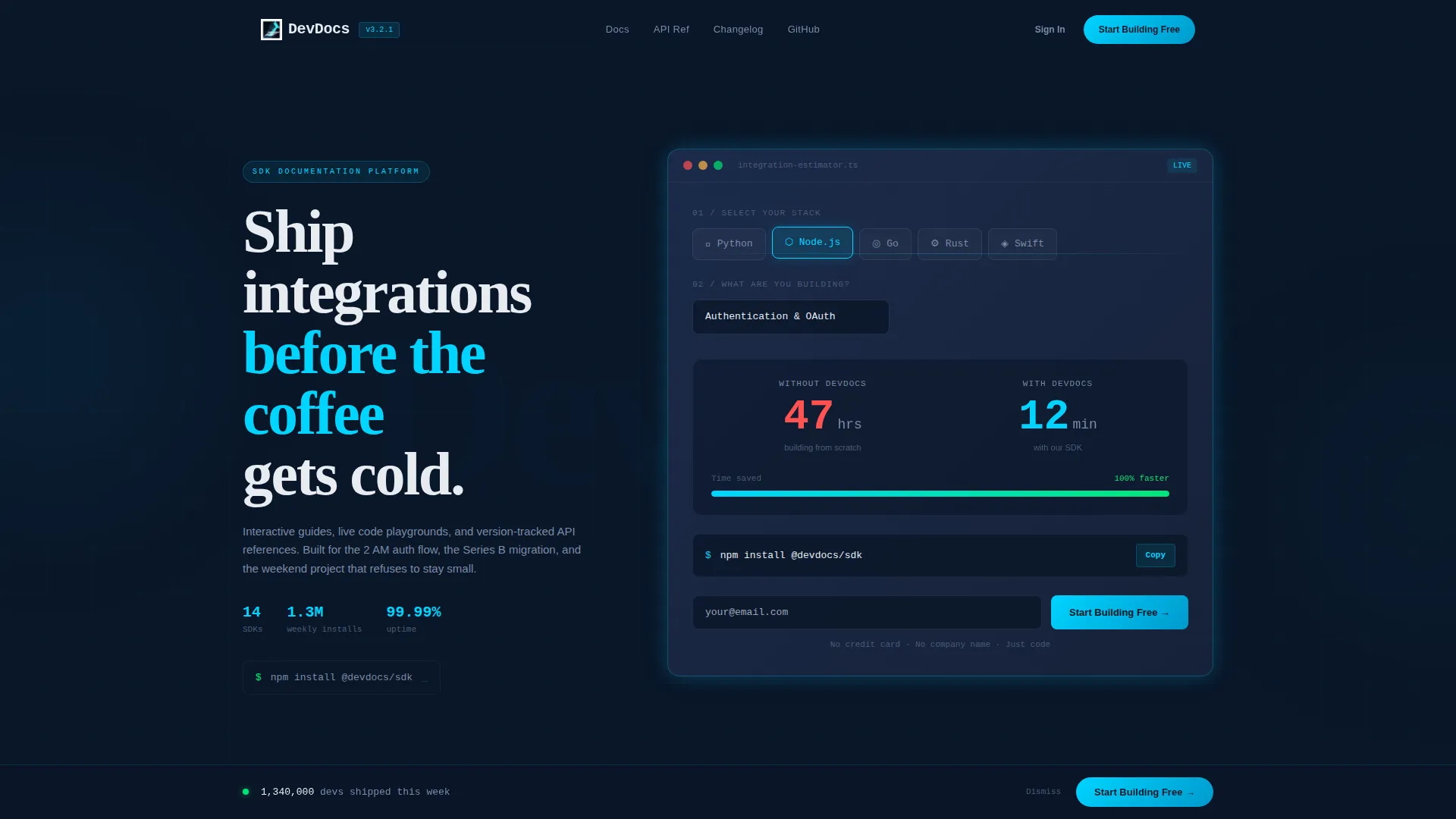
The header section contains a fully interactive estimator embedded above the fold. Visitors select a programming language from a row of glowing icons (Python, Node, Go, Rust, Swift), choose a use case from a dropdown (auth, payments, storage, or messaging), and the tool instantly calculates estimated integration time with the SDK versus building from scratch. Results animate in real-time with large monospaced numerals, making the return on investment clear before any body copy is read.
Live Code Playground
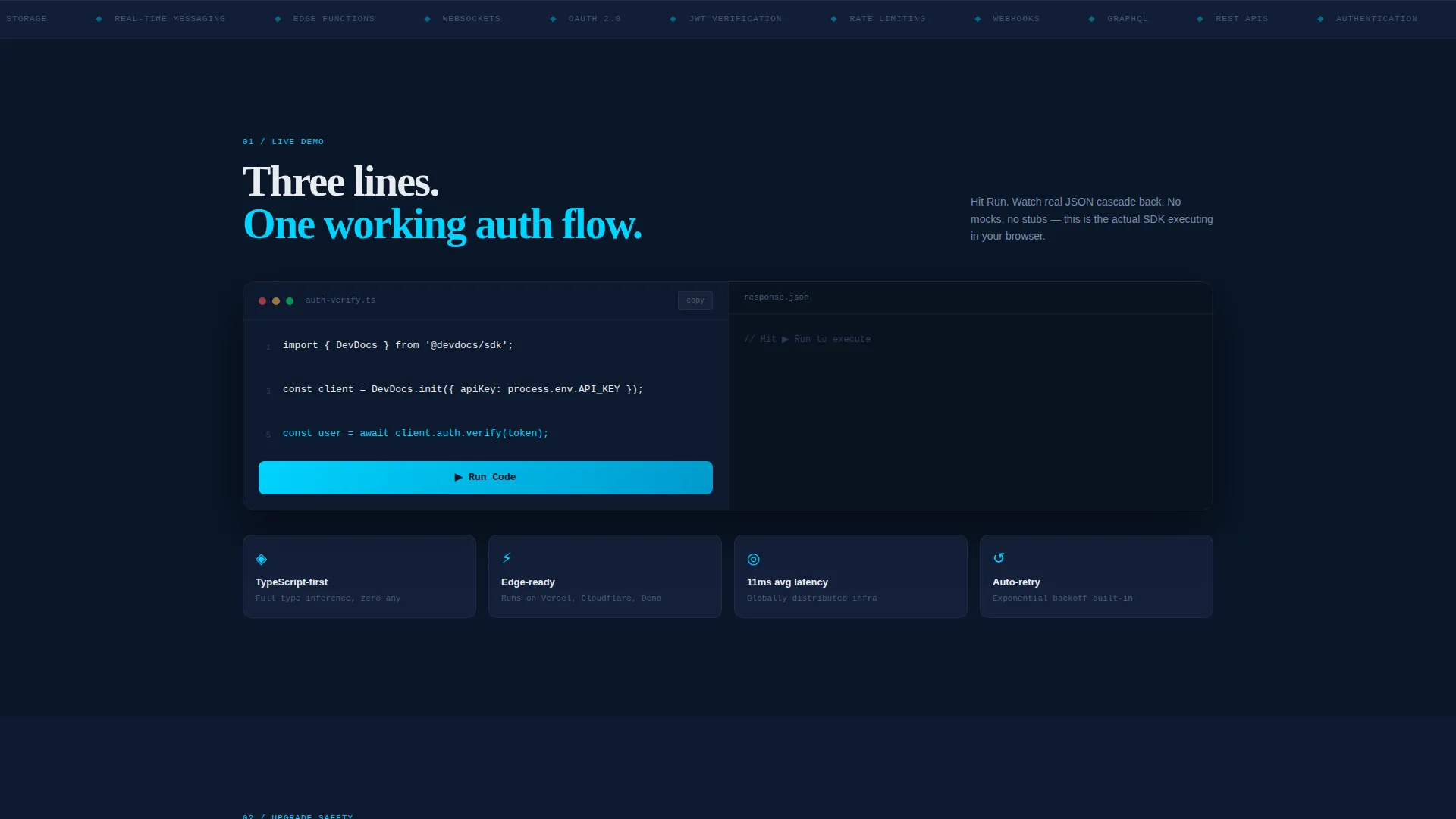
The first scroll reveal presents a three-step code playground: import, initialize, and call. The code executes in the browser and returns a cascading response in JSON format. This section gives visitors working proof that the SDK functions exactly as described, removing doubt before it forms.
Version Diff Viewer
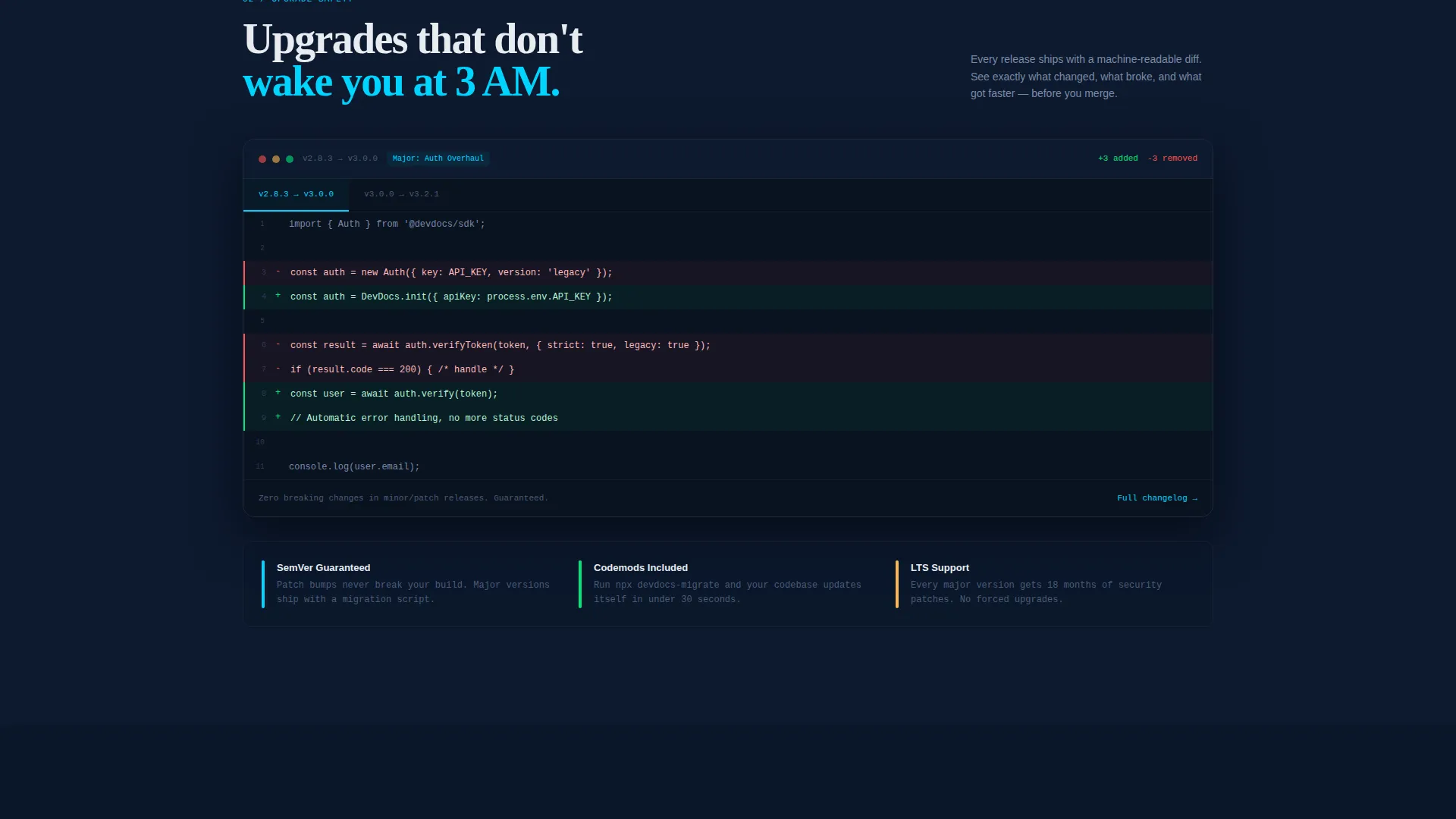
The second scroll reveal shows a side-by-side comparison of old and new code versions with red and green syntax highlights. This communicates how straightforward SDK upgrades are, addressing one of the most common objections from platform teams managing production dependencies.
Dependency Tree Visualizer
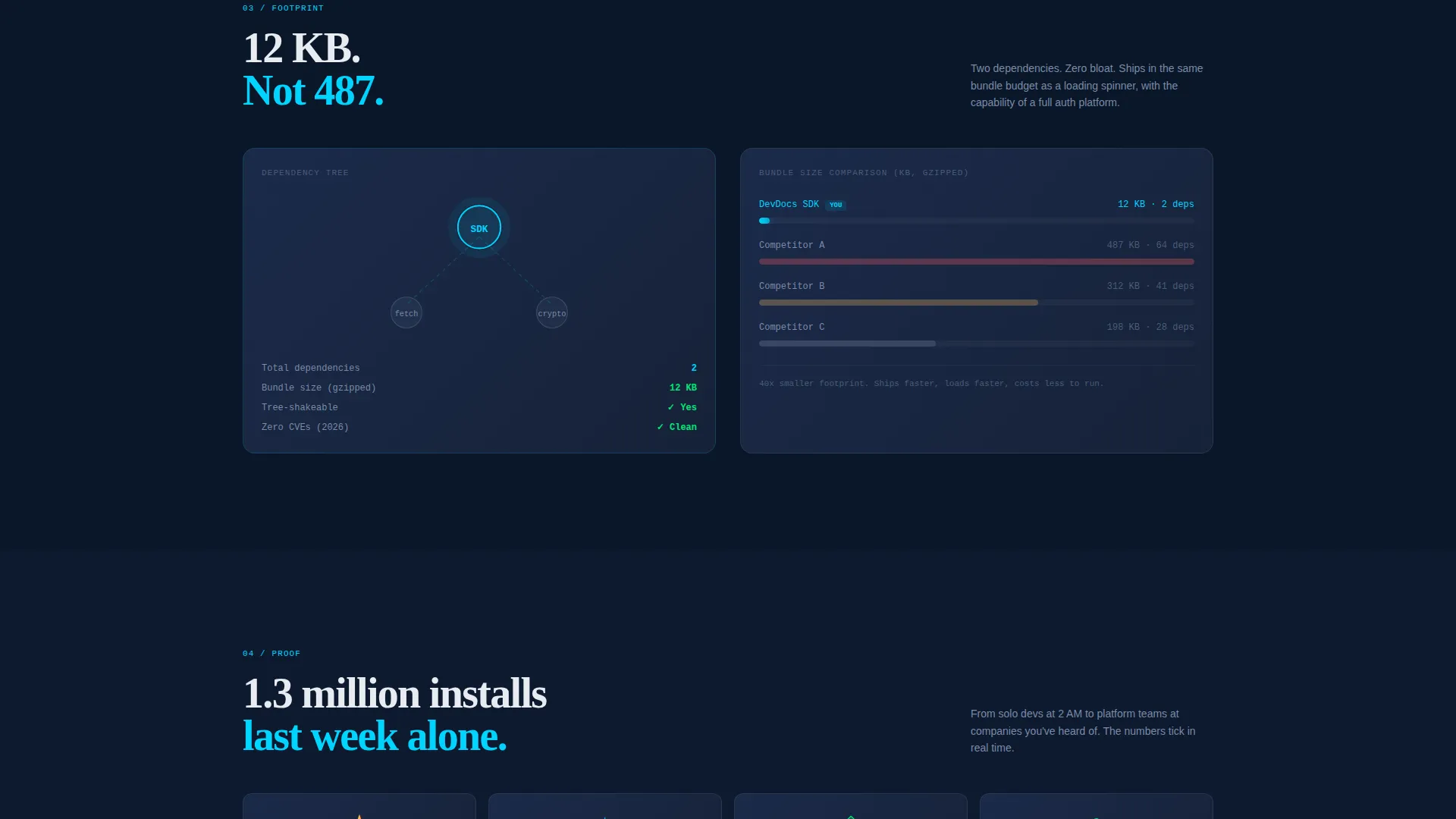
The third scroll reveal animates a dependency tree that shrinks the SDK's footprint visually against a competitor comparison. This gives technically minded visitors a concrete, granular proof point about the SDK's lightweight design.
Community Proof Section
A social proof block displays a live-ticking GitHub stars counter and a real-time npm weekly download count. These numbers build confidence for visitors who evaluate tools by adoption signals before committing to integration.
Freemium Conversion System
The primary call-to-action button ("Start Building Free") appears first inside the estimator results and then persists as a subtle sticky bar after the second scroll reveal. An inline sign-up asks only for email and preferred language or framework. "Copy Install Command" buttons (npm install, pip install, go get) sit beside every code example as a zero-friction conversion path for developers who prefer the terminal over a form.
Page sections overview
| Section | Purpose |
|---|---|
| Integration Time Estimator | Above-the-fold interactive tool that calculates SDK versus. scratch build time |
| Language and Use Case Selector | Stack icons and dropdown that feed the estimator inputs |
| Estimator Results Display | Animated monospaced output with primary call to action button |
| Live Code Playground | Three-step in-browser code execution with real-time JSON response |
| Version Diff Viewer | Side-by-side old and new code with color-coded change highlights |
| Dependency Tree Visualizer | Animated SDK footprint comparison against a competitor reference |
| Community Proof Block | Live GitHub stars counter and npm weekly download ticker |
| Sticky Conversion Bar | Persistent sign-up prompt that appears after second scroll reveal |
| Inline Sign-Up Form | Email and language preference fields only, no credit card required |
| Copy Install Command Buttons | One-click terminal commands placed beside every code example |
Design & branding system
The Invoke template follows a Startup Velocity visual theme built on a Midnight Blue color system. Every color choice reinforces the feeling of a focused, late-night coding session on a fast machine.
- Background is deep terminal navy (#0A1628); card surfaces and code blocks use desaturated slate (#1B2A4A) with a subtle electric cyan (#00D4FF) border glow on interactive elements
- Body text uses clean mono white (#E8ECF1) for crisp legibility against the dark field; syntax highlights, accent buttons, and interactive states all use electric cyan (#00D4FF)
- Scroll-reveal animations fade sections up from the dark background, creating a progressive disclosure rhythm that rewards curiosity with increasingly specific technical proof
Mobile & speed optimization
The scroll-reveal structure is designed to perform on smaller screens without losing the progressive disclosure effect. Interactive components are laid out to remain usable on touch devices.
- Language selector icons and dropdown inputs are sized and spaced for thumb interaction on mobile viewports
- Code playground, diff viewer, and dependency visualizer each occupy focused, full-width blocks that stack cleanly on narrow screens
- The sticky conversion bar and "Copy Install Command" buttons remain accessible throughout the scroll experience on both desktop and mobile
How this template helps you convert
Invoke is structured to convert developer visitors through proof before persuasion. Every section earns the next click rather than asking for commitment upfront.
- The Integration Time Estimator delivers an immediate, personalized result (for example, "47 hours versus 12 minutes") that creates a concrete reason to keep reading before a single marketing claim is made.
- Progressive scroll reveals build layered technical evidence, moving from a working demo to upgrade simplicity to dependency efficiency, so each new section deepens confidence rather than repeating the same pitch.
- The dual conversion path (inline email sign-up and one-click install commands) means developers can convert through whichever channel requires the least friction for them personally.
Other information about this template
Invoke is categorized under Documentation and Support, specifically within the API Documentation subcategory and the SDK and Library Docs niche. It is designed as a single scroll-reveal landing page, not a multi-page documentation site.
- The template style is Scroll Reveal (Progressive), meaning each section materializes as the visitor scrolls rather than loading all at once
- The header concept is a Calculator and Estimator tool, which is an approach that works particularly well for developer tools where quantified time savings outperform written claims
- The freemium and free-trial landing page direction means the primary goal is low-friction sign-up, not demo booking or enterprise contact forms
- This template is well suited to teams building or relaunching SDK documentation pages, API reference hubs, or library landing pages where showing working code is more persuasive than describing it
Theme
Startup Velocity
Creative direction
Calculator/Tool First
Color system
Midnight Blue
Style
Scroll Reveal (Progressive)
Direction
Freemium/Trial
Page Sections
Integration Time Estimator
Live In-browser Code Playground
Version Diff Viewer
Dependency Tree Visualizer
Dual-path Freemium Conversion
Live Community Proof Block
Related questions
What kind of product is this template designed for?
Do visitors need to sign up before using the interactive tools?
What is the conversion path for developers who prefer not to fill out a form?
Which programming languages does the estimator support out of the box?
What information does the inline sign-up form collect?



