Construction Software Directory Website Template
Scaffold is a scroll-reveal landing page template built for construction learning management and jobsite safety compliance. It presents an interactive dashboard mockup, animated certification stats, and a split-panel audit simulation to show exactly how a compliance platform works. Safety directors, training coordinators, and general contractors get a compelling, data-driven page that earns app downloads before asking for them.
by Rocket studio
Quick summary
Scaffold is a comprehensive tool designed for construction safety compliance software. The template uses a dark command-center aesthetic, iridescent data visualizations, and scroll-triggered animations to turn visitor curiosity into confident app downloads. Every section progressively reveals platform capability, from a live dashboard hero to a side-by-side audit simulation, making the product real before the visitor commits.
Who this template is for
This template is built for construction software teams and SaaS companies selling scaffolding compliance platforms. It speaks directly to buyers already living the problem, not just browsing solutions.
- Safety officers and safety directors managing hundreds of workers across active construction sites
- Training coordinators onboarding new apprentices mid-project and tracking OSHA module completion
- Project managers, site supervisors, site managers, and general contractors who need audit-ready documentation instantly
What problem this template solves
Scaffolding projects face serious risks when compliance is tracked on paper. Inspectors miss renewal dates, construction teams lose forms, and safety concerns multiply under deadline pressure. This template gives a software product a page that reflects those stakes and proves the solution in real time.
- Certification renewal deadlines slip through manual systems, exposing workers and contractors to violations of safety regulations
- Paper-based scaffold inspection logs make it nearly impossible to verify compliance on site during unannounced audits
- Scattered documentation across projects prevents safety officers and site managers from maintaining safety standards consistently
What you get with this template
You get a complete, scroll-reveal landing page with high interactivity and a clear path to app download. The template is structured to earn trust through data before it asks for a conversion.
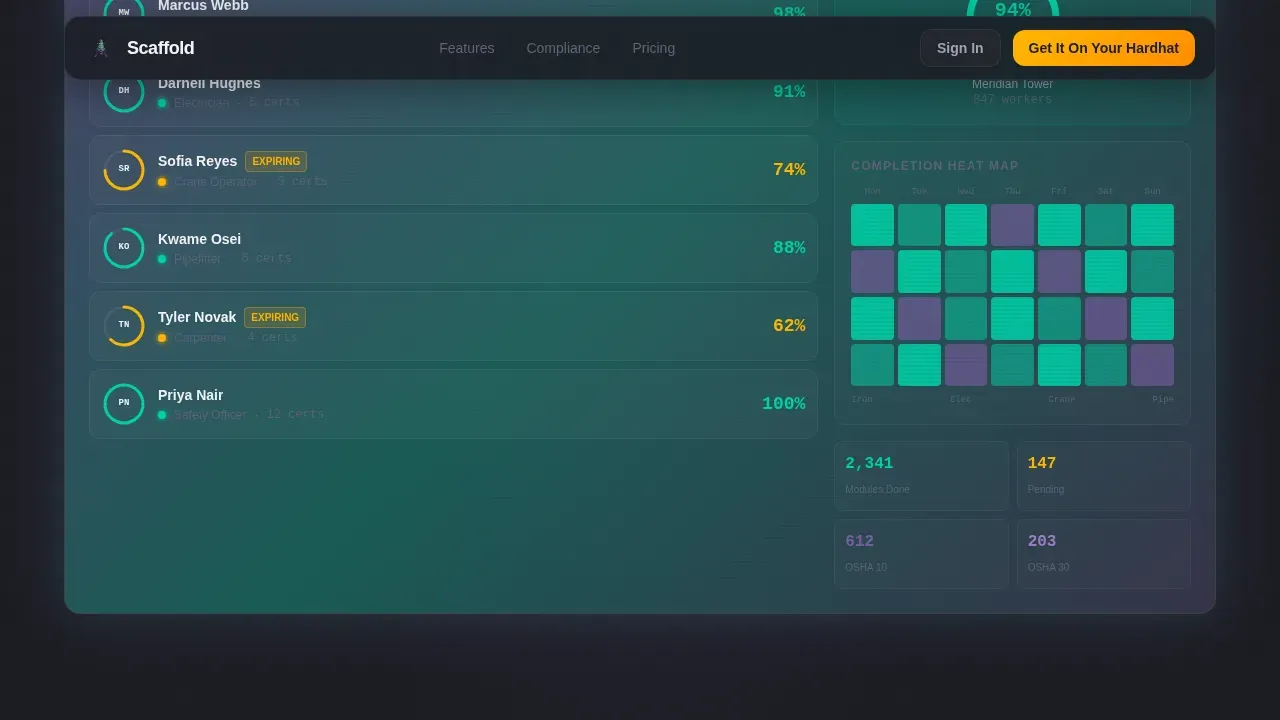
- An interactive hero dashboard mockup showing live scaffolding compliance data, hoverable crew cards, and animated progress rings
- Three progressive scroll-reveal sections: animated stats, a trade-by-trade certification matrix, and a split-panel audit simulation
- A dual-platform app download section with a floating call-to-action bar and a secondary desktop demo path
Feature list
This template includes carefully structured sections and interactive components drawn directly from the project brief. Each feature supports the goal of communicating scaffolding compliance capability with clarity and urgency.
Interactive Compliance Dashboard Hero
The header drops visitors into a functioning dashboard mockup for a live project called "Meridian Tower." It displays 847 workers, a compliance score of 94.2%, three amber-flagged certifications expiring this week, and a heat map across eight trades. Visitors can hover crew cards, watch progress rings animate, and click a tab that switches between compliance view and training pipeline. This scaffold inspection overview feels real because it behaves like the product itself.
Animated Stats Reveal Section
The first scroll reveal lands with "37 minutes versus 4.5 hours" for new hire onboarding. Numbers appear before narrative, a Stats-First Impact direction that lets data do the persuading. This section helps project managers and site supervisors immediately grasp the efficiency gains of replacing manual safety practices with a digital platform.
Trade-by-Trade Certification Matrix
This section unfurls a certification checklist row by row, each trade animating its completion percentage like a progress bar filling in real time. It helps safety officers and inspectors see exactly which scaffolding installation crews are compliant and which need corrective actions, without reading a single paragraph.
Split-Panel Audit Simulation
One panel shows a frantic paper-file search. The other shows a single query returning every document instantly. This side-by-side view is the most persuasive section on the page. It visualizes the inspection process improvement and makes the case for digital compliance forms without using a single claim that is not already proven on screen.
App Download Call-to-Action Section
The primary call to action reads "Get It On Your Hardhat" with dual buttons for iOS and Android. A floating bottom bar appears after the header interaction. The full-width download section reappears after the audit simulation. A secondary path offers "Try the Demo Dashboard" for desktop users who want to explore before committing.
Page sections overview
| Section | Purpose |
|---|---|
| Interactive Hero Dashboard | Show live scaffolding compliance data and earn immediate trust |
| Animated Stats Reveal | Prove onboarding speed with a concrete number comparison |
| Certification Matrix | Visualize trade-by-trade scaffold inspection completion rates |
| Audit Simulation Panel | Contrast paper chaos with instant digital document access |
| App Download Section | Drive iOS and Android downloads with a dual-button layout |
| Floating call to action Bar | Persist the download prompt after hero interaction |
| Footer | Close with a clean single-row linear pattern |
Design & branding system
The visual system is built around a Dashboard Pro theme using an AI Iridescent color palette. It feels like a near-future construction command center, dark enough to make data luminous and grounded enough to feel professional on a jobsite.
- Deep structural charcoal (#1B1D23) background, scaffold white (#F4F5F7) card surfaces, holographic violet (#7B5EA7) and electric teal (#00D4AA) gradient accents across data visualizations
- High-vis safety amber (#FFB800) used exclusively for call-to-action buttons and urgent-state indicators such as expiring certifications
- DM Sans bold for headings and IBM Plex Mono for data values and numbers, reinforcing the command-center and technical quality feel
Mobile & speed optimization
Field workers access information on ruggedized tablets and phones. This template is built mobile-first, with thumb-friendly buttons and layouts that stay readable on small screens in bright outdoor conditions.
- All animations use CSS transforms for GPU-accelerated rendering, keeping scroll interactions smooth on mobile hardware
- GSAP ScrollTrigger drives progressive section reveals, progress ring animations, and tab switching without impacting layout reflow
- The floating call-to-action bar and dual-button download section are sized and spaced for one-handed on-site use
How this template helps you convert
The page is structured so visitors touch the product three times before the download ask appears. Each interaction builds confidence and reduces hesitation.
- The interactive hero dashboard proves the product is real. Visitors hover crew cards and watch certifications animate before reading a word of copy.
- The stats reveal and certification matrix prove the product works. Numbers and visual progress bars deliver the business case faster than any paragraph could.
- The audit simulation proves the product is urgently needed. Seeing the paper-chaos panel next to the instant-search panel creates the moment a visitor decides to download.
Other information about this template
This scaffold smart jobsite compliance management landing page template is a digital, mobile-friendly tool designed to move scaffolding operations from paper to real-time tracking. It is ideal for architects, engineers, safety officers, and project managers who need a high-converting page that communicates the value of a construction compliance platform clearly.
- Construction teams can customize sections, swap project data details, and adapt the inspection checklist displays to match their specific scaffolding installation workflows
- The template supports communication between field and office by visually demonstrating instant data sharing, which eliminates gaps that create potential hazards and compliance failures
- A scaffold inspection checklist is vital for maintaining scaffold safety, and this template is built to showcase checklist-driven scaffolding management, including pre-inspection, post-assembly, and daily-use inspection forms
- The template is ideal for meeting regulatory requirements and demonstrating adherence to industry standards, including safety regulations enforced by bodies such as OSHA
- Waterproof scaffold tags, inspection logbooks, and control tags signed and dated are all concepts the template can surface visually within the certification matrix and audit simulation sections
- Guardrails, personal protective equipment tracking, and corrective actions for defects can all be represented within the dashboard mockup components, helping clients understand the full scope of scaffolding compliance management
- Templates are crucial in construction operations for standardizing data collection, and this one provides professional, editable forms that help construction teams maintain orderly records and stay compliant
- For further information about how to customize this template or adapt it to specific regulatory requirements, the platform provides direct support resources



Theme
Dashboard Pro
Creative direction
Stats-First Impact
Color system
AI Iridescent
Style
Scroll Reveal (Progressive)
Direction
App Download
Page Sections
Interactive Meridian Tower Dashboard Hero
Stats-first Scroll Reveal Sections
Split-panel Audit Simulation
Dual-platform App Download Section
Progressive Iridescent Scroll Animations
Customizable Compliance Forms and Checklist Displays
Related questions
Who is this template designed for?
What sections are included in this template?
Can I customize the dashboard data and checklist details shown in the template?
Does the template work well on mobile devices?
How does this template support scaffold safety compliance messaging?



