Android Course Landing Page Template - Card Grid
The Kotlin Immersive Android Landing Page is a modular card-grid landing page built for online Kotlin and Android development courses. It opens with a free trial invitation, walks visitors through instructor-led module cards, embedded code playgrounds, and a floating call-to-action bar, all styled in a warm Botanical color system that feels like a well-lit greenhouse library.
by Rocket studio
Quick summary
This landing page template is designed for Kotlin and Android development online courses. It uses a modular card grid layout, a Botanical color system, and a faculty-style scroll experience. Visitors meet instructors, try live code playgrounds, and reach a signup form without friction. The template is built to earn trust before asking for a commitment.
Who this template is for
This template suits educators, indie course creators, and developer-focused training platforms who need a landing page that converts skeptical technical learners. It works especially well when the course content is deep and the audience needs to feel the teaching quality before enrolling.
- Junior developers who want to understand Kotlin properly, not just copy snippets
- Career switchers moving from unrelated fields into Android development
- Mid-level engineers transitioning from Java who write Kotlin with outdated habits
What problem this template solves
Most course landing pages look like marketing pages for people who are already convinced. Technical learners are different. They need to experience the teaching style before they hand over an email address. This template removes that barrier by letting visitors interact with the course before signing up.
- Generic course pages fail to show teaching quality, so developers scroll past without engaging
- Long onboarding flows after signup frustrate visitors who came to learn, not to fill forms
- Syllabus-style layouts feel cold and administrative, making it hard for learners to feel connected to the course
What you get with this template
You get a complete single-page layout built around a card grid that doubles as both a course syllabus and a faculty introduction. Every structural decision serves the goal of reducing hesitation and moving visitors toward the free module.
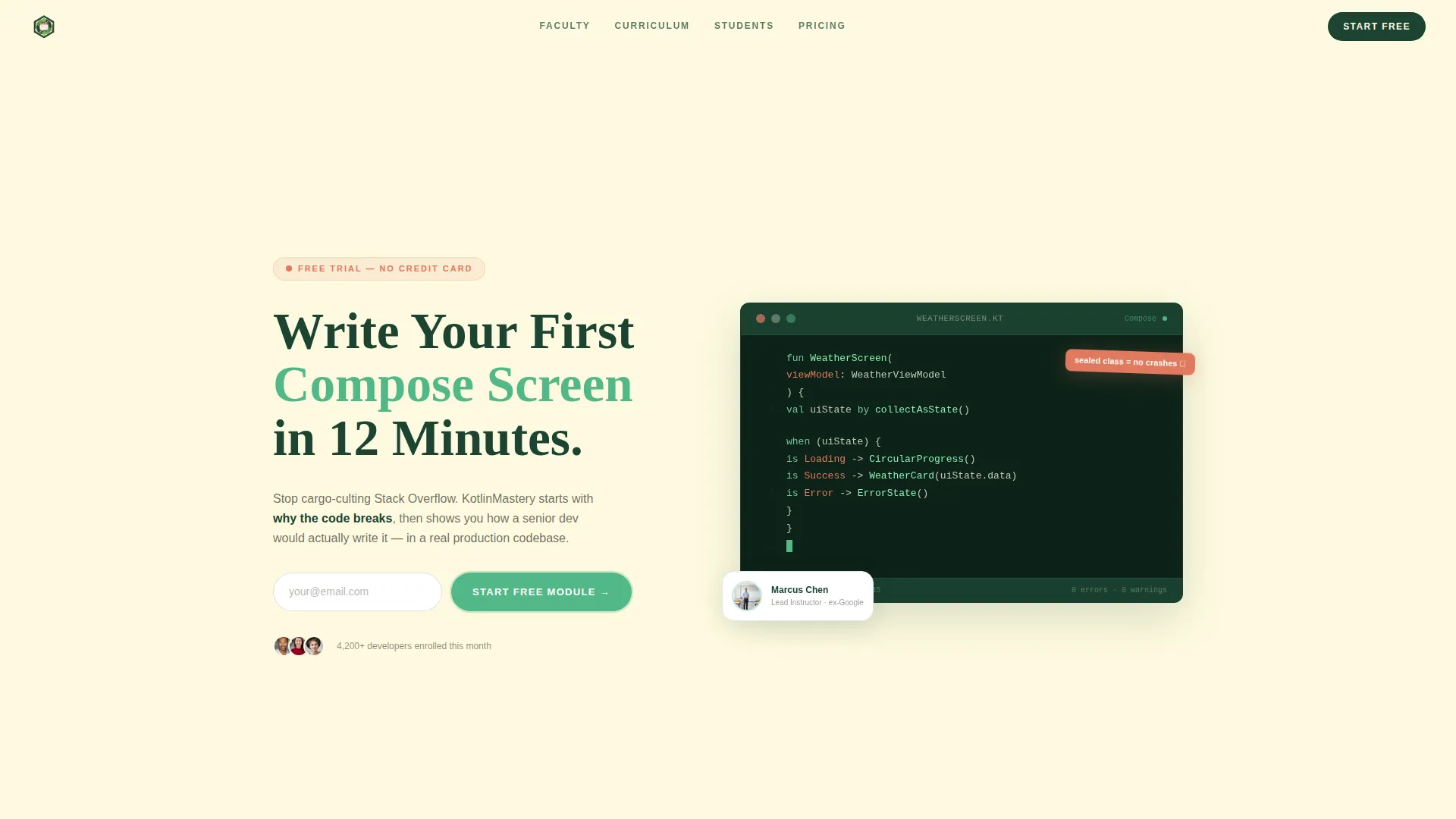
- A split-composition header with a free trial invitation, a single email field, and a call-to-action button
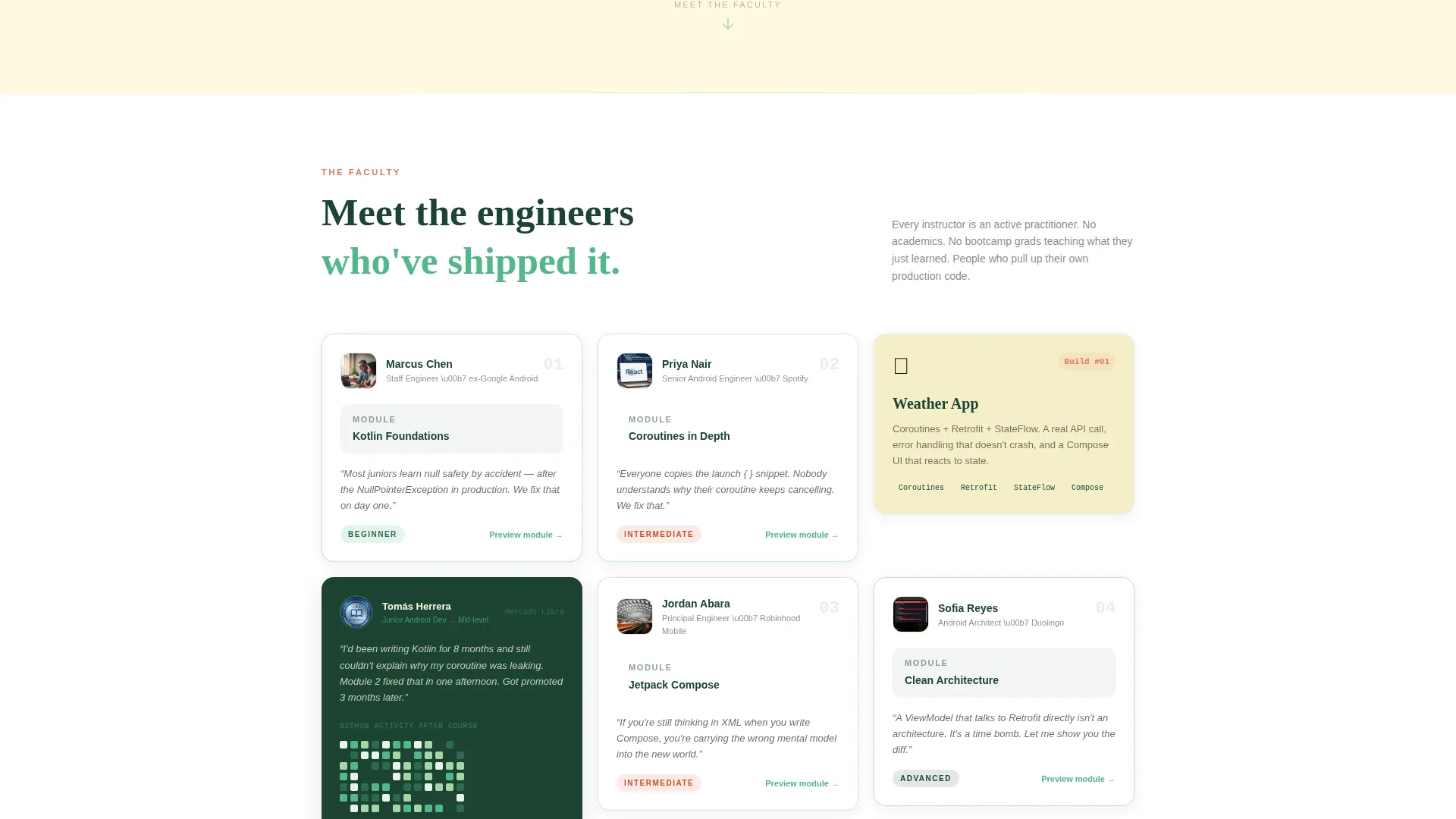
- A modular instructor card grid with inline preview expansion, lesson titles, difficulty badges, and a 30-second video clip per card
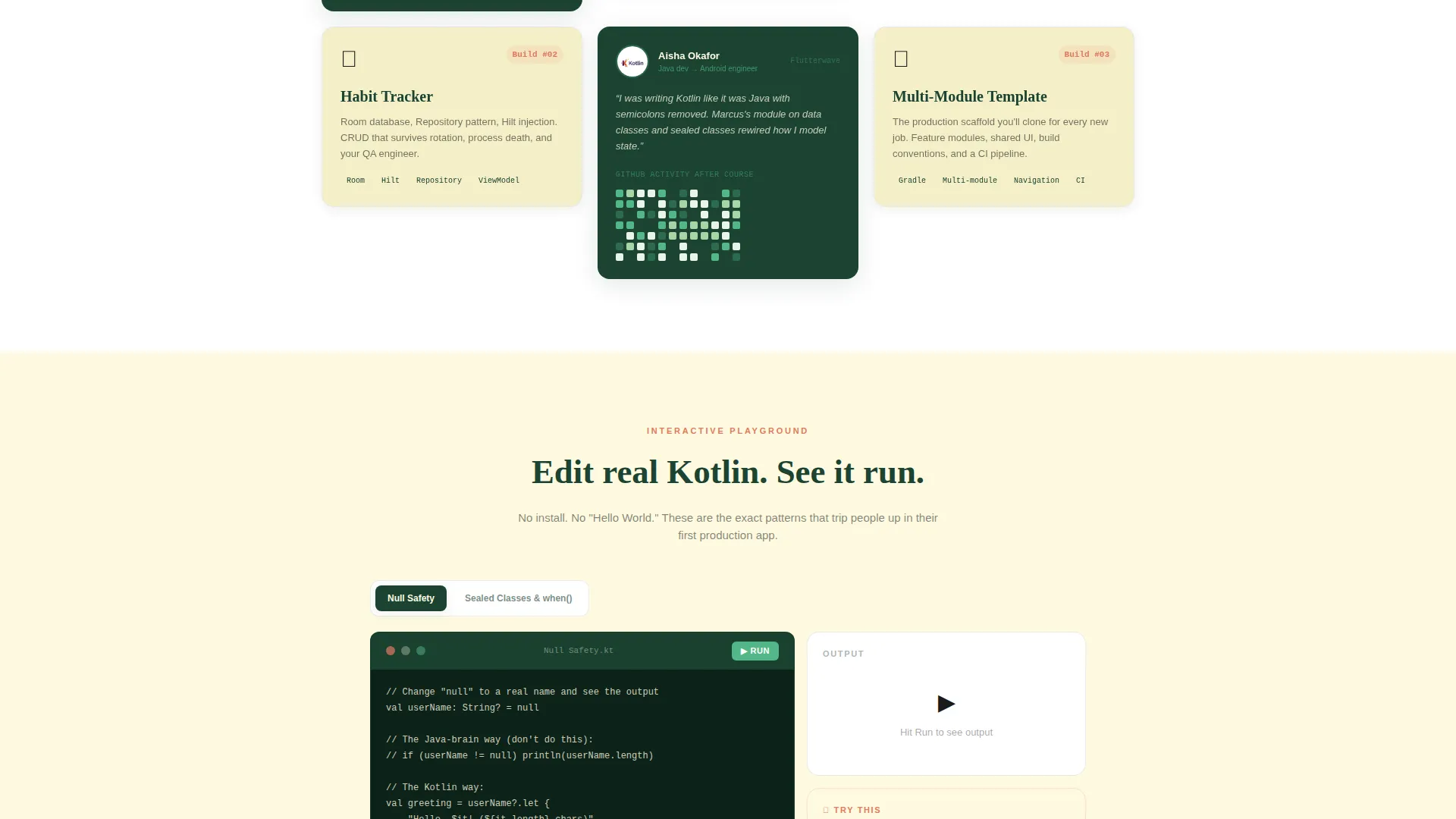
- Two embedded code playgrounds where visitors edit real Kotlin inline and see live output before signing up
Feature list
This section covers the core built-in components and interaction patterns included in the template.
Split-Composition Hero Header
The header divides into two halves. The left shows the lead instructor mid-sentence at a standing desk with a hand-drawn architecture diagram on the whiteboard behind them. The right displays a live code editor with a partially completed Compose user interface and a blinking cursor. A headline and single email field sit below, paired with a mossy green call-to-action button.
Modular Instructor Card Grid
Each card in the grid introduces a course module through the person who teaches it. Cards show the instructor's face, their specialty, and a short quote about the most common student struggle in that topic. The grid alternates between instructor cards, student testimonial cards with GitHub contribution graphs, and milestone cards showing completed projects like a weather app, a habit tracker, and a multi-module production template.
Inline Card Preview Expansion
Clicking any instructor card expands it inline without leaving the page. The expansion reveals a 30-second video clip, three lesson titles, and a difficulty badge. This keeps visitors on the page and lets them sample module content before committing.
Dual Conversion Paths
The primary path is "Start the Free Module," which collects only an email and immediately redirects to the first lesson. The secondary path offers a downloadable Kotlin cheat sheet as a PDF gate, collecting email plus self-reported experience level: beginner, intermediate, or Java background.
Embedded Kotlin Code Playgrounds
Two interactive code blocks are embedded in the page. Visitors can edit real Kotlin code inline and see the output directly. This demonstrates the teaching approach in practice and builds confidence in the course quality before any form is submitted.
Floating Bottom Call-to-Action Bar
A persistent call-to-action bar appears after the visitor scrolls past the third card row. It carries the same "Start the Free Module" prompt and keeps the primary conversion action visible throughout the entire scroll experience.
Page sections overview
| Section | Purpose |
|---|---|
| Hero Header | Free trial invitation with split layout, email field, and call-to-action |
| Instructor Card Grid | Introduce course modules through the people who teach them |
| Inline Card Preview | Expand any card to show a video clip, lesson titles, and difficulty badge |
| Code Playground One | Let visitors edit and run Kotlin inline to experience the teaching style |
| Student Testimonial Cards | Build social proof with real learner feedback and GitHub graphs |
| Milestone Build Cards | Show what students will have built at key course checkpoints |
| Code Playground Two | Second interactive block reinforcing the hands-on learning approach |
| Cheat Sheet Gate | Secondary conversion path collecting email and experience level |
| Floating call to action Bar | Persistent signup prompt appearing after third card row scroll |
Design & branding system
The visual identity follows an Educational Guide theme built on a Botanical color system. The palette draws from natural, warm references, a greenhouse library where sunlight filters through leaves onto paper pages. Every color choice reinforces a calm, focused study environment rather than a high-pressure sales page.
- Deep forest canopy (#1B4332) and living moss (#52B788) form the primary palette for backgrounds, card borders, and buttons
- Sun-through-leaves cream (#FEFAE0) and soft white alternate as section backgrounds, while annotation pink (#E07A5F) is reserved for badges, highlights, and interactive accents
- Code snippets sit inside dark canopy blocks where syntax highlighting reads like new growth against deep green, and cards float on subtle forest-edged shadows with a gentle scroll-reveal lift
Mobile & speed optimization
The card grid layout is built modularly, meaning each card row stacks and reflows cleanly on smaller screens without losing the instructor-first visual hierarchy. The floating call-to-action bar remains accessible on mobile throughout the scroll.
- Cards reflow from multi-column grid to single-column stack on narrow viewports, preserving the faculty introduction rhythm
- The inline card expansion and code playground components are designed to fit within mobile viewport widths without horizontal overflow
- The header split composition adapts so both the instructor image and code editor remain legible at phone screen sizes
How this template helps you convert
The entire page is structured around giving value before asking for anything. Every section either builds trust, demonstrates teaching quality, or reduces friction on the path to signup.
- The two embedded code playgrounds let visitors prove the teaching style works for them before entering an email, making the eventual signup feel like a natural next step rather than a gamble.
- The dual conversion paths serve different levels of visitor readiness: the free module path captures people ready to start now, while the cheat sheet path captures browsers who need more time, both without sending anyone away empty-handed.
- The floating call-to-action bar ensures the primary signup action stays visible after every scroll interaction, so visitors who finish reading an instructor card do not need to hunt for the next step.
Other information about this template
This template is a strong fit for course creators who want to position their Kotlin and Android development curriculum as a professional, mentor-led experience rather than a video library. The Team and People creative direction means the page sells the instructors as much as the content, which is particularly effective for technical audiences who value expertise over polish.
- The template style is Card Grid (Modular), which makes it straightforward to add or remove instructor cards as the course roster grows
- The lp_direction is Content and Resource delivery, meaning every section is built to provide genuine value rather than to pressure visitors into a decision
- The header concept is a Free Trial invitation, so the page opens by removing risk rather than stating a price
- The Educational Guide theme and Botanical color system are designed to feel distinct from typical developer tool marketing, giving the course a warm, approachable identity that matches the patient senior dev tone described in the course brief
Theme
Educational Guide
Creative direction
Team & People
Color system
Botanical
Style
Card Grid (Modular)
Direction
Content/Resource
Page Sections
Split-composition Hero with Free Trial Call to Action
Faculty-style Instructor Card Grid
Inline Module Preview Expansion
Two Embedded Kotlin Code Playgrounds
Dual Conversion Path Design
Floating Bottom Call-to-action Bar
Related questions
Can I change the number of instructor cards in the grid?
Do the embedded code playgrounds require a backend connection?
What happens after a visitor submits the free module form?
Is the cheat sheet download path separate from the main signup?
What type of course works best with this template?



