Containerization Managed Service Landing Page Template
Kube is a hub-and-spoke landing page template built for a containerization managed service. It opens with a live cost-comparison calculator, guides visitors through five interactive operational demos, and closes every section with a clear call to action. The Slate and Sky color system and Startup Velocity theme give the page a focused, terminal-at-dawn energy that speaks directly to technical buyers.
by Rocket studio
Quick summary
Kube is a single-page, anchor-navigated landing page template designed for a container orchestration managed service. It pairs a real-time cost calculator header with five interactive spoke sections covering deployment, scaling, observability, security, and recovery. The design targets CTOs, platform engineers, and founding engineers who are tired of managing infrastructure complexity by hand.
Who this template is for
This template is built for technical teams and startup leaders who understand the pain of running containers at scale without managed support. The language, layout, and calls to action are written specifically for people making infrastructure decisions under real pressure.
- CTOs at Series A startups who are burning runway on DevOps hires they cannot afford
- Platform engineers at mid-stage companies overwhelmed by Kubernetes complexity and operational overhead
- Founding engineers who want to ship product instead of maintaining cluster configurations
What problem this template solves
Container orchestration is genuinely hard. Teams waste weeks wrestling with YAML configurations, Helm chart dependencies, and node failures that surface at 3 a.m. This template gives a managed service a landing page that speaks the language of that exact frustration and shows a clear way out.
- Visitors arrive skeptical and tired; the calculator instantly reflects their real infrastructure cost back at them
- Technical buyers need proof before they commit; the interactive spoke demos provide that proof in the page itself
- Generic landing pages fail DevOps audiences; this template uses the vocabulary and visual language of the terminal environment they already trust
What you get with this template
This template delivers a complete, conversion-focused landing page structured around an anchor navigation hub with five spoke sections. Every element is purpose-built for a containerization managed service audience.
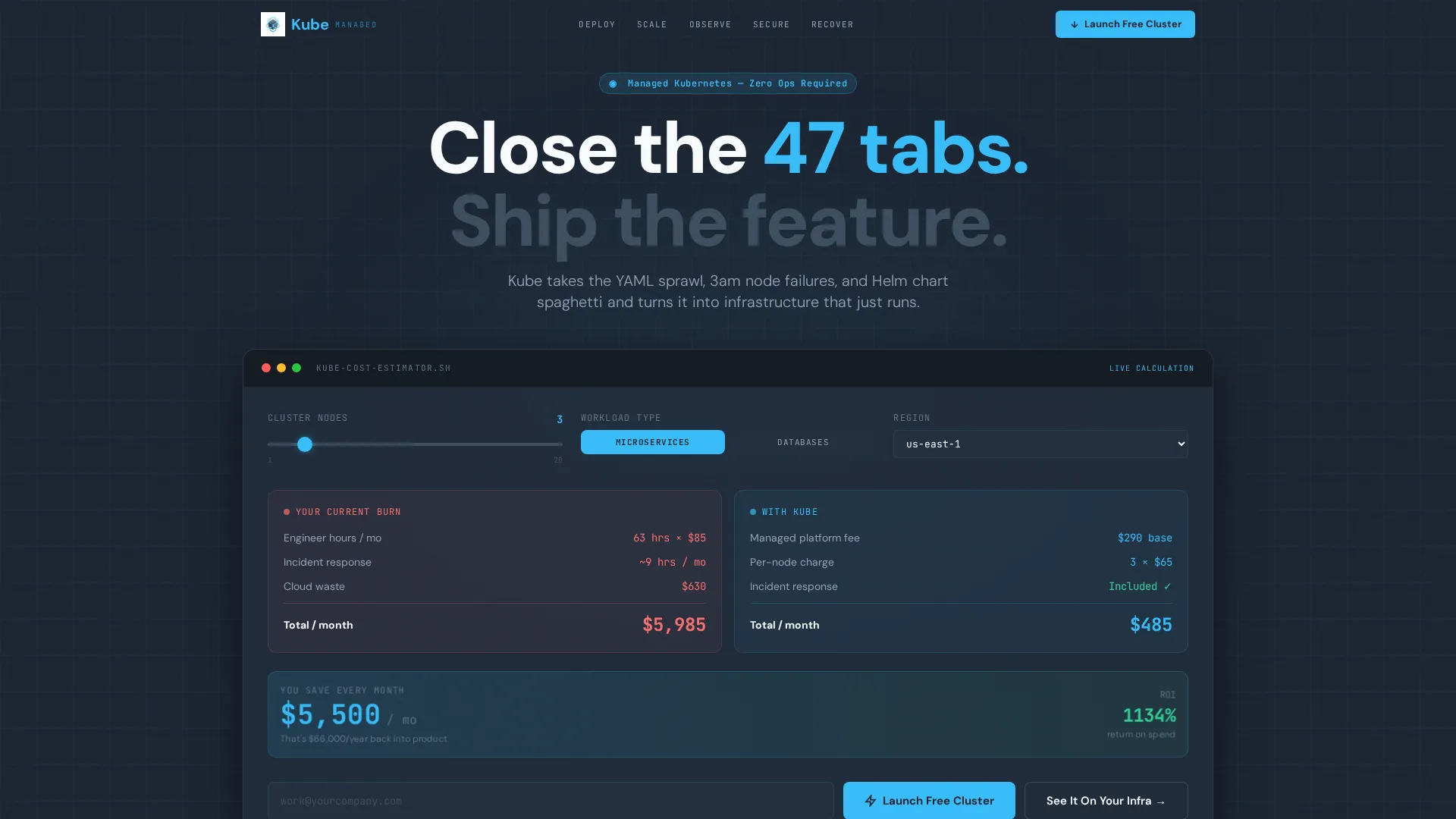
- A live cost-comparison calculator with sliders for cluster size, workload type, and region, animating in real time
- Five interactive operational domains: Deploy, Scale, Observe, Secure, and Recover, each with its own micro-demo experience
- Dual call-to-action paths: a primary "Launch a Free Cluster" flow requiring only a work email and GitHub connect, and a secondary "See It On Your Infra" questionnaire routing to a personalized demo
Feature list
This template packs a focused set of purpose-built components. Each one is designed to reduce friction for a technical buyer and move them toward a free trial.
Live Cost-Comparison Calculator
The header section features a two-column calculator pre-loaded with realistic defaults: a three-node cluster slider, a workload toggle between stateless microservices and stateful databases, and a US-East region selector. The left column tallies engineer hours, incident response, and cloud waste in red-trending numbers. The right column shows a single managed line item in sky blue. The savings delta animates at the bottom as visitors drag sliders.
Hub-and-Spoke Anchor Navigation
A persistent spoke wheel serves as the anchor navigation. Each of the five spokes, Deploy, Scale, Observe, Secure, and Recover, represents a distinct operational domain. Clicking a spoke opens an interactive micro-demo rather than simply scrolling to a section, keeping visitors engaged past the fold.
Interactive Operational Micro-Demos
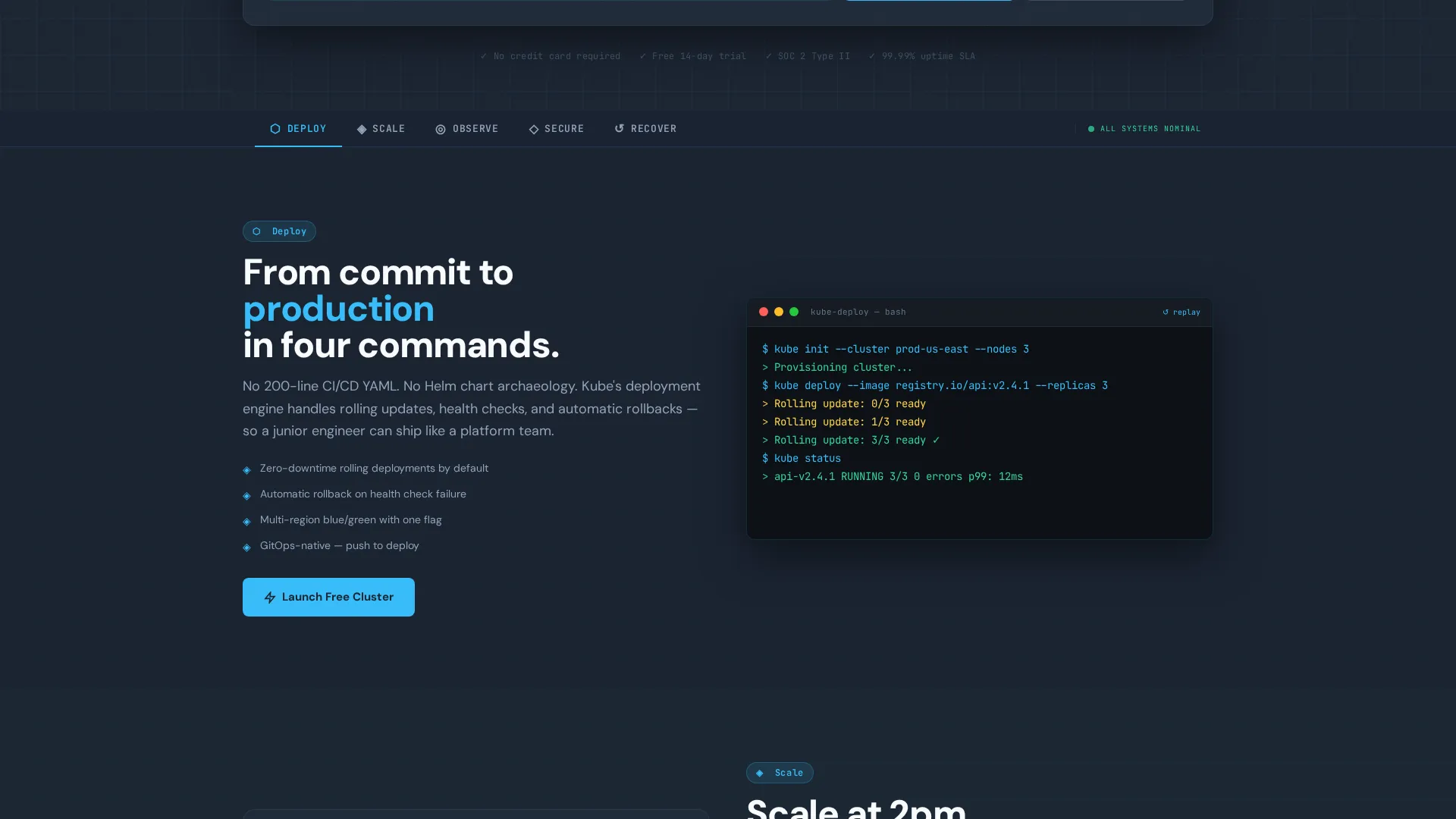
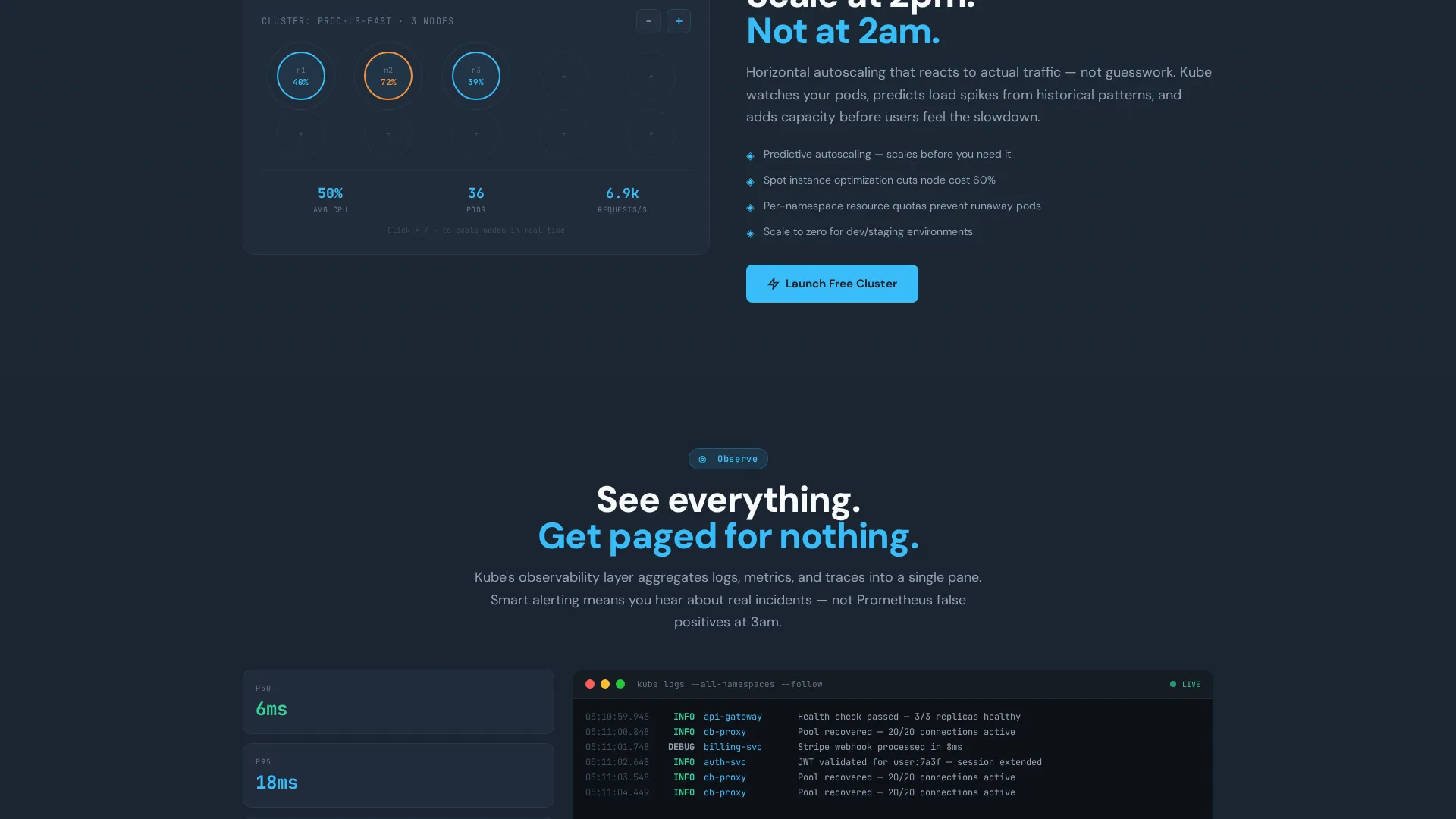
Each spoke section contains a domain-specific interactive experience. Deploy shows a simulated terminal with a rolling deployment in four commands. Scale offers a drag-to-resize node visualizer. Observe streams a simulated live log. The complexity of each section escalates deliberately, so by the fifth spoke the visitor understands the depth of the managed layer.
Dual Conversion Paths
The primary call to action, "Launch a Free Cluster," appears at the calculator and after each spoke demo. It requires only a work email and a GitHub connection. The secondary path, "See It On Your Infra," opens a lightweight architecture questionnaire covering current provider, cluster count, and monthly container hours, then routes to a personalized demo.
Startup Velocity Visual Theme
The Slate and Sky color system uses deep terminal slate for backgrounds, cloud-infrastructure gray for secondary surfaces, open-sky blue for interactive elements and live data, and deploy-white for content areas. Every flash of sky blue signals that something is active and healthy, which reinforces the managed service's core promise.
Page sections overview
| Section | Purpose |
|---|---|
| Cost Calculator Header | Show real infrastructure burn versus managed cost in real time |
| Anchor Nav Hub | Provide persistent spoke-wheel navigation across all five domains |
| Deploy Spoke | Demonstrate a rolling deployment via a simulated four-command terminal |
| Scale Spoke | Let visitors drag a node visualizer to feel effortless horizontal scaling |
| Observe Spoke | Stream a simulated live log to illustrate real-time operational visibility |
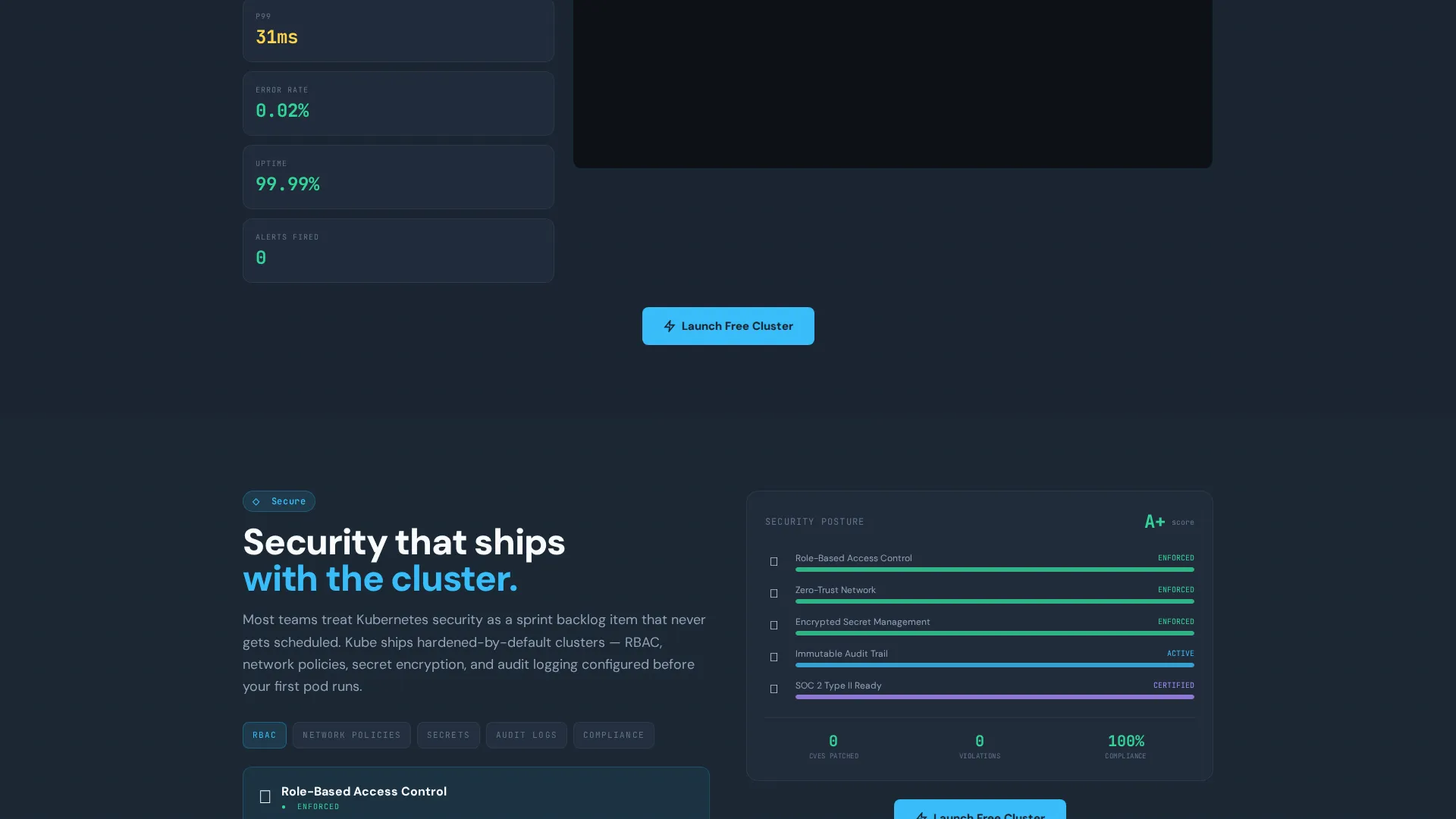
| Secure Spoke | Explain the security layer managed by the service, not the user |
| Recover Spoke | Show how the platform handles node failures without 3 a.m. intervention |
| Primary call to action Block | Drive free trial signups with email and GitHub connect |
| Secondary call to action Path | Route architecture questionnaire responses to a personalized demo |
Design & branding system
The visual identity follows the Startup Velocity theme, using a Slate and Sky color palette that feels like a well-configured terminal at dawn: dark, focused, and precise. Every color choice carries functional meaning for a technical audience.
- Deep terminal slate (#1B2432) forms the primary background, creating a focused environment that mirrors the tools engineers already use
- Open-sky blue (#38BDF8) is reserved for interactive elements, live data, and calls to action, so every active state feels immediate and healthy
- Deploy-white (#F8FAFC) keeps content surfaces clean and readable against the dark base, while cloud-infrastructure gray (#3D4F5F) separates secondary zones without breaking visual flow
Mobile & speed optimization
The template is structured to remain usable and persuasive on smaller screens. Interactive components are designed to scale down without losing the core demonstration value.
- The calculator sliders and workload toggles reflow cleanly for touch interaction on mobile viewports
- The spoke-wheel navigation adapts to a vertical scroll-based layout on narrow screens, preserving the section-by-section escalation logic
- Micro-demo panels are sized to fit within mobile frames so visitors can still experience the Deploy and Observe simulations on a phone or tablet
How this template helps you convert
The conversion strategy is built into the page architecture itself. Every section earns the next click rather than simply asking for it.
- The calculator does the persuasion before any copy does: when visitors see their own estimated burn rate versus the managed alternative, the free trial call to action feels like stopping the bleeding rather than making a purchase decision.
- The five-spoke interactive structure builds confidence progressively. Each micro-demo answers a specific technical objection, so by the Recover spoke the visitor has mentally handed over the operational burden and is ready to act.
- The dual call to action paths respect different buyer stages. High-intent visitors can start a free cluster immediately. Evaluation-stage buyers can request a personalized demo through the architecture questionnaire, keeping both groups moving forward.
Other information about this template
This template is categorized under containerization technology and is specifically matched to the containerization managed service niche. It is designed as a hub-and-spoke anchor-navigation landing page, not a multi-page website. The interactive explorer creative direction and click-through landing page direction are both embedded in the structural logic of the template.
- The template style is Hub and Spoke with anchor navigation, meaning all five operational domains live on a single page connected by a persistent navigation element
- The header concept is a Calculator and Estimator, which is the primary persuasion mechanism and the first thing every visitor interacts with
- The theme is Startup Velocity and the color system is Slate and Sky, making the template immediately recognizable to a DevOps and platform engineering audience
- The intersection match score for containerization managed service within the containerization technology subcategory is 13, indicating a high degree of specificity alignment
Theme
Startup Velocity
Creative direction
Interactive Explorer
Color system
Slate & Sky
Style
Hub & Spoke (Anchor Nav)
Direction
Click-Through
Page Sections
Live Cost-comparison Calculator
Hub-and-spoke Anchor Navigation
Interactive Operational Micro-demos
Dual Conversion Call-to-action Paths
Startup Velocity Visual Identity
Related questions
Who is this landing page template designed for?
Can I customize the calculator defaults to match my own pricing?
What are the two call-to-action paths included in this template?
Does the template include all five operational spoke sections?
Is this template a single-page layout or a multi-page site?



