AI & Machine Learning Pricing Website Template
Label is a split-screen landing page template built for AI data labeling and training platforms. It leads with an interactive cost estimation widget, then walks engineers through annotation samples, throughput dashboards, and integration snippets. The design follows a dark Dashboard Pro theme with a Slate and Sky color system, driving visitors toward downloading the labeling SDK.
by Rocket studio
Quick summary
Label is a single-page landing page template for AI data labeling and training platforms. It opens with a dramatic Dark Glass Panels header, then immediately leads visitors into an interactive estimation widget. Engineers can price their project before reading a single pitch line. The page closes with a focused SDK download call to action.
Who this template is for
This template is built for teams that live inside data pipelines and need to communicate their platform's value quickly and credibly to a technical audience.
- Machine learning engineers managing large unlabeled datasets who need to budget annotation work fast
- Computer vision startups and enterprise AI teams at companies like insurers or automakers that need ground truth data at scale
- AI data labeling platform founders or product marketers who want a tool-first landing page that earns trust before asking for a conversion
What problem this template solves
ML teams often struggle to convince engineers to commit to a labeling platform without hard numbers. A purely promotional page loses technical visitors fast. This template solves that by putting the proof first.
- Visitors arrive to a calculator, not a pitch deck, so they build their own project budget before any persuasion begins
- The page removes objections about cost transparency, integration complexity, and quality assurance by showing real data and code snippets inline
- The SDK download call to action only appears after the visitor has already engaged with throughput data, annotation samples, and quality audit visuals
What you get with this template
You get a fully structured, single-page landing page layout ready to adapt for any AI data labeling and training platform. Every section is purposefully ordered to move a skeptical engineer from curiosity to conversion.
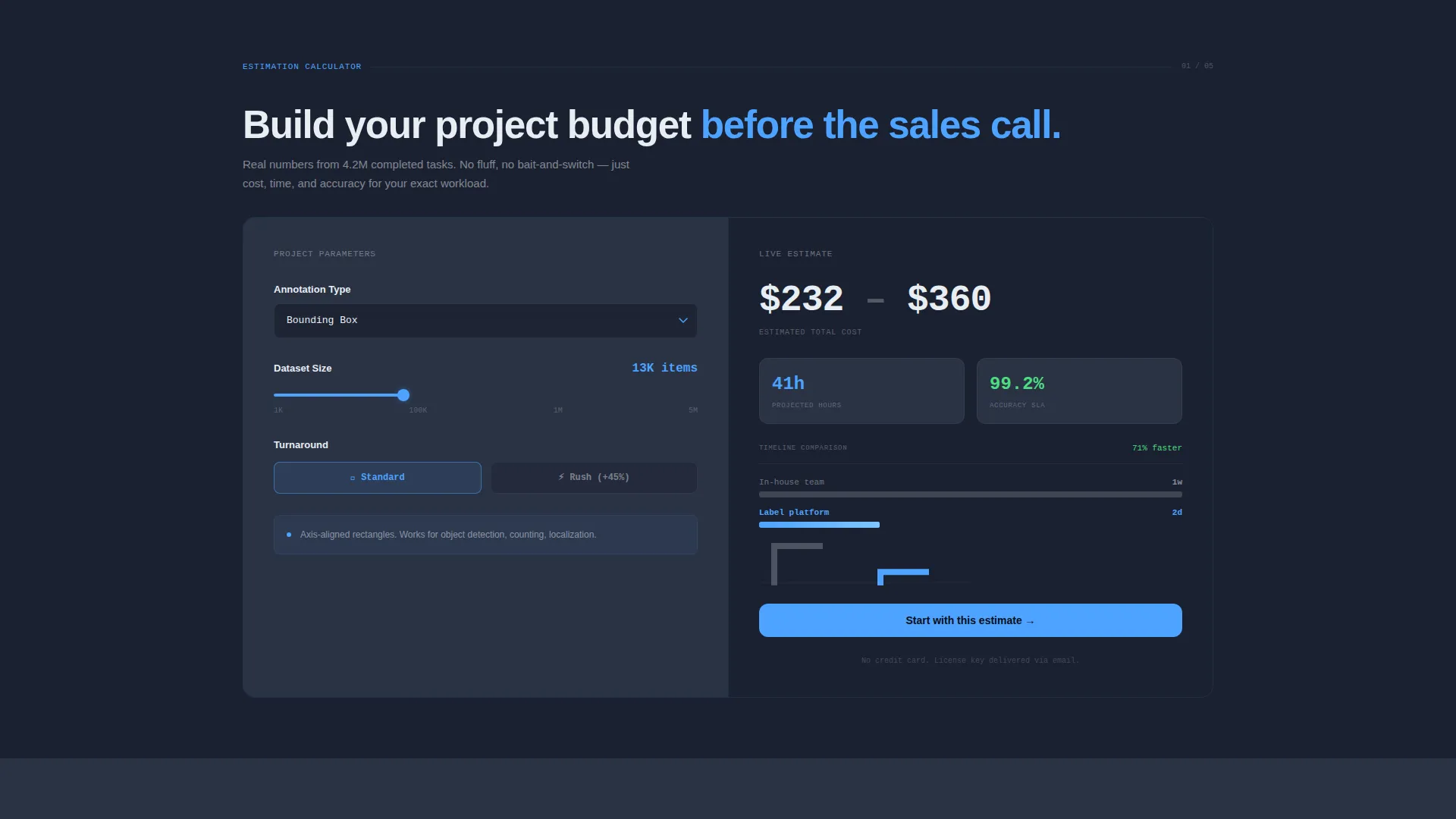
- An interactive cost and timeline estimation widget with dropdowns, a dataset size slider, and a live output panel showing cost, hours, accuracy SLA, and a comparison sparkline
- A complete visual flow covering the annotated header, calculator, annotation sample gallery, throughput dashboard mockup, integration code snippets, and quality assurance breakdown
- A conversion-focused footer section with an SDK download call to action, a platform toggle for PyPI, npm, and Docker, an email field for license key delivery, and a secondary anchor link back to the calculator
Feature list
This section describes the core built-in components that make the Label template functional and conversion-ready.
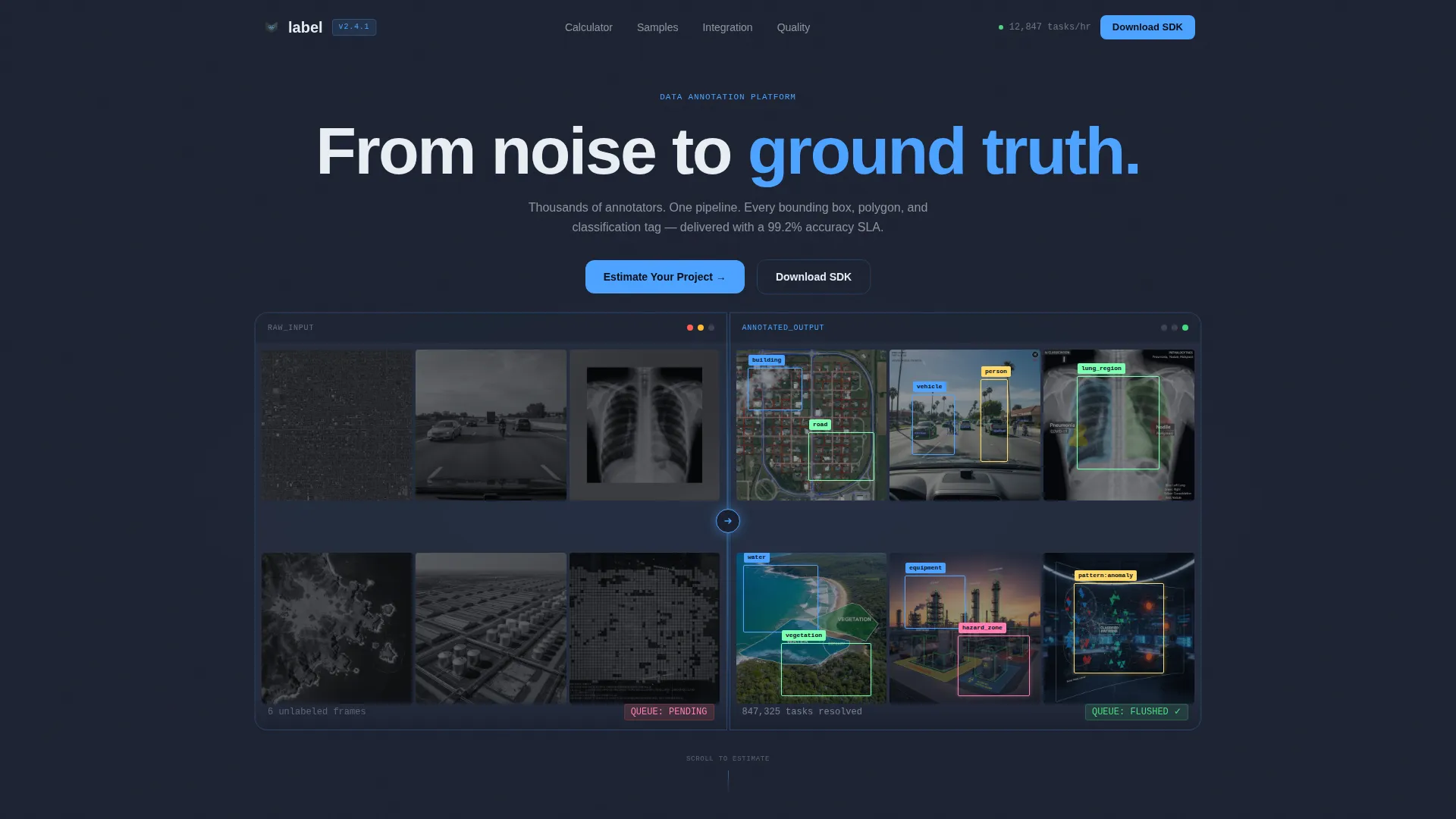
Split-Screen Dark Glass Header
The header renders two side-by-side frosted glass panels on a deep charcoal background. The left panel shows a raw, unannotated image grid. The right panel mirrors it with bounding boxes, polygons, and classification tags overlaid in sky blue. A luminous divider pulses between the panels, and the headline "From noise to ground truth." fades in after a two-second delay.
Interactive Estimation Widget
Placed directly below the header fold, this widget lets visitors configure their project without leaving the page. Left-side controls include annotation type dropdowns (bounding box, segmentation, named entity recognition, classification), a dataset size slider ranging from 1,000 to 5 million items, and a turnaround toggle for standard or rush delivery. The right side updates live with estimated cost, projected hours, accuracy SLA, and a comparison sparkline contrasting in-house versus outsourced timelines.
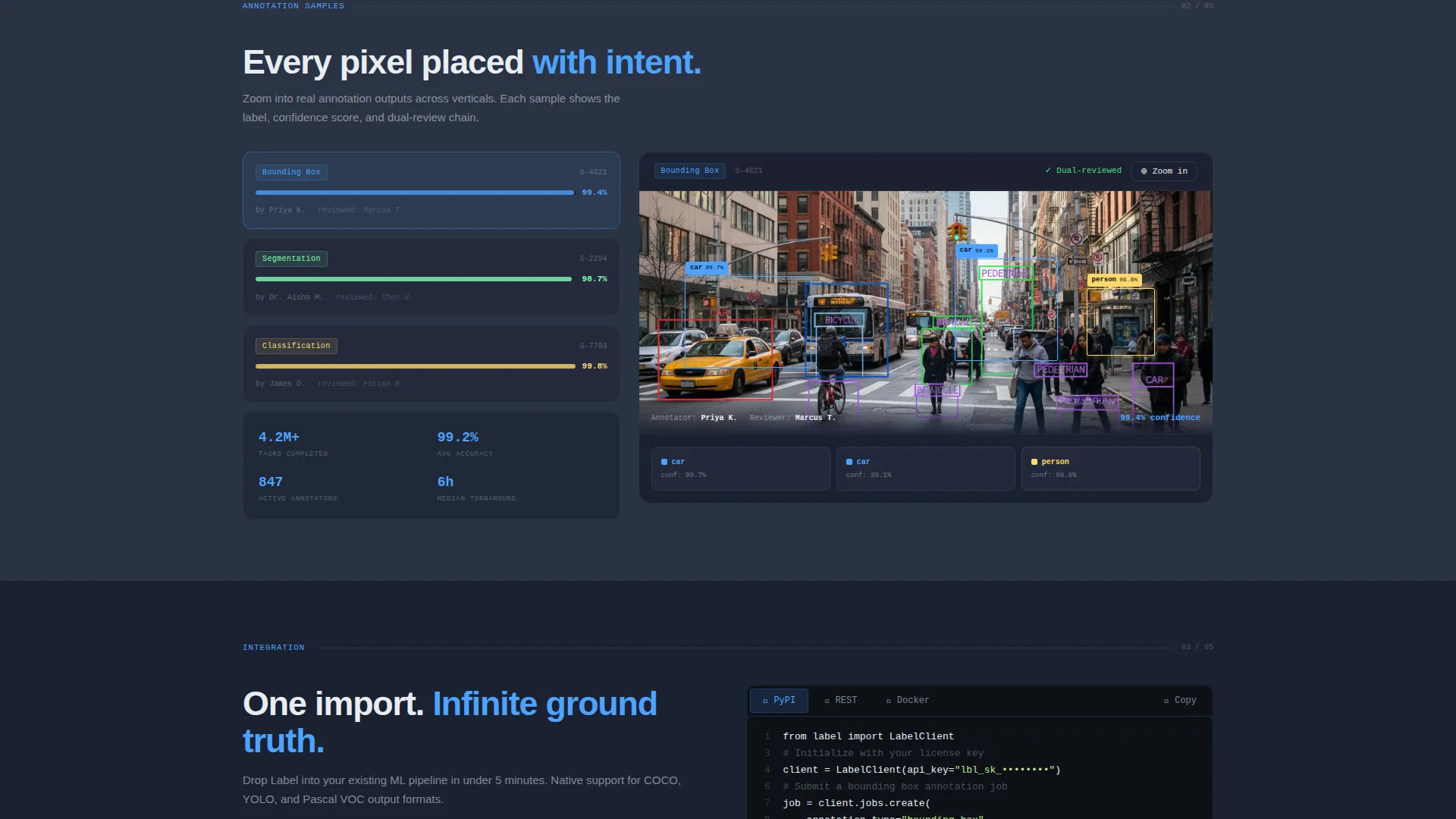
Annotation Sample Gallery
After the calculator, the page reveals annotated image samples with zoom-in detail capability. This section gives visitors visual confirmation that the quality suggested by the calculator numbers is real and inspectable.
Throughput Dashboard Mockup
A real-time style dashboard panel mockup shows queue status, task completion rates, and pipeline health using the sky blue progress bar and status indicator style of the Slate and Sky color system. It reinforces the "every queue flushed green" feeling described in the platform's core promise.
Integration Code Snippets
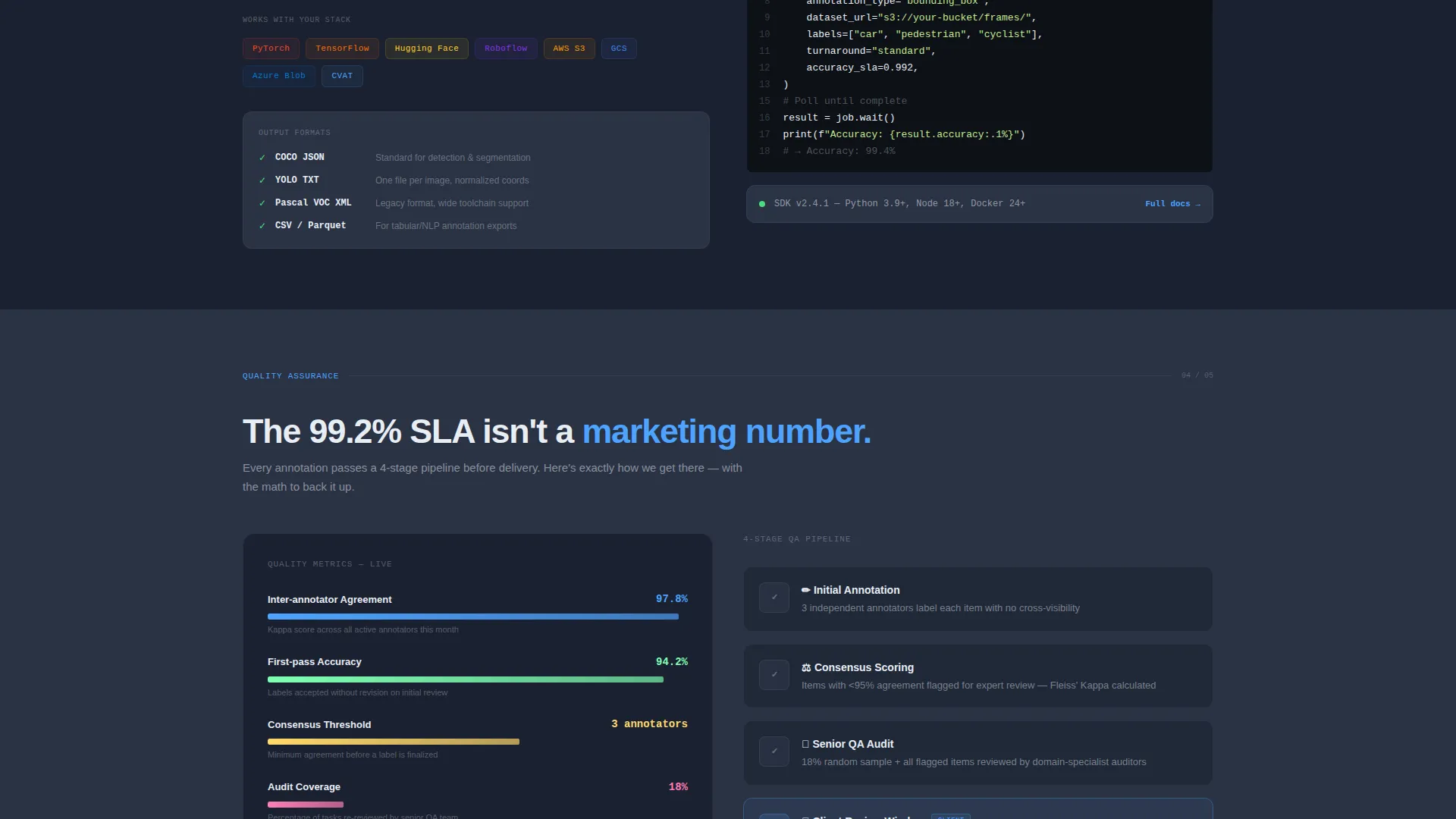
Inline code blocks demonstrate Python and REST API integration patterns. These snippets let engineers assess how the platform fits their existing stack without leaving the page or opening documentation externally.
Quality Assurance Breakdown
A dedicated section visualizes the consensus scoring and audit loop process. It shows how annotation quality is verified, giving enterprise buyers the evidence they need to justify the platform to their teams.
Page sections overview
| Section | Purpose |
|---|---|
| Dark Glass Header | Sets visual tone and reveals core promise |
| Estimation Widget | Lets visitors price their project interactively |
| Annotation Sample Gallery | Shows labeled output quality up close |
| Throughput Dashboard | Demonstrates pipeline capacity visually |
| Integration Snippets | Proves technical fit with code examples |
| Quality Assurance Breakdown | Explains consensus scoring and audit loops |
| SDK Download call to action | Drives the primary conversion action |
Design & branding system
The template uses the Dashboard Pro theme with a Slate and Sky color palette. Every design decision reinforces a sense of technical authority and operational calm, like a cockpit at cruising altitude.
- Deep command-line charcoal (#1B2131) dominates all backgrounds and card surfaces, gunmetal panel gray (#2A3244) separates nested panels and secondary containers, and high-altitude sky blue (#4DA3FF) activates progress bars, borders, active states, and call-to-action buttons
- Pale status-bar white (#E8EDF3) keeps all typography readable and breathable against the dark depth of the layout
- The frosted glass panels in the header carry a 1-pixel sky-blue border and subtle blur effect, making them feel like floating heads-up display elements rather than static image blocks
Mobile & speed optimization
The split-screen layout is designed with responsiveness in mind, ensuring the two-panel header and interactive widget translate cleanly across screen sizes without losing visual impact.
- The 50/50 split-screen panels reflow gracefully on smaller viewports so the annotated and unannotated image grids remain legible and distinct
- The estimation widget's dropdown and slider controls are touch-friendly and sized for comfortable interaction on mobile devices
- The dark color system and minimal image overhead keep the visual weight manageable across connection types
How this template helps you convert
The Label template is built around a calculator-first philosophy. Engineers trust tools more than promises, so the page earns the download before it asks for it.
- The interactive estimation widget lets visitors build a real project budget using their own numbers, which creates personal investment in the outcome before any marketing copy appears
- Each subsequent section (annotation samples, throughput mockup, code snippets, and quality audit visuals) adds a new layer of proof that the numbers in the calculator reflect real platform capability
- By the time visitors reach the SDK download call to action with the PyPI, npm, and Docker toggle, they have already mentally committed their project to the platform and just need the integration step to begin
Other information about this template
This template is categorized under Technology, with a subcategory focus on AI and Machine Learning and a niche alignment to AI data labeling and training workflows. It is a strong fit for platforms serving the broader data annotation market.
- The template style is a 50/50 split screen layout using the Dashboard Pro theme, making it visually distinctive among AI and machine learning landing pages
- The Slate and Sky color system is purposefully restrained, using only four core colors so teams can adapt the palette to their own brand without a full redesign
- The secondary call to action, "Try the Calculator Again," anchors visitors back up the page and keeps them engaged rather than letting them leave when they are not yet ready to download
Theme
Dashboard Pro
Creative direction
Calculator/Tool First
Color system
Slate & Sky
Style
Split Screen (50/50)
Direction
App Download
Page Sections
Split-screen Annotated Header
Interactive Cost Estimation Widget
Annotation Sample Gallery with Zoom
Throughput Dashboard Mockup
Integration Code Snippet Blocks
SDK Download Call to Action with Platform Toggle
Related questions
Who is the Label template designed for?
Can I adapt the estimation widget to reflect my platform's actual pricing?
Does the template include real code snippets or are they placeholder content?
Is this a single landing page or a multi-page website?
What is the primary call to action on this landing page?



