Data Engineering Newsletter Landing Page Template
Lakehouse is a bold brutalist landing page template built for a data engineering newsletter and community hub. It features an interactive lakehouse architecture diagram, hub-and-spoke anchor navigation, collapsible issue previews, inline code snippets, and a real-time format comparison module. Every element is designed to prove technical depth before asking for a single click.
by Rocket studio
Quick summary
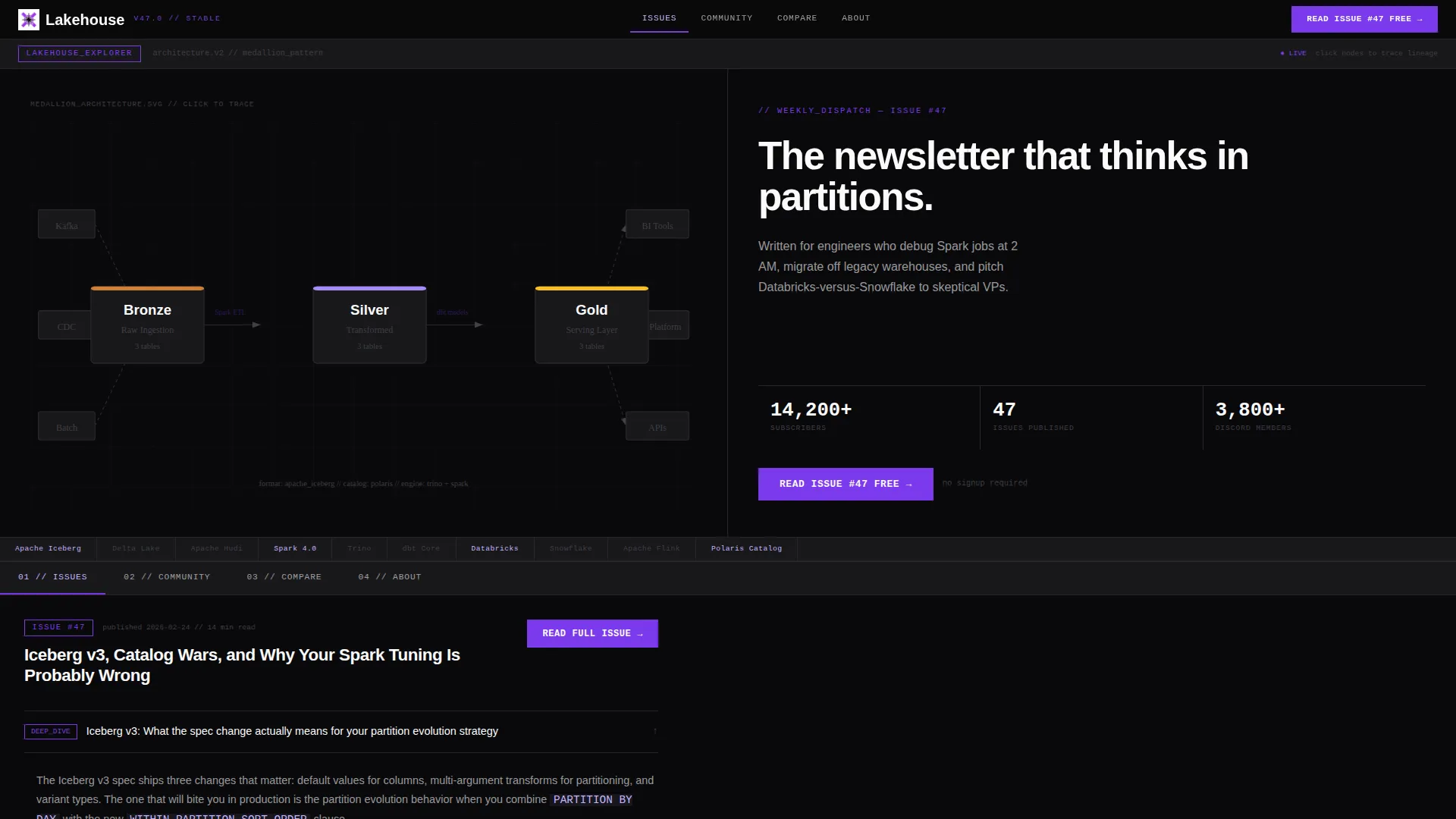
Lakehouse is a single-page, hub-and-spoke landing page template for a data engineering newsletter and community. It opens with a clickable architecture diagram showing Bronze, Silver, and Gold data layers. Visitors explore self-contained content modules without linear scrolling. The design is bold brutalist, terminal-dark, and built to earn subscriber trust through real content rather than marketing copy.
Who this template is for
This template is built for technical newsletter creators and community builders working in the data infrastructure space. It speaks directly to practitioners, not generalists.
- Senior data engineers who want a community landing page that matches their technical standard
- Analytics engineers and platform leads looking to showcase a newsletter that covers real architecture decisions
- Data infrastructure educators or independent writers building a paid or free subscriber base around lakehouse content
What problem this template solves
Generic newsletter landing pages ask visitors to trust a headline and a signup form. That approach fails with senior engineers who need proof before they commit. This template solves that trust gap by making the content itself the landing experience.
- Visitors see a working architecture diagram, real community threads, and actual issue content before any call to action appears
- There is no form gate on this page; the primary call to action sends readers to a full free issue, letting the writing close the conversion
- Engineers arriving from technical channels expect density and precision, not a polished marketing brochure
What you get with this template
You get a complete, interaction-rich landing page that functions as both a marketing surface and a live content preview. Every section is a spoke off a persistent anchor navigation bar.
- An interactive header with clickable Bronze, Silver, and Gold data layer nodes and animated lineage arrows
- Five self-contained content spokes covering issue preview, community threads, format comparison, and newsletter metadata
- A pinned call-to-action button and a behavior-triggered Discord toast notification, both always within reach
Feature list
This template ships with the following built-in interactive components and design modules.
Interactive Architecture Header
The header renders a live mini-explorer of a lakehouse architecture diagram inside the viewport. Visitors click nodes labeled Bronze, Silver, and Gold to watch animated SVG arrows trace data lineage between ingestion, transformation, and serving layers. A typewriter-effect headline types in character by character beneath the diagram, reinforcing the terminal aesthetic from the first second on the page.
Hub and Spoke Anchor Navigation
A persistent anchor navigation bar sits at the top of the page at all times. Each navigation item links directly to a self-contained content spoke. The pinned "Read Issue #47 Free" button stays visible in the nav bar regardless of which spoke the visitor is currently exploring, keeping the primary call to action always one click away.
Collapsible Issue Preview Spoke
One spoke expands a sample newsletter issue with collapsible sections organized into deep dives, hot takes, and tooling benchmarks. Visitors can open and close each section independently. This module lets the writing itself act as the conversion mechanism, giving readers a full picture of the newsletter's depth before they ever see a signup prompt.
Community Threads Spoke
A dedicated spoke surfaces community discussion threads ranked by upvotes. Each thread displays syntax-highlighted code snippets inline, so visitors can read real engineering conversations without leaving the page. This module functions as live social proof, demonstrating the community's technical quality rather than describing it.
Real-Time Format Comparison Module
A comparison spoke lets visitors toggle between format cards for the three major open table formats used in modern data lakehouse architectures: Delta, Iceberg, and Hudi. Specs rearrange in real time as visitors switch between cards. This interactive element addresses one of the most common decision points for the target audience and positions the newsletter as the go-to resource for that conversation.
Behavior-Triggered Discord Toast
After a visitor interacts with at least two spokes, a brutalist toast notification slides in from the bottom-left corner of the screen. The toast surfaces the secondary call to action: "Join the Discord." The trigger is interaction-based, meaning the invitation appears only after the visitor has already demonstrated engagement with the content.
Page sections overview
| Section | Purpose |
|---|---|
| Interactive Architecture Header | Opens with a clickable Bronze, Silver, Gold diagram and animated lineage arrows |
| Anchor Navigation Bar | Keeps primary call to action pinned and gives instant access to all spokes |
| Issues Spoke | Shows a collapsible sample issue with deep dives, hot takes, and benchmarks |
| Community Spoke | Displays upvoted threads with inline syntax-highlighted code |
| Compare Spoke | Lets visitors toggle between Delta, Iceberg, and Hudi spec cards in real time |
| About Spoke | Presents newsletter cadence, archive stats, and subscriber count metrics |
| Minimal Footer | Closes the page with a clean horizontal flow and essential links |
Design & branding system
The visual identity is Bold Brutalist. Hard grid lines, blunt spoke transitions, and a terminal-window aesthetic define every layout decision. Nothing fades softly here; every cut is deliberate.
- Color system uses void black (#09090B) as the dominant canvas at roughly eighty percent coverage, deep partition violet (#7C3AED) for navigation anchors, interactive states, and calls to action, schema lilac (#C4B5FD) for secondary labels and metadata, and raw terminal white (#FAFAFA) for body text
- Typography pairs DM Sans for headings with JetBrains Mono for code blocks, labels, and metadata fields, keeping the terminal aesthetic consistent at every reading level
- Violet elements act as attention signals across the page: wherever something glows violet, it is interactive or actionable
Mobile & speed optimization
The template is designed desktop-first, prioritizing the large-monitor experience that senior engineers typically use. Interactive elements like the architecture diagram and comparison toggle are built to use the full screen real estate available on widescreen displays.
- Server Components handle static sections to keep initial page loads lean, while Client Components power the interactive spokes
- The typewriter animation, SVG lineage arrows, node click states, spoke transitions, and toast notification are all client-side, keeping server rendering clean
- Desktop-first layout decisions reflect the target audience's device behavior, where terminal aesthetics and dense information grids read best on large monitors
How this template helps you convert
The conversion strategy here is proof before ask. Every interactive element earns visitor trust before a call to action is surfaced.
- The primary call to action, "Read Issue #47 Free," stays pinned in the anchor nav bar so it is always visible without interrupting content exploration, removing friction at the moment of decision
- The secondary call to action, "Join the Discord," appears only after the visitor has interacted with at least two spokes, triggering as a toast notification at the point of maximum engagement rather than on page load
Other information about this template
This template is built within a hub-and-spoke architecture that works especially well for technical content communities where depth is the product. A few additional details worth knowing before you build with it.
- The template style is Hub and Spoke with Anchor Navigation, meaning each content module is independent and navigable out of order
- The header concept is an Interactive Preview, a design pattern where the header demonstrates the product rather than describing it
- Creative direction follows an Interactive Explorer approach, where each spoke rewards curiosity without requiring linear reading
- The landing page direction is Click-Through, meaning no form fields appear on the page and conversion happens off-page through the free issue link
- The template sits within the Data Lakehouse Technology subcategory and is purpose-built for the Data Lakehouse Newsletter and Community niche
- Social proof elements include a subscriber count metric, community thread upvote counts, and real inline code snippets that demonstrate community quality



Theme
Bold Brutalist
Creative direction
Interactive Explorer
Color system
Void & Violet
Style
Hub & Spoke (Anchor Nav)
Direction
Click-Through
Page Sections
Interactive Architecture Diagram Header
Persistent Anchor Navigation Bar
Collapsible Sample Issue Spoke
Community Threads with Inline Code
Real-time Open Table Format Comparison
Behavior-triggered Discord Toast Notification
Related questions
Does this template include a newsletter signup form?
Can I replace the Bronze, Silver, Gold diagram with my own architecture?
Is the comparison module limited to three format cards?
Who is this template designed for?
Does the Discord toast notification fire immediately on page load?



