Robust Platform Engineering Landing Page Template
Photon is a split-screen landing page template built for a silicon photonic computing framework that compiles neural networks into light. It features a full-bleed animated header, a scrolling feature matrix with inline expandable rows, and a frictionless install flow. The design uses a void-black and iridescent color system that feels like a live photonic chip rendering its own performance data.
by Rocket studio
Quick summary
Photon is a single-page, split-screen landing page template designed for a photonic computing framework. It combines an animated dark-field header, a layered feature matrix, and a direct install call to action. The result is a focused page that takes an ML infrastructure engineer from curiosity to a copied terminal command in one uninterrupted scroll.
Who this template is for
This template is built for technically fluent audiences who need to evaluate a deep-infrastructure tool fast. It skips marketing fluff and goes straight to specs, code, and proof.
- Machine learning infrastructure engineers benchmarking inference latency in nanoseconds
- Quantum-optics researchers moving from simulation environments to physical silicon
- Startup chief technology officers who need to demonstrate photonic accelerator performance to investors
What problem this template solves
Most developer tool landing pages either oversell with vague promises or bury the technical proof under generic hero sections. Engineers leave before they reach the benchmarks. This template is structured so the most credible content arrives exactly when trust needs building.
- Visitors never have to navigate away to find specs, code snippets, or latency comparisons
- The install path is visible from the first scroll and stays reachable via a sticky bottom bar
- No email forms or gated content slow down the conversion moment
What you get with this template
You get a complete, single-page layout built around the photonic computing framework use case. Every section is designed to move a technical reader from initial impression to install action without friction.
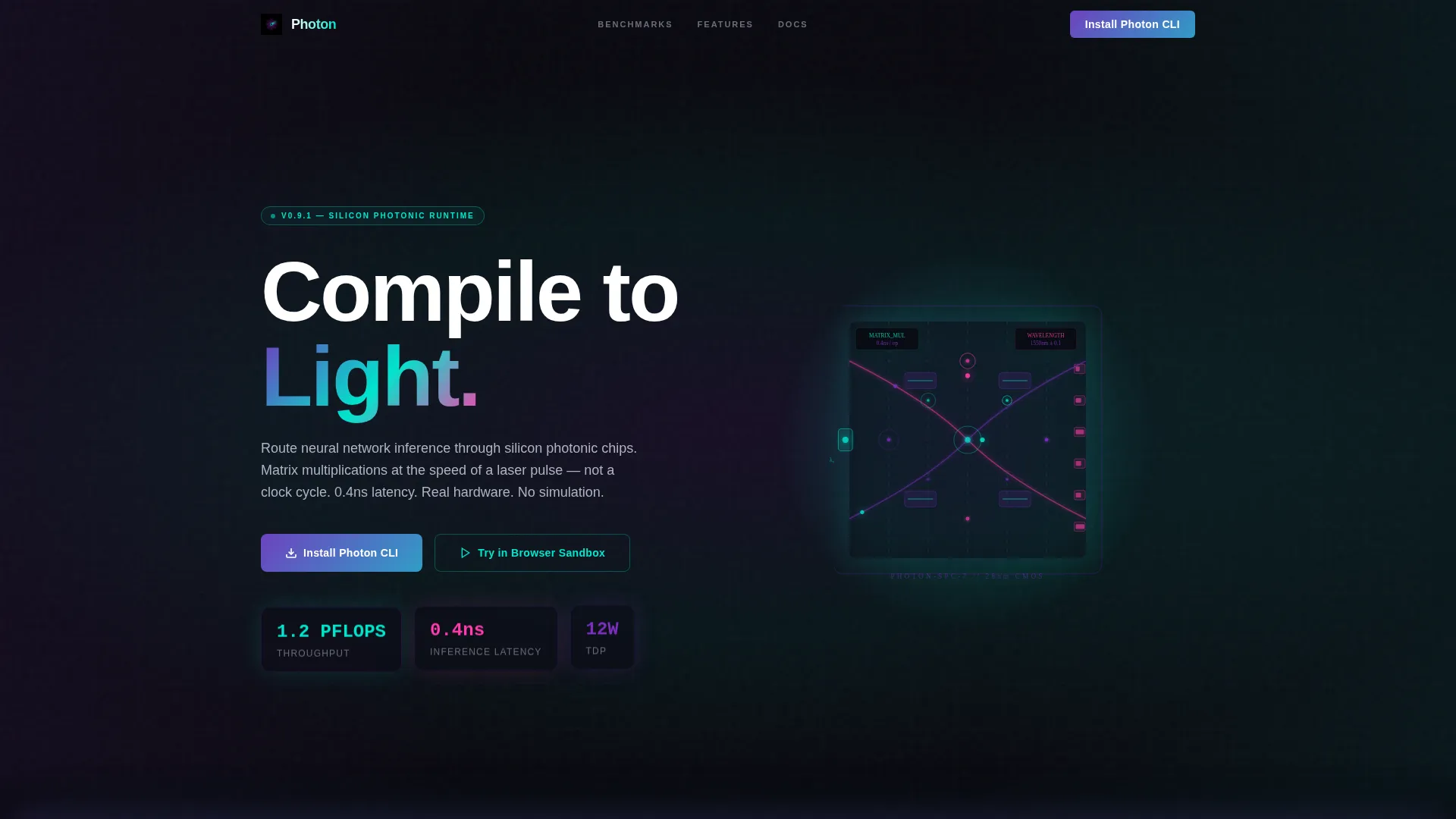
- A full-viewport animated header with live-feeling performance counters and a chip architecture diagram
- A scrolling feature matrix with left-right panel splits and inline expandable spec rows
- A multi-tab install block supporting pip, conda, and Docker with clipboard-ready commands
Feature list
This template ships with a set of purpose-built components that reflect the framework's technical depth and the visitor's decision-making process.
Animated Full-Bleed Header Scene
The header fills the entire viewport with a near-black background. A single horizontal light beam fractures into spectral threads that trace a chip architecture diagram. Photon pulses animate along waveguide paths, interference patterns bloom at junction nodes, and performance counters tick upward in real time, displaying figures like 1.2 PFLOPS, 0.4 nanosecond latency, and 12W thermal design power. After a two-second hold, the headline "Compile to Light." materializes in white.
Split-Screen Feature Matrix
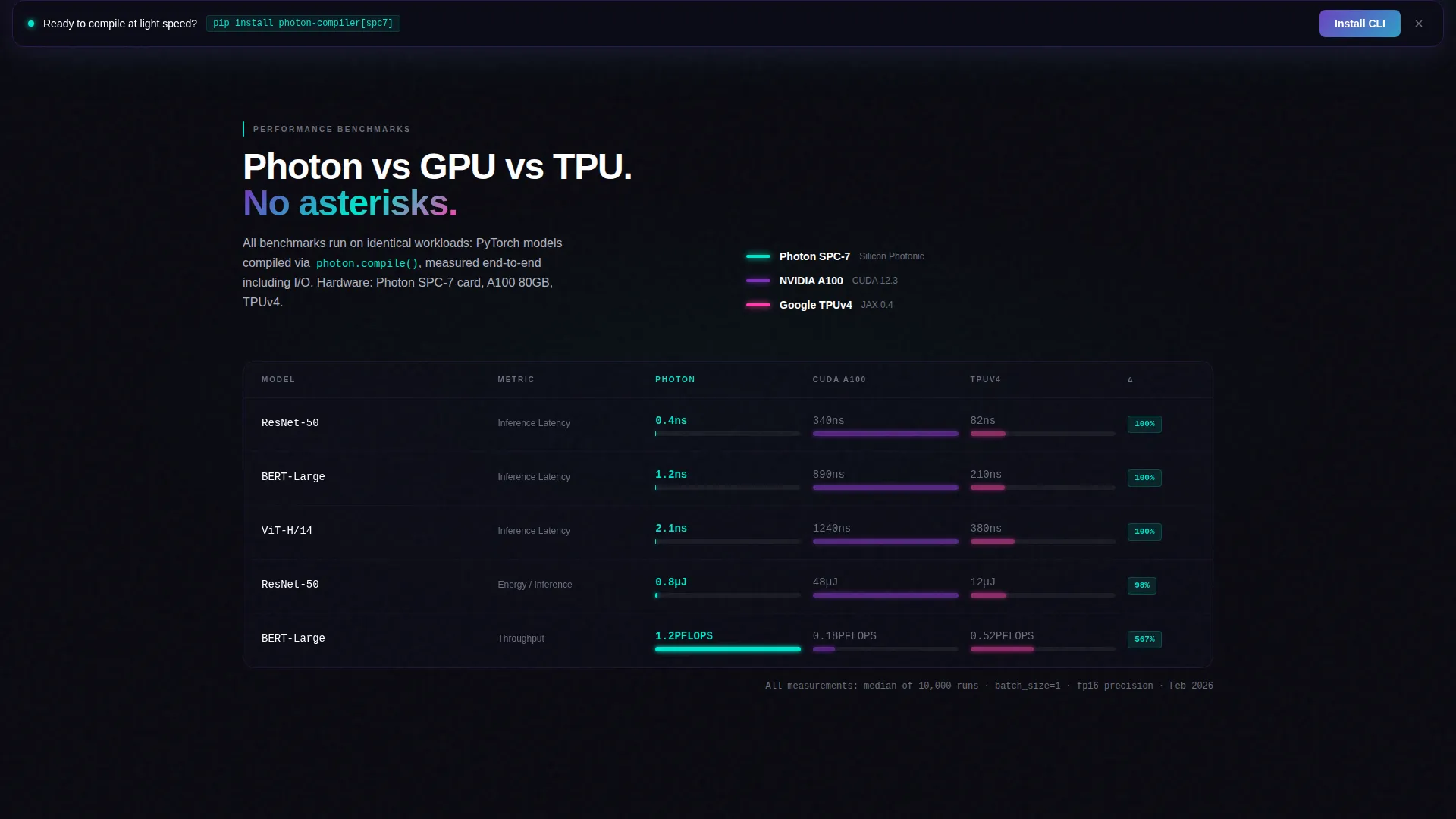
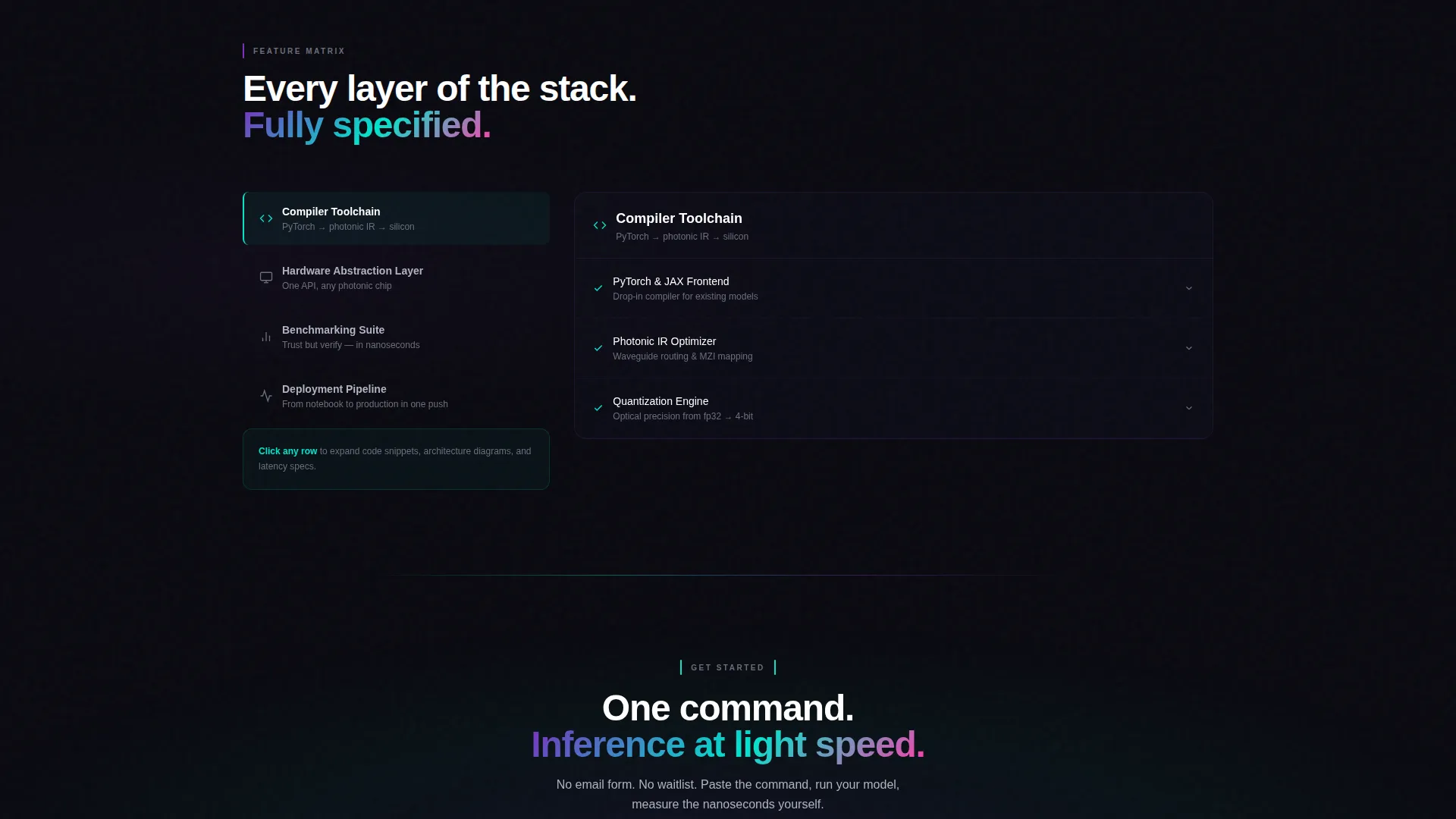
Every feature section divides the viewport into a left panel showing the feature category and a right panel holding an expandable spec grid. Clicking any row unfolds inline content including code snippets, architecture diagrams, and latency comparison sparklines. Baselines shown include comparisons against CUDA and Tensor Processing Unit workloads, building layer-by-layer technical credibility without any page navigation.
Inline Expandable Spec Rows
Each row in the feature matrix expands in place when clicked. The expanded state reveals structured technical detail: runnable code examples, component diagrams, and sparkline charts. The interaction keeps the visitor anchored on the page while progressively deepening their understanding of each capability area.
Multi-Tab Install Block
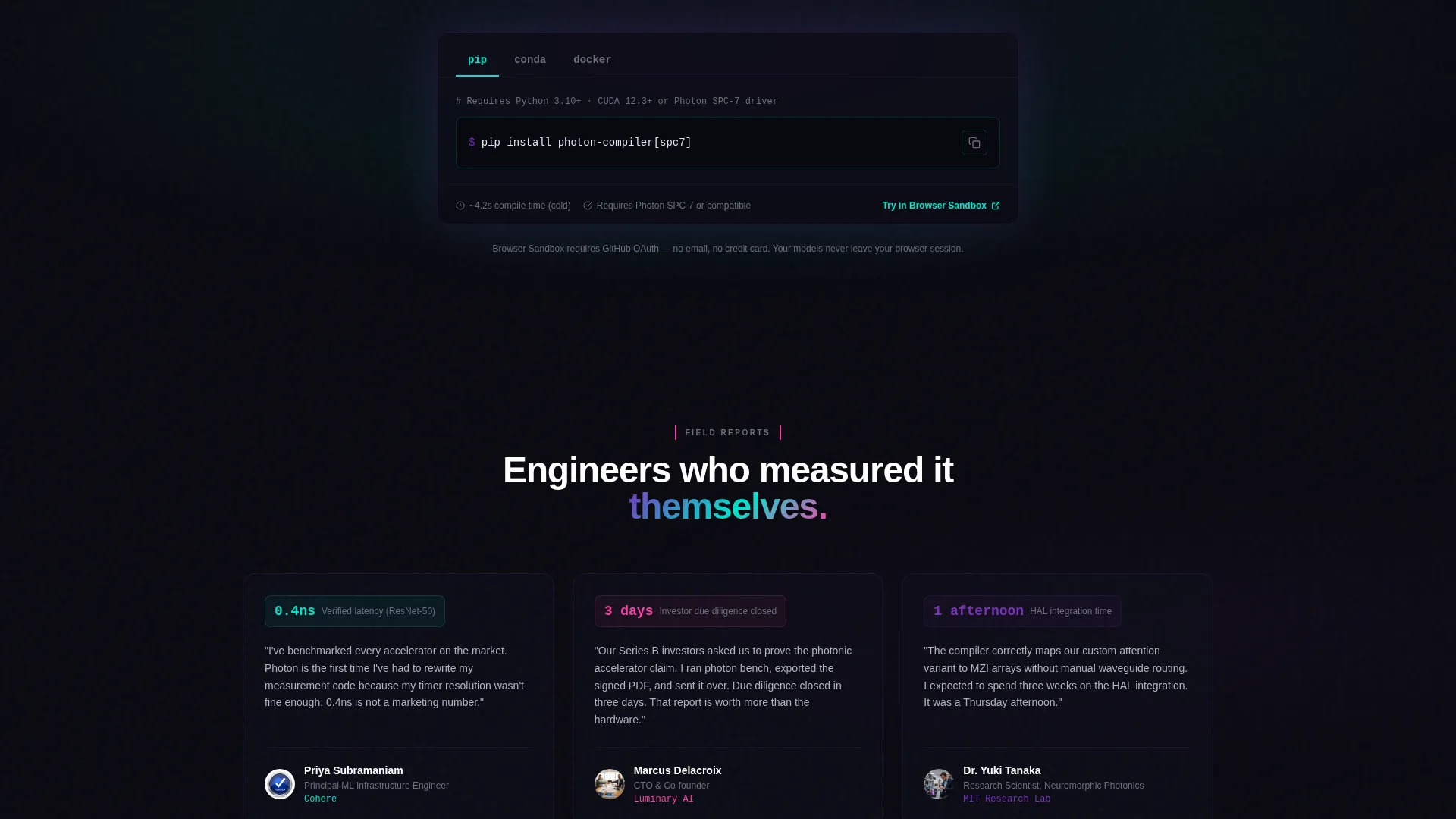
The primary call to action is an "Install Photon CLI" button that reveals a three-tab selector. Tabs cover pip, conda, and Docker. Each tab displays a single copy-paste terminal command alongside a clipboard button. This removes all decision friction at the final conversion step.
Browser Sandbox Entry Point
A secondary call to action, labeled "Try in Browser Sandbox," routes visitors to a hosted notebook environment. Access requires only a GitHub OAuth login. There is no email form, no approval queue, and no separate account creation step.
Sticky Install Bar
After the visitor scrolls past the second content section, a sticky bottom bar appears with the "Install Photon CLI" call to action. It persists across all subsequent sections, keeping the conversion action within reach at every point in the scroll journey.
Page sections overview
| Section | Purpose |
|---|---|
| Animated Header Scene | Establish atmosphere and display live performance figures |
| Headline Reveal Block | Deliver the core framework positioning statement |
| Compiler Toolchain Panel | Explain the neural-network-to-light compilation layer |
| Hardware Abstraction Panel | Describe the silicon photonic chip interface |
| Benchmarking Suite Panel | Show latency comparisons against GPU and TPU baselines |
| Deployment Pipeline Panel | Cover production-ready install and packaging options |
| Install call to action Block | Present pip, conda, and Docker commands with clipboard copy |
| Browser Sandbox call to action | Offer frictionless hosted notebook trial via GitHub login |
| Sticky Install Bar | Keep the primary conversion action visible after scroll two |
Design & branding system
The visual identity follows a Dashboard Pro theme using an AI Iridescent color system. The palette is built around near-total darkness, with color appearing only when light hits at the right angle, much like a diffraction grating.
- Core palette: void black (#09090F) for backgrounds, cool gray (#B0B3C1) for body text, pure white for headings, spectral violet (#7B2FBE), refracted cyan (#00E5CC), and prismatic pink (#FF3CAC) reserved for active states and hover glows
- Interactive surfaces such as buttons, toggles, and chart lines carry accent gradients that shift from violet through cyan, giving each element the shimmer of light bending through a photonic waveguide
- No stock imagery is used anywhere in the template; all visual content is generated from the layout's own structural and animated elements
Mobile & speed optimization
The split-screen layout is designed to reflow gracefully for smaller viewports. Heavy animation elements are scoped to the header scene so the rest of the page remains lightweight and fast to scroll.
- The 50/50 split-screen panels stack vertically on narrow screens, preserving readability of spec grids and code snippets
- The sticky install bar is sized and positioned to remain usable on touch devices without obscuring critical content
- Inline expandable rows collapse by default on mobile, keeping initial load clean and letting users tap to reveal detail on demand
How this template helps you convert
This template is engineered around a single conversion goal: get a qualified engineer to paste the install command into a terminal. Every design and layout decision supports that outcome.
- The animated header establishes immediate technical credibility with live performance numbers, so the visitor arrives at the feature content already primed to trust the tool.
- The feature matrix escalates from "what it does" to "how fast it does it" to "prove it yourself," answering the three questions an engineer asks before committing to a new framework.
- The sticky install bar and the multi-tab command block remove every remaining barrier at the moment of decision, making the download the natural end of the page experience.
Other information about this template
This template is a strong fit for teams building in the photonic computing technology space who need a credible, engineering-focused web presence quickly. It is part of a broader set of Dashboard Pro theme templates using the AI Iridescent color system.
- The template style is a 50/50 split screen, which works well for tools that need to balance narrative and technical specification side by side
- The landing page direction is optimized for app download, making it suitable for any developer framework or command-line tool that relies on direct install adoption
- The header concept, Dark Full-Bleed plus Glow, can be adapted to other deep-tech or infrastructure product contexts where a void-dark aesthetic reinforces the product's precision and performance story
- The creative direction, Feature Matrix, is especially effective for products with multiple distinct capability layers that each need their own proof points
Theme
Dashboard Pro
Creative direction
Feature Matrix
Color system
AI Iridescent
Style
Split Screen (50/50)
Direction
App Download
Page Sections
Animated Full-bleed Header Scene
Split-screen Feature Matrix
Inline Expandable Spec Rows
Multi-tab Install Command Block
Browser Sandbox Entry Point
Sticky Install Bottom Bar
Related questions
Can I customize the performance numbers shown in the header?
Does the template include all three install method tabs out of the box?
Is any backend or server setup required to use this template?
Can I relabel the feature matrix categories to match my product?
Who is this template best suited for?



