Cloud-Native Enterprise Software Professional Website Template
Deploy is a split-screen headless CMS landing page template built for engineering-led teams who need verifiable performance claims front and center. It showcases sub-4-second deploy times, 99.999% uptime metrics, and a Kubernetes-native architecture across five tightly structured sections. The Tech Glass visual system, electric lime accents, and monospace typewriter headline make every scroll feel like a live benchmark run.
by Rocket studio
Quick summary
Deploy is a single-page, split-screen (50/50) landing page template designed specifically for cloud-native CMS products. It leads with a live Dashboard Preview hero, then walks engineers and product managers through speed, scale, security, and integrations specs, each presented as a hard technical proof point. The Acid Digital color system and Tech Glass theme give every section the credibility of a server-room readout, not a marketing brochure.
Who this template is for
This template is built for technical product teams that sell to other technical people. It skips lifestyle imagery and abstract promises in favor of verifiable numbers and crisp user interface screenshots. The page makes the value proposition obvious before the visitor reaches the second scroll.
- Senior engineers at SaaS companies who are exhausted by patching vulnerabilities in a traditional cms at 2 a.m. and want a headless cms that lets the development team move faster without inheriting legacy debt.
- Product managers at media startups who need multichannel content delivery across web, mobile apps, kiosks, and wearables without hiring a full DevOps unit.
- Agency CTOs managing multiple websites on aging stacks who want a headless cms solution that brings consistent branding, role based access control, and fast campaign launches across all client properties.
What problem this template solves
Most landing pages for developer tools fail in one of two directions. They are either over-designed with thin copy that never earns the install, or they are too terse to build trust. Neither approach converts the skeptical senior engineer who treats your landing page like a pull request. The Deploy template solves this by anchoring every scroll to a number, then pairing that number with a product screenshot that proves it. Rigid templates that force vague storytelling do not serve a technical target audience. This one does not use vague storytelling.
- The credibility gap: Traditional cms platforms cannot produce the performance data that engineers demand. This template exists to display that data cleanly, replacing emotional copy with structured data and measurable specs that speak directly to the engineers who will run the CLI command.
- The conversion rate problem: The average landing page converts at about 2.35%. High-performing ones can reach 11.45% or more. This template is structured to push past the average by reducing friction to a single action, install the CLI or try the hosted playground, and front-loading the evidence that justifies that action.
- The stack fragmentation problem: Agency CTOs and senior engineers who manage multiple websites across different frontend frameworks waste development time reconciling mismatched systems. This template demonstrates how a headless cms platforms approach consolidates content delivery across every channel from a single content repository.
What you get with this template
You get a fully composed, production-ready landing page built around a cloud-native headless cms product. Every section is pre-structured to carry real technical copy. No placeholder storytelling, no drag and drop page builder clutter, no pre built components that fight your brand guidelines. You get a clean starting point that is already optimized to convert the engineering buyer.
- Five tightly scoped page sections covering hero, speed specs, scale specs, security specs, and integrations, each following the Spec Sheet creative direction: one capability, one proof, per scroll unit.
- A dual-call to action conversion architecture with a primary "Install the CLI" action featuring a one-click clipboard copy terminal command and platform toggle buttons for macOS, Linux, and Docker, plus a secondary "Try the Hosted Playground" path for non-technical evaluators.
- A Tech Glass design system built on void black (#0B0D10) backgrounds, frosted-glass panel layers at 70% opacity, electric lime (#BFFF00) for every interactive element and data highlight, and cool terminal white (#E0E6ED) for all body copy and paragraph text.
Feature list
This template ships with a focused set of capabilities derived directly from the prompt brief. Every feature below is present in the described structure and design.
Split-Screen Hero with Live Dashboard Preview
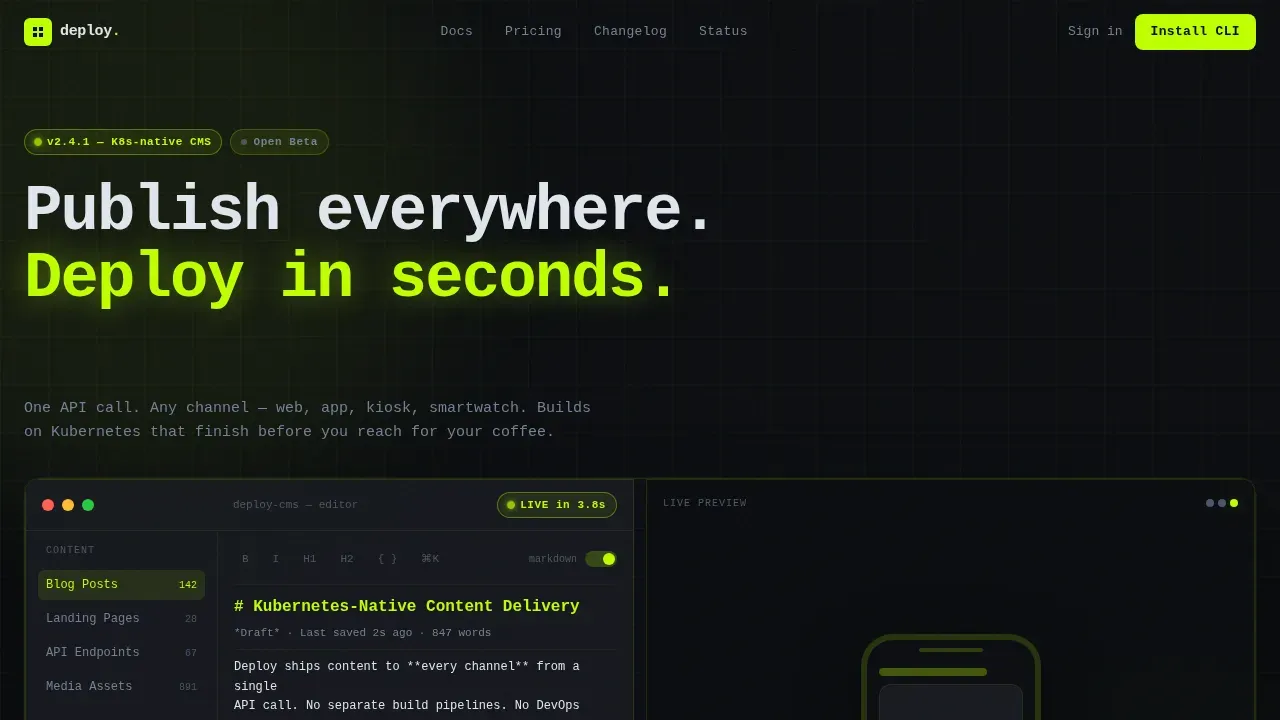
The hero section divides the viewport exactly 50/50. The left panel renders a CMS content editor mid-session: an inline Markdown blog post draft, a half-open media asset drawer, and a deployment status pill glowing in electric lime reading "LIVE in 3.8s." The right panel shows the published output inside a device frame that cycles between phone, tablet, and browser viewport every few seconds. This is not illustration or stock imagery. It functions as product proof at first glance, immediately communicating the headless approach to multichannel content delivery without a single word of explanation.
Spec Sheet Scroll Sections
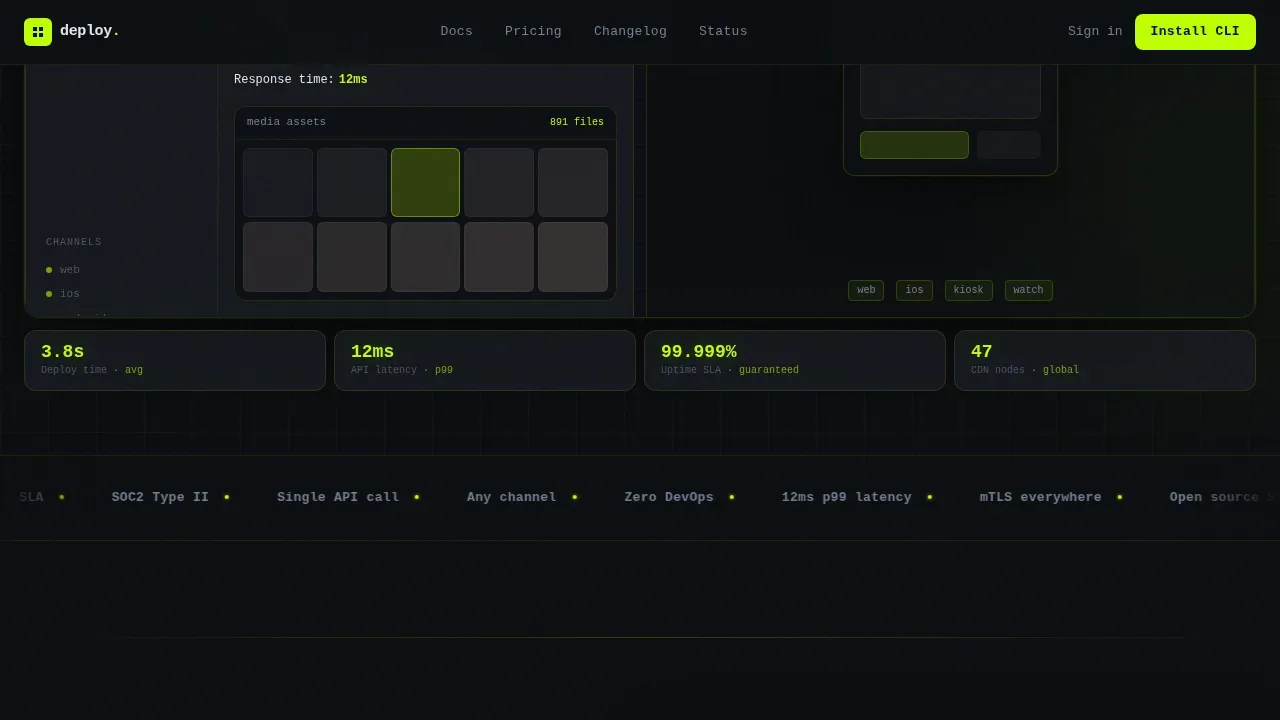
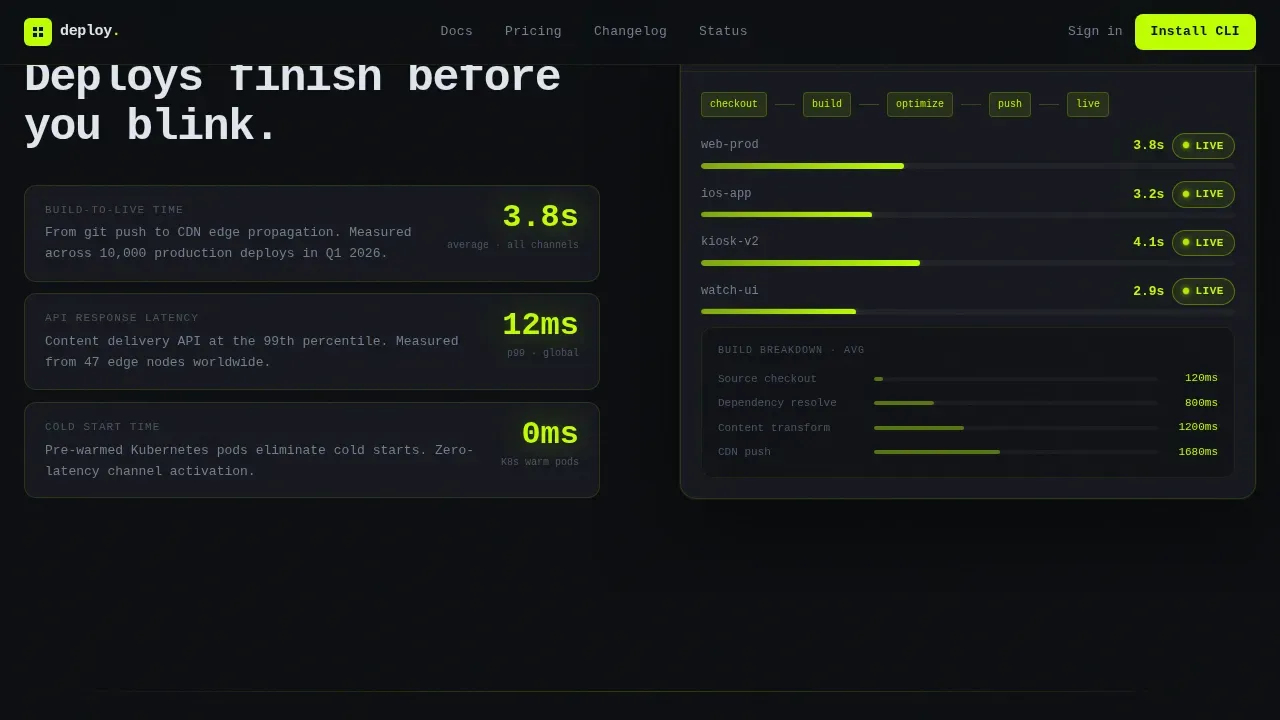
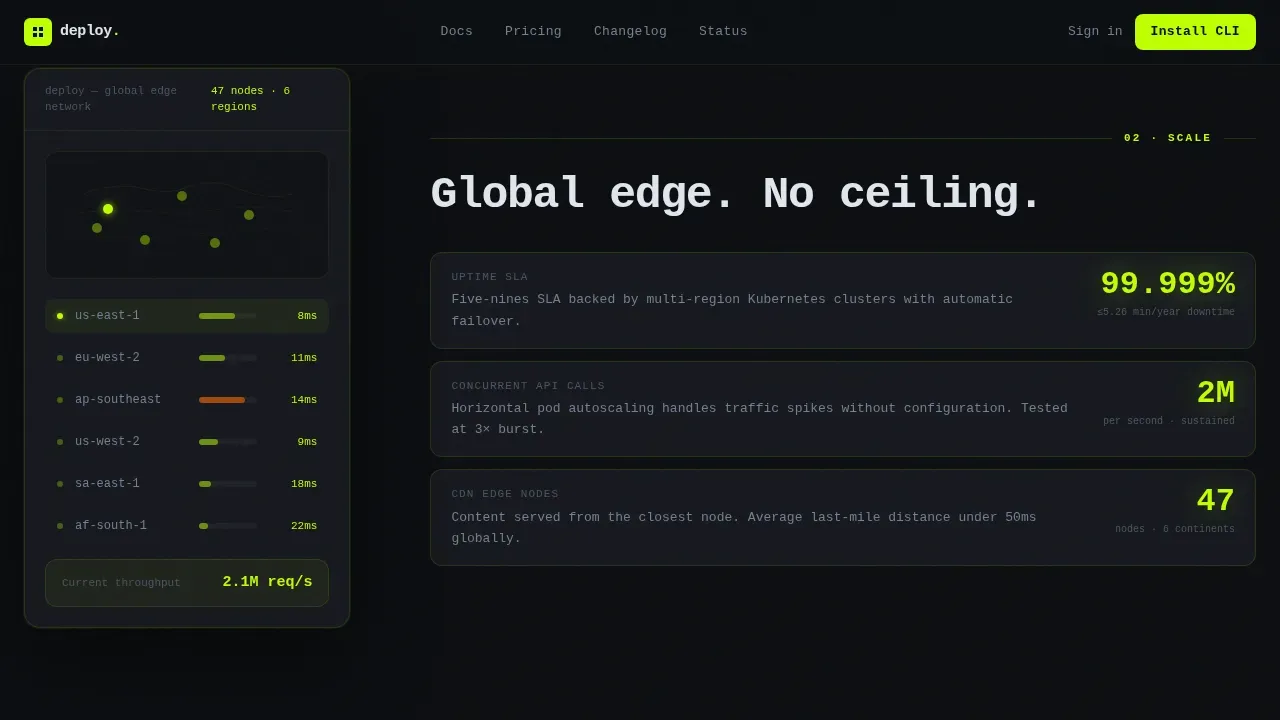
After the hero, four sections escalate through speed, scale, security, and integrations. Each section follows a strict left-right rhythm: a hard technical specification on the left (response time in milliseconds, uptime SLA percentage, supported frontend frameworks in code-font chips) paired with a contextual user interface screenshot on the right showing that spec in action. Deploy time is shown as 3.8 seconds. API latency is shown at under 12 milliseconds. Uptime SLA is displayed as 99.999%. The security section covers zero-trust mesh and a CVE patch window of under four hours. This Spec Sheet creative direction removes emotional copy entirely and replaces it with an engineering case built from verifiable claims. Frontend developers and development team members can read each section like a benchmark report.
Dual call to action with CLI Install Architecture
The primary call to action is "Install the CLI." It presents a one-click copy-to-clipboard terminal command (npx create-deploy-cms) along with platform toggle buttons for macOS, Linux, and Docker. The secondary call to action, "Try the Hosted Playground," gives non-technical evaluators a browser-based sandbox path before committing to an install. This dual-path architecture ensures both the hands-on engineer and the evaluating product manager reach a conversion point that fits their workflow. The page earns the install by front-loading performance specs. By the time a visitor reaches the call to action, the only friction left is choosing their operating system.
Typewriter Monospace Headline Animation
The headline above the split-screen hero types itself in monospace font: "Publish everywhere. Deploy in seconds." This typewriter effect is powered by GSAP and sets the tone for the rest of the page. The animation communicates speed before the visitor reads a single spec. It also reinforces the Spec Sheet creative direction by signaling that this page shows, not tells. The monospace font choice connects visually to terminal culture, which is exactly the digital experience the primary audience lives in every day.
Acid Digital Color System with Spotlight Interactions
The electric lime (#BFFF00) color hits every interactive element: buttons, toggles, cursor trails, live metric numbers, and the deployment status pill. This creates a consistent visual grammar where the eye always knows where to act. Frosted-glass card layers sit over near-black backgrounds, creating depth without distraction. Spotlight hover effects on cards reveal additional detail on cursor contact. The cursor trail in lime reinforces design consistency across every scroll position. This color system is not decorative, it is a conversion tool that draws attention to data highlights and call-to-action elements simultaneously, supporting brand consistency across the entire page.
Integrations Section with Framework Chips
The integrations section presents supported frontend frameworks as code-font chips: Next.js, Nuxt, Astro, and Flutter. This format communicates compatibility at a glance for frontend developers who already have strong opinions about their stack. The section closes with the CLI call to action, creating a natural handoff from "I see my framework is supported" to "I am ready to install." This section also implicitly covers the api first approach of the headless cms, confirming that existing content and existing templates from other systems can be migrated or integrated through the same API layer.
Page sections overview
| Section | Purpose |
|---|---|
| Hero Split Screen | Showcase the CMS editor and live device output simultaneously, with typewriter headline |
| Speed Specs | Present 3.8s deploy time and sub-12ms API latency with build pipeline breakdown |
| Scale Specs | Display 99.999% uptime SLA, 47 CDN edge nodes, and 2M concurrent API calls |
| Security Specs | Cover zero-trust mesh, SOC 2 Type II compliance status, and CVE patch window |
| Integrations and call to action | Show framework chips for Next.js, Nuxt, Astro, Flutter, and close with CLI install |
| Linear Footer | Single-row footer following Pattern 1 layout |
Design & branding system
The visual identity follows the Tech Glass theme powered by the Acid Digital color system. This palette does not compromise. It was designed to feel like staring into a GPU-cooled server rack through a smoked glass side panel. The only color that escapes is the radioactive green pulsing off the motherboard LEDs. Every design decision supports the conversion goal and the engineering credibility of the headless cms being sold. Brand consistency is maintained through a strict two-role color grammar: lime acts, white reads.
- Color roles: Void black (#0B0D10) for backgrounds, translucent panel gray (#1A1D24 at 70% opacity) for frosted-glass card layers, electric lime (#BFFF00) for all interactive elements and data highlights, and cool terminal white (#E0E6ED) for body copy, paragraph text, and label content.
- Typography: JetBrains Mono handles all code elements, headlines, and typewriter animation. DM Sans handles body copy, spec label text, and secondary paragraph content. This pairing preserves developer freedom in typography while keeping the reading flow clear for non-technical evaluators.
- Animation and interactivity: GSAP drives the typewriter headline, scroll reveals, and spotlight hover cards. Device frame cycling on the hero right panel switches between phone, tablet, and browser viewport automatically. Cursor trail in electric lime and clipboard copy interaction on the CLI command complete the high-interactivity experience.
Mobile & speed optimization
The template is built desktop-first because the primary audience is engineers at workstations. That said, the layout scales cleanly to tablet and mobile viewports. The device frame cycling in the hero right panel demonstrates responsive output as a feature rather than an afterthought. The page architecture supports server-side rendering for static sections and client-side rendering for animation components, keeping performance high where it counts. Minifying CSS, JavaScript, and HTML removes unnecessary code and improves loading speed. Static site generation removes the need for database queries and server-side code execution on every request, resulting in sub-second load times for pre-rendered sections.
- Performance architecture: Static sections use server components for fast initial load. Animation-heavy sections use client components scoped to only what needs interactivity. This split avoids shipping JavaScript to sections that do not need it.
- Image handling: No stock imagery or illustration is used anywhere in the template. All visuals are product user interface screenshots. This eliminates large decorative image payloads and keeps page weight focused on content delivery rather than decoration.
How this template helps you convert
The Deploy template is designed so that every scroll increment reduces a visitor's objection count. The Spec Sheet creative direction is not aesthetic, it is a conversion strategy. Visitors who make it past the speed section already trust the deploy time number. By the scale section, they are benchmarking mentally. By the integrations section, they are choosing their operating system. The page drives toward the CLI install by treating every section as evidence rather than persuasion. Conversion tracking integrations, A/B testing of the headline or call to action copy, and analytics setup through tools like conversion tracking platforms are all practical additions once the template is live.
- Front-load the proof: Speed specs appear in section two, before any feature list or benefit copy. This tells the engineering visitor that the page respects their time and answers the benchmark question before they ask it. Fast loading pages lead to better conversion rates, and a page that proves its own speed builds instant credibility with engineers evaluating the headless cms.
- Reduce decision friction to one variable: By the time a visitor reaches the dual call to action, every major objection has been addressed by a numbered spec. The only remaining decision is which OS to install on. The platform toggle buttons for macOS, Linux, and Docker make that decision a single click, not a documentation search.
Other information about this template
This section covers additional context that helps teams evaluate whether the Deploy template fits their workflow, stack, and content management goals. It addresses broader considerations around headless cms platforms, page builders, marketing automation, and conversion tracking that go beyond the template's immediate visual design.
- Headless cms solution compatibility: The template is structured to present any headless cms solution that delivers on an api first approach. Teams that have already adopted jamstack sites or are moving away from a traditional cms will find the Spec Sheet layout maps naturally to the technical claims of their product.
- Page builders and development time: Many page builders offer drag and drop interfaces that simplify design for non-technical users. However, frontend developers and senior engineers often find those tools restrictive. The Deploy template avoids the rigid templates and locked site's code that most drag and drop page builders impose, giving the development team full control over source code and presentation layer decisions.
- Content management and content delivery context: The right headless cms for a team depends on whether they need server side rendering, static site generation, or a hybrid. Headless cms solutions that deliver structured data via API give the frontend components team creative freedom to build any presentation layer, from landing pages to mobile apps to voice assistants. Decoupling content from the display layer is the core architectural benefit of the headless approach, and the Deploy template is built to sell exactly that benefit.
- Conversion tracking and A/B testing: Once live, the template supports conversion tracking setup through any analytics provider. A/B testing headline copy, call to action button text, or the order of spec sections can incrementally improve conversion rates over time. Ongoing testing can improve landing page performance over time, and modular design involving reusable components allows for quick iterations without rebuilding the entire page. Performance benchmarking tools such as Google PageSpeed Insights or GTmetrix analyze metrics like Largest Contentful Paint (LCP) and Cumulative Layout Shift (CLS) and are useful for validating page performance after deployment.
- Marketing automation and campaign landing pages: Teams that use marketing automation platforms to drive traffic to campaign landing pages will find the Deploy template's single-focus call to action structure effective. The page is designed with one primary action and one secondary path, which reduces distraction and focuses visitor attention. Campaign launches that send traffic to a dedicated, metrics-forward landing page consistently outperform traffic sent to a general homepage.
- Multiple websites and brand consistency: Agency CTOs managing multiple websites for different clients can adapt the template's design tokens, primarily the color variables and typography pairings, to match each client's brand guidelines while preserving the structural integrity of the Spec Sheet layout. Consistent branding across campaign landing pages and product pages supports brand consistency at scale.
- Content creation and content teams: The template's hero panel shows a CMS content editor mid-session, which is a natural demonstration of how content creation happens inside the product. This makes the page legible to both engineering evaluators and content teams or editorial teams who will eventually use the CMS day to day. Seamless collaboration between the marketing team, content editors, and the development team is a core selling point of any headless cms, and the hero screenshot communicates it visually without requiring a word of explanation.
- Digital experience and digital marketing context: Many businesses moving from a traditional cms to a headless cms are doing so to improve their digital experience across channels. The Deploy template is purpose-built to demonstrate that improvement concretely. Digital marketers who evaluate headless cms platforms often focus on whether the system can support campaign landing pages, new pages, and new features without waiting on a development team for every change. The decoupled architecture shown in the template addresses all of those concerns. Seamless integrations with marketing automation tools, version control systems, and content delivery networks make the headless cms a stronger long-term investment than patching a traditional cms platform indefinitely. AI tools and no-code platforms are increasingly part of the digital marketing stack, and AI-driven platforms can automate backend processes, making it easier to manage integrations and deployments for landing pages. Using AI and no-code tools can significantly reduce the time from concept to launch for landing pages, complementing the speed-forward story this template tells. The integration of AI in no-code tools enhances the ability to quickly generate and deploy landing pages, which aligns with the same content velocity that a cloud-native headless cms is designed to deliver. A global CDN like Cloudflare or AWS CloudFront serves content from the edge node closest to the user, reducing latency, a fact worth highlighting when presenting scale specs to skeptical engineers. Continuous Integration/Continuous Deployment (CI/CD) pipelines automate testing and deployment for consistent performance, and this template's scale section is designed to present those pipeline details in a format engineers immediately recognize. Monitoring tools like Prometheus or Grafana help track performance metrics and enable proactive issue resolution, and teams that adopt the headless cms being marketed through this template will want to surface those integrations clearly. Incremental Static Regeneration (ISR) updates static content in the background without requiring full rebuilds, making it a valuable architectural option for content-heavy landing pages that need to stay current without sacrificing load speed. Role based access control, version control, and a structured content repository are all capabilities that content editors, developers, and the marketing team depend on when managing multiple websites and campaign launches simultaneously. Raw data from the CMS API flows cleanly to the presentation layer, giving frontend components teams the structured data they need to build high-performance digital experiences without being constrained by a rigid traditional cms template. Better performance at the CDN edge, seamless integrations with third-party services, and developer freedom to choose among frontend frameworks make the right headless cms the most defensible long-term content management decision for teams that are serious about their digital experience.
Theme
Tech Glass
Creative direction
Spec Sheet
Color system
Acid Digital
Style
Split Screen (50/50)
Direction
App Download
Page Sections
Split-screen Hero with Dashboard Preview
Spec Sheet Scroll Architecture
Dual Call to Action with CLI Install Command
GSAP Typewriter and Scroll Animations
Acid Digital Tech Glass Design System
Integrations Section with Framework Chips
Related questions
Who is the Deploy template best suited for?
Can I adapt the color system for a different brand?
Does the template support A/B testing of the call to action or headline copy?
What frontend frameworks does this template work with?
Is this a multi-page template or a single landing page?



