Mobile App Directory Website Template
Launchpad is a split-screen landing page template built for community app builders. It features a live Feature Tab Switcher, drag-and-drop interactive components, and a two-step lead generation flow. Non-technical founders can showcase forums, event calendars, and member directories with zero code, and invite visitors to start building before they ever scroll to the signup form.
by Rocket studio
Quick summary
Launchpad is a single-page template designed for community app builders who want to convert curious visitors into active sign-ups. The split-screen layout puts a live interactive preview beside every headline. Visitors toggle between feature modules, drag components, and recolor a phone mockup, all before hitting the "Start Building Free" button.
Who this template is for
This template is built for non-technical founders who are assembling a community product and need a landing page that sells the experience before anyone signs up.
- Discord server owners who have outgrown chat and need a branded, self-hosted community space
- Membership-site creators tired of connecting separate tools for forums, events, and payment
- Niche-hobby organizers and independent community builders who want a structured home that belongs to them
What problem this template solves
Most community builders struggle to explain what their app does without a live demo. A static screenshot fails to communicate drag-and-drop simplicity. This template solves that by turning the landing page itself into the product demo.
- Visitors interact with real module previews instead of reading feature bullets
- The two-step form appears only after visitors have already engaged with the builder experience
- The page removes the "I'll figure it out later" hesitation by letting people half-build something before they commit
What you get with this template
You get a fully structured, interactive landing page that mirrors the community app building experience it promotes. Every section is purposeful and sequenced to move visitors from curious to committed.
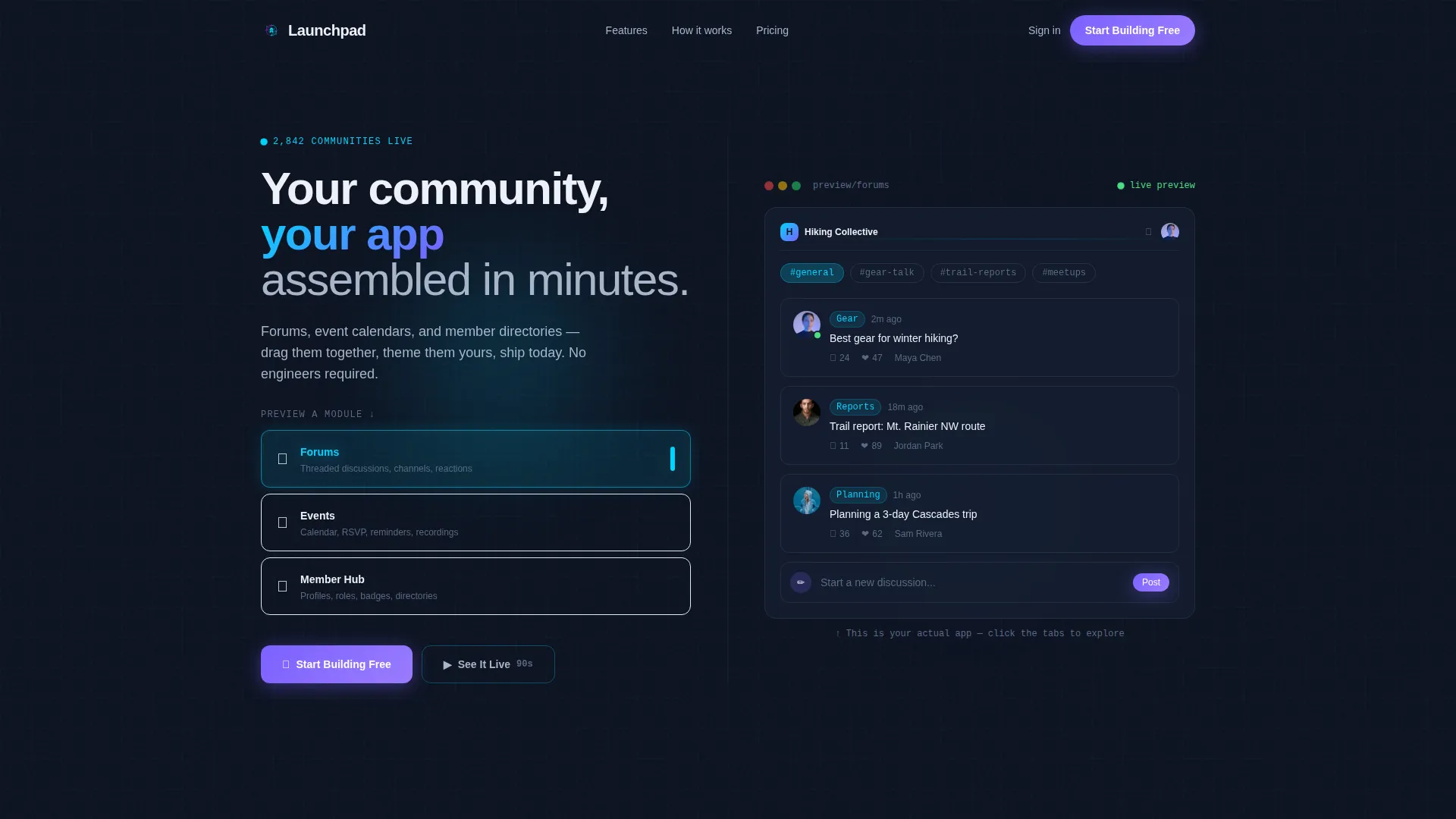
- A split-screen header with a three-tab Feature Tab Switcher showing Forums, Events, and Member Hub previews
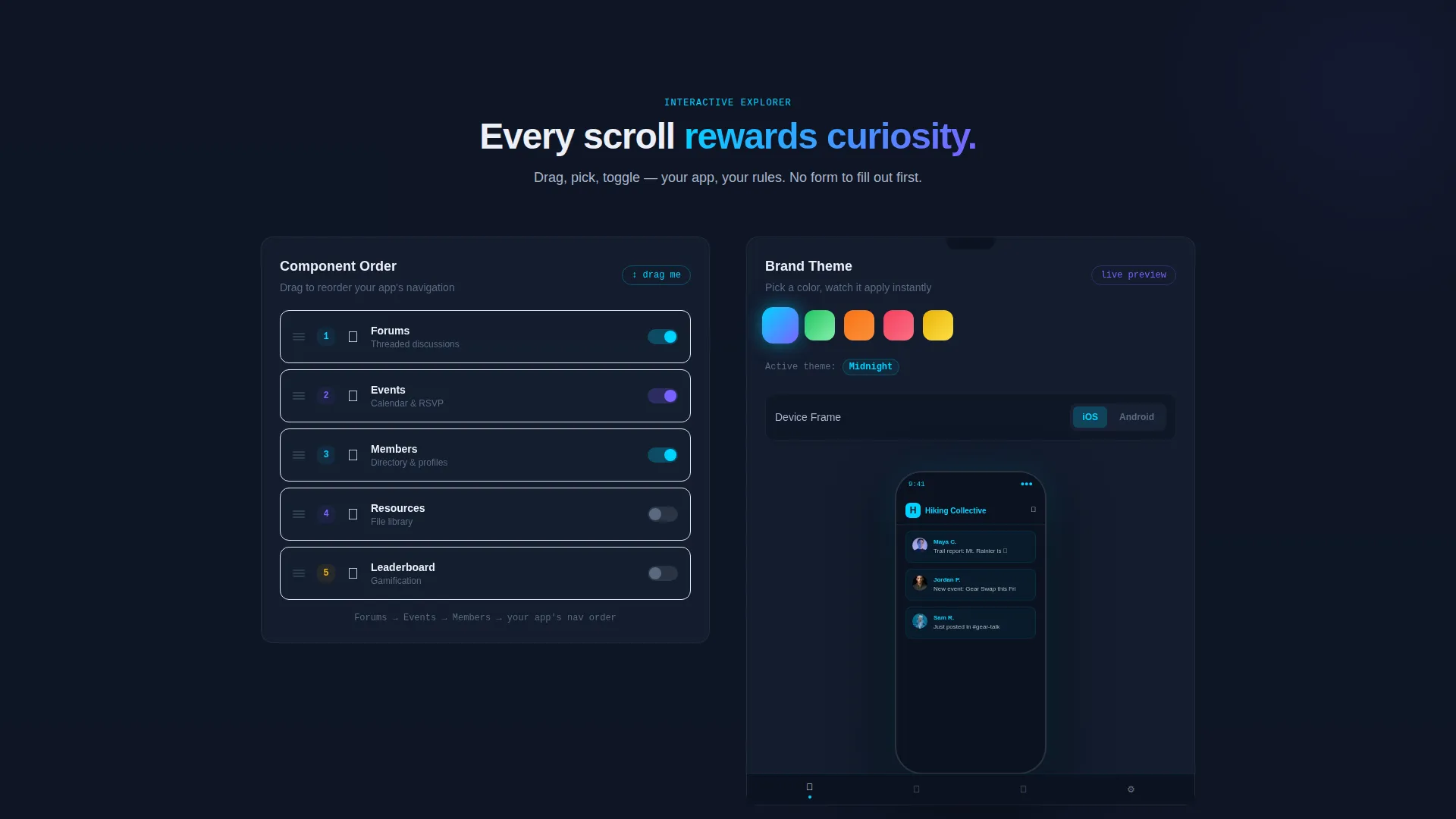
- An Interactive Explorer section with drag-to-reorder panels, a live theme-color picker, and an iOS/Android frame toggle
- A two-step lead generation form with community name, audience type selector, and email fields
Feature list
This template packages a set of distinct interactive components, each designed to keep visitors engaged and reduce the distance between interest and action.
Live Feature Tab Switcher
The header splits the screen 50/50. The left side holds three tabs labeled "Forums," "Events," and "Member Hub." Clicking a tab slides a live interactive preview onto the right side, complete with dummy avatars, sample posts, and a mini calendar that flips. The active tab glows in interface-glow cyan, making the current selection immediately clear.
Drag-to-Reorder Component Panel
Below the header, visitors encounter a component panel they can physically reorder by dragging. This interaction communicates the builder's flexibility without a single line of explanation. It turns a feature description into a hands-on moment.
Real-Time Theme Color Picker
A color picker lets visitors repaint a phone mockup instantly. Changing the palette updates the preview in real time, giving a concrete sense of brand ownership. This section makes personalization feel immediate and low-effort.
iOS and Android Frame Toggle
A single toggle switches the sample app preview between an iOS frame and an Android frame. Visitors see their potential community app on both platforms without leaving the page. It reinforces cross-platform reach through direct visual proof.
Assembled App Reveal Sequence
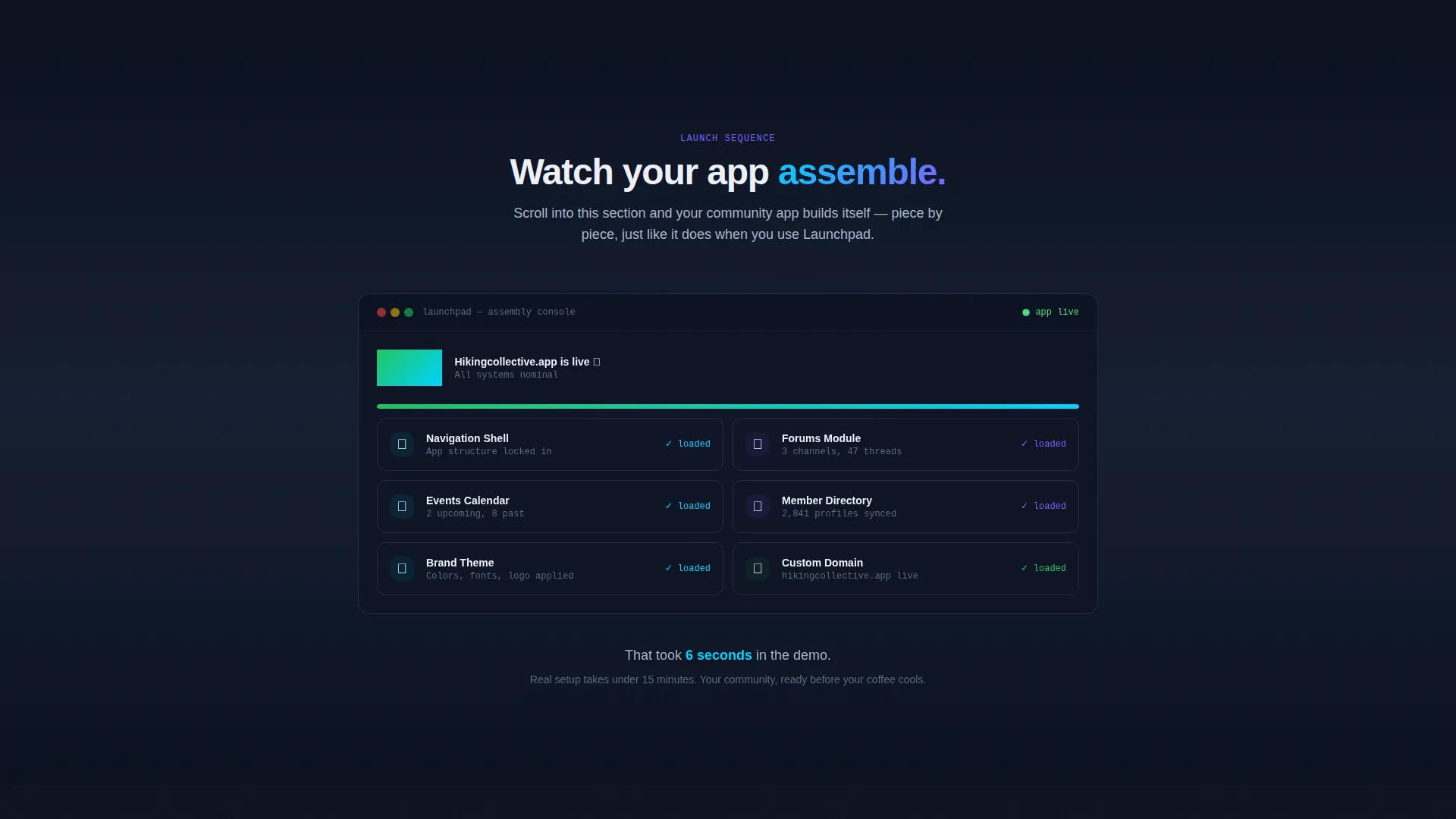
As visitors scroll deeper, the full app preview builds itself piece by piece, like a launch countdown reaching zero. Each scroll depth adds a new component to the assembled view. The sequence creates momentum and makes the signup moment feel like a natural next step.
Two-Step Lead Generation Form
The primary call to action reads "Start Building Free" in hot-launch violet. Clicking opens an inline form with three fields: community name, audience type (hobby, creator, SaaS, or nonprofit), and email. A secondary path labeled "See It Live" links to a 90-second interactive demo for visitors who want more before committing.
Page sections overview
| Section | Purpose |
|---|---|
| Split-Screen Header | Introduces tabs and live module previews side by side |
| Feature Tab Switcher | Lets visitors interact with Forums, Events, and Member Hub |
| Drag-to-Reorder Panel | Shows builder flexibility through direct hands-on interaction |
| Theme Color Picker | Lets visitors repaint the phone mockup in real time |
| iOS/Android Toggle | Demonstrates cross-platform preview with a single switch |
| App Assembly Reveal | Builds the full app preview scroll-by-scroll like a launch sequence |
| Primary call to action Section | Presents the "Start Building Free" two-step inline form |
| Secondary Demo Path | Offers a "See It Live" link to a 90-second interactive demo |
Design & branding system
The visual identity follows a Startup Velocity theme built on a Midnight Blue color system. The palette is intentionally dark and signal-driven, so every lit accent feels like a live indicator rather than a decoration.
- Core background colors are deep terminal navy (#0B1120) and satellite-map dark (#162032), giving the page a mission-control atmosphere
- Interface-glow cyan (#00D4FF) marks active states and interactive highlights, while hot-launch violet (#7B61FF) is reserved for call-to-action buttons and hover states
- Near-white smoke (#EDF0F7) is used for text panels and cards, ensuring strong contrast against the dark backgrounds
Mobile & speed optimization
The split-screen layout and interactive components are structured to translate cleanly across screen sizes. The template's design choices support a smooth experience on smaller displays without sacrificing the interactive feel.
- The 50/50 split adapts for narrower screens so tab content and previews remain readable and usable
- Interactive elements such as the color picker and frame toggle are touch-friendly for mobile visitors
- The scroll-triggered app assembly sequence is designed to work progressively, so visitors on any device can follow the reveal at their own pace
How this template helps you convert
Every design and interaction decision in this template is aimed at reducing friction between a visitor's first impression and their decision to sign up. The page earns the click instead of asking for it.
- The Feature Tab Switcher puts visitors inside the product experience in the first five seconds, replacing passive reading with active exploration and building immediate confidence in the builder's value.
- The assembled app reveal sequence escalates engagement as visitors scroll, so by the time the "Start Building Free" form appears, they have already invested time and curiosity in the product, making the signup feel like saving progress rather than starting a process.
Other information about this template
This template sits at the intersection of the Technology category and the Mobile App subcategory, purpose-built for the community app builder niche. It is a strong fit for any project where the product itself is the best sales argument.
- The Interactive Explorer creative direction ensures that every scroll depth delivers a new micro-interaction, keeping bounce rates low without relying on video or long-form copy
- The Lead Generation landing-page direction structures the entire page around a single conversion goal, with both a primary and a secondary path to match visitors at different levels of readiness
- The Startup Velocity theme and Midnight Blue color system are suited to tech-forward brands that want to project energy, focus, and forward momentum without looking generic
- This template is a natural fit for builders exploring community platform tools and no-code app creation workflows
Theme
Startup Velocity
Creative direction
Interactive Explorer
Color system
Midnight Blue
Style
Split Screen (50/50)
Direction
Lead Generation
Page Sections
Live Feature Tab Switcher
Drag-to-reorder Component Panel
Real-time Theme Color Picker
Ios and Android Frame Toggle
Scroll-triggered App Assembly Reveal
Two-step Inline Lead Generation Form
Related questions
Do I need coding skills to use this template?
Can I change the color scheme to match my brand?
What types of communities is this template suited for?
What is the secondary call to action on this template?
Is this a single-page or multi-page template?



